
Your CRM says the pipeline looks healthy. Your forecast call says something else. The team says they're slammed, the account leads say proposals keep slipping, and you're staring at a dashboard that feels polished but somehow doesn't explain where the week went.
That gap is usually a tracking problem, not a sales problem. Most agencies record the deal, the stage, and the amount, then stop there, even though significant work unfolds in meetings, follow-ups, internal reviews, and scope changes. Recent industry data shows sellers now spend only 28% of their week actively selling, down from 35% in 2022, which means a huge amount of opportunity-related work is happening in communication and administrative tasks outside the CRM, making traditional tracking methods less reliable (source). If you're also trying to sharpen intake, effective lead generation for agents is only useful when the opportunity data behind it is clean enough to trust.
Why your CRM pipeline might be lying to you
Agency leaders usually notice the problem in the same way. The CRM shows a full pipeline, the stages look tidy, and then delivery starts asking where the promised work is, while finance asks why the forecast keeps moving. On paper, the pipeline looks alive. In practice, it can be full of stale deals, vague next steps, and opportunities that ate hours of senior time without ever getting close to close.
The issue isn't that CRM data has no value. It's that a stage, an amount, and a close date only tell you what someone entered, not what the team did to move the deal. When most of the work happens in calls, emails, revisions, and handoffs, a static pipeline can make progress look cleaner than it is.
The hidden work sits outside the CRM
That's where agency tracking usually breaks. People treat the CRM like a record of truth, but the full picture resides in calendars and inboxes. A strategy call, a scoping review, a creative lead meeting, and a legal check can each change the odds of winning, yet none of those steps are visible if nobody logs them well.
Practical rule: if the calendar is busy but the CRM looks quiet, the CRM is lying by omission.
A stronger approach ties opportunity records to actual activity. That gives operations a way to see whether the pipeline is filling, whether deals are moving, and whether the work consuming senior time is tied to anything that will close. It also helps you spot wasted effort earlier, which matters when every hour spent pre-sale is an hour not spent on billable delivery.
The cleaner the CRM looks, the more dangerous this blind spot can be. Teams often assume the problem is forecasting discipline when the actual issue is data capture. If you only track the last field someone edited, you're judging a deal by its final state instead of its path.
What opportunity tracking really means for an agency
For an agency, opportunity tracking is the system that ties business development to delivery capacity and margin. A deal record alone does not show whether the team is spending senior time on work that is likely to close. A stronger approach makes the trade-offs visible, so you can see which opportunities deserve attention and which ones are draining effort without much return.
The basics still matter. You need stage, close date, amount, and owner, because CRM reporting depends on structured fields such as those. But an agency also needs to know who joined the calls, how often the client responded, what changed in the scope, and how much internal time went into the deal before a proposal was sent.
Track the sale, not just the record
That distinction matters because agencies sell through people. A deal can look attractive on paper and still consume a senior strategist, an account director, and a creative lead across several rounds of scope changes. The win may feel good, but the actual cost can still be high.
Use the CRM to store the pipeline state, then use activity data to show what happened around the opportunity. That lets you compare deals that look similar in the database but behave very differently in practice. One prospect may move quickly because the buyer is clear and feedback comes back fast. Another may need repeated follow-ups, repeated scope resets, and more internal attention than the likely return justifies.
A published best-practice guide says the process should start by defining and agreeing on pipeline stages, then storing lead, opportunity, and sales data from multiple sources in one platform, segmenting opportunities by source, and feeding won or closed data back into daily tools (sales opportunity tracking best practices). That shape works for agencies too, because it keeps new business tied to the rest of the business instead of trapped inside a sales dashboard.
Practical rule: if a deal cannot be tied back to time, source, and next step, it is not managed well enough to forecast with confidence.
The Core Metrics for Agency Opportunity Tracking
Most agencies do not need a bigger dashboard. They need a smaller one with better numbers, and the numbers have to reflect both the CRM record and the actual work happening on calendars. The core pipeline metrics that matter most are win rate, sales cycle length, average deal size, forecast accuracy, and pipeline coverage ratio. Those measures turn a list of opportunities into a management system, not just a report (pipeline reporting guide).
A useful way to read them is straightforward. Pipeline coverage shows whether there is enough qualified opportunity relative to quota, and many teams aim for 3:1 coverage, meaning about $3 of pipeline for every $1 of quota because not every deal closes (pipeline reporting guide). Stage conversion rates show whether deals are moving, and forecast accuracy compares committed revenue to actual closed revenue each quarter, which is how you find out whether the forecast is disciplined or just hopeful.
Use formulas that match agency reality
For revenue teams that live in high-touch selling, the formulas matter because they force consistency. A benchmark guide defines opportunity win rate as won opportunities divided by total opportunities, and pipeline velocity as (number of opportunities × average deal value × win rate) ÷ sales cycle length (SDR KPI guide). You do not need to memorize the formula to use it well. Faster cycles, better win rates, and stronger deal values all improve velocity, while a slow cycle drags it down.
Activity quality matters too. These sales metrics productive teams track are useful because they remind you that output is not the same as effort. A team can book a lot of meetings and still waste time on deals that never progress, especially if the CRM shows activity but the calendar tells a different story.
If I were building a dashboard for an agency COO, I would keep it tight:
- Coverage: Is there enough qualified pipeline to support the quarter?
- Conversion: Are opportunities moving from stage to stage?
- Speed: Are deals taking longer than expected?
- Accuracy: Did the forecast match what closed?
- Value: Are we winning work that justifies the effort?
Internal reporting gets better when the dashboard warns you early. If coverage looks fine but conversion is weak, the pipeline is inflated. If conversion is fine but cycle length keeps stretching, the team may be stuck in decision drift or spending too much time on opportunities that look active in CRM but are not getting real attention.
Mapping the opportunity workflow from call to close
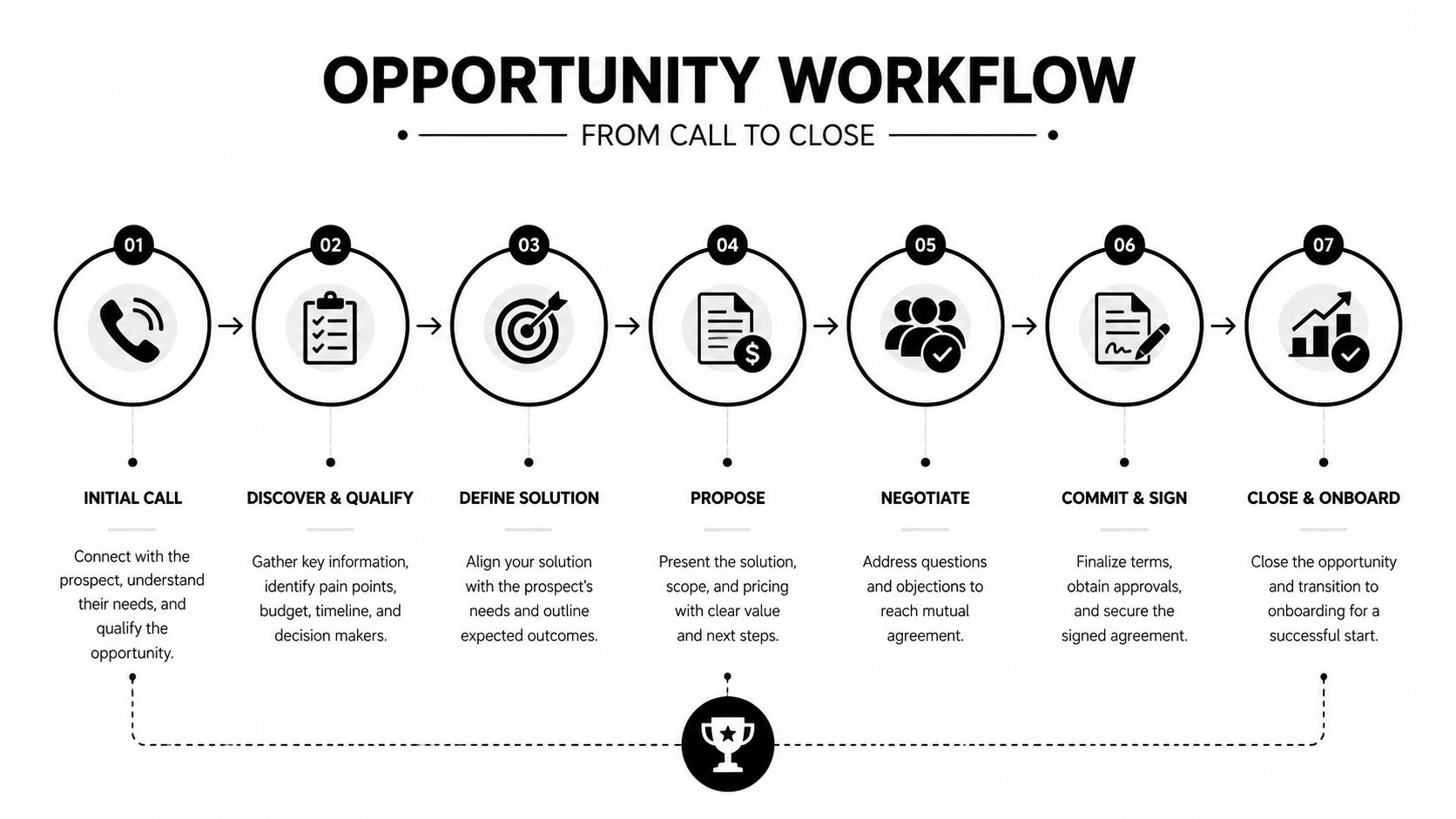
A good agency workflow isn't fancy. It's consistent. The point is to make sure every opportunity moves through the same basic path, so the team can tell the difference between a real deal and a hopeful conversation.
Keep the stages concrete
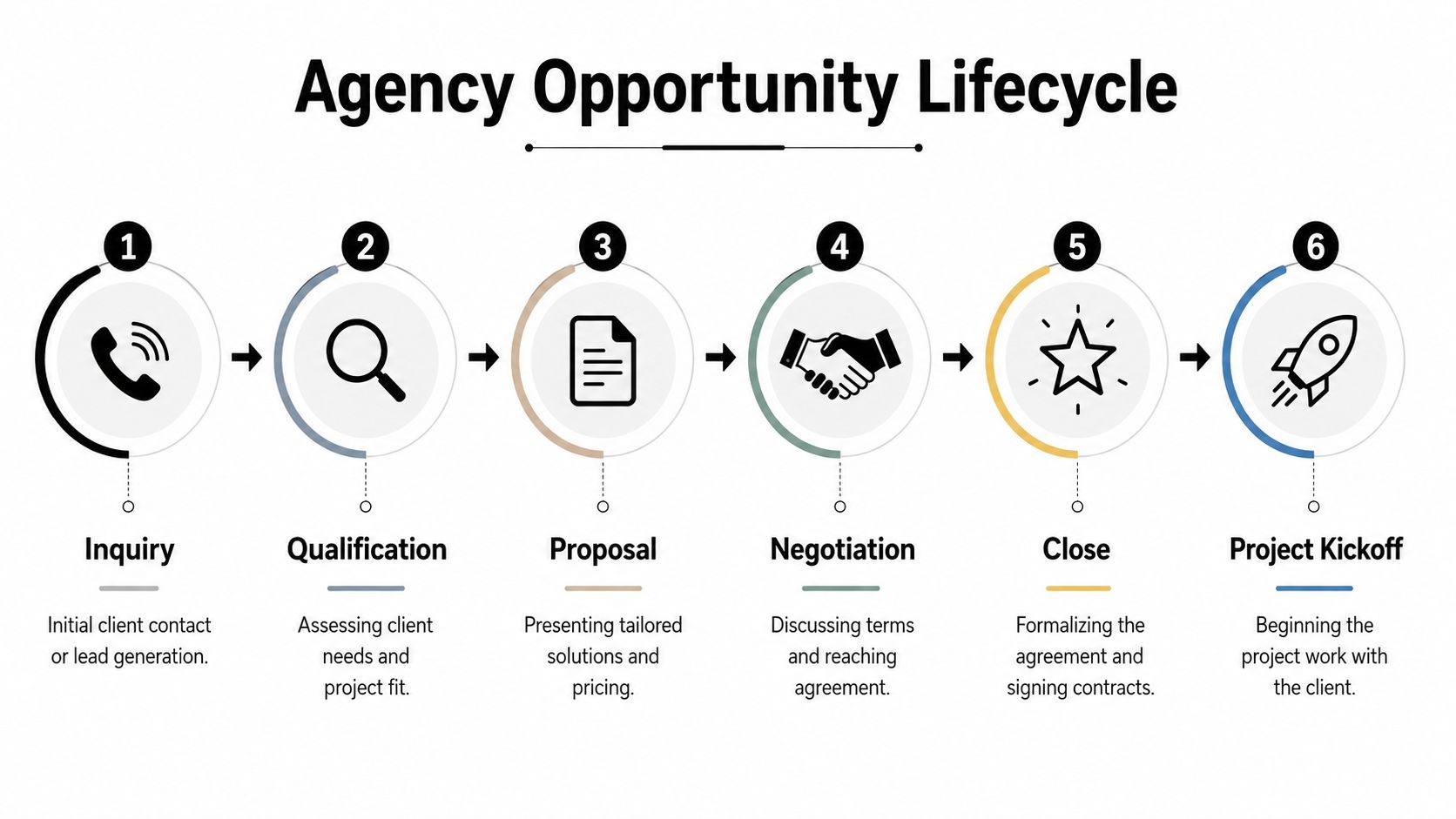
Start with inquiry, then qualification, then scope and proposal, then negotiation, then close, then kickoff. At each point, capture different information. Inquiry needs source and owner. Qualification needs fit, urgency, and buyer type. Scoping needs budget shape, timeline, and likely stakeholders. Negotiation needs decision risk, open questions, and promised follow-up.
That shape matters because it stops your CRM from becoming a dumping ground. A stage should mean something specific enough that two people would place the same deal in the same bucket. If one account lead uses “proposal” for a simple price quote and another uses it for a full commercial review, your stage data won't be comparable.
A CRM controls article recommends weekly pipeline reviews for reps, bi-weekly reviews for managers, a required next step with a date on every opportunity, a flag for any opportunity with no activity in the last 14 days, and a closed-lost reason chosen from 5–6 specific options rather than free text (opportunity management controls). That's the right level of discipline for agencies too, because it turns workflow into something you can govern.
Practical rule: if two account leads define a stage differently, the stage isn't real yet.
Capture the handoffs that kill momentum
The handoff is where many deals stall. A prospect is interested, then procurement steps in, then the scope gets rewritten, then the internal champion goes quiet. When you track each transition, you can see where the process breaks, not just where the deal ended.
The goal isn't to add busywork. It's to make the next action obvious. If the next step is clear, dated, and owned, the opportunity is easier to manage. If the next step is vague, the deal is already drifting.
Common pitfalls that sink agency pipelines
The fastest way to wreck opportunity tracking is to obsess over total pipeline value and ignore how deals behave in the practical workflow. Big numbers feel reassuring, but they hide stalled opportunities, repeated pushes, and prospects that keep changing shape without advancing. The strongest teams watch risk, not just volume.
A pipeline can look full and still be weak. If the record says the deal is alive but the calendar shows no calls, no prep, and no internal review, the opportunity is already drifting. That gap between CRM status and actual activity is where agency forecasting usually breaks.
Stage age tells you more than deal size
A Salesforce stage analysis guide recommends looking at historical average days in each stage, open-opportunity days in stage, probability to close, neglected opportunities that haven't been touched in 60 days, stalled opportunities that exceed historical stage duration, and pushed opportunities. That is the right lens for agencies because it keeps attention on deals that are breaking pattern, not just on the largest numbers at the top of the board.
One common threshold used in the field is to flag inactivity after 14 to 21 days based on sales-cycle length, and to treat deals that spend at least 2x their average stage time as high risk. You do not need fancy scoring to use that idea. If a deal has gone quiet and the stage age is out of line, the team should inspect it immediately and compare the CRM record with the last real calendar touch.
The usual mistakes are boring, and expensive
The other failures are more mundane. Teams let people use different stage names, so the same deal shows up in three different buckets. They skip activity logging because it feels tedious, then try to forecast from a record that has no meeting trail. They store close dates that are really placeholders. They also forget to track pre-sales time, which makes it impossible to tell whether a “big win” was worth the effort.
Calendar activity is the missing piece in many agencies. If account leads, strategists, and founders are spending time in prep calls, proposal reviews, or internal alignment meetings, that effort needs to show up beside the opportunity record. Tools like ROI tracking software for agencies help connect those calendar events back to the deal, so you can see where time is spent instead of relying on whatever someone remembered to type into the CRM.
The fix is not to add more fields for the sake of it. The fix is to make the fields you already have harder to abuse. Require real next steps. Review stale deals often. Use the same stage definitions across the team. Tie opportunity status to calendar activity, because a deal without recent work is not healthy just because it still sits in the pipeline.
An implementation roadmap for your agency
A modern system starts with cleaning up the CRM, but it only becomes useful when you connect it to the calendar. That is where many agencies see the gap between what they recorded and what transpired. Meetings, follow-ups, prep time, and internal reviews are where opportunity work lives, and those moments rarely show up clearly in a bare CRM record.
Build the data shape first
Start with stage definitions, owners, amounts, close dates, and a required next step. Add source and opportunity IDs so records line up cleanly across systems. Data sync work breaks when identifiers are not stable, because duplicate records and broken joins make reporting unreliable (data model guidance).
If your team manages product-level detail, preserve it over time. Salesforce notes that opportunity field history can be enabled, but opportunity product history is not available natively, so teams that need product-level change tracking must create periodic snapshots to keep the time series intact. Without that, you end up analyzing only the final version of the deal, not the path that got there.
Pull calendar activity into the record
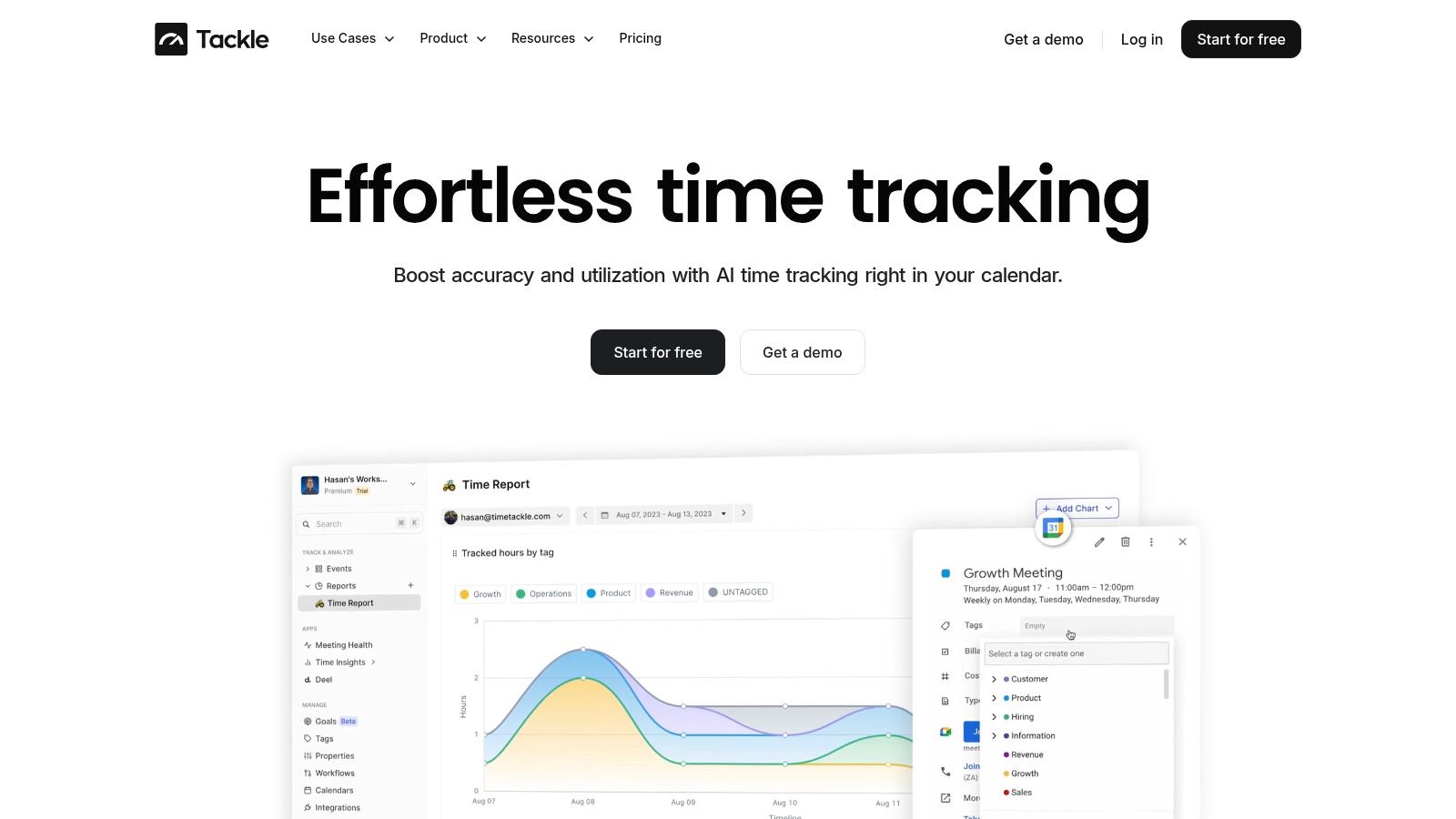
This is the part many agencies miss. Employees spend about 58% of their workday in communication, so much of the actual work on an opportunity happens in meetings and emails, not CRM fields (calendar activity research). A good tracking setup captures that activity from calendars automatically, so the team does not need to keep entering it by hand.
That matters because manual timesheets and manual notes always lose detail. If your calendar already shows the calls, the client reviews, and the internal working sessions, you can tag those events by opportunity and see where time is spent. You do not need perfect self-reporting to get useful visibility. You need a reliable capture layer.
Use CRM integration guidance to map what should sync, then apply tags or rules that sort meetings by client, opportunity, or internal prep. Keep it simple enough that people will not avoid it. The best system is the one that adds less admin than it removes.
Automate the review loop
Once the data is in place, automate reminders for stale deals, stage pushes, and missing next steps. Review the exceptions weekly so the team can focus on risk instead of scanning every record. If the workflow still needs a person to remember everything, it is not really a workflow yet.
Measuring the ROI of better opportunity tracking
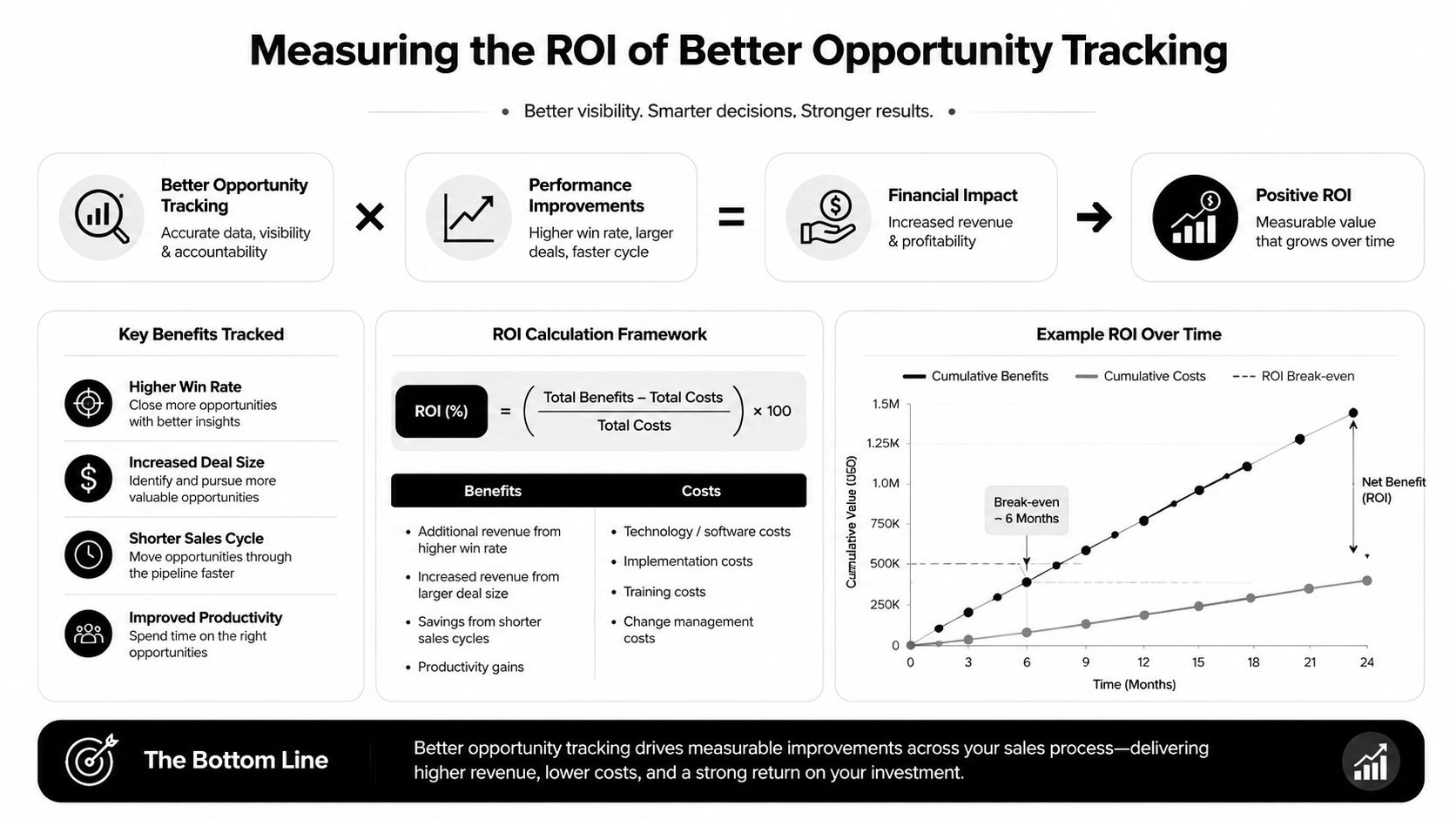
The ROI shows up in fewer surprises. Forecasts get closer to reality, deal reviews get faster, and leaders can see where time is going before the quarter ends badly. The ultimate benefit is not just better reporting. It's better decisions about what to pursue, what to pause, and what to stop.
Measure outcomes, not activity for its own sake
Start with forecast accuracy, then watch sales cycle length, win rate, and pipeline coverage. The value of a better system is easier to prove when you compare those numbers before and after the process change. If the forecast gets tighter and fewer opportunities go stale, the system is working.
You can also measure how much pre-sales effort ends up supporting actual revenue work. When calendar capture shows where senior time goes, leaders can see whether that time is concentrated on deals that close or on deals that drain the team. That's a cleaner way to think about resource use than asking people to remember what they did two weeks ago.
If you want a structured way to show the business case, ROI tracking software guidance can help frame the cost and outcome side of the conversation. The point isn't to add more reporting. It's to prove that better tracking saves time, improves focus, and reduces waste in the selling process.
If you're ready to stop guessing about where opportunity effort really goes, visit TimeTackle and see how calendar-based tracking can connect meetings, CRM records, and resource visibility in one place. It's a practical way to replace messy manual reporting with cleaner, more useful data.