
CRM integration is the process of connecting a CRM with other business tools so customer data moves between sales, marketing, and service systems without manual re-entry. In a mid-sized agency, that usually means the lead is in the CRM, the calendar lives elsewhere, hours sit in a separate tracker, and the COO is still waiting on a Monday report that won't land until Wednesday.
The gap between those tools is where the pain sits. Teams spend time copying data, fixing mismatches, and arguing over which number is right, while the CRM slowly turns from a helpful record into a source of doubt.
The simple answer and why it matters
A common agency day looks like this. A new lead lands in the CRM, the account manager books time in Google Calendar, the project lead logs hours in another system, and finance wants a clean view of utilization before the weekly ops meeting. By the time everyone has checked their own tool, the report is already stale.
That is why CRM integration matters. It connects the CRM to the rest of the stack so customer data moves between systems without manual re-entry, and the next team sees the update where it works from. carBoost CRM features is a useful example of how CRM data can be tied to broader operational workflows, which is the central purpose here.
This is not a niche IT task anymore. 91% of companies with 10 or more employees use CRM software, and 74% of businesses in the United States have implemented a CRM system to manage customer interactions, according to the CRM statistics gathered by CRM.org. That scale matters because a CRM has moved from a contact database to the operating layer for customer-facing work.
Practical rule: if the CRM is already where sales, service, or delivery teams look first, integration is part of the operating model.
The money side is hard to ignore too. Nucleus Research-based reporting puts the average return at $8.71 for every $1 spent on CRM software, and other industry summaries say CRM users are 86% more likely to exceed sales goals than non-users, both cited in the CRM statistics round-up. For agencies, that promise only shows up when the CRM reflects the work being done.
A cleaner way to see it is this. Integration is a discipline for keeping records trustworthy as work moves across tools. Sales can qualify a lead, project teams can update delivery status, billing can see what changed, and the CRM stays useful because the same customer story is showing up in each place. That is also why tools such as carBoost CRM features matter, because they show how CRM data stops being isolated and starts supporting the rest of the operation.
That is the blunt version. If utilization is fuzzy, billing is delayed, and reporting takes a human chain of handoffs, the issue is often not the CRM itself. It is that the CRM is cut off from the tools where the work really happens.
How CRM integration actually works
At a basic level, each app keeps its own database, and the integration layer is the translator between them. When a contact is added in one tool, a trigger fires, the data gets mapped field by field, and the record lands in the CRM or another connected system. That same flow can then kick off updates in downstream tools.
The moving parts you need to name
The clean way to think about it is simple. One system owns the record, one layer moves the data, and the rest of the stack reacts to the change. Salesforce's integration guidance describes this as a multi-system data synchronization problem, not just a UI connection, because each app may live in cloud, legacy, or on-prem environments and the integration has to handle authentication, field mapping, rate limits, and system-of-record ownership.
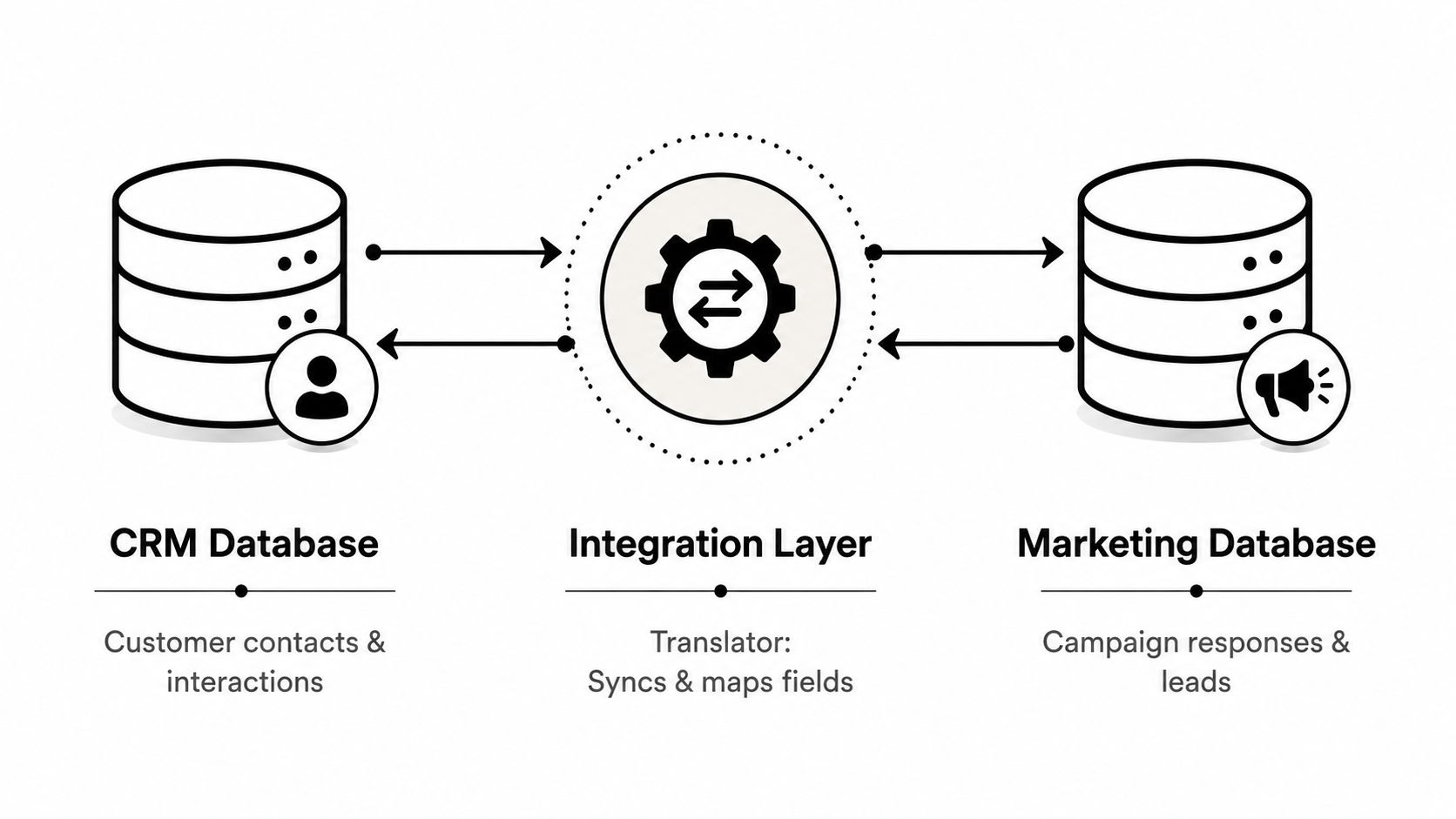
The terms matter because they shape the setup. System of record means the tool that owns the truth for a specific object, like a contact or a deal. Sync direction tells you whether data moves one way or both ways. Cadence tells you whether updates happen in real time with webhooks or on a schedule with batches. TimeTackle's API and data integration overview fits this model well because the point is not just moving records, it is deciding how and when those records move.
Why “connected” is not the same as “reliable”
A lot of teams stop at the word connected and assume the work is done. It isn't. If field ownership is unclear, you get duplicate records, stale values, and manual workarounds, which is exactly the kind of mess Salesforce warns about in its CRM integration guidance. If the mapping is solid and the ownership rules are clear, the sync can run in real time or on a schedule without people babysitting it.
A calendar analogy works here. You would not let two calendars be the source of truth for one account meeting, so don't let two systems fight over the same customer field.
The practical takeaway is plain. The hard part is not making apps talk. The hard part is making sure they say the same thing, at the right time, with the right owner attached to every field.
Common integration patterns and how to choose one
Mid-sized agencies usually end up with four patterns. Some are quick and narrow, some are flexible but heavier, and one or two will fit your stack better than the rest. The mistake is treating them like equal choices when they really aren't.
The four patterns side by side
| Pattern | Setup time | Flexibility | Maintenance burden |
|---|---|---|---|
| Native connectors | Low | Low to medium | Low |
| iPaaS middleware | Medium to high | High | Medium |
| Custom API integrations | High | Very high | High |
| Reverse ETL | Medium | Medium to high | Medium |
Native connectors are the built-in links inside the CRM or the app itself. They work well for obvious connections like email, calendar, and support tools, and they usually keep the setup simple. iPaaS tools like Workato or Tray sit in the middle and give you more control when one workflow crosses several systems. Custom APIs give you the most control, but they also ask the most from your engineering or ops team. Reverse ETL pushes warehouse data back into the CRM, which is useful when analytics is driving the action.
For a 50 to 200 person agency, I'd start with native connectors for the obvious tools, then move to iPaaS only when a workflow spans more than three systems. That gives you a default path instead of a vague “it depends” answer. If your sales inbox, calendar, and service desk can sync through built-in tools, use them first.
A practical example from agency work
TimeTackle's project-management integration material shows the shape of a native-plus-API pattern that works well for operational teams. A calendar-to-time-tracking flow can pull activity from Google Calendar or Outlook, then push it into reporting without forcing the team into a separate manual logging habit. TimeTackle's project management integrations is worth a look if your current setup is a patchwork of calendar data, time tracking, and CRM context.
The trade-off is clear. Native connectors are easier to live with, but they can be limited. Custom builds are powerful, but someone has to own them when the vendor changes a field, a permission, or an API rule.
Benefits and ROI for mid-sized agencies
The value of CRM integration shows up in the work ops leaders already struggle to keep aligned. Faster reporting, cleaner billing, better utilization visibility, and less time spent reconciling the same data in three tools. The return comes from removing the manual work around the connection, not from the connection itself.
What gets better in practice
When CRM data flows cleanly into the rest of the stack, reporting cycles stop depending on repeated export work. Finance gets a more consistent picture of what was sold, what was delivered, and what still needs a billing check. Project leads also get a clearer view of who is busy, who is underused, and where time is getting lost.
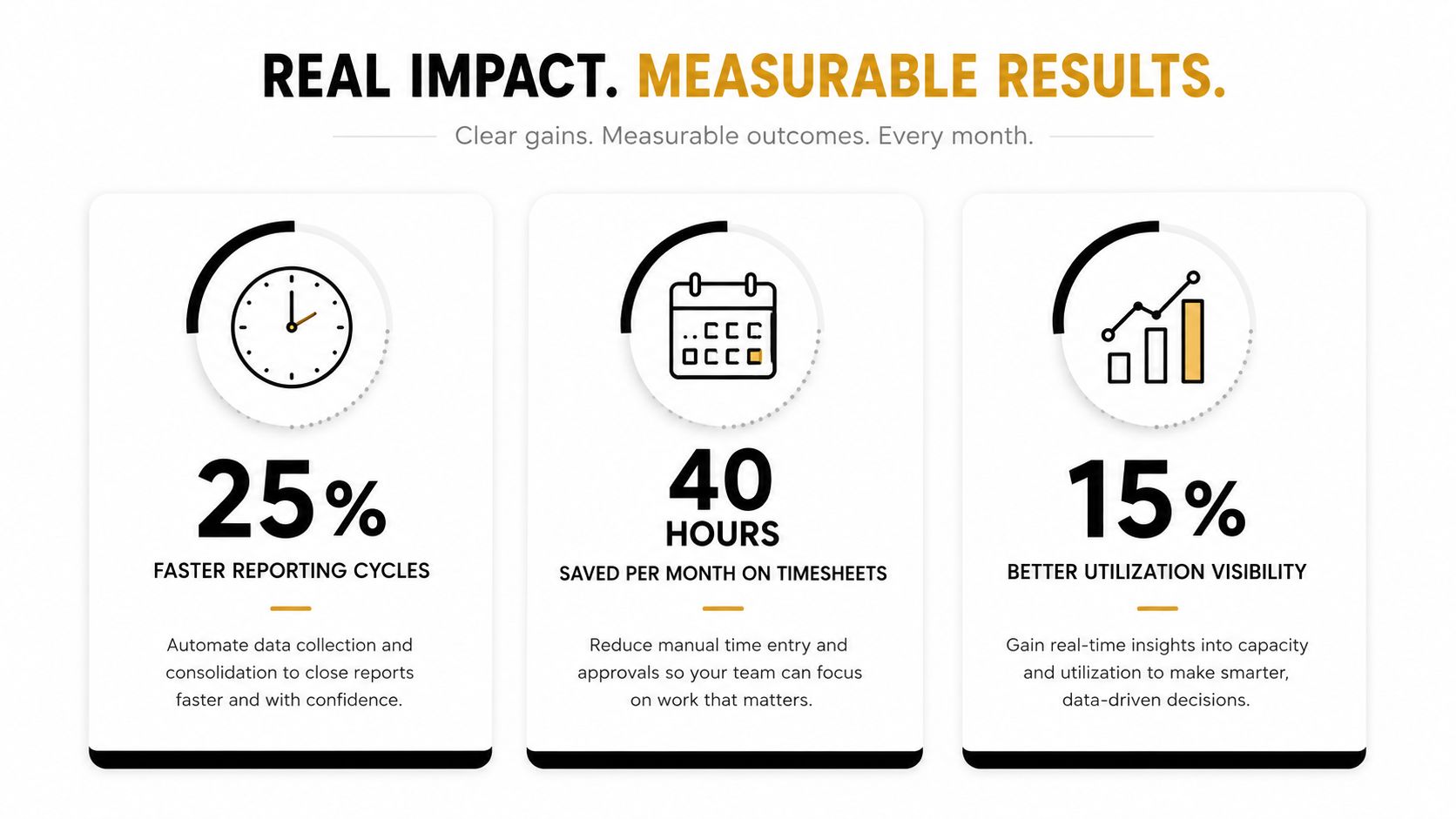
Every unbilled hour cuts into margin. If the CRM and the rest of the system agree on client, project, and activity data, teams stop spending time checking who entered what and when. That is the point where integration starts paying back in daily operations, not just in dashboards that look tidy on a screen.
A mid-sized agency usually sees the payoff in small but repeated wins. Reconciliation takes less time because the same client and project records appear the same way in sales, delivery, and finance tools. Managers spend less time fixing mismatched fields. Account teams spend less time answering basic questions about which system is right. Each of those savings is modest on its own, but together they reduce the drag that slows reporting, billing, and resourcing.
But I would not oversell it. Integration will not fix a broken sales process, and it will not clean up bad data by magic. If field names are messy or people do not trust the numbers, the connection just moves the mess faster.
ROI comes from data trust. Once people believe the CRM matches the work, they stop building shadow reports and side spreadsheets, which is where a lot of the hidden waste lives.
Technical and security considerations to plan for
A good integration plan is mostly a checklist of decisions. Who authenticates, what gets synced, which system owns each field, and how often the data moves. If those choices are fuzzy, the rollout becomes a support problem later.
The decisions that matter before launch
Authentication comes first. Some tools use OAuth, which is usually better when you want scoped access and easier revocation, while others still depend on API keys for simpler service-to-service links. Rate limits come next, because they shape how often you can sync without getting blocked or delayed. If the API is strict, a real-time dream may need to become a scheduled batch.
Encryption should be a default, not a debate. Data should stay protected in transit and at rest, and access should be limited to the people and services that need it. Audit logs matter too, because when a record changes, you want to know what changed it and which system did it.
For B2B SaaS agencies that integrate customer CRMs, the multi-tenant issue is real. Every customer can bring different custom fields, different API quotas, and different business rules, so the integration layer has to isolate tenant state instead of assuming one shared setup for everyone. That is why staged rollout matters. Truto's 2026 architecture guidance says to start in staging with realistic test data, then enable only a small subset of records in production while watching logs for missing required fields and duplicates.
Operational rule: if a field, an event, or a permission is not explicitly owned by someone, it will become a problem within a quarter.
TimeTackle's product pages say the platform is SOC 2 Type II certified and uses enterprise-grade encryption, which is the kind of baseline you want from a tool that sits near customer and calendar data. That doesn't remove the need for your own access rules, but it does lower the risk of starting from a weak security posture.
The short version is this. Treat security as part of the design, not a review step at the end. Once the sync runs, every missing ownership rule turns into a cleanup task.
Four use cases that show integration in action
The easiest way to judge CRM integration is to look at the manual work it removes. If a workflow still depends on one person copying the same details from one screen to another, the integration is not finished.
Marketing to sales handoff
A form fill should land in the CRM with attribution attached and duplicates handled before sales ever sees it. Without that, two reps may chase the same lead, or the account may be split across multiple records. With the integration in place, the handoff is simple, and the rep starts with the right context instead of a blank slate.
Support to customer success
When support tickets update the account record, customer success can spot trouble sooner. Before integration, a ticket might sit in a support tool while the health score stays untouched in the CRM. Afterward, the score reflects the account's actual state, which means the team doesn't wait for a weekly review to notice a problem.
Calendar to utilization
Calendar data is one of the cleanest agency signals because the work already happened there. Meetings tagged in Google or Outlook can feed a time-tracking system like TimeTackle, so utilization reports stop depending on manual timesheet entry. TimeTackle's HubSpot calendar integration guide shows how this kind of bridge can connect calendar activity back to CRM work without turning every employee into a data clerk.
Ecommerce to CRM
If you work with clients that sell online, order history and support tickets should sit on the same account view. That lets customer success see churn risk without digging through separate tools. It also keeps the sales team from missing the fact that a customer's recent order or open issue changes the conversation.
The pattern is consistent. Integration earns its keep when it removes a recurring task that a real person hates doing. If nobody misses the old manual step, the workflow probably wasn't painful enough to justify the build.
Your rollout checklist and what to watch after go-live
The safest rollout is boring. Start in staging with realistic test data, check the field mapping, then turn on only a small slice of records in production while someone watches the logs. If the first batch lands cleanly, expand from there.
The rollout order I'd use
- Pick one workflow. Start with the process that creates the most manual pain, not the one that sounds the most impressive.
- Map the fields. Define exactly which source field lands where, and decide who owns the truth for each object.
- Choose the pattern. Use a native connector, iPaaS, custom API, or reverse ETL based on the scope, not habit.
- Ship a small version. Turn it on for a narrow set of records first, then widen it after you've watched the logs.
The biggest post-launch problems are predictable. Inconsistent field mapping creates mismatched records, so the fix is a stricter field map and a named owner. Duplicate records need dedupe rules before the sync expands. API limits force you to slow the cadence or batch the updates. Delayed sync usually means the schedule is too aggressive or the event logic is broken.
Two more problems show up once teams start trusting the data. Workflow mismatches happen when one department expects a field to behave differently than another, so the answer is to document the rule and train people on it. Weak reporting and scalability issues usually mean the integration works technically but doesn't hold up under real use, so you need review cycles and clear ownership after launch.
The point is simple. CRM integration is not a one-time project, it is an ongoing governance job. The risk is that everyone trusts the data for a month, then stops trusting it six months later because no one owns the cleanup.
Start with one workflow, map the fields, choose the pattern, and ship it. If you want a tool built around calendar-driven time capture and operational reporting, take a look at TimeTackle and compare it against the way your team already works.