



Month-end usually starts with good intentions and ends with a spreadsheet mess.
An account manager exports time data from one system. Finance pulls invoice totals from another. Project leads add notes in Slack or email because the work doesn't map cleanly to the way anyone tracked it. Then someone asks a simple question: “Which clients are profitable?”
That's when the scramble starts.
For a lot of agencies, ROI tracking software becomes relevant only after this pain gets expensive enough. The core issue isn't just campaign reporting. It's operational visibility. You need a clean way to connect team effort, delivery cost, client revenue, and margin without making managers spend half a day stitching exports together.
That's where the category gets useful. Good tools don't just give you another dashboard. They reduce reporting labor, cut the guesswork around utilization, and make profitability visible before the quarter is over.
The spreadsheet nightmare you know too well
The pattern is familiar. Your team finishes the month, and nobody fully trusts the numbers.
Time lives in one tool. Expenses sit in accounting software. Revenue sits in your billing or CRM system. A project manager has one version of reality, finance has another, and client services has a third. You can produce a report, but getting there means copying fields, fixing labels, and trying to remember whether “strategy,” “planning,” and “workshop prep” should all roll up under the same client bucket.
The worst part is that manual reporting creates false confidence. The spreadsheet looks neat by the end, but the logic behind it is often fragile. One missed export, one bad formula, or one person forgetting to log internal time can change your margin picture fast.
Where agencies lose time
A lot of teams think they have a profitability problem when they have a tracking problem. They can't see cost-to-serve clearly enough, so pricing decisions stay reactive.
That's why a solid internet marketing dashboard matters as part of the reporting stack. Not because a dashboard is magic, but because leaders need one place to compare activity, spend, and outcomes without hunting through five systems.
The same logic applies to time capture. If your people still fill out timesheets from memory on Friday afternoon, you're asking for fuzzy data. This breakdown between manual logs and actual work patterns is one reason the trade-offs in spreadsheets vs timesheet apps matter so much for agency operations.
Most reporting pain starts upstream. If time capture is weak, profitability reporting will stay weak no matter how good the dashboard looks.
What the mess is really costing you
The visible cost is reporting time. The hidden cost is slower decision-making.
When leadership can't see profitability by client, service line, or team until long after the work is done, they tend to miss the moment when correction was still easy. You keep servicing an account at the wrong scope. You keep assigning senior people to work that should have moved down a level. You keep selling retainers that look healthy on paper and thin in practice.
That's why ROI tracking software matters operationally. It gives agencies a way to link effort to outcome while the work is still in motion, not after the postmortem.
What is ROI tracking software really
The phrase “ROI tracking software” typically evokes thoughts of ad dashboards. That's too narrow.
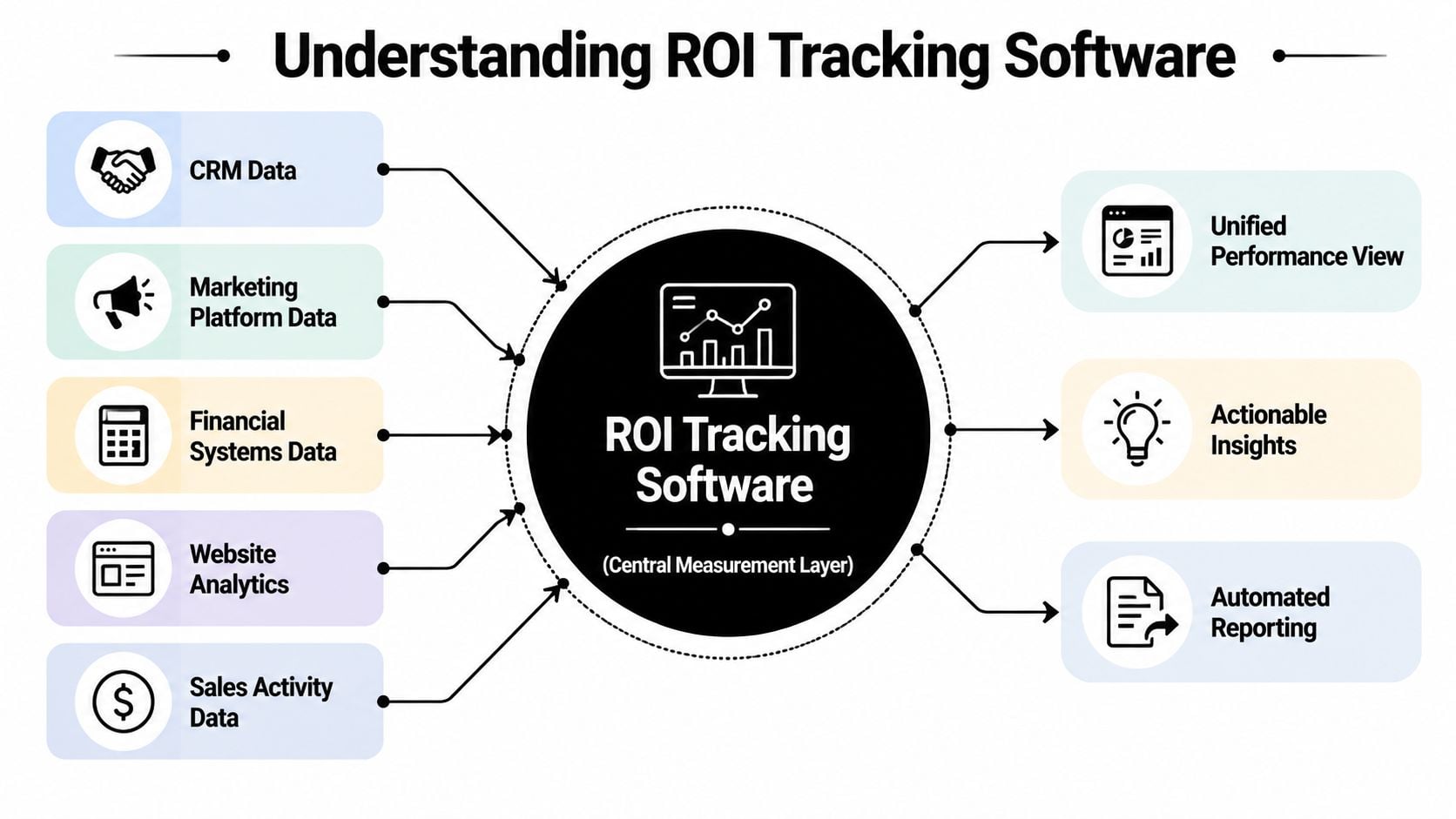
At a practical level, ROI tracking software is a measurement layer. It pulls activity data from the systems where work happens, then connects that data to financial outcomes so you can see what created value and what only created activity. Modern tools now stress wide integration coverage. One agency-focused roundup points to platforms with 80+ marketing platform integrations and another with 100+ data source connectors, which shows how the category has moved toward cross-channel attribution instead of isolated reporting (agency ROI tracking roundup).
It's not just campaign reporting
A basic reporting tool tells you what happened in one platform. A real measurement layer connects systems that usually don't talk well to each other. That might include CRM records, website analytics, ad spend, project activity, financial data, and team time.
For an agency, that matters because profitability rarely sits in one source. Revenue might come from a retainer, but the actual cost comes from labor, revisions, meetings, internal prep, and tool overhead. If the software can't connect those moving parts, it won't help much with operating decisions.
A lot of marketers first meet this concept when they start applying ROI to ad campaigns. The same logic works inside service delivery. You still need to connect input and output. The only difference is that your inputs also include labor and delivery complexity, not just media spend.
Why the category changed
Older setups often relied on end-of-month exports and manual spreadsheet cleanup. Newer systems moved toward automated pipelines and live dashboards because teams needed answers while campaigns and projects were still running.
That shift changed the value of the software. It's no longer just there to prove what happened. It's there to support decisions such as:
- Budget moves: Shift spend away from channels or clients with weak return.
- Resourcing choices: See whether high-cost talent is doing low-value work.
- Scope control: Catch accounts where effort is outrunning revenue.
- Pricing review: Compare what you sold against what it took to deliver.
Practical rule: If a tool can't connect work data to money data, it's a reporting tool, not a real ROI system.
For agency leaders, that distinction matters. A dashboard can look polished and still fail the core test. Can it tell you where profit is coming from, where it's leaking, and what to change this month?
Core metrics you should actually track
A lot of agencies track what's easy instead of what's useful. Clicks, leads, and top-line revenue all matter, but they don't tell you whether the work is efficient, scalable, or worth repeating.
The strongest setups combine marketing metrics with operating metrics. One B2B guide reports that companies using real-time tracking are 1.5× more likely to exceed revenue goals, which helps explain why teams care so much about faster visibility into metrics like customer acquisition cost, conversion rates, and customer lifetime value (real-time ROI tracking guide).
The metrics that actually change decisions
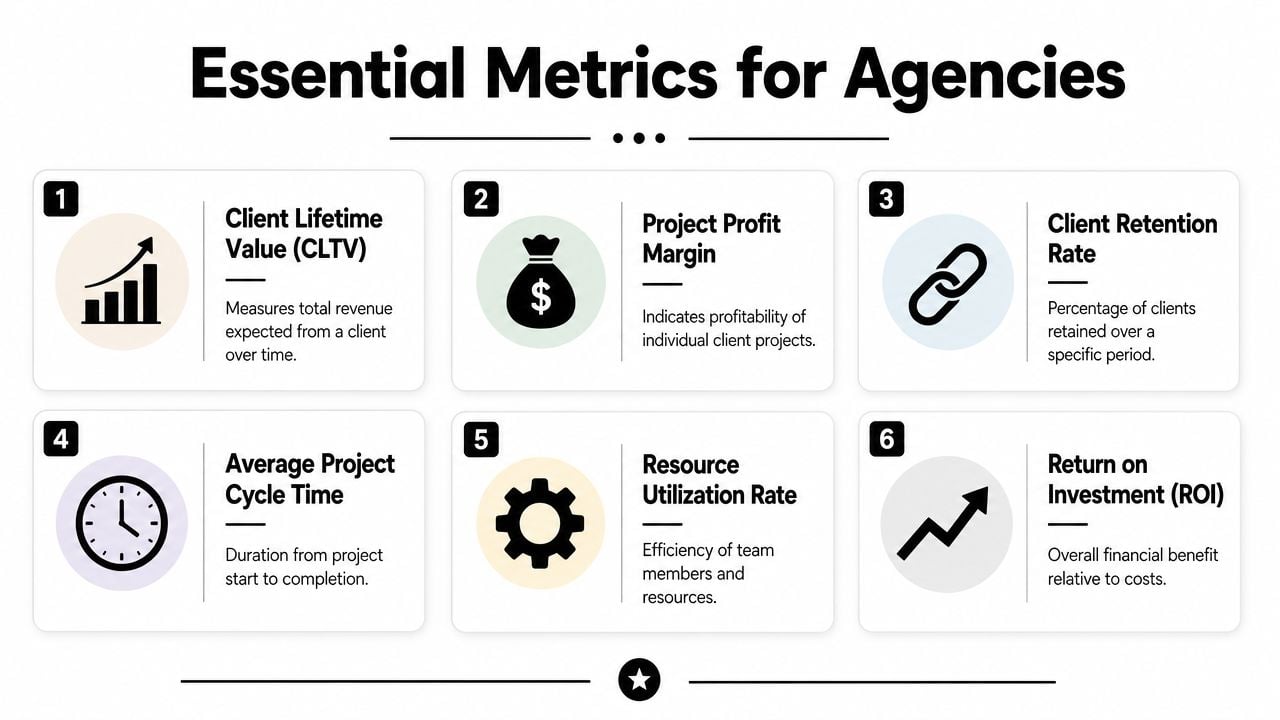
If you run an agency, these are usually the numbers worth putting in front of leadership every week:
- Customer acquisition cost: Useful when you want to know whether growth is getting more expensive.
- Customer lifetime value: Helpful for deciding how much acquisition cost you can absorb and still keep the account economics healthy.
- Project profit margin: Delivery reality comes to light. A project can look successful to the client and still be weak financially.
- Resource utilization rate: This tells you whether your team capacity is being used in a way that supports margin.
- Average project cycle time: Long delivery cycles often hide rework, poor scoping, or handoff issues.
Those metrics cover both sides of the house. Growth and operations.
What agencies often miss
The blind spot is usually cost-to-serve per client. Agencies know revenue by account, but they don't always know how much labor, admin time, and revision overhead sits behind that revenue. That's how “great” clients turn out to be margin drains.
Here's a simple way to frame it:
| Metric | What it answers | Why it matters |
|---|---|---|
| Customer acquisition cost | What did it cost to win this client? | Helps judge sales and marketing efficiency |
| Customer lifetime value | What is the account worth over time? | Helps judge whether acquisition cost is acceptable |
| Project profit margin | Did we make money on this work? | Exposes underpriced delivery |
| Utilization rate | Are the right people doing the right work? | Helps with staffing and capacity planning |
| Cycle time | How long does work take to move through delivery? | Surfaces delays and process drag |
Not every agency needs every metric daily. A creative retainer business may care more about labor mix and account margin. A performance shop may care more about channel attribution and CAC. The mistake is assuming one dashboard should answer every question at the same speed.
One more practical note. Some teams pull data from web sources to enrich campaign or competitive reporting. If that's part of your workflow, tools with strong anti-bot bypass technology can keep that data collection more reliable. Just don't confuse more inputs with better insight. The metric still has to lead to an action.
If a metric doesn't change staffing, pricing, spend, or scope, it probably belongs in a secondary report.
Must-have features for agencies and ops teams
Feature checklists get bloated fast. Most of them read like vendor copy and miss the core issue. Agencies don't need more places to look at data. They need fewer manual steps between work happening and margin becoming visible.
That changes what “must-have” means.
Start with automatic activity capture
If the tool depends on perfect manual entry, the data quality will slip. It always does.
For service teams, the strongest setups pull work activity from calendars, CRM systems, project tools, and communication patterns, then categorize it with as little user effort as possible. That matters because people are bad at reconstructing a week from memory, especially when the week included internal calls, prep work, revisions, and context switching.
Here's the kind of interface agencies should expect from this category:
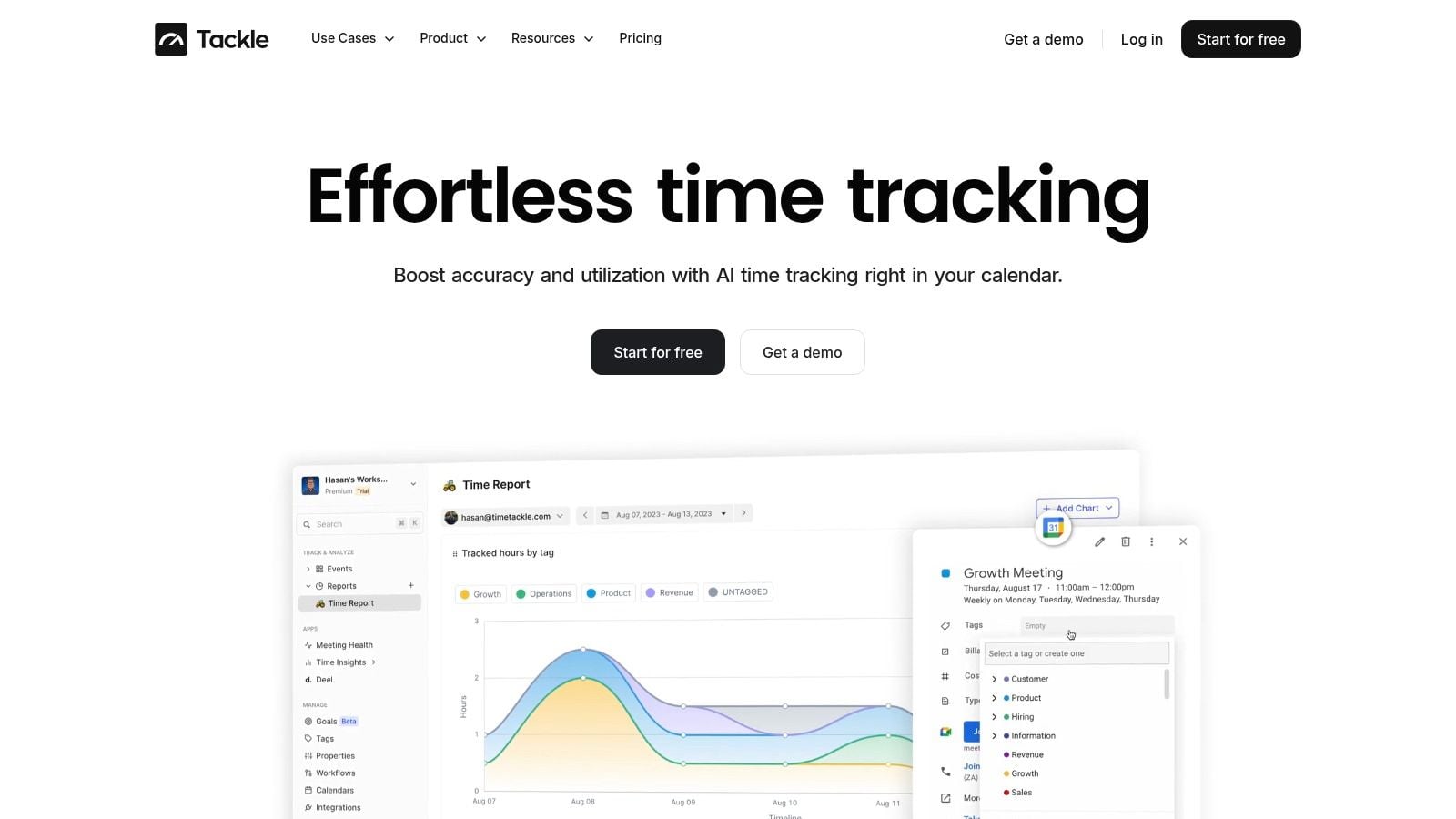
The reason calendar-based capture works well is simple. Meetings, client calls, workshops, reviews, and internal planning already leave a trail. If the software can turn that trail into structured data, reporting gets faster and managers get fewer “I forgot to log that” gaps.
Rule-based tagging matters more than fancy dashboards
A polished dashboard won't save a messy data model.
Good ROI tracking software should let you apply rules that tag work by client, service line, project, team, or opportunity. Without that structure, your reporting stays brittle. Every month becomes another cleanup exercise where someone fixes naming issues by hand.
A useful evaluation list looks more like this:
- Automated capture: Pull activity from calendars and connected systems so teams don't rebuild their week from memory.
- Flexible tagging rules: Categorize work based on client, project, meeting type, pipeline stage, or internal function.
- Usable filters and exports: Let ops leaders slice by account, department, or date range without asking an analyst for help.
- Workflow automation: Reduce repetitive reporting steps through scheduled reports, shared views, and repeatable logic.
One example in this category is TimeTackle's automated reporting software, which focuses on pulling calendar and work activity into dashboards and exports that ops teams can use for utilization and profitability reporting.
What doesn't work well
Some features sound good in demos and fail in real use.
Tools struggle when they require constant manual tagging, rely on rigid templates, or make it hard to reconcile client work with finance data. Agencies also run into trouble when dashboards look clean but can't answer simple questions such as which team is over-servicing a retainer or how much non-billable work sits behind a “profitable” account.
The test is plain. Can an account lead, finance partner, and ops manager all get to the same version of reality without passing spreadsheets back and forth?
How to choose the right ROI tracking tool
Buying the wrong system usually happens for one reason. Teams buy for reporting aesthetics instead of data reliability.
A slick dashboard is easy to sell internally. It's much harder to ask whether the data behind it will stay trustworthy once privacy controls, ad blockers, offline conversions, and long sales cycles get involved. That's the core selection problem.
Check the tracking model first
For marketing and attribution use cases, the more reliable setups now depend on server-side tracking paired with attribution software, because client-side-only tracking keeps losing accuracy under browser privacy controls and ad blockers. Good practice also includes mapping both micro and macro conversion events and comparing multiple attribution models such as first-touch, last-touch, linear, U-shaped, time-decay, or data-driven when journeys are long (server-side ROI tracking guidance).
That matters because agencies often work across mixed client types. Some accounts convert quickly. Others have longer paths with multiple decision makers. If your tool forces one simplistic attribution view onto every account, you'll over-credit one channel and under-credit the rest.
Use a fit test, not a feature dump
When comparing tools, I'd pressure-test them in this order:
Data collection reliability
Can the tool capture the events and work activity you care about, or only the obvious ones?Attribution flexibility
Can you compare models, or are you locked into one view of credit assignment?Operational reporting depth
Can you report by client, project, service line, team, and time period without rebuilding everything manually?Finance connection
Can you reconcile effort and cost against invoiced revenue or recognized revenue in a way finance will trust?
A lot of products can do one or two of those well. Fewer handle all four.
Price is only part of the cost
Many agency buyers get sloppy. They compare license fees and ignore the cost of making the software usable.
A proper ROI review should treat software as a total cost of ownership problem. Industry guidance recommends including infrastructure, software, personnel, training, and maintenance, then comparing those costs to direct and indirect benefits over a 6–12 month window (ROI framework for software investment).
That means your buying decision should include questions like these:
- Implementation load: How much setup work will ops, finance, or engineering need to do?
- Training burden: How long until managers and team leads can use it without support?
- Maintenance reality: Will someone need to keep fixing mappings, tags, and dashboard logic every month?
- Adoption risk: If people don't use the system consistently, will the ROI case fall apart?
A cheap tool with heavy admin overhead often costs more than a pricier tool that cuts reporting labor.
Calculating ROI for agency projects with examples
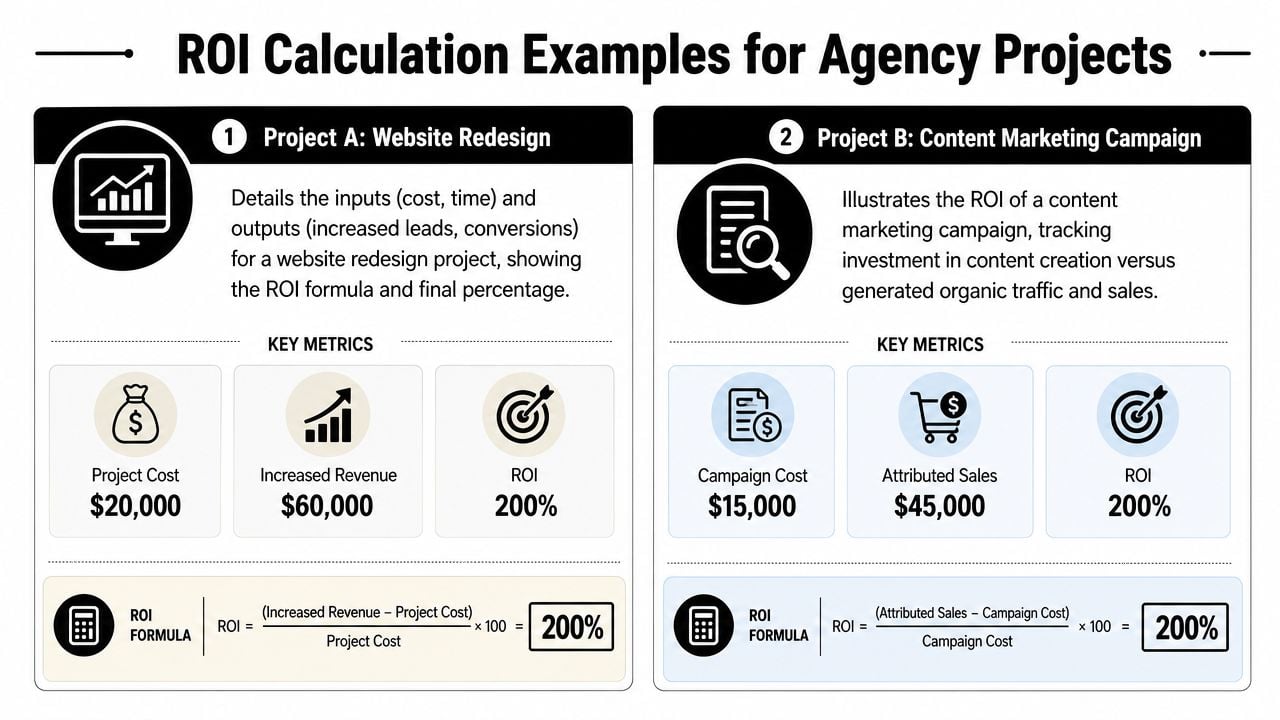
Many teams overcomplicate things. The math doesn't need to be fancy. The inputs need to be honest.
For agency work, start with a basic structure. Total return sits on one side. Total cost sits on the other. The mistake is that many teams count only direct delivery cost and ignore the admin, reporting, prep, and internal coordination work that made the project possible.
Example one, the retainer that looks healthy until labor is included
Say an agency runs a six-month digital marketing retainer. The account brings in recurring revenue each month, and the team assumes it's a strong client because billing is steady.
Then the tracking system pulls in actual time from calendars, meetings, CRM-linked sales support, reporting prep, revisions, and client comms. Finance adds software costs tied to delivery. Paid media spend is already known. Now the agency can compare total account revenue against total delivery cost, including labor and supporting overhead.
That's the true value of ROI tracking software. It turns “this account feels good” into “this account is profitable only if senior review time stays within range.”
If you need a cleaner way to estimate labor input before building that model, a billable hours calculator is a practical starting point.
Example two, the fixed-fee project with hidden drag
Now take a one-off website build.
The fee is fixed, so the revenue line looks simple. The cost side is where things get messy. Discovery workshops run long. Internal QA expands. The PM spends more time coordinating handoffs than anyone expected. A strategist joins late-stage calls that were never scoped. None of that looks dramatic in isolation, but together it changes margin.
Here's a simple comparison:
| Project view | Weak method | Better method |
|---|---|---|
| Revenue | Final invoice amount only | Final invoice amount |
| Labor cost | Billable production hours only | Billable and non-billable delivery support |
| Overhead | Ignored | Include relevant delivery overhead and tool cost |
| Reporting | End-of-project estimate | Ongoing view during delivery |
“Good project ROI math is less about formula choice and more about whether you counted the work honestly.”
The best examples are usually boring. No fancy attribution model. No giant spreadsheet. Just clean activity capture, clear cost categories, and one consistent definition of project profitability.
That's enough to make pricing, scoping, and staffing better on the next project.
Troubleshooting common ROI tracking mistakes
The first mistake is chasing “real-time” for its own sake.
Yes, faster visibility can help. But not every agency needs second-by-second dashboards. Some businesses have long conversion cycles, offline steps, or delayed revenue recognition, which means a weekly or monthly view can be more accurate than a live dashboard that creates noise. That's one reason the market often oversells instant reporting and underexplains when delayed, multi-touch attribution is the better fit (discussion of when real-time is and isn't necessary).
Don't confuse speed with clarity
A dashboard that refreshes constantly can still tell the wrong story. This is common in agencies with long sales cycles, consultative projects, or deals that close after several conversations across different channels.
If revenue shows up well after the early activity, instant reporting can tempt teams to overreact. They cut a channel too early, under-credit account management, or ignore offline actions that later turn out to be decisive.
A better question is this. What reporting cadence matches your actual decision cycle?
- Daily views: Good for active media buying or short-cycle response work.
- Weekly reviews: Better for most delivery, utilization, and resourcing decisions.
- Monthly profitability checks: Often the right level for account margin and service-line review.
- Longer attribution windows: Necessary when revenue lands well after the first touch.
Measure the software's own return
The second mistake is forgetting to measure whether the tracking system itself is worth the cost.
That answer shouldn't rely only on better attribution. It should also include labor savings. One useful framework is to track how often custom reporting requests come in, how complex they are, and how many developer or analyst hours they consume. That approach comes from guidance on measuring analytics ROI and is useful because it grounds the business case in reporting overhead, not just revenue lift (measuring software ROI through reporting demand and labor).
In practice, I'd watch for four signals:
- Reporting hours: Are month-end and client reporting taking less time?
- Request volume: Are fewer ad hoc data pulls landing on ops or analyst teams?
- Adoption quality: Are managers using the system in reviews and planning?
- Decision speed: Are pricing, staffing, and scope corrections happening earlier?
If those improve, the software is doing its job. If they don't, you may have bought a prettier reporting layer without fixing the workflow behind it.
If your agency is stuck between weak timesheets and manual reporting, TimeTackle is worth a look. It focuses on automatic activity capture from calendars and connected systems, then turns that data into reports ops teams can use for utilization, client work analysis, and profitability review without rebuilding the story in spreadsheets every month.


