
If you want your projects to succeed, you have to get the planning right. It’s that simple. A solid plan is about defining your scope, locking in your goals, and getting everyone aligned before the real work kicks off. This is the stuff that saves you from scope creep, busted budgets, and a burnt-out team down the line.
Setting the Stage for Project Success

The fate of a project is pretty much decided before the first task is ever assigned. For agency leaders, this is where you get ahead of the usual headaches—like spotty time tracking and guessing games with resource allocation. A good project kickoff isn't just another meeting; it's where you anchor expectations and get everyone pointing in the same direction.
This is your chance to turn confusion into clarity. The whole point is to create a single source of truth that every single decision flows from. It all starts with great documentation. If you want a masterclass on this, check out how to write a design project brief that gets results; it's the perfect anchor for any creative project.
Defining a Rock-Solid Project Scope
First thing's first: you need to nail down what the project will deliver. Just as critical is defining what it will not deliver. Think of this as your first line of defense against scope creep. Getting this right means having real conversations with stakeholders to figure out what they actually need, not just what they're asking for.
"Look beyond the stakeholders’ stated needs to identify the underlying desired benefits. These benefits are the objectives your project should deliver."
You have to ask the right questions to get to the business reasons behind the request. Once you've got that clarity, put it all into a formal scope statement that everyone important signs off on. That document becomes your north star for any change requests that pop up later.
Identifying Stakeholders and Objectives
A project without clear objectives is just busy work. Every single project needs specific, measurable goals that tie back to the bigger business picture. This is the 'why' that keeps the team motivated and helps you make the tough calls when tasks and resources start competing.
At the same time, you need a complete list of anyone and everyone who has a stake in how this project turns out. That includes:
- Project Sponsors: The people signing the checks and giving high-level direction.
- Key Team Members: The folks in the trenches doing the actual work.
- End-Users: The people who will live with the final product or service.
- External Partners: Any vendors, contractors, or collaborators you're working with.
Mapping out all these stakeholders and their expectations is a non-negotiable step. It also shines a light on how important it is to build a healthy environment for the project to live in. If you're curious about what that looks like, we have a whole guide on creating a supportive project management environment.
When you establish clear, open communication from the get-go, you sidestep the chaos that sinks so many agency projects. It’s how you get the team and the client working as one.
Crafting a Realistic Project Plan and Schedule
With a solid scope locked in, it's time to roll up your sleeves and get into the real work of planning and managing projects. This is where you move from the big-picture vision to the day-to-day roadmap that will actually guide your team. A great project plan is so much more than a glorified to-do list; it’s a living document that brings clarity, sets realistic expectations, and keeps everyone pointed in the same direction.
The very first move is to deconstruct your project. Take that huge, sometimes intimidating, end goal and start breaking it into smaller, more digestible pieces. The classic tool for this is the Work Breakdown Structure (WBS), and it's absolutely essential for making a complex project feel achievable.
Deconstructing Goals into Manageable Tasks
Think of a WBS as an org chart for your project's deliverables. It’s a top-down, hierarchical breakdown of everything you need to accomplish. At the very top, you have the final product, and each level underneath it drills down into smaller and smaller components.
For instance, if you're tackling a "New Website Launch," your top-level WBS items might be:
- Design Phase: This bucket would hold tasks like wireframing, creating mockups, and finalizing the style guide.
- Development Phase: Here, you'd list out front-end coding, back-end setup, and database integration.
- Content Phase: This covers all the copywriting, sourcing images, and getting everything loaded into the CMS.
From there, you can break things down even further into specific, assignable tasks. Getting this granular from the start makes it infinitely easier to estimate time, line up your resources, and track progress without anything falling through the cracks. For a deeper dive, our complete guide on how to make a project plan walks you through the entire process.
Estimating Timelines and Allocating Resources
Once you have your tasks clearly defined, the next hurdle is figuring out how long each one will take. Let's be honest, this is where a lot of project plans start to fall apart. Pure guesswork is a recipe for disaster, so you need to lean on data-driven techniques instead.
Start by looking at past projects. How long did a similar design task take last quarter? What about that back-end integration from six months ago? This historical data is gold.
Just as important, you have to involve your team in this process. The people who will actually be doing the work have the most realistic grasp of the effort involved. After you've gathered your estimates, you can start sequencing tasks, flagging dependencies (where Task B can't start until Task A is done), and building out a timeline that stands a chance in the real world.
This is also your moment for smart resource allocation. It's not just about assigning the right person to the right task; it's about making sure no one is drowning in work. Burnout is a notorious project killer. Using calendar-based tools gives you a clear line of sight into everyone’s existing commitments, helping you balance workloads before they become a problem.
Let's face it: project failure rates are still stubbornly high, but the reasons are almost always preventable. Globally, 12% of projects are considered total failures. But here's the flip side: high-performing organizations that use dedicated software see a 77% success rate. This data just highlights how powerful strong planning and the right tools can be. Discover more project management statistics on contentsnare.com.
Automating Your Project Tracking and Monitoring
Let's be honest: manual timesheets are a complete drag. Chasing down your team for weekly status reports not only kills productivity but also gives you data that’s already stale by the time it lands in your inbox. To effectively plan and manage projects today, you have to move from that reactive, administrative grind to a more proactive, data-first approach. The secret? Putting smart automation to work for you.
This isn't about adding another complicated tool to your team's stack. It's about finding solutions that slide right into their existing workflows and remove friction. When tracking happens automatically in the background, you get a clean, continuous stream of data without ever having to ask, "Did you fill out your timesheet?"
Leveraging Calendar-Driven Time Capture
Your team already lives and breathes by their calendars. Every client call, every internal meeting, and every block of focused work is scheduled there. So why force them to copy all that information into a separate timesheet?
Tools like TimeTackle tap directly into this existing behavior. They capture activities straight from Google or Outlook calendars, creating a perfect, passive record of where time is actually going. Time tracking suddenly becomes an effortless byproduct of a well-organized day instead of a chore everyone dreads. This is the first and most crucial step toward getting real visibility into your projects.
The diagram below shows the classic project planning flow—a process that automation makes incredibly easy to track and validate.
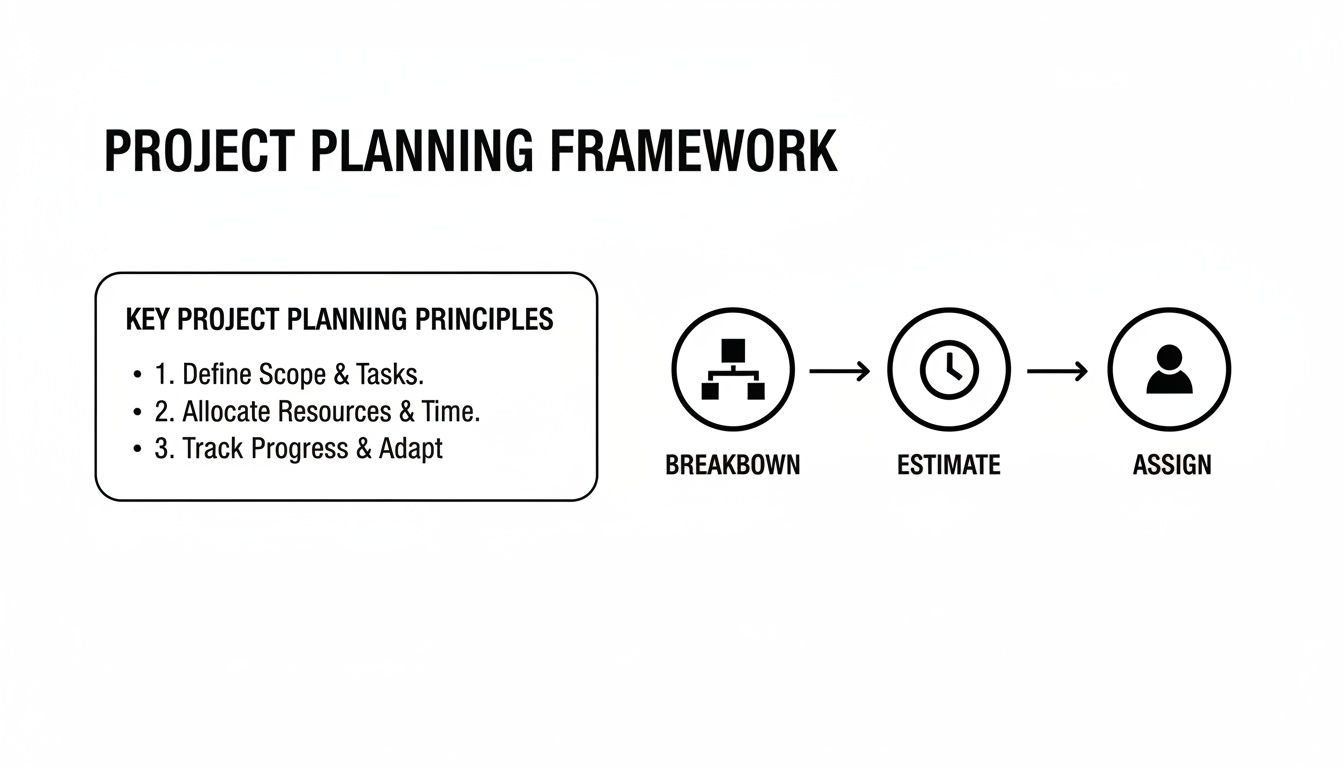
This process—breaking down work, estimating the effort, and assigning resources—is exactly what automated tracking measures against real-world activity, giving you a clear picture of plan vs. actuals.
This move toward smarter tools is happening everywhere. The project management software market is expected to reach $12.02 billion by 2030 as more teams look for better ways to manage their work. The payoff is huge: 80% of organizations see better internal communication, and it's no surprise that 77% of high-performing projects use project management software.
Before we dive deeper into setup, it helps to see just how different the automated approach is from the old way of doing things.
Manual vs Automated Project Tracking
| Metric | Manual Tracking (Spreadsheets & Timesheets) | Automated Tracking (e.g., TimeTackle) |
|---|---|---|
| Data Accuracy | Prone to errors, guesswork, and "guesstimates" | Highly accurate, based on actual calendar events |
| Team Effort | High-effort; a recurring administrative chore | Zero-effort; happens passively in the background |
| Timeliness | Delayed; data is often days or weeks old | Real-time; insights are available instantly |
| Productivity | Drains productive hours on administrative tasks | Frees up team members to focus on billable work |
| Visibility | Limited and often misleading view of resource use | Clear, continuous visibility into project health & utilization |
| Reporting | Time-consuming manual report creation | Instant, customizable reports generated with a few clicks |
As you can see, the switch isn't just a minor upgrade—it fundamentally changes your ability to manage projects effectively.
Setting Up Rule-Based Workflows
Once the time data flows in automatically, the next move is to make it meaningful. This is where you can create simple, rule-based workflows to categorize every minute of work by project, client, or task type—all without anyone lifting a finger.
For instance, you could set up rules like:
- Any calendar event with "Acme Corp" in the title gets tagged to the "Acme Corp Account."
- All meetings that include people from the "UX Design Team" are categorized under "Creative Services."
- Events containing keywords like "Q4 Launch Campaign" are automatically assigned to that specific project code.
This kind of automation builds consistency and accuracy right into your data, creating a reliable foundation for real-time reporting. For agencies trying to get a better handle on their projects, exploring the best campaign management software platforms can provide even more ways to enhance these automated processes.
By automating how you collect and categorize data, you pull project managers out of the administrative weeds. You empower them to focus on what actually matters: strategic oversight, managing risks, and leading their teams to a successful project close.
This pivot from manual entry to automated workflows is what modern project management is all about. You can learn more about workflow automation in our guide to see how these principles apply beyond just time tracking. With these systems humming along, you'll finally have the instant, trustworthy visibility you need to plan and manage every project with confidence.
Managing Workflows and Project Execution

A brilliant plan is just a document until you actually put it into action. The execution phase is where all your strategy and planning meet reality, and it's all about navigating the day-to-day currents of agency life. This is the real core of planning and managing projects—turning timelines and tasks into tangible progress.
Solid execution really hinges on two things: clear communication and a single source of truth. When everyone knows exactly where to find the latest updates, who owns what, and what needs to happen right now, you eliminate the confusion that pulls projects off track. That clarity lets you focus on what really matters: keeping the project moving forward.
Running Meetings That Move the Needle
We've all been in them—pointless meetings that are notorious productivity killers. To make your check-ins actually count, they need a tight structure and a clear purpose. Every single meeting should have a defined agenda that’s shared in advance. This simple step ensures team members show up prepared to contribute, not just to listen.
Instead of going around the room for vague status updates, focus on blockers and solutions. I've found a simple framework can make a huge difference:
- What was accomplished since our last meeting? Acknowledge progress and celebrate the wins.
- What are the top priorities before our next meeting? Get everyone aligned on immediate next steps.
- What roadblocks are in the way? This is the most critical question. It surfaces issues before they have a chance to derail the timeline.
By focusing the conversation on action and problem-solving, you transform meetings from a passive report-out into an active work session. It keeps the team engaged and maintains that crucial project momentum.
Establishing a Strong Change Control Process
Let's be honest, scope creep is one of the biggest threats to any project's success. It usually starts with small, "harmless" requests that slowly but surely expand the project's boundaries, straining your budget, timeline, and team.
A formal change control process isn't about saying "no"—it’s about managing "yes" responsibly.
When a new request comes in, don't treat it as a disruption. Frame it as a decision point. Document the request, assess its impact on the project's resources and schedule, and present the trade-offs to the stakeholders.
This approach creates total transparency and empowers the client to make an informed choice. Maybe it means adjusting the budget, pushing back the launch date, or swapping out a lower-priority feature. Having a structured process like this protects your team from burnout and ensures every change is a deliberate, strategic decision, not just an unmanaged addition.
Using Visual Tools to Streamline Reporting
Your team’s valuable time shouldn't be wasted manually compiling status reports. Smart integrations and visual tools can automate this entire process, pulling real-time data into dashboards that are actually easy to understand. For instance, syncing project data to a shared Google Sheet gives all stakeholders a live, accessible overview without any extra work.
This kind of automated reporting kills those repetitive administrative tasks, freeing you and your team to focus on higher-impact activities. When you have instant visibility into key metrics, you can spend your energy on proactive risk management and keeping the team motivated. That shift from manual reporting to automated insight is fundamental to executing projects efficiently.
Closing Projects and Measuring Real ROI
It’s tempting to rush onto the next big thing the second a project wraps up. But that final phase—the closing—is where your most valuable lessons are hiding. A structured closing process is a non-negotiable final step in planning and managing projects. It’s your chance to lock in the wins, make sure stakeholders are truly satisfied, and pull out crucial insights that will make every future project run that much smoother.
This isn't just about ticking off boxes on a checklist. Think of it as a strategic review that ensures all deliverables are officially signed off on, the team gets a real sense of accomplishment, and you’ve properly archived all the assets for later. Without this formal closure, loose ends have a funny way of lingering, and all that hard-won knowledge just evaporates.
Conducting a Productive Post-Mortem
The heart and soul of the closing process is the post-mortem, or retrospective. This isn’t a session for pointing fingers. It's a blameless, honest look at what went right, what went wrong, and what you’d all do differently next time. The whole point is to create a safe space for genuine feedback.
To keep the conversation on track and actually productive, try framing it around a few key questions:
- What did we set out to do? (Go back and review the original goals.)
- What actually happened? (Compare the plan against the final outcome.)
- What went well and why? (Pinpoint the processes or moments that really shined.)
- What could have gone better? (Identify the friction points and bottlenecks without blame.)
- What will we do differently next time? (This is the most important part—define actionable changes.)
Documenting the answers to these questions gives you a powerful playbook for continuous improvement. It’s how you stop making the same mistakes twice.
From Raw Data to Real Return on Investment
All that project data you’ve collected tells a story, and the final chapter is calculating the true return on investment (ROI). This goes way beyond just looking at the final budget numbers. By using the automated time and activity data you've gathered, you can dig into deep efficiency and utilization metrics.
A common mistake is treating project closure as a simple administrative task. Instead, view it as the final, critical step in value creation, where you convert project data into institutional knowledge and a stronger bottom line.
Fire up your dashboards and you can see exactly how many hours were spent on each phase or task versus what you originally estimated. This analysis is pure gold. It shows you precisely where your quoting process is hitting the mark and where it needs some serious refinement, helping you build more profitable and realistic proposals down the road.
This data-driven approach is more than just good practice; it’s a strategic necessity. A massive global talent gap in project management is on the horizon, with demand for skilled pros expected to jump from 39.6 million in 2025 to 58.5 million by 2035. That’s a 48% increase, and it means agencies have to get smarter about using technology to multiply their efficiency. You can read the full PMI report on the talent gap here.
By mastering project closure and ROI analysis, you’re not just cleaning up old projects. You’re equipping your team to do more with less, proving tangible value, and staying way ahead of the curve.
Even the most buttoned-up project plan is going to run into questions. Agency life is famous for throwing curveballs, and knowing how to handle the common ones is what separates a good project leader from a great one.
Here are a few of the hurdles we see teams face all the time, along with some straight talk on how to clear them.
How Can We Improve Project Estimate Accuracy?
Stop guessing and start using your own data. The single biggest leap you can make in estimate accuracy comes from looking at what your team has actually done in the past, not what you think they can do.
If you’re not already, use a tool that automatically tracks time against specific projects and tasks. This isn't about micromanagement; it's about building an internal library of what effort really looks like. When a new request comes in, you can look back at similar deliverables and see exactly how many hours they took.
Once you have those hard numbers, talk to the people who will actually be doing the work. Their on-the-ground experience is the other half of the equation.
The best estimates are a mix of historical data and expert human judgment. Break bigger deliverables into smaller, bite-sized tasks—it’s always easier to estimate the small stuff. And please, always build in a contingency buffer of 15-20%. Something will always go sideways.
How Do You Handle Scope Creep Without Damaging Client Relationships?
The trick is to have a clear change control process in place before you even need one. You have to set the ground rules from day one.
When a client asks for something new—and they always will—your first move isn't to say "no." Instead, you document the request and calmly explain what it means for the project's timeline, budget, and your team's workload.
Frame it as a choice. "We can absolutely get that done for you. Based on our initial look, it'll add about X hours and likely shift the final deadline by Y days. I'll put together an updated proposal for you to approve." This makes you a strategic partner, not a roadblock. It gives the client the power to decide if the new request is worth the trade-offs, keeping the relationship positive while protecting the project.
What Is the Best Way to Increase Team Adoption of New Tools?
People will only use a new tool if it makes their life genuinely easier. The biggest hurdle to adoption is friction, so your job is to remove as much of it as possible.
Start by picking software that solves a real pain point, like getting rid of manual timesheets. A platform that automatically logs time from a calendar event is going to win hearts and minds far faster than one that requires people to remember to start and stop a timer.
Next, bring your team into the conversation early. Let them have a say in the selection process. Follow that up with solid training, and make sure leadership is visibly using the tool every single day. If the boss is doing it, everyone else is more likely to follow. Finally, don't try to boil the ocean. Roll out the most important features first, and let everyone get comfortable before you introduce the more advanced stuff.
Ready to ditch the timesheet grind and get a crystal-clear view of where your projects really stand? See how TimeTackle uses calendar-driven automation to make project tracking accurate and almost effortless. Get started with TimeTackle today.