Let's be honest. Managing an agency often feels less like steering a ship and more like juggling chainsaws. You’re constantly trying to figure out who’s working on what, who’s free, and who’s about to burn out. Resource allocation software is your command center for bringing order to that chaos. It’s the difference between navigating with a messy spreadsheet and having a clear dashboard of your team's capacity in real time.
What is resource allocation software, really?

If you’re running an agency, the biggest headache is almost always a lack of visibility. Who’s actually available for that new client project starting next month? Is the design team swamped, or do they have room for one more task? Trying to answer these questions with gut feelings and outdated spreadsheets is a recipe for missed deadlines and frustrated teams.
This is where resource allocation software steps in. It creates a single source of truth for your most valuable asset: your team's time. It gives a bird's-eye view of everyone's workload, skills, and availability, all in one place.
More than just project management
It’s easy to confuse these tools with standard project management software, but they solve different problems. A project management tool is great for tracking tasks and deadlines within a single project. It often falls short when you need to zoom out and see the big picture across all projects.
Resource allocation software is the air traffic control for your agency. It makes sure no one is overbooked, every project has the right people, and you can see potential collisions—like two key projects needing the same lead designer—weeks before they happen.
This focus on people and capacity is what sets it apart. The goal isn't just to manage tasks; it’s to manage the people doing those tasks effectively and sustainably. You can dive deeper into this distinction in our guide on resource planning versus project management.
Why it's gaining momentum
The shift toward these tools is picking up steam, especially for mid-sized agencies. As your team grows, the complexity of scheduling explodes. A system that worked for 10 people will break down with 50. The market reflects this.
The global Resource Management Software market is on track to hit a valuation between $500 million and $1.5 billion in 2025. Even more telling is its projected compound annual growth rate of up to 30% through 2030. This boom is driven by the rising cost of talent and the need for agencies to track every billable hour with precision.
This software is becoming a must-have for agencies looking to grow profitably without burning out their teams. It helps leaders get clear, data-driven answers to business questions, like:
- Can we take on this new project without overloading our current team?
- Do we need to hire a new developer, or can we reschedule some existing work?
- Which projects are actually the most profitable based on the hours we invest?
- Are we staffing projects with the right people for the job?
By turning guesswork into informed decisions, these tools empower you to build a smarter, more resilient, and more profitable agency.
The hidden costs of ignoring resource management
That constant, low-grade chaos you feel in your agency? It’s not just the price of doing business. It’s the sound of money slipping through the cracks, hidden in the daily grind of messy spreadsheets and last-minute staffing decisions. This is the real cost of poor resource planning, and it shows up as project delays, team burnout, lost revenue, and eventually, unhappy clients.
When you don’t have a real system for allocating resources, you’re flying blind. Your team feels busy, but are they busy on the right things? Are your most valuable people focused on billable client work, or are they trapped in a cycle of internal meetings and administrative headaches? If you can't answer that question instantly, you've found the first sign of a major operational weakness.
The downward spiral of inefficiency
Once you lose a clear view of your team's capacity, a frustratingly predictable pattern kicks in. Projects get staffed based on who seems free, not who actually has the right skills for the job. This guesswork always leads to the same problems:
- Overburdened experts: Your top performers get thrown at every fire, creating bottlenecks and heading straight for burnout. Their time isn't protected, and they quickly become a single point of failure for multiple projects.
- Underused talent: At the same time, other skilled team members are sitting on the bench. Managers simply don't have visibility into their availability or niche skills, which is a direct blow to your payroll efficiency.
- Constant project delays: Without solid data, project timelines are just hopeful guesses. Deadlines start to slip, client trust begins to fray, and your agency's hard-earned reputation takes a hit.
This isn't just an internal headache; it's incredibly expensive. Every hour a billable employee spends trying to figure out who can take on a task is pure profit left on the table.
The biggest hidden cost of all is opportunity cost. While your team is scrambling just to keep up, you lack the data to confidently go after new business. You can't answer a potential client's most basic question: "When can you start?"
From guesswork to data-backed decisions
This is where resource allocation software comes in and completely flips the script. It’s the tool that shifts your agency from a state of reactive firefighting to one of proactive, strategic planning. The benefits aren't just about "being more organized"—they translate directly to a healthier bottom line.
Suddenly, operations leaders can stop relying on gut feelings and start making decisions with real data. You can finally get clear answers to business questions:
- Hiring: Is the design team truly swamped, or is their work just poorly scheduled? The data will tell you whether you need to open a new role or simply optimize the current workflow.
- Project intake: Can you actually handle that exciting new client, or will it stretch your team to the breaking point? A quick look at your future capacity gives you a firm yes or no.
- Team structure: Are you top-heavy with senior talent but starving for mid-level doers to execute? Utilization reports will immediately expose any imbalances in your team.
This move toward data-driven operations is part of a much bigger shift. The global software market, valued at $830.83 billion in 2025, is expected to skyrocket to $2.21 trillion by 2034. Enterprise software, which includes these powerful management tools, makes up a huge slice of that pie. You can discover more insights about this growing market and see how businesses everywhere are leaning on integrated platforms to get ahead.
Putting money into resource allocation software is an investment in your agency’s long-term stability and growth. It cuts down on administrative waste, boosts your billable utilization, and gives you the foresight you need to build a more profitable and sustainable business.
5 core features every agency needs in a resource allocation tool
Let's be real—not all resource allocation software is created equal. While plenty of tools offer a simple calendar view, the best platforms for agencies dig much deeper. They’re built to solve your biggest operational headaches, not just add another layer of complexity to your tech stack.
Think of this as your buyer's guide. We'll walk through the five core features that high-performing agencies rely on to stay profitable and keep their teams from burning out. This is your checklist for finding a platform that actually supports your growth.
1. Real-time capacity planning and forecasting
The most fundamental feature you need is a clear, real-time view of your team’s capacity. This isn't just about seeing who’s busy this week; it's about understanding workloads months down the road. A good tool lets you see at a glance who is overbooked, who’s on the bench, and who you might need to hire next quarter.
This capability is all about shifting from reactive to proactive. It should allow you to:
- Visualize workloads across individuals, teams, and entire departments.
- Forecast future capacity based on your active project pipeline and even tentative deals.
- Spot potential bottlenecks weeks or months before they derail a project.
- Run “what-if” scenarios to see exactly how taking on a new project would impact your team.
Without solid forecasting, you’re always putting out fires. With it, you can confidently tell new clients when you can start and balance workloads before they become a problem.
2. Skills-based talent matching
Staffing projects based on whoever seems available is a recipe for mediocrity. The most effective resource allocation software includes a skills management database, allowing you to tag team members with specific skills, certifications, and experience levels.
When a new project lands, you can search for a “senior copywriter with fintech experience” instead of just “any available writer.” This ensures the right person is on the right task from day one, which dramatically improves project quality and cuts down on ramp-up time. It’s about making smarter assignments, not just faster ones.
This feature is your best defense against constantly overloading your go-to experts. It helps you distribute complex work more evenly and gives other team members a chance to grow their skills on challenging new projects.
3. Flexible and automated time tracking
Nobody likes filling out timesheets. It’s tedious, often inaccurate, and a massive source of administrative drag. The best tools get this and build time tracking directly into the one place your team already lives: their calendars.
Look for a platform that offers automated time capture from Google Calendar or Outlook. Instead of manually plugging in hours, the software simply pulls data from calendar events. All your team has to do is keep their calendars up-to-date. This simple shift can save dozens of hours a week and gives you far more accurate data for billing and project costing.
4. Insightful reporting and dashboards
Data is useless if you can't make sense of it. Your resource allocation software should transform all that raw project and time data into dashboards that are easy to understand at a glance. These visuals need to give you quick answers to your most urgent business questions.
The right dashboards are your operational command center. Key reports to look for include:
- Utilization Rate: See billable vs. non-billable hours for every person and team.
- Forecast vs. Actuals: Compare your planned hours against the actual time spent to sharpen future estimates.
- Project Profitability: Get a true look at the cost of a project based on the real hours invested.
- Capacity Trends: Monitor team availability over time to make smarter hiring decisions.
5. Seamless integrations
Finally, your allocation tool can't live on an island. It has to talk to the other systems you rely on every day. Key integrations include your project management software (like Asana or Jira), your CRM (like Salesforce or HubSpot), and your accounting software.
These connections create a single source of truth. For example, when a deal is marked "won" in your CRM, it can automatically create a placeholder project in your resource tool. This completely eliminates double data entry and makes sure everyone from sales to project management to finance is on the same page.
Choosing the right tool means knowing what you absolutely need versus what’s just nice to have. Some features are foundational for running a modern agency, while others are advanced add-ons you might not need on day one.
The table below breaks down the essentials from the extras to help you prioritize.
Essential vs. nice-to-have software features
| Feature Category | Essential for Agencies | Why It Matters |
|---|---|---|
| Capacity Planning | ✅ Real-Time Workload Views | You need to see who's over/under-booked now to prevent burnout and make smart staffing decisions. |
| Forecasting | ✅ Pipeline-Based Forecasting | Planning based on potential projects in your sales pipeline lets you anticipate future hiring needs. |
| Skills Matching | ✅ Searchable Skills Database | Assigning the right person to the right task is important for project quality and client satisfaction. |
| Time Tracking | ✅ Automated Calendar Sync | Manual timesheets are inaccurate and a huge time-suck. Automation is a must for reliable data. |
| Reporting | ✅ Utilization & Profitability Dashboards | These core metrics tell you if your agency is healthy and where you're making or losing money. |
| Integrations | ✅ PM & CRM Connections | Your resource tool must sync with where work is managed and where new business comes from. |
| Advanced Features | 💡 AI-Powered Recommendations | "Nice-to-have" features like AI-suggested staffing can speed things up but aren't necessary to start. |
| Advanced Features | 💡 Custom Approval Workflows | Complex, multi-step approval chains are often overkill for mid-sized agencies. |
Ultimately, focus on the core features that solve your immediate operational pains. You can always grow into the more advanced functionalities as your agency scales and your processes mature.
How to choose the right software for your agency
Let's be honest: shopping for resource allocation software can feel overwhelming. So many tools promise the world, and their websites all start to look the same. But finding the right platform for your agency isn't about finding the one with the longest feature list—it's about finding the one that solves your most frustrating problems.
The secret is to start with a brutally honest assessment of your agency’s operations. Are manual timesheets eating up hours every week? Do your project forecasts feel more like wild guesses than data-driven predictions? Or is the biggest headache simply not knowing who has the bandwidth for new work? Pinpoint what’s actually broken before you start looking for a fix.
Identify your specific pain points
Before you even think about booking a demo, pull your ops leaders and project managers into a room. The only goal of this meeting is to walk out with a shortlist of the top 2 problems that a new tool must solve.
Think of this list as your North Star. As you start looking at different platforms, you can filter everything through a simple question: “Does this feature actually fix our broken forecasting?” or “Will this really help us get a handle on who is available next Tuesday?” This keeps you from getting distracted by flashy gadgets you'll never use.
This simple flow chart breaks down how to approach it.
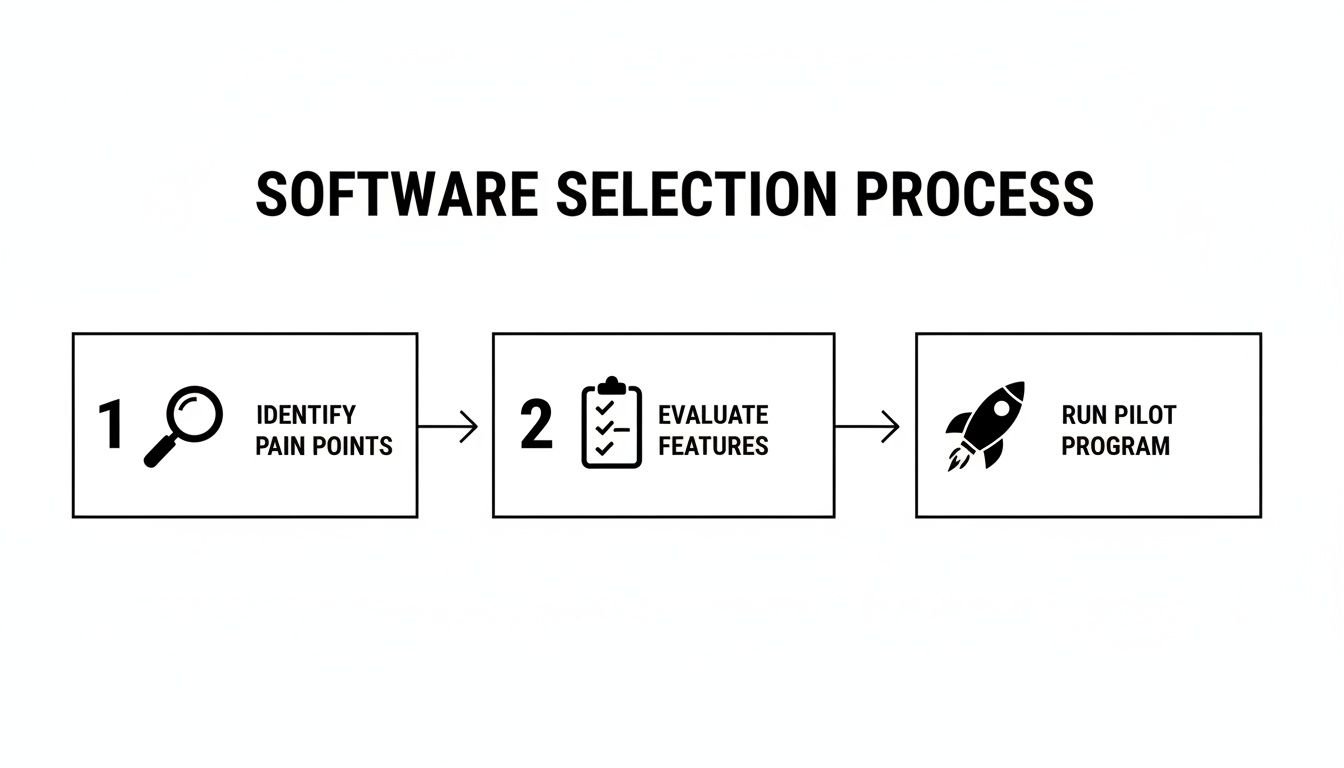
This three-step approach—identifying pain, evaluating key features, and running a small pilot—keeps your decision grounded in what your team truly needs, not what a sales rep promises.
Run a focused pilot program
Once you've narrowed the field to one or two serious contenders, it's time for a real-world test drive. Resist the temptation to roll out a trial to the entire agency. Instead, pick a small, representative team for a pilot program.
A single project team of 5-10 people is the perfect size. Give them a clear, time-boxed mission, like managing one specific project from start to finish using the new tool for two weeks. This small-scale test will tell you more about a platform's true usability than a dozen slick demos ever could.
The market for these tools is exploding for a reason. According to Future Market Insights, the Project Management Software market is projected to soar from $9.60 billion in 2026 to $32.27 billion by 2036. That's not just random growth; it’s a direct response to the complexities of modern agency work and the need for tools that deliver real-time insights. If you want to see how these trends are shaping the software landscape, you can read the full research about the project management software market.
A practical vendor checklist
When it's time to compare your top choices side-by-side, a simple checklist will keep your evaluation objective and focused. If you're looking for a head start on who to evaluate, check out our guide on the best resource management software.
Score each vendor on these factors:
- Ease of use: Is the interface actually intuitive? A tool your team dreads using is a tool that’s already failed. It should feel like it was designed for how people in your agency really work, especially if your team lives in their calendars all day.
- Onboarding and support: What kind of help will you get out of the gate? Look for vendors who provide dedicated onboarding support. A smooth transition is worth its weight in gold.
- Security and compliance: Can you trust them with your data? SOC 2 compliance is the gold standard here. It's a non-negotiable sign that the vendor takes security seriously.
- Scalability: Will this tool grow with you, or will you outgrow it in a year? Make sure the platform can handle more users, projects, and complexity as your agency lands bigger clients and expands its team.
By focusing on these practical needs, you’ll end up with a resource allocation software that doesn't just look great in a sales deck but becomes an indispensable part of your daily operations.
How to make the switch a success, not a nightmare

Let's be honest: the best resource allocation software is completely worthless if nobody on your team actually uses it. The success of your new tool has less to do with its flashy features and much more to do with how you introduce it to the team. A thoughtful implementation turns a potentially painful switch into a clear win for everyone.
The secret is to lead with empathy. Your team's first question will always be, "What's in it for me?" Answer it directly and honestly. This isn't about micromanagement; it's about making their work lives easier.
Frame the new tool as a solution to their biggest headaches: less time wasted on manual timesheets, clearer expectations on every project, and a real, data-driven way to guard their work-life balance. When the software is seen as a shield against burnout, adoption happens fast.
Communicating the "why" to your team
Clear, consistent communication from leadership is non-negotiable. Before you send a single software invite, you need to set the stage. Get everyone together for a team-wide meeting and explain the "why" behind this change, focusing squarely on the benefits they will see.
Show them exactly how the new resource allocation software will help:
- Kill the administrative busywork: Explain how features like automated time tracking from their calendars will finally eliminate the need for tedious manual timesheets. This gives them back precious time for focused, creative work.
- Bring clarity and fairness: Explain how the platform provides a transparent, shared view of everyone's workload. This is your system for making sure projects are distributed more equitably, so no single person becomes the permanent bottleneck.
- Protect their personal time: Emphasize that the tool helps managers spot and prevent overload before it spirals out of control. It’s a system designed to make sure they can log off at the end of the day without feeling like they’re letting anyone down.
When your team sees the software as a tool for their own benefit, they become advocates for the change, not obstacles.
A phased rollout for a smooth transition
Whatever you do, don't try to boil the ocean by launching everything to everyone all at once. A phased rollout minimizes disruption and builds positive momentum. Think of it as a series of small, manageable steps instead of one giant, overwhelming leap.
Your implementation playbook should follow a clear sequence:
- Initial setup and integration: Start by connecting the essentials. Link the new software to your team’s calendars, existing project management tools, and your CRM. The goal is to get the core data flowing automatically from day one.
- Train your team leads first: Turn your project managers and team leads into champions. Run a dedicated training session just for this group so they can confidently answer questions and guide their direct reports.
- Onboard teams project by project: Begin by rolling out the software for one new project with a single, willing team. This creates a low-stakes learning environment where you can iron out any kinks. Use the success of this first group to build excitement for the next teams in line.
- Establish new reporting rhythms: Start weaving the new dashboards and metrics into your existing weekly meetings. Make reviewing team utilization and capacity a standard part of your operational check-ins. This is how you embed the tool into your agency’s culture.
By taking this measured approach, you give your team the space to adapt gradually. This avoids that dreaded feeling of having to learn a complex new system overnight and makes sure the new habits actually stick. A successful transition is the final, necessary step in turning your investment in resource allocation software into real, measurable results.
Dashboards and metrics that actually matter

So, you’ve got your resource allocation software all set up. Now what? It's easy to get mesmerized by all the new charts and graphs at your fingertips. But a good dashboard isn't about throwing data at a wall to see what sticks—it’s about getting clear answers to your most critical questions.
This is your chance to cut through the noise. The goal isn’t to track everything possible, but to zero in on the handful of key performance indicators (KPIs) that actually reflect the financial health and operational pulse of your agency. A great dashboard tells a story at a glance, showing you exactly where you’re winning and where you need to step in.
Key metrics to monitor
Instead of getting overwhelmed, let’s focus on the core metrics that link directly to your profitability and your team's well-being. These are the numbers that deserve a permanent spot on your main dashboard.
Billable utilization rate: This is the bedrock of agency operations. It’s the percentage of your team's time spent on work you can actually bill to a client. Hitting a healthy utilization rate—typically around 75-85% for billable staff—is one of the most direct paths to a healthier bottom line.
Forecast vs. actual hours: Think of this as your project reality check. When you compare the hours you planned for a project against the hours your team actually worked, you get priceless feedback. It sharpens your future estimates and acts as an early warning system for scope creep.
Project profitability: This is where resource planning meets the P&L. By tracking the cost of hours logged against a project’s budget, you can see in black and white which clients and projects are your true money-makers. That insight is pure gold when deciding where to aim your business development efforts.
Team capacity and workload trends: This metric is your first line of defense against team burnout. A solid dashboard will show you how work is spread across the team, instantly showing who's consistently overloaded and who might have room to take on more.
If you want to get this foundational metric right, our guide on how to calculate utilization rate breaks it all down.
What a good dashboard looks like
A powerful dashboard doesn't just show you numbers; it helps you decide what to do next. It needs to be visual, intuitive, and built to answer questions fast.
Take this dashboard view, for example. It gives an ops leader a clear, immediate snapshot of the agency's health.
From this one screen, you can see that while overall utilization looks good, one team is heading for burnout with over 95% utilization. At the same time, another team's low utilization might mean it’s time to chase new business in that area or cross-train staff to help their swamped colleagues.
The real power of a dashboard is its ability to turn data into a conversation. It's not just a report; it's a starting point for proactive conversations about workload, project health, and strategic planning.
When you focus on these essential metrics and build dashboards for clarity, your resource allocation software becomes much more than a scheduling tool. It becomes a strategic command center that helps you grow the business, protect your team, and build a more resilient agency.
Frequently asked questions about resource allocation software
It's natural to have questions when you're thinking about adding a new tool to your stack. This is especially true for something that touches every corner of your agency, from how projects get planned to how your team feels at the end of the week. Let's walk through the most common questions agency leaders and ops managers have about resource allocation software.
Is our project management tool enough for this?
Probably not. Your project management (PM) tool is fantastic at what it does—tracking tasks, milestones, and deadlines for a specific project. It’s the blueprint. But it usually falls short when you ask bigger capacity questions. It tells you what needs to get done, but not who is actually free to do it across every single project in your pipeline.
This is where resource allocation software comes in. It’s built to focus on your people—their skills, their availability, and their total workload across the entire agency. It’s designed to answer the tough questions, like:
- Who can we assign to that new project starting next month?
- Is our lead designer completely swamped for the next three weeks?
- Do we have enough developers on hand to take on the Q4 pipeline?
Think of it this way: your PM tool is the detailed map for a single road trip. Your resource allocation software is the air traffic control system for your entire airport.
How long does implementation really take?
That's always a fair question. Nobody has time for a six-month setup. The good news is that modern, cloud-based tools are built to get you up and running fast. For a typical mid-sized agency, you can have the basics in place in just a few days to a week.
The first step usually involves linking your team’s calendars (like Google or Outlook), sending out invites, and plugging in your current projects. If you need more complex, custom integrations, it might take a couple more weeks. But the core value is available almost immediately. The trick is to pick a partner that provides solid onboarding support to walk you through it.
Will my team feel like they are being micromanaged?
This is easily the biggest fear, but it all comes down to how you frame it. Good resource allocation software isn't about being Big Brother. It’s about protecting your team from burnout and making sure work is distributed fairly.
When you position the tool as a shield against overwork and a way to eliminate tedious admin tasks like manual timesheets, your team will see it as a benefit, not a burden. Transparency helps everyone see who is overloaded and who has capacity, leading to better collaboration and support.
When you lead with the benefits—less admin headache, a more even spread of projects, and a smarter way to plan—teams usually welcome it as a tool that helps them protect their own work-life balance.
What is the real ROI of this software?
The return on investment shows up in a few powerful ways. First, just by bumping up your billable utilization rate by a few percentage points, an agency can add a significant amount to the bottom line without hiring anyone new. Second, it slashes the administrative hours your team wastes on manual scheduling, chasing timesheets, and building reports from scratch.
Third, it directly improves project profitability. You'll have the hard data needed to create much more accurate quotes and stop budget overruns before they happen. And finally, by preventing team burnout, you cut down on the massive costs associated with employee turnover. When you add up the impact on revenue, efficiency, and retention, the return becomes clear.
Ready to stop guessing and start knowing? TimeTackle gives your agency the real-time visibility you need to plan projects, balance workloads, and drive profitability. See how our calendar-based automation can transform your operations.