For any business that sells expertise—think agencies, consultancies, or IT services firms—Professional Services Automation (PSA) software is the central nervous system. It’s the one platform that brings together project management, resource planning, time tracking, and billing, finally getting you out of those chaotic spreadsheets and disconnected tools.
Unifying Your Services Business Operations
Picture an orchestra where every musician is playing from different sheet music. The result is pure chaos. Cues are missed, the timing is off, and the whole performance just falls flat. This is exactly what it’s like to run a services business on a patchwork of systems: spreadsheets for project plans, a separate app for timesheets, and invoices cobbled together from memory.
Professional services automation software is the conductor that gets everyone in sync. It ensures every part of your business, from the team delivering the work to the finance department sending the bill, is working in harmony from a single, unified platform.
The Core Problem PSA Solves
Without a PSA system in place, businesses bleed money and efficiency in predictable ways. The symptoms are painful and all too common:
- Revenue Leakage: Billable hours slip through the cracks or get tracked inaccurately. The result? You’re under-billing clients and leaving money on the table.
- Poor Resource Utilization: It’s a constant guessing game. Who’s overworked? Who’s sitting on the bench? And is the right person really on the right project?
- Zero Visibility: Leadership is flying blind. There’s no real-time view of project profitability, client health, or what your resource needs will be next quarter. Decisions end up being based on gut feelings instead of hard data.
A PSA system gives you a real-time, 360-degree view of your business's health. It stops being about scattered data points and starts being about actionable intelligence that connects the work being done directly to its financial impact.
From Niche Tool to Industry Standard
What started out as simple tools for project billing has exploded into a massive software category, and for good reason. It’s become a critical piece of the modern business puzzle. Analysts now predict the global PSA software market will hit somewhere between USD 15.0–15.22 billion in 2025, with some forecasts soaring as high as USD 44.5 billion by 2035.
This isn't just random growth; it signals a fundamental shift in how services businesses operate. Companies now recognize that to scale successfully, they have to automate the entire service lifecycle—from the first sales call to the final invoice. You can explore more on the evolution of the PSA market to see just how essential these platforms have become.
The Five Core Modules of a PSA Platform
Think of a Professional Services Automation (PSA) platform as the central nervous system for your services business. It’s not just one tool; it’s a collection of interconnected modules working in harmony to keep every part of your operation running smoothly.
Getting a handle on these five core modules is the key to understanding how a PSA creates a single, unified workflow from project kickoff to final payment.
The diagram below gives you a bird's-eye view of how a PSA centrally manages the big three: projects, resources, and billing.
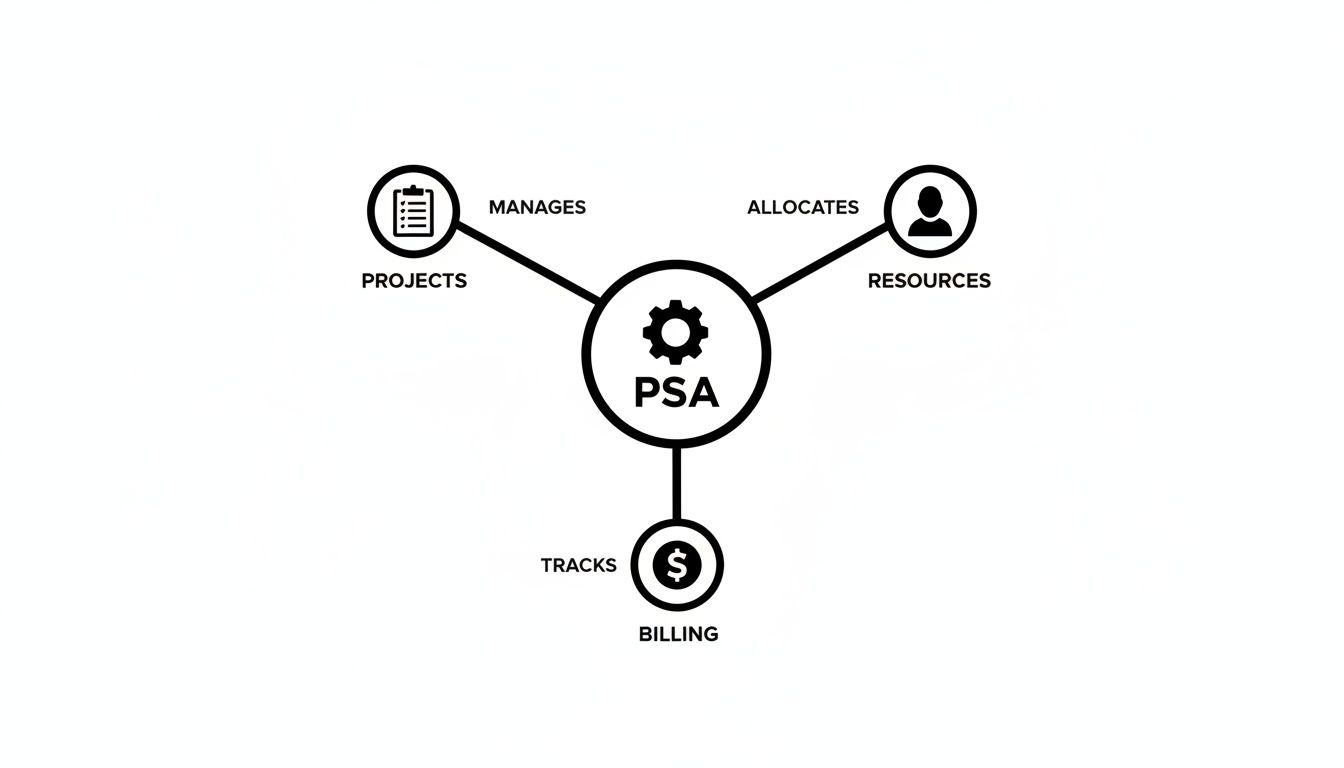
This isn’t just a random assortment of software. It's a true hub where every critical business function informs the others, giving you a complete picture of your company's health.
1. Project and Task Management
This is your playbook for getting work done. The project management module is where you lay out the entire roadmap for every client engagement, from the initial scope to the final sign-off. It’s where you build project plans, define tasks, set milestones, and see exactly where things stand.
For an agency, this could mean creating a standard template for a website redesign so no crucial steps are ever missed. For a consultancy, it's all about breaking down a complex six-month strategy project into clear phases and deliverables. This module brings consistency and predictability to your service delivery.
2. Resource Management
The resource management module tackles the million-dollar question for any services firm: who is available to work on what, and when? It helps you move past frantic, last-minute staffing decisions based on who seems to have the least on their plate.
Instead, you get a clear, centralized view of your entire team's capacity, skills, and current workload. With that kind of visibility, you can accurately forecast hiring needs, prevent burnout by leveling out assignments, and make sure your top expert is on the right task. This is the difference between reactive chaos and proactive control.
3. Time and Expense Tracking
This module is the bedrock of your profitability. It gives your team a simple way to log the hours and expenses they put into specific projects. The best PSA systems are ditching the clunky, manual timesheets that everyone hates filling out—the same ones that lead to inaccurate data and delayed invoices.
Accurate time tracking isn't just a chore. It's the raw data that fuels everything from project profitability reports and utilization metrics to, most importantly, the invoices you send to clients. Without it, you're just guessing about your financial performance.
For instance, a marketing agency can see exactly how many hours went into creative development versus client meetings for a big campaign. That kind of granular data shows you where the time is really going, helping you quote future projects more accurately and protect your margins from scope creep.
4. Billing and Invoicing
Here’s where all your team's hard work officially becomes revenue. The billing and invoicing module automates the entire process of creating and sending accurate invoices based on the time and expenses logged in the system.
This puts an end to the tedious, error-prone task of manually piecing together data from spreadsheets and emails. The module can handle any billing model you throw at it, from fixed-fee projects to time-and-materials contracts. Because it’s tied directly to time tracking, you can generate a detailed invoice with just a few clicks. This dramatically shortens the quote-to-cash cycle and keeps your cash flow healthy.
To dig deeper into this, check out our guide on specialized billing software for professional services and see how it fits into this workflow.
5. Reporting and Analytics
Finally, the reporting and analytics module takes all that raw data from the other four modules and turns it into strategic business intelligence. This is where leaders get a real-time, 30,000-foot view of business health through live dashboards and custom reports.
Instead of waiting weeks for someone to compile a report, you can instantly see:
- Project Profitability: Which projects are your winners, and which are secretly draining resources?
- Resource Utilization: Is your team hitting its billable targets?
- Client Health: Who are your most profitable clients?
- Future Forecasts: What does the revenue pipeline look like for next quarter?
This module connects all the dots, showing you how a dip in team utilization last month is directly impacting this month's revenue. It empowers you to make sharp, data-driven decisions instead of just reacting to old news.
Key Business Benefits of Using PSA Software
So, we've looked at the individual modules. But the real magic of professional services automation software isn't in what the pieces do—it's in the business results they deliver when they work together. Bringing a PSA into your company isn't just a tech upgrade; it's a strategic decision that tackles core operational headaches and directly boosts your bottom line. It turns scattered, messy data into a well-oiled machine for growth.

This is where you stop guessing and start managing by the numbers. It’s also where a PSA system delivers its biggest return on investment. Let's dig into the specific benefits you can expect.
Drive Significant Profitability Gains
Think of a PSA as a profitability engine. Its main job is to plug all the tiny, invisible leaks that drain revenue from your business. By wiring your time tracking directly into your project financials, you get a crystal-clear picture of where every single hour and dollar is going.
This integration pays off in a few key ways:
- Accurate Billing: It’s the end of revenue leakage. Every billable minute gets captured and invoiced correctly, so you're not leaving money on the table from forgotten tasks or underestimated effort.
- Real-Time Margin Tracking: Forget waiting until a project is wrapped up to see if you actually made money. Dashboards show you budget vs. actuals as it happens, letting you catch scope creep and course-correct before your margins disappear.
- Smarter Quoting: Your sales team gets a secret weapon: historical data. Knowing how long similar projects actually took helps them build proposals that protect your profitability from day one.
Optimize Your Resource Utilization
Your people are your most valuable—and most expensive—asset. A PSA platform helps you manage your talent like a pro, making sure the right people are on the right projects at the right time. Resource planning shifts from a frantic, reactive scramble to a calm, proactive strategy.
Without a single view, it's all too common to have some folks completely swamped while others are sitting on the bench. That chaos hammers both your revenue and your team's morale. A PSA gives you perfect visibility into everyone’s capacity, skills, and upcoming availability.
This means you can confidently forecast what skills you'll need for the next quarter, make smarter hiring decisions, and balance workloads to prevent burnout—which is absolutely critical for keeping your best people around.
Imagine a marketing agency sees its top three designers are booked solid for the next six weeks. That insight lets a manager either reschedule a new project or line up a trusted freelancer well in advance. No last-minute panic, no blown client deadlines.
Enhance Full-Cycle Project Visibility
One of the biggest frustrations for any leader is simply not knowing what's going on. Are projects on track? Are we bleeding money? Are our clients happy? A PSA tool solves this by creating a single source of truth for everything project-related, all served up on live dashboards.
This clarity empowers everyone, from the ground floor to the corner office:
- Project Managers can finally stop chasing status updates. They can track task progress, monitor budgets, and spot risks before they snowball into crises.
- Executives get a 30,000-foot view of the entire project portfolio. They can check in on overall profitability, client health, and how resources are allocated across the firm.
- Clients can even get their own portal to see progress, review deliverables, and collaborate with your team. This transparency builds an incredible amount of trust.
This level of visibility kills the ambiguity. It empowers your entire team to make faster, better decisions because everyone is working from the same playbook. Project management stops being about endless status meetings and becomes a real-time feedback loop that delivers successful projects and happy, loyal clients.
PSA vs CRM vs Project Management Tools
Navigating the world of business software can feel like you’re drowning in a sea of acronyms, with each one promising to solve all your problems. It’s incredibly easy to get confused between Professional Services Automation (PSA), Customer Relationship Management (CRM), and Project Management (PM) tools.
While they might seem to overlap at a glance, they each play a very distinct and critical role. Getting it wrong means wasted money and persistent operational headaches. Getting it right means a business that practically runs itself.
Let's use a simple analogy: building a house.
- Your CRM is the real estate agent who finds the client and closes the deal.
- Your PM tool is the general contractor on-site, managing the day-to-day construction tasks to get the house built.
- The PSA, however, is the architect and business manager rolled into one, overseeing the entire venture—from the initial budget and resource plan to the final profitability analysis and client invoice.
Each system is designed to answer a fundamentally different question for your business.
Where Each Platform Shines
A CRM is laser-focused on the world before the sale. Its entire reason for being is to manage the customer journey from a curious lead to a closed deal. It tracks communications, manages the sales pipeline, and helps your team build and maintain strong client relationships. Its core question is always: How do we win and keep more customers?
A Project Management (PM) tool picks up the baton once a deal is won. It’s all about the delivery and execution of the work itself. With features like task lists, Kanban boards, and team collaboration spaces, its job is to ensure the project gets completed efficiently and on schedule. Its core question is: Are we completing the project tasks on time?
A Professional Services Automation (PSA) platform, on the other hand, manages the entire business lifecycle of a project. It’s the connective tissue between the sales process, project delivery, and the ultimate financial outcome. It handles everything from resource management and project accounting to time tracking and profitability reporting. Its ultimate question is: Is this project actually profitable for our business?
While a CRM manages the relationship and a PM tool manages the work, a PSA manages the business of the service. It’s the only platform that connects your people, projects, and profits in a single, unified view.
A Clear Comparison of Core Focus
Still a bit fuzzy? Sometimes seeing it side-by-side makes all the difference. This table breaks down what each system is built for, its standout features, and the core business problem it solves.
| Software Category | Primary Focus | Key Features | Core Question It Answers |
|---|---|---|---|
| PSA (Professional Services Automation) | The entire business lifecycle of a project-based service. | Resource Management, Project Accounting, Time & Expense, Billing, Utilization Reporting. | Is this project and this client profitable for our business? |
| CRM (Customer Relationship Management) | Managing the customer relationship and sales pipeline. | Lead/Opportunity Tracking, Contact Management, Sales Automation, Email Marketing. | How do we win and retain more customers? |
| PM (Project Management) | Executing tasks and collaborating on project delivery. | Task Lists, Kanban Boards, Gantt Charts, File Sharing, Team Collaboration. | Are we completing the project tasks on time? |
How These Tools Work Together
Here’s the thing: the most successful services firms don't just choose one tool; they integrate them to create a seamless operational flow from sales to delivery to finance. In this ideal setup, the PSA acts as the central command center.
An opportunity marked as "won" in the CRM can automatically trigger the creation of a new project in the PSA. The PSA then allocates resources and budgets, pushing specific task lists to a PM tool if your team prefers working there. As your team tracks time against those tasks, the data flows right back into the PSA.
This constant feedback loop drives everything from client invoicing to profitability analysis. This integration is crucial for maintaining a single source of truth across your entire business. For a deeper dive into related software, exploring options for CRM and automation development can provide valuable insights into managing these workflows.
Ultimately, understanding key metrics like resource utilization is foundational to profitability—a concept we break down completely in our detailed guide on how to calculate utilization rate. This shows just how directly data from one system can impact the strategic decisions you make in another.
How to Choose the Right PSA Software for Your Business
Picking the right professional services automation software is a big deal. It's a decision that will shape how your company operates for years to come. This isn't just about buying a tool with a long list of features; it's an investment in a central hub that should drive your profitability and efficiency.
To sidestep the common trap of "feature bloat," you need to start by getting crystal clear on your biggest headaches. Is chaotic resource scheduling driving everyone crazy? Or is it revenue leakage from sloppy, inaccurate time tracking? When you focus on solving your most pressing problems first, you can cut through the marketing noise and find a PSA that actually fits your business—not the other way around.
Evaluate Core Functionality
First things first, make sure the platform’s core modules can handle your day-to-day operational grind. A flashy dashboard means nothing if the system falls flat on the fundamentals. You're looking for robust, interconnected features that manage the entire project lifecycle from sale to invoice without skipping a beat.
Your evaluation checklist should prioritize these areas:
- Project and Financial Management: Can it handle your specific project types and billing models, whether that's fixed-fee, time and materials, or retainers? You need real-time budget vs. actuals reporting to see if you're making or losing money on a job.
- Resource Management: How easy is it to see who's available, forecast future staffing needs, and assign the right person based on their skills? The goal here is simple: maximize utilization without burning out your best people.
- Time and Expense Capture: Is logging time and submitting expenses a simple, intuitive process for your team? A clunky timesheet system is a recipe for poor adoption and garbage data, which defeats the entire purpose of the investment.
Check for Critical Integrations
Your PSA software won't be an island. It has to talk to the other critical systems you rely on every day to create a single, unified flow of data. Manually entering information from one platform to another is just asking for errors and wasted time.
Before you even think about signing a contract, confirm the PSA offers seamless, native integrations with your key tools:
- CRM System: A rock-solid connection to your CRM (like Salesforce) is non-negotiable. When a deal is marked "won," that should automatically kick off a new project in the PSA, pulling over all the client details and scope of work.
- Accounting Software: The platform has to sync flawlessly with your accounting software, whether it’s QuickBooks, Xero, or NetSuite. This automates invoicing and revenue recognition, ensuring your financial data is consistent and accurate everywhere.
- Calendars and Communication Tools: Look for integrations with tools your team actually uses, like Google Calendar, Outlook, and Slack. These connections make everyday workflows smoother and tasks like time capture feel less like a chore.
Prioritize User Experience and Adoption
Let's be blunt: the most powerful software in the world is completely worthless if your team hates using it. User experience (UX) isn't just a "nice-to-have" feature; it's the single most critical factor for a successful rollout. A confusing, clunky interface is a surefire way to get low adoption rates and a terrible return on your investment.
Always involve your team in the evaluation process. A platform that makes sense to a project manager or a team consultant during a demo is far more likely to be adopted successfully than one chosen solely by leadership.
Ask for a trial or a sandbox environment and have your key team members take it for a spin. Can they easily log their time? Can they update a project's status and find what they need without a two-hour training session? The path of least resistance always wins, so pick a system that feels intuitive right from the start. To get a feel for how different tools compare, you can explore a detailed time tracking software comparison to see what makes a platform truly user-friendly.
Ensure Scalability and Reporting Power
Finally, think about where your business is headed. The PSA you choose today needs to support you as you grow bigger and take on more complex work. A system that works just fine for a 20-person team might completely buckle under the pressure of 100 employees and multi-phase projects.
Gauge its ability to scale by asking for case studies from businesses larger than yours. More importantly, make sure its reporting and analytics engine can deliver the strategic insights you need to lead. Can you easily build custom dashboards to track your most important KPIs, like project margin, resource utilization, and client profitability? The right PSA won't just solve today's problems—it will give you the data-driven clarity you need to make smarter decisions tomorrow.
Implementing Your PSA and Avoiding Common Pitfalls
Bringing a professional services automation platform into your business isn't just about installing software. Think of it more like upgrading your company's entire operational engine. A successful rollout depends on a smart strategy that puts your people and processes on the same level as the technology. Without a solid plan, even the best PSA can fall flat.

The real aim is to make the switch as painless as possible. You want to build momentum and show value right from the start, getting your team excited about the change instead of dreading it.
Your Roadmap to a Smooth Implementation
A structured approach takes the mystery out of the process and tees your team up for a win. It’s always tempting to go for a "big bang" launch and turn everything on at once, but trust me, a phased rollout drastically improves your odds of success.
Focus on these key stages to get it right:
- Define Clear Goals: Start by zeroing in on your single biggest headache. Is it wonky invoicing? Under-utilized team members? Figure out what a "win" looks like and aim your initial implementation squarely at solving that one problem.
- Secure Team Buy-In: Your team has to understand why this is happening. Frame the PSA as a tool that will make their lives easier—less admin, clearer priorities, fewer mind-numbing tasks—not just another piece of software to learn.
- Appoint a Project Champion: Find a well-respected person on your team to lead the charge. They’ll be the go-to for questions, training, and feedback, acting as the perfect bridge between leadership and the people who will use the tool every day.
- Start with a Pilot Project: Whatever you do, don't go live across the entire company on day one. Pick a small, motivated team and have them run a real project through the new PSA. This will shake out any issues and create a small army of internal fans before you go wide.
Sidestepping Common Implementation Traps
Knowing what not to do is every bit as important as knowing what to do. So many PSA rollouts get tripped up by the same, predictable hurdles. If you see them coming, you can steer right around them.
The most common reason for a failed implementation isn’t the software itself, but a breakdown in process, communication, or data management. Technology can’t fix a flawed foundation; it only magnifies it.
Keep your project on the rails by avoiding these classic mistakes:
- Poor Data Migration: This is the #1 project killer, bar none. Shoving messy, outdated, or inconsistent client and project data into a shiny new system is like pouring dirty oil into a new engine. Clean your data before you move it. That means archiving old projects and finally standardizing how you name clients.
- Over-Customizing from Day One: It’s so tempting to try and bend the software to fit every quirky, legacy workflow you’ve ever had. Don't. Start by using the PSA's out-of-the-box settings to learn best practices. You can customize later once you have a real feel for what’s truly necessary.
- Lack of Ongoing Training: A single training session on launch day is never, ever enough. Plan for continuous learning. Offer office hours for questions, and create super-simple video guides for the most common tasks. Adoption is a marathon, not a sprint; it needs consistent support before it becomes second nature.
Frequently Asked Questions About PSA Systems
When you start digging into professional services automation, a few questions always seem to pop up. Getting solid answers is a big part of figuring out if a PSA is the right move for your team right now. Let’s tackle the most common ones.
At What Company Size Should We Consider a PSA?
This isn't about hitting a magic number of employees; it’s about hitting a tipping point in complexity.
While there isn't a hard and fast rule, most firms really start to feel the pain that a PSA system solves once they grow to 15-20 team members. At that point, trying to juggle projects, people, and money in spreadsheets stops being a process and starts being a chaotic, full-time job for someone.
The real signals aren't about headcount, though. They're about operational friction. Look for these signs:
- You have no idea who is working on what. Resource planning has turned into a frantic guessing game played out in Slack channels and last-minute meetings.
- Profitability is a total mystery until months after a project is done. You're flying blind, with no real-time insight into whether your work is actually making money.
- Invoicing is a slow, painful slog. Your finance team burns days just piecing together timesheets and expense reports to get bills out the door.
If that sounds painfully familiar, your complexity has officially outgrown your tools, no matter how many people are on your team.
How Long Does a Typical PSA Implementation Take?
The timeline for getting a PSA up and running can vary pretty wildly, mostly depending on your company's size and the state of your data. It's definitely not an overnight flip of a switch, but it doesn't have to be a year-long saga, either.
A realistic timeframe is usually somewhere between 4 to 12 weeks. A smaller agency with clean client data and simple processes might land on the quicker end of that. On the other hand, a larger firm with funky billing models and data scattered across a dozen old systems will need more time for cleanup, migration, and training.
The biggest thing that will speed up or slow down your implementation is data readiness. Seriously. Time spent cleaning up and standardizing your client lists, project data, and timesheets before you even start is worth its weight in gold. It will save you from a world of delays.
Can a PSA Replace Our Accounting Software?
This is a huge point of confusion, but the answer is a straightforward no. A PSA system isn't built to replace dedicated accounting software like QuickBooks, Xero, or NetSuite. It’s designed to work with it.
Think of it like this:
- Your PSA runs the operational finances. It’s laser-focused on the business of delivering services—things like project budgets, time tracking, resource costs, and sending invoices to clients. It answers the question, "Is this project profitable?"
- Your accounting software runs the corporate finances. It handles the big-picture money stuff like payroll, accounts payable, taxes, and the general ledger. It answers the question, "Is the whole company profitable?"
The real power comes when you connect them. The PSA pushes all the detailed, accurate invoice and revenue data straight into your accounting system. This kills manual data entry, cuts down on errors, and makes sure your financial reporting is always in sync, giving you a complete financial picture from a single project all the way up to the company's P&L statement.
Ready to stop chasing timesheets and start getting real-time insights into your team's productivity and project profitability? TimeTackle’s AI-powered, calendar-first approach automates time capture and delivers the clarity you need to run a more efficient and profitable services business. Learn more about TimeTackle and see how our platform complements your workflow.