
It's a simple concept, but one that trips up countless agencies and service businesses. The real difference between billable hours and non billable hours comes down to one question: is this work directly generating revenue from a client?
Getting this right is the first real step toward understanding your agency's true profitability and operational health.
Defining Billable And Non Billable Hours
Think of your billable hours as the engine that powers your business. This is the work your clients are actually paying for—the strategy sessions, the design mockups, the lines of code, and every direct communication that moves their project forward. It's the core of your revenue stream.
On the other hand, non billable hours are the essential activities that keep that engine running smoothly. This bucket includes everything from your internal team huddles and administrative upkeep to sales pitches, marketing, and professional development. While this work doesn't show up on a client invoice, it's a critical investment in your agency's future.
The Clear Line Between Revenue And Operations
When you blur the line between these two categories, problems start to creep in. You might find yourself underbidding on projects, discovering hidden leaks in your revenue, or looking at profitability reports that just don't add up. Having crystal-clear definitions is the foundation for accurate financial forecasting and smart resource planning.
To help you get started, here's a quick look at how common agency tasks typically fall into either the billable or non-billable category.
Billable vs Non Billable Activities At A Glance
This table offers a straightforward breakdown, making it easy to see what’s client-facing work versus what’s internal overhead.
| Activity Type | Billable Examples | Non Billable Examples |
|---|---|---|
| Client Communication | Project status calls, feedback sessions, client presentations | Initial sales calls, networking events |
| Project Work | Writing copy, designing assets, developing code, campaign management | Creating internal process documents, fixing internal IT issues |
| Strategy & Planning | Client discovery workshops, campaign planning meetings | Internal brainstorming sessions, quarterly business planning |
| Administration | Preparing client-specific reports and invoices | General timesheet entry, submitting expense reports |
| Professional Growth | Research for a client project | Attending industry webinars, internal skills training |
Ultimately, a clear understanding helps everyone on the team know exactly where their time is going and how it contributes—either directly to a client's success or to the long-term health of the business.
The Real Impact On Agency Profitability And Utilization
Getting a handle on billable vs. non-billable time is so much more than an accounting task—it’s the key to understanding your agency's actual financial health. When non-billable hours start to creep up and overwhelm the billable work, your profit margins take a direct hit. Every hour spent on internal admin is an hour you could have been generating client revenue.
This isn’t just some business school theory. Take a look at the legal industry, a classic professional services model. The average lawyer bills just 2.6 hours out of a standard 8-hour workday. That means only 33% of their time is directly earning money. For an agency, that kind of revenue leak can be absolutely devastating. Clio's legal trends report breaks down these benchmarks in detail, and it's a real eye-opener.
Key Metrics: Utilization And Realization
If you want to get a true reading on your agency's efficiency, you have to track two crucial KPIs: utilization rate and realization rate. The utilization rate tells you what percentage of an employee’s total work time is actually billed to clients. Think of it as a direct measure of productivity.
A low utilization rate is a major red flag. It’s often a sign that your team is getting swamped by internal meetings, administrative overhead, or scope creep that isn't being properly captured and billed.
The realization rate, on the other hand, measures how much of the time you bill is actually collected. It’s great at exposing problems with invoicing, client pushback, or unnecessary write-offs. When you look at these two metrics together, you get a crystal-clear picture of your financial performance. You can get a much deeper understanding by exploring how to calculate utilization rate properly.
This chart really drives home the divide between the work that brings in revenue and the work that just keeps the lights on.
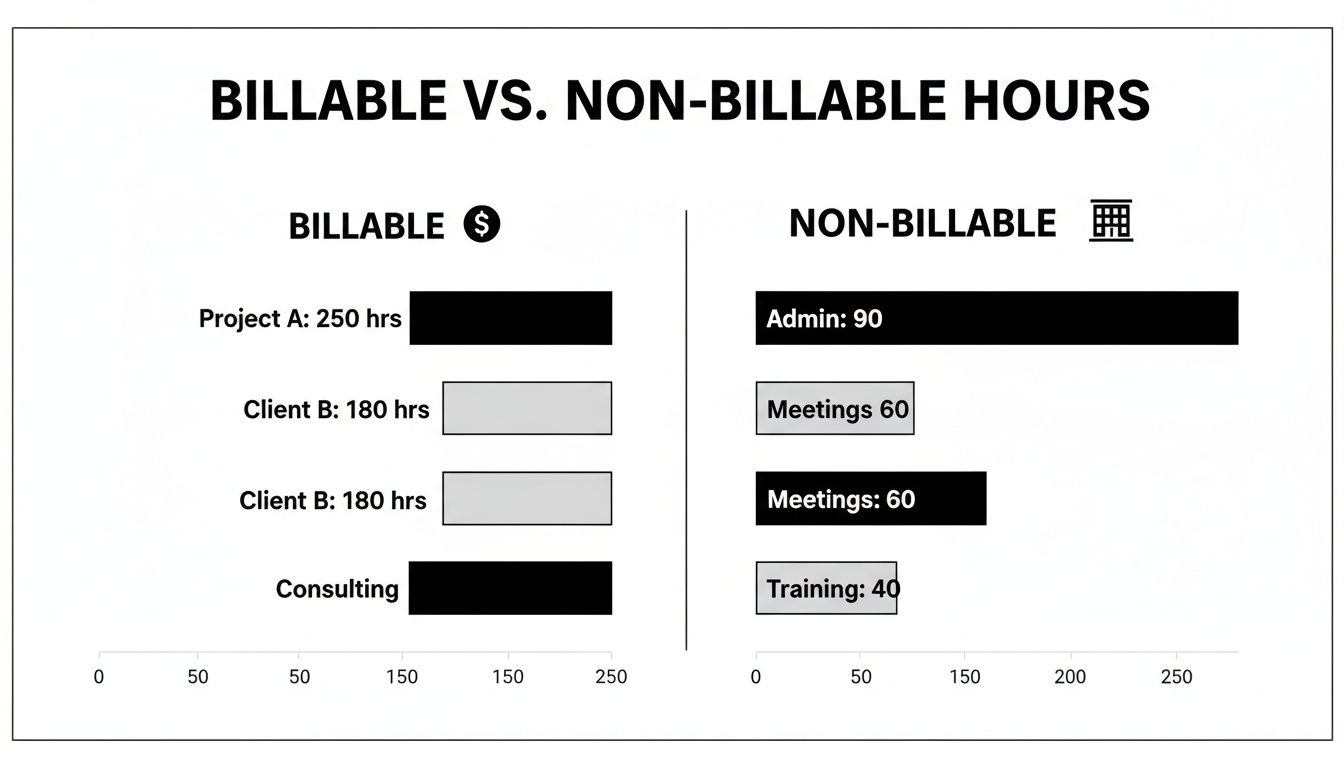
Seeing it laid out like this makes it obvious how critical it is to maximize revenue-generating activities while making those necessary internal tasks as efficient as possible.
The Financial Drain Of Unchecked Non-Billable Hours
Let's put some real numbers to this. Imagine a mid-sized agency with 50 billable employees, charging an average of $150 per hour. If every single employee loses just one billable hour a day to inefficient, non-billable work, the potential loss is just staggering.
- Daily Loss: 50 employees x 1 hour x $150/hour = $7,500
- Monthly Loss: $7,500/day x 20 workdays = $150,000
- Annual Loss: $150,000/month x 12 months = $1.8 million
This simple math shows just how high the stakes are. Not accurately tracking the balance between billable and non-billable work isn't a minor slip-up—it's a massive threat to your bottom line. It directly limits your ability to invest in growth, reward your team, and stay competitive. The goal isn't to kill all non-billable time, but to make sure every minute of it is intentional and efficient.
How to Categorize Work By Role And Industry
Defining billable and non-billable work is easy in theory, but applying those rules across different roles and industries? That’s where things get tricky.
A single, company-wide policy just doesn't work. The value a Project Manager delivers is worlds away from a Creative Director's output. That's why you need clear, role-specific guidelines. They're your best defense against the small, innocent miscategorizations that slowly eat away at your profitability.
When everyone knows exactly what counts as direct client work for their specific job, timesheets get more accurate and financial forecasts actually mean something. It all comes down to mapping daily tasks to one of two buckets: direct client value or internal operational support.
Guidelines For Creative and Marketing Agencies
In the whirlwind of an agency, roles often blur, which makes having clear definitions absolutely critical. Here’s a practical breakdown for a few common agency positions to help sort billable from non-billable work.
Project Managers
PMs constantly straddle the line between client-facing work and internal process management. Getting this distinction right is everything for accurate project budgeting.
- Billable Tasks: Building a project timeline for a specific client, running a client status meeting, pulling together a client-facing report, or negotiating project scope directly with a stakeholder.
- Non-Billable Tasks: Creating a new internal project management template, leading an internal team post-mortem, training a new hire on your agency’s software, or any admin work not tied to a specific client.
Creative Directors and Designers
For your creative team, the line is usually drawn between direct client creation and everything else—like skill development or internal branding.
- Billable Tasks: Brainstorming concepts for a client campaign, designing assets that are part of a statement of work, jumping on client feedback calls, or providing art direction for a client’s photoshoot.
- Non-Billable Tasks: Holding an internal brainstorm for a pitch that isn't sold yet, creating new portfolio pieces, attending an industry conference for inspiration, or designing marketing materials for your own agency.
By setting these boundaries, you give your team the confidence to make consistent decisions. It gets rid of the guesswork and makes sure the time you invest in a client’s success is actually captured and billed.
Distinctions In Consulting and Professional Services
While agencies are all about deliverables, consulting firms are selling pure expertise and strategy. The core principles are the same, but how you apply them looks a little different.
Management Consultants
A consultant’s time is literally the product. So, pretty much all client-focused analysis and strategy work is going to be billable.
- Billable: Leading client discovery workshops, analyzing data for a client report, building out strategic roadmaps, and presenting findings to the client's leadership.
- Non-Billable: Writing proposals for new business, networking to drum up leads, developing proprietary consulting frameworks, or contributing to the firm's thought leadership like a whitepaper or webinar.
At the end of the day, the test is simple: Does this activity directly move a paying client's project forward? If yes, it's almost certainly billable. If it's about helping the business win or do future work better, it’s a non-billable investment. Creating a simple, accessible guide for each role is the first step toward real financial clarity.
Common Pitfalls In Tracking Billable Hours
Even with rock-solid definitions, actually tracking the difference between billable and non billable work is loaded with challenges. Most agencies leak revenue not because their strategy is flawed, but because of common, everyday tracking habits that quietly chip away at profitability. Spotting these pitfalls is the first step toward plugging those leaks for good.
One of the biggest culprits is simple timesheet fatigue. Let's be honest, tracking time can feel like a chore. When it does, team members put it off. This inevitably leads to "guesstimating" hours at the end of the week—a practice that is notoriously inaccurate and almost always ends with under-billing the client.
The manual nature of old-school tracking is another huge hurdle. When you're relying on memory and spreadsheets, you're just inviting human error and inconsistency. It's nearly impossible to get a true picture of project costs that way.
Strategic Missteps and Scope Creep
Beyond individual habits, bigger strategic oversights can create even more chaos. If a project's scope is fuzzy from the get-go, it becomes a nightmare to distinguish between the agreed-upon work and the extra tasks that should be billed separately. That's the classic recipe for scope creep.
Inconsistent tracking rules across departments only make things worse. If the design team logs time one way and the development team does it another, you can forget about generating reliable data on project profitability or team utilization. Without a unified standard, you're flying blind financially.
The real issue often comes down to pressure. When teams are pushed to hit high billable quotas, they might feel tempted to fudge the numbers or conveniently forget to log non-billable time spent on crucial (but unbillable) tasks like internal reviews. This fosters a culture where accuracy takes a backseat.
Common Tracking Errors To Avoid
Pinpointing where your process is breaking down is key. Here are some of the most common slip-ups operations leaders should be watching for:
- Forgetting Small Tasks: Not logging a quick five-minute client email or a short phone call seems minor. But over the life of a project, all those tiny interactions add up to a significant amount of unbilled work.
- Miscategorizing Internal Work: Time spent improving internal processes or on team training is essential, but it sometimes gets mistakenly logged against a client project. This completely skews your profitability data and hides operational slack.
- "Eating" Time on Revisions: When a project needs more rounds of revisions than anyone planned for, team members might not bill for all that extra time. They do it to avoid awkward client conversations, but they're effectively giving away free work.
By identifying these systemic weaknesses in your time management workflow, you can start tackling the root causes of lost revenue and build a more accurate, profitable, and transparent operation.
How AI Is Transforming Time Tracking
Let's be honest, manual time tracking is usually the first thing to fall apart when things get busy. We've all been there: timesheet fatigue sets in, you're trying to guess what you did at the end of the week, and tasks inevitably get forgotten. All those little gaps add up to a significant revenue leak. This is where Artificial Intelligence isn't just a minor upgrade; it's a fundamental change in how professional services should manage their most critical asset—time.

AI-powered tools tackle the core issue head-on by passively capturing activity from the digital tools your team is already living in. Instead of relying on memory or manual timers, AI analyzes calendar events, emails, documents, and project management apps to build a detailed, minute-by-minute log of work. This completely removes the burden of start-stop timers and memory-based timesheets, which instantly boosts accuracy.
Automated Categorization and Tagging
The real magic of AI is its ability to automatically categorize all that captured time. It doesn't just log hours; it understands the context. For instance, by looking at the attendees in a meeting or keywords in an email subject, a smart system can suggest whether the time was billable or non-billable.
An AI can learn that any meeting with "Client X's" domain in the invite list should automatically be tagged as "Billable – Client X." On the flip side, that weekly internal sync with your immediate team gets tagged as "Non-Billable – Internal Meeting" without anyone lifting a finger. This level of automation takes the guesswork out of the equation and creates consistency across the entire company.
AI flips the script on time tracking, turning it from a dreaded administrative chore into a strategic data-gathering process. You get a real-time, accurate picture of how resources are being used, all without hounding your team for constant updates.
We're already seeing the results. In the legal world, 61% of firms using AI for billing are reporting huge jumps in efficiency. Some studies have even shown passive tracking can capture up to $4,000 more in billable time per user, per month. For tax professionals, AI is saving them nearly 3 hours per week on research alone.
From Raw Data to Actionable Insights
But AI's role goes beyond just capturing and sorting time entries. Think about the other data sources you can pull in, like learning how to record meetings and transcribe them with AI. When you feed this richer information into an intelligent platform, you start to uncover critical insights about your operations and profitability that were completely invisible before.
This shift is more than a convenience; it's becoming essential for any agency that wants to stay competitive. To really get into the weeds on this, check out our guide on AI time tracking and its benefits. It shows why AI isn't just a nice-to-have but a core tool for maximizing your bottom line.
Automating Time Tracking For Better Insights
Manually separating billable and non billable time is usually where things fall apart. You can have the clearest guidelines in the world, but the day-to-day grind of starting and stopping timers, trying to remember what you worked on, and punching numbers into a spreadsheet is a recipe for mistakes—mistakes that hit your bottom line. Automation tools like TimeTackle take a much smarter approach by plugging directly into your team's existing calendar.
It’s surprisingly simple. Just connect your Google or Outlook calendar, and the platform starts pulling in every meeting and scheduled block of time. From there, you can set up simple, rule-based automations to categorize work without anyone having to lift a finger. For any service-based business, the ability to effectively Keep Track Of Time is everything, and this is how you do it right.
Creating A Seamless Workflow
Think about it: you could create a rule that automatically tags any meeting with a specific client's email domain as "Billable" and assigns it to their project. At the same time, another rule could tag all your recurring internal check-ins as "Non-Billable—Operations." Just those two simple automations can eliminate thousands of manual clicks a year and, more importantly, enforce consistency across the entire company.
Automation transforms time tracking from a backward-looking administrative chore into a forward-looking strategic tool. It provides the clean, real-time data needed to make informed decisions about resource allocation and project profitability.
This is where the magic happens. All that automatically captured data flows into a clear, visual dashboard inside TimeTackle, giving you an instant snapshot of your team's utilization.

Right away, you can see exactly how time is split between revenue-generating client work and internal, non-billable tasks. When you start integrating this with your CRM or project management tools, you get a complete picture of your operational health. This is the kind of insight that lets you plan strategically and make sure your team is focused on what truly matters.
Find out more about how automated timesheets can change your workflow and start driving better business outcomes.
Frequently Asked Questions
Digging into the details of billable and non billable time usually brings up a few practical questions, especially around getting your team on board and setting targets that actually make sense. Here are the answers to some of the most common things we hear from agencies trying to get a better handle on their time.
How Do We Get Our Team To Track Time Accurately Without Micromanaging?
Nobody likes feeling like Big Brother is watching. The key is to frame time tracking as a tool for team success, not surveillance.
Explain how accurate data helps you protect the team from burnout, justify bringing on new people, and price projects in a way that’s fair to everyone. Then, make it as painless as possible. Use automated tools that pull data from places they already work, like their calendars, to cut down on manual entry. When the process is easy and the benefits are obvious, adoption just happens.
The goal isn't to watch over anyone's shoulder. It's to gather the data needed to protect the team's time, scope projects correctly, and ensure the agency remains healthy and profitable for everyone involved.
What Is A Good Billable Utilization Rate For An Agency?
For most client-facing roles, a healthy target is somewhere between 75% and 85%.
Trying to hit 100% is a recipe for disaster. It completely ignores the essential non-billable work that keeps the agency moving forward, like professional development, internal meetings, and business development. The best bet is to set benchmarks for each specific role and use your data to see how you're tracking, tweaking your goals based on the agency's strategy and current capacity.
Can Non Billable Time Be Valuable To Our Agency?
Absolutely. In fact, it's essential. Strategic non-billable time is a direct investment in your agency's future.
Think about all the critical activities that fall under this category:
- Drafting proposals to land new business
- Creating marketing content that builds your own brand
- Training and earning new certifications
- Fine-tuning your internal processes to work smarter
The goal isn't to get rid of non-billable hours. It's to understand them, manage them, and make sure they’re fueling long-term growth instead of just being lost to administrative quicksand.
Stop chasing timesheets and start getting real-time insights into your agency's profitability. TimeTackle automates time tracking directly from your calendar, so you can focus on what matters most. Discover how TimeTackle can transform your operations today.