Workplace distractions are more than just a pain; they're a direct hit to your bottom line. We’ve all seen it: a single interruption derails a focused employee for over 20 minutes. This leads to a cascade of problems—lost billable hours, pushed-back deadlines, and a slow burn of team morale that you’ll never find on a timesheet.
The hidden costs of a distracted workplace

It’s easy to write off interruptions as the cost of doing business in a busy agency. A quick question on Slack, an impromptu "catch-up," the constant ping of notifications—they feel productive. But they carry a steep, and often invisible, price tag.
The real problem isn't the two minutes an interruption takes. It's the 23 minutes of recovery time it takes for an employee to get back into a state of deep focus. This is a phenomenon known as context switching, and it's a massive productivity killer. Every time a team member shifts their attention from a complex client project to an unexpected message, their brain has to completely reboot.
Doing this over and over all day leads to mental fatigue, a higher chance of errors, and a noticeable dip in work quality.
Quantifying the financial impact
The costs add up faster than you'd think. Picture a designer who bills at $150 per hour. If they get interrupted just four times a day, the recovery time alone burns more than an hour of their productive capacity. Now, scale that across a team of 20. Suddenly, you're looking at over 20 lost billable hours every single day—a cost that hammers your agency's profitability without ever being recorded.
These financial leaks show up in a few ways:
- Budget Overruns: Projects consistently take longer than you quoted because that "unseen" time lost to distractions was never part of the plan.
- Reduced Utilization Rates: Your team looks busy, but they aren't spending time on high-value, billable work. Their calendars are filled with reactive responses, not proactive progress.
- Employee Burnout and Turnover: Being in a constant state of distraction is incredibly stressful. It leaves people feeling like they're always behind, which is a fast track to burnout and a huge hidden expense for any agency.
Beyond obvious interruptions
The problem often runs deeper than shoulder taps and chat alerts. Systemic issues can create a culture of distraction that leaders don't even see. For example, clunky workflows that demand constant back-and-forth for approvals can be just as disruptive as a loud conversation. You might also find other things are killing your team's productivity without you even realizing it.
https://www.timetackle.com/6-things-you-dont-know-are-killing-your-productivity/
Beyond these general distractions, it’s also helpful to understand the specific challenges that come with conditions like ADHD in the workplace. Supporting a neurodiverse team isn't just an inclusivity initiative; it’s a smart strategy to unlock everyone's full potential by building an environment where they can do their best work.
The true cost of distraction isn't measured in minutes lost, but in the lost potential for deep, innovative work that drives an agency forward. It's the difference between merely completing tasks and delivering exceptional results.
Fighting workplace distractions isn't about micromanaging or creating a silent, joyless office. It's a strategic move to reclaim lost profits and protect your team's most valuable asset: their focus. By seeing distractions as a direct financial lever, you can start making changes that actually improve your bottom line. This means moving away from guesswork and using hard data, like calendar analytics, to see where the real problems are hiding.
How to pinpoint your agency's biggest distractions
Before you can solve the constant interruptions draining your team’s focus, you have to get a clear, honest look at the problem. Guesswork won't cut it. And while team feedback is valuable, people often misdiagnose what's truly breaking their concentration.
The real source of truth is already in your hands: your team’s calendars.
Moving past anecdotes and digging into hard data is the only way to see where your team's focus is actually being shattered. This isn't about finger-pointing. It's about finding the systemic cracks in your operations that create an environment ripe for distractions in the workplace.
After all, you can't fix what you can't measure. Here’s how you start measuring what matters.
Start by auditing your calendar data
Think of your agency’s shared calendar as a logbook of your team's most valuable resource—time. It tells the real story of how time is spent, not just how people think it’s spent. A proper calendar audit will bring patterns of inefficiency to the surface that are otherwise impossible to spot.
Pull up the data for the last 30-60 days. You’re on a mission to find answers to a few key questions:
- Is meeting overload killing deep work? What percentage of your team's week is locked in scheduled meetings? If that number is creeping above 25%, it's a huge red flag. That leaves precious little time for the focused work that actually moves projects forward.
- Are we talking to ourselves too much? Look at the ratio of internal meetings versus client-facing ones. If your team is spending more time in internal huddles than with clients, your own processes might be the biggest source of work.
- What’s with all the last-minute meetings? Do calendars look like a game of Tetris, with small, ad-hoc meetings squeezed in everywhere? This signals a reactive culture where "quick questions" constantly derail planned, productive work.
- Are recurring meetings on autopilot? Take stock of every recurring meeting. Do they all have a clear purpose and an owner? It's amazing how many standing meetings stick around long after they've lost their value.
This initial review gives you a solid baseline. It turns that vague feeling of "we're always so busy" into concrete numbers you can actually do something about.
Categorize time to see the full picture
With a general idea of your meeting load, it's time to get more specific. A calendar just shows blocks of "busy" time until you add labels. Once you categorize those blocks, you start to see what, exactly, is making everyone so busy.
This is where you can pinpoint specific types of distractions with laser focus. You don't need a hundred different labels to start. Keep it simple and clear.
We’ve found these categories work well for most agencies:
- Billable Client Work: Direct, revenue-generating project tasks.
- Non-Billable Client Comms: Essential client calls, emails, and meetings that aren't directly billable.
- Internal Admin: Team syncs, administrative overhead, and internal project management chatter.
- Business Development: Time spent on sales calls, writing proposals, or networking.
Tagging every single event manually would be a nightmare. This is why you need automation. Using rule-based tools like TimeTackle, you can automatically categorize events based on attendees, keywords like "Sync" or "Review" in the title, or the meeting type. This not only saves hundreds of hours but also guarantees your data is consistent.
By categorizing every hour, you turn a calendar full of "meetings" into a dashboard that reveals exactly how much time is invested in growth versus internal churn.
This detailed view is where the big "aha!" moments happen. You might find your highest-paid strategist is losing 15% of their week to random internal status updates—a costly symptom of a broken process that's quietly draining your profits.
Identify symptoms and their root causes
With real data in front of you, you can now play detective. It's time to connect the symptoms you're seeing in the calendar data to their underlying root causes. Remember, distractions are rarely the problem themselves; they're signs of deeper friction in your operations.
To help you diagnose what's really going on, think about how symptoms connect to their source.
Common agency distractions and their root causes
This table can help you connect the dots between the daily frustrations your team feels (the symptom) and the operational issues causing them. It’s your starting point for moving from just observing problems to actively solving them.
| Observable Symptom | Potential Root Cause | How to Investigate |
|---|---|---|
| Calendars are packed with back-to-back 30-minute meetings. | A "meeting-first" culture; lack of clear async communication channels. | Analyze meeting agendas (or the lack thereof). Survey the team: "Could this have been an email or a Slack message?" |
| "Quick sync" or "catch-up" meetings pop up daily. | Unclear project roles and responsibilities; poor project documentation. | Review your project briefs and role definitions. Are people meeting constantly because they don’t know who owns what? |
| Engineers and designers are pulled into too many sales calls. | The sales process lacks technical support documentation or a dedicated solutions engineer. | Track the time your technical experts spend on pre-sales. Could you build a knowledge base to answer common questions? |
| The team spends a lot of time on manual reporting and data entry. | Outdated tools or inefficient, manual workflows. | Map out your current reporting process from start to finish. Pinpoint every step that could be automated. |
This diagnostic approach is a game-changer. You stop telling people to "have fewer meetings" and start fixing the broken processes that make those meetings feel necessary.
Instead of putting a bandage on the symptom, you’re finally treating the underlying condition. You’re not just stopping the cough; you’re curing the cold.
An actionable playbook for reducing interruptions
Alright, you've done the hard work of diagnosing where your agency's time is leaking. Now for the fun part: plugging the holes. Moving from data to action calls for a clear playbook, one that’s all about creating an environment where deep work can actually happen.
This isn't about setting restrictive rules or micromanaging your team. It’s about building smarter systems that make focus the path of least resistance. The goal is to stop relying on individual willpower—which is always in short supply—and start baking focus right into your company’s DNA.
Establish clear communication protocols
Let's be honest: one of the biggest culprits behind constant distractions in the workplace is the "always-on" vibe that comes with instant messaging. When every question is treated with the same urgency, deep work doesn’t stand a chance.
The fix is to set crystal-clear expectations for which tool to use and when. It’s not about banning Slack; it’s about using it with intention.
- Instant Messengers (like Slack): These are for true emergencies that need a response now. Think "The client's site is down," not "What are your thoughts on this Q3 marketing idea?"
- Email: This is your home for conversations that need a thoughtful, detailed response but aren’t on fire. We're talking project updates, formal requests, and sharing documents for review.
- Project Management Tools (like Asana or Jira): This is where all task-specific conversations belong. Keeping feedback and discussions in context stops the endless "quick sync" meetings that kill productivity.
When you create these clear lanes for communication, you give your team permission to tune out the noise. They can finally trust that if something is truly critical, it will find them through the right channel.
Overhaul your meeting hygiene
Meetings are often the single biggest black hole for productive time in any agency. A bad meeting doesn't just waste an hour; it shatters momentum and creates a ripple effect of lost focus that can derail an entire day.
You can make a huge impact by enforcing one simple rule: No agenda, no meeting.
An agenda is a contract. It tells attendees what the meeting is for, what's expected of them, and what a successful outcome looks like. Without one, you're just inviting people to a conversation with no purpose.
From now on, every single meeting invitation should clearly state:
- The Goal: What decision needs to be made or what problem will be solved?
- The Agenda: A bulleted list of topics for discussion.
- Required Prep: What do attendees need to read or prepare ahead of time?
- The Owner: Who is running the meeting and keeping it on track?
This discipline alone will filter out a surprising number of pointless meetings before they ever hit the calendar. It forces the organizer to think critically about whether a meeting is even the right tool for the job.
Champion calendar hygiene and focus time
Your team's calendars are battlegrounds for their attention. If they aren't actively defending their time, it will quickly fill up with other people's priorities. Good calendar hygiene isn't about being rigid; it's about turning the calendar from a reactive schedule into a proactive plan for getting meaningful work done.
The single most important practice to introduce is blocking out "focus time."
This is non-negotiable, uninterrupted time dedicated to deep work. Encourage your team to schedule 2-3 hour blocks of focus time directly on their calendars, just as they would a client meeting. During these blocks, they should be shutting down email, silencing Slack, and focusing on their most critical tasks.
This simple process flow shows how you can pinpoint where focus time is needed most.
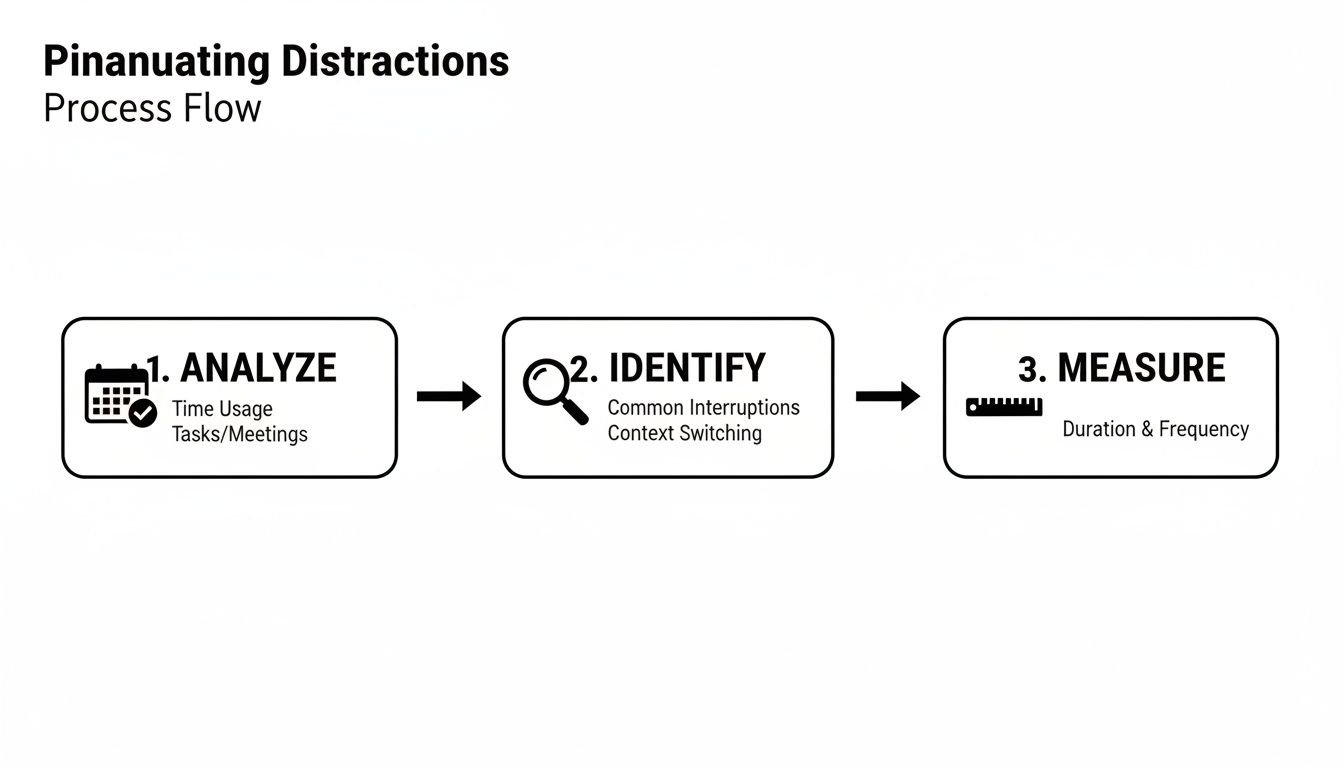
By analyzing calendar data, identifying patterns of interruption, and measuring their impact, you can get strategic about scheduling focus blocks to protect your team from the most disruptive parts of the day.
Use automation to eliminate mental friction
So many of the distractions we face aren't from people, but from clunky processes. Manual, repetitive tasks like categorizing calendar events, pulling reports, or tracking time are a constant source of mental friction. Each tiny administrative task is another context switch that pulls your team away from valuable, billable work.
This is a perfect opportunity to fight back against digital distractions. Rule-based automation is your secret weapon here. Tools like TimeTackle can automatically analyze and tag every event on your team's calendars based on rules you define.
For instance, you can easily set up automations that:
- Automatically tag any meeting with a client's domain as "Billable Client Time."
- Categorize any internal event with "Sync" or "Review" in the title as "Internal Admin."
- Label events with specific project codes to track time without anyone having to lift a finger.
Automating this busywork doesn't just save a ton of administrative hours. It also reduces the cognitive load on your team, freeing up precious mental energy for creative, strategic thinking that actually moves the needle.
Using calendar analytics to track your progress

You’ve rolled out new communication rules and encouraged everyone to block off focus time. That’s a great start. But how do you actually know if it's working? Without data, you’re just guessing whether you're winning the war on distractions in the workplace.
This is where you close the loop. You need to turn your team’s calendar data into a live dashboard that shows real progress. Otherwise, you might just be shifting unproductive meetings from one day to another, not eliminating them. Analytics tell you the real story.
Setting up your distraction-tracking dashboard
First things first, you need to define what success actually looks like in numbers. This means picking a few key performance indicators (KPIs) that directly measure interruptions and protect your team’s time. A good dashboard gives you a clean, at-a-glance view of whether your new policies are taking hold.
Don't drown in data. Just focus on the metrics that tell the most important story. Here are a few powerful KPIs that I’ve seen operations leaders use to track their progress effectively.
Meeting Load Percentage: This one’s simple: what percentage of a person’s workweek is spent in meetings? The goal here is a steady downward trend. Seeing this drop from 40% to 25% means you’ve given your team back hours of their week for actual work.
Internal vs. External Meeting Ratio: This KPI compares time spent on internal huddles versus client-facing calls. A healthy shift is seeing more time dedicated to external, billable, or revenue-generating activities.
Focus Time Ratio: This shows how much of the workweek your team has successfully blocked off for uninterrupted deep work. An upward trend is a fantastic sign that your focus time policies are being adopted and respected.
Fragmented Time Score: This is a killer metric. It flags how many tiny, useless blocks of free time are wedged between meetings. A high score means a calendar full of context-switching traps. Your goal is to crush this score by encouraging longer, consolidated work blocks.
These KPIs turn vague goals like “fewer meetings” into solid targets you can monitor every single week. To see exactly how this comes to life, you can explore the power of calendar analytics and insights and see these metrics in action.
Interpreting the data to refine your approach
A dashboard isn't just a report card—it's your roadmap. The numbers show you what’s working, what isn't, and where you need to adjust your strategy. It’s how you move from broad, company-wide rules to targeted, effective support.
For instance, let's say the Meeting Load Percentage plummets for the design team but stays stubbornly high for your project managers. That’s not a failure; it’s a clue. It tells you the PMs might need a different kind of help. Maybe their workflows are still too dependent on real-time syncs, and what they really need are better project templates or clearer role definitions to cut down on check-in meetings.
The point of a dashboard isn’t just to see if you’re winning or losing. It’s to understand why, so you can make smarter decisions and offer targeted support where it’s needed most.
This data-backed approach leads to far more productive conversations. Instead of a vague, "Your team has too many meetings," you can say, "I see your team's internal meeting load is at 35%, while the company average is down to 22%. Let's dig into the types of meetings you’re having and find some candidates for async updates."
A sample dashboard for tracking progress
Seeing the data clearly is half the battle. A simple dashboard makes the information easy for anyone to grasp and connects your metrics directly to your goals.
Here’s an example of what your KPI dashboard might look like. It's a straightforward way to see the real-world impact of your focus-improvement initiatives.
KPI dashboard for tracking distraction reduction
| KPI | What It Measures | Ideal Trend | TimeTackle Feature to Use |
|---|---|---|---|
| Meeting Load Percentage | The portion of work hours spent in meetings. | ▼ Down | Calendar Analytics Dashboard |
| Focus Time Ratio | The portion of work hours protected for deep work. | ▲ Up | Custom Tags & Time Blocking Reports |
| Unscheduled Meetings | Number of ad-hoc meetings added with <24 hours' notice. | ▼ Down | Calendar Event History Filter |
| Low-Value Admin Time | Time spent on non-billable, repetitive administrative tasks. | ▼ Down | Rule-Based Automation & Tagging |
By keeping a consistent eye on these metrics, you create a powerful feedback loop that drives continuous improvement. You can celebrate wins when the Focus Time Ratio climbs and step in with specific solutions when a team is struggling with fragmented time. This cycle of measuring and refining is how you build a lasting culture of focus.
Leading the shift to a more focused culture
You can have the best tools and the slickest new policies, but they'll fall flat without your team's support. Real, lasting change isn’t about software; it’s about people. This is where you manage the human side of the shift, turning a good idea into a new, focused way of working.
Getting buy-in is absolutely everything. If your team views these changes as just another form of micromanagement, the entire effort is doomed from the start.
You have to sell the "why" behind every new process. Frame it for what it truly is: a strategy to protect their sanity, cut down on stress, and reclaim the space they need to do the deep, rewarding work they were hired for in the first place.
Start with leadership as the example
Cultural change always starts at the top. If leaders are still firing off "urgent" Slack messages at 8 p.m. or dropping meetings on calendars without agendas, nobody else will take the new guidelines seriously. Your leadership team has to be the most visible and consistent champion of a focus-first culture.
This means they need to lead by example, every single day.
- Publicly block and protect focus time. When the team sees their manager has a "Deep Work" block on their calendar, it gives them explicit permission to do the same.
- Adhere strictly to communication protocols. If a leader gets a non-urgent question via Slack, they should gently redirect it to email or your project management tool, reinforcing the new norms.
- Celebrate the process, not just the results. Give a shout-out to team members who demonstrate great meeting hygiene or who respectfully push back on an unnecessary interruption.
When your team sees that leaders are also committed to reducing distractions in the workplace, it builds a foundation of trust. The shift feels like a shared effort, not a top-down mandate.
Communicate the "why" and celebrate early wins
To get your team on board, you need to focus on the benefits—not for the company, but for them. Explain how fewer interruptions directly lead to less after-hours work, more satisfying projects, and a calmer, more predictable workday.
As you roll out these changes, be on the lookout for small victories and celebrate them loudly. Did the marketing team slash their internal meeting time by 20% in the first month? Share that win in a company-wide update. Did a designer ship a major project ahead of schedule because their focus time was finally protected? Highlight that success story.
These early wins create momentum. They turn abstract policies into tangible proof that a more focused way of working is not only possible but also better for everyone involved.
Building a culture of focus also means creating an inclusive environment. It requires understanding and supporting employees with conditions that can affect concentration. Fostering a supportive atmosphere for issues like ADHD in the workplace helps ensure every team member has the opportunity to thrive.
Ultimately, your goal is to make deep work the default setting for your agency. It’s a gradual process, but by leading with empathy, celebrating progress, and consistently modeling the right behaviors, you can build a sustainable culture where focus is sacred. The payoff is more innovative work, happier teams, and a healthier bottom line.
Frequently Asked Questions
When leaders start to get serious about tackling workplace distractions, the same handful of questions always seem to pop up. Here are our direct answers to the most common concerns we hear, drawn from real-world experience helping teams build a more focused culture.
How do I get my team to adopt focus time without feeling micromanaged?
This is a big one. Nobody wants to feel like Big Brother is watching their calendar. The key is to frame focus time as a protective measure, not a restrictive one. You're giving your team permission to disconnect from the constant barrage of pings and requests.
Explain that the goal is to shield their ability to do the deep, meaningful work that’s actually satisfying. It’s about reducing the pressure to be “always-on.”
The fastest way to get buy-in? Lead from the front. Block out your own focus time and—this is the crucial part—actually respect it. When your team sees you won't interrupt them during their blocks, it proves the initiative is genuine and builds immediate trust.
Don’t just celebrate the act of blocking time; celebrate the results. When someone ships a project early because they had a few solid, uninterrupted days, make that the story everyone hears.
What's the most common mistake agencies make when trying to reduce distractions?
The classic blunder is throwing a new tool or policy at the problem without ever touching the underlying culture. Simply telling people to have fewer meetings or to use Slack less is doomed to fail if the unwritten rule is "reply to everything instantly."
This puts your team in an impossible position, forcing them to choose between the new rule and what they know is expected of them.
To get it right, you have to tackle the communication culture first. Set clear, simple guidelines for when to use email vs. chat. Be ruthless about the "no agenda, no meeting" rule, and make sure leadership follows it without exception. The culture has to shift before any tool can make a real difference.
How long does it typically take to see results from these changes?
You’ll see some quick wins almost immediately. Things like calendar clarity and a drop in meeting load often show up within the first 30 days. This is usually the result of trimming the low-hanging fruit, like finally killing off those pointless recurring meetings everyone hates.
But building a true culture of focus takes time. This is about changing habits, which is a marathon, not a sprint. You should expect to see significant, lasting improvements in overall productivity, project velocity, and even team morale over a 3-6 month period. That's how long it really takes for these new behaviors to stick and for the compound benefits of deep work to kick in.
Ready to get a clear, data-driven view of how your team spends its time? TimeTackle turns your calendar data into powerful productivity insights, helping you pinpoint distractions and protect your team’s focus. See how it works at timetackle.com.