As a freelancer, your time is your money. It’s the most direct equation in your business. So why are so many of us still tracking that precious time with spreadsheets or scribbled notes? This old-school habit isn't just inefficient; it's almost guaranteed to be costing you income.
A dedicated freelance time tracking app isn't some fancy, over-the-top gadget. Think of it as a business intelligence tool, one that’s built to plug your revenue leaks for good.
Why manual time tracking is a leaky bucket for your income

Relying on manual methods feels simple enough on the surface, but it's a leaky bucket. Every forgotten 15-minute client call, every batch of five-minute email replies, and every quick "can-you-just" revision adds up. These unbilled moments can easily siphon hundreds or even thousands of dollars from your bottom line over a month.
This isn't just about the lost cash, either. It's about running your business on bad data. Without a precise record, you can't really tell which projects are actually profitable and which ones are secretly draining your energy and resources. You’re essentially flying blind, making it impossible to make smart calls about the work you take on next.
The hidden cost of "good enough" tracking
The real problem with manual tracking is that it depends on a flawed tool: human memory. We get in the zone and forget to start a timer. We round our hours down to be "nice." Or we just flat-out lose track during a chaotic day. These tiny inaccuracies create a huge gap between the work you did and the work you billed for.
A modern freelance time tracking app closes this gap with one simple fix: automation. Instead of you having to remember, the app just captures your activity in the background. It gives you an honest, accurate picture of your workday, which means you get paid for every single minute you've earned. This is a big deal for solo freelancers and an absolute necessity for agencies and teams where knowing your team's true capacity is everything.
This shift toward precision isn't a niche trend; it's happening on a massive scale. The global market for time tracking apps designed for freelancers hit $2.21 billion in 2024, and it's not hard to see why. With freelancers now making up nearly 40% of the U.S. workforce, the demand for smarter billing and better project management is exploding.
Ultimately, ditching that spreadsheet isn't just a minor upgrade—it's a fundamental shift in how you operate. Our deep dive on spreadsheets vs. timesheet apps explores this transition in more detail. By patching those revenue leaks and giving you crystal-clear data, an app helps your freelance practice stop being reactive and start being proactive.
The essential features of a modern tracking tool
When you start shopping for a freelance time tracking app, it’s easy to get overwhelmed by a sea of features. But let's be honest, most of them are just noise. A simple start/stop button is the bare minimum; a truly modern tool needs to do way more to actually save you time and, more importantly, make you more money.
So, what really matters? The best features are the ones that solve the real, nagging problems freelancers face every day, like forgetting to log time and needing bulletproof evidence of your work for clients.
Automatic time capture
If there’s one feature that’s a complete game-changer, it’s automatic time capture. Instead of you having to remember to start and stop a timer for every little thing, the app should just know. Think of it as a silent assistant that logs your hours for you as you work.
This isn't a small thing. It’s what catches those five-minute email replies and the quick 15-minute client calls that almost always slip through the cracks. On their own, they seem minor, but these little chunks of time can easily add up to dozens of unbilled hours every single month.
When you're evaluating different apps, it's helpful to separate the must-haves from the nice-to-haves. A clear checklist can cut through the marketing noise and help you focus on what will actually impact your bottom line.
Below is a quick comparison table to guide your decision-making process.
Essential features checklist for freelance time tracking apps
| Feature | What it Does | Why it Matters for Freelancers |
|---|---|---|
| Automatic Time Capture | Automatically logs time based on your activity (e.g., calendar events, app usage) without manual start/stop. | Eliminates forgotten entries and captures all billable hours, especially small tasks. It's the difference between guessing and knowing. |
| Calendar Integration | Syncs with your Google or Outlook Calendar to log scheduled meetings and work blocks automatically. | Turns your existing schedule into an accurate timesheet with zero extra effort. Your calendar is already your source of truth; this connects it to your billing. |
| Reporting & Analytics | Provides visual dashboards and reports on how time is spent across clients, projects, and tasks. | Offers clear insights into profitability, helps you spot scope creep, and proves your value to clients with detailed breakdowns. |
| Billing & Export | Allows you to export time data into professional invoices or shareable reports (e.g., PDF, CSV, Excel). | Speeds up the invoicing process and builds client trust through transparency. Less admin work means you get paid faster. |
| Project Management Integration | Connects with tools like Asana, Trello, or Jira to link tracked time directly to specific tasks. | Provides a single, unified view of project progress and budget, ensuring your time data lives where the work actually happens. |
| Data Security & Compliance | Uses encryption and follows security standards like SOC 2 to protect your and your clients' sensitive data. | A non-negotiable for professional work. It protects you and your clients, building a foundation of trust. |
This checklist covers the core functionality that separates a basic timer from a powerful business tool. While other features might be flashy, these are the ones that deliver a real return on your investment.
Key integrations and reporting
A great tracking tool never works in a silo. It has to plug into the other software you rely on every single day. These integrations are what transform a simple timer into the central hub of your freelance business.
- Calendar integration: Your app absolutely must sync with Google Calendar or Outlook Calendar. This is the key to automating your time logs for meetings and scheduled work blocks without you lifting a finger.
- Project management tools: Connections to platforms like Asana, Trello, or Jira are essential. It means your time data can be tied directly to specific projects and tasks, giving you a crystal-clear picture of your workflow.
- Powerful reporting: A good app gives you clean, visual dashboards. You should be able to see at a glance where your time is going, which clients are your most profitable, and how your projects are pacing against your initial estimates.
- Billing & export options: Once your time is tracked, getting it out should be painless. Look for features that let you export data to create invoices or send reports directly to clients. This simple step builds immense trust and gets you paid faster.
The demand for these automated solutions is exploding. The market for time tracking apps was valued at $263 million in 2025 and is projected to grow by 7.2% annually through 2033 as more businesses finally ditch their clunky spreadsheets. You can read more about this market shift and see why so many are making the upgrade.
Data security and privacy
Finally, let's talk about something you can't afford to ignore: security. When you’re tracking work for clients, you're not just logging hours; you're handling their sensitive information.
A modern freelance time tracking app must treat your data—and your clients' data—with the highest level of security. This isn't just a "nice-to-have"; it's a fundamental requirement for building a professional, trustworthy business.
Always look for tools that offer enterprise-grade encryption and are upfront about their privacy policies. A certification like SOC 2 compliance is a strong signal that the company takes security seriously. It’s your assurance that your time data is not just accurate, but also completely safe.
How to choose the right app for your business
Picking a freelance time tracking app isn't just about downloading another piece of software; it's a serious business decision. The right tool slips right into your workflow and can directly boost what you earn. The wrong one? It just becomes a daily headache.
To make the right call, you need to think like a business owner, not just a user. This means looking past the flashy marketing and zeroing in on the features that actually impact your bottom line. It’s a classic case of weighing cost against real-world value.
Cost vs. actual value
The first question on everyone's mind is usually price: free or paid? A free app is definitely tempting. For freelancers just starting out with one or two clients, it can be a perfectly fine way to get your feet wet. These tools typically cover the absolute basics—a simple start/stop timer and manual entries.
But as your business grows, the cracks in a free tool start to show. A paid freelance time tracking app should be seen as an investment in your own efficiency. That monthly fee often pays for itself many times over simply by catching billable hours you would have otherwise missed. For example, a subscription might run you $15 a month, but if it helps you capture just one extra billable hour, it’s already delivering a positive return.
Ease of use and learning curve
A powerful app is worthless if it's a nightmare to use. The best tools feel intuitive from the moment you open them, requiring minimal setup. You should be able to get it up and running with your workflow in minutes, not hours.
The goal is to spend your time doing billable work, not fighting with the software that's supposed to be tracking it. If an app’s interface is cluttered or confusing, it will only add to your administrative burden.
Look for a clean design and a user experience that just makes sense. If you can’t figure out how to create a project, assign a task, and pull a basic report within the first 15 minutes of a free trial, it’s probably not the right fit.
Quality of integrations and automation
A standalone timer just creates more work for you down the line. A modern freelance time tracking app needs to act as the central hub for your productivity, which means it has to play nicely with the other tools you rely on every day. For most freelancers, this means:
- Calendar sync: Automatically logging meetings and scheduled work blocks from your Google or Outlook Calendar.
- Project management: Linking your time entries directly to specific tasks in tools like Asana, Trello, or Jira.
- Invoicing software: Exporting your time data into a format that your accounting system can easily digest.
These integrations are what unlock true automation, saving you from the soul-crushing task of manual data entry. This is especially true in certain niches. For instance, professionals looking for remote writing jobs find that an integrated app is non-negotiable for managing multiple articles and billing accurately across different clients.
Ultimately, picking the right app is a business calculation. A serious freelancer juggling multiple clients and projects should see a robust, paid platform not as an expense, but as a strategic investment in accuracy, efficiency, and—most importantly—profitability. If you're ready to see how the top contenders stack up, check out our guide on the top 5 time tracking apps for freelancers.
Putting your time tracking app into action
A great tool is only as good as the habits you build around it. Now that you've picked a freelance time tracking app, it’s time to move from theory to practice. Let's get it woven into your daily workflow so tracking feels second nature, not like another chore on your to-do list.
The first move is setting up your workspace inside the app. This means creating distinct projects for each client. If it helps, you can break those projects down into smaller, billable tasks. For example, a "Website Redesign" project might have tasks like "Discovery Call," "Wireframing," and "Development." This simple structure is what gives you a crystal-clear picture of where your time is going.
This setup process brings us right back to the core things you need to think about when choosing an app: finding the right balance between cost, ease of use, and the features you can't live without.
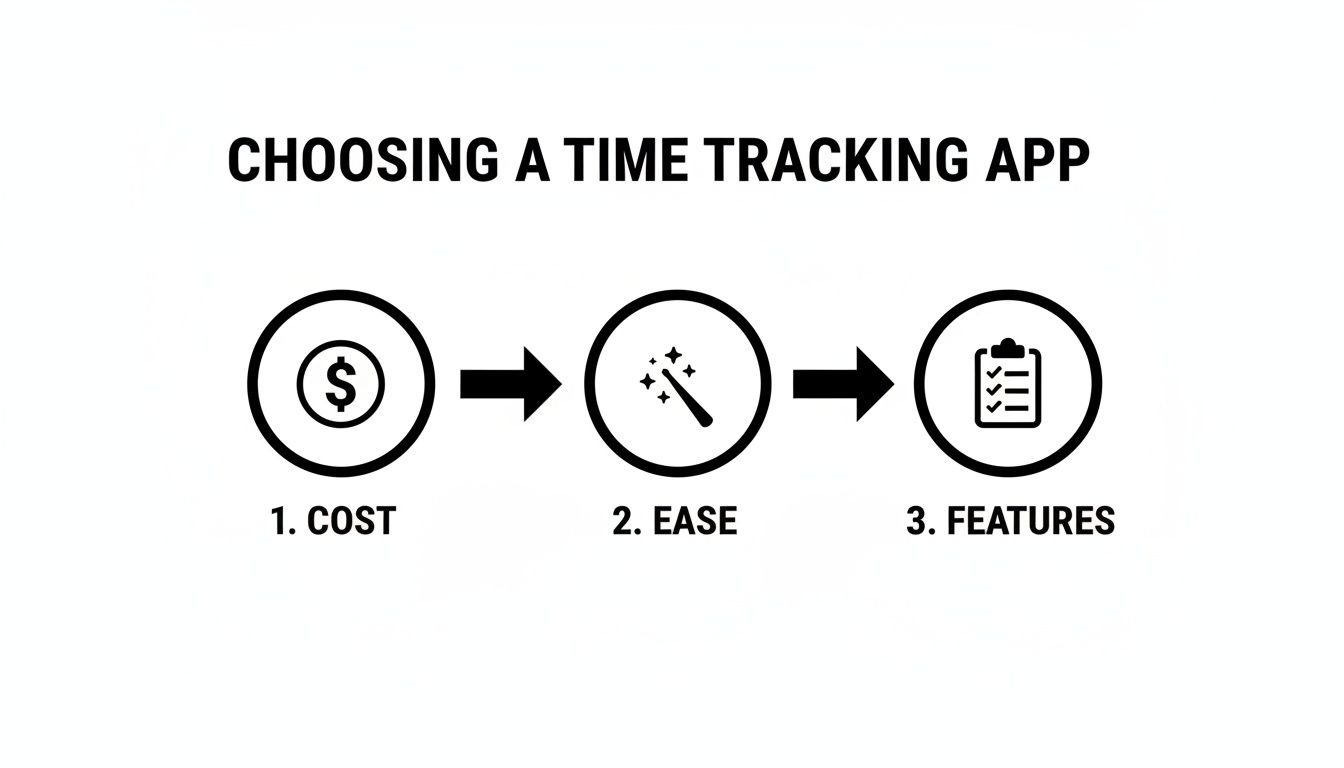
As you can see, a little bit of thoughtful decision-making upfront is the foundation for getting a new tool to stick.
Building a consistent tracking routine
With your projects ready to go, the next step is all about consistency. The absolute best way to build this habit is to hook the app directly into your work triggers.
- Start your day with your timer: As soon as you sit down to work, open your app. Make it the very first thing you do, even before you check your email.
- Use tags for deeper insights: Don't just track projects; use tags to really categorize your work. Tags like "billable," "non-billable," "admin," or "revision" can show you exactly how much of your day is spent on activities that actually generate revenue.
- Review your time weekly: Set aside just 15 minutes every Friday to glance at your weekly report. This quick review helps you spot weird patterns, check for accuracy, and see where your time really went.
This isn't just about logging hours; it's about gaining real control. The massive shift to remote and hybrid work has cranked up the need for this kind of visibility. In fact, the time tracking software market is on track to hit an incredible $149.92 billion by 2034, growing at a blistering 25.66% CAGR from 2026. This isn't just hype—it's a direct response to a painful reality. With a reported 51% of employee time often vanishing into low-value tasks, businesses are scrambling for tools to get that productivity back. You can discover more insights about these market trends on fortunebusinessinsights.com.
From tracking time to making smarter decisions
Once tracking becomes second nature, you can unlock the app's real power. The data you're collecting is basically business intelligence that can directly shape your strategy.
For instance, by analyzing your reports, you might discover that a client you thought was profitable is actually a time-suck because of endless revisions—classic scope creep. This data gives you the hard evidence you need to confidently renegotiate your rate or change how you manage that project.
You can also use your historical data to create much more accurate quotes for future work, basing your estimates on real numbers instead of just guessing. A good system connects your daily actions to your financial health. For more tips on this, check out our guide on time tracking and invoicing for freelancers.
Using time analytics to make smarter decisions

Let's be honest, tracking your time just to send out accurate invoices is missing the point. It’s like owning a race car and only driving it to the grocery store. Once you start logging hours with a freelance time tracking app, you're actually creating a stream of powerful business intelligence.
When you look at that data the right way, it becomes a roadmap for growth. It shows you how to work smarter, not just grind harder. You’ll finally get answers to the questions that keep you up at night, like which clients are secretly draining your profits and where your most valuable hours are really going.
From raw data to business intelligence
Your time tracking app’s analytics dashboard is your new secret weapon. It takes a boring list of hours and turns it into the story of your business. For small agencies, this is the moment you finally get a real grip on team capacity and project profitability.
A good app will lay this all out in clear, visual dashboards. Instead of getting lost in endless spreadsheets, you can see at a glance where your team's energy is flowing. This is step one in treating your time like the valuable, manageable asset it is.
For example, a tool like TimeTackle can transform raw calendar data into an interactive dashboard, making analysis a breeze.
The real value here is how automated reports can instantly flag which projects are eating up the most time, letting you make quick, data-backed adjustments on the fly.
Uncovering hidden patterns in your work
The true magic of time analytics happens when you start spotting the patterns you’d otherwise miss completely. By making a habit of checking your reports, you can start asking—and finally answering—the tough questions about your business.
- Which services are actually the most profitable? You might discover that those "quick" logo jobs you do have a much higher effective hourly rate than the massive, complex web projects you thought were your bread and butter.
- Which clients are the real time sinks? The numbers don’t lie. That client with the big budget might be less profitable than a smaller one because of endless meetings and revisions. This data gives you the confidence to renegotiate rates or even fire a client who’s a bad fit.
- Where are my productivity leaks? Are you drowning in non-billable admin tasks? Your analytics will shout it from the rooftops. One freelancer we know started using Clockify and saw their income jump simply because they could finally see and cut down on unproductive time.
- How accurate are my project quotes? Comparing your estimated hours to your actuals is a game-changer. You’ll quickly learn where you’re underbidding, allowing you to sharpen your quoting process and build a more predictable, profitable business.
Using time analytics isn’t about micromanaging every minute. It’s about getting a clear, objective view of your business so you can make confident, strategic decisions that fuel real growth.
This analytical mindset is what separates freelancers who just scrape by from those who build thriving, efficient businesses. You stop guessing and start knowing.
Frequently asked questions
Thinking about bringing a freelance time tracking app into your workflow? It’s completely normal to have a few questions floating around. We’ve rounded up some of the most common ones we hear from freelancers and agency owners to clear up the confusion and show you exactly how these tools can become a natural part of your business.
Is a free time tracking app good enough?
When you’re just starting out, a free app can be a fantastic first step. If you’re juggling one or two clients and only need a simple start/stop timer, a free tool gets the job done without touching your budget. It’s a great way to get into the habit of logging your hours.
But as your freelance business grows, you’ll start to feel the pinch. Free tools typically don't have the powerful automation or in-depth reporting that can save you a mountain of admin work. This is where you should start seeing a paid app as a business investment, not an expense. The small monthly fee is almost always covered by the extra billable hours it helps you find—hours that would have otherwise been forgotten.
A paid tool can easily pay for itself by capturing just one or two extra billable hours per month. It's not an expense; it's an investment in your own profitability.
Think of it this way: a solid tool with calendar integration and automated reporting can easily save you 3-5 hours a month on admin tasks alone. That’s time you can now pour back into billable work, directly boosting your income and making the subscription pay for itself many times over.
How do I get my clients to trust the tracked time?
This is a worry we hear a lot, but the solution is surprisingly simple: transparency. A professional freelance time tracking app is your secret weapon for building trust. This isn't about just sending an invoice with a single line item for "hours worked." It's about giving them concrete proof of the value you delivered.
Most quality apps generate clean, shareable reports that break down your time by:
- Project: Shows the total time dedicated to a specific client’s goals.
- Task: Details exactly how time was spent on activities like "Initial Research," "First Draft," or "Implementing Feedback."
- Date: Provides a clear, day-by-day timeline of when the work happened.
When you hand a client a report with this level of detail, it puts any questions to rest. It shows you're organized, professional, and confident in the work you're billing for. This kind of data-backed invoice builds trust far more effectively than a number you pulled from a spreadsheet ever could. It lets the data do the talking for you.
Will a time tracking app feel like micromanagement?
It’s easy to picture a time tracker as a "boss in a box" constantly looking over your shoulder. But for a freelancer, the game is completely different. A freelance time tracking app isn't for a manager to watch you; it’s a tool built for you. Its real job is to give you intelligence on your own business, not to add pressure.
The data you gather helps you understand your own work patterns, spot which projects are actually the most profitable, and make sure you’re paid fairly for every minute you put in. It’s all about empowerment and business insight, not surveillance. You're the one in the driver's seat, using that information to make smarter choices about your most valuable asset: your time.
Stop losing billable hours to manual tracking and start getting paid for all your work. TimeTackle automates time tracking directly from your calendar, giving you the accurate data you need to boost profitability and streamline your agency’s operations. See how it works at TimeTackle.