
A hosted time app is a cloud-based tool that tracks work for your team, letting you finally ditch clunky spreadsheets and outdated desktop software. These apps live on secure, remote servers, which means your team can access them from anywhere with an internet connection. For modern agencies that need reliable data without the administrative headache, they're a necessity.
What exactly is a hosted time app?
Think of a hosted time app as a smart, company-wide stopwatch that lives online. Unlike old-school software that had to be installed on a specific computer, a “hosted” solution means the provider handles all the technical heavy lifting—the servers, the security, and all the updates. Your team just needs to log in through a web browser or a mobile app.
This setup immediately solves many problems. Your IT department doesn't have another piece of software to maintain, and everyone, from remote freelancers to your in-office staff, can track their hours using the exact same system.
The two main types of hosted time apps
Now, not all hosted time apps work the same way. They generally fall into two camps:
- Manual apps: These are basically the digital version of a classic timesheet. Employees have to remember to start and stop timers or fill in their hours at the end of the day. While it’s a step up from a spreadsheet, it still relies entirely on human memory and consistent manual entry.
- Automated apps: This is where things get really interesting. An automated hosted time app hooks into the tools your team already uses every day, like Google Calendar, Outlook, or your project management platform. It captures activities, meetings, and tasks automatically, without anyone needing to hit a “start” button.
The core difference is this: manual apps require your team to report on their work, while automated apps capture the work as it happens. For a busy agency, this distinction is everything.
Automated tracking removes the guesswork and forgotten tasks that throw your data off. For instance, if a project manager jumps on an unscheduled client call that was on their calendar, an automated system logs it. A manual system, on the other hand, depends on them remembering to enter it later—which we all know doesn't always happen.
To get a deeper look at the fundamentals, check out our guide on what time tracking software is. This move from manual input to automated capture is a big shift for understanding real project costs and where your team’s time actually goes.
Why manual timesheets are hurting your agency

For most agencies, manual timesheets are just part of the daily grind. It's tedious, but seems like an unavoidable piece of running the business. But have you ever stopped to calculate what that “necessary” evil is actually costing you? The truth is, that old system of spreadsheets and manual entries is a silent profit killer.
Think about a typical Monday morning at a mid-sized agency. A project manager is already busy, not with strategy, but with chasing down last week’s hours. A designer, trying to beat a deadline, quickly guesses their time and completely forgets a 45-minute client call. Meanwhile, another team member logs a generic “8 hours” for a project, burying the fact that two of those hours were spent on non-billable admin.
These aren't one-off mistakes. They’re happening every single day. While each one feels small, multiply that across a team of 50 people for a year, and you're looking at a huge revenue leak.
The problem of timesheet fatigue
At the heart of it all is timesheet fatigue. You hired your team for their creativity, strategic thinking, and technical skills—not for their ability to be human stopwatches. Asking them to carefully log every minute of their day isn't just a drag; it pulls them away from the high-value work they should be focused on.
This constant administrative headache is a direct cause of underreporting and wildly inaccurate data. People forget to start timers, they round up (or down), or they just don’t bother logging quick tasks. It’s not that they’re being dishonest. It's that manual time tracking is a broken process that works against our natural habits.
This isn't just a feeling; it's a measurable problem. A 2026 survey by Toggl, which polled over 5,000 knowledge workers, found that a surprising 72% reported timesheet fatigue as a major source of frustration. This fatigue led to them underreporting time by an average of 20–30% per project.
This widespread inaccuracy poisons your project profitability and overall operational health. It paints a completely distorted picture of where your team's time—and your agency's money—is actually going, making it nearly impossible to plan with any real confidence. If you'd like to dig deeper, you can learn more about the impact of time tracking on mobile productivity.
The ripple effect of bad data
When your timesheets are wrong, it's not just a billing headache. It's a data crisis that infects every strategic decision you make. Bad data in means bad decisions out.
Here’s how the damage quietly spreads across your agency:
- Inaccurate project bids: You underbid a new project because your records say a similar one took 100 hours, when in reality, it took 130. You’re set up to lose money before the work even starts.
- Poor resource allocation: If you don't know how long tasks actually take, you can't forecast your team's capacity. This is how you end up with burned-out employees and blown deadlines.
- Hidden scope creep: Without precise time tracking, you can't see a project slowly ballooning beyond its original scope. All those “quick favors” for a client go unbilled and unnoticed until it's a crisis.
- Low utilization rates: Most agencies aim for a healthy utilization rate of 75-85%. But according to a 2026 Deloitte report, the reality for many is closer to 62%. A huge chunk of that gap is uncaptured billable time lost to flimsy manual tracking.
At the end of the day, manual timesheets lock you into a vicious cycle of guesswork. You guess your hours, which makes you guess your project costs, which forces you to guess at your agency's real profitability. Switching to an automated hosted time app isn't about micromanagement—it's about finally getting an honest look at your business.
The real-world benefits of an automated app
Let's be honest, moving away from manual timesheets isn't just about fixing a process that everyone hates. It's about unlocking some serious, measurable gains for your agency. An automated hosted time app changes time tracking from a dreaded chore into a powerful source of business intelligence. The benefits go way beyond just saving a few minutes each week.
For anyone in operations or project management, the biggest win is getting an accurate, real-time look at project profitability. When your app automatically pulls every meeting from Google Calendar or Outlook and syncs tasks from your CRM, nothing falls through the cracks. This means all the work gets accounted for, leading to much sharper billing and a true picture of what your projects actually cost.
Imagine knowing, right now, exactly how many hours your team has poured into a specific client this month—without having to chase anyone down for their timesheets. That's the power of automation.
Boosting billable utilization and team morale
A core metric for any agency is billable utilization, and automated tracking hits this number directly. By capturing all the little bits of time that were previously lost to forgetfulness or sloppy rounding, agencies consistently see a real lift in their billable hours. It’s not about squeezing more work out of people; it’s about accurately billing for the great work they’re already doing.
This shift also does wonders for team morale. When you get rid of the daily grind of manual timesheets, you free up your team to focus on their real jobs. They’re happier and more productive because their energy goes into creative and strategic work, not soul-crushing admin tasks.
Here’s what that looks like in the real world:
- More accurate invoices: Every single billable minute is captured, which means your invoices are complete and easy to defend. This cuts down on client disputes and shores up your cash flow.
- Happier teams: Taking timesheet fatigue out of the equation removes a major source of frustration. This can directly impact employee retention and job satisfaction.
- Data-driven decisions: With data you can actually trust, COOs can confidently assign resources, build project budgets, and forecast revenue without guessing.
- Clear profitability insights: Project managers can finally see which clients or projects are their cash cows and which ones are just draining resources, allowing them to make smart, strategic adjustments.
Beyond just tracking time, an automated app's true strength is its ability to connect with your other essential systems, creating efficiencies much like those found in integrated payroll platforms. This connectivity builds a central nervous system for your agency’s operations.
The goal isn't just to track time; it's to understand it. An automated system turns raw data into actionable insights, showing you where your agency's most valuable resource—your team's time—is really going.
Ultimately, bringing in an automated hosted time app is about making smarter decisions. It helps operations leaders and project managers move from guessing to knowing, and that’s the foundation for building a more profitable and efficient agency.
Key features every agency time app needs
When you're shopping for a time tracking app for your agency, it's easy to get lost in a sea of similar-looking tools. But let's be clear: not all of them are built for the job. For a mid-sized agency juggling multiple clients and projects, a simple timer just won't cut it.
You need a system that can handle the real-world messiness of client work, resource planning, and staying profitable. Think of the right hosted time app as the central nervous system for your operations—not just another piece of software for your team to learn. It should start paying for itself almost immediately by automating the grunt work that’s slowing you down.
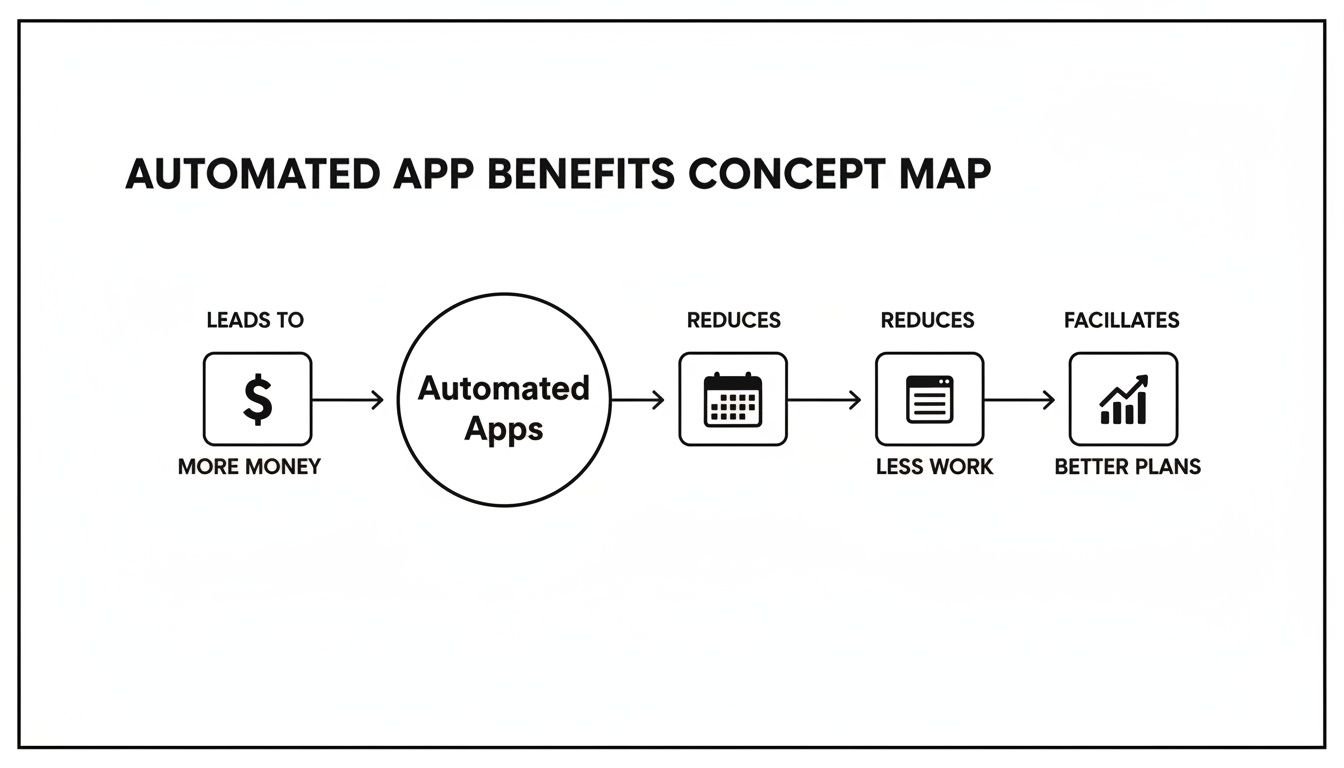
The image above boils down the value of automation to three simple outcomes: more money, less work, and better plans. It’s a great visual for how automatically capturing time leads directly to healthier finances, less administrative drag, and smarter strategic decisions.
Automated time capture from calendars
If there's one feature that will change everything for your agency, this is it. The ability to automatically pull time entries from your team's calendars—whether they use Google or Outlook—is what finally kills the manual timesheet for good. Every scheduled meeting, client call, and focused work block gets logged without anyone having to do a thing.
For an agency, this is a game-changer. It means all those quick, unscheduled phone calls and last-minute internal huddles are finally accounted for, capturing billable hours that used to just disappear into the ether. This kind of passive tracking is infinitely more accurate than asking people to remember what they did at the end of the day.
Customizable tagging and categorization
Once all that time is captured, you need to make sense of it. A powerful hosted time app lets you build out a flexible system of tags and categories, which is how you connect raw hours to what really matters to the business.
You should be able to set up tags for things like:
- Clients and projects: Pinpoint exactly how much effort is flowing into each account.
- Tasks: Easily tell the difference between “design,” “strategy,” and “project management.”
- Billable vs. non-billable: Instantly see how much time is spent on non-billable work like sales pitches or internal training. This is critical for understanding your true overhead.
This is what turns a basic time tracker into a true business intelligence tool. To get a feel for what’s possible with this data, you can learn more about how to use calendar analytics and insights to make better decisions.
Dynamic dashboards and flexible filters
Raw data is useless if you can't easily see what it's telling you. The best apps give you dynamic, visual dashboards that turn all that tracked time into reports you can actually understand. You shouldn’t have to export everything into a spreadsheet just to figure out who worked on what.
Look for a tool with flexible filters. This lets you quickly check profitability by client, measure team utilization rates, or compare how resources are split between projects. This immediate feedback loop is what allows managers to spot problems—like scope creep or an unprofitable client—long before they blow up.
Seamless integrations with your existing tools
Finally, a modern time app has to play nice with the other tools you already use. It should fit right into your workflow, not force you to change it. That means seamless integrations with your CRM, project management software, and accounting platforms are non-negotiable.
When your systems are connected, you stop creating data silos and start automating even more of the administrative burden. For instance, linking your time tracker to your CRM can automatically tie hours to specific deals or client accounts, giving you a complete picture of the client lifecycle.
This is where agencies find huge efficiency wins. A 2026 McKinsey analysis of 1,200 mid-sized firms found that manual reporting eats up 25% of a project manager's time. The right integrations are a huge part of winning that time back. For more information, you can explore the findings on app-based efficiency. To dig into different options and see how they stack up, a good Time Tracking Software Comparison can offer some valuable insights.
How to evaluate security and scalability
Handing over your team's sensitive data to a third-party app always requires a leap of faith. When you bring on a hosted time app, you’re fundamentally trusting that vendor to guard your information and make sure the service can keep up as your agency expands.
Let’s break down what that really means and what you should look for. The term “hosted” just means the software runs on their servers, not yours. While this frees you from managing the underlying infrastructure, it puts the responsibility squarely on you to verify their security practices. A good vendor won't just talk about security; they'll prove it.
Assessing a vendor’s security posture
A vendor’s claims about being “secure” are one thing; independent, third-party verification is what truly matters. The most reliable benchmark for trustworthiness here is a SOC 2 Type II certification. This isn't just a simple checklist. It's a rigorous, months-long audit confirming a company has strong controls for protecting customer data and actually follows them over time.
When you're evaluating a potential vendor, dig into these key security elements:
- SOC 2 Type II compliance: This is the gold standard, full stop. It proves the vendor doesn’t just have security policies on paper but lives by them consistently.
- Data encryption: Your data needs to be encrypted both in transit (as it travels across the internet) and at rest (while stored on their servers). This acts as a safeguard, preventing unauthorized access even if a breach occurs.
- Cloud infrastructure: Ask what cloud provider they use. You want to hear names like Amazon Web Services (AWS), Google Cloud, or Microsoft Azure. These platforms offer an incredibly secure foundation with robust physical and network security measures already built-in.
For a closer look at what separates basic security from the real deal, you can read more about what enterprise-grade security actually means for a SaaS application.
Ensuring the app can scale with your agency
Scalability is all about whether the app can handle your agency's growth without grinding to a halt. A tool that feels zippy and responsive with 50 employees might become painfully slow by the time you hit 200. The app has to grow with you.
This is especially true when you start accumulating years of historical data. An inefficient app can become a bottleneck, making it impossible to run reports on past performance.
Data from Apptio implementations, for example, suggests that limiting historical data to one prior fiscal year is necessary to keep report calculation times under five hours. Agencies that ignore this can see report generation slow by as much as 200%, which puts a major brake on agile decision-making. You can learn more about the importance of data trends and performance if you want to dive deeper.
Ultimately, a well-designed hosted time app manages all this data behind the scenes, ensuring your dashboards and reports stay fast and responsive, no matter how much your agency grows.
Your plan for a smooth transition

Rolling out a new tool can feel like a massive undertaking, but switching to an automated hosted time app doesn’t have to be a nightmare. The trick is to skip the disruptive “big bang” launch. Instead, a phased approach builds momentum and gets your team on board without the chaos.
Think of it less as a company-wide mandate and more as a controlled experiment. A successful transition is all about scoring quick wins that prove the tool’s value right away.
Start with a pilot program
Instead of unleashing the new app on your entire agency, choose one small, tech-savvy team to go first. This pilot group can help you iron out any wrinkles in the process and, more importantly, become your biggest advocates when it's time for the full rollout.
Give your pilot program a clear, measurable goal. Something like, “reduce administrative time by 50% for the project management team in 30 days.” This makes the benefit crystal clear and gives you a powerful success story to share.
A phased implementation checklist
A structured plan keeps you on track and makes sure nothing falls through the cracks. Follow these steps to guide your move from manual timesheets to a slick, automated system:
- Hook up your tools: Before anyone even logs in, connect the time app to your agency's nervous system. That means linking your team’s Google or Outlook calendars and your main project management software.
- Create your rulebook: Work directly with your pilot team to set up your tagging and categorization rules. What are the essential projects, clients, and task types you absolutely need to track?
- Train your champions: Run a quick training session that focuses on the why. Don’t just demo the features; show them how this tool will eliminate their most tedious administrative task for good.
- Listen and tweak: After a week or two, check in with the pilot team. What’s working? What’s not? Use their real-world feedback to fine-tune your rules before you go live with everyone else.
The secret to getting your team on board is to frame the new app not as a management tool, but as a personal assistant that gets rid of their most annoying administrative task—the timesheet.
When you show them how an automated system gives them time back in their day, you’ll get genuine buy-in. The change starts to feel less like a top-down order and more like a shared upgrade to a smarter way of working. With a solid plan in hand, you can confidently lead the charge.
Answering your team's toughest questions
When you're thinking about a new time tracking system, a few questions always come up. It's only natural. We've heard them all from agencies just like yours, so let's tackle them head-on with some clear, straight-talk answers.
How long does this actually take to set up?
This is probably the number one question, and the answer is better than you think. A modern, automated hosted time app can genuinely be up and running in a single day. The heavy lifting is done for you.
You'll connect your team's calendars and a few other business tools, decide on your project tags, and send out the invites. From there, most agencies get a small pilot group live within a week to iron out the kinks. A full, agency-wide rollout? You’re typically looking at less than a month from start to finish.
Will my team think I'm spying on them?
We get it. This is a huge—and completely valid—concern. No one wants to feel like Big Brother is watching. The key is all in how you frame it. This isn't about spying; it's about reducing the soul-crushing admin work that everyone hates.
Automated, calendar-based tracking is a game-changer here because it's passive. It works in the background, capturing work that’s already scheduled to ensure accurate billing and smarter resource planning. There are no timers to start and stop, and it's definitely not about monitoring keystrokes.
The goal is simple: get full credit for all the work your team is already doing. This benefits everyone, from the junior designer to the agency partners. It's about accuracy, not surveillance.
Can it really track both billable and non-billable time?
Yes, and honestly, this is where you'll find some of the most valuable insights. A good app lets you create custom tags and rules to automatically sort and categorize every minute spent.
This means you can finally get a clear, accurate look at the time spent on:
- Direct client projects
- Internal meetings and huddles
- New business pitches and sales activities
- General administrative tasks
Suddenly, you have a complete and honest picture of your agency's operations. You'll see your true overhead costs and understand where your team's amazing effort is really going.
Ready to replace timesheet fatigue with accurate, automated insights? See how TimeTackle uses your calendar to capture every billable minute, helping your agency become more profitable and efficient. Discover how it works.