
If your go-to labor cost formula is just an employee's salary divided by the hours they work, you're almost certainly underpricing every single project. This isn't a small oversight; it's a genuine threat to your profitability. The only way to get this right is by using a fully loaded labor rate—a figure that captures all the expenses tied to an employee, not just the number on their paycheck.
Why Your Simple Labor Cost Formula Is Hiding a Profitability Crisis

So many agencies fall into the trap of using a dangerously simple method to calculate labor costs. They’ll take a direct cost, like an annual salary, and divide it by the standard 2,080 work hours in a year. It’s quick, sure, but it’s also a recipe for shrinking margins.
Think of your total labor cost as an iceberg. An employee's salary is just the tip—the part everyone sees and accounts for. But lurking beneath the surface is a massive, hidden block of additional expenses that can quietly sink your business if you ignore them.
The true cost of an employee is often 25% to 40% higher than their base salary alone. When you don't account for these "hidden" costs, every project quote and budget you create is built on a faulty foundation right from the start.
The Hidden Costs Sinking Your Margins
So, what exactly is hiding below the waterline? These are all the indirect costs and burdens that a truly accurate labor cost formula must include. They typically fall into a few key categories.
Let's break down what's visible versus what often gets missed.
| Cost Category | Description | Example Components |
|---|---|---|
| Visible Labor Costs | Direct compensation paid to an employee, easily tracked in payroll. | Base Salary, Hourly Wages, Overtime Pay |
| Hidden Labor Costs | Indirect expenses required to support an employee, often overlooked in project pricing. | Payroll Taxes, Health Insurance, 401(k) Match, PTO, Rent, Utilities, Software Licenses, Training, Equipment |
As you can see, the list of hidden costs is far longer and can add up fast. When you only account for wages, you’re effectively subsidizing every project with money you thought was profit.
Here's a closer look at those hidden costs:
- Payroll Taxes: This isn’t just what comes out of their check; it’s your share as an employer for Social Security, Medicare, and unemployment insurance (FICA and FUTA).
- Employee Benefits: Health insurance premiums are a big one, but don’t forget retirement plan contributions (like a 401(k) match) and paid time off (PTO).
- Essential Overhead: Every single employee uses company resources. This includes their portion of the rent, utilities, software licenses, and even administrative support staff salaries.
- Training and Equipment: The costs for professional development, certifications, and necessary hardware like laptops add up quickly and belong in this calculation.
This guide will walk you through a clear, actionable labor cost formula designed to uncover these hidden expenses. Getting this right is the first step toward building a more resilient and genuinely profitable business.
Calculating Your Foundational Labor Rate
Before you can nail down your labor costs, you need a solid, reliable hourly rate for your team. This isn't as simple as dividing an annual salary by 52 weeks. It’s about figuring out a realistic number that reflects the actual hours an employee is available to work.
Think of this foundational rate as the starting block for all your other calculations, like the fully loaded labor rate. Getting this right is absolutely critical if you want a cost structure you can actually trust.
From Annual Salary to Hourly Rate
You’ve probably heard the number 2,080 tossed around for total annual work hours (that’s just 40 hours/week × 52 weeks). But here’s the thing: nobody works every single one of those hours. People take vacations, observe holidays, and call in sick. Accounting for this time off is the first real step toward accuracy.
Let's walk through a quick, practical example. Imagine you have a senior designer on an $80,000 annual salary.
- Standard Annual Hours: 2,080
- Company Holidays: 10 days (which is 80 hours)
- Paid Time Off (PTO): 15 days (that's another 120 hours)
First, let's tally up the total non-working hours: 80 hours for holidays plus 120 hours for PTO gives you 200 non-working hours.
Key Takeaway: The goal here isn't just to find an hourly wage. It's to determine an employee's cost for their available productive time. If you ignore paid time off, you'll inflate their available hours and artificially tank their base labor rate.
Now, just subtract those non-working hours from the standard total to find the actual time they're available to work.
2,080 Standard Hours – 200 Non-Working Hours = 1,880 Available Hours
Calculating the Base Hourly Rate
With a true number for available hours in hand, you can finally plug it into a simple formula to get your foundational hourly rate:
Base Hourly Rate = Annual Salary / Total Available Work Hours
For our senior designer, that looks like this:
$80,000 / 1,880 Hours = $42.55 per hour
This $42.55 is a much more realistic starting point than the $38.46 you'd get by incorrectly dividing by 2,080 hours. It’s a crucial first step, but remember, this still isn't the whole story. The true cost of labor goes way beyond base wages to include all the extras like benefits and taxes.
For instance, the U.S. Bureau of Labor Statistics recently reported that while wages and salaries went up 4.1% year-over-year to Q3 2025, benefits—which make up a whopping 31.8% of an employee's cost—also jumped significantly. Understanding these extra costs is vital, something we explore when you learn more about the difference between bill rate vs pay rate.
When you're crunching the numbers for things like average hourly wages or benefits per employee, a handy tool like a Mean Calculator can help you get a quick average. This foundational number is the bedrock you'll build your fully loaded labor rate on.
Uncovering the True Cost With a Fully Loaded Rate
Calculating a basic hourly rate is a great start, but it really only gets you part of the way there. To truly understand your agency's financial health and profitability, you need to go deeper and figure out the fully loaded labor rate.
This is the single most important number for pricing your services correctly. Why? Because it accounts for every single dollar spent to support an employee, not just their direct salary.
Think of it like this: the base hourly rate is the sticker price of a car. The fully loaded rate is the total cost of ownership—including insurance, gas, maintenance, and registration. Without factoring in these "hidden" costs, you're not seeing the complete picture.
What Goes Into a Fully Loaded Rate?
The fully loaded rate adds several layers of cost on top of an employee's salary or wages. To get this number right, you have to track down every expense associated with that employee, from mandatory taxes to the software they use every day.
These additional costs are often bundled together and called the "labor burden."
Key components usually include:
- Mandatory Payroll Taxes: This covers your employer contributions for Social Security, Medicare (FICA), and federal and state unemployment taxes (FUTA/SUTA).
- Employee Benefits: Often the largest chunk, this includes health insurance premiums, retirement contributions (like a 401(k) match), paid time off, and other perks.
- Overhead Costs: These are the shared operational expenses needed to keep the lights on, like office rent, utilities, software licenses, and administrative salaries.
Getting this right is crucial. To understand your fully loaded labor rate, you first need to know how to calculate total compensation accurately, which goes way beyond just the base salary.
The flowchart below shows how you get from a simple salary to a more accurate foundational rate, which is the starting point for this whole calculation.
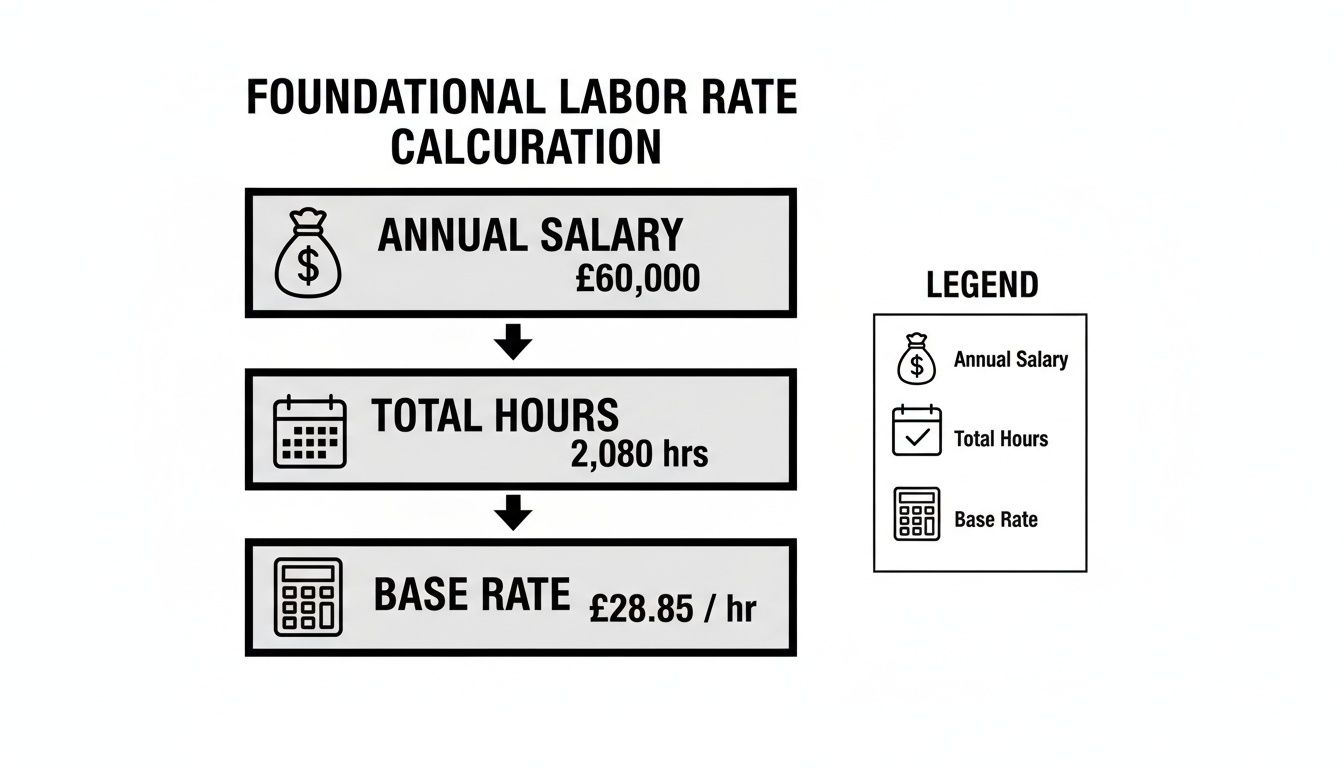
This visual breaks down how the base hourly rate comes from the annual salary, but it smartly uses the total available work hours—not just the standard 2,080—for a more realistic starting point.
Allocating Overhead Costs Per Employee
Distributing company-wide overhead across your team is where many businesses stumble. The goal is to assign a fair portion of these shared costs to each employee. Here’s a simplified example of how you might break it down for a company with 50 employees.
| Overhead Category | Total Annual Cost | Cost Per Employee (Example: 50 Employees) | Impact on Hourly Rate |
|---|---|---|---|
| Office Rent & Utilities | $120,000 | $2,400 | ~$1.25/hr |
| Software Subscriptions | $50,000 | $1,000 | ~$0.52/hr |
| Administrative Salaries | $150,000 | $3,000 | ~$1.56/hr |
| Office Supplies | $10,000 | $200 | ~$0.10/hr |
| Total Overhead/Employee | $330,000 | $6,600 | ~$3.43/hr |
As you can see, even these basic overhead costs add a significant amount—over $3.00 per hour in this case—to each employee's true cost. This is money you have to account for when pricing projects.
The Fully Loaded Labor Cost Formula
Once you've gathered all the associated costs, the formula itself is pretty straightforward. You're just adding everything up and then dividing by the hours an employee actually spends doing productive work.
Fully Loaded Rate = (Total Employee Cost + Overhead Allocation) / Actual Productive Hours
Pay close attention to that last part: Actual Productive Hours. This isn't the total time someone is at their desk. It's the time an employee spends on billable client work or other value-adding activities. This denominator is far more realistic because it excludes time spent in internal meetings, on administrative tasks, or in training.
Accurately tracking this distinction is fundamental to getting a number you can trust.
This approach lines up with more advanced financial methods that tie costs to real-world activities. If you want to go deeper on this concept, you can learn more about what is activity-based costing and how it can completely change your profitability analysis. By using a fully loaded labor cost formula, you move from guessing to knowing, ensuring every project is priced for real profit.
Putting Your Labor Cost Formula into Practice
Theory is a great starting point, but let’s be honest—it’s the real-world application that actually makes a difference to your bottom line. Moving from abstract formulas to practical, everyday use can feel like a big leap, but this is exactly where you bridge the gap between financial strategy and daily operations.
Let's walk through two common scenarios any agency owner or project manager will recognize. These examples show how to use your new, accurate rates for both scoping new work and analyzing current costs, so you can start making smarter financial decisions right away.
Scenario 1 Scoping a New Project
Imagine your agency is quoting a new website redesign. The project needs a designer, a developer, and a project manager. Instead of pulling a blended rate out of thin air, you’re going to calculate the labor cost using each person's unique, fully loaded hourly rate. Precision is the name of the game here.
Here’s how the breakdown looks:
- Senior Designer: 60 hours required × $75 fully loaded rate = $4,500
- Lead Developer: 80 hours required × $90 fully loaded rate = $7,200
- Project Manager: 30 hours required × $65 fully loaded rate = $1,950
Add it all up, and you get a total estimated labor cost of $13,650. This detailed approach ensures your quote truly reflects the cost of the talent involved. No more underpricing projects and accidentally killing your margins before the work even starts.
Spreadsheet Tip: In Excel or Google Sheets, you can knock this out with a simple
SUMPRODUCTformula. If your hours are in cells A2:A4 and your rates are in B2:B4, just type:=SUMPRODUCT(A2:A4, B2:B4). Done.
This method gives you a solid, defensible cost basis for your proposal that you can explain with confidence.
Scenario 2 Analyzing a Single Employee's Monthly Cost
Now, let's flip from forecasting to tracking. You need to know the actual monthly labor expense for one of your employees to see how it lines up with your budget. Let’s take a full-time content strategist whose fully loaded annual cost comes out to $95,000.
First, you’ll need their true monthly cost:
$95,000 / 12 months = $7,916.67 per month
That $7,916.67 is the number that belongs on your monthly financial reports—not just their gross salary. It’s a complete picture of the company's investment in that employee each month, factoring in all the benefits, taxes, and overhead.
This kind of granular insight is what makes resource planning and profitability analysis actually work. In industries like manufacturing, the labor cost formula is a critical KPI, often calculated as total labor costs divided by total manufacturing costs. A custom furniture maker, for example, might see labor making up 40-60% of their total costs because of the skilled craftsmanship involved. In contrast, an automated food processing plant might only see 10-20%. For a deeper dive on this, check out how NetSuite breaks down labor costs in manufacturing.
This highlights exactly why agencies must use burdened rates. It helps you avoid the classic, painful mistake of underbidding projects. When you consistently apply the labor cost formula in both planning and review, it stops being just a number and becomes a powerful tool for guiding your agency toward sustainable growth.
How Inaccurate Time Data Makes Your Formula Useless

You can have the most sophisticated, carefully built labor cost formula in the world, but it will completely fall apart if it’s built on bad data. It's like a world-class chef trying to cook with spoiled ingredients—the final dish is guaranteed to be a disaster.
The same principle applies here. Your formula is only as good as the time data you feed it.
When time tracking is flawed, every single financial projection, budget, and project quote is immediately compromised. The “Productive Hours” variable in your formula becomes a work of fiction, painting a distorted picture of your agency's financial health. This isn't just a minor administrative hiccup; it's the root cause of shrinking profit margins and poor business decisions.
The High Cost of Guesstimates and Gaps
So, where does this bad data come from? Manual time entry is almost always the culprit. We ask our employees to recall their workweek, often days after the fact, which inevitably leads to guesstimates and forgotten tasks. This kicks off a domino effect of problems that directly wreck your labor cost formula.
You’ll see common issues pop up again and again:
- Timesheet Fatigue: Employees are already busy. Filling out timesheets feels like one more administrative burden, so they rush through it, leading to sloppy entries.
- Rounding and Padding: People rarely work in perfect 30-minute blocks. Hours get rounded up or down, and sometimes padded to meet a perceived expectation, rather than reflecting reality.
- Forgotten Work: Those short tasks, quick client calls, and internal huddles? They are constantly left out, which means you're seriously underreporting the true time investment on a project.
Imagine a developer pulls a 60-hour week to crush a deadline but only logs the standard 45 hours. Just like that, your labor cost calculation is off by a whopping 25%. Now, multiply that kind of discrepancy across your entire team. You're making critical business decisions with dangerously incomplete information.
This kind of consistent underreporting leads directly to underpriced projects because you simply aren't accounting for the full labor investment. Your formula might be mathematically sound, but it spits out useless numbers because its most important variable—time—is flat-out wrong. Learning how to motivate employees to track time helps, but the system itself is often the real problem.
From Manual Error to Automated Truth
The best solution is to take human error out of the equation entirely by automating how you capture time. Tools that sync directly with employee calendars, like TimeTackle, create a reliable source of truth by logging activities as they actually happen.
This passive data collection ensures every meeting, task, and work block is accounted for without anyone having to remember a thing. It provides a truly accurate measure of "Productive Hours."
This shift in data quality is more than just a small improvement; it's fundamental. Historically, labor costs have always evolved. For instance, in US manufacturing, labor's share of total costs dropped from a peak of 45% in 1980 to just 22% by 2024, largely due to automation. This shows just how much external factors can change cost structures, making precise internal data more critical than ever.
When you ground your labor cost formula in precise, automatically captured time, you transform it from a theoretical exercise into a powerful, reliable tool for managing your business.
Common Questions About the Labor Cost Formula
Even with a clear process, putting a new labor cost formula into practice can stir up some questions. Knowing what to expect is the key to applying your new rates confidently and consistently. Let's walk through some of the most common things agency leaders ask when they start digging into their true labor costs.
Think of this as a quick FAQ to solidify your understanding and make sure your financial strategy is built on solid ground.
Direct vs. Indirect Labor Costs
One of the first hurdles is nailing down the difference between direct and indirect labor. Getting this right is absolutely fundamental to an accurate labor cost formula.
Direct labor costs are tied to the people who are hands-on in creating what the client pays for. Think of a developer coding a website or a designer crafting a logo—their work is the direct source of your revenue.
Indirect labor costs, on the other hand, are for the essential support crew who make that work possible. This includes roles like HR, finance, or administrative assistants. They aren't billable, but they're the operational backbone of your agency.
A precise labor cost formula must account for both. If you only factor in the cost of your direct, billable staff, you're ignoring the significant expense of the people who support them. That's a surefire way to underprice your projects.
How Often Should I Recalculate Labor Rates?
Your labor rates aren't a "set it and forget it" number. Business costs are always in flux, and your rates need to keep up with reality.
At a minimum, you should plan to recalculate your fully loaded labor rates annually. But honestly, you should also revisit the numbers any time you have a significant cost change.
Think about running the numbers again after events like:
- Annual salary reviews or giving out cost-of-living adjustments.
- Introducing a new benefits package or seeing a jump in health insurance premiums.
- Renewing your office lease at a higher rate or moving to a new space.
For agencies that are growing quickly or have teams that change in size, a quarterly review is a much smarter move. It's the best way to maintain pricing accuracy and protect your profit margins.
How Do I Price Projects With Different Team Members?
A classic mistake is using a single "blended" or average rate for everyone when you scope a project. This approach can seriously warp your cost estimate and hide just how expensive it is to put your senior, higher-paid talent on the job.
To calculate a project's labor cost correctly, you have to use the specific fully loaded rate for each person involved.
The formula looks like this:
Total Project Cost = (Employee A's Loaded Rate × Hours) + (Employee B's Loaded Rate × Hours) + …
Using this method makes sure your quote reflects the actual value—and cost—of the team you're assigning to the work. It gives you a far more precise and defensible estimate for both you and your client.
What’s a Healthy Labor Cost Percentage?
Finally, how do you know if your labor costs are even in the right ballpark? For most professional service agencies, a healthy labor cost percentage usually lands somewhere between 40% and 60% of your gross revenue.
This metric is a vital sign of your agency's financial health.
- Consistently above 60%: This could be a red flag. It might point to issues with your pricing, team efficiency, or low staff utilization. You might be overstaffed or, more likely, just not charging enough.
- Consistently below 40%: This could mean you're understaffed and leaving growth opportunities on the table. It might also signal that you have room to invest in more top-tier talent to elevate your service quality.
Your labor cost formula is only as reliable as the time data you feed it. Manual timesheets are filled with errors and guesstimates, making even the most perfect formulas useless. TimeTackle solves this by automatically capturing activity right from your team's calendar, creating an undisputed source of truth for your calculations. Discover how TimeTackle provides the accurate data you need to unlock true profitability.