
That frantic Friday afternoon scramble, trying to piece together every billable minute from the week—it's more than just an end-of-week headache. It's a gaping hole in your revenue pipeline. When professional services time tracking is loose and imprecise, it’s not just about a few lost hours. It's about the real financial and operational damage that bleeds a firm’s profitability, one day at a time.
The Hidden Costs of Inaccurate Time Tracking
Picture your firm's potential revenue as a bucket of water. Every unbilled 15-minute phone call, every task you underestimated, and every moment of administrative guesswork is a tiny hole. One drop might not seem like a big deal, but over time, those small leaks add up to a significant, steady drain on your resources.

This guesswork doesn’t just hit your bank account. The damage ripples through your entire operation, often in ways that are tough to trace back to the source. The fallout is both financial and relational, creating a cycle of inefficiency that puts the brakes on growth.
The Direct Impact on Your Bottom Line
The most obvious pain point of sloppy time tracking is revenue leakage. It’s simple: firms consistently under-bill because they can’t prove where all the time went. Studies show that fuzzy time tracking can cause businesses to lose 15-25% of their billable hours each year. That’s not just a dent in profit margins; it strains cash flow by pushing back invoicing, sometimes forcing healthy firms onto credit just to keep the lights on.
A lack of precision also makes it impossible to figure out what's actually profitable. Without solid data, you're just guessing which clients, projects, or services are your winners and which ones are silently draining your budget. The line between productive, billable vs. non-billable hours becomes hopelessly blurred.
Without accurate time data, every business decision—from project quoting to resource allocation—is based on a foundation of guesswork. This reactive approach makes it nearly impossible to scale predictably and profitably.
Eroding Client Trust and Internal Morale
The damage isn't just internal. Inaccurate tracking erodes trust with your clients. When invoices are vague or inconsistent, disputes are pretty much guaranteed. These aren’t just awkward conversations; they actively damage long-term partnerships, turning trusted clients into skeptical customers who start questioning every single line item.
And let's not forget the impact on your own team. Forcing highly skilled professionals to reconstruct their work week from memory is a huge source of administrative friction and burnout. This manual-entry nightmare pulls them away from the high-value client work they should be doing, torpedoing productivity across the board.
The first step toward plugging these leaks is to get serious about professional services time tracking. It’s about building a more resilient, profitable, and trustworthy firm from the inside out.
Building Your Foundation for Profitable Projects
For any professional services firm—be it a consultancy, law office, or creative agency—solid professional services time tracking is the bedrock of success. It’s easy to see it as a chore, but a better way to think about it is as a ship's logbook. Without that log, you're essentially sailing blind, unable to spot hidden risks or chart a clear course to your destination: profitability.

This logbook doesn't just record the journey. It gives you the critical data needed to navigate tricky waters, steer clear of scope creep, and make sure every project is a successful voyage. It all starts with one simple act: accurately capturing time against specific clients, projects, and individual tasks.
Once you have that fundamental data, you can build a powerful understanding of your business's true health and performance.
From Raw Data to Actionable Insights
With a reliable stream of time data coming in, you can finally start measuring the key performance indicators (KPIs) that actually matter. These aren't just vanity metrics; they transform raw hours into a clear picture of your firm's efficiency and profitability. Without them, you’re just collecting numbers. With them, you’re making smart business decisions.
Three of the most critical KPIs to watch are:
- Utilization Rate: This metric shows you how much of your team's available time is actually spent on billable client work. A high utilization rate is usually a great sign of a healthy, productive team.
- Realization Rate: This reveals the percentage of billable hours that you actually invoice and collect from clients. It’s a reality check, highlighting the gap between the work you do and the revenue you earn.
- Project Profitability: By tracking all time and costs against a project's revenue, you can nail down its true profit margin. This is how you identify which types of work make you the most money—and which ones are costing you.
Having a tight grip on these numbers directly informs huge decisions, like calculating your optimal daily rate for new projects. These metrics give you the confidence to price your services correctly and walk into contract negotiations from a position of strength.
Choosing Your Time Tracking Method
Not all time tracking methods are created equal. The approach you pick directly impacts both the accuracy of your data and the amount of administrative hassle for your team. Every method has its trade-offs, from cost and complexity to the level of detail it provides.
The goal is to find a system that minimizes friction for your team while maximizing the quality of the data collected. The less intrusive the tool, the more likely it is to be adopted consistently.
Here’s a breakdown of the common methods to help you figure out the best fit for your firm.
| Tracking Method | Description | Pros | Cons |
|---|---|---|---|
| Manual Spreadsheets | Employees manually enter their time into shared documents like Excel or Google Sheets. | Low initial cost; highly customizable. | Prone to human error; time-consuming; difficult to analyze at scale. |
| Basic Timers | Simple desktop or mobile apps where users start and stop a timer for each task. | Easy to use; provides more accurate duration data than manual entry. | Lacks project management integration; often requires manual data transfer for invoicing. |
| Automated Software | Integrated platforms that capture activity from calendars, emails, and other apps to suggest timesheet entries. | Highly accurate; drastically reduces administrative work; provides powerful analytics. | Higher subscription cost; requires initial setup and team training. |
Ultimately, the right choice comes down to your firm's size, complexity, and growth plans. While spreadsheets might work for a solo practitioner, growing firms quickly discover that investing in automated professional services time tracking pays for itself. You'll see the returns in recovered billable hours and smarter business decisions. This foundational data is your map to sustained profitability.
What You're Really Unlocking With Time Data
If you think professional services time tracking is just for getting invoices out the door, you’re missing the bigger picture. It’s like using a top-of-the-line camera just to take blurry selfies. Sure, billing is the most obvious win, but the real power comes from the business intelligence you build with every minute you track. This data isn't just about logging hours; it's about getting a clear, strategic look at how your entire business actually runs.
Once you move past the basics, you start to see the hidden rhythms of your company. Good time data helps you finally answer the questions that probably keep you up at night. Which clients are really the most profitable? What kind of work always seems to blow past the budget? This kind of clarity replaces guesswork with solid, informed decisions.
All of a sudden, you can quote new projects with real confidence, put your best people where they'll have the biggest impact, and guide your firm toward the work that pays the bills and grows the bottom line. It transforms time tracking from a boring administrative task into a crucial asset that fuels real, sustainable growth.
Improving Team Performance and Wellbeing
But it’s not just about the numbers. Thoughtful time tracking can also make a huge difference for your team. When you roll it out the right way, it’s a tool for fairness and transparency, not for spying on people. It gives you an objective way to see who’s doing what, making sure work is spread out evenly and helping prevent the burnout that hits so many professional services firms.
This data-driven approach builds a culture where hard work is actually seen and rewarded. Instead of just going on a gut feeling, managers have real data to back up their praise for high performers and to spot team members who might be struggling and need a hand. It takes the awkwardness out of performance reviews and makes them more productive for everyone.
Plus, when everyone can see how their time contributes to the big picture—to project success and the company's health—it's a huge motivator. It gives their work more meaning and cuts down on the eye-rolling that usually comes with filling out manual timesheets from memory.
Building a Culture of Transparency
None of this works, though, if your team doesn't get it or, worse, doesn't trust it. This is where a lot of firms stumble. In fact, research shows that a staggering 41% of employees have no idea what data is being collected about them, why it's being gathered, or how it’s actually being used. That lack of clarity is a breeding ground for suspicion and can sink the whole effort. You can dive deeper into employee perspectives on time tracking at Leapsome.com.
By being upfront about the "why"—explaining that the goal is better planning, fairer workloads, and understanding which projects are actually profitable—you can get the buy-in you need. Transparency is what turns skeptics into champions of the system.
When it’s all clicking, a solid professional services time tracking system creates a positive cycle that helps everyone involved.
- For Leadership: It delivers the strategic insights needed to steer the company toward better profits and smoother operations.
- For Project Managers: It provides a real-time pulse on project health, so they can make smart adjustments to scope, budget, and deadlines before things go off the rails.
- For Team Members: It guarantees workloads are fair, offers clear data to recognize great work, and cuts down on annoying administrative tasks.
When you start treating time data like the strategic asset it is, you turn a simple daily task into a powerful engine for a more profitable, happier, and successful firm.
How to Choose the Right Time Tracking Solution
Walk into the "time tracking software" aisle, and you'll find a dizzying number of options. It's easy to get stuck in analysis paralysis. But choosing the right tool isn't about just finding a fancy stopwatch; it's about picking a partner that fits your firm's specific workflow, financial targets, and growth plans.
The best solution should feel less like a chore and more like a strategic asset that pays for itself. Think beyond just counting hours. The real goal is to find a system that makes life easier for your team while giving leadership the powerful insights they need to steer the ship. If a tool is clunky or confusing, your team simply won't use it consistently, leaving you with a pile of useless, incomplete data.
Core Features You Cannot Ignore
To cut through the noise, start by focusing on a handful of non-negotiable features. These are the absolute must-haves for any modern professional services firm. They form the foundation of a system that will not only capture time but also boost efficiency and profitability across your entire business.
A great tool is more than just a logger—it becomes the central hub for your project's financial health. Make sure any platform on your shortlist includes:
- Seamless Integrations: The software must connect effortlessly with the tools you already use, like your project management and accounting software (think QuickBooks, Xero, or Asana). This is critical for preventing mind-numbing manual data entry, cutting down on errors, and making sure your billing and payroll are always spot-on.
- Powerful Reporting and Analytics: Look for customizable dashboards. You need to be able to track key metrics like utilization rates, project profitability, and realization rates without having to dump everything into a spreadsheet and spend hours crunching numbers.
- Flexible Billing Configurations: Let's be honest, professional services firms rarely have a one-size-fits-all billing model. The right software needs to handle multiple billing rates—whether by person, by project, or even by specific task—to ensure every single invoice is accurate.
- Mobile Accessibility: Your team isn't chained to their desks. A solid mobile app for entering time on the go is crucial for capturing billable moments as they happen, whether your consultants are on-site with a client or catching a flight.
This infographic paints a clear picture of the direct impact that shifting from manual methods to a strategic time tracking solution can have on the metrics that matter most.
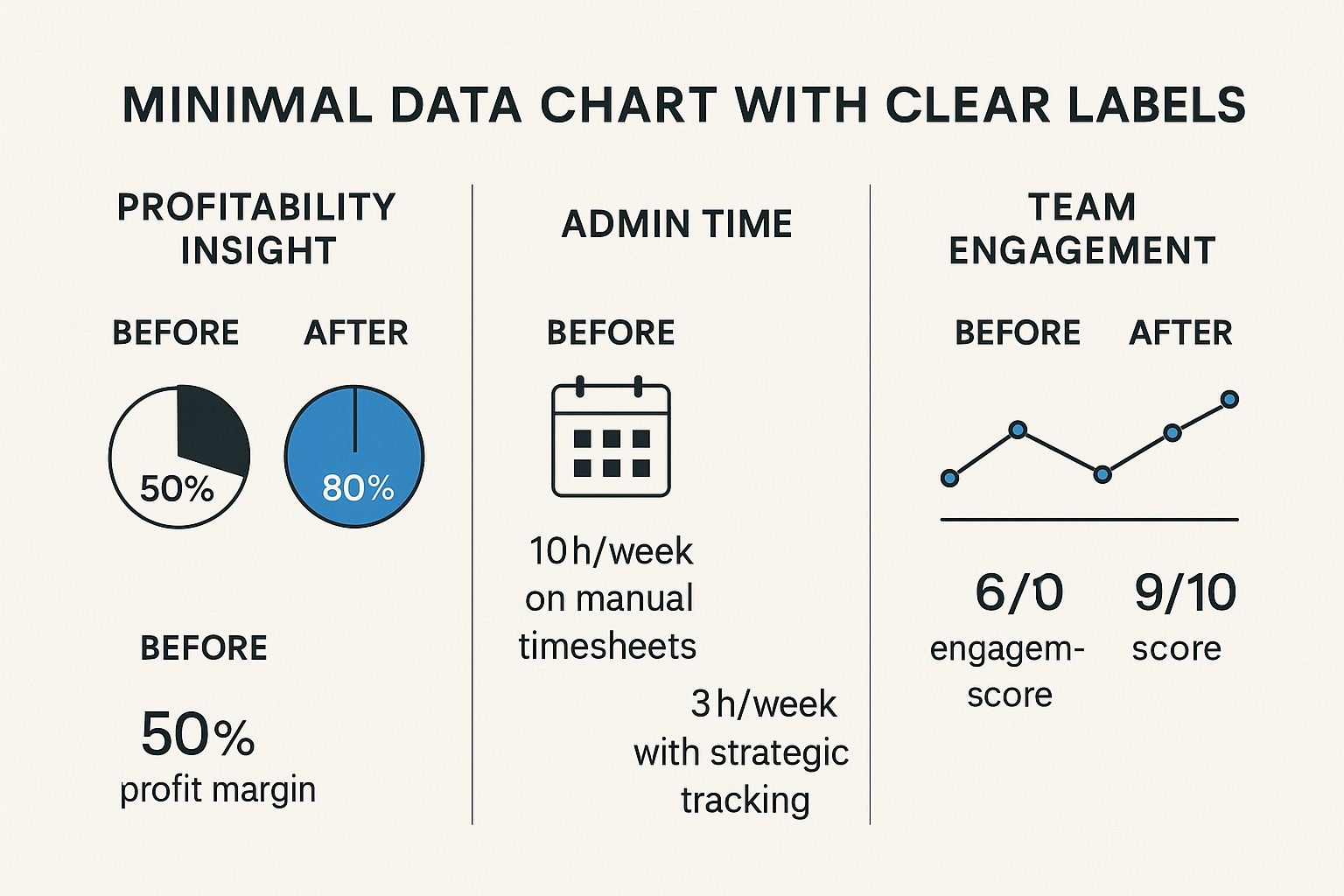
As the numbers show, embracing a more intelligent system can seriously bump up profit margins, slash administrative busywork, and even boost team morale by getting rid of tedious tasks.
Comparing Different Tool Categories
Not all time tracking solutions are built the same. They typically fall into a few different buckets, each designed for different kinds of firms. To get a better handle on the options out there, it can be helpful to look at a comprehensive list of time tracking tools built for various professional settings.
The best choice really hinges on your firm's current size, complexity, and where you see yourself in a few years. A tool that's perfect for a solo consultant will quickly become a roadblock for a 50-person agency.
To help you decide, let's compare the different types of solutions available.
Comparison of Time Tracking Solutions for Professional Services
This table breaks down the main categories of time tracking tools, comparing them on key features, cost, and who they're best suited for. Use it to find the best fit for your firm.
| Solution Type | Key Features | Average Cost | Best For | Primary Limitation |
|---|---|---|---|---|
| Basic Timers | Manual start/stop, simple reports, mobile app | Free to ~$10/user/mo | Freelancers & very small teams (1-5 people) | Lacks automation and deep integrations |
| Integrated Tools | Connects to PM/accounting software, project budgeting | ~$10-$25/user/mo | Small to mid-sized firms (5-50 people) | Reporting can be limited, still requires manual entry |
| AI-Powered Platforms | Automated activity capture, predictive analytics, deep integrations | ~$25+/user/mo | Growing and large firms (50+ people) | Higher initial cost and more features to learn |
After reviewing the options, it becomes clear that while a simple timer might work for a freelancer, it won't scale with a growing business.
As a firm grows, the need for smart automation and deep analytics becomes impossible to ignore. A basic timer is a fine starting point, but a growing agency will discover that an AI-powered system delivers a much higher return on investment. It does this by cutting out manual entry almost entirely and offering insights that help you plan for the future. You can learn more about how modern agency time tracking software can grow with you.
Ultimately, picking the right professional services time tracking solution is a major business decision. By zeroing in on the core features and being honest about your firm's needs, you can find a platform that does more than just capture billable hours—it can become a cornerstone of your long-term success.
How AI Is Transforming Professional Time Tracking
Let's be honest, the era of the manual timesheet is thankfully drawing to a close. For years, time tracking was all about looking in the rearview mirror—logging what had already happened. But Artificial Intelligence (AI) is flipping the script, turning this tedious chore into a powerful, forward-looking strategic tool.
This isn't just about saving a few minutes here and there. It's about reclaiming countless billable hours and finally getting a crystal-clear view of your firm's operational health.

Think of an AI-powered system as an intelligent co-pilot for your entire team. Instead of forcing your top talent to constantly interrupt their flow to start and stop timers, this co-pilot works quietly in the background, piecing together an accurate log of the day's journey.
From Manual Logging to Intelligent Automation
The real magic of AI in professional services time tracking is its ability to automatically capture and categorize work without anyone lifting a finger. These aren't just fancy timers; they're smart systems that analyze the digital breadcrumbs we all leave behind throughout the day to build a complete picture of where time is going.
This intelligent automation plugs right into the tools your team already relies on:
- Calendar Events: AI scans your team's Google or Outlook calendars to identify client meetings, internal syncs, and dedicated work blocks, automatically drafting them as time entries.
- Email Correspondence: It's smart enough to recognize communication with specific clients or about certain projects, suggesting that the time spent drafting a reply should probably be logged.
- Document Activity: Time spent wrestling with a proposal in Google Docs or perfecting a slide deck in PowerPoint can be captured and automatically assigned to the right project code.
The system then serves up these activities as a pre-populated timesheet. All the professional has to do is give it a quick once-over and hit "approve." What was once a painful, end-of-week scramble becomes a simple, two-minute check-in. This dramatically cuts down on human error and makes sure far more billable work actually makes it onto the invoice.
Beyond Time Capture to Predictive Insights
But simple automation is just the beginning. The true power of AI kicks in when it starts analyzing all that historical time data, offering up predictive insights that help you manage projects much more proactively. This is where the intelligent co-pilot really earns its keep.
For example, an AI tool can look at past projects of a similar scope and flag a new one that's starting to creep over budget—long before it becomes a five-alarm fire. It can also forecast your resource needs, helping you spot potential staffing crunches weeks or even months down the road.
AI doesn’t just record what you’ve done; it helps you make smarter decisions about what you’re going to do next. It transforms time data from a historical record into a predictive asset.
In recent years, time tracking software has become incredibly sophisticated, especially for consultants. Modern tools now combine AI-powered tracking with built-in integrations for billing and payments. This helps consultants get a better handle on their productivity—the system can suggest task durations and spot inefficiencies—while also connecting directly with invoicing platforms to make getting paid a whole lot simpler. You can find more insights on this from Empmonitor.com's guide to consultant time tracking software.
By killing the administrative busywork and delivering actionable intelligence, AI is making professional services time tracking a core driver of profitability and operational excellence. It frees your team to focus on high-value client work, giving them peace of mind that their time is being captured accurately and put to strategic use.
Implementing Your System for Success
Picking the right software is just step one. Let’s be honest, even the best platform on the market is basically a very expensive paperweight if your team doesn't actually use it. A successful rollout of a professional services time tracking system is less about the tech and more about the people. It calls for a clear, battle-tested game plan that focuses on building genuine buy-in, not just forcing compliance.
This whole process kicks off long before anyone logs their first hour. It starts with setting the ground rules and, most importantly, explaining the "why" behind the change. Your team needs to hear from you that this isn't about micromanagement. It’s about keeping the firm healthy, making sure workloads are fair, and quoting future projects with confidence.
Setting Clear Policies and Procedures
If you want clean, actionable data from your new system, you need consistency. Vague guidelines are a recipe for messy data that’s impossible to make sense of. Before you go live, your leadership team needs to sit down and hammer out a clear set of standards that everyone can follow. This becomes the single source of truth for how time gets tracked across the board.
Your implementation checklist should nail down a few key things:
- Defining Billable vs. Non-Billable Hours: Write a simple, clear policy that spells out exactly what’s billable (think client meetings, project work) and what isn’t (like internal training or admin tasks).
- Establishing Project Codes: Create a standardized list of project and task codes. This is critical. It ensures everyone is logging time to the same buckets, which makes your project profitability reports accurate.
- Creating a Communication Plan: Map out how you'll introduce the new system, what training will look like, and how you’ll provide ongoing support. A solid communication plan calms nerves and builds trust from the get-go.
The goal here is to kill ambiguity. When team members know exactly how to categorize their work, the data becomes reliable, and the whole process just becomes second nature.
Building Team Buy-In and Overcoming Resistance
Let's face it, people don't always love change. Time tracking, especially, can feel intrusive if you handle it the wrong way. The secret to getting everyone on board is to frame it around the benefits for them, not just for management. When your team sees how accurate data leads to better project planning and helps prevent burnout, they're much more likely to embrace it.
Getting this right means being proactive and empathetic. You have to address concerns head-on and make the switch as painless as possible. For a deeper look at this, we have a whole guide on how to motivate employees to track time.
Avoiding Common Implementation Pitfalls
So many firms stumble during the rollout phase by making a few common, and totally avoidable, mistakes. Knowing what these traps are ahead of time can be the difference between a successful launch and a failed investment.
Keep an eye out for these classic missteps:
- Lack of Leadership Buy-In: If the partners and senior leaders aren't using the system and talking about its importance, why would anyone else? Leaders have to walk the walk.
- Choosing an Overly Complicated Tool: A system with a massive learning curve will just frustrate your team and kill adoption rates. Always prioritize a simple, clean user experience.
- Neglecting Proper Training: Firing off a single email with a login link is not a training plan. You need to schedule dedicated sessions, create simple how-to guides, and give people a clear person to contact when they have questions.
By focusing on clear policies, genuine communication, and steering clear of these classic blunders, you can turn your professional services time tracking system from a simple tool into a core engine for your firm's success.
Frequently Asked Questions
When it comes to professional services time tracking, a few common questions always pop up, especially around getting the team on board and making it work in the real world. Let's tackle some of the biggest concerns firms have.
How Do We Track Time Without Micromanaging?
This is all about the "why." You have to frame time tracking as a tool that helps the team, not a way to watch their every move. The goal isn't to monitor individuals; it's about getting a clear picture of workloads, quoting projects accurately, and keeping the business healthy.
When your team sees that the data is used to prevent burnout by spotting where you're under-resourced, they'll get it.
The other piece is to automate everything you can. Tools that pull data from calendars and project management apps make tracking less of a chore. Instead of filling out a timesheet from scratch, your team is just quickly verifying what they've already done. And, of course, lead from the front. When partners and managers track their time, it sends a powerful message.
The secret is shifting the conversation from individual surveillance to collective success. It's about gathering data to make smarter decisions that benefit the whole team.
What Is the Biggest Implementation Mistake?
Hands down, the biggest mistake is forgetting about the people. Too many firms buy a great piece of software, roll it out, and just expect everyone to use it without any context. That's a recipe for failure.
A successful rollout needs a solid change management plan. You have to communicate why you're doing this, create simple guidelines for how to tag projects, and actually train people on the new system.
Ignoring feedback or leaving your team out of the selection process is another classic blunder. If people feel like a tool is being forced on them, they'll find a million ways not to use it. The human side of implementation is just as critical as the technical setup.
How Often Should We Review Time Tracking Data?
You can't just set it and forget it. The data is only valuable if you actually use it, and that means looking at it on a consistent schedule. A layered approach works best.
- Weekly: This is for the project managers. They should be in the weeds, checking project hours against the budget. It's the best way to catch scope creep before it blows up a project.
- Monthly: At this level, firm leadership should be looking at the big picture. Think team utilization, client profitability, and realization rates. This is your monthly health check.
- Quarterly: Now you're getting strategic. Use three months of data to inform resource planning, adjust your service offerings, and spot long-term trends that will shape the future of the firm.
Regular reviews are what turn raw numbers into a powerful tool for steering your business.
Ready to swap manual timesheets for real-time insights? See how TimeTackle uses AI to automate time tracking right from your team's calendar, giving your firm the data it needs to grow without the busywork. Learn more and get started today.