Think of an orchestra where every musician has a different sheet of music. The violinist is playing a waltz, the cellist is deep into a symphony, and the drummer is just freestyling. They're all talented, but the result isn't harmony—it's just noise. That’s what happens when your agency runs on disconnected software.
Your CRM knows your clients. Your project management platform knows your tasks. Your time tracker knows your hours, and your accounting software knows your numbers. When these tools don't talk to each other, your team becomes the go-between, stuck manually copying and pasting data from one screen to another. This isn’t just a hassle; it's a direct hit to your bottom line.
Why Disconnected Tools Are Costing Your Agency Money
The problems with siloed software go way beyond a few wasted minutes. They create serious operational friction that quietly eats away at your agency's profits and ability to compete.
When your tools don't connect, you're left dealing with:
- Wasted Billable Hours: Your team spends valuable time doing duplicate data entry—updating project details, client info, or timesheets in two, three, or even four different places.
- Costly Human Errors: Every time data is moved manually, there's a risk of a mistake. A typo in a budget or an incorrect task status can spiral into bad reports, inaccurate invoices, and shaky business decisions.
- A Complete Lack of Clarity: Without a single, connected view, getting a real-time pulse on project health, team availability, or profitability is nearly impossible. Leaders are forced to fly blind, making calls with stale or incomplete information.
- Painfully Slow Invoicing: Trying to match timesheets with project tasks and client accounts turns into a month-end headache, delaying cash flow and burning out your finance team.
In short, a disconnected tech stack forces your highly skilled, creative team to act like administrative robots. They're stuck with low-value tasks instead of focusing on the strategic, client-facing work that actually drives revenue.
Before we go any further, let's look at the real-world difference between a clunky, manual setup and a smooth, integrated one.
The Operational Shift From Siloed Tools To A Connected Ecosystem
This table breaks down the day-to-day impact of making the switch. It’s not just about technology; it’s about transforming how your team works.
| Operational Aspect | Siloed Tool Approach (Manual Chaos) | Integrated Ecosystem (Automated Harmony) |
|---|---|---|
| Project Kickoff | Manually re-enter client data from CRM to project management tool. | New client in CRM automatically creates a new project and folder structure. |
| Task Updates | Team updates status in one tool, then emails or messages the update to others. | A completed task in one system automatically notifies the next person in line. |
| Time Tracking | Manually log hours in a spreadsheet, then copy them into the project and billing tools. | Time is tracked against a specific task and syncs instantly for reporting and invoicing. |
| Budget Monitoring | Finance team pulls reports from multiple systems and merges them in a spreadsheet. | A real-time dashboard shows budget vs. actuals, pulling data from all connected tools. |
| Client Reporting | Manually compile data from various sources into a slide deck, hoping it's accurate. | Automated reports are generated with up-to-the-minute data on progress and costs. |
As you can see, the shift is dramatic. It moves your agency from a state of constant catch-up to one of proactive, data-driven control.
The market is already making its choice. The global project management software market is valued at USD 8.72 billion in 2024 and is expected to hit USD 10.33 billion in 2025. This explosion is driven by the demand for connected workflows that bring project platforms, CRMs, calendars, and financial tools together. You can dive deeper into these project management software market trends.
At the end of the day, project management integrations are no longer a "nice-to-have" luxury. They've become a core business strategy. Creating that seamless operational rhythm is how you unlock true efficiency, trust your data, and build a more profitable agency.
Decoding the Language of Software Integration
Dipping your toes into the world of project management integrations can feel like you're suddenly expected to speak a new language. You'll hear words like API, native, and middleware thrown around, but you don't need a computer science degree to get what's going on. For operations leaders and project managers, the real goal is much simpler: getting your tools to talk to each other.
Think of your project management software as the central station for your operations. Every integration is just a different kind of track connecting that station to other essential platforms, like your CRM, calendar, or accounting software. The right track depends entirely on your team's needs, budget, and technical comfort level.
When those tracks aren't built, you get chaos. Information gets lost, work gets duplicated, and nobody has a clear picture of what's happening.
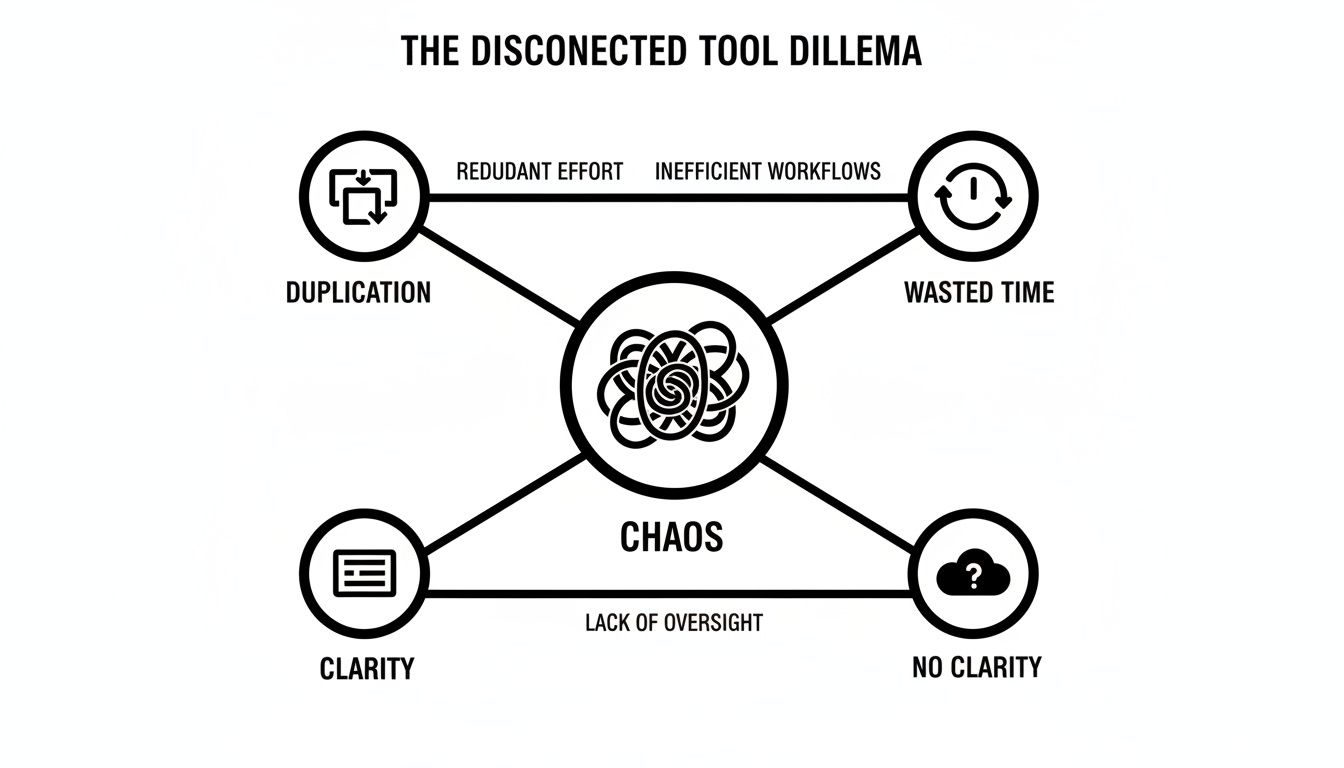
This picture says it all. A disconnected toolset is a direct line to wasted time, duplicated effort, and a painful lack of clarity. Let's break down the common types of connections that fix this mess.
The Main Types of Software Connections
Not all integrations are built the same. Each type strikes a different balance between simplicity, power, and cost, and knowing the difference helps you have much smarter conversations with software vendors.
You'll generally run into three main categories:
- Native Integrations: This is the "plug-and-play" option. Think of it like a manufacturer-approved accessory for your phone—it's designed by the software company to connect perfectly with another specific tool. These are often included with your subscription and usually take just a few clicks to set up.
- API-Based Integrations: An API (Application Programming Interface) is like a box of Lego bricks. It gives developers the building blocks they need to create a totally custom connection between two (or more) systems. This gives you ultimate flexibility but requires someone with technical skills to build and maintain it.
- Middleware Platforms: Tools like Zapier, Make, or Workato are the universal translators of the software world. They sit in the middle, letting you connect thousands of different apps without writing a single line of code. You create simple "if this, then that" rules, making them a super accessible way to automate tasks between tools that don't connect natively.
The choice here isn't just technical; it's strategic. Native integrations are perfect for core, high-volume connections. Middleware is a lifesaver for linking niche tools or automating very specific, smaller tasks across your workflow.
One-Way vs. Two-Way Data Syncing
Beyond how your tools connect, you need to think about how the data flows. This is where you'll hear about one-way and two-way syncs, and the difference is critical for keeping your information accurate across the board.
Let's say you connect your CRM to your project management tool.
-
A one-way sync is like a one-way street. When a sales rep marks a deal "won" in the CRM, it can automatically create a new project in your PM tool. But if you change the project name in the PM tool, that update does not get sent back to the CRM. The information only flows in one direction.
-
A two-way sync is a busy, two-way street. In this setup, a change in one system is automatically pushed to the other, and vice-versa. Update the project name in your PM software, and the record in the CRM updates, too. This ensures both systems always have the latest, most accurate information.
For most agencies and ops teams, a two-way sync is the gold standard for core systems like a CRM and PM tool. It creates a single source of truth and kills the risk of someone working off old, outdated information. This is the foundation of a truly efficient and automated workflow.
The Real-World ROI of a Connected PM Stack
Connecting your software isn't just a technical exercise—it's a direct investment in your agency's profitability and sanity. Let's move beyond the jargon. The return on investment (ROI) from effective project management integrations shows up in real, measurable ways that you'll feel on your bottom line.
It’s the difference between running on a treadmill and actually getting somewhere.
For mid-sized agencies, the gains are immediate and substantial. The biggest win? A drastic reduction in administrative busywork. Instead of your team wasting hours manually copying data between timesheets, task lists, and billing software, automation steps in. This frees up your most valuable asset—your people—to focus on client strategy and creative work, not mind-numbing clerical tasks.

This shift doesn't just save time; it creates more accurate, trustworthy data, which is the bedrock of any profitable agency.
From Manual Chaos to Financial Clarity
Think about the classic story of a creative agency drowning in spreadsheets. Before they connected their tools, their process was a recipe for disaster. Project managers were constantly chasing down timesheets, the finance team manually cross-referenced hours against project codes, and invoices often went out weeks late, riddled with errors. This created painful cash flow bottlenecks and, worse, eroded client trust.
After implementing a connected system, their world changed. Here’s what that looked like:
- Unshakeable Data Accuracy: By integrating their calendar and time tracking with their PM and accounting software, every single billable hour was automatically captured and categorized. This wiped out manual errors, leading to 100% accurate invoicing and better profit margins on every single project.
- Real-Time Project Health Dashboards: Instead of waiting for month-end reports to see what went wrong, leadership got a live view of project budgets, timelines, and resource allocation. They could spot potential overages a week in advance, not a month after the damage was done.
- Frictionless Client Onboarding: When a new client was signed in their CRM, it automatically triggered the creation of a project, folders, and kickoff tasks in their PM tool. This seamless handoff from sales to delivery set a professional, organized tone from day one.
The ultimate ROI isn't just about saving time; it's about gaining control. An integrated stack turns reactive problem-solving into proactive, data-driven management, empowering you to make smarter decisions, faster.
The True Cost of Inaction
The benefits are clear, but what's the cost of doing nothing? Agencies that cling to disconnected tools face problems that only get worse over time. As they scale, the manual workload grows exponentially, leading to burnout, higher operational costs, and a hard ceiling on how many clients they can handle effectively.
It's not just a hunch. A study on project management success found a strong link between integrated systems and hitting project goals. In fact, teams with integrated processes were 17% more likely to meet or exceed their goals than those without. That’s not a small advantage; it's a massive competitive edge.
Ultimately, investing in project management integrations pays for itself, and then some, by:
- Increasing Billable Utilization: Less time on non-billable admin tasks means more time on client work.
- Speeding Up Cash Flow: Automated, accurate invoicing means you get paid faster.
- Improving Client Retention: Delivering projects on time, on budget, and with total transparency keeps clients happy.
The ROI isn’t some hypothetical number on a spreadsheet. It’s the reclaimed hours, the confident financial forecasting, and the operational harmony that lets your agency grow without breaking.
How AI Is Making Integrations Smarter
The evolution of project management integrations is taking a giant leap, moving past simple data syncing and into the world of intelligent, predictive automation. Artificial intelligence (AI) is turning these connections from passive data pipelines into active partners that can anticipate needs, spot risks, and help you make smarter, faster decisions.
This isn't just a minor upgrade; it's a fundamental shift in how we think about our software. Instead of just making sure data from one tool shows up in another, AI-powered integrations analyze that data on the fly to give you insights you can actually use. This is where automation gets really exciting, graduating from repetitive chores to genuine, intelligent assistance.

From Simple Triggers To Predictive Insights
Traditional integrations are pretty basic. They run on simple "if this, then that" logic: if a task is marked complete, then send a Slack notification. But AI adds a layer of learning and context, paving the way for far more sophisticated workflows that help you run a more proactive and profitable operation.
Let's look at a few practical ways this plays out:
- Intelligent Time Categorization: Forget manual timesheets. An AI integration can scan calendar events, meeting titles, and linked documents to automatically sort time spent on specific projects, clients, and even task types. Tools like TimeTackle are built for this, turning messy calendar data into clean, accurate project information without anyone lifting a finger.
- Proactive Risk Detection: By crunching the numbers from your project management tool, time tracker, and financial software, an AI can flag projects that are about to go over budget or slip past a deadline. It spots subtle patterns—like a consistent slowdown in one phase of a project—that a human manager might not notice until it’s already a problem.
- Smart Resource Allocation: When a new project kicks off, an AI-driven integration can recommend the best person for each task. It looks at current workloads, past performance on similar jobs, and even individual skill sets to make an informed suggestion, helping you make the most of your team's time.
AI isn't just about speeding up old processes; it's about unlocking entirely new capabilities. It provides the kind of predictive insights that let leaders solve problems before they hit the bottom line, instead of just reporting on them after the fact.
The market is catching on fast. Artificial intelligence integration is one of the hottest areas in the industry, with the AI in project management market expected to jump from USD 3.08 billion in 2024 to USD 3.58 billion in 2025. This growth shows just how seriously agencies are taking AI-powered tools to automate complex work and solve nagging problems like timesheet fatigue. For a broader view, check out these insightful project management statistics.
AI as the Ultimate Timesheet Solution
If there's one universal headache in any agency, it's the administrative black hole of timesheets. They're often inaccurate, almost always late, and deeply unpopular with creative teams. This is a problem tailor-made for AI.
AI-driven tools act as a translator, automatically converting the unstructured chaos of a team's daily work—calendar events, emails, document edits—into the structured data you need for billing and project analysis. For an agency, this is a massive win. It kills manual data entry, guarantees accuracy, and gives you a real-time picture of where every minute is going. To see what else can be handed off, have a look at our guide on which workplace tasks are ready to be delegated to AI.
At the end of the day, smarter integrations powered by AI aren't just about saving a few hours a week. They're about building a more resilient, data-driven agency that can adapt on the fly, forecast with confidence, and scale without chaos.
Your Blueprint for a Successful Integration Strategy
Jumping into a project to connect your entire software ecosystem can feel like a massive undertaking. But with a solid plan, it stops being a complex technical nightmare and becomes a manageable, results-driven initiative. The secret isn't connecting every tool at once. It's about making smart, deliberate choices that solve your biggest operational headaches first. A clear blueprint ensures your project management integrations deliver real value from day one.
This game plan is for the operations leaders and project managers tasked with turning that connected vision into reality. It’s a proven framework for success, designed to help you sidestep common pitfalls and ensure your project delivers a measurable return. By following these steps, you’ll build momentum and prove the value of a connected system to the whole company.
Start by Mapping Your Current Workflows
Before you can build a better system, you need to deeply understand the one you have now. It’s time to become a workflow detective.
Grab your teams and map out your core processes from start to finish. Where does a project actually begin? How does information get from the sales team to the project kickoff meeting? Follow the trail from task completion all the way to client invoicing.
Your goal here is to pinpoint the exact moments of friction. Look for the manual handoffs where data gets copied and pasted, the gaps where communication breaks down, and the administrative tasks that eat up the most time. Find the "email chains of doom" or the "spreadsheet swamps" where productivity goes to die. This hands-on analysis will show you exactly where to start for the biggest impact.
Set Clear and Measurable Goals
Once you've identified the pain points, you need to define what success looks like in concrete terms. Vague goals like "improve efficiency" are impossible to measure and mean nothing. Instead, set specific, quantifiable objectives that tie directly back to the problems you just uncovered.
Here are a few examples of strong, measurable goals:
- Reduce manual data entry for timesheets by 75% within the first quarter.
- Cut the time from project completion to invoice submission by 40%.
- Decrease errors in client reporting by 90% by automating data pulls.
- Automate project creation from our CRM, getting new project setup time down to under 5 minutes.
These kinds of goals give you a clear target to aim for. They also become the metrics you’ll use later to demonstrate the project's ROI to leadership. Just as importantly, they keep the project scope tight, focusing the team on solving a specific business problem rather than getting lost in the technical weeds.
Choose the Right Integration Method
With your goals defined, it's time to pick the right tool for the job. As we've covered, you have three main options: native integrations, custom API-based solutions, and middleware platforms. The best choice depends on your specific needs, your budget, and the technical resources you have in-house.
Think big, but start small. Launch one high-impact integration first to prove its value before expanding. This initial win builds confidence, secures buy-in, and provides valuable lessons for future projects.
This "start small" approach is crucial. For example, you might kick things off with a simple native integration between your PM tool and your calendar to automate time tracking—a universal pain point. For more complex connections, you might explore what's possible with workflow automation using a middleware tool before committing the resources for a full custom build.
Prioritize Data Security from Day One
In any integration project, data security cannot be an afterthought. It has to be a priority from the very beginning. You are building digital pipelines that will carry sensitive company and client information between systems.
Work closely with your IT department or a security consultant to ensure any new connection complies with data protection regulations like GDPR or CCPA. Vet your vendors thoroughly. Review their security certifications (like SOC 2 Type II) and make sure you understand their data encryption policies. A security breach could instantly wipe out all the efficiency gains from your new integration, so make it a non-negotiable part of your strategy.
For most agencies, the team’s calendar isn’t just for scheduling meetings. It’s the single source of truth for where time and effort actually go. Client calls, heads-down work, internal syncs—it all lives right there. The problem? This goldmine of data is usually walled off from the project management and billing systems that need it most.
This disconnect creates a massive blind spot, making it nearly impossible to gauge project profitability or see who’s over- or under-utilized. It also forces everyone into that painful weekly ritual: trying to piece together a timesheet from memory. It's a clunky process that's almost guaranteed to be wrong.
Good project management integrations are all about closing this gap. They need to treat the calendar like the central hub it already is.

The goal is simple: get information flowing from the calendar to the rest of your tools, turning raw activity into data you can actually use.
Turning Your Calendar into a Data Engine
Imagine a world where you never have to chase down another timesheet. That's the idea here. An integration layer automatically pulls in every single activity from your team's Google or Outlook calendars. This is where a tool like TimeTackle comes in, acting as the bridge that translates messy calendar events into clean, structured data your other systems can actually read.
But this is about more than just logging hours; it's about adding a layer of intelligence. You can set up smart, rule-based automations that read event titles, descriptions, or even who was invited, and then automatically apply the right tags.
- Client Meetings: An event named "Project Kickoff with Client X" gets automatically tagged with the "Client X" project code.
- Internal Strategy: A recurring "Marketing Sync" is instantly marked as non-billable internal time.
- Creative Work: A calendar block labeled "Design Sprint – Phase 2" is linked to that specific project task.
This kind of automated sorting makes sure every minute is accounted for and put in the right bucket, all without anyone on your team having to lift a finger.
This approach flips the script, turning the calendar from a dumb scheduling grid into a dynamic data-capture engine. It supplies the ground-truth data your entire PM stack needs to run, ensuring reports and invoices are based on reality, not on someone’s best guess.
Syncing Clean Data Across Your Ecosystem
Once all that calendar data is captured and cleaned up, the last piece of the puzzle is syncing it everywhere else. The now-structured time and activity data flows straight into your project management tools, like Asana or Jira, giving you a true, effortless picture of project progress and resource burn. This is the bedrock of a truly connected system, and you can see a deep dive of how this works in our guide to the Asana and Google Calendar integration.
At the same time, this data can be pushed to your accounting and billing software, which dramatically speeds up invoicing and slashes errors. Instead of being just another app, a calendar-first integration becomes the heart of your operations, pumping clean, accurate data to every corner of your agency. It ensures every decision you make is based on a real-time understanding of how your most valuable asset—your team’s time—is being spent.
Common Questions About Project Management Integrations
Jumping into a more connected workflow always brings up a few questions. Getting straight answers is the only way to move forward with confidence and build a system that actually works for your team. Here are some of the most common things we hear from operations leaders when they start thinking about project management integrations.
What Is the Difference Between an Integration and a Plugin?
It’s easy to get these two mixed up, but they do very different jobs. The simplest way to think about it is to picture your project management software as your main workshop.
A plugin is like adding a new tool to the workbench inside that workshop. Maybe it's a special Gantt chart view that now lives directly within your PM tool. It adds a new feature, but it's all happening inside that one piece of software.
An integration, on the other hand, is like building a conveyor belt that connects your workshop to a completely different factory down the street. It’s a bridge that lets two separate apps talk to each other and share data automatically. A classic example is an integration that sends a “completed task” from your PM software over to your accounting tool to create an invoice.
How Technical Do I Need to Be to Set Up Integrations?
This is where it gets interesting, because the answer ranges from "not at all" to "you'll need a developer." The technical skill required really depends on the type of connection you want to build.
- Native Integrations: These are your best friend if you’re not a coder. They are built to be "plug-and-play" and usually just involve a few clicks and logging into both of your accounts to get things flowing.
- Middleware Tools: Platforms like Zapier or Make are in the "low-code" camp. They give you a visual drag-and-drop interface to build some seriously powerful connections between apps without writing a single line of code.
- Custom API Integrations: This is the most powerful path, but it's also the most complex. Building a direct connection using an API requires a developer who can write, test, and maintain the code that makes it all work.
For most agencies, the smart money is on starting with native and middleware tools. Solve your biggest headaches first, then go from there.
Which Integrations Should Our Agency Priorize First?
For almost any service-based business, the fastest and biggest wins come from connecting your work to your money. The goal is a smooth, automated line from the second work gets done to the second an invoice goes out the door.
Start by integrating your project management tool with your team's calendar or time tracking system and your accounting software. This one set of connections can wipe out countless hours of chasing down timesheets, fixing manual data entry mistakes, and correcting invoicing errors.
Once that core financial workflow is humming along, the next logical priority is usually connecting your PM tool to your CRM. This creates a clean, professional handoff from the sales team to the delivery team, making sure crucial details about a new client never get lost in the shuffle. By hitting these high-impact areas first, you’ll see the value immediately and build momentum for everything else.
A truly connected workflow starts with clean, accurate data. TimeTackle provides the essential bridge between your team's calendar and your entire PM stack, automating time capture and ensuring every decision is based on reality. See how it works at https://www.timetackle.com.