
That simple click of a stop watch feels familiar, right? It’s the classic way to track time. But for modern agencies and professional services firms, it’s often the sound of money slipping away. This old-school method relies entirely on human memory and discipline, which means it rarely captures the messy, fragmented, yet totally billable reality of a busy workday.
On the flip side, automated, calendar-based systems are proving to be a much more accurate and efficient way to protect your profitability.
The Hidden Costs of Manual Stop Watch Tracking
The start-stop-log cycle of a manual timer seems easy enough, but its simplicity is a trap. Every time someone forgets to start a timer, guesstimates an entry after the fact, or spends 20 minutes just trying to piece together their timesheet, inaccuracies creep in. And those inaccuracies hit your bottom line, hard.
This manual grind creates a huge administrative burden, pulling your team away from the valuable client work they should be doing and bogging them down in tedious data entry. This isn't just a minor hassle; it's a direct threat to your operational efficiency and financial health.
The reliance on manual tracking snowballs into a whole host of problems:
- Lost Billable Hours: Think about all the quick client calls, urgent email responses, or five-minute fixes. They add up, but they almost never get logged with a stopwatch.
- Administrative Burnout: Your team and managers waste hours every single week creating, reviewing, approving, and—let's be honest—chasing down timesheets.
- Inaccurate Project Quoting: When you base future project estimates on flawed historical data, you're setting yourself up for unprofitable engagements from the start.
From Clockwork to Clicks
The stopwatch has been around for ages, evolving from the clunky 19th-century chronographs used in scientific trials to the digital timers we see today. Early innovators like Nicolas Mathieu Rieussec and brands like Heuer brought precision timing to racetracks and factories. If you're curious, you can learn more about the history of the stop watch and its journey. This leap from mechanical to digital made timers accessible to everyone, but it never solved the fundamental problem for professional services: human error.
Here’s what a modern, digital stopwatch often looks like—clean and simple.
Sure, the interface is friendly. But it still demands constant manual interaction. In the fast-paced, dynamic world of an agency, that constant need to start and stop a timer is the number one source of billing mistakes and lost productivity. It's time to put this legacy method up against a smarter, automated alternative.
Comparing Manual vs. Automated Time Tracking
The choice between a manual stop watch and an automated system isn't just about technology—it fundamentally changes how a team interacts with time itself. The old-school method is an active, deliberate process. An employee has to consciously start a timer, stay aware of it, and—most importantly—remember to stop it before logging the details. The entire burden of accuracy rests on individual discipline and memory.
Automated, calendar-based tracking flips the script entirely. It's a passive process that works quietly in the background, integrating with the digital calendars and work tools your team already uses to capture activities as they happen. AI then assembles this data into a draft timesheet, shifting the employee's job from tedious data entry to a simple review and approval.
This decision tree gives you a clear visual of the two paths you can take.
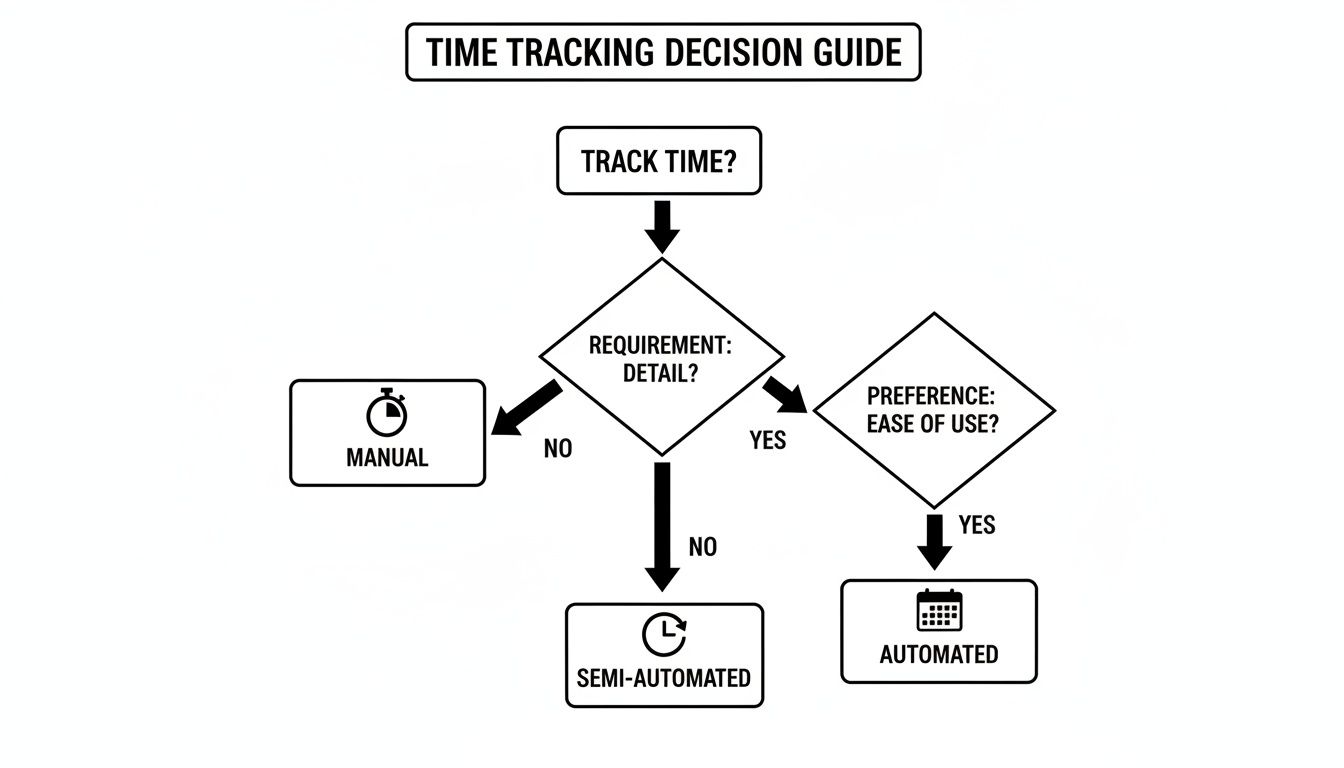
As the flowchart shows, the real split is between an active, user-driven process (manual) and a passive, system-driven one (automated).
To really understand the impact of this choice, let's break down how these two methods stack up against each other on the criteria that matter most to agencies and professional services firms.
Manual Stop Watch vs. Automated Calendar Tracking
Here's a side-by-side look at the two approaches.
| Criterion | Manual 'Stop Watch' Method | Automated Calendar-Based Tracking |
|---|---|---|
| Workflow | Active: User must start/stop timers for every task. | Passive: Captures activities from digital calendars in the background. |
| Accuracy | Prone to human error, guesstimates, and forgotten entries. | High-fidelity data based on actual calendar events and tool usage. |
| Team Burden | High friction; feels like a chore, leading to poor adoption. | Minimal effort; requires only a quick review and approval of drafts. |
| Admin Burden | Requires constant chasing, reminders, and manual data compilation. | Drastically reduces admin overhead; no more "timesheet police." |
| Data Quality | Often vague and inconsistent (e.g., "Project Work"). | Granular and contextual, tied to specific clients, projects, and tasks. |
| Business Value | Primarily a tool for basic billing and invoicing. | A powerful business intelligence tool for strategic planning. |
This table lays out the core differences, but the real-world implications go much deeper, especially when it comes to your bottom line and your team's sanity.
The Battle for Data Accuracy
With manual tracking, data accuracy is a constant uphill battle. It’s no secret that retroactive time logging—when people fill out timesheets at the end of the day or week—is wildly unreliable. Studies have shown this can lead to inaccuracies of up to 50%. A single forgotten timer can wipe a valuable 15-minute client call off the books for good.
These little omissions might seem minor, but they compound incredibly fast across a team. Soon enough, you're looking at a huge gap between the work your team actually performed and the work you end up billing for. This isn't just about lost revenue; it completely undermines the reliability of your data for quoting future projects.
Automated systems, on the other hand, capture a complete and objective record of the workday. By pulling data directly from calendar events, video calls, and project management tools like Asana or Jira, they create a detailed activity log that becomes your single source of truth. The accuracy is no longer dependent on someone remembering to click a button.
The core difference is this: a manual stop watch records what we remember to log, while an automated system records what we actually did. This shift from memory to reality is where agencies reclaim thousands in lost billable hours.
Team Adoption and Administrative Burden
Every manager knows the headache of chasing down timesheets. The manual stop watch approach often feels like a punishment to the team, leading to low morale, perpetually late submissions, and an endless cycle of nagging reminders. That administrative drag eats up management time that should be spent on growing the business.
The burden is very real and includes:
- Chasing Submissions: Managers lose hours every single week just reminding people to submit their timesheets.
- Verifying Entries: Vague or questionable entries require a back-and-forth conversation to figure out what the time was actually for.
- Manual Reporting: Someone has to manually pull all that individual data together into a report, a process that’s both time-consuming and prone to error.
Automated systems cut through all of that friction. Because the timesheet is already drafted for them, employees only need to spend a few minutes reviewing and confirming the entries. This high-adoption, low-effort model frees managers from being the timesheet police and lets them focus on analyzing the rich, high-quality data the system delivers.
Quality of Business Intelligence
Finally, think about the strategic value of the data you're collecting. Manual stop watch data is often too vague or inconsistent to be of any real use beyond basic invoicing. Entries like "Project Work" or "Client Call" don't give you the granularity needed for any kind of deep analysis.
Automated tracking, however, links every minute directly to specific calendar events, projects, and even communication threads. This creates a rich, textured dataset that can answer the critical questions your business is facing:
- How much time are we really spending on non-billable client hand-holding?
- Which phases of our projects consistently blow past the budget?
- What is the true cost of our sales and discovery process before a contract is even signed?
By providing clear, detailed, and accurate data, automation transforms time tracking from a billing chore into a powerful business intelligence tool. It offers up insights that are simply impossible to get from a manual stop watch.
Real-World Scenarios for Creative and Client Services
Theory is one thing, but the true cost of a manual stopwatch really hits home in the day-to-day grind of agency life. Let's move past the abstract and step into the shoes of two key players in a busy digital agency to see exactly how manual tracking falls short.

These scenarios aren't hypotheticals; they're where profitability leaks happen every day. We'll see how automated systems plug those gaps—not by adding more administrative burden, but by eliminating it.
Scenario 1: The Account Manager's Juggling Act
Meet Sarah. She's an Account Manager, and her day is a whirlwind of scheduled meetings and spontaneous, high-stakes client interactions. While her calendar might show a clean 30-minute client check-in, her real value is delivered in the chaotic moments in between.
A typical hour for Sarah looks something like this:
- An urgent 10-minute call from a client about a last-minute campaign tweak.
- A quick 5-minute huddle with a designer to clarify some confusing feedback.
- Responding to three critical client emails, which takes another 15 minutes.
- A 20-minute internal strategy session that popped up out of nowhere.
With a manual stopwatch, Sarah is supposed to start and stop a timer for every single one of these tasks. Let's be honest: that never happens. The friction is just too high. Her job is to put out fires and keep clients happy, not to be a professional timekeeper.
The result? An hour or more of highly billable, valuable work simply evaporates every day. The stopwatch only captures the big, scheduled blocks, completely missing the reactive, problem-solving work that defines her role.
An automated system, on the other hand, catches all of this without her lifting a finger. It sees the calendar events, logs the unscheduled video call, and can even track the time spent in her email client. At the end of the day, it presents her with a complete, accurate draft of her time, turning those forgotten fragments into revenue. This is one of the biggest challenges explored in guides on time tracking for agencies—how to capture the work that can't be planned.
Scenario 2: The Designer's Focus Problem
Now, let's look at Alex, a graphic designer. His best work happens during long periods of deep, uninterrupted focus. Every time he has to switch out of his design software to start, stop, or switch a timer, that creative flow is shattered. The mental cost of that constant context-switching is huge.
When Alex is deep in a complex logo design, the last thing on his mind is a timer. He might spend 90 minutes on one client's project, then jump over to a quick 15-minute revision for another. If he forgets to switch the timer, one client gets overbilled while the other is underbilled. This creates billing headaches and, worse, erodes client trust.
The stopwatch forces a creative professional to choose between maintaining their focus and maintaining accurate time logs. This is a choice that ultimately costs the agency money, one way or another.
With an automated system, Alex stays locked in his creative zone. The software passively tracks his activity in applications like Adobe Creative Suite. It intelligently connects that activity to the right project based on his calendar and other digital breadcrumbs, drafting a precise timesheet without ever pulling him out of his work.
This allows Alex to dedicate 100% of his mental energy to being creative, which boosts the quality of his work and the accuracy of the agency’s billing. The outcome is a happier, more productive designer and a more profitable agency.
Calculating the ROI of Modern Time Tracking
Moving from a manual stop watch to an automated system isn't just a workflow upgrade; it's a direct investment in your agency's profitability. The return on that investment becomes crystal clear when you start to quantify the financial gains. For any agency leader looking to build a business case, the argument boils down to three core areas: recovered billable hours, slashed administrative costs, and dead-on quoting accuracy.

The biggest driver of ROI, without a doubt, is recapturing all that previously unbilled time. As we've seen, manual tracking consistently fails to log the fragmented but valuable work that fills up a day—those quick client calls, urgent emails, and impromptu team huddles that never make it onto a timesheet.
Uncovering Lost Revenue
Let's run the numbers for a hypothetical 50-person agency. We'll assume a blended billable rate of $150/hour and that each employee loses a mere 15 minutes of billable time daily because of the friction involved with manual tracking. Honestly, this is a conservative guess, as studies have shown that trying to log your time retroactively is wildly inaccurate.
Here’s how the math plays out:
- Daily Loss Per Employee: 0.25 hours x $150/hour = $37.50
- Daily Loss for the Agency: $37.50 x 50 employees = $1,875
- Annual Recoverable Revenue: $1,875 x 250 workdays = $468,750
Just by capturing this tiny slice of lost time, the agency could add nearly half a million dollars to its annual revenue. That figure alone is often more than enough to justify the switch to an automated platform.
The most significant ROI comes not from tracking more, but from tracking effortlessly. Automation captures the billable minutes that a manual stopwatch was never designed to handle, turning operational noise into concrete revenue.
Reducing Administrative Overhead
Beyond the direct revenue, you have to consider the soft costs that come with manual timesheets. Think about the hours managers and operations staff sink into chasing down, verifying, and compiling all that data. If a manager earning $100,000 a year spends just two hours a week on timesheet admin, that's over $5,000 in wasted salary for that one person.
Now, multiply that across all your team leads. Add in the time every single employee spends trying to piece their week back together. The costs balloon quickly. Automation practically eliminates this headache, freeing up your most expensive people to focus on high-value, strategic work instead of chasing paper. It’s a simple shift that redirects thousands of payroll dollars from internal policing to productive, client-facing activities that actually boost your bottom line.
How to Transition From Manual to Automated Tracking
Making the switch from a manual stopwatch to an automated system isn't really about the tech—it's about managing change. A great transition comes down to a clear, thoughtful plan that gets your team excited about the move, rather than just dropping a new tool on them. The trick is to show them how it solves their biggest headaches.
Start by getting real about your current workflow. Pinpoint the exact frustrations: the hours wasted chasing down timesheets, the revenue that slips through the cracks from unbilled work, and the creative energy drained by constantly starting and stopping a timer. This audit gives you the "why" you need to drive real adoption.
Create a Smooth Migration Plan
A phased rollout is your best friend here. It prevents everyone from feeling overwhelmed and helps build momentum. Instead of a hard cutover for the entire agency, kick things off with a pilot program.
This lets you test the waters in a controlled way, gather honest feedback, and fine-tune your setup. More importantly, it creates internal champions who can genuinely speak to the benefits. A successful migration is a core theme when you look at how automated timesheets change the way you manage time and organize the workday.
Here's a simple checklist to get you from A to B:
- Audit Your Pain Points: Get specific. Document exactly where the stopwatch method is letting you down. Is it inaccurate billing? Administrative burnout? A total lack of project visibility? Put numbers to the problem wherever you can.
- Select the Right Tool: Your choice should hinge on key integrations. Does it play nicely with your team's calendars (Google, Outlook), project management software, and billing platforms?
- Run a Pilot Program: Pick a small, tech-friendly "champion" team to take the new system for a spin. Their success stories and feedback are pure gold for a company-wide rollout.
- Communicate the 'Why': Don't frame this as a top-down mandate. Talk about the benefits for the team: less tedious admin, more accurate data for fair workloads, and the freedom to stay in a state of deep focus.
The goal isn't just to replace a tool; it's to replace a tedious habit. A successful transition makes the new workflow so much easier that your team would never dream of going back to the old way.
Train for the New Workflow
Finally, your training needs a mindset shift. It’s no longer about "how to enter time," but rather "how to review and approve time."
The new workflow is worlds faster, with the main task being a quick verification of AI-generated drafts. Run a few short training sessions showing just how simple it is to make a quick edit, add a note, and approve an entire week's worth of entries in minutes. This turns what could feel like a huge change into a simple, welcome upgrade.
Thinking about making the switch from a stopwatch to an automated time tracker? It’s a big move, and a few common questions always pop up. Let’s tackle them head-on, because getting these concerns out of the way is the first step to a smoother, more profitable workflow.
Will My Team Feel Like I'm Micromanaging Them?
This is probably the biggest concern we hear, and it's completely valid. But modern automated tools aren't about employee surveillance. Forget invasive methods like screen recording or keystroke logging—that’s not what this is.
Instead, these systems are built for billing accuracy. They capture work context from the digital tools your team already uses, like calendars and project management apps. The goal is to build an objective, accurate record of billable work, not to watch over anyone's shoulder. Good platforms are designed with privacy in mind, giving your team control to verify and approve their own time entries.
How Much of a Headache Is the Setup and Training?
You might be surprised. The technical part is usually a breeze—most platforms integrate with your existing calendars and PM tools in just a few minutes. There's rarely any complex IT work involved.
The real work isn’t technical; it’s about rethinking old habits. The main effort is in defining your project rules and guiding your team through the shift from manual entry to a simple review-and-approve process.
The learning curve is less about the tool and more about the mindset. But trust us, the long-term time savings and recovered revenue make that initial investment in change management more than worth it.
Do We Lose the Ability to Make Manual Edits?
Not at all. Automation is here to get rid of the soul-crushing task of building a timesheet from scratch, not to wrestle control away from your team. You always have the final say.
These systems generate incredibly detailed draft timesheets based on captured activity, but that’s all they are—drafts. Employees and managers can easily jump in to review, make edits, add specific notes for context, or even create new entries for offline work. It’s the perfect blend: automated data capture with 100% human oversight, ensuring every entry is accurate.
Ready to see how much revenue you're leaving on the table with manual tracking? TimeTackle provides the visibility you need to capture every billable minute, effortlessly. Discover a smarter way to track time.