
Time card approval sounds so… formal, doesn't it? At its core, it's just the process of looking over your team's timesheets to make sure everything adds up before you run payroll or bill a client. It’s that critical last look to confirm hours, project codes, and billable time are all accurate, saving you from some serious headaches down the road.
Why Your Time Card Approval Process Is Probably Broken
Let’s be honest for a second. The end of a pay period probably kicks off a frantic scramble. You're chasing down timesheets, trying to make sense of vague entries, and manually fixing one error after another. It’s a massive drain on your agency’s resources.
For ops leaders and project managers, this isn't just a minor administrative chore; it's a huge operational bottleneck with real financial consequences.
The friction is palpable. Your team is tired of filling out timesheets, so they rush through it, leading to sloppy submissions. Then, managers burn valuable time they don't have correcting those mistakes instead of, you know, managing. This painful cycle hits your bottom line directly through billing mistakes, delayed invoices, and shoddy resource planning.
The Real Cost of Doing Things the Old Way
In the world of mid-sized agencies and consulting firms, sticking with manual time card approvals is a huge liability. A recent analysis of thousands of US companies found that while 65.9% of tracked work hours are billable, a whopping 34.1% are not. You can dig into more time tracking insights on OpenPR, but that gap alone shows how crucial an accurate approval process is for capturing revenue.
This manual grind creates a domino effect across your entire operation:
- Delayed Invoicing: When approvals drag on, invoices go out late. That directly hurts your cash flow.
- Inaccurate Project Costing: If you don't have precise time data, you're just guessing at project profitability and future staffing needs.
- Eroded Profit Margins: Every unbilled hour and administrative mistake is money straight out of your pocket.
- Poor Decision-Making: Bad data leads to bad decisions about staffing, client retainers, and how to grow the business.
The core problem with spreadsheet-driven approvals is that they treat a dynamic, strategic process like a static accounting task. It disconnects the work being done from the value it creates, making it nearly impossible to see the bigger picture.
An effective time card approval workflow, on the other hand, turns this pain point into a genuine strategic advantage. By ditching the spreadsheets for a modern, automated approach, you transform a tedious chore into a source of valuable business intelligence.
It’s about more than just getting payroll right. It’s about building a more profitable, efficient, and data-driven agency.
Manual Vs Automated Time Card Approval
The difference between wrestling with spreadsheets and using a dedicated workflow tool is night and day. One is a reactive, time-consuming mess, while the other is a proactive system that gives you back time and provides clarity. Let's break down the real-world differences.
| Feature | Manual Process (Spreadsheets) | Automated Workflow (e.g., TimeTackle) |
|---|---|---|
| Submission | Manual email attachments; easy to lose track of versions. | Centralized, one-click submissions from employees. |
| Approval Routing | Relies on email chains and manual forwarding; slow and prone to error. | Pre-defined, multi-level approval chains that route automatically. |
| Error Checking | Entirely manual; requires managers to spot-check every entry. | Automated flags for missing info, overtime, or budget variances. |
| Reminders | Requires managers to personally chase down late submissions. | Automatic email and app notifications for submissions and approvals. |
| Integration | Disconnected from payroll and invoicing; requires manual data re-entry. | Seamless integration with payroll, accounting, and project tools. |
| Time Investment | Hours per pay period spent on admin tasks, chasing, and corrections. | Minutes per pay period; managers only review exceptions. |
| Reporting | Cumbersome and time-consuming to compile any meaningful data. | Real-time dashboards and reports on billable hours and project costs. |
Ultimately, clinging to a manual process costs you far more than just time. It introduces unnecessary risk, slows down your financial cycle, and keeps you from accessing the data you need to make smart business decisions. An automated system isn't a luxury—it's foundational for any agency serious about growth and profitability.
Designing A Workflow That Actually Works
Before you can automate anything, you need a solid blueprint. Building an effective time card approval workflow really starts with defining who does what. It’s all about creating a clear chain of command that cuts down on confusion and builds accountability into your daily operations.
Making the leap from manual chaos to automated clarity is a big deal. For years, the evolution of time card approvals was a slow march from paper-based drudgery to digital precision. It wasn't that long ago that most mid-sized agencies were wrestling with spreadsheets, which invited rampant errors—in fact, some studies show payroll discrepancies as high as 10-20% annually, all from unapproved or miscategorized hours.
This side-by-side comparison really highlights the shift from a clunky, manual system to a smooth, automated one.
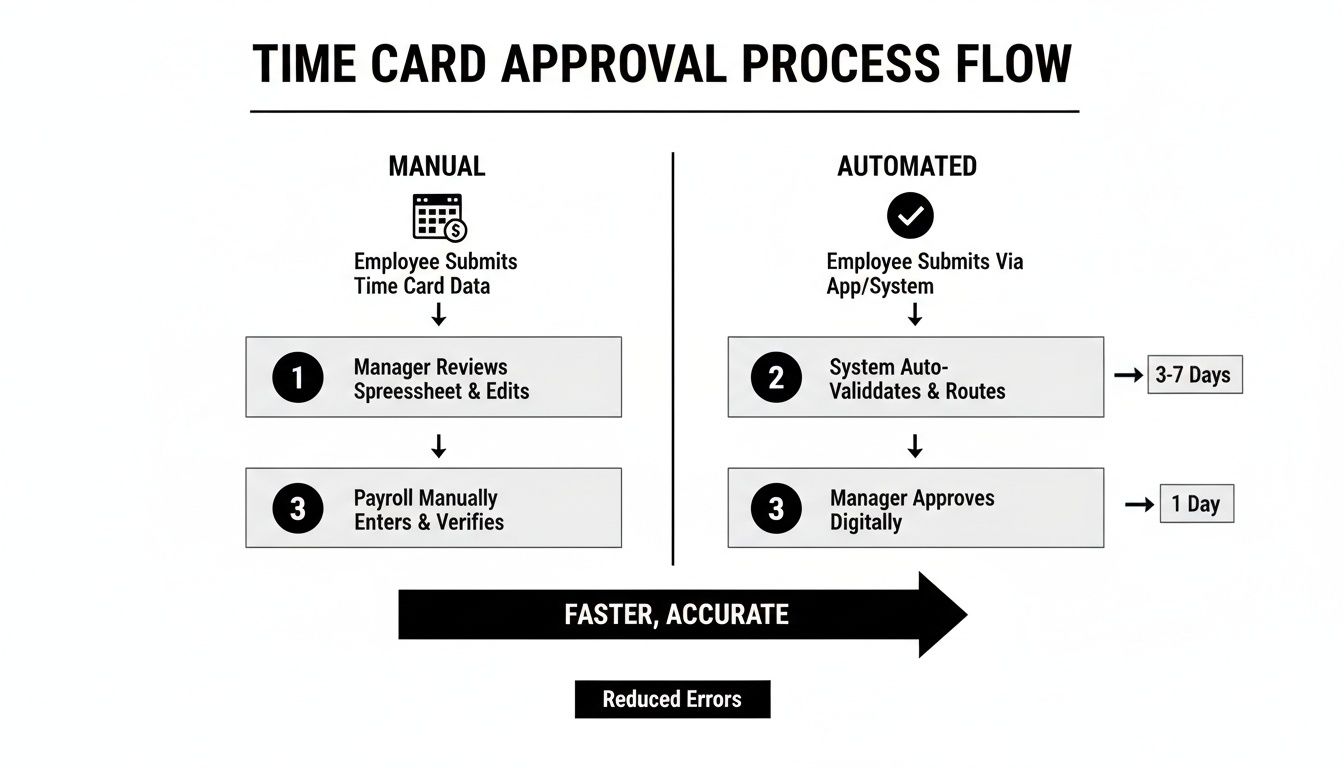
The main takeaway here is how much you reduce manual touchpoints and decision loops. That’s what directly speeds up the whole approval-to-payment cycle.
Establishing Clear Roles and Policies
First things first, you need to map out your approval hierarchy. A well-defined structure ensures every timesheet gets reviewed by the right people at the right time. For a creative agency, this might look like a multi-level chain that balances project oversight with financial control.
- Team Member: Submits their own time card, making sure all hours are logged against the correct project codes.
- Project Manager: They're the first line of defense. They review entries for project-specific accuracy, confirming the time makes sense with project milestones and budgets.
- Department Head/Operations Lead: This is the second level of approval, looking at the bigger picture—things like team utilization, overtime, and budget adherence across multiple projects.
- Finance/Payroll: The final approver who does a last check for compliance with company policy before processing timesheets for payroll and client invoicing.
Your workflow is only as strong as the policies that govern it. Without clear, standardized rules, even the best technology will fall short.
To get a better handle on the universal principles of good workflow design, it’s helpful to look at how other departments have nailed it. The logic behind things like accounts payable process best practices translates directly to creating a bulletproof time card approval system.
Creating Standardized Guardrails
Once you've got your roles figured out, it's time to create simple, non-negotiable policies that everyone can actually follow. Think of these rules as the guardrails that keep your process on track and prevent common headaches from derailing your workflow. By setting clear expectations, you make it way easier for employees to submit accurate time cards from the get-go.
Your policy document should clearly outline a few key things:
- Submission Deadlines: Set a firm, recurring deadline (like Friday at 5 PM) and be clear about what happens if it's missed.
- Billable vs. Non-Billable Hours: Give specific examples for each category. This takes the guesswork out of it.
- Correction Protocol: Define a simple process for how employees should correct and resubmit a rejected time card.
Of course, giving your team the right tool for the job is essential. A user-friendly time card app for employees can make sticking to these policies almost effortless.
Putting Your Approval Process On Autopilot
Once you have a solid workflow design, it's time to let technology handle the heavy lifting. Automating your time card approval process isn't about removing people from the equation. Far from it. It’s about freeing your managers from the manual grind so they can focus on the exceptions that actually need their attention. This is how you win back hours once lost to chasing down timesheets.

The first, most obvious win is automated reminders. Forget the Friday afternoon flurry of Slack messages from a stressed-out project manager. The system can automatically nudge team members who have outstanding timesheets, dramatically improving submission rates without anyone lifting a finger.
On the flip side, you can set up alerts for approvers, pinging them the moment a time card is ready for review. You can even flag entries that have been sitting in their queue for too long.
Implementing Rule-Based Approvals
This is where the real magic happens. By setting up rules that handle the bulk of routine approvals, you create an intelligent assistant that knows your company policies inside and out. It’s designed to free up your managers' brainpower.
Consider creating automations for common scenarios like these:
- Pre-Approved Projects: Automatically approve any time logged against a specific internal project or a client retainer where you aren't scrutinizing every minute.
- Budget Thresholds: Get an early warning by instantly flagging any time entry that pushes a project over 80% of its budgeted hours.
- Overtime Alerts: Set up a rule to automatically route any timesheet with overtime hours to a department head for that mandatory second look.
These rules don't just speed things up; they enforce consistency. Instead of combing through every single line item, managers can shift their focus to reviewing the flagged exceptions that genuinely require a strategic decision.
By automating the predictable, you empower your leaders to focus on what matters. Their time is better spent analyzing budget variances and resource allocation—not just verifying routine data entry.
Pre-Populating Time Cards From Calendars
Let's be honest, one of the biggest reasons for timesheet errors (and employee frustration) is the simple act of trying to remember what you did all week. Integrating with tools your team already uses, like Google Calendar or Outlook, is a game-changer here.
Tools like TimeTackle can connect directly to your team's calendars and pre-populate their timesheets based on scheduled meetings and events. A two-hour client workshop on the calendar? It automatically shows up as a two-hour entry on the timesheet, already tagged to the correct client.
The benefit here is twofold. For employees, it kills the administrative headache of building a timesheet from scratch, which means better accuracy and more on-time submissions. For managers, the data they're reviewing is rooted in a source of truth—the calendar—which leads to fewer rejections and back-and-forth corrections.
This simple connection dramatically speeds up the entire time card approval cycle. If you want to slash manual work, exploring the world of automated timesheets is the perfect place to start.
How To Measure And Optimize Your Workflow
A time card approval workflow isn’t a “set it and forget it” system. If you really want to turn this process into a source of operational intelligence, you have to measure its performance and constantly look for ways to make it better. Data is your best friend here, turning what feels subjective into something you can objectively improve.

Without tracking key metrics, you’re just flying blind. You might feel like approvals are slow, but you won't know why or where the actual bottlenecks are hiding. A data-driven approach lets you pinpoint problems with surgical precision and make targeted improvements that stick.
Inefficiencies in manual processes are a huge—and often hidden—cost. Data shows that while billable hours make up about 65.9% of logged time, approval delays can easily inflate non-billable work. As more businesses ditch error-prone manual methods, it's clear where the industry is heading. For a deeper dive into the numbers, check out these time tracking statistics from Clockify.
Key Metrics for Workflow Health
So, where do you start? The first step is identifying the key performance indicators (KPIs) that truly reflect the health of your time card approval process. You want metrics that are actionable and paint a clear picture of what’s really going on.
Here are a few essential KPIs I always recommend monitoring:
- Average Approval Time: This is the big one. It measures the clock from the moment a time card is submitted to its final approval. A high average time can signal anything from manager overload to confusing policies.
- Submission Compliance Rate: This is simply the percentage of time cards submitted on or before the deadline. A low rate is often a symptom of clunky submission procedures or a lack of employee training.
- Percentage of Rejected Time Cards: This tracks how many submissions are sent back for corrections. A high rejection rate is a massive red flag, usually pointing to problems like confusing project codes or inconsistent logging habits.
Visualizing these KPIs on a real-time dashboard is a game-changer. You stop reacting to yesterday's problems and start proactively managing your workflow. This visibility turns abstract numbers into a clear story about your team's operational rhythm.
To help you get started, here’s a quick-reference table outlining the most important metrics to keep an eye on.
Key Metrics For Time Card Approval Health
| Metric | What It Measures | Industry Benchmark | How to Improve |
|---|---|---|---|
| Average Approval Time | The time from submission to final approval. | < 48 hours | Automate reminders, clarify approval chains, and ensure mobile access for managers. |
| Submission Compliance | The percentage of time cards submitted on time. | > 95% | Simplify the submission process, send automated reminders, and provide clear instructions. |
| Rejection Rate | The percentage of time cards sent back for edits. | < 5% | Standardize project codes, offer training, and use software with validation rules. |
| Cost Per Time Card Process | The total cost (labor, software) to process one time card. | Varies by industry | Automate manual steps, reduce errors through better software, and streamline the workflow. |
| Manager Approval Burden | The average time managers spend reviewing and approving time cards each pay period. | < 1 hour per manager | Implement exception-based approvals and use dashboards to quickly spot outliers. |
Tracking these KPIs will give you a solid foundation for diagnosing issues before they snowball into major payroll headaches or project delays.
Turning Data into Action
Let's walk through a real-world scenario. Imagine you're an Operations Leader at a busy consulting firm. While checking your dashboard, you notice the rejection rate for a specific team has shot up to 30% over the past two weeks. The company average? Just 5%.
Instead of making assumptions, you dig into the rejected entries. A pattern emerges almost immediately: most rejections are tied to a new client project with ambiguous task codes. Your team members are basically guessing where to log their hours, which is causing a constant back-and-forth for corrections.
The fix is surprisingly simple. You work with the project manager to clarify the codes and then send out a quick one-page guide to the team. The very next week, that team’s rejection rate plummets back to the company average.
That’s the power of data in action. It helps you diagnose the root cause and apply a precise solution instead of wasting time on guesswork. If you're looking to take this even further, our guide on how to measure team productivity is a great next step.
Common Time Card Approval Pitfalls To Avoid
Even with a beautifully designed workflow and slick automation, a few common mistakes can still trip you up. Think of these as the hidden friction points that slowly sabotage your entire time card approval process. Trust me, avoiding them from the start is way easier than fixing them later.
These issues often look small at first. But they can snowball into massive headaches, leading to payroll errors, blown project budgets, and a general lack of faith in the system you've worked so hard to build. Let's get ahead of them.
Vague Time Entry Categories
One of the most common problems I see is simple ambiguity. When your team doesn't have crystal-clear categories to log time against, they're left to guess. That guesswork leads to messy, inconsistent data that’s pretty much useless for real analysis.
You end up with entries like "Client Work" or "Admin Tasks." What does that even mean? It tells you nothing about which client is profitable or where your team's hours are really going. The fix is to get ruthlessly specific with your project and task codes.
- Bad Example: "Marketing"
- Good Example: "Marketing – Client XYZ – Q3 Campaign – Content Creation"
This isn't about micromanagement; it's about clarity. This level of detail empowers your team to log their time correctly on the first try, which drastically cuts down on rejections and the endless back-and-forth between employees and managers.
A great time card approval process starts with great data hygiene. If your input categories are messy, your output reports will be meaningless. Garbage in, garbage out.
Inconsistent Deadline Enforcement
Setting a deadline for timesheet submissions is the easy part. Actually enforcing it consistently? That’s much harder, but it’s absolutely critical for a smooth process.
When deadlines become suggestions, you get a chaotic scramble at the end of every single pay period. Managers are stuck chasing people down, payroll gets delayed, and the entire workflow grinds to a halt. The solution is to tie submission compliance directly to performance expectations. Make it clear that submitting accurate time cards on time is a core professional responsibility, period.
Automated reminders are a massive help, of course, but they need to be backed by a firm policy. If someone consistently misses the deadline, their manager should address it just like any other performance issue. This builds a culture of accountability where everyone gets why it's so important to keep things moving.
Lack of Proper Training
You can't just throw new hires—or even current employees—into your time tracking system and expect them to get it right. A huge pitfall is just giving someone login access and assuming they’ll figure it out. This is a recipe for a huge spike in errors and rejected time cards.
A simple, effective onboarding is your best friend here. Create a short training doc or a quick video that walks new team members through the process from start to finish.
- Explain the "Why": Briefly touch on why accurate time tracking matters for the company, whether it's for client billing or understanding project profitability.
- Define Key Terms: Clearly explain what you mean by "billable" vs. "non-billable" time and give a few real-world examples of each.
- Show the "How": Give them a literal step-by-step walkthrough of how to fill out and submit a time card in your specific software.
- Outline the Approval Path: Show them who reviews their time card and what happens if it gets rejected so they know how to fix it.
This small investment in training pays for itself almost immediately by preventing countless errors and ensuring your time card approval process actually works the way you designed it to.
Common Questions About Time Card Approval Workflows
Even the most carefully planned workflow will run into real-world challenges. Let's tackle some of the most common questions that come up when leaders are fine-tuning their time card approval process.
How Do You Get Team Members to Actually Use the New System?
Let's be honest: change is hard, and filling out timesheets often feels like a chore nobody asked for. If you want your team to get on board, you have to sell them on the benefits to them, not just the benefits to the company.
Forget talking about profitability or resource allocation. Instead, show them how this new process means fewer follow-up emails and less administrative headache on their end. Demonstrate how a simple calendar integration can literally give them back time every single week. When they see the new system as a tool that makes their life easier, not just another layer of corporate oversight, you'll see adoption happen almost overnight.
The best way to get buy-in is to make the right way the easiest way. If your new process is genuinely simpler and faster than the old one, people will use it. It’s that simple.
What’s the Best Way to Handle Disputed Hours?
It’s inevitable. At some point, a manager and an employee won't see eye-to-eye on logged hours. The key is to handle these moments quickly and fairly, without turning it into a big confrontation.
First, set a clear rule: if a manager disputes an entry, they must reject it with a specific, constructive note. "This seems high" isn't helpful. "Was this time for the Q3 report or the client discovery call? Please use project code X for the report," gives the employee the context they need to make a quick fix.
If there's still a disagreement, the next step should be a simple conversation between the employee and manager to talk it through. This direct, one-on-one communication solves 99% of these issues without needing to escalate things further. It keeps the process moving and maintains a culture of trust.
What Happens When an Approver Is on Vacation?
An out-of-office manager should never bring your payroll to a screeching halt. This is a classic bottleneck, and a well-designed workflow can eliminate it completely through smart delegation.
The process is simple: before a manager goes on leave, they designate a temporary approver in the system. This could be another manager, a team lead, or a department head. All submitted time cards are then automatically routed to the backup, ensuring the workflow continues without anyone needing to manually forward emails or chase people down.
- Primary Approver: The person who normally signs off on the time card approval.
- Delegated Approver: The designated backup who steps in to approve submissions for a set period.
- System Admin: Can always step in to override and re-assign approvals if both the primary and delegated approvers are unavailable.
By setting up these delegation rules ahead of time, you build a resilient process that doesn't depend on any single person. It’s a small step that prevents a ton of last-minute scrambling and makes sure everyone gets paid on time, every time.
Ready to stop chasing timesheets and start getting real insights from your team’s time? TimeTackle automates the entire time card approval process by syncing with your team's calendars, eliminating manual entry and providing clear, actionable data. See how it works at https://www.timetackle.com.