Let’s be honest, the term "time tracker" doesn't exactly spark joy. It probably brings to mind old-school punch clocks or annoying, micromanage-y software. But for modern agencies and professional services firms, a good time tracker is something else entirely. It’s less of a punch clock and more of a business intelligence tool, showing you exactly where your most valuable resource—your team's time—is actually going.
This isn't about watching the clock; it's about making every hour count. It's how you turn vague feelings about a project's profitability into hard data.
Moving Beyond the Punch Clock
If you still think of time tracking as a way to babysit your team, it's time for a mindset shift. For today's agencies, a modern time tracker is more like a health monitor for the business. It gives you the vital signs on project profitability, shows you who’s overbooked (and who’s not), and spots operational bottlenecks before they cause real damage. It’s all about moving from guesswork to data-backed decisions.
The goal here is to stop seeing time tracking as a dreaded chore and start seeing it as your most valuable strategic asset. We'll explore how automated, calendar-integrated systems finally solve the classic problems of manual timesheets—the forgotten entries, the wild inaccuracies, and the sheer number of hours wasted just trying to fill them out. This clarity is what plugs the leaks in your profitability and fuels real growth.
The Shift from Manual Entry to Strategic Insight
For decades, time tracking was a look-back exercise. You’d get to Friday afternoon and try to piece together your week, inevitably forgetting half of what you did. That kind of retrospective data is notoriously unreliable and, frankly, not very useful for making smart business decisions.
Modern tools, especially those that plug right into your team's calendars, completely flip the script. They capture data as it happens, automatically building a reliable picture of the workday. For an agency, this shift is everything. It’s how you finally get clear answers to critical questions like:
- Project Profitability: Are we actually making money on that big client, or are they a time-sink?
- Resource Allocation: Is my senior team spending their days on high-value, billable work or getting stuck in endless internal meetings?
- Operational Efficiency: Where are the roadblocks in our process that are killing our margins?
By taking the grunt work of data collection off your team's plate, you free them up to do what they do best. At the same time, you give leaders the insights they need to make smarter, faster decisions. It’s a total game-changer.
Why Time Tracking Is Gaining Momentum
This isn't just an internal priority for a few forward-thinking agencies; it's a massive global trend. The time tracking software market is absolutely exploding. It was valued at around USD 3.8 billion in 2025 and is projected to hit a staggering USD 16.1 billion by 2035.
A big driver was the massive shift to remote and hybrid work that started back in 2020. Suddenly, companies everywhere needed a way to understand what their distributed teams were working on without resorting to micromanagement. You can find more details on time tracking market growth and its key drivers here.
But it's bigger than just managing remote teams. It’s about building a business that’s resilient, efficient, and profitable, no matter where your people log in from. Consider this guide your playbook for turning raw time data into your agency's biggest competitive advantage.
Understanding Different Time Tracker Technologies
Let's be honest, the term "time tracker" can conjure up anything from a dusty old spreadsheet to a Big Brother-style monitoring tool. But not all time trackers are created equal. The key is finding one that actually helps your agency instead of adding another tedious task to everyone's plate.
The journey for most businesses starts with the basics: manual entry. Think spreadsheets or simple stop-and-start timers. While they seem easy enough, they’re notoriously unreliable. These methods hinge completely on human memory and diligence, which, let's face it, are in short supply at 4:45 PM on a Friday. This leads to guesstimates, lost billable hours, and a whole lot of team frustration.
From Manual Timers to Automated Capture
To solve the memory problem, many agencies graduate to automated time trackers. These are the tools that run in the background, logging which apps you use, websites you visit, and documents you have open. They definitely provide a more accurate picture of activity without needing someone to constantly punch a clock.
This is a big step up from a spreadsheet, but it can feel a bit intrusive and often captures a lot of "noise"—the five minutes you spent on a news site or the ten minutes you were helping a colleague with their computer. It still leaves a team member with the chore of sifting through this digital trail and assigning everything to the right project. The burden of memory is gone, but the administrative headache of categorization remains.
This is where the real breakthrough for agencies and professional services comes in: the AI-powered, calendar-based time tracker.
This technology represents a fundamental shift. Instead of tracking your activity and asking you to make sense of it, it starts with your planned work—your calendar—and uses that as the foundation. It's about working smarter, not just tracking harder.
For most agencies, the calendar is already the single source of truth for the workday. It’s where meetings, client calls, and focused work blocks are scheduled. An intelligent time tracker simply taps into this existing workflow, logging time against the events you've already planned.
Here’s a look at the core benefits that a modern time tracker unlocks.
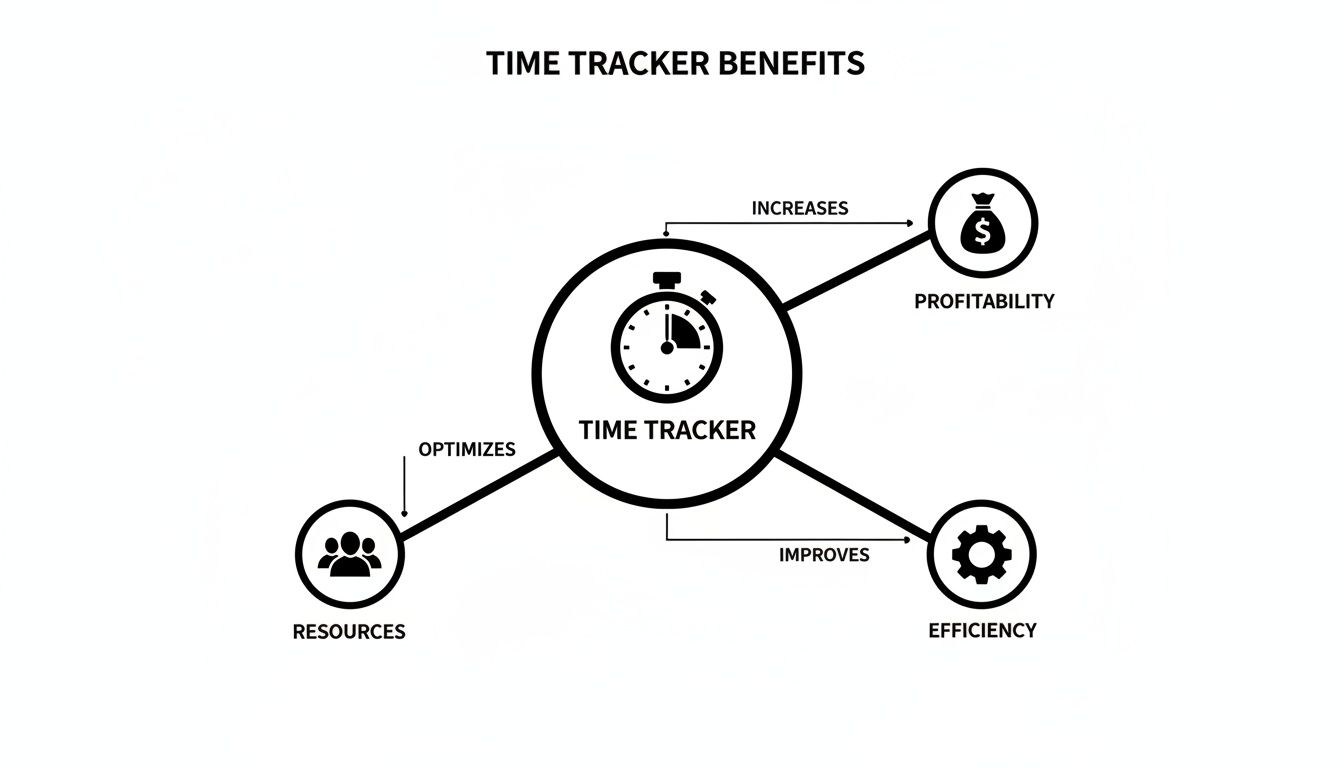
As you can see, getting your time data right has a direct ripple effect on profitability, resource management, and overall efficiency. It turns a simple tool into a genuine strategic asset.
To make these differences crystal clear, let's compare the three main types of time trackers side-by-side.
Comparison of Time Tracker Types
| Feature | Manual Time Trackers | Automated Time Trackers | AI-Powered Calendar Trackers |
|---|---|---|---|
| Accuracy | Low; relies on memory and guesstimates | High for activity, but context can be lost | Very high; based on planned, confirmed work |
| Admin Effort | Very high; requires constant manual entry | Medium; requires reviewing and categorizing activity | Very low; automates logging and categorization |
| Team Adoption | Low; seen as a tedious chore | Mixed; can feel intrusive or "micromanagey" | High; works with existing calendar habits |
| Strategic Value | Low; data is often unreliable for forecasting | Medium; provides activity data but lacks project context | High; links time directly to projects and clients |
This table shows the clear evolution. While manual and basic automated trackers have their place, AI-powered calendar trackers are built for the strategic needs of modern agencies, focusing on minimizing friction and maximizing data quality.
The Power of AI and Calendar Integration
The most sophisticated systems today integrate directly with calendars like Google Calendar and Outlook. When a scheduled meeting with "Client A" wraps up, the time is automatically logged and assigned to that client's project. No one has to remember to start or stop a timer.
But the real magic is in the AI. These platforms use smart rules and automations to categorize time with almost no human input. You could set a rule, for instance, that automatically tags any meeting with a specific contact as "Client Management" under their associated project. This transforms a painful, error-prone chore into a seamless background process, guaranteeing your data is both accurate and consistently organized.
The demand for this kind of intelligence is exploding. The time tracking software market jumped from USD 3.35 billion to USD 3.93 billion in a single year, largely driven by the shift to remote and hybrid work. This growth is a response to a problem firms have known about for years: without precise billing and project tracking, profit erosions of 10-20% are common.
This is what moving away from messy spreadsheets to an intelligent, automated system looks like in practice. You get a clean, clear view of how time is spent, allowing you to finally get a true handle on your agency's most valuable—and perishable—resource.
The Features That Drive Agency Growth
Okay, so we've covered the different types of time trackers. Now let's get to the good stuff: the features that actually matter. For an agency, the right tool isn't just about logging hours. It's a growth engine, churning out the data you need to scale profitably. Some features are simply non-negotiable because they plug directly into the metrics that keep agency leaders up at night.
These are the core functions that turn a simple time tracker from a passive recording tool into an active business intelligence platform. They build the bridge from raw time data to the kind of insights that sharpen everything from project bids to resource planning.
Seamless Integrations with Your Core Tools
A time tracker that lives on an island is useless. It absolutely must connect deeply with the tools your team already lives in—namely, your calendars and your Customer Relationship Management (CRM) system.
Think of it this way: your calendar holds all your team's commitments, and your CRM holds all your client and project data. A time tracker that links these two creates a single source of truth for everything you do, billable or not. No more duplicate data entry. No more manual reconciliation headaches.
This connection is what makes powerful automation possible. For instance, time spent on a sales call that's logged in the CRM can automatically be tagged as a "Pre-sales" activity. Just like that, you have a crystal-clear view of your business development efforts.
Granular Analysis with Customizable Tags
Let's be real—not all work is created equal, especially in an agency. An hour spent on client revisions is completely different from an hour of new creative development. A time log that just says "Project X – 8 hours" is basically useless for making smart decisions.
This is where customizable tags and labels are a game-changer. They let you add layers of context to every single time entry, creating a rich dataset you can slice and dice to answer the really tough business questions.
You can set up tags for things like:
- Specific tasks like "Design," "Copywriting," or "Client Management."
- Project phases such as "Discovery," "Implementation," or "Support."
- Work types to separate billable from non-billable work.
This is the level of detail you need to find the true cost of a project and see exactly where your team's energy is going.
With detailed tags, you can finally move beyond surface-level metrics. You can analyze which service offerings are most profitable, identify which project phases consistently go over budget, and ensure your team is spending their valuable time on the right priorities.
Intelligent Automation to Eliminate Manual Work
The number one reason timesheets fail? The sheer effort it takes to fill them out. The best time tracking features are the ones that kill this friction with smart, rule-based automation.
Instead of hounding your team to remember to categorize every meeting, you can create rules that do it for them. For example, you could set up a rule that automatically tags any calendar event with a specific client's name as "billable" and assigns it to their project. This doesn't just save hundreds of hours across the team; it makes your data dramatically more consistent and accurate. Clean data is also a cornerstone of the best practices for managing remote teams, where clarity is key to alignment and productivity.
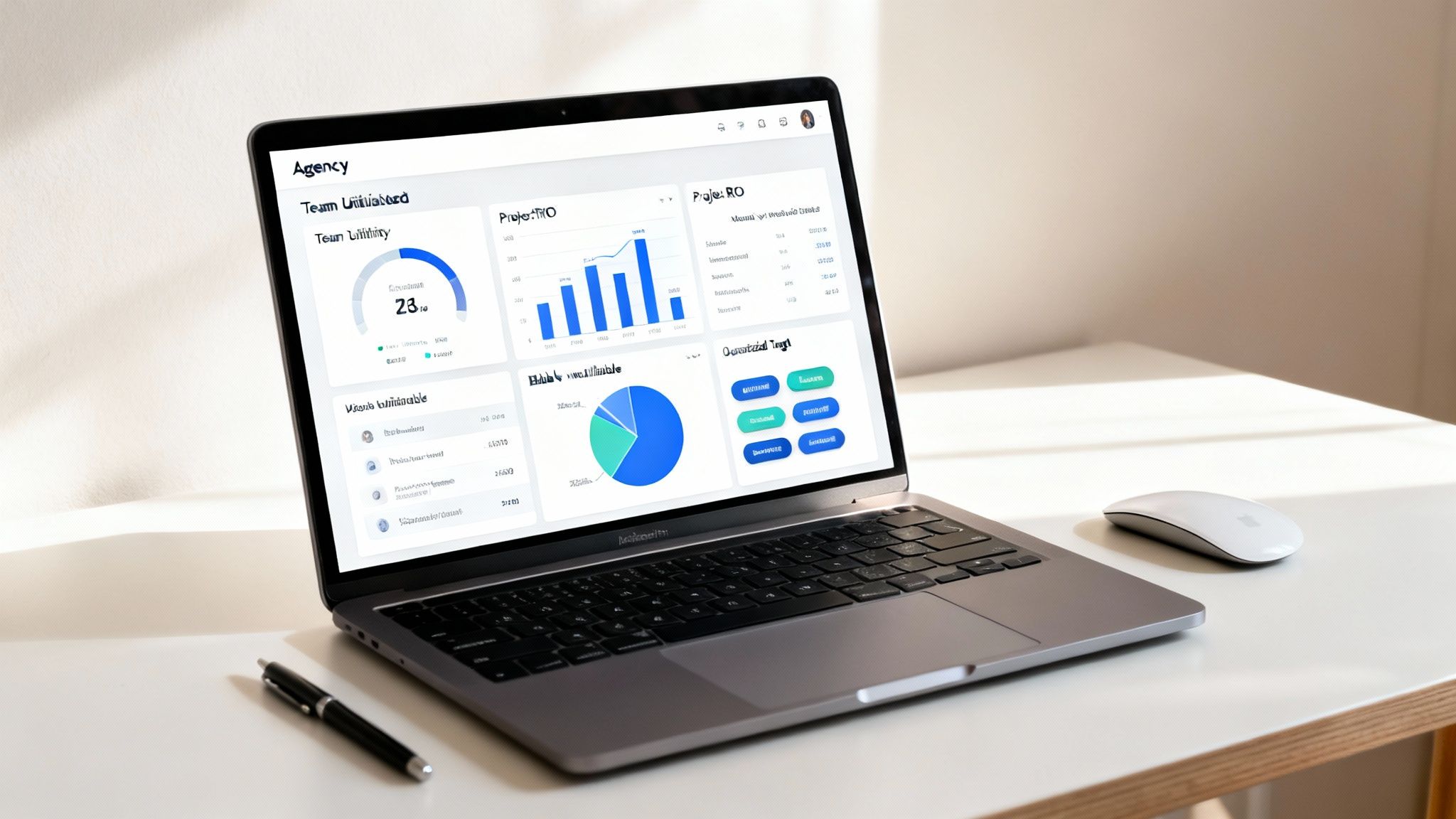
Dynamic Dashboards and Reporting
Raw data is one thing, but making sense of it is another. A top-tier time tracker gives you dynamic, visual dashboards that turn all that complexity into at-a-glance insights. Leaders shouldn't have to export data into a spreadsheet and build pivot tables just to figure out what's happening in their own business.
Your reporting features should instantly visualize key performance indicators (KPIs) like:
- Team Utilization Rates: See who is over- or under-utilized in real-time.
- Project ROI: Compare budgeted hours against actuals to see which projects are hitting the mark.
- Client Profitability: Identify your most valuable clients versus those who are a drain on resources.
- Billable vs. Non-Billable Ratio: Get a high-level view of the agency's overall efficiency.
These are the features that truly drive growth. They give you the clarity to spot trends, fix problems before they blow up, and make confident, data-backed decisions that push the entire agency forward.
Calculating the ROI of Automated Time Tracking
Putting money into any new software means you need a solid business case, and a modern time tracker is no different. The return on investment (ROI) isn't just about shaving off a few minutes on admin tasks; it’s about fundamentally rewiring your agency's financial health. It’s about turning those fuzzy estimates into hard, actionable data.
The real ROI boils down to two things: capturing lost revenue and seriously boosting your operational efficiency.
For most agencies, the biggest and fastest win comes from nailing billing accuracy. We all know manual timesheets are leaky buckets for revenue. Studies consistently show that when people log their time after the fact, they under-report their billable hours by a pretty shocking margin. An automated system that grabs every single meeting and work block ensures nothing slips through the cracks, immediately adding thousands in previously lost revenue straight to your bottom line.

A Story of Agency Transformation
To see how this plays out, let’s imagine 'Innovate & Co.,' a mid-sized creative agency. Before they adopted an automated time tracker, things were, to put it mildly, chaotic. Project managers spent their Fridays chasing down timesheets, billing was based on guesstimates pulled from messy spreadsheets, and they had this nagging feeling that some of their biggest clients were secretly unprofitable.
The team felt overworked, but leadership couldn't figure out why. They were constantly under-billing for all those "quick calls" and extra revisions that nobody ever bothered to log.
After switching to an automated, calendar-based system, the picture changed almost overnight. The tool captured every billable moment, revealing they had been leaving 15-20% of their revenue on the table. Every single month. For a deeper dive on this, check out our complete guide on mastering the art of calculating billable hours.
From Inefficiency to Insight
Beyond just plugging revenue leaks, Innovate & Co. stumbled upon a second, equally powerful benefit: a huge jump in operational efficiency. By automating the soul-crushing process of manual time entry, they reclaimed hundreds of hours of administrative work across the agency each month.
This newfound time wasn't just a cost saving; it was a strategic asset. Creatives could spend more time on high-value client work, and project managers could focus on optimizing workflows instead of nagging their teams about timesheets.
Suddenly, the agency's leadership team had clear, reliable data to make much smarter decisions. They could:
- Price Projects Confidently: Knowing the true cost of similar past projects let them build proposals that actually guaranteed profitability.
- Optimize Staffing: Dashboards clearly showed which teams were buried and which had room to breathe, leading to much better resource allocation.
- Identify Problem Clients: The data didn't lie. It showed exactly which clients respected project scope and which were a constant drain on resources, allowing for more strategic account management.
This kind of shift toward data-driven operations is becoming non-negotiable. The explosion of remote and hybrid work has thrown the need for accurate time tracking into overdrive. The market was valued at USD 19.18 billion and is projected to hit an incredible USD 149.92 billion by 2034.
Think about it: before 2020, only about 20% of firms tracked time digitally. Now, it's over 70%, all driven by the simple need for accuracy when your team is scattered everywhere. You can read more about this explosive market growth and what's behind it.
How to Choose the Right Time Tracker for Your Agency
Picking the right software for your agency can feel like getting lost in a maze of marketing hype and endless feature lists. The trick is to cut through all that noise. You need a clear checklist that focuses on what actually moves the needle on agency performance.
This isn't just about logging hours. It's an investment in a system that brings operational clarity and helps you grow profitably. Forget the flashy dashboards for a second and focus on the core stuff that will make a real difference, day in and day out. That means prioritizing deep integrations, smart automation, and reporting that actually answers your most important business questions.
Core Integrations and Automation
First things first: a modern time tracker has to play nice with your existing tech stack. A standalone tool that forces your team to jump into yet another app is a complete non-starter.
You need to look for deep, native integrations with the calendars your team lives in every day, like Google Calendar and Outlook Calendar. This is the bedrock of effortless, automated time capture. No one should be manually entering what's already on their schedule.
On top of that, a solid CRM integration is a must-have. When your time tracker talks to your client and project data, it kills duplicate entry and creates a single source of truth for all your billable work. This is what lets you track time against specific deals, retainers, or project phases, giving you a crystal-clear view of profitability from the first sales call to the final deliverable.
Reporting Flexibility and Data Access
Raw time data is pretty useless if you can't slice and dice it easily. The time tracker you choose has to offer flexible, dynamic reporting. Can you filter, group, and visualize data by client, project, team member, or custom tags? You should be able to get answers to your critical questions without spending hours wrestling with spreadsheets.
Look for tools that give you multiple export options, like direct exports to Excel or Google Sheets, for those times you need to do a deeper analysis. The ability to pull key reports quickly is what separates a guessing game from an informed business decision.
The right reporting features transform time data from a simple record of the past into a predictive tool for the future. You can use it to spot budget overruns before they happen, optimize resource allocation, and build more accurate quotes for new business.
Security, Usability, and Scalability
You’re tracking sensitive project and client information, so security isn't just a feature—it's a requirement. Make sure any vendor you consider has enterprise-grade security certifications, like SOC 2 Type II compliance. This is your proof that your data is protected by strict, independently audited security controls.
Beyond security, think about the actual user experience. A clunky, complicated tool will tank team adoption, defeating the whole purpose of buying it. A clean interface, an intuitive workflow, and minimal friction are essential. The best tools hum along quietly in the background, requiring very little active effort from your team. For more information, you can explore our guide on the best agency time tracking software.
Finally, think about where your agency is headed. Will this tool grow with you? A scalable time tracker should be able to handle an expanding team, more complex projects, and growing data volumes without skipping a beat. You're not just choosing a tool for today; you're choosing a partner that can support your agency for years to come.
To help you compare your options methodically, we've put together a checklist. Use this to score potential vendors and see how they stack up against the features that truly matter for a growing agency.
Vendor Evaluation Checklist
| Evaluation Criteria | Why It Matters | Your Rating (1-5) |
|---|---|---|
| Calendar Integration (Google/Outlook) | The foundation for automated time tracking. It must be a deep, native integration, not a clunky workaround. | |
| CRM Integration (e.g., Salesforce, HubSpot) | Connects time data to client and project profitability, creating a single source of truth for billable work. | |
| Automated Time Capture | Eliminates manual entry, dramatically improves data accuracy, and increases team adoption. | |
| Customizable Reporting & Dashboards | You need to easily see data by client, project, task, or team member to make informed decisions. | |
| Data Export Options (Excel, CSV) | Essential for deeper analysis, financial modeling, or integrating with other business intelligence tools. | |
| User Interface & Ease of Use | If the tool is hard to use, your team won't use it consistently. Simplicity is key. | |
| Security Certifications (SOC 2) | Non-negotiable for protecting sensitive client and project data. | |
| Scalability & Performance | The platform must be able to grow with your agency without slowing down or becoming unstable. | |
| Customer Support & Onboarding | A good partner will help you get set up for success and be there when you have questions. |
Taking the time to run through a checklist like this ensures you're making a decision based on long-term value, not just a flashy demo. It helps you focus on the practical impact the tool will have on your agency's efficiency and profitability.
A Practical Plan for Rolling Out Your New Tool
Let's be honest: a powerful time tracker is worthless if nobody uses it. Simply buying the software won't magically fix your problems. Real success comes from a smart, thoughtful rollout that gets your team on board from day one. This isn't just about flipping a switch; it's about leading a change in how your agency sees and values its own time.
A structured implementation plan is what separates a smooth transition from a chaotic one. The goal is to move seamlessly from setup to full team adoption, getting ahead of any roadblocks and making sure the tool actually delivers on its promise.
Define What Success Looks Like First
Before you even think about setting up an account, you need to clearly define what a "win" looks like. What specific business pains are you trying to heal with this new tool? Vague goals like "improving efficiency" are just not going to cut it.
You have to get specific and set targets you can actually measure. For example, your success metrics might be:
- Cut down the time spent on manual timesheet admin by 50% within three months.
- Increase billable hour capture by 10% in the first quarter.
- Get a 95% team adoption rate by the end of the pilot program.
When you have these kinds of clear, quantifiable goals, you create a benchmark to measure your progress against. It keeps the whole project focused on results you can take to the bank.
Start Small with a Pilot Program
Trying to roll out a new system to the entire agency at once is a recipe for disaster. Don't do it. Instead, start small with a dedicated pilot program. Pull together a cross-functional team of five to ten people who can be your champions—and your early-warning system.
This small, controlled test run gives you a chance to gather crucial, real-world feedback on your setup, integrations, and training guides. You'll quickly find out which parts of the software are confusing or where the gaps are in your tagging system, all before it impacts the whole company.
The feedback from a pilot team is pure gold. They'll uncover the practical friction points and workflow quirks you'd never find in a demo, allowing you to refine the process for a much smoother agency-wide launch.
Get Your Tagging System Straight
Consistency is everything. If you let everyone create their own tags and labels, you'll end up with a messy, useless pile of data. Before you go live, you need to create a standardized, agency-wide system for projects, clients, and tasks.
Sit down with department heads and build a logical structure that actually mirrors how your agency works. This is the only way to ensure that when you pull reports, you're comparing apples to apples. This simple step is one of the most critical parts of getting clean, actionable insights from your new tool. You can find more advice on this in our guide to time tracking best practices.
Train for the "Why," Not Just the "How"
Finally, when it's time to train the rest of the team, don't just demo features. You have to sell the benefits. Frame the entire conversation around "what's in it for them."
Explain how an automated, calendar-based time tracker will:
- Kill the Admin Headache: Show them exactly how much time they’ll get back by never having to fill out a manual timesheet again.
- Create Fairer Workloads: Explain that accurate data helps leaders see who’s genuinely overloaded so they can rebalance work fairly.
- Protect Their Focus Time: Make it clear that this is about understanding work patterns to make things better, not about micromanaging their every move.
When you focus on how the tool makes their lives easier and their work more sustainable, you change the entire narrative. It stops being a top-down mandate and becomes a shared tool for making work better for everyone. That’s how you overcome resistance and get the buy-in you need for a successful launch.
Common Questions About Time Trackers
Bringing any new tool into the mix is going to stir up some questions, and time trackers are no different. As an agency leader, you’re probably thinking about how your team will react, the extra admin work on your plate, and what the real impact will be on your bottom line. Let's tackle these head-on.
Will My Team Feel Micromanaged?
This is probably the biggest hesitation for most leaders, and it’s a completely valid one. Nobody wants to feel like Big Brother is watching. The secret is all in how you frame it.
A modern time tracker isn’t a surveillance tool. It's about creating enough transparency to see the big picture—to protect your team from burnout and make sure workloads are actually fair. When you have real data, you can spot who’s consistently swamped and step in to rebalance assignments before they burn out.
Plus, an automated, calendar-based system is way less invasive than making people start and stop timers all day. It focuses on the work that was planned and accomplished, not on tracking every single click. That builds trust.
How Much Effort Is Required to Manage It?
The thought of wrangling yet another piece of software is enough to make anyone tired. But the whole point of a modern, automated system is to reduce your workload, not add to it.
Once you’ve connected your team’s calendars and set up a few simple automation rules, the ongoing management is practically nonexistent. It's a tiny fraction of the time you’d otherwise spend chasing down manual timesheets and trying to make sense of them.
The goal of an automated time tracker is to reduce administrative work, not create more. It should operate quietly in the background, capturing data without constant intervention from you or your team.
Is Our Agency and Client Data Secure?
Handing over sensitive project and client data to a cloud service is a big deal. Security isn't just a feature; it's a requirement.
When you're evaluating options, look for a vendor with top-tier security standards, specifically SOC 2 Type II certification. This isn't just marketing fluff; it's an independent audit that proves a company has enterprise-grade controls in place to keep your information safe. Paired with strong encryption, these measures are your assurance that your agency’s most valuable data is locked down.
How Does a Time Tracker Actually Improve Profitability?
At the end of the day, it all comes down to the numbers. A time tracker plugs the leaks and sharpens your financial picture in a few key ways:
- It stops revenue leakage. Think of all the small, billable moments that get lost—the quick check-in calls, the 15-minute meetings. By capturing all of it accurately, you ensure you get paid for every ounce of work your team delivers.
- It informs smarter bids. With historical data on how long projects actually take, you can price new proposals with confidence. No more guesswork. You're protecting your margins from the very start.
- It optimizes your most valuable resource. Time trackers give you a clear map of where your team's energy is going. This allows you to consciously shift effort away from low-value internal tasks and toward high-impact, billable work that moves the needle.
Ready to turn your team's time into a strategic asset? TimeTackle provides the AI-powered, calendar-based time tracker that gives you clarity without the administrative burden. See how TimeTackle can boost your agency's profitability.