
Let's be honest, time tracking often gets a bad rap in professional services. It feels like just another administrative chore, another box to tick at the end of a long day. But what if I told you it's actually your firm's most powerful strategic tool?
Think of it less as logging hours and more as the central nervous system of your entire business—absolutely vital for operational health, profitability, and real growth.
Why Time Tracking Is Your Firm's Secret Weapon
For any professional services firm, time isn't just a metric; it's the very thing you sell. Whether you're a marketing agency, a law practice, or a consultancy, the hours your team puts in are what directly create revenue and client value. But so often, managing this critical asset is an afterthought, left to clunky spreadsheets or, even worse, just memory.

This casual approach creates some serious blind spots. When you don't have a clear picture of where time is actually going, your firm is left grappling with damaging challenges that hit your bottom line hard.
Addressing Core Business Challenges
Good time tracking brings the kind of clarity needed to solve some of the industry's most persistent headaches—the kind of problems that often go unnoticed until the financial damage is already done.
We're talking about major issues like:
- Revenue Leakage: Think of all the quick client calls, extra revisions, or unrecorded scope creep. Those unbilled hours quietly drain your profits every single day.
- Inaccurate Project Quotes: Guessing on project estimates is a recipe for disaster. It often leads to underbidding, which can turn what should have been a profitable engagement into a net loss.
- Inefficient Resource Allocation: How do you know who's swamped and who has room for more work? Without that data, you can't assign the right people to the right projects, leading to team burnout and missed opportunities.
Failing to get a handle on this stuff is incredibly costly. Research shows that firms with sloppy time tracking practices can lose 15–25% of their billable hours every year from unrecorded work alone. That's a staggering figure, highlighting how small, consistent leaks can turn into a massive revenue drain. You can dig into more data on how this impacts firms by reading the full report on TimeRewards.com.
Moving from Chore to Strategy
The real goal here is to shift your team's mindset. Time tracking isn't a necessary evil; it's a proactive business intelligence tool. Modern systems aren't about micromanaging your people—they're about empowering them.
By capturing accurate data, you arm your firm with the insights needed to make smarter decisions. It’s the foundation for understanding project profitability, improving operational efficiency, and building stronger, more transparent client relationships.
This shift turns time tracking from a backward-looking chore into a forward-looking strategic asset. It gives you a real-time pulse on your firm's health, allowing you to steer the business toward sustainable growth with confidence. The practical strategies ahead will show you exactly how to make this happen.
The Hidden Costs of Getting Time Tracking Wrong
Getting time tracking wrong is so much more than a minor administrative headache. For professional services firms, it's a silent killer of profitability. The damage goes way beyond just missing a few billable hours here and there—it kicks off a domino effect of financial and strategic problems that can quietly poison your entire operation.

Think about a marketing agency that keeps underbidding its fixed-fee projects. If they have no accurate data on how long similar work took in the past, every proposal is a shot in the dark. Each new project they win could actually be a step toward unprofitability, slowly bleeding their margins until cash flow grinds to a halt.
This isn't just a hypothetical. When your time data is a mess, you're essentially flying blind. You end up making critical business decisions based on gut feelings instead of hard facts.
The Financial Drain of Inaccurate Data
The most immediate and painful results of bad time tracking are financial. These costs often stay buried until the damage is already done, showing up in a few particularly nasty ways.
- Eroded Profit Margins: Every single unrecorded hour on a project is a direct hit to its profitability. When you can't see the real effort involved, you have no way to guard your margins against scope creep or hidden inefficiencies.
- Strained Cash Flow: Late or messy timesheets mean late invoicing. Simple as that. This pushes out your payment cycles and creates cash flow gaps that can make it tough to cover payroll and other essentials.
- Wasted Administrative Hours: Just picture the hours your finance or ops teams burn chasing people for timesheets, fixing errors, and manually piecing together reports. That's valuable brainpower that should be focused on strategic financial planning.
If you don’t have a crystal-clear picture of your team’s billable performance, you're just leaving money on the table. A precise system is non-negotiable for capturing every valuable minute. For more on this, our guide on using a billable hours calculator dives deep into maximizing that revenue.
Strategic Damage and Client Distrust
Forget the direct financial hit for a moment—the strategic damage can be even worse. Flawed data kneecaps your ability to plan for the future and can permanently tarnish your firm's reputation. A lack of reliable time tracking for professional services can create some serious long-term problems.
Let's take a law firm working on a complex contingency case. Without meticulous tracking, they might not realize the case is a financial black hole until thousands of dollars in unrecoverable hours have already been sunk. That’s not just a monetary loss; it’s a massive misallocation of their best legal minds. And failing to get time tracking right opens you up to other issues, especially when dealing with the hidden risks of international hiring.
This leads straight to another huge problem: eroding client trust. When your invoices are vague, inconsistent, or constantly disputed, it creates immediate friction. Clients want to see clear proof of the value you're providing. Confusing bills just invite scrutiny and make clients second-guess your firm's integrity and organization.
Ultimately, getting time tracking wrong means you're operating on a foundation of guesswork. You can't accurately forecast revenue, scope new projects with any confidence, or prove your value to clients. The cost isn't just lost income—it's lost opportunity, lost trust, and a lost edge over the competition. A solid system isn’t a luxury; it’s an absolute necessity for survival and growth.
Unlocking Strategic Growth Beyond Better Billing
Fixing leaky billing is just the start. Once you get a handle on that, effective time tracking opens the door to something far more valuable: strategic growth. Think of it less as loss prevention and more as the engine for smarter, data-backed business decisions. You'll stop playing defense—chasing down timesheets and correcting invoices—and start playing offense, steering your firm confidently toward a more profitable future.

When every hour is accounted for, you suddenly have a crystal-clear, high-definition picture of your operations. This clarity is the foundation for turning raw numbers into real business intelligence, letting you fine-tune everything from which projects you take on to how you manage your team's well-being.
Identify Your Most Profitable Work
It’s a common trap to think your biggest clients or most prestigious projects are the most profitable ones. The truth is often buried in the details. That smaller, less glamorous account might have a ridiculously smooth workflow with zero scope creep, giving it much healthier margins than that big-name, high-maintenance client.
Proper time tracking for professional services lets you run a real profitability analysis on every project. Finally, you can answer the big questions with actual data:
- Which project types consistently bring in the best margins?
- Which clients soak up the most unbilled "extra" time?
- Are we pricing our fixed-fee projects correctly based on what they actually take to deliver?
This kind of insight is a game-changer. One report found that businesses using time tracking software can boost project profitability by up to 25%. How? By simply identifying and doubling down on their most lucrative work. Once you know where your firm is really making money, you can chase more of that work and politely phase out the projects that silently drain your resources.
Fuel Data-Driven Quotes and Proposals
Guesswork is the arch-nemesis of profitability, especially when you're quoting new business. If you bid too low, you're setting your team up for burnout and financial strain. Bid too high, and you lose the work entirely. Accurate time tracking data from past projects completely eliminates this gamble.
Let's say you're an IT consultancy quoting a new software implementation. Instead of pulling a number out of thin air, you can pull reports from three similar projects you finished in the last year. You'll know the exact average hours spent on discovery, development, testing, and deployment.
This historical data becomes your quoting superpower. It allows you to build proposals that are not only competitive but also profitable by design, giving you the confidence to stand by your numbers and win business without sacrificing your margins.
This data-backed approach shifts your sales process from an art to a science. You can walk into negotiations with hard evidence of the value and effort required, which makes justifying your pricing a whole lot easier and builds trust right from the start.
Optimize Resource Allocation and Prevent Burnout
Your team is, without a doubt, your most valuable asset. In the world of professional services, burnout is a constant threat. Overworked people are less productive, less engaged, and much more likely to look for a new job. Good time tracking is your best early-warning system.
With a clear view of everyone's workload, you can manage your team's capacity intelligently. Managers can spot who is consistently logging way too many hours and who might have the bandwidth to jump on a new task. This visibility is crucial for:
- Balancing Workloads: Spread projects more evenly across the team, so no single person becomes a bottleneck or heads toward burnout.
- Improving Utilization: Make sure your team’s billable time is maximized without pushing them over the edge.
- Informing Hiring Decisions: When a whole department is consistently maxed out, you have a clear, data-driven case for bringing on more help.
At the end of the day, this isn’t about micromanaging people. It’s about protecting your team and your business. By optimizing how you allocate resources, you boost both efficiency and morale, creating a healthier, more sustainable work environment.
To really drive home the impact, let's look at how these strategic gains stack up.
Strategic Gains from Effective Time Tracking
The table below summarizes how accurate time tracking data translates into tangible business improvements across different operational areas.
| Business Area | Challenge without Time Tracking | Advantage with Time Tracking |
|---|---|---|
| Project Profitability | Guessing which clients and projects are profitable based on revenue alone. | Pinpointing the highest-margin work with precise cost-vs-revenue analysis. |
| Sales & Quoting | Creating proposals based on gut feelings, leading to underbidding or losing bids. | Building accurate, competitive, and profitable quotes based on historical project data. |
| Resource Management | Uneven workloads, hidden burnout risks, and reactive hiring decisions. | Proactively balancing assignments, preventing burnout, and making data-driven staffing choices. |
| Client Relationships | Difficulty justifying costs and managing scope creep without hard evidence. | Fostering trust with transparent, detailed reports that clearly show the value delivered. |
As you can see, the data you collect does far more than just fill out an invoice. It becomes the bedrock of a smarter, more resilient business.
How to Get Your Team to Actually Use a Time Tracking System
Let's be honest: even the slickest software is just expensive shelfware if your team won't touch it. The success of any time tracking for professional services has less to do with the tech and more to do with the people.
A rushed, top-down rollout that feels like Big Brother is watching is doomed from the start. The real trick is to build a positive culture around tracking time, focusing on a thoughtful plan that gets your team on board from day one. This turns what could be resistance into real participation.
Start with Leadership and the Power of "Why"
Before you even look at a single software demo, the very first step is getting genuine buy-in from your leadership. And I don't just mean a quick email from the CEO. This needs to be a real commitment from managers at every level to champion the system and—most importantly—to use it themselves.
When leaders track their own time, it sends a powerful signal: this is a core business process, not just another task for junior staff. But what's even more crucial is explaining the "why." You have to frame time tracking as a tool that helps the team, not just management.
The narrative has to be about protection, not surveillance. It's about protecting your team from burnout by making sure workloads are balanced. It's about protecting the company's financial health so it can keep growing and creating opportunities for everyone.
This is a make-or-break step. A staggering 41% of employees say their companies never explain why time data is being collected, which just breeds mistrust. Without that transparency, even the best systems are set up to fail. You can learn more about how transparency impacts employee experience from the insights on Leapsome.com.
Get Your Team Involved in the Process
Want a surefire way to get people to use the new system? Give them a voice in picking it. People are much more likely to support a decision they were a part of.
Pull together a small committee with people from different departments—the ones who will actually be using this thing every day.
This group can help you:
- Pinpoint the Pain: What are the biggest headaches with the way you're doing things now (or not doing them at all)?
- Define the "Must-Haves": What features would genuinely make their lives easier? A simple timer? A great mobile app? An integration with the project management tool they already love?
- Test Drive the Options: Let them join the demos and give honest feedback. A tool that looks perfect to a CFO might feel clunky and frustrating to a creative director.
When you give your team ownership like this, they stop being passive recipients of a new policy and become active partners in finding a solution that works for everyone.
Keep the Structure Simple and Logical
Complexity is the arch-nemesis of adoption. When you're setting up your new system, the project and task structure needs to be dead simple. If someone has to spend five minutes hunting for the right project code for a 30-minute task, they're going to get frustrated—fast.
Sit down with your team leads and build a structure that mirrors how your firm actually works.
- Start Broad: Use client names or major internal projects as your top-level categories.
- Add Clear Projects: Under each client, list the active projects using the names everyone already uses. No confusing codes.
- Use General Task Buckets: Forget about dozens of nitpicky tasks. Start with a few broad categories like "Client Meetings," "Creative Development," "Project Management," or "Research."
You can always add more detail down the road. The initial goal is to make tracking time so easy it becomes a two-click habit. A complicated setup is a top reason time tracking fails, so make simplicity your guiding star. For a deeper dive, check out our guide on how to motivate employees to track time.
Launch with Empathetic Training and Support
Your launch training needs to answer every employee's favorite question: "What's in it for me?"
Address their concerns directly. Show them exactly how this data will be used to create better project estimates, which means fewer unrealistic deadlines and frantic weekends. Demonstrate how the new tool saves them time compared to that clunky old spreadsheet.
Keep the training sessions short, hands-on, and focused on the core features they'll use daily. After you go live, make sure support is easy to find and be ready to listen to feedback. By putting your people first, you're not just implementing software; you're building a system that actually sticks.
Choosing the Right Time Tracking Software for Your Firm
The software market is packed with options, but don't worry—the perfect tool for your professional services firm is out there. Finding it means cutting through the noise, focusing less on flashy features and more on what your team genuinely needs to get the job done. This guide will give you a practical framework for picking a tool that fits your firm like a glove.
First things first: not all time tracking software is created equal. A tool built for a solo freelancer just won't have the deep, project-level reporting a consulting firm needs. On the flip side, a massive enterprise platform would be total overkill for a small creative studio. Your firm's size, your industry, and your unique way of working should be what drives this decision.
Core Tracking Features You Cannot Compromise On
Before you even glance at the advanced capabilities, you have to make sure any potential software absolutely nails the fundamentals. These are the non-negotiables, the very foundation of an effective time tracking system. Get these wrong, and even the most expensive platform will fall flat.
Think of them as the engine in your car—everything else is just a nice-to-have if the core doesn't run smoothly.
- Automated Timers and Manual Entry: Your team needs options. One-click start/stop timers are perfect for tracking work as it happens, but manual entry is just as critical for logging time after a client call or an unexpected meeting.
- Mobile Accessibility: Work happens everywhere, not just at a desk. A solid mobile app is a must for consultants, lawyers, or anyone on your team who travels or works from client sites. It makes on-the-go time entry a breeze.
- Calendar Integration: A system that syncs with Outlook or Google Calendar to pull in meetings is a game-changer. It slashes manual effort, boosts accuracy, and is often one of the biggest factors in getting your team to actually use the tool.
Essential Integrations for Professional Services
A time tracker that doesn't talk to your other tools is just a lonely data silo. To really unlock its power, the software has to connect seamlessly with the other systems your firm depends on every single day. These connections are what turn time tracking from a chore into a central hub for business intelligence.
Good integrations mean no more double-entry, smoother workflows, and consistent data across your entire operational stack.
A well-integrated system ensures that the time data you collect automatically informs everything from project budgets to client invoices. This creates a single source of truth that aligns your operations, finance, and project management teams.
Here are the key integrations to look for:
- Project Management Tools: Connecting with platforms like Asana, Jira, or Trello lets your team track time directly against specific projects and tasks. This gives you a super granular view of where the effort is going.
- Accounting and Invoicing Software: Integration with QuickBooks, Xero, or similar accounting systems puts your billing on autopilot. Tracked hours flow right into accurate client invoices without any manual headaches.
- CRM Systems: Linking to your CRM (like Salesforce) helps you connect time spent to specific clients and even sales opportunities, giving you a crystal-clear picture of your cost of client acquisition and service.
Evaluating Platforms Based on Your Firm's Needs
With the core features and integrations covered, you can start looking at different platforms through the lens of what your firm actually needs. For a marketing agency, a top priority might be finding the best agency time tracking software that can easily handle retainers and generate client-specific reports.
Here’s a simple framework to guide your evaluation:
- Firm Size and Scalability: Will this software grow with you? A simple tool might be fine today, but can it handle more complex project structures and a bigger team down the road?
- Industry Specialization: A law firm has to deal with compliance and legal billing codes, while an IT services firm might need to track time against support tickets. Look for tools that speak your industry's language.
- Reporting and Analytics: How easy is it to get the data you need out of the system? You'll want customizable dashboards that can show project profitability, team utilization, and billable vs. non-billable hours at a glance.
To help you compare some common features, we've put together a table that breaks down why each one matters and which types of firms benefit the most.
Feature Comparison for Time Tracking Tools
Evaluating essential software features based on the primary needs of different professional services firms.
| Feature | Why It Matters for Professional Services | Best For |
|---|---|---|
| Project Budget Tracking | Provides real-time visibility into project health, helping you stay on budget and avoid profit loss. | Consulting firms, creative agencies, IT services |
| Billable vs. Non-Billable | Essential for accurately invoicing clients and understanding internal overhead costs. | All professional services, especially law firms and accounting |
| Customizable Reporting | Allows you to create reports tailored to specific clients, projects, or internal KPIs. | Firms with diverse client needs or complex project structures |
| User Permissions & Roles | Ensures data security and allows managers to see team data while restricting access for others. | Any firm with more than a few employees, especially larger teams |
| Expense Tracking | Lets you attach project-related expenses directly to time entries for comprehensive client billing. | Firms that frequently incur pass-through costs (e.g., travel, materials) |
This table should give you a good starting point for matching features to your firm's day-to-day reality. Remember, the goal is to find a tool that makes life easier, not more complicated.
The infographic below drives home an important point: focusing on the human side of things—which includes picking a user-friendly tool—yields much better results than just forcing new tech on your team.
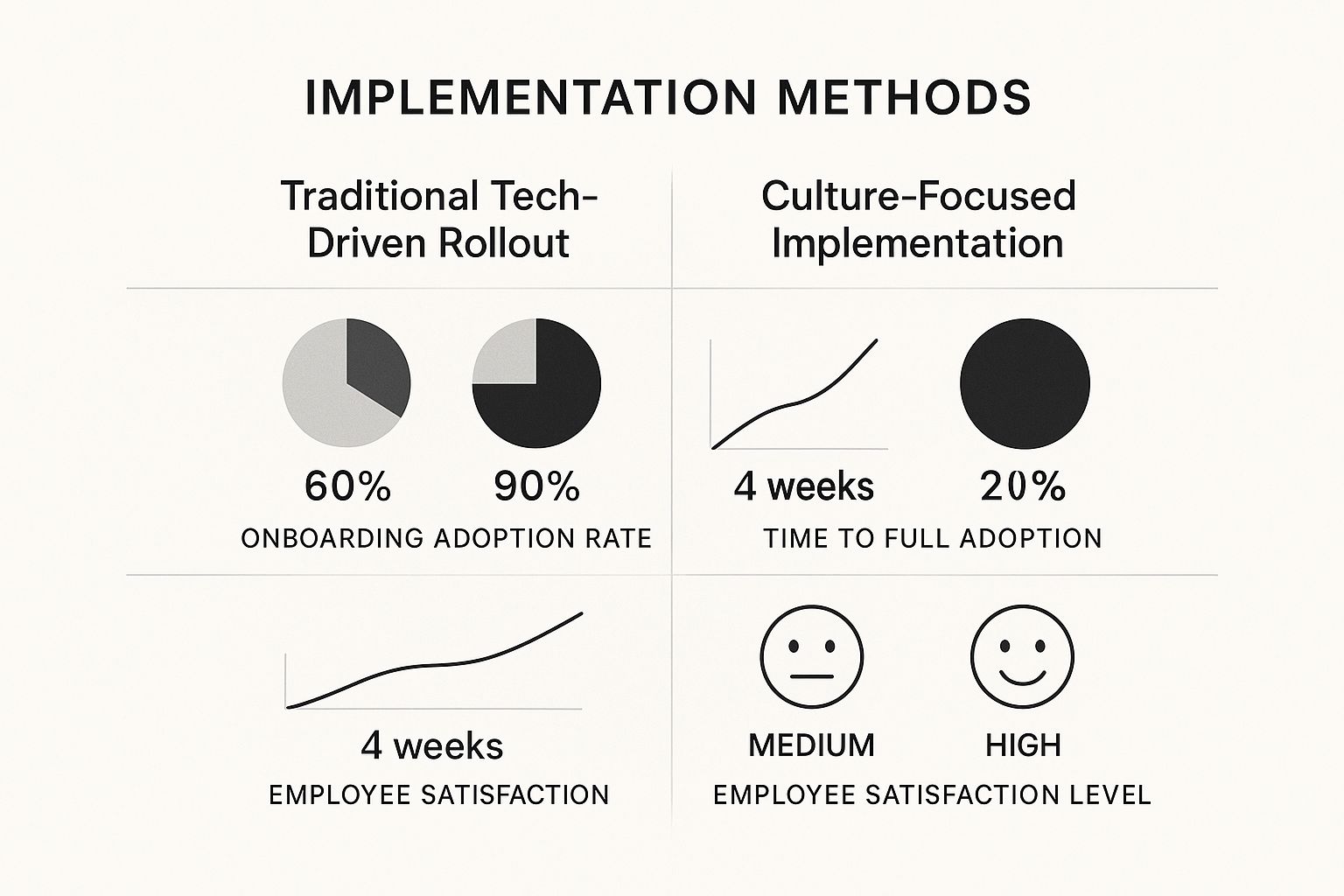
The data is clear. When you put your team at the center of the process, adoption rates soar and everyone is happier. By carefully matching software features to how your firm actually works and getting your team involved in the decision, you’re not just buying a tool. You’re investing in a more profitable and efficient future.
Turning Your Time into Your Greatest Asset
We’ve covered a lot of ground in this guide, moving from the steep costs of neglect all the way to the strategic high ground of mastering time tracking for professional services. Now, let's tie it all together.
For any firm where expertise is the product, time isn't just a number to be tallied up. It's your inventory, your currency, and the raw material of your success. Treating it as anything less is a massive missed opportunity.
The core idea is simple, but its impact is huge. A well-designed, thoughtfully implemented time tracking system isn't just more administrative work. It's an engine for profitability, a blueprint for smarter operations, and a cornerstone for building transparent, trust-based client relationships. It marks the critical shift from putting out fires to building a fire-proof business.
Stop Counting Hours and Start Making Hours Count
When you adopt this mindset, you stop just logging minutes. You start gathering the kind of business intelligence that answers your firm's most important questions:
- Where are we actually making money?
- Is our pricing model built for sustainable growth?
- Is our team being used in a way that maximizes both their impact and their well-being?
Time tracking gives you the hard data to stop guessing and start knowing. It transforms your firm's most precious resource—time—from a simple billing unit into your single greatest competitive advantage. This clarity is what allows you to build a more resilient, efficient, and profitable future.
This guide has laid out the frameworks you need to audit your current process, whether it’s a sophisticated system or just a collection of spreadsheets. The next move is yours.
Use this knowledge to move past simply managing time and start the real work of maximizing its value. Take that first step toward a more deliberate, data-informed future where every hour worked is an hour invested wisely. Your firm’s true potential depends on it.
Let's Tackle a Few Common Questions
Jumping into any new system is going to stir up some questions. It's only natural. Let's walk through some of the most common hurdles and curiosities that pop up with time tracking for professional services and get you some clear, practical answers.
How Do I Handle Employee Pushback?
This is the big one. The moment you mention "time tracking," some folks immediately hear "micromanagement." The trick is to reframe it right from the start. This isn't about surveillance; it's about protection.
You have to be crystal clear about the "why." Explain how this data helps you build more realistic project quotes. Show them how it prevents burnout by giving you the visibility to balance workloads fairly. It’s the key to keeping the firm financially healthy, which is good for everyone. When your team sees it as a shield that protects their time and pushes back against impossible deadlines, that resistance usually melts away.
Here's a pro tip: Get your team involved in picking the software. When they have a voice in choosing a tool that actually makes their day-to-day easier, they become champions for the change, not just subjects of it.
What About Tracking Non-Billable Time?
Don't fall into the trap of thinking only billable hours matter. Tracking your non-billable time is just as critical. All that internal work—admin tasks, business development, training sessions—is a huge operational cost. If you ignore it, you're flying blind and have no idea what your firm's true profitability really is.
The key is to keep it simple. You don't need a hundred different categories. Start with a few broad buckets like:
- Business Development: Time spent writing proposals or on sales calls.
- Internal Meetings: All-hands, department check-ins, you name it.
- Professional Development: Courses, certifications, and other skill-building activities.
This data is gold. It shines a light on your overhead costs and helps you make much smarter decisions about where your team's time is really going.
Can Small Firms Actually Afford This?
Absolutely, and it's not the budget-breaker you might think. Most modern time tracking platforms are cloud-based SaaS products, which means you pay a flexible, per-user subscription. Gone are the days of massive upfront investments in servers and software licenses.
A smaller firm can easily start on a basic plan that handles the essentials, like timers and simple reports. As you grow, you can add more advanced features without having to rip everything out and start over. Honestly, the ROI from capturing just a handful of unbilled hours each month often pays for the subscription all on its own.
Ready to see how effortless, calendar-based time tracking can change your firm's bottom line? TimeTackle automatically captures your team's work, giving you the insights to quote with confidence, manage resources like a pro, and grow your business. See how it works at https://www.timetackle.com.