When teams work from anywhere, the old ways of tracking time just don't cut it anymore. Let's be honest, manual timesheets were a pain even when everyone was in the office. For remote teams, they're a recipe for frustration and bad data.
Modern time tracking for remote employees isn't about counting hours—it's about gaining clarity on where effort is actually going. We've moved past clunky spreadsheets and into a world of automated, calendar-based tools that show you the complete picture without the need for micromanagement.
The Reality of Remote Work and Time Tracking
In a remote-first world, trying to manage time like you would in a physical office is a losing game. The old model, built around physical presence, often creates a culture of "productivity theater." You know the one—where people feel pressured to stay green on Slack just to prove they're working.
This approach quickly leads to timesheet fatigue and erodes the trust between leaders and their teams. The real challenge is to stop thinking about time tracking as surveillance and start seeing it as a tool for genuine operational insight.
Many businesses are still stuck on manual entry, which is a massive time sink and notoriously inaccurate. In fact, studies show that time theft—whether on purpose or by accident—hits about 75% of businesses. That's a huge financial risk to take based on flawed data. A better strategy reframes time tracking as a tool that empowers everyone, instead of one that controls them.
Shifting from Manual Entry to Automated Capture
The solution is a change in both mindset and technology. Instead of forcing your team to piece together their week from memory every Friday afternoon, a modern system can passively capture work activities as they happen. The employee's calendar becomes the single source of truth, automatically logging every meeting, focus block, and scheduled task without any extra effort.
This is a complete game-changer. For a deeper look at the fundamental differences, consider how each approach stacks up.
Comparing Manual vs Automated Time Tracking
The table below breaks down the core differences between the old way and the new way, showing how the shift impacts everything from data quality to agency profitability.
| Aspect | Manual Time Tracking | Automated Time Tracking | Impact on Agencies |
|---|---|---|---|
| Process | Employees manually fill out timesheets, often weekly. | Software passively captures activity from the employee's calendar. | Frees up billable hours previously lost to administrative work. |
| Accuracy | Prone to errors, guesswork, and rounding. | Captures precise, real-time data directly from scheduled events. | Enables highly accurate project costing and client billing. |
| Employee Experience | Tedious, time-consuming, and often feels like micromanagement. | Effortless and respects autonomy by focusing on planned work. | Boosts morale and reduces burnout by eliminating a hated task. |
| Data Insights | Provides a delayed, often inaccurate view of past work. | Delivers immediate, granular insights into resource allocation. | Allows for proactive decision-making on project scope and budgets. |
The move to automation isn't just about saving a few minutes here and there; it's about fundamentally changing how you operate.
This automated, calendar-based approach unlocks several powerful advantages:
- Eliminates Administrative Burden: It gives employees back precious time they can spend on high-value, billable work instead of filling out timesheets.
- Improves Data Accuracy: You get a crystal-clear, real-time record of how time is spent, which leads to better project costing and profitability analysis.
- Builds Trust and Autonomy: By focusing on the outputs recorded in the calendar, you show respect for your team's autonomy and kill the urge to micromanage.
This shift is all about treating your time data like the strategic asset it is. When you have an accurate picture of where your team's effort is going, you can make smarter decisions about resource allocation, spot burnout risks before they become a problem, and keep project budgets right on track.
Ultimately, effective time tracking for remote teams isn't about watching the clock. It’s about getting the clarity you need to run a healthier, more profitable business. To build this kind of environment, it's helpful to explore broader remote work best practices that foster trust and prevent burnout. With a foundation of trust and accurate data, both leaders and employees can finally focus on what really matters: delivering exceptional work.
Why Old-School Timesheets Just Don't Work for Remote Agencies
For a remote agency, sticking with traditional timesheets is like trying to navigate with a paper map in a world run by GPS. It's clunky, wildly inaccurate, and almost guarantees you'll get lost. This whole process was born in a physical office where you could see everyone working, but it completely falls apart with the freedom and trust that remote work demands.
We’ve all seen it. It’s 4 PM on a Friday when the project manager drops the dreaded Slack message: "Friendly reminder, timesheets are due!" What happens next is a mad dash as everyone—designers, developers, strategists—frantically tries to piece together their week from a foggy memory. This isn't just an administrative chore; it's a real threat to your agency's bottom line.
This weekly scramble of guesswork is where everything starts to go wrong. A creative director might block out eight hours under "Client A – Design," completely forgetting about the two hours they spent on a last-minute, unbilled revision. This isn't dishonest—it's just what happens when you rely on a broken system. People aren't wired to remember every 15-minute task with perfect accuracy days later.
The Hidden Price Tag of Bad Data
When your team is just guessing, you’re not just collecting fuzzy data—you're literally throwing money away. The fallout from this trickles down into every corner of your agency, creating a massive financial and operational drag.
The most obvious hit is revenue leakage. Every single hour that goes unbilled is cash you'll never see. In fact, a recent survey revealed that professional services firms lose an incredible $50,000 per employee every year from unlogged time. For an agency of any decent size, that can easily spiral into millions of dollars in lost revenue, all because the system relies on memory instead of reality.
The real problem with manual timesheets is they treat time as a chore to be completed, not a strategic asset to be measured. Shifting that mindset is the first step to getting your profitability back on track.
Beyond just losing money today, that flawed historical data leads directly to inaccurate project scoping. When you quote a new project based on timesheets filled with guesstimates, you're building your agency's future on a foundation of quicksand. You might underbid a big web development project because the last one looked like it took 100 hours, when in reality it took 150. Right from the start, you've set your team up for burnout and completely tanked your profit margins.
It's About More Than Just the Money
The damage isn't just financial. A culture that revolves around hounding people for timesheets creates a subtle, toxic vibe of micromanagement. Project managers turn into nags, and team members live with a constant, low-grade anxiety about getting their hours in. This dynamic wears down trust and shifts the focus from doing amazing work to just filling out a form.
All this pressure chips away at team morale. Instead of feeling empowered and trusted, employees feel like they're under a microscope. The conversation stops being about the value they're creating and starts being about accounting for every last minute. This is especially harmful for creative and strategic folks, whose best ideas don't always fit neatly into 30-minute chunks.
The whole system just feels completely disconnected from how modern agencies actually work. To break free from these old habits, you have to look at how outdated methods stack up against modern tools, which you can dig into by exploring the differences between spreadsheets and dedicated timesheet apps. An outdated system isn't just inefficient; it's a huge risk to your agency's health, both operationally and culturally.
Using the Calendar as Your Source of Truth
Let's be honest: traditional time tracking is a chore. It forces your team to stop what they're doing and try to piece together their workweek from memory. It’s tedious, frustrating, and almost always inaccurate.
There’s a much smarter way. Instead of making people build a timesheet from scratch, you can treat the tool they already use to plan their day—the calendar—as the definitive record of how their time is spent. Think of it as a digital breadcrumb trail of work that’s already there, just waiting to be collected.
This simple shift changes the entire dynamic. The focus moves from backward-looking guesswork to forward-looking intention. Every meeting, focus session, and client call is already blocked out. Instead of asking employees to remember what they did last Tuesday, the system simply captures what they planned to do, turning calendar events into accurate time data without a single manual entry.
This automated approach builds a system based on trust. It respects your team's autonomy by assuming the work scheduled in their calendar is the work being done. The conversation immediately shifts from a suspicious, "Were you working?" to a collaborative, "What great things are we achieving with our time?"
From Raw Events to Rich Data
A calendar entry by itself is just a block of time. The real magic happens when you enrich that raw data with context. This is where connecting your time tracking platform to your project management tools becomes absolutely essential for any remote team.
When your time tracking system talks to tools like Asana, Jira, or ClickUp, it can automatically pull in the details that matter—project codes, client names, and specific tasks. This makes categorizing time effortless.
- Automated Project Tagging: A meeting called "Project Alpha Kickoff" can be automatically tagged to the "Project Alpha" client account. Simple.
- Billable vs. Non-Billable Rules: You can create rules that automatically classify internal syncs as non-billable and client strategy calls as billable.
- Task-Specific Tracking: A "Design Sprint" block on the calendar can be directly tied to a specific deliverable in your project management system.
By layering project data onto calendar events, you transform a simple schedule into a detailed ledger of resource allocation. This isn’t just about logging hours; it’s about understanding exactly where your most valuable resource—your team’s time—is being invested.
This gives you granular insights that manual timesheets could never hope to provide. It directly connects daily activities to financial outcomes, showing you not just how busy your team is, but how productive they are for specific clients and projects. For a deeper look at this, our guide on time tracking with Google Calendar breaks it all down.
The screenshot below shows how a clean dashboard can turn all that raw calendar data into real business intelligence.
Here, you can see at a glance how time is distributed. It gives you immediate clarity on where everyone's effort is going.
Building a System Based on Trust
Ultimately, choosing a calendar-based approach to time tracking for remote employees is a powerful cultural statement. It tells your team that you trust them to manage their schedules and focus on their actual work, not on administrative busywork. In a remote world where autonomy and trust are everything, that’s a huge deal.
This method gets rid of the friction and the adversarial feeling that so often comes with time tracking. No more chasing down timesheets. No more managers having to play time police. The data is generated as a natural part of the team's existing workflow, making the whole process feel invisible.
By automating the drudgery of time logging, you give your team their mental energy back to focus on what you hired them for: creative problem-solving and delivering fantastic work for clients. This shift doesn’t just improve data accuracy and operational efficiency—it builds a more engaged and empowered remote team.
How to Implement a Modern Time Tracking System
Making the switch to a modern, calendar-based time tracking system isn't about flipping a switch overnight. It’s more like guiding your team through a thoughtful change—moving from a culture of just "getting it done" to one of genuine clarity and trust. This roadmap will walk you through everything from writing the right policies to managing the human side of change and getting the tech set up for success.
First things first: you need a time tracking policy that feels empowering, not like Big Brother is watching. Your goal should be to frame it around shared business goals, not surveillance. Talk about how this system will kill administrative headaches, guarantee accurate client billing, and give you the data needed to distribute workloads fairly.
The core message has to be crystal clear: "We're doing this to help everyone work smarter, not to watch your every move." Nailing this tone from the start builds the psychological safety you need to get real buy-in from your remote team.
Transparency is your best friend here. Be completely upfront about what data you’re collecting and exactly how it will be used. This tackles privacy concerns head-on before they can grow into bigger issues, which is especially critical in a world where employee monitoring has created so much distrust.
Crafting a Policy That Builds Trust
A great time tracking policy is simple, fair, and tied directly to business results. It needs to clearly explain why you're tracking time and set expectations without adding a bunch of annoying friction to everyone's day.
Here are the key ingredients for a solid policy:
- Statement of Purpose: Kick things off by explaining the "why." Focus on the good stuff: improving project profitability, smarter resource allocation, and finally getting rid of manual timesheets for good.
- Scope: Be specific about which activities and employees the policy covers. For most agencies, this will include all client-facing work and internal projects.
- System of Record: Officially name the calendar as the single source of truth for all time data. This simple step reinforces that tracking is based on planned work, not trying to remember what you did last Tuesday.
- Data Usage and Privacy: State in no uncertain terms how the data will be used for operational insights. Promise—in writing—that it won't be used for surveillance and that personal calendar events will always remain private.
This simple flow below is what it’s all about: turning calendar events into business data you can actually use.
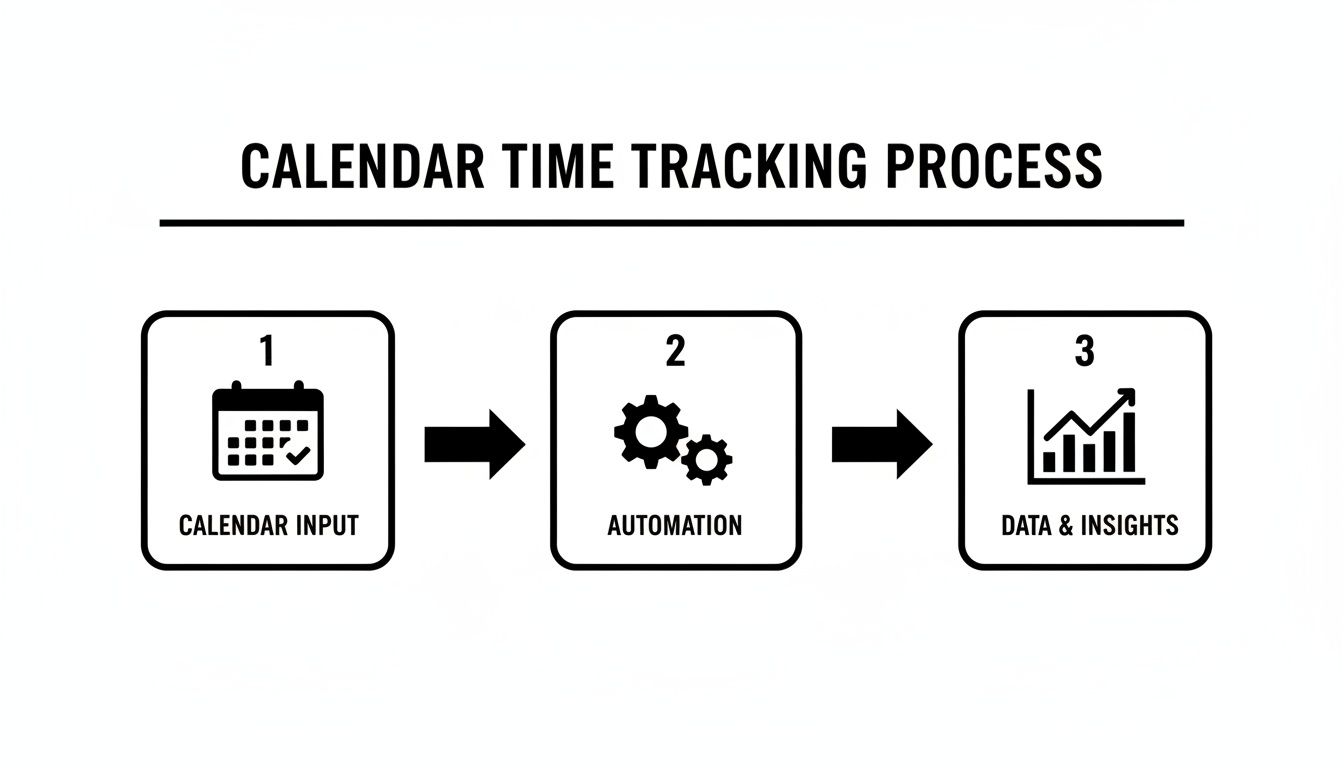
This visual—from planning in the calendar to automated data capture—is the bedrock of a system that gives your team autonomy while delivering the insights the business needs.
Managing Change and Securing Team Buy-In
Let's be honest: even the best system on the planet will crash and burn without team adoption. Smart change management is all about communicating the personal benefits to each and every team member. Frame this whole transition as the ultimate solution to a universal pain point: the dreaded weekly timesheet.
Show them how an automated system gives them back precious time and mental energy. The numbers tell a compelling story. By 2026, a massive 96% of companies worldwide will have adopted time-tracking software, with 70% of large enterprises actively monitoring employees. This trend has created a huge trust problem—56% of workers feel anxious about being watched, and 43% see it as a straight-up invasion of privacy. You can be the exception. By focusing on operational intelligence instead of observation, you respect your team's privacy and build a healthier, more trusting remote culture. You can dig into these employee monitoring statistics to see just how important a trust-first approach is.
To get everyone on board, try these moves:
- Involve Team Leads Early: Get your department heads and project managers in on the selection and rollout process from day one. Their buy-in is absolutely essential.
- Run a Pilot Program: Kick things off with a small, enthusiastic group. This lets you iron out any wrinkles and creates a few internal champions who can rave about the new system.
- Host a Kickoff Session: Get the whole team together for a meeting where you demo the tool, walk through the new policy, and answer every single question with total transparency.
Configuring Your System for Automation
Okay, policy is written and the communication plan is ready. Now for the tech setup. The main goal here is to automate as much data categorization as you can. This ensures your data is consistent and nobody has to do much manual work.
Start by setting up integrations with your core tools, like your project management platform and CRM. This lets the system automatically pull in client names, project codes, and task details, adding rich, useful context to your calendar data.
Next, it's time to define your custom tags and categorization rules. This is where you get to really tailor the system to how your agency actually works.
- Define Key Categories: Create simple, clear tags like
Billable,Non-Billable,Internal, andAdmin. - Set Up Automation Rules: Build rules that automatically apply these tags based on keywords in calendar event titles. For example, any event with "Client Kickoff" could instantly be tagged as
Billable. - Connect to Projects: Create rules that link calendar events to specific projects based on who's attending or certain keywords. This makes sure every chunk of time is allocated perfectly.
This kind of setup changes time tracking from a manual chore into a smart, passive data collection process. It gives leaders the accurate insights they need to run a more efficient and profitable remote agency, all while freeing employees up to focus on doing their best work.
Turning Time Data Into Business Intelligence

Automated time tracking does more than just count hours—it turns a mountain of passive data into your sharpest source of business intelligence. It’s like switching from a blurry, outdated photograph of your operations to a live, high-definition video feed. You finally see what’s actually happening, right as it happens.
This visibility is a game-changer for time tracking for remote employees, where you can't just walk the floor to see who’s working on what. Without hard data, leaders are left managing on gut feelings and best guesses, which is a massive gamble in any market. Modern tracking systems replace that guesswork with cold, hard facts.
Think of dynamic dashboards and automated reports as your new command center. They take chaotic streams of calendar events and project tags and distill them into clean, actionable insights, empowering smarter decisions from the ground up.
Unlocking Project Profitability and Efficiency
One of the first things you'll notice is the ability to gauge true project profitability with almost surgical precision. When you can automatically capture every single minute spent on a client, you can pit those logged hours directly against the project budget in real time.
This creates a powerful, continuous feedback loop. You no longer have to wait until a project is wrapped up to find out it was a financial disaster.
Instead, you can spot budget creep the moment it starts and make adjustments on the fly. Maybe that means reassigning a few people, having a tough conversation with the client about scope, or fixing a broken workflow before it completely tanks your margins.
This isn't just about accounting; it's about operational agility. Real-time profitability data allows you to double down on your most profitable clients and services while re-evaluating or restructuring the ones that consistently drain resources.
The data also shines a bright light on hidden bottlenecks in your process. If you spot a pattern where a specific project phase always takes 20% longer than you estimated, you’ve just uncovered a systemic problem. Now you have the proof you need to refine that process, offer better training, or simply update your quoting templates for good.
Optimizing Resource Allocation and Team Utilization
Zooming out from individual projects, this treasure trove of data gives you a bird's-eye view of your most valuable asset: your team's time. Utilization reports show you exactly how your team's capacity is being spent, breaking it all down by billable, non-billable, and administrative work.
This is often where the biggest opportunities for improvement lie. For instance, a detailed analysis of over 481,000 tracked work hours revealed that while remote employees spend 51% of their day on focused "deep work," a whopping 49% is eaten up by coordination overhead like emails, chats, and meetings. By making this imbalance crystal clear, leaders can start protecting that focus time and seriously boost their ROI. You can dig into the numbers yourself in this comprehensive remote work study.
With clear dashboards, you can get instant answers to critical questions:
- Who is overutilized? Pinpoint team members heading for burnout and redistribute their workload before it becomes a real crisis.
- Who has spare capacity? Find the perfect person for a new project without disrupting key workflows or piling more onto your top performers.
- Are we drowning in non-billable work? Identify trends in internal meetings or admin tasks that can be streamlined, automated, or cut altogether.
This level of insight turns resource management into a strategic game of chess, letting you move the right people to the right tasks at exactly the right time. It’s a direct driver of both efficiency and employee morale, finally connecting day-to-day activities to the company’s biggest goals.
Choosing the Right Time Tracking Tool
Picking the right time tracking tool for your remote team isn't about finding the one with the longest feature list. It’s about finding the right fit for how your agency actually works. If you force a clunky, unfamiliar process on your team, you'll just create friction and get half-hearted adoption. The real goal is to find a system that feels like a natural extension of their existing workflow.
Your first move should be to hunt for tools that offer native, seamless integrations with the systems you live in every day. Think calendars (Google or Outlook) and your CRM. This kind of deep connection is the bedrock of an automated system, letting data flow exactly where it needs to go without anyone lifting a finger.
Next, dig into the automation. Can you set up custom, rule-based workflows to categorize time automatically? For instance, can you create a rule that instantly tags any calendar event with "Client X" as billable and assigns it to the right project? That’s the kind of automation that truly kills administrative busywork and keeps your data clean and consistent.
Core Features for Remote Agency Success
Beyond the basics, there are a few key areas that really move the needle for a remote agency's bottom line. A truly powerful tool doesn't just clock hours; it delivers the kind of insights that help you build a more profitable business.
- Flexible Reporting and Exports: Your data is useless if you can't get to it and play with it. Look for dynamic dashboards with easy-to-use filters and the ability to export reports to formats like Excel, CSV, or even sync directly with Google Sheets.
- Enterprise-Grade Security: You're handling sensitive client and employee information, so security is non-negotiable. Make sure any platform you consider is SOC 2 certified and uses robust encryption to lock down your data.
- Intuitive User Interface: The best tool is the one your team doesn't hate using. A clean, friendly interface flattens the learning curve and encourages people to actually use it consistently, no lengthy training manuals required.
While many remote workers feel more productive, the data shows collaboration overload can drag productivity down by 8-19%. On the flip side, businesses that adopt AI-powered time trackers report efficiency gains of up to 32% and slash administrative tasks by 50%, turning that potential loss into a massive win. You can explore more insights on remote work productivity to see just how much smart tooling matters.
For a detailed breakdown of your options, check out our time tracking software comparison guide.
Got Questions About Remote Time Tracking? We've Got Answers.
Switching to a new way of tracking time naturally brings up a few questions. The best way to get everyone on board and build trust is to tackle these concerns head-on. Here are the most common questions we hear from agency leaders and our straightforward answers.
"Will My Employees Feel Like I'm Spying on Them?"
This is a big one, and it's a completely fair question, especially with all the invasive "bossware" out there. The trick is to be crystal clear about why you're tracking time and to pick a tool that respects your team's privacy.
Modern, calendar-based systems aren't about watching people work. They focus on understanding what work is happening for which clients and projects. It’s not about monitoring keystrokes or taking screenshots.
Make it clear that the goal is better workload balance, spot-on client billing, and smarter project planning. Frame it as a tool that kills the administrative busywork of manual timesheets and gives the whole team data to help them win.
It completely changes the conversation from, "Are you working hard enough?" to "Are we spending our time on the right things to move the needle?" That shift builds trust because the focus is on business clarity, not spying on individuals.
"How Can We Get the Team to Actually Use a New System?"
Getting people to adopt something new is all about showing them what's in it for them. The biggest win? An automated system gets rid of the soul-crushing task of filling out a timesheet every single week. That alone is a huge relief that gives them back precious time to focus on what they were hired to do.
But it goes deeper. Show them how this data is their best defense against burnout. When workloads are transparent, it's easy to see when someone is overloaded and justify bringing in more help or pushing back a deadline.
Get your team leads involved in picking the tool. Start with a small pilot group to iron out the kinks and create a few internal champions who can sing its praises before you roll it out to everyone.
"Is Automated Tracking Even Accurate for Creative Work?"
Absolutely. In fact, it's usually way more accurate than asking someone to remember what they did three days ago. Creative and strategic work is messy; it doesn't fit neatly into clean, pre-packaged tasks.
A calendar-based system automatically logs all the meetings, deep-work blocks, and quick collaboration sessions that make up a creative's day.
With custom tags and smart automation rules, you can easily categorize activities like "Client Brainstorm," "Design Sprint," or "Strategy Session." You end up with a much richer, more reliable picture of where the real effort is going than you'd ever get from someone's memory at 4 PM on a Friday.
Ready to swap timesheet chaos for automated clarity? TimeTackle turns your team's calendar into a powerful source of business intelligence, giving you the insights to improve profitability and protect your team from burnout. See how it works.