
At its core, an employee time clock app is a digital tool that lets your team clock in and out from a computer, tablet, or smartphone. It’s the modern answer to outdated punch cards and the messy spreadsheets so many agencies are still wrestling with. These apps give you accurate, real-time data on employee hours, project costs, and overall productivity.
Moving Beyond Manual Timesheets
If you're an agency leader, you know the feeling. Staring at a mountain of incomplete timesheets, trying to piece together who worked on what, and when. It’s a frustrating cycle of chasing down hours, correcting mistakes, and manually punching data into your billing system. This isn't just a waste of time; it's a direct hit to your bottom line through billing errors and lost productivity.
An employee time clock app is so much more than a digital punch card. It’s better to think of it as your agency's operational nervous system. Sticking with manual timesheets is like trying to run a high-performance engine with nothing but a basic fuel gauge—sure, it tells you if there's gas in the tank, but it gives you zero insight into efficiency or performance. A modern app gives you the deep diagnostics you need to really thrive.
Gaining Actionable Insights
With the right platform, you suddenly have immediate, actionable insights into the metrics that actually matter. This kind of visibility empowers your team to make smarter decisions on the fly. For agencies, this translates directly to:
- Tracking Project Profitability: Instantly see which projects are making you money and which are quietly bleeding you dry from scope creep.
- Optimizing Resource Allocation: Get a clear view of your team's capacity so you can assign the right people to the right tasks without burning them out.
- Accelerating Billing Cycles: Simplify timesheet approvals and generate accurate invoices in a fraction of the time, which does wonders for your cash flow.
Ultimately, moving beyond manual timesheets is one of the most direct ways to improve operational efficiency within your agency. It frees up your team's time for more strategic, client-focused work. If you're still on the fence, you might find our breakdown of spreadsheets vs. timesheet apps enlightening.
This shift isn't just a trend; it's a massive market movement. The global employee time tracking software market is expected to jump from USD 1.9 billion in 2025 to USD 4.8 billion by 2033. That growth is being fueled by the urgent need for smarter workforce management, especially in remote and hybrid environments.
Features That Fuel Agency Profitability
A modern employee time clock app is so much more than a glorified stopwatch. It's an active tool designed to protect your agency’s most valuable—and often most leaky—asset: billable time. The right features don't just count hours; they translate directly into tangible financial gains by bringing clarity, stopping revenue leakage, and speeding up your entire billing cycle.
Think of it this way: trying to manage projects with manual timesheets is like navigating a city with a folded paper map. You'll probably get there, but it’s slow, outdated, and you have no idea what traffic looks like. A great app is like having a live GPS. It gives you real-time updates and instantly shows you the most profitable route forward.
Automated Time Capture for Flawless Accuracy
The bedrock of any solid time tracking system is effortless and accurate time capture. Let's be honest, manual entry is a breeding ground for errors, forgotten tasks, and guesstimates that almost always round down in the client's favor.
Automated time capture completely flips this script. It works by integrating directly into your team's existing workflow, especially their calendars. By syncing with a Google or Outlook calendar, the app can automatically log time spent in meetings, on client calls, or during focused work blocks. This removes the administrative headache for your team and ensures every single billable minute gets accounted for, creating a perfect, undeniable record of work. It shifts the entire process from remembering to simply verifying.
Our guide on time tracking for agencies digs deeper into how this one fundamental shift can radically improve your data integrity.
Mobile employee time clock apps are transforming accountability. Recent analyses show that companies deploying these apps see a remarkable 35% increase in overall productivity, primarily by capturing accurate time and reducing idle periods. Discover more about how these statistics impact modern workforces at Breeze.pm.
Real-Time Dashboards and Project Visibility
Scope creep is the silent killer of agency profits. A project can look perfectly healthy on paper but quickly go off the rails as small, unbilled tasks pile up. Real-time dashboards are your first line of defense, offering an immediate, visual overview of project health at a glance.
Imagine a project manager seeing a project is already at 80% of its budgeted hours, but only 50% of the work is actually done. With that kind of instant insight, they can act immediately:
- Reallocate Resources: Move tasks to team members who have more bandwidth.
- Adjust Timelines: Proactively communicate with the client about potential delays before they become a problem.
- Flag Scope Creep: Identify the extra work and start a conversation about a budget increase.
This level of visibility turns reactive fire-fighting into proactive profit protection. It’s the difference between finding out you've lost money after a project is finished and steering it back to profitability while it's still in flight.
Manual Timesheets vs. A Modern Employee Time Clock App
To really spell out the benefits, it helps to see a direct comparison. The gap between old-school methods and what's possible today is massive.
| Feature | Traditional Manual Timesheets | Modern Employee Time Clock App |
|---|---|---|
| Data Accuracy | Low (relies on memory, estimates) | High (automated capture, real-time) |
| Project Visibility | Delayed (end-of-week reports) | Instant (live dashboards and alerts) |
| Billing Cycle | Slow (manual review and approvals) | Fast (streamlined, automated workflows) |
| Admin Overhead | High (constant chasing and data entry) | Low (minimal manual input required) |
The table makes it pretty clear. One approach is stuck in the past, leaking time and money, while the other gives you the control and insight needed to run a truly profitable service business.
Calculating Your Return on Investment
How does a monthly software subscription suddenly turn into thousands of dollars in reclaimed revenue? It's a fair question. For agency leaders, the real value of an employee time clock app goes far beyond its sticker price. It’s about the tangible gains that directly beef up your bottom line, turning a small operational expense into a massive profit driver.
The calculation starts by looking at the most common source of lost income: unbilled time.
Even tiny inaccuracies snowball. Let's say a 50-person agency recovers just 15 minutes of previously unbilled time per employee each day. At an average billable rate of $150/hour, that simple fix translates to over $234,000 in additional annual revenue. This isn't about squeezing more hours out of your team; it's about accurately capturing the value of the work they're already doing.
Tangible Gains You Can Measure
The financial perks don't stop at billable hours. A modern time tracking system creates efficiencies across your entire operation, slashing administrative waste and protecting your profit margins from those slow, silent leaks.
Consider these direct financial impacts:
- Reduced Payroll Processing Time: Automating timesheet collection and approvals can cut the time your finance or operations team spends on payroll by up to 80%. This frees them up to focus on strategic financial analysis instead of chasing down spreadsheets.
- Eliminated Revenue Leakage: With precise data, you can build project estimates and budgets that actually reflect reality. This helps you put a stop to the scope creep that quietly eats away at profitability.
- Faster Invoicing and Improved Cash Flow: When time data is accurate and approvals are instant, invoices get out the door faster. This simple change can dramatically shorten your accounts receivable cycle, putting money in the bank sooner.
This chart really drives home how modern time tracking boosts the key drivers of agency profitability.
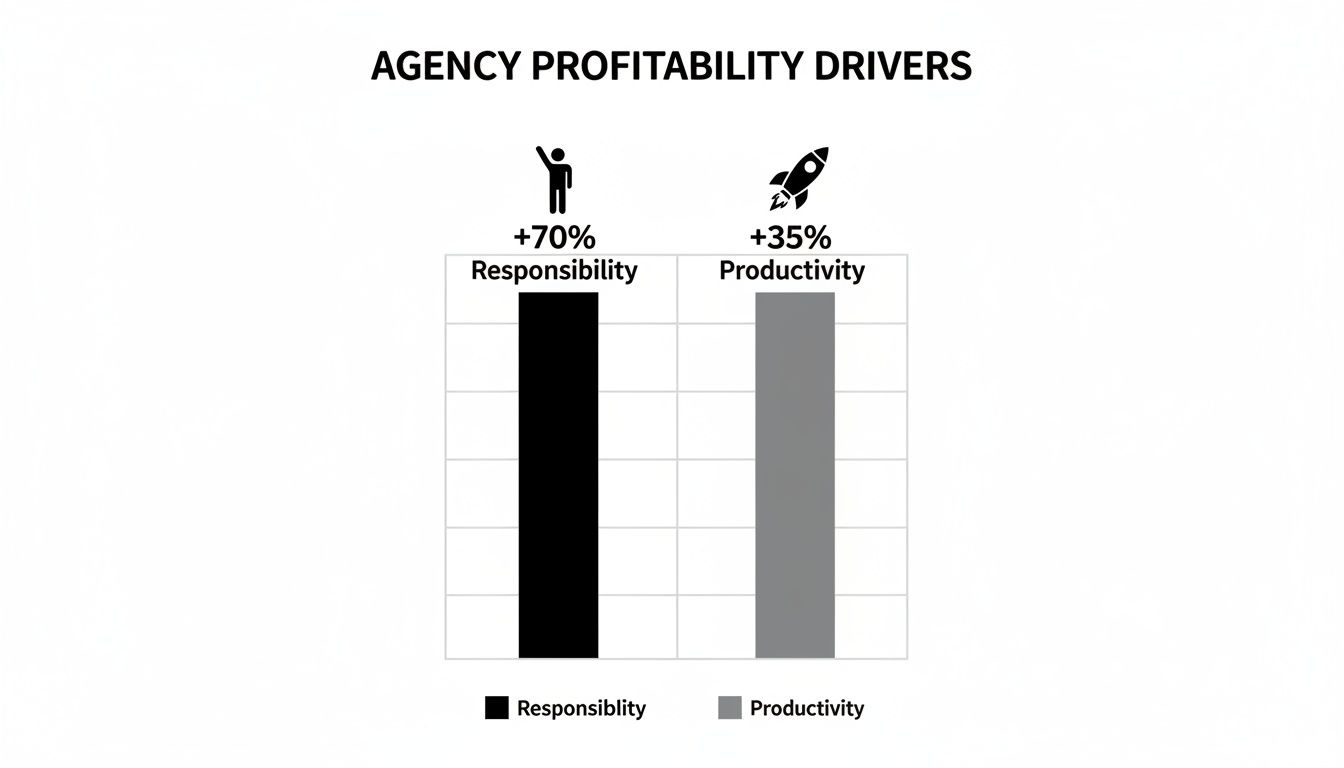
The data is clear: giving teams better tools for accountability directly leads to a major lift in overall productivity and performance.
Intangible Benefits That Build Value
While they're a bit harder to stick a price tag on, the intangible returns are just as powerful. A great employee time clock app can fundamentally improve your agency's culture and strengthen client relationships.
Think about the morale boost when managers no longer have to chase down timesheets. This single change replaces a nagging culture with one of trust and accountability, letting your team focus on brilliant creative work and client success.
On top of that, presenting clients with detailed, data-backed reports builds immense trust and justifies your value. It shifts the conversation from "how many hours did you work?" to "look at the incredible value we delivered."
To dig deeper into justifying this kind of investment, it’s helpful to understand how to calculate the return on investment for automation projects. And if you're looking for practical ways to manage this process, our guide on how to track billable hours offers some actionable strategies.
Uncovering the Hidden Costs of Inaction
What’s sticking with spreadsheets and manual entry really costing your agency? It’s a question many leaders sidestep, assuming the current system is "good enough." The reality is, the price of inaction is steep, often showing up in ways that quietly corrode your profitability and team culture.
This isn't just about the occasional data entry mistake. The cost is a slow, consistent bleed of resources. It’s found in the hours your operations manager spends chasing down timesheets instead of analyzing project performance. It’s hidden in the revenue you lose every month from under-billing clients due to inaccurate, guesstimated time entries.
The Ripple Effect of Inaccurate Data
When your time data is unreliable, every strategic decision you make is built on shaky ground. Inaccurate data creates a dangerous ripple effect that touches every part of your agency.
- Project Profitability Becomes a Guessing Game: You can't tell which clients or projects are truly profitable versus those that are secretly draining your resources.
- Future Estimates Are Flawed: Quoting new work becomes a shot in the dark, leading to a cycle of under-scoped projects and overworked teams.
- Resource Planning Fails: Without a clear picture of who is working on what, you risk burning out your top performers while underutilizing others.
The damage goes beyond just the numbers on a spreadsheet. The constant nagging for timesheets creates a culture of frustration and administrative burden, a phenomenon often called "timesheet fatigue." This persistent, low-level annoyance pulls your team's focus away from creative problem-solving and high-value client work.
The cost of doing nothing far outweighs the investment in a modern employee time clock app. You're not just paying for software; you're buying back lost revenue, administrative hours, and your team's focus.
Compliance and Security Risks
Beyond the financial drain, manual systems expose your agency to some serious compliance and security risks. For instance, the Fair Labor Standards Act (FLSA) mandates precise record-keeping for non-exempt employees, including all hours worked and any overtime. A forgotten spreadsheet or a misplaced paper timesheet can quickly morph into a costly legal headache. A secure, centralized employee time clock app ensures your records are accurate, consistent, and ready for an audit at a moment's notice.
The market's rapid expansion only highlights the urgency here. The global Time and Attendance software market hit $3.7 billion in 2024, with projections showing it will reach $4.7 billion by 2029. This growth is fueled by businesses realizing that robust, secure platforms are essential for navigating regulatory demands and protecting sensitive data. You can explore more about the dominant trends in the HCM market on appsruntheworld.com. Ignoring this shift isn't just inefficient—it's a gamble with your agency's financial and legal health.
Your Implementation and Adoption Checklist
Picking the right employee time clock app is just the start. The real magic happens when your team actually uses it—and likes it. A botched rollout can stir up frustration and resistance, killing the very efficiency you were hoping to gain. But a smart, thoughtful strategy ensures a smooth transition that feels like an upgrade from day one.
Think of it like giving a new playbook to a sports team. You wouldn't just toss it on the table and expect a win. You’d walk them through the plays, explain the logic, and practice until it’s muscle memory. The same goes for any new agency software.
The goal here is to shift the team's perspective from a tool that's mandated to one that's genuinely valued. This starts by being upfront about the "why." This isn't about micromanagement. It's about protecting project profitability, billing clients fairly, and freeing everyone from the soul-crushing cycle of chasing down timesheets.
Phase 1: Figure Out What You Actually Need
Before you even start looking at demos, you need a crystal-clear picture of the problem you're trying to solve. What are your agency's biggest time-tracking headaches? Rushing this step is like starting a road trip without putting a destination in your GPS.
- Map Out Your Current Mess: Seriously, document how time gets tracked, approved, and billed right now. Pinpoint every single bottleneck and point of friction. Where do things grind to a halt?
- List Your Must-Have Integrations: What tools does your team live in every day? The new app has to play nice with your project management software and, crucially, your team's calendars (like Google or Outlook).
- Define What "Success" Looks Like in a Report: What data do you need to see? Is it project-level profitability? Team utilization rates? Be specific about the insights you're counting on.
Phase 2: Plan Your Rollout
Once you've picked a tool, fight the urge to unleash it on the entire company at once. A phased rollout is your best friend—it minimizes disruption and lets you collect feedback, turning a small group of early users into your biggest advocates.
Great adoption comes from showing people immediate value. Start with a small pilot group of tech-savvy team members who can give you honest feedback and later show their peers how the new tool actually makes their lives easier.
Kick things off with a single team or on one low-stakes project. Use this pilot phase to iron out any kinks in the setup, polish your training guides, and create a success story you can share with the whole agency. This controlled launch builds momentum and makes the company-wide deployment feel less like a scary change and more like an exciting, positive upgrade for everyone.
The Future of Time Tracking Is Automated

Imagine a world with no timesheets. No more hounding your team for hours, no more guesstimates, and absolutely no more administrative drag. While a standard employee time clock app was a step up from the physical punch card, the next real leap in time intelligence is all about passive, automated time capture.
This approach gets to the root cause of inaccurate tracking and the friction it causes with your team. Instead of asking people to constantly start and stop timers, these systems work by tapping into the data from their existing digital footprint. They piece together an accurate picture of the workday by analyzing what's already happening in the tools they use every single day.
Leveraging Your Calendar as the Source of Truth
The richest source for this data? Your team's calendar. Platforms like Google Calendar and Outlook are already the command center for your agency's operations. Think about it—they hold a detailed log of:
- Client Meetings: Every scheduled call, pitch, and presentation is right there.
- Internal Reviews: Team huddles, project check-ins, and creative sessions are all blocked out.
- Focused Work Blocks: Time carved out for specific client deliverables or deep work is already on the schedule.
By plugging directly into this data, an automated system can build a nearly complete timesheet draft. All your employees have to do is give it a quick review and a thumbs-up. This completely flips the script on time tracking, turning it from a tedious chore into a simple verification step. That's a much lighter lift for everyone involved.
This shift to passive data collection represents a monumental change. It treats time tracking not as an additional task to be completed, but as a natural byproduct of the work that is already being done.
This isn't just about saving a few minutes here and there. It’s about getting the most accurate data possible with the least amount of effort. For professional service firms and agencies that need maximum billing accuracy with minimum disruption, automated, calendar-based tracking isn't just another feature—it's the future. It's how you capture every single billable moment without burning out your team.
Got Questions? We’ve Got Answers.
When agency leaders start looking into employee time clock apps, the same questions tend to pop up. It's only natural. You want to make sure you’re making the right call for your team, your clients, and your bottom line. Let's tackle those common concerns head-on.
Will My Team Feel Like I'm Micromanaging Them?
This is probably the biggest hesitation we hear, and it’s a fair one. But modern time clock apps aren't about surveillance; they're about transparency. When you frame it correctly—as a tool to make sure clients are billed fairly and projects stay profitable—most people get it immediately.
The best systems, especially those that automatically sync with calendars, actually do the opposite of micromanaging. They get your team out of the business of filling out tedious timesheets by hand, freeing them up to focus on the creative, high-impact work they were hired to do.
How Hard Is It to Integrate With Our Other Tools?
You'll be happy to hear that the leading time clock apps are designed to play nicely with the software your agency already lives in. Most offer ready-to-go connections for essential tools like Google Calendar, Outlook, Slack, Asana, and Jira.
Getting everything connected is usually a matter of a few clicks. If you choose an app that’s built around the calendar, it fits so naturally into your team's existing workflow that adoption feels less like a new process and more like a welcome shortcut.
"Adoption hinges on making the tool an enhancement, not a hurdle. When an app eliminates a pain point—like the universal dislike of manual timesheets—it becomes a welcome addition to the workflow rather than an intrusive mandate."
What's the Typical Cost?
Most apps operate on a simple per-user, per-month subscription model. You can generally expect to pay somewhere in the range of $5 to $15 per person. So, for a 50-person agency, you’re looking at a monthly investment of around $250 to $750.
The real question, though, is about the return on that investment. That cost is often covered many times over by capturing just a few previously unbilled hours, slashing administrative overhead, and steering clear of those costly project overruns.
Ready to see how automated time tracking can genuinely change the game for your agency's profitability and efficiency? With TimeTackle, you can put an end to timesheet fatigue and unlock powerful insights from the data already sitting in your team's calendars. Explore how TimeTackle works and start your journey to effortless accuracy.