
Friday afternoon is when Jira time tracking usually stops being a feature and starts becoming a cleanup job.
A project lead wants margin by client. Finance wants hours tied to the right work. Account managers want to know whether the retainer is already burned. Then someone opens Jira and finds half the work logged, some of it dumped into one issue, and the rest still sitting in people’s heads.
I’ve seen the same pattern across marketing agencies, implementation teams, productized services firms, and consultancies. The argument is rarely about whether time data matters. Everyone agrees it does. The fight is about how to collect it without turning every week into a timesheet chase.
If you’re evaluating jira for time tracking, there are three paths:
| Approach | Best fit | What it does well | Where it breaks |
|---|---|---|---|
| Native Jira | Teams with simple internal tracking needs | Built-in worklogs, estimate vs actual reporting, no extra app to buy | Manual entry, basic reporting, weak adoption when people forget |
| Jira with plugins | Teams committed to Jira that need better reports and approvals | Better timesheet views, pivots, dashboards, status-based analysis | Still depends on users logging time |
| Dedicated automated platform | Agencies and services teams where time is tied to billing and utilization | Captures work from real activity sources, cuts admin effort, better operational reporting | Requires process design and integration choices |
The hard truth is simple. Most Jira setups do not fail because the reporting tab is missing. They fail because the data entry model is weak. If your team has to remember what happened across five meetings, two client calls, Slack follow-ups, and a late afternoon task switch, the worklog will always lag behind reality.
The endless chase for accurate timesheets in Jira
By the time a missed timesheet shows up in Jira, a significant problem happened days earlier.
A strategist spent half her Tuesday in client calls. A delivery manager jumped between internal planning, scope questions, and urgent fixes. A developer closed issues but forgot to log the context-switching that ate the middle of the day. Jira has tasks, statuses, comments, and due dates. What it often does not have is a clean record of time.
For agencies, that gap hits three places fast:
- Billing gets messy because billable and non-billable work blur together.
- Capacity planning gets shaky because logged time no longer matches how teams spend the week.
- Project reviews get political because everyone argues about memory instead of data.
The market has noticed that manual entry is the main pain point. BigPicture notes that automated time tracking integrations for calendar and CRM sources in Jira setups remain poorly addressed, and cites that 70% of professional services teams report manual tracking as their top pain point, while rule-based automation can reduce collection overhead by 50-80% when the problem is solved (BigPicture on Jira time tracking).
That lines up with what operations teams already know. The issue is not that people refuse to log time. It’s that manual recall is a bad collection method.
Common approaches
The usual sequence is predictable.
First, the team uses native Jira because it is already there. Then someone asks for better reporting, so they add a marketplace app. Later, leadership realizes that better forms did not fix compliance, and the conversation shifts from “How do we get nicer timesheets?” to “How do we stop chasing timesheets at all?”
If your process depends on Friday memory, your data quality problem started on Monday.
Why this becomes a business problem
For a software team using Jira internally, rough time data may be good enough for retrospectives. For a services team, it is not. Time is tied to revenue, margin, staffing, payroll support, client trust, and future scoping.
That is why the decision around jira for time tracking should not start with a feature checklist. It should start with one question. Do you need people to log what they remember, or do you need a system that reflects how work happened?
The default path with Jira’s native time tracking
Jira’s native time tracking is the baseline because it is already part of the product.
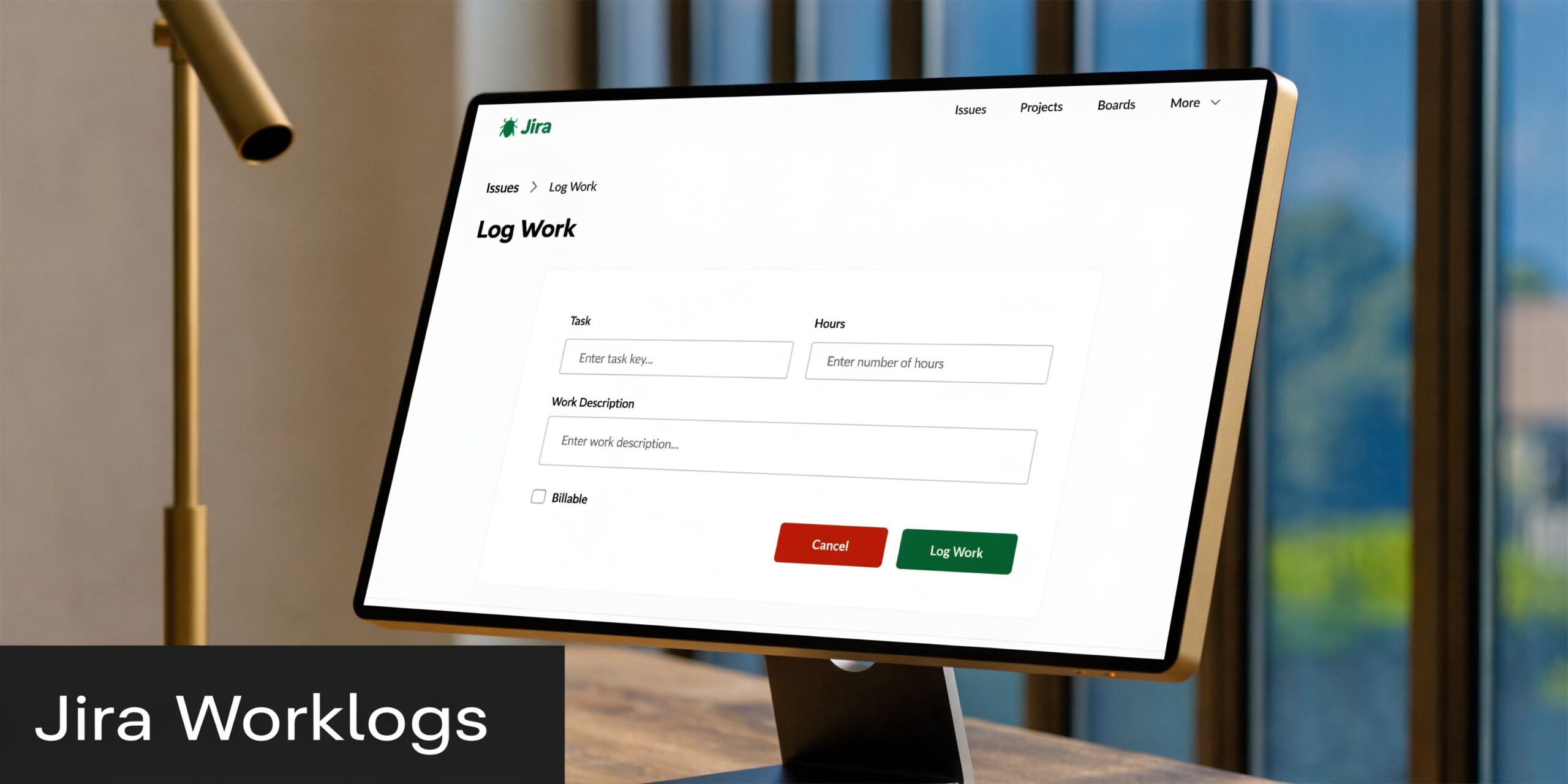
According to Atlassian Marketplace history for Time Tracking Stats for Jira, Jira’s native time tracking has been a core feature since around 2017 for Jira Server and has always been default-enabled in Jira Cloud. The worklog is the base unit, and it captures the user, time spent, and estimates, which makes retrospective analysis useful for budgeting and delivery projections (Atlassian Marketplace version history).
How native logging works
At a practical level, native Jira time tracking is simple.
An admin enables time tracking in issue settings. Teams add the right fields to the issue layout. Then users log time directly against issues by entering hours, dates, notes, and remaining estimates if they use estimate management properly.
That sounds straightforward because it is.
For some teams, especially internal product or engineering groups, that simplicity is the point. The issue already exists, so the worklog sits in the same record as the task, comments, assignee, and status history.
What you can get from it
Native Jira gives you enough to answer a few basic questions:
- Estimate versus actual. You can compare original estimate, current estimate, and logged time.
- Issue-level visibility. You can see who recorded time and where.
- Basic project review. Managers can inspect whether the work tracked on an issue roughly matches the effort expected.
That is useful, especially when teams work in Jira all day.
Where native Jira works well
Native Jira is a decent fit when the team’s main goal is operational discipline inside delivery, not detailed agency reporting.
It works best when:
- Projects are mostly internal and nobody needs polished client-facing timesheets.
- Managers care about variance more than utilization analysis.
- The team culture is disciplined enough that people log time close to when work happens.
- Finance reporting lives elsewhere and Jira does not need to carry the whole burden.
Where it starts to strain
The trade-off is obvious once the team grows.
The system only knows what users enter. It does not know about the meeting that ran long, the half hour spent in discovery before an issue existed, or the context switching between clients. If users forget, Jira does not fill the gap.
Native Jira is good at storing time. It is not good at collecting it.
Reporting is also narrow. You can inspect worklogs and compare estimates to actuals, but once operations asks for utilization by client, non-billable load by team, or time patterns across service lines, native reporting starts to feel thin.
So yes, jira for time tracking can start with native features. Many teams should start there. They just should not confuse “available” with “sufficient.”
Upgrading inside Jira with marketplace plugins
Teams often outgrow native Jira in a predictable way. They do not abandon Jira first. They try to make Jira better at time tracking.
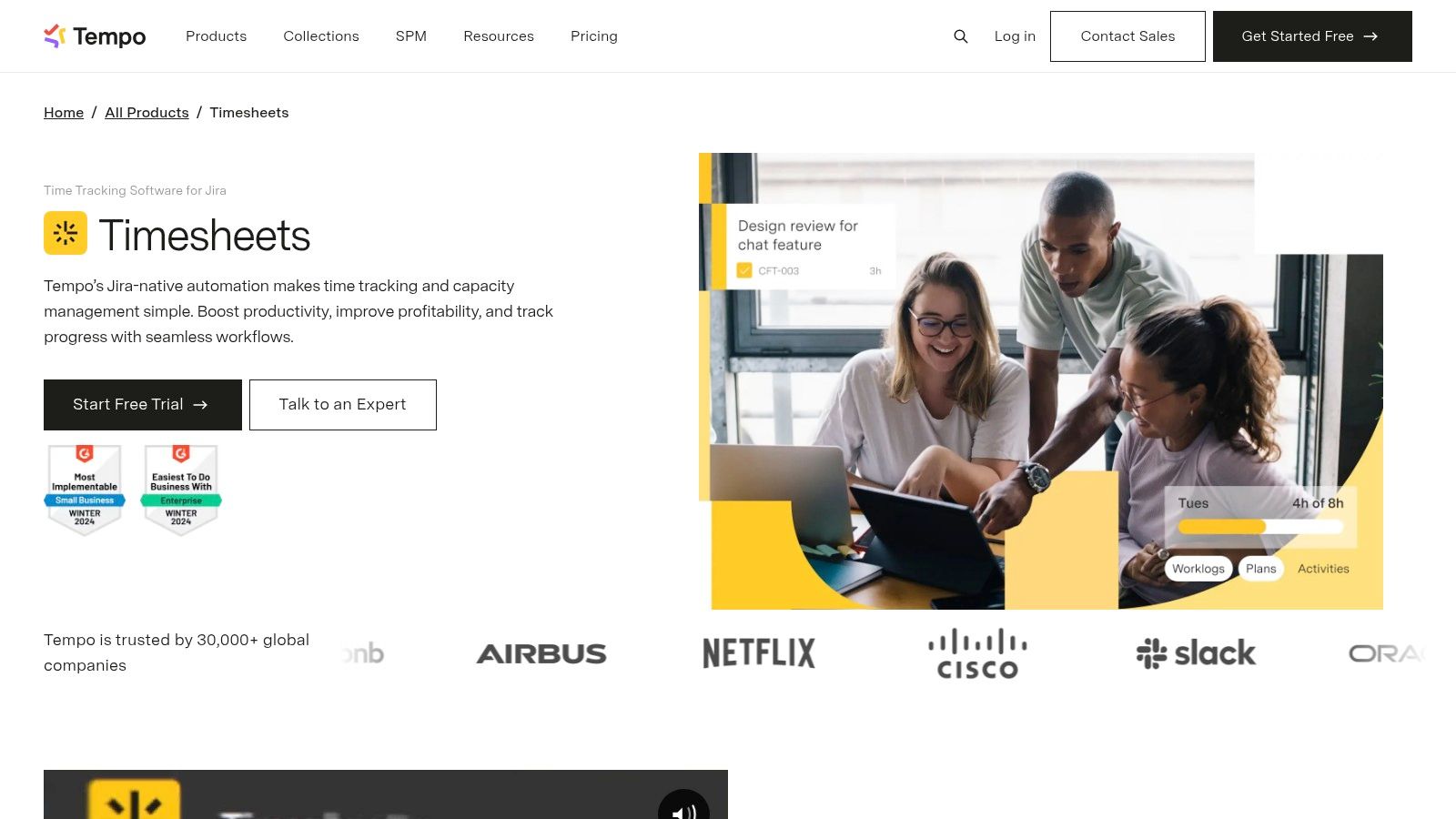
That is where marketplace apps come in. Tempo, Time Reports, Timesheet Builder, and similar tools improve the working experience around worklogs. They give teams grid views, approvals, stronger filtering, and better reporting without forcing people into a second system.
What plugins fix
The biggest gain is not magic. It is usability.
Plugins usually improve four things:
- Timesheet entry screens that are easier to fill out than issue-by-issue logging
- Approvals and controls for managers who need cleaner month-end review
- Richer reporting by user, status, epic, initiative, or date range
- Dashboarding that gives operations and finance a view Jira does not provide by default
For a team that is already committed to Jira, this can be a good middle path. The behavior stays familiar. The data stays close to delivery work. Admins avoid a full process change.
If you are reviewing app options, this roundup of Jira integrations for web development workflow is a useful starting point because it shows how teams usually extend Jira rather than replace it.
The trade-off most buyers miss
Plugins make manual logging better. They do not remove manual logging.
That sounds obvious, but teams often miss it during evaluation. They see approval workflows, polished dashboards, and prettier timesheets, then assume adoption will fix itself. Usually it does not. The same person who forgot to log Tuesday in native Jira can still forget Tuesday in a premium plugin.
What changes is the cleanup process. Managers get better review tools, and operations gets more ways to slice the data after it is entered.
When plugin-based Jira is the right call
I usually recommend this route when a team has two conditions.
First, Jira is already the center of operational work, and leadership wants everything to stay there. Second, the primary pain is reporting depth, not data capture.
That often fits agencies that need:
- better weekly timesheet views
- team lead approvals
- status-based or epic-based reporting
- stronger exports for payroll or finance support
Why it still feels like chasing
The weakness is memory.
A plugin can make it easier to enter time in batches, but it still asks people to reconstruct the week. In agencies, that is where quality drops. Client calls happen in calendars. Sales handoffs happen in CRM. Internal planning happens across meetings and chat. Jira issue logs tell part of the story, not the whole day.
So this path is better, but it is not different. If the goal is to reduce timesheet fatigue at the root, plugins improve the form. They do not change the collection model.
Thinking beyond Jira for automated time capture
The biggest mistake I see in jira for time tracking projects is treating Jira as the only place where time can begin.
That assumption makes sense if all work starts and ends on issues. In agencies, it rarely does. The work starts in calendar invites, sales calls, delivery handoffs, internal reviews, client workshops, and follow-ups that happen before anyone touches a worklog.
A different model starts from activity capture, not issue entry.
Why manual logging keeps losing
Manual entry asks people to do two jobs at once. First, do the work. Then remember the work well enough to classify it later.
That second job is where systems break.
Automated time capture flips the sequence. It pulls in activity from sources like Google Calendar or Outlook, then lets teams categorize and clean that data with rules, tags, and review workflows. Instead of asking, “What did you do on Thursday?” the system asks, “We captured these events. Which client, project, or work type do they belong to?”
That is a much easier question for a busy team to answer.
What this changes in practice
The practical shift is bigger than it sounds.
With automated capture, teams stop treating timesheets as a memory exercise and start treating them as a review process. That matters because review is faster and more accurate than reconstruction.
For agencies, this usually improves four operating habits:
- Meetings get counted because the data starts from the calendar
- Client work gets tagged earlier because categorization rules can follow project or account patterns
- Non-billable load becomes visible instead of disappearing into unlogged internal time
- Managers spend less time chasing because they review exceptions, not blank timesheets
For teams exploring that route, this overview of automated timesheet software is useful because it frames the category around capture and categorization rather than around better manual forms.
The objection that comes up first
Operations leaders often ask whether this replaces Jira.
It should not.
Jira is still where the work gets planned, assigned, and tracked. Automated capture tools are better used as the intake layer for time. They collect activity from the tools where time happens, then sync clean summaries back into project systems where needed.
That split is healthy. Project management and time collection are related, but they are not the same job.
If your team lives in calendars, calls, and client meetings, asking Jira alone to tell the full time story is asking the wrong system to do the hard part.
Comparing reporting and insights across systems
Once the data is in place, the next question is whether the reports help you run the business or just explain last week.
That is where the gap between native Jira, Jira with plugins, and dedicated platforms gets much easier to see.
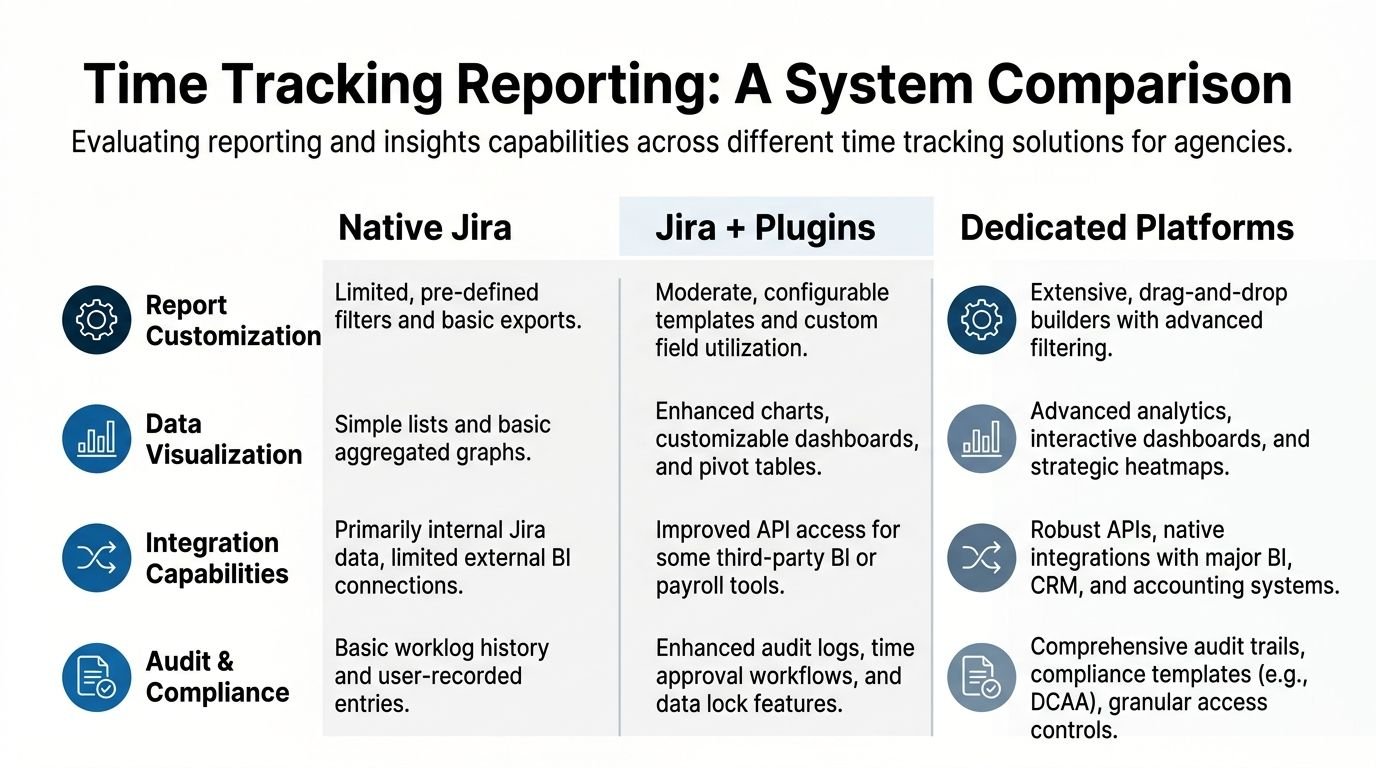
Quick comparison
| Criteria | Native Jira | Jira with plugins | Dedicated platforms |
|---|---|---|---|
| Data source | Worklogs on issues | Worklogs plus app-specific reporting layers | Captured activity across calendars and connected systems |
| Reporting depth | Basic estimate vs actual and issue-level review | Stronger pivots, dashboards, approvals, status analysis | Broader operational reporting across projects, clients, teams, and work types |
| Accuracy risk | High if users forget to log | Lower admin friction, same memory problem | Better capture because the system starts with activity |
| Best audience | Internal software teams | Jira-heavy agencies and PMOs | Services firms that need billing, utilization, and planning accuracy |
| Main limitation | Thin reporting and manual effort | Better interface, same core dependency | Requires setup discipline and process ownership |
What native Jira can tell you
Native Jira is useful for one narrow but important question. Did the team estimate and deliver work roughly as expected?
That is where the built-in Time Tracking Report earns its keep. HeroCoders notes that Jira’s native report compares original estimates to actual logged time, which makes it good for checking estimation accuracy and spotting slippage on issues and projects (HeroCoders on Jira time tracking).
For delivery managers, that is real value. You can inspect variance and discuss where the work expanded.
The limit is that native Jira mostly reports on what got logged. It is less useful for answering bigger agency questions like where time disappeared between meetings, support, internal coordination, and project execution.
What plugins add
Plugins expand the reporting lens inside Jira.
Broken Build notes that apps like Time Reports provide deeper pivots by days, users, epics, and statuses, while tools such as Tempo’s Time in Status can calculate average resolution time per sprint or total “In Progress” time. The same source says that exposing bottlenecks this way can improve workflow efficiency by 20-30% (Broken Build on velocity and cycle time in Jira).
That matters because plugin reporting starts to answer management questions, not just issue questions.
You can compare teams. You can inspect where work stalls in review. You can filter by assignee, issue type, or custom fields. For operations, this is often the first time Jira reporting feels useful beyond project managers.
If you want a broader category view before choosing a path, this time tracking software comparison helps frame the trade-offs between Jira-centered apps and dedicated systems.
What dedicated platforms change
Dedicated platforms usually win on one point. They report on time as work happened, not just time as users later entered it.
That changes the quality of the discussion.
Instead of debating whether someone forgot to log meetings, managers can examine how much of a client team’s week went to calls, planning, delivery, support, internal admin, and non-billable coordination. That is the kind of reporting agencies need when they care about margin and staffing.
The reporting test I use
When I evaluate any time setup, I ask five questions:
- Can leadership trust the input data, or is it mostly reconstructed later?
- Can we separate billable from non-billable work without manual cleanup every month?
- Can managers see time by client, service line, and team without exporting raw logs to spreadsheets?
- Can the delivery team connect time back to Jira issues when needed?
- Can finance and ops use the same data without rewriting it?
If the answer is yes to only the Jira-specific questions, native is enough. If the answer is yes inside Jira but not beyond it, plugins are probably the fit. If the answer needs to span utilization, billing support, and staffing decisions, dedicated platforms usually make more sense.
Better reports do not fix bad capture. They only make the gaps easier to see.
How to implement an integrated workflow
The cleanest setup I’ve seen keeps Jira focused on work management and moves time capture into a system built for collection.
That sounds bigger than it is. In practice, the workflow is straightforward if you design it around clear ownership.
Start with where time happens
Begin with the employee calendar, because that is where meetings, reviews, workshops, and client calls already live.
Then connect the tools that add business context, such as the CRM or account structure. That gives you a way to tag captured activity to the right client, project, or revenue stream without asking each person to type the same labels over and over.
At this stage, do not try to mirror every Jira field. Keep the taxonomy tight. Client, project, work type, billable status, and team are usually enough to start.
Build rules before you ask for behavior
Teams often overtrain and under-automate.
A better sequence is:
- Capture activity first from the calendar and connected systems.
- Apply tagging rules based on attendee, title pattern, domain, client name, or project mapping.
- Review exceptions instead of asking everyone to review every item.
- Approve and export for reporting, billing support, or payroll processes.
- Push summary data back into Jira where issue-level visibility matters.
That last step is the one teams often miss. Jira does not need to own primary time collection to remain useful. It can still receive summarized or approved time against relevant issues, so project managers keep their view of effort without carrying the full burden of timesheet administration.
Keep one source of truth for each job
When this goes wrong, it is usually because teams try to make both systems equal masters.
Use one source of truth for project work. That is Jira.
Use one source of truth for captured time and categorization. That is the dedicated time platform.
Finance, operations, and delivery can still work from the same underlying dataset, but each system should own the part it is best at.
A simple operating model
This model works well for agencies:
- Team members review captured activity and fix exceptions
- Ops or team leads monitor missing tags, approval rules, and reporting quality
- Project managers read summarized effort in Jira for delivery oversight
- Finance uses approved categorized data for billing support and month-end checks
Done well, this reduces duplicate entry without stripping Jira of its role. It also lowers the social cost of time tracking, because people stop feeling like they are filling in a second job at the end of the week.
The right setup for your agency or services team
There is no universal winner. The right answer depends on what kind of team you run and what pain you are trying to remove.
A lot of articles pretend every organization should buy the most advanced stack available. That is lazy advice. Some teams are fine with native Jira. Others need much more.
Choose native Jira if your needs are narrow
Native Jira is enough when time tracking supports delivery discipline, not commercial reporting.
That usually fits:
- internal software teams
- product groups that care about estimate versus actual
- smaller teams with simple workflows
- organizations where finance does not depend on Jira logs
This path is cheap in operational terms because it is already there. The cost shows up in compliance and reporting quality if you ask it to do more than it was built for.
Choose plugins if Jira is your operating center
Plugins make sense when your team lives in Jira and wants better structure without changing habits too much.
This is often the right fit for agencies that need:
- cleaner weekly timesheets
- manager approvals
- richer reporting by epic, status, or user
- better dashboards for delivery leads
There is a real upside here. TitanApps notes that Jira is strong for velocity, throughput, and Epic Burndown reporting, and that agile teams can achieve stable forecasting after 3-5 sprints. The same source also notes that native reports often have sprint count caps, while apps can provide long-term trends and multi-project views that may yield 15-25% productivity gains (TitanApps on Jira productivity metrics).
For delivery planning, that is useful. For agencies with billing pressure, it still leaves the entry problem in place.
Choose automated capture when time is part of the product
My perspective: If you run a mid-sized marketing agency, implementation firm, consulting team, client services org, or any business where labor is the main cost and the main thing sold, manual-first systems stop scaling earlier than people expect.
You need to know not only what got logged to Jira, but also how the week got spent. Meetings, client calls, internal reviews, pre-sales support, rework, admin, and coordination all affect profitability. If those hours depend on memory, the reporting will drift.
That is why dedicated platforms are usually the better fit for services businesses. They solve the collection problem first, then feed cleaner data into delivery and finance workflows.
A practical decision filter
Use this test.
If your biggest complaint is “Jira’s reports are too basic,” add a plugin.
If your biggest complaint is “People forget to fill timesheets, so our reports are wrong,” stop trying to solve a capture problem with better reporting.
The more your revenue depends on labor accuracy, the less sense it makes to rely on remembered worklogs as your main data source.
Calculating the true return on investment
The return on a better time setup usually shows up in three places. Admin time, captured work, and decision quality.
Start with admin time because it is the easiest to see. How many hours does your team spend every week entering, correcting, approving, and chasing time? If that burden falls across project managers, team leads, finance, and individual contributors, the true total is usually larger than anyone expects.
Then look at missed or misclassified work. In agencies, the gap is often not dramatic fraud or obvious failure. It is the quiet stuff. Internal calls not tagged correctly. Client meetings left unlogged. Coordination time pushed into a generic issue. Those small misses compound into weak billing support and poor project review.
Finally, price the reporting effect. Better data helps leaders staff accounts earlier, spot overloaded teams faster, and question unprofitable work before it becomes normal. That is harder to model exactly, but it matters more over time than the hours saved on form filling.
A simple ROI worksheet works better than a fancy business case:
- Manual effort today. Count the weekly hours spent on entry, cleanup, reminders, and approval.
- Recovery of overlooked time. Estimate where meetings, calls, and support work go missing or get dumped into vague categories.
- Management value. Identify decisions currently delayed because the team does not trust the time data.
- System cost and rollout effort. Include licenses, admin setup, and change management.
If your current process produces trustworthy, low-friction data, keep it. Many teams do not need to change.
If your leaders spend every month arguing about whether the timesheets are complete, you already know the answer. The cost is not just the software. The cost is the uncertainty your team is carrying now.
If your team is stuck between Jira worklogs, plugin add-ons, and a more automated model, TimeTackle is worth a look. It is built for teams that want time data to start from calendars and connected systems, then flow into reporting and operations with less manual effort.