For many agencies, old-school timesheets are a total nightmare. They’re a constant source of frustration that leads to bad data, unchecked scope creep, and a fast track to team burnout. A modern time tracking app flips this script. It turns a dreaded chore into a real strategic advantage, giving you the clear insights you need for growth, smart resource planning, and actual profitability. It’s time to stop guessing and start knowing.
Moving Beyond Manual Timesheets
Let's be real: chasing down manual timesheets is an operational headache no one signed up for. It feels less like a valuable business activity and more like a punishment.
Your team members are forced to play detective at the end of every week, trying to piece together hours from fuzzy memories, calendar entries, and sent emails. This whole process is broken from the start, and it pumps bad data right into the heart of your business decisions.
The fallout from this bad data is huge. Inaccurate time logs completely throw off your project profitability numbers. You’re left wondering which clients are actually making you money and which ones are secretly bleeding you dry. Without a clear map of where the hours are going, scope creep isn't just a risk—it's a certainty. All those "quick calls" and "minor tweaks" add up, quietly eating away at your margins until there's nothing left.
The Problem with Guesswork
Relying on manual entry is like trying to navigate rush hour traffic with a map you drew from memory. You might get there eventually, but it’ll be stressful, inefficient, and you'll definitely take a few wrong turns. You simply don't have the real-time information you need to react.
This outdated approach creates some major headaches for agency leaders:
- Inaccurate Project Scoping: When you don't have solid historical data on how long projects actually took, every new estimate is just a shot in the dark.
- Hidden Inefficiencies: Manual logs almost never capture the full picture of non-billable admin work or internal huddles, which means your true operational costs are a mystery.
- Team Burnout and Frustration: Hounding your team to reconstruct their week is demoralizing. It also pulls them away from the valuable, client-focused work they should be doing.
A modern time tracking app replaces all that ambiguity with a high-resolution map of your business. It gives you the clarity to navigate tricky projects, put the right people on the right tasks, and find new paths to profitability.
A New Perspective on Tracking Time
We need to change the conversation around time tracking. This isn't about micromanagement; it's about empowerment.
When an agency brings in an automated time tracking app, it gives everyone—from project managers to designers to developers—access to better information. This empowers teams to protect their focus time, make a real case for more resources, and actually see the impact of their hard work.
By ditching unreliable spreadsheets, you get a clear, objective record of your agency's most precious resource: its time. To see just how critical this shift is, check out our deep dive on the differences between spreadsheets vs timesheet apps. Making this move is the first real step toward building a smarter, more profitable, and sustainable agency.
What Is a Modern Time Tracking App
When you hear "time tracking," do you picture old-school punch cards or those clunky, annoying start-and-stop timers? It's a common image, but a modern time tracking app is a world away from that. It’s less of a stopwatch and more like an intelligent command center for your agency’s operations.
The real evolution is a complete shift in thinking: from just counting hours to truly understanding how those hours create value.
Forget the days of chasing down team members for manual timesheets. Today's tools have moved far beyond basic timers. They’re defined by their intelligence and automation, often working silently in the background to capture a complete, accurate picture of your team's day without anyone having to lift a finger. This is the fundamental difference between the old way and the new.

Active vs. Passive Tracking
The most important development in time tracking is the jump from active to passive data collection. Grasping this distinction is key to understanding the value a modern app brings to your agency.
- Active Tracking: This is the traditional method. Employees have to manually start a timer when they begin a task and stop it when they finish. It’s disruptive, prone to human error, and almost always results in inaccurate data because people forget, get interrupted, or just guess their time later.
- Passive Tracking: This is the modern, automated approach. Instead of relying on manual input, the system captures activity from data sources you already use—most importantly, the team's calendar. Tools like TimeTackle connect directly to Google or Outlook calendars to build a perfect, effortless record of the workday.
By using the calendar as the primary source of truth, passive tracking eliminates the administrative headache for your team. It shifts the entire conversation from "Did you log your hours?" to "What can this data tell us about our business?"
This isn't just about convenience; it's a strategic advantage. When data capture happens automatically, adoption rates skyrocket, and the information you collect is far more reliable.
The Brains Behind the App
What makes a modern time tracking app so powerful isn't just capturing the data—it's what it does with that data. Think of it as having an operational analyst working for you 24/7.
It all starts with smart integrations. A modern app doesn't live on an island; it connects seamlessly with the tools your agency already depends on, like project management software and CRMs. This creates a single, unified view of your operations, linking time directly to specific projects and client accounts.
Then, AI-driven categorization comes into play. Instead of someone having to manually tag every single calendar event or time entry, the system uses rule-based automation. For example, you can set a rule that any meeting with "Client X" in the title is automatically tagged as billable work for that client's project. This kind of intelligent sorting saves hundreds of hours and ensures your reporting is always consistent.
The global shift to remote and hybrid work has made these capabilities non-negotiable. As a result, the time tracking software market, currently valued at USD 3.8 billion, is projected to explode to USD 16.1 billion by 2035. This massive growth is driven by the urgent need for accurate payroll and operational clarity in distributed teams. You can find more insights about this expanding market and its trends.
Essential Features for Agency Success
Let’s be honest, picking a time tracking app for your agency isn’t like choosing any other piece of software. A generic tool with a simple start-stop button just won't cut it. Your agency has complex operational challenges, from juggling resource allocation to figuring out which clients are actually profitable. You need something built for that reality.
The right features do more than just log hours; they give you a clear, actionable picture of your business. They should work for you in the background, turning raw data into the kind of intelligence you need to make smarter decisions. So, let's break down the non-negotiable features that separate a basic timer from a strategic business asset.
Automated Calendar Capture
The biggest reason time tracking fails is manual entry. It's that simple. Your team forgets, gets pulled into another task, or just doesn't have the time to stop and log every single thing they do. The best time tracking apps get rid of this problem entirely.
By connecting directly to your team’s Google or Outlook calendars, the app automatically logs every meeting, client call, and focused work block. This calendar-first approach creates a perfect, gap-free record of the day without making your team do any extra work. It’s the only way to get data you can truly rely on.
- Agency Scenario: Think of an account manager with back-to-back client calls all morning. Instead of trying to piece together her day hours later, an app with calendar capture has already recorded every 30-minute call. That's 100% of that billable time accounted for, accurately and effortlessly.
Rule-Based Project Tagging
Agencies are constantly juggling dozens of clients and hundreds of projects, each with its own billing codes and rules. Manually tagging every calendar event as "Client A – Project X – Billable" is not just tedious—it’s a recipe for mistakes. This is where smart automation really shines.
A top-tier time tracking app lets you set up custom rules that categorize activities for you. For example, you could create a rule that automatically tags any calendar event with "Client Z" in the title as billable work for their current retainer. This enforces consistency across the board and saves your team countless hours of mind-numbing data entry.
This isn't just a time-saver. It's about building a structured, reliable dataset from the moment time is captured. Clean data is the key to unlocking any meaningful business insights.
Before we move on, it's worth seeing just how different this approach is from the old way of doing things. The contrast between manual and automated tracking is stark, especially when you consider the impact on an agency's operations.
Comparing Manual vs Automated Time Tracking for Agencies
| Feature | Manual Timesheet Method | Automated Time Tracking App (e.g., TimeTackle) |
|---|---|---|
| Effort Required | High. Daily, often tedious, manual entry from memory. | Minimal. "Set it and forget it" after initial setup. |
| Data Accuracy | Low. Prone to human error, guesstimates, and forgotten tasks. | High. Captures 100% of calendar events for a complete record. |
| Team Adoption | Often a struggle. Seen as an administrative chore. | Seamless. Works in the background without disrupting workflows. |
| Strategic Insight | Limited. Data is often too messy or incomplete for deep analysis. | Rich. Clean, structured data powers profitability and utilization reports. |
| Time to Insight | Slow. Requires manual data cleanup and spreadsheet analysis. | Instant. Real-time dashboards provide immediate answers. |
As you can see, automation doesn't just make the process easier; it fundamentally changes the quality and usefulness of the data you collect, turning it from a necessary evil into a genuine strategic advantage.
Deep Software Integrations
Your time tracking app can't be an island. To be truly valuable, it needs to talk to the other critical systems you rely on every day, especially your project management tools like Asana or monday.com and your CRM platform.
Deep integrations let you sync time data directly with client accounts and project tasks. This creates a single source of truth where you can instantly connect the dots between the time your team is spending and the revenue it’s generating. It’s how you link effort to outcome.
- Agency Scenario: By integrating their time tracker with their CRM, a finance lead can pull a report showing the total hours invested in a client versus the revenue that client generates. They discover a "high-maintenance" client is barely profitable, providing the data needed to renegotiate the contract or adjust the service level.
Dynamic Reporting Dashboards
Finally, all this perfectly captured and categorized data is worthless if you can't easily see what it's telling you. Static, one-size-fits-all reports just don't cut it for the kinds of questions agency leaders need to answer. You need dynamic, customizable dashboards that let you slice and dice the data in ways that are actually meaningful to you.
Look for a time tracking app that gives you flexible filtering and powerful visualizations. You should be able to instantly pull reports on:
- Team Utilization: Who is burning out and who has room for more work?
- Project Profitability: Which projects are making you money and which are bleeding you dry?
- Client ROI: Are your most demanding clients also your most profitable ones?
- Service Line Performance: Which of your agency's services deliver the highest margins?
Being able to ask and answer these complex business questions on the fly is what turns a time tracker from a simple utility into an indispensable tool for growth. It lets you stop guessing and start making data-driven decisions that directly boost your bottom line.
Unlock Your Agency's True Profitability
A modern time tracking app isn't just another tool for logging hours—it's the financial command center for your entire agency. It’s what takes you from making educated guesses to acting with data-driven confidence, drawing a straight line from your team’s daily work to your bottom line.
This kind of clarity is built on four key pillars. Nailing them will fundamentally change how you operate, staff projects, and bill for your work, turning your agency into a more resilient, efficient, and profitable machine.

Pinpoint Project Profitability
Let’s be honest: do you truly know which clients and services are making you money? Without hard time data, it's just a gut feeling. It’s a classic agency story—the biggest client on your roster is secretly your least profitable once you account for all the "quick calls" and extra revision cycles.
Think of a time tracking app as a financial MRI for your projects. It gives you a crystal-clear picture of where every single hour is going, so you can weigh that investment against what you’re actually earning. This is the kind of insight that drives smart, strategic decisions.
- Real-world example: One agency was convinced their flagship retainer client was a massive win. But after just one month of tracking, they found that "out-of-scope" requests were eating up 20 unbilled hours every month. That profitable account was actually a loss leader. Armed with this data, they renegotiated the contract from a position of strength.
Optimize Resource Utilization
Burnout is the silent killer of agency productivity. It creeps in when you overload your star players while others have untapped capacity, leading to inefficiency and tanking morale. Smart resource allocation isn’t about being a taskmaster; it’s about creating a sustainable rhythm that keeps your team firing on all cylinders.
With clear utilization reports, you can see everyone's workload at a glance. You can spot who’s stretched thin and who has room for more, allowing you to make staffing decisions before problems arise.
This isn't micromanagement; it's strategic leadership. You ensure the work is spread fairly, you head off costly burnout, and you can plan for future hires based on real numbers, not just a hunch.
Streamline Billable Hours Capture
Every minute that goes unbilled is revenue you’ll never see again. For any agency, capturing billable time accurately is non-negotiable. But manual timesheets are full of holes, letting countless small tasks and quick client chats fall through the cracks. An automated time tracker plugs those leaks for good.
By pulling data directly from your team's calendars, every meeting and work block gets accounted for. It’s a simple change that can have an enormous impact on your invoices. You can discover more ways to accurately track billable hours and see just how much revenue you might be leaving on the table. This shifts time tracking from a dreaded chore to an automatic background process that strengthens your cash flow.
With the rise of remote work, this is more critical than ever. The time tracking market is expected to hit USD 11.43 billion by 2030 for a reason—agencies are leaning on automation to ensure billing is spot-on and administrative waste is cut. For firms with 50-200 employees, automating this process can literally slash the time spent on timesheet compliance in half. You can read the full analysis on the growth of the time tracking market.
Boost Operational Efficiency
How much time do your managers and ops leads waste just chasing down timesheets? That administrative grind is a huge, often invisible, cost. It’s time they could be spending on high-value work like strategic planning, nurturing client relationships, or mentoring the team.
An automated time tracking app completely wipes out this category of busywork.
- No More Chasing: When time is captured from the calendar, the data is already there. No more nagging emails or awkward follow-ups.
- Instant Reporting: What used to take hours of spreadsheet wrangling can now be done in a few clicks. Pulling reports becomes effortless.
- A Single Source of Truth: Everyone is on the same page, working from the same accurate data. This ends all the back-and-forth about "who worked on what."
This operational upgrade hands your leadership team back their most valuable resource—time—so they can focus on what actually moves the needle for the agency.
How to Solve Your Agency's Biggest Operational Pains
If you're an agency leader, you know the most persistent operational headaches aren't just small annoyances. They're real threats to your profitability and team morale. More often than not, these problems can be traced back to a single source: bad time data. A modern time tracking app hits these issues head-on, replacing guesswork with objective facts.
Instead of being just another tool to manage, a calendar-first solution like TimeTackle gets to the root of your biggest frustrations. It changes time tracking from a manual chore into an automated system that brings clarity to the problems that keep you up at night. Let’s look at how this approach solves four specific, critical pain points for agencies.
The Problem of Inaccurate Project Scopes
Every agency leader knows the feeling of a project going completely off the rails because the initial scope was a shot in the dark. When you build proposals based on foggy memories or incomplete timesheets, you’re basically inviting scope creep and shrinking margins to the party. Scoping accurately requires a solid foundation of historical data.
This is where a calendar-based time tracking app becomes your secret weapon. It automatically captures every meeting, workshop, and work block from past projects, building a rock-solid historical baseline. You can finally see exactly how many hours that "standard" website build actually took, giving you the hard data you need to create profitable, realistic scopes for future work.
This is a live look at the TimeTackle dashboard, showing how calendar data can be automatically categorized and analyzed.
The dashboard gives you a clear, visual breakdown of how time is allocated, making it simple to spot trends and figure out if a project is actually making you money.
The Challenge of Low Team Adoption
You can spend a fortune on the most powerful platform out there, but if your team doesn't use it, it’s worthless. The number one reason time tracking initiatives fail is the sheer friction of manual entry. People are busy, they forget to start timers, and trying to piece together a week from memory is both inaccurate and just plain demoralizing.
An automated, calendar-first approach completely eliminates this burden.
By using the calendar as the single source of truth, the system works silently in the background. There are no timers to start or stop and no timesheets to fill out from scratch. Team adoption is practically guaranteed because there’s nothing new to do.
The Complexity of Client Reporting
Pulling together client reports by hand is a time-sucking nightmare. You're exporting data, wrestling with spreadsheets, and trying to stitch together a coherent story—all hours that could be spent on actual strategic work. The process isn’t just inefficient; it's also a breeding ground for errors that can chip away at client trust.
A smart time tracking app solves this with AI-powered tagging and dynamic reporting. You can set up rules that automatically sort calendar events based on keywords, attendees, or meeting titles. Need to show a client exactly where their retainer went this month? A detailed, accurate report is just a few clicks away, freeing your team from the administrative grind.
The Demand for Enterprise-Grade Security
In this day and age, data security is non-negotiable, especially when you're handling sensitive client information. Using unvetted or insecure tools puts both your agency and your clients at risk. As a leader, you need to know that your operational data is protected by the highest standards out there.
This is exactly why choosing a platform with proven security credentials is a must. For example, TimeTackle's SOC 2 Type II compliance isn't just a badge; it represents a rigorous, third-party audit of our security controls. This gives you peace of mind, knowing your data is handled with the enterprise-grade security that modern business requires.
A Practical Guide to Successful Implementation
A powerful new time tracking app can feel like a silver bullet, but its real value hinges on one thing: getting your team to actually use it. Just dropping a new tool into the workflow without a thoughtful plan is a recipe for failure. A great implementation isn't about the technology; it's about leading your team through a change.
The whole process comes down to building a sense of shared purpose right from the start. Instead of presenting the tool as a top-down mandate for monitoring, frame it as a solution to common frustrations. Show your team how it will cut down their admin work, protect their valuable focus time, and give them the hard data they need to argue for better resource allocation.
Gaining Team Buy-In
True adoption starts with empathy. You need to address your team’s potential concerns head-on and zero in on the direct benefits for them. This isn't about surveillance; it's about making their work lives easier and more sustainable.
You can completely shift the narrative by highlighting how the right time tracking app helps:
- Eliminate Guesswork: No more struggling to piece together what you did last Tuesday.
- Protect Against Burnout: Data can clearly show when workloads are becoming unmanageable.
- Justify More Resources: Hard numbers are the best possible argument for hiring more help or getting a project's budget increased.
By framing the rollout around these benefits, you transform the tool from a "have to" into a "want to." This is the bedrock of a successful launch.
Getting this right is all about clear communication. To help, we've put together a guide on how to motivate employees to track time that offers actionable strategies for building enthusiasm and ensuring a smooth transition.
A Phased Rollout for Success
Once you have buy-in, resist the urge to go live for everyone at once. A strategic, phased approach lets you work out the kinks and build momentum, which guarantees a much smoother company-wide launch down the road.
Follow these four critical stages for a seamless implementation:
- Define Your Data Structure: Before a single minute gets logged, decide on your project codes, client tags, and activity categories. A clean, logical structure from day one is absolutely essential if you want to generate meaningful reports later.
- Run a Pilot Program: Hand-pick a small, representative group of employees to test drive the new app for a week or two. This pilot phase is invaluable for gathering honest feedback, identifying potential roadblocks, and creating internal champions for the new system.
- Provide Practical Training: Host a training session that focuses on real-world workflows, not just a boring rundown of features. Show the team exactly how the app fits into their daily routines and how to make sense of the data it provides.
- Celebrate Early Wins: As you start gathering data, share positive insights with the team. For example, show them how you identified an under-resourced project or validated the need for a new hire. Demonstrating the tool's value early and often is how you build lasting momentum.
This structured approach is even more important as teams become more distributed. Mobile time tracking apps are a huge driver of this, with the market projected to hit USD 5.1 billion by 2033. The rapid growth of the mobile segment just highlights the need for easy-to-adopt solutions that work for everyone, everywhere. By focusing on a people-first implementation, you ensure the tool becomes a genuine asset for your agency, not just another piece of software.
Common Questions About Time Tracking Apps
Even when the benefits are crystal clear, dropping a new tool into your team’s workflow is going to stir up some questions. Let's get out in front of the common hesitations and tackle the concerns we hear most often from agency leaders.
How Do We Convince Our Team This Is Not Micromanagement?
This is the big one, and it’s all about framing. You have to position the tool as something that helps them, not just management. This isn't about watching their every move. It’s about protecting their focus, getting a real handle on workloads, and making sure no one is drowning while someone else has bandwidth.
When your team sees that hard data is what you’ll use to justify hiring more help or to push back on a client’s crazy demands, the whole narrative changes. It stops being a "gotcha" tool and becomes a shield that protects their time and sanity. Adoption feels a lot more natural after that.
The goal isn't to watch every click; it's to get an accurate, high-level view of your agency's most valuable asset—its time. This clarity empowers everyone to work smarter, not just harder.
Can a Time Tracking App Handle Our Complex Projects?
Absolutely, but your average, run-of-the-mill timer app won't cut it. Agencies are a different beast. You need a platform built for that complexity, with things like customizable tags and smart, rule-based automation that can actually mirror how your business runs.
A modern time tracking app lets you tag every minute of work by client, project, service line, and billable status. This means whether you're billing hourly, by project, or on a retainer, every second is captured accurately and consistently without messy manual work.
How Long Does Implementation Actually Take?
The tech setup for a cloud-based app? That’s fast—often just a few minutes. The real work, the part that actually determines success, is the planning and rollout. For a mid-sized agency, you should budget somewhere between two to four weeks for a proper, successful implementation.
This breaks down the process flow that works best.
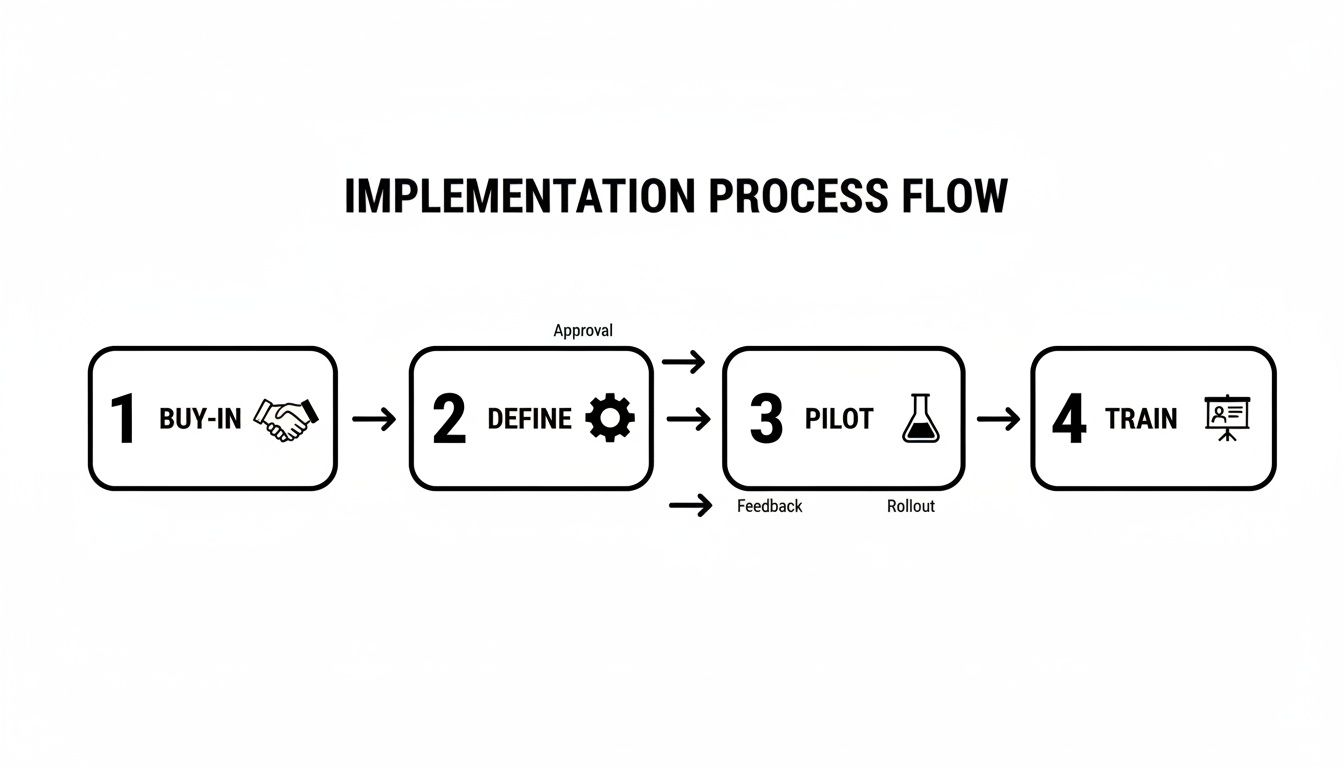
Trust us, taking the time to follow a phased approach like this pays off. It's worlds more effective than trying to flip a switch overnight and hoping for the best.
Is Our Client Data Secure?
This is a complete non-negotiable. You have to dig into the security credentials of any vendor you’re considering. Don’t just take their word for it; look for enterprise-grade security protocols and official compliance certifications.
One of the big ones to look for is a SOC 2 Type II certification. This isn't just a piece of paper; it means the vendor has passed a rigorous, independent audit of their security and data protection practices. Never, ever compromise on security here.
Ready to replace guesswork with clarity? TimeTackle provides an automated, calendar-first time tracking solution that gives your agency the operational insights needed to boost profitability and efficiency. Discover how TimeTackle can solve your biggest operational pains today.