
Let’s get right to it. Batching is the simple act of grouping similar tasks and doing them all in one dedicated block of time. Think of it like a chef doing all their prep work—chopping every vegetable, measuring every spice—before a single pan hits the heat.
It’s about creating efficiency and flow.
What is batching and why should your agency care?

For a busy agency, this isn't just another productivity hack. It's a direct countermeasure to the operational chaos that causes timesheet headaches and frustratingly vague reporting. Batching stops the constant mental gear-shifting that demolishes focus and drains your team's energy.
Instead of bouncing from writing a client email to updating a project board to hopping on a last-minute call, you dedicate specific, uninterrupted time to each type of work. This one shift can have a massive impact on your team’s output and sanity.
The problem with scattered work
Does this sound familiar? A designer starts the day answering a flood of emails, gets pulled into an unplanned creative review, works on a mock-up for 20 minutes, and then has to stop and try to remember it all to fill out their timesheet. Each one of those shifts costs mental energy.
This scattered approach is the default for many agencies, and it creates a domino effect of problems:
- Timesheet fatigue: When your team constantly stops and starts, logging their time accurately becomes a genuine chore. The result is guesswork and growing frustration.
- Reduced focus: It's nearly impossible to produce deep, creative, or strategic work when your focus is shattered every 15 minutes. The quality of the work inevitably suffers.
- Reporting nightmares: Inaccurate time tracking means you’re flying blind. You can't see where your agency’s most valuable resource—your team’s time—is actually going.
- Employee burnout: Being constantly pulled in a dozen different directions is mentally exhausting and a fast track to burnout.
To really see the difference, let’s compare two versions of a typical agency day.
The daily impact of scattered work vs. a batched schedule
| Activity | Scattered Workday | Batched Workday |
|---|---|---|
| Email & Comms | Checked 15+ times throughout the day, derailing deep work. | Handled in two 30-minute blocks (morning & end of day). |
| Client Work | 25-minute sprints between meetings and interruptions. | A 2.5-hour "deep work" block with zero distractions. |
| Internal Meetings | Randomly scheduled, breaking up the afternoon. | Grouped together on a designated "meeting day" or time block. |
| Time Tracking | A frantic 15-minute scramble at 5 PM to recall the day's tasks. | Logged in 2 minutes after each completed batch. Simple and accurate. |
| Focus & Energy | Constant mental fatigue from switching contexts. | High focus during work blocks, with intentional breaks in between. |
The contrast is stark. A scattered day feels reactive and draining, while a batched day is proactive and controlled.
How batching solves these problems
Batching brings a deliberate structure to the workday that directly fights these issues. For example, you might create a "communications batch" from 9:00 to 9:45 AM for all emails and Slack messages. Once that block is over, those apps get closed, protecting the deep work time that follows.
This isn’t just theory. Industry reports show that professionals can see up to 32% efficiency gains and spend 50% less time on administrative tasks after adopting batching. For an agency’s operations lead, this can translate to a 40% reduction in manual reporting overhead, making it far easier to connect daily activities to ROI. You can dig into similar findings on efficiency in reports from Fact.MR.
By grouping similar tasks, you create a workflow that aligns with how our brains operate best. You stay in one mental “zone,” which allows for deeper concentration and higher-quality results in less time. It’s not about working harder; it’s about working smarter.
The science of why batching feels so good
Ever wonder why jumping from a spreadsheet to an email and then to a design file feels so draining? It’s because our brains simply aren’t wired for that kind of rapid-fire multitasking. When you dig into the “why” behind batching, you realize it's less about slick calendar tricks and more about how our brains are built to work.

Escaping attention residue
Every single time you switch from one task to another, a little piece of your focus—what scientists call “attention residue”—gets left behind. You might be starting a new proposal, but part of your brain is still stuck on the email you just fired off. This mental hangover makes it incredibly hard to give your full concentration to the new task at hand.
One of the biggest wins of batching is how it cuts down on the cognitive cost of what is context switching. Instead of constantly paying this mental tax, batching lets your brain settle into one “zone.” You handle all your emails at once, so when you finally move on, your mind is clear and ready for what’s next.
This constant shifting is unbelievably expensive. Every switch can gobble up as much as 23 minutes of your focus. In a fast-paced agency, that lost time adds up, contributing to the staggering 50 million productivity hours US businesses lose every day from scattered work, according to time tracking statistics from Breeze.
By working with your brain's natural tendencies instead of against them, batching lets you lock into one type of task. This simple shift minimizes the friction of switching and lets you produce higher-quality work in a fraction of the time.
Achieving a state of flow
The real magic happens when batching helps you enter a state of deep work, often called “flow.” This is that mental sweet spot where you're completely absorbed in what you’re doing, feeling energized and laser-focused. In a flow state, productivity doesn’t just increase; it skyrockets, and the work itself becomes genuinely rewarding.
Getting into this state is almost impossible when you’re being pulled in a dozen different directions. Batching is the key because it carves out the long, uninterrupted blocks of time your brain needs to settle in and find its groove.
For agency leaders, this is the main takeaway: batching is much more than organizing a schedule. It’s a powerful strategy for boosting your team's performance, elevating the quality of their work, and stamping out the burnout that comes from a constantly fragmented day. To dig deeper, check out our guide on how to get started with deep work.
Practical batching methods for your agency
Knowing that batching works is one thing; actually putting it into practice is another. The good news is that batching isn't a rigid, one-size-fits-all system. Think of it as a flexible concept with a few core methods you can mold to fit your agency’s unique rhythm and client demands.
Let’s break down three main approaches to get you started.
This flow chart gives you a simple visual of the three core batching methods and how they build on each other.
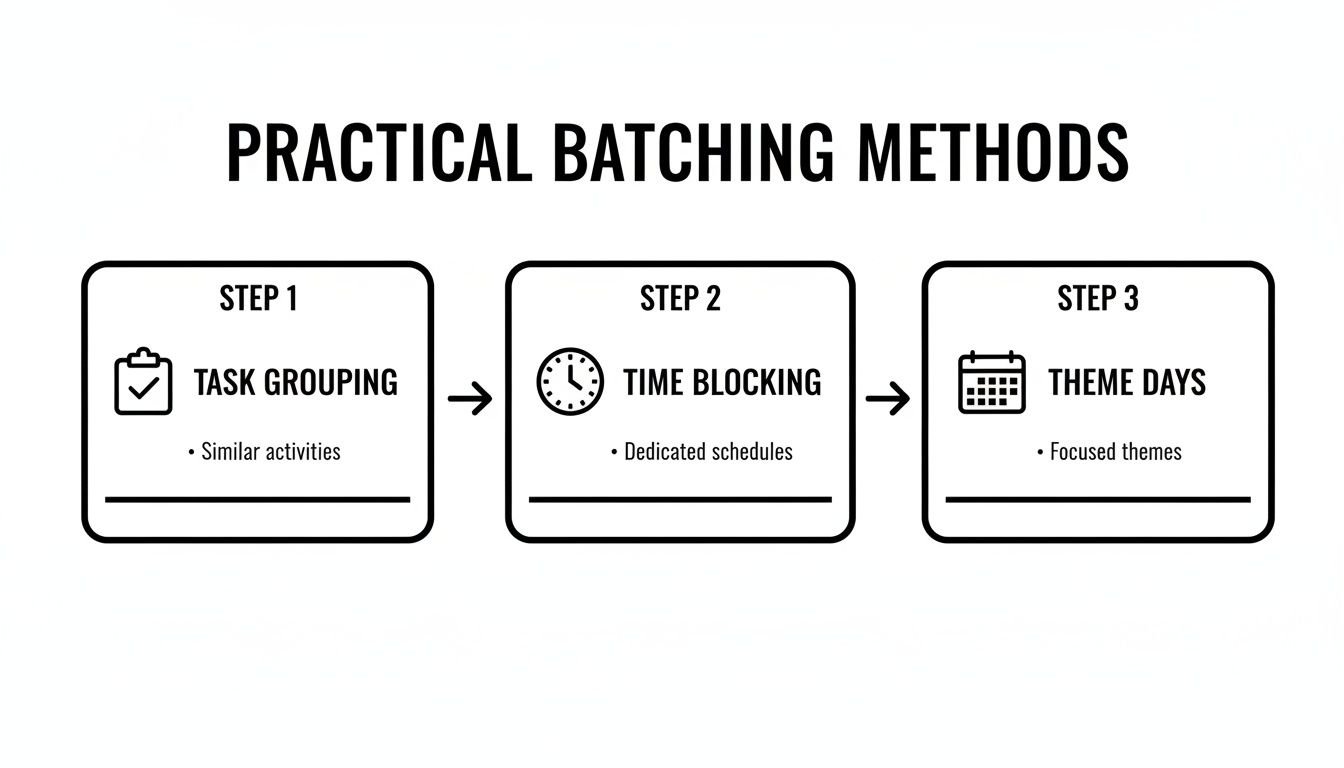
As you can see, the methods scale up—from grouping tiny, individual tasks to blocking out dedicated hours, and finally, to organizing entire days around a single focus.
Task batching
This is batching in its purest and most straightforward form. Task batching is simply grouping identical or very similar low-effort tasks and knocking them all out in one dedicated session. The whole point is to find a groove and plow through that repetitive work without constantly needing to switch gears.
Here are some real-world examples for an agency:
- Creative Team: Instead of designing social media graphics on the fly for every client request, dedicate a single block of time to create all graphics for the entire week across multiple accounts.
- Sales Team: Instead of sporadic outreach that breaks up the day, batch all cold calls or LinkedIn connection requests into a focused 90-minute power session.
- Consulting Team: Rather than writing and sending follow-up notes after each separate client call, schedule one block at the end of the day to get them all done at once.
Time batching
A close cousin to task batching, time batching is all about dedicating a specific block of time on your calendar to a category of work. It’s less about the individual to-dos and more about fiercely protecting your focus for a certain kind of thinking. While it’s a distinct strategy, it shares DNA with other calendar management techniques. If you want to dive deeper into similar concepts, you can learn more about how timeboxing can amplify productivity.
Time batching is about creating fences around your focus. You’re not just scheduling tasks; you’re scheduling your attention.
For instance, you might block off 10:00 AM to 12:00 PM every single day for "Deep Client Work." During that time, you silence all notifications, close unrelated tabs, and focus only on high-value project deliverables. This ensures your most important work gets your best, most uninterrupted energy.
Theme day batching
This is the most structured approach of the three, where you dedicate an entire day to a single theme or core area of your business. This method is a game-changer for leaders and team members who wear a lot of different hats, as it dramatically cuts down on context switching at a macro level. For example, if you’re trying to optimize a core process, like mastering client onboarding best practices, you could dedicate a specific day to process improvement.
Here’s what a week of theme days might look like:
- Mondays: All about internal strategy and team alignment meetings.
- Tuesdays: Finance and admin day (invoicing, reporting, payroll).
- Wednesdays & Thursdays: Client-facing "deep work" days with a strict no-internal-meetings rule.
- Fridays: Reserved for business development, marketing, content creation, and professional growth.
By adopting one of these methods, you give your team a clear, predictable structure that doesn’t just manage their time—it helps them do their absolute best work.
How to start batching across your team

So, you're sold on the idea of batching. Now, how do you actually make it happen? It all begins with a simple, personal task audit. Before you can group anything, you need an honest look at where your time is really going.
For just a few days, jot down every single task you do. This isn't about judging your productivity—it's about gathering data. You’ll probably spot patterns right away. Maybe you're checking email 15 times a day or getting pulled into tiny, unscheduled design tweaks that shatter your concentration.
These patterns aren't problems; they're opportunities.
Building your personal batches
With your task list in hand, start clustering similar items together. Don't aim for perfection here. The goal is just to find the low-hanging fruit and cut down on all that context switching.
- Communications: Group all your email replies, Slack checks, and voicemails into two or three dedicated blocks per day.
- Admin Tasks: Combine tedious chores like filling out timesheets, updating your project management tool, and scheduling meetings into a single, focused session.
- Shallow Work: Cluster all those small, low-effort tasks like minor file organization or quick client updates.
- Deep Work: Fiercely protect large, uninterrupted chunks of time for your most demanding work, like writing copy, developing strategy, or deep-diving into analytics.
Once you have these batches, treat them like real appointments. Block them off on your calendar—Google, Outlook, whatever you use. This makes your focus time visible to the rest of the team and acts as a barrier against surprise meetings.
Scaling batching to your team
Getting an entire team on board means turning individual habits into a shared, predictable system. This is where a great ops manager can truly shine, creating simple rules that everyone can follow without feeling micromanaged.
A successful team-wide batching system isn't about dictating every minute of the day. It’s about creating a shared framework that protects the team’s most valuable asset: their collective focus.
A great place to start is with team-wide time blocks. You could, for instance, declare “No-Meeting Mornings” every Tuesday and Thursday from 9 AM to 12 PM. This simple rule carves out a predictable window for deep, uninterrupted work across the entire company.
You can also create dedicated team calendars that signal what type of work is happening and when. A "Client Calls" calendar lets everyone see when the team is tied up, while a "Heads-Down Time" calendar is a clear sign to avoid interruptions. If you’re looking for more inspiration, our guide on creating the perfect team calendaring system is packed with ideas.
Automating the process with rules
Let's be honest, manually tagging every calendar event is just another chore to add to the list. This is where technology can step in and make batching almost effortless. By using a tool with rule-based automation, you can essentially teach your calendar to categorize your work for you.
This is a screenshot of how TimeTackle can use rules to automatically categorize your time.
See how simple rules—like tagging any event with "Call" in the title as "Client Communication"—instantly eliminate the need for manual data entry?
You can set up your own rules to automatically apply tags based on keywords in the event title, who's invited, or the meeting type. For example:
- Any event with "sync" or "review" gets tagged as "Internal Meeting."
- Events invited by a key client are automatically labeled with that client’s name.
- Any block of time you’ve named "Focus" is tagged as "Deep Work."
This kind of automation turns your calendar from a dumb scheduling tool into a smart, self-organizing system. It removes all the friction, making it easy for your team to adopt batching while giving you clean, accurate data for analysis with zero extra effort.
How to measure if your batching strategy is working
It's one thing to feel more productive after starting a new system, but it's another thing to prove it's actually working. Without hard data, batching is just a good idea. With it, you can show exactly how it's impacting the bottom line.
The real payoff isn't just "time saved"—it shows up in concrete results that make your agency more efficient and profitable. So, how do you show that batching is a genuinely valuable strategy? You track the right numbers.
Key metrics to track
Forget about fuzzy feelings of being "more focused." You need to get specific with data that tells the real story of your agency's health. These are the numbers that catch the attention of managers and COOs.
Start by getting a baseline for these key metrics before you roll out batching, then track them again afterward.
- Team utilization rate: This is the big one. What percentage of your team's day is spent on billable client work versus all the internal admin stuff? Batching should push this number up by carving out and protecting time for what truly matters.
- Non-billable admin hours: How many hours are your people losing each week to things like timesheets, sorting through internal emails, or prepping for status updates? A good batching system will make this number plummet. For example, if your team members each spend 3 hours a week on timesheets, batching that task could drop it to just 30 minutes.
- Project turnaround time: How long does it take to get a project from kickoff to final delivery? When your team has protected blocks for deep work, projects just move faster. You'll likely see a noticeable drop in completion times.
- Employee satisfaction: This might feel soft, but you can track it. Use simple surveys asking your team to rate things on a 1-10 scale, like "frustration with timesheets" or "ability to focus without interruptions." Happier, less-frustrated people are a sure sign your workflow is getting healthier.
You’re not just looking for time savings; you’re looking for an efficiency dividend. For instance, a manager could pull a report showing how batching "deep work" has increased the team's billable efficiency by 20%. That’s the kind of hard data that proves your strategy's worth.
Using dashboards to see your progress
Trying to crunch all these numbers by hand in a spreadsheet is a recipe for a headache. This is where a platform like TimeTackle really shines. It connects to your calendar and automatically categorizes all that data for you.
An operations manager can pull up a dashboard and see these changes visualized over time, all with a few clicks. You can watch the direct impact of your batching efforts unfold without any of the manual grunt work. This turns batching from a simple productivity hack into a measurable business strategy with a clear return on investment.
Common batching mistakes and how to fix them
Let's be real: rolling out a new system like batching is never perfectly smooth. It’s normal to hit a few bumps along the way. But knowing what to watch for can be the difference between a system that actually sticks and one that gets abandoned after a week.
Here are the most common mistakes teams make when they first try batching and, more importantly, how to get back on track.
The overly rigid schedule
This is the first trap almost everyone falls into. You create a batching schedule that’s as rigid as a concrete wall, mapping out every single minute of your day. But the second an urgent client request lands in your inbox, the whole beautiful structure shatters.
This isn't a sign that batching is broken; it’s a sign your schedule needs to breathe. The fix is simple: build in ‘flex blocks.’
Don’t schedule 100% of your day. Instead, add one or two 60-minute blocks of unscheduled time during the week. This is your planned time for the unplanned—the emergencies, unexpected client needs, or that one task that just runs long.
Underestimating task time
"Oh, this will only take 20 minutes." We've all said it, and we've all been spectacularly wrong. When you're batching tasks, constantly underestimating how long things really take is a recipe for pure frustration. A task block that’s too short creates a domino effect of stress, pushing your entire schedule off the rails.
To fix this, start tracking your time on tasks for one week before you build your schedule. This isn't about judging your speed; it's about gathering honest data. Once you know that a "quick report" actually takes you 45 minutes, you can build a schedule based on reality, not just wishful thinking.
Letting interruptions win
You’ve blocked out a "deep work" session, ready to dive in. But your focus is constantly torpedoed by Slack pings, email dings, and "got a quick question?" drop-ins from colleagues. If you don't actively defend your batched time, it will be eaten alive by distractions.
Batching only works if the blocks are truly uninterrupted. Here are a few ways to protect your focus:
- Use status indicators: Set your Slack or Teams status to "Focusing" or "Heads Down" and—most importantly—turn off the notifications.
- Create team agreements: Establish clear ground rules, like no interruptions during designated "deep work" blocks unless it’s a true, hair-on-fire emergency.
Failing to get team buy-in
You can architect the world's most perfect batching system, but if your team sees it as just another top-down mandate, they won’t get on board. Resistance usually comes from a fear of being micromanaged or losing their autonomy.
The solution is to show, don't just tell. Frame batching as a tool to reduce administrative headaches and create more space for the work they actually enjoy. Better yet, prove it with data. Share metrics showing how batching has cut down on non-billable hours or sped up project delivery. When people see how it helps the whole team win, they're much more likely to embrace it.
Common questions about task batching
Even with a clear plan, switching to a new system like task batching brings up questions. It's completely normal. Let's tackle some of the most common ones that come up as teams start to make the shift.
How do you handle urgent tasks when your day is batched?
Life happens. A perfectly batched day can get thrown off by a sudden client fire drill or an unexpected problem. The key isn't to create a rigid, unbreakable schedule, but a flexible one.
The best approach is to build one or two "flex blocks" directly into your week. Think of these as 30-60 minute buffers specifically reserved for the unpredictable. When an emergency pops up, it doesn't derail your entire day—you simply slot it into your planned flex time.
My team is hesitant to change their workflow. how do I get them on board?
Nobody likes feeling micromanaged, and the idea of a new "system" can sometimes feel like just that. The key is to frame batching not as a new rule, but as a tool to give them back their time.
Focus on how it helps them reduce the boring admin work and carve out more deep-focus time for the creative or strategic parts of their jobs they actually enjoy. A great way to prove this is to start with a small pilot team. Use a tool to track their metrics before and after implementing batching. Once your team sees hard data showing less time spent on reporting and more time on high-impact work, they'll be far more willing to jump on board.
What is the difference between time blocking and task batching?
This is a great question, and the two are often confused. Think of it this way: time blocking is when you assign a purpose to every block of time in your day. For example, 9-10 AM for "Project X" and 10-11 AM for "Emails." It's a fantastic foundation for managing your schedule.
Task batching is a specific type of time blocking. Instead of just blocking out time for random tasks, you group similar tasks into a single, dedicated block. So, instead of a general "Emails" block, you'd create a "Communications Batch" from 10-11 AM where you handle all your emails, Slack messages, and return phone calls at once.
All batching uses time blocking, but not all time blocking is batching. The secret is grouping by task similarity to keep your brain in one single, efficient mode.
Ready to stop guessing and start seeing exactly where your team's time is going? TimeTackle uses AI to automatically categorize your calendar data, giving you the clear insights you need to build a smarter, more efficient batching system. Start your free trial today.