When you're trying to manage your time working from home, it's not about forcing yourself to work harder—it’s about taking back control. The real secret is shifting from a reactive mindset, where your inbox runs your life, to a proactive system where your calendar guides your day. This is how you sidestep the all-too-common trap of longer hours and burnout that so many remote professionals fall into.
The remote work paradox of productivity and burnout

Working from home is supposed to offer more control, right? Yet, somehow, many of us end up feeling more drained and putting in longer hours than ever. This is the central paradox of remote work. We get the autonomy we wanted, but we lose the clear lines between our work and personal lives.
The data backs this up. A Stanford study found that remote workers delivered a 13% increase in performance. This boost came from working more minutes each day and being more efficient with that time. But the study also showed a major downside: feelings of isolation and the struggle to truly switch off.
Why old habits fail in a remote world
Let’s be honest—the tools and habits we relied on in the office just don’t cut it at home. Manual timesheets are a perfect example. They’re a frustrating, inaccurate chore that forces you to piece together your week from memory. It’s a waste of time and filled with errors.
The real problem with remote work isn't a lack of productivity—it's the risk of unseen overwork. When boundaries blur, burnout becomes the default outcome unless you actively manage your time.
This constant administrative headache leads to what we call “timesheet fatigue.” Even worse, it completely hides where your team’s energy is actually going. You can't tell if you're sinking too much time into low-value tasks or if that big client is actually profitable when your data is just guesswork.
We clearly need a new game plan. It’s time to stop chasing hours and start directing them. By treating your calendar as a strategic tool, you can build a system that protects your focus and gives you clear, honest insights into your work. To truly get ahead, you have to start mastering asynchronous remote work for ultimate productivity. This is the first step toward building a remote career that’s both sustainable and genuinely productive.
Using calendar blocking to design your ideal workday
When you work from home, your calendar is your single most powerful tool for managing your time. But most of us treat it like a passive log of meetings that other people drop into our day. It’s time to stop letting your calendar happen to you and start using it as your command center for a focused, proactive workday.
This is about more than just keeping track of appointments. Strategic calendar blocking means you intentionally design your day before it starts. You're the one deciding what gets your attention and when, not your inbox or a flood of random requests. It gives you a clear, visual roadmap for your time, so you can see where your focus is going.
From a reactive log to a proactive plan
The first real step is to schedule everything, not just meetings. This means carving out dedicated blocks for deep work, plowing through emails, handling admin tasks, and—just as importantly—taking planned breaks. These are usually the first things to get sacrificed on a busy remote day, but they're absolutely necessary for staying productive long-term.
Think of it as setting a budget for your time. When you assign every hour a specific job, you close the door on all those little unscheduled distractions that sneak in and derail your focus.
Your calendar should reflect your priorities, not just your obligations. If deep work is important, it deserves its own dedicated, non-negotiable block of time on your schedule.
A simple color-coding system in Google Calendar or Outlook can make your entire day's plan clear in a single glance. For instance, you could try something like this:
- Green for client work: All your billable tasks, client meetings, or dedicated project work.
- Blue for internal projects: Time blocked for company initiatives, team meetings, or professional development.
- Yellow for administrative tasks: This is for clearing out your inbox, updating your project management software, or filing expense reports.
- Gray for breaks: Actually schedule your lunch and a couple of short breaks to force yourself to step away and recharge.
This visual system immediately shows you if your day is balanced or if you're drowning in low-impact activities. It also creates a powerful psychological commitment to stick to the plan you’ve laid out.
Build routines with recurring blocks
One of the biggest drains on our mental energy is constantly deciding what to do next. You can get rid of that decision fatigue by creating recurring blocks for all your routine tasks. If you know you need to check emails at the start and end of your day, put a 30-minute recurring event on your calendar for it.
This kind of automation saves you from having to reinvent your schedule every single morning. For anyone wanting to take their calendar blocking even further, there are plenty of great tools out there. To seriously upgrade your strategy, check out some of these top-rated best time blocking apps that can help you protect your focus.
When you pair calendar blocking with another smart technique like timeboxing, you build an even more robust system for productivity. You can dive deeper into that method in our complete guide to timeboxing as a tool for amplifying your productivity. Adopting this proactive scheduling mindset is the true foundation for smarter, more automated time management, helping you finally take control of your remote workday.
Automating time tracking without manual timesheets
Let's be honest—manual timesheets are a broken system. They’re a constant source of frustration, often filled with guesswork, and a massive drain on productive hours. We've all been there, trying to remember what we did on Tuesday afternoon three days later.
Research from the Workforce Institute at Kronos found that nearly half of employees admit to falsifying timesheets. This means you could be making business decisions based on flawed, incomplete data. It’s time to stop the cycle of chasing down spreadsheets and start getting accurate insights.
The answer is already sitting in your workflow: your calendar. By treating your calendar as the single source of truth and adopting a solid calendar blocking system, you can automate time tracking entirely. This is a game-changer for work from home time management because it logs time as it's planned, not as it's remembered days later.
Moving from guesswork to automation
This is where tools like TimeTackle come in. By connecting directly to your Google or Outlook calendar, you can use rule-based automations to categorize every single event. No more hounding team members to fill out spreadsheets on a Friday afternoon.
Imagine you run a consulting agency. You could create a simple rule that automatically tags any meeting with an invitee from a client's domain (like "@clientcompany.com") as “Billable” and assigns it to that client’s project. Just like that, every client call is logged and categorized without anyone lifting a finger.
The goal isn't just to track time; it's to make that data collection invisible and effortless. When your calendar does the work, your team can focus on what they were hired to do.
This all starts with a structured calendar. A simple calendar blocking flow, like the one below, provides the perfect foundation for automated reporting.
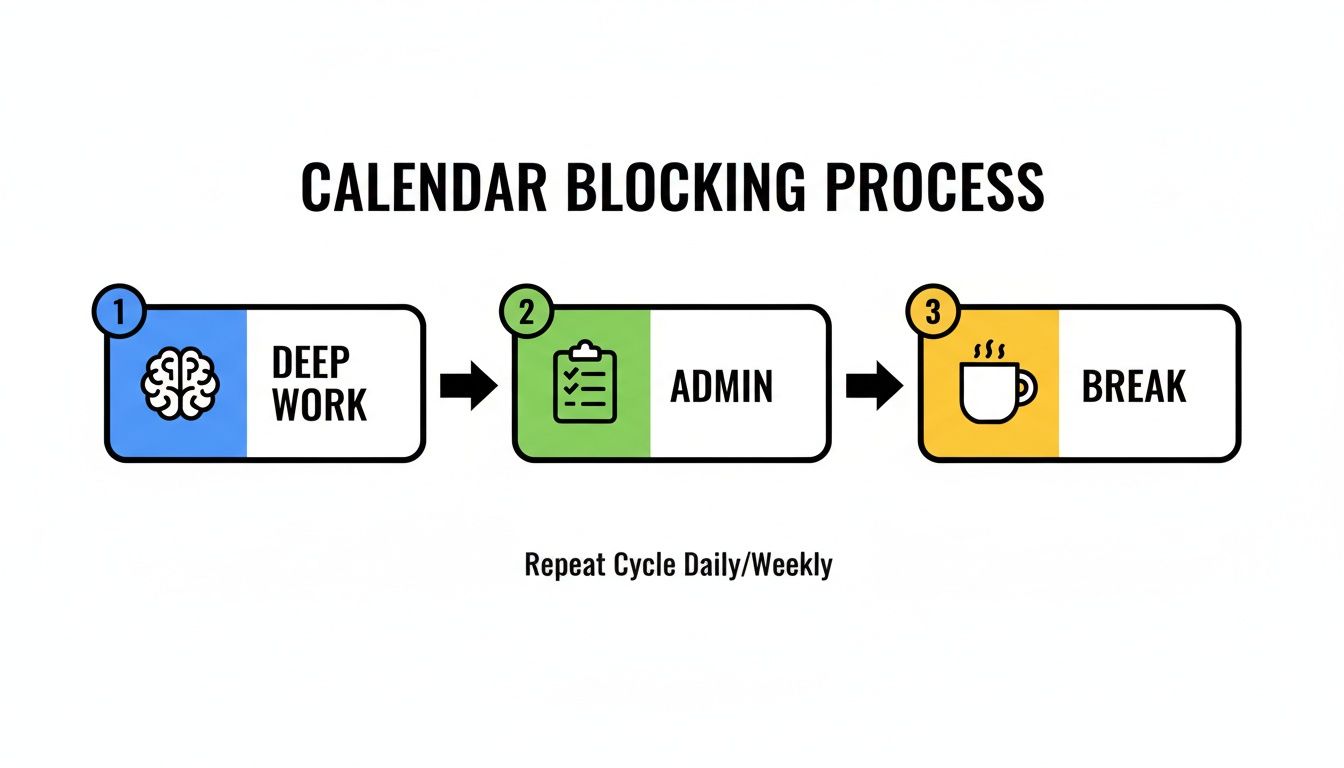
When you structure your day with clear blocks for deep work, admin tasks, and breaks, you’re creating a blueprint that automation tools can easily read and process.
Custom rules for any team
The beauty of this approach is its flexibility. It’s not a one-size-fits-all solution; it can be tailored for any department.
Here’s how different teams I've worked with have put this into practice:
- Marketing Teams: They create rules to automatically tag time spent on specific campaigns. For example, any event with “Q3 Lead Gen” in the title gets assigned to the “Lead Generation” project. This finally gives them a true picture of the effort behind their MQLs.
- Software Teams: A development team can set up rules to tag any calendar event containing a Jira ticket number (e.g., “PROJ-123”) to the “Product Development” category. This provides a crystal-clear view of time spent on new features versus bug fixes.
- Sales Teams: They can automatically tag events based on keywords like “Demo” or “Discovery Call” to track how much time is spent across different stages of the sales funnel. This helps them measure the cost of customer acquisition with incredible accuracy.
Automating this process is one of the most powerful strategies for improving how you manage and measure work. If you're interested in digging deeper, you can explore more about remote employee time tracking methods in our detailed guide.
This shift does more than just eliminate timesheet fatigue. It hands you the accurate, real-time data needed to truly understand project profitability and team capacity—a much smarter way to manage work in a remote-first world.
Turning time data into actionable business insights
Getting your time tracking on autopilot is a huge relief, but that’s not where the story ends. The real magic happens when you start turning all that raw data into clear, actionable business insights. When your calendar becomes the single source of truth, you can finally stop guessing and start making strategic decisions based on what’s actually happening.
This is the shift from just logging hours to asking the big-picture questions about your team’s health and your company's profitability. Accurate time data is the bedrock of effective work from home time management because it gives you a clear window into how your most valuable asset—your team's time—is being used.
From data points to real business answers
With a tool like TimeTackle, you can build reports and dashboards that answer the tough questions every leader faces. Instead of getting lost in messy spreadsheets, you get an instant, clear view of your most important performance indicators. This is how you move from constantly putting out fires to proactively shaping your strategy.
The most successful remote teams don't just track hours; they analyze them. They use time data to validate their strategy, spot inefficiencies, and protect their team from burnout before it takes hold.
Think about it: a manager can easily pull a report filtering time by tags like “Billable” vs. “Non-Billable.” All of a sudden, you see exactly how much of your team's capacity is going toward revenue-generating work versus internal meetings or admin tasks. That one insight can completely change how you approach resource allocation.
Answering business questions with your calendar
Once you have automated reporting in place, you can finally tackle the specific business challenges that were always hidden by inaccurate manual timesheets. You can build reports to find out:
- Which clients are truly profitable? You might discover that a client who brings in high revenue is actually a drain on resources once you account for all the unplanned calls and extra revisions. This data gives you the power to renegotiate contracts or rethink your service model.
- Are we spending too much time in internal meetings? A quick report might show your team is stuck in non-essential syncs for 15-20% of their week. That’s a clear signal to rethink your meeting culture and claw back that precious focus time.
- Is the team at risk of burnout? By monitoring the hours logged per person, you can spot individuals who are consistently working late or on weekends. This allows you to step in early, rebalance workloads, and keep your best people from hitting a wall.
To make this data even more powerful, you can use TimeTackle to sync your reports directly with Google Sheets for custom analysis or create visualizations that make trends impossible to miss. For more ideas, check out the top ten things to do with your Google Calendar data.
Ultimately, this level of visibility gives leaders the confidence to make smarter, data-backed decisions about everything from staffing to operational health.
Setting firm boundaries to prevent remote work burnout

Sure, your team might be getting more done, but what's the cost to their well-being? The truth about remote work is that the digital "on" switch never seems to turn off, making burnout a constant threat. When the lines between the office and the living room disappear, setting firm boundaries isn't just a nice-to-have—it's a survival skill for sustainable work from home time management.
The data tells a pretty complicated story. While many remote workers say they're just as productive (or even more so), there's a dark side: they can't seem to disconnect. Recent surveys show that while 44% of remote employees are logging longer hours, a staggering 36% also report feeling burned out. It’s a loud-and-clear signal that without intentional boundaries, the freedom of remote work morphs into a 24/7 job. You can dig into more of these trends in this detailed hybrid work stats report from Archie.
Creating your digital off-switch
The first move is to take back the end of your workday. In an office, you have natural cues—packing your bag, the commute home—that signal the day is done. Working from home, you have to create those cues yourself.
One of the most powerful things you can do is schedule a “hard stop” right in your calendar. Try creating a recurring 15-minute event at 5:00 PM every day called something like "End of Day Shutdown." Use that sliver of time to wrap up your last few tasks, quickly plan for tomorrow, and then—this is the important part—actually close your laptop and walk away.
Your availability is not your value. Protecting your personal time is what allows you to show up focused and energized during work hours. It's an investment in your own performance.
Making your availability clear is just as important. Get in the habit of using your Slack or Microsoft Teams status to signal when you're head-down in deep work, grabbing lunch, or officially signed off. It’s a simple action that sets expectations and keeps late-night pings from dragging you back to your desk.
The manager's role in a healthy work culture
Here’s the thing: boundaries are a team sport, and managers have to lead the charge. If you’re a leader sending emails at 10 PM, you’re sending an unspoken message that your team should be online, too. A culture that genuinely respects personal time has to start from the top down.
Managers can also use time data—not for micromanagement, but for sanity checks on workload. If reports from a tool like TimeTackle show one person is consistently hitting 50+ hours while another is at 35, that isn’t a performance issue. It’s a resource allocation problem. This kind of visibility lets you step in and rebalance tasks before someone burns out.
Ultimately, building a great remote team is about creating a culture where logging off is celebrated just as much as getting things done.
Common questions about calendar-based time management
Moving your team to a new system for managing time while working from home always brings up a few questions. When that system involves the calendar, those questions can be pretty pointed. Adopting a calendar-based approach is a big shift in mindset, not just a software swap.
Let's walk through some of the most common concerns I hear from teams making the move away from manual timesheets.
How do I convince my team to adopt calendar-based time tracking?
This is always the first and biggest hurdle. The secret? Focus on "what's in it for them." Nobody gets excited about new tracking software. But people do get excited about ditching tasks they hate—like filling out timesheets.
Frame the switch as a way to eliminate administrative work, not pile on more. You have to explain that by simply using their existing calendar, they're getting rid of a tedious, thankless chore. This isn't about tracking them; it's about giving them back their time to focus on work that actually matters.
Try saying something like this:
"We're getting rid of manual timesheets for good. From now on, your calendar will automatically log your time so you never have to spend another Friday afternoon trying to remember what you did all week."
Show them the direct benefits:
- Less admin, more focus: They get back the hours they used to waste on timesheets.
- A single source of truth: No more back-and-forth or confusion over what was worked on and when.
- Fairer workload distribution: It gives managers the visibility to see who's overloaded and rebalance work before burnout sets in.
Isn't this just another form of micromanagement?
It’s a totally fair question, but in practice, the reality is the complete opposite. Manual timesheets often lead to more micromanagement. Why? Because managers don't have clear visibility, forcing them to constantly ask, "What are you working on?" or "Where are we at with Project X?"
Calendar-based time tracking provides the clarity that makes those constant check-ins unnecessary.
The goal isn't to watch every minute of your team's day. It's to understand where the time is going on a macro level—by project, by client, or by task. This data helps leadership make smarter strategic decisions, not police individual keystrokes. You build trust by showing the team how the data is used to improve things for them—like protecting their focus time and justifying more resources—not to scrutinize their every move.
How quickly can we expect to see results?
You'll see two kinds of results, and they arrive at different speeds. The first is immediate: the elimination of timesheet-related admin work. That benefit kicks in the very first week. Your team instantly gets back the hours they used to spend filling out, chasing, and correcting timesheets.
The second, more strategic result—gaining actionable business insights—takes a little more time. After about 3-4 weeks of consistent data collection, you'll have a solid baseline. That's when you can start spotting real trends in project profitability, team capacity, and operational efficiency. That's the point where you can begin making data-backed decisions that actually move the needle.
Ready to ditch timesheet fatigue and get a clear, accurate view of your team's work? TimeTackle turns your calendar into an automated insights engine, giving you the data you need to improve profitability and protect your team from burnout. Start your free trial today and see what your calendar is telling you.