



It’s late, payroll closes in the morning, and one ugly line item is holding everything up.
A designer stayed on a client launch until well past dinner. A project lead is salaried, but also non-exempt, and worked through part of the weekend. Someone split time across two accounts with different billing rates. Your spreadsheet says one thing, your time tracker says another, and now you’re trying to answer the question that always sounds simple until it isn’t: what counts as double time, and how do you calculate it without creating a wage problem?
That’s where most agencies get stuck. The basic math is easy. The challenge lies in figuring out which hours qualify, which rate applies, and how to document the result well enough that finance, payroll, and managers all come to the same answer.
What is double time and why does it trip up agencies
A lot of payroll mistakes start with one bad assumption. Teams treat double time like “extra overtime,” when it is a separate premium pay rule that may apply only under certain laws, policies, or contracts.

For agencies, the problem gets worse because work rarely happens in clean blocks. You’ve got deadline pushes, remote staff in different states, account teams moving between clients, and salaried people who may still need overtime treatment depending on classification. That mess creates payroll edge cases fast.
The basic rule people mix up
Federal law and state law are not the same thing. Federally, the FLSA only requires time-and-a-half after forty hours in a workweek. States can go further.
For example, California requires double time after twelve hours in a workday, and a worker paid $20 per hour who puts in a 14-hour day would earn $360 total, which is 75% more than straight time. That same source also notes that miscalculation can expose firms to backpay and statewide penalties that can exceed $100M annually (Hubstaff).
That’s not abstract risk for agencies. One bad week of rushed approvals, late-night launches, and sloppy timesheet cleanup can turn into underpayment.
Agencies usually don’t miss double time because the formula is hard. They miss it because the underlying time data is messy.
Why agency teams struggle more than other businesses
Retail and hospitality deal with long shifts, but agencies deal with mixed work records. That changes the failure points.
Here’s where I see the confusion show up most often:
- Daily thresholds get missed: Managers look only at weekly totals, so they miss state rules tied to long single-day stretches.
- Project records don’t match payroll records: Client billing codes and payroll earning codes often live in separate systems.
- Salaried staff get treated as exempt by default: Salary alone doesn’t settle overtime treatment.
- Late edits break the audit trail: Someone fixes a timesheet after the fact, but payroll never sees the reason behind the change.
If you’re also trying to sort tax treatment around overtime income, this overview of overtime deductions for hourly workers is worth keeping handy. It won’t replace payroll compliance, but it helps operations and finance teams understand the downstream employee impact.
Calculating double time pay step-by-step
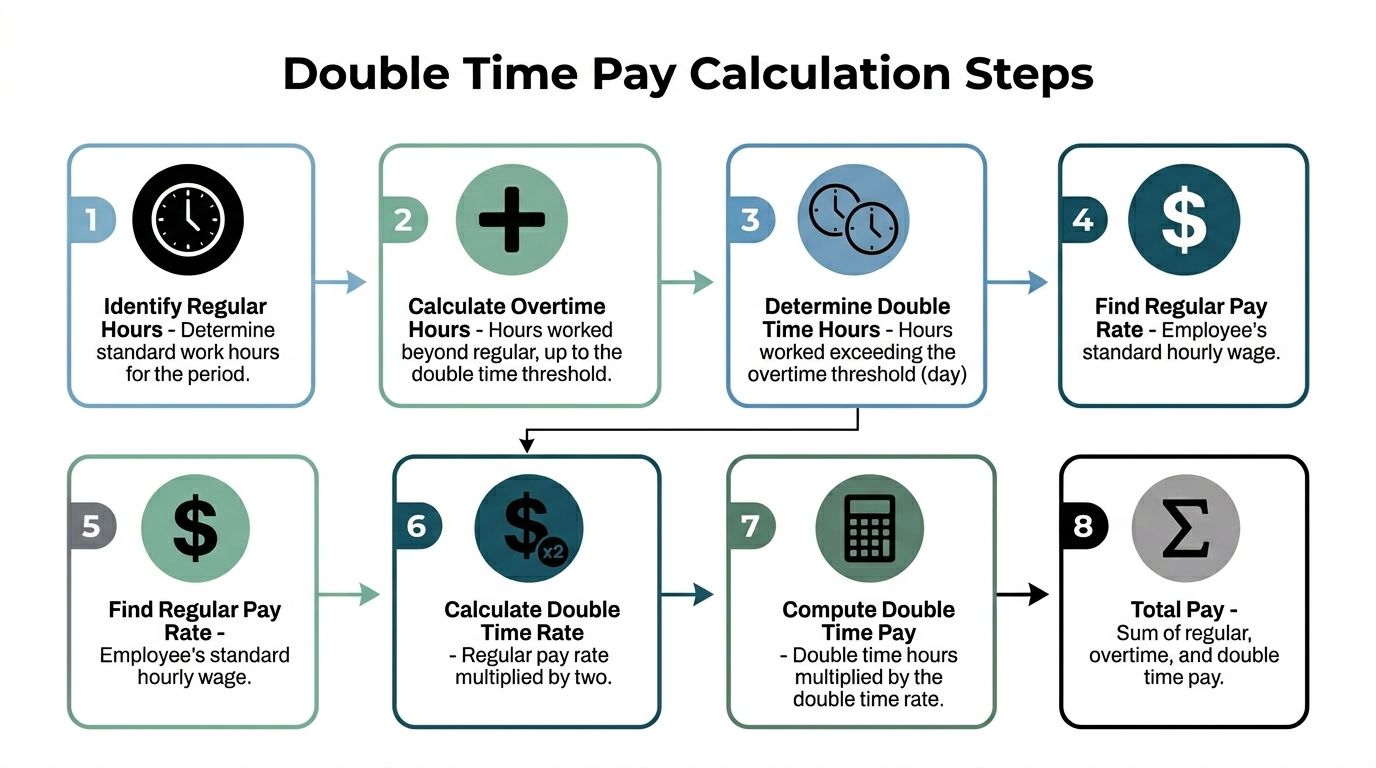
Once you know the hours qualify, the core double time calculation is straightforward. The hard part is separating hours into the right buckets before you run payroll.
Start with the regular rate
Your regular rate is the base hourly rate used to compute premium pay. For a simple hourly example, assume a California designer earns $40 per hour and worked 14 hours in one day to finish a campaign rollout.
You break that day into three parts:
- First 8 hours at straight time
- Next 4 hours at time-and-a-half
- Hours beyond 12 at double time
Work the example line by line
Here’s the full pay breakdown for that day:
| Hours worked | Pay rule | Rate | Amount |
|---|---|---|---|
| First 8 hours | Regular pay | $40/hour | $320 |
| Hours 9 to 12 | Time-and-a-half | $60/hour | $240 |
| Hours 13 to 14 | Double time | $80/hour | $160 |
Total pay for the day is $720.
That’s the same structure payroll teams use in California when they split one long day into regular, overtime, and double-time tiers. If you want a separate walkthrough of the state logic, this guide on how to calculate overtime in California is a good companion for your process notes.
The formula you need
For a simple hourly case, the formula is:
- Regular pay = regular hours × regular rate
- Overtime pay = overtime hours × 1.5 × regular rate
- Double time pay = double-time hours × 2 × regular rate
- Total pay = all three added together
That sounds obvious, but two things usually go wrong in practice:
- Payroll teams apply 2x to the whole shift instead of only the qualifying hours.
- Managers skip the daily split, then try to patch it at the weekly payroll stage.
Practical rule: Don’t calculate premium pay from total hours alone. Calculate it from qualifying hours inside the day or week that triggered the premium.
A clean process for payroll review
When I review a long-shift record, I don’t start in payroll. I start with the time record and ask four questions:
- Where was the employee working? State rules matter.
- What was their status? Non-exempt or exempt changes the whole analysis.
- How many hours fell into each threshold? You need clean segmentation.
- Did anything change the regular rate? That becomes a bigger issue in the next section.
If those answers are clear, the math is easy. If they aren’t, no formula will save you.
Handling the tough stuff salaried staff and blended rates
A clean hourly example falls apart fast when payroll gets a timesheet for a salaried but non-exempt account lead, or a producer who split the week across jobs with different pay rates. That is the point where agencies either apply a clear method or start creating manual adjustments they have to explain later.

Salaried non-exempt employees still need a regular rate
Salary status does not remove double-time obligations. If the employee is non-exempt under the rules that apply, payroll still needs a regular hourly rate for the premium calculation.
A common starting method is to divide annual salary by 52 weeks and then by 40 hours to get the base hourly figure used for premium pay (Harvest).
Use this sequence:
- Start with annual salary
- Convert it to weekly pay by dividing by 52
- Convert weekly pay to an hourly rate by dividing by 40
- Apply overtime and double-time multipliers only to the qualifying hours
Agencies get this wrong all the time because "salaried" gets treated as shorthand for "exempt." Payroll cannot afford that shortcut. Project managers, coordinators, and account staff often receive a salary and still fall into non-exempt treatment.
Salary is a pay method. Exempt status is a legal classification.
Where agencies make the salary mistake
The failure usually starts upstream. A department lead marks someone as salaried, ops carries that label into the timesheet process, and payroll inherits a bad assumption.
For agency teams, two questions have to stay separate:
| Question | Why it matters |
|---|---|
| Is the employee exempt or non-exempt? | It determines whether premium pay applies. |
| If the employee is non-exempt, what is the regular rate? | It determines the pay basis for overtime and double time. |
Teams often answer the first question and skip the second. That is how underpayments happen.
Blended rates are where agency payroll gets messy
Blended rates create problems because agency time is rarely tied to one clean rate bucket for the whole pay period. A single employee may spend part of the day on one assignment, pick up a rush project at a different pay rate, then hit premium hours before the week closes.
The billing side makes this worse. Client A may be billed at one rate and Client B at another, while the employee's payroll setup follows a different set of rates entirely. If payroll uses client pricing to drive premium pay, the numbers drift quickly.
The practical fix is to decide, before payroll week gets busy, which rates govern pay and how premium hours will be allocated when one employee worked under more than one pay rate. That rule needs to live in the timesheet process, not in someone's memory. If your team is still cleaning up entries in Excel, tighten the input side first with better timesheet Excel formulas for structured time tracking.
What works in practice
For payroll, the safest process is boring and repeatable:
- Separate pay rate from bill rate: Client pricing belongs to invoicing. Premium pay belongs to payroll.
- Set an allocation rule before you need it: Decide how blended-rate premium hours will be assigned, document it, and use the same rule every pay period.
- Use approved time records as the source: Pull from the timesheet, time tracker, or approved schedule. Rebuilding a week from chat messages is how errors get baked in.
- Keep the reasoning with the entry: If premium time was assigned to one project instead of another, leave a note that payroll and finance can both follow.
That process is less elegant than the examples in generic payroll articles, but it holds up under audit and it keeps project accounting from fighting payroll after the fact.
Don’t forget rate-changing extras
Double time also goes wrong when payroll uses a flat base rate in a pay period that includes extra earnings affecting the regular rate review.
Agency teams usually run into trouble in these situations:
- Shift differentials
- Non-discretionary bonuses
- Temporary project premiums
- Pay periods with unusual mixed earnings
Those cases need judgment, not copy-and-paste math. Once extra compensation enters the period, double time stops being a simple formula exercise and becomes a payroll review problem. That is usually the point where manual calculations start costing more in rework than the original premium pay itself.
How to build a double time calculator in a spreadsheet
A spreadsheet is better than handwritten adjustments and Slack approvals. It is not a clean payroll system.
That said, if you’re still using Excel or Google Sheets for review, you can at least structure the math so the same logic runs every time.
A simple layout that works
Use these columns for a one-day calculation:
| Column | Purpose |
|---|---|
| A | Employee name |
| B | Regular hourly rate |
| C | Total hours worked in day |
| D | Regular hours |
| E | Overtime hours |
| F | Double-time hours |
| G | Regular pay |
| H | Overtime pay |
| I | Double-time pay |
| J | Total pay |
Then define the hour buckets with formulas.
The formulas
Assume:
- Regular rate is in B2
- Total hours worked is in C2
Use:
D2 regular hours
=MIN(C2,8)E2 overtime hours
=MAX(MIN(C2-8,4),0)F2 double-time hours
=MAX(C2-12,0)G2 regular pay
=D2*B2H2 overtime pay
=E2*(B2*1.5)I2 double-time pay
=F2*(B2*2)J2 total pay
=G2+H2+I2
That setup works well for a California-style daily review where the first eight hours are regular, the next four are overtime, and anything above twelve is double time.
Why the logic works
The formula design matters more than people think.
- MIN caps a bucket. Regular hours can’t exceed eight in this model.
- MAX stops negative results. If someone worked six hours, you don’t want negative overtime.
- Nested MIN and MAX isolate the middle tier. That’s the overtime block between eight and twelve hours.
If you want to extend the sheet, you can add separate tabs for weekly review, state logic, and exceptions. You can also pair it with a guide like this one on timesheet Excel formula to standardize how managers input data before payroll sees it.
Watch for this: A spreadsheet can calculate correctly and still produce the wrong answer because someone entered the wrong state, rate, or classification.
Where spreadsheets break down
This is the trade-off. A sheet can model the rule, but it can’t guarantee the inputs.
The risk gap is not small. According to Gartner payroll benchmarks cited in Oracle payroll documentation, teams using integrated HCM systems achieve 92% first-pass payroll compliance, while teams relying on manual Excel tracking average 65% (Oracle).
That tracks with what operations people already know. Sheets are fine for testing logic, checking one-off cases, or validating payroll output. They are weak at controlled workflows, approvals, and state-specific edge cases.
Why you should stop calculating double time manually
Payroll closes at 4:00 p.m. A producer worked a fourteen-hour day on Friday, a coordinator split time across two client codes, and a salaried non-exempt team lead covered weekend work after a late staffing change. If your process still depends on emails, spreadsheet notes, and someone “fixing it in payroll,” that is the week double time turns expensive.
Manual calculation breaks down because agency payroll is rarely clean. The formula is straightforward. The hard part is getting the right rate, the right classification, and the right trigger tied to the right hours before payroll is finalized.
Manual work fails in the exceptions
Double time mistakes rarely come from a standard eight-hour day. They show up in edge cases. A person changes locations midweek. Someone coded hours to the wrong client. A salaried non-exempt employee needs a regular rate calculation before premium pay can even be applied. An employee with blended earnings creates a rate question that accounting and payroll answer differently.
That is why manual cleanup turns into investigation. By the time someone spots the issue, the team is reconstructing events from chat threads, manager memory, and rushed approvals.
What automation fixes
A good system reduces interpretation. It does not remove payroll judgment, but it gives payroll cleaner inputs and a clearer audit trail.
Here’s what improves first:
- Time capture starts closer to the work itself. Approved records, calendars, and mapped activities are more reliable than end-of-week recall.
- Rules run the same way every time. State thresholds, classification logic, and exception flags stop living in one payroll manager’s head.
- Problem records surface before close. Long days, missing work locations, and rate mismatches can be reviewed while managers still remember what happened.
- Payroll receives structured data. Categorized hours are easier to review than a note that says “please add double time.”
Tools such as automated timesheet software help agencies pull work records into one place, tag them correctly, and hand payroll a file that needs review instead of reconstruction.
Build a process that survives real payroll weeks
If I were tightening this process inside an agency, I would set it up in this order:
- Capture hours once from the source system whenever possible.
- Store the fields payroll needs, including status, work location, and pay basis.
- Flag exceptions automatically for long days, seventh-day patterns, and missing classifications.
- Keep billing logic separate from wage logic so client pricing decisions do not distort pay calculations.
- Send approved records into payroll with categories already assigned.
That setup saves time, but the bigger benefit is control. Payroll can review exceptions instead of chasing basic facts.
If payroll day starts with “What happened here?”, the process is too manual.
The usual fixes do not hold up
Agencies often patch the gap instead of fixing it. Finance keeps a special-cases tab. Department heads send overtime notes by email. Payroll and project accounting run in separate systems, then someone reconciles differences at month-end. Late approvals sit in chat with no permanent record.
Those workarounds feel manageable until there is a dispute, an internal audit, or a wage claim. Then every missing field and every informal approval becomes your problem.
Teams that want stronger process discipline often pair system changes with training. If your payroll staff also needs formal grounding, Master UK Payroll with dedicated payroll courses is a useful resource for structured payroll training.
The better process is plain on purpose. Capture the time once. Classify it correctly. Apply the rule consistently. Export clean records. That is how agencies cut payroll errors without adding another round of manual checks.
Quick answers to common double time questions
A few questions come up every single time payroll teams tighten this process.
Is double time required for holidays
Not under federal law by default. Holiday double time is often a company policy or contract issue rather than an automatic legal rule.
So if your handbook promises holiday premium pay, follow the policy exactly and apply it consistently. If it doesn’t, don’t assume holiday work automatically means double time.
Can an employee waive double time
If double time is required under the law that applies to the work, an employee can’t agree to give it up. Payroll compliance is not something managers and employees can negotiate away in a side conversation.
That matters because agencies sometimes try to “flex” long days informally. Informal flexibility is fine for scheduling. It is not fine as a substitute for wage compliance.
What’s the cleanest way to think about federal versus California rules
Use this short comparison:
| Rule set | Main trigger |
|---|---|
| Federal FLSA | Time-and-a-half after forty hours in a workweek |
| California | Daily and other state-specific premium rules can apply, including double time after long workdays |
If your team works across jurisdictions, don’t flatten everything into one national payroll rule. That’s where trouble starts.
Which state law applies if someone works in multiple states
The usual starting point is the law of the state where the work is physically performed. That means remote and travel-heavy agency teams need cleaner location records than most managers think.
If your operation touches UK payroll as well, it helps to train the team on country-specific payroll mechanics instead of guessing. This resource on Master UK Payroll with dedicated payroll courses is useful if your finance group needs a structured refresher outside the U.S. context.
What should managers do before payroll closes
Keep it simple:
- Approve time early: Late approvals create rushed pay fixes.
- Flag long-day exceptions: Don’t make payroll hunt for them.
- Confirm employee status: Salary and exemption are not the same thing.
- Document unusual assignments: If hours moved between projects, write down why.
Get those four things right, and double time calculation becomes manageable instead of chaotic.
If your team is still piecing together payroll from calendars, spreadsheets, and last-minute manager notes, it’s worth looking at TimeTackle. It captures work from calendars and connected systems, lets teams tag and categorize time with rules, and gives operations and finance cleaner records to review before payroll runs.


