
A time block calendar isn't just a fancy to-do list. It’s a completely different way of thinking about your day. Instead of reacting to a list of tasks, you proactively schedule your entire day—and your team's—into specific blocks of time. Every minute gets a job, turning your calendar from a simple meeting log into a detailed game plan.
It's time to ditch manual timesheets
Let's be honest: manual timesheets are a nightmare. For any modern team, they’re a time-suck, disliked by everyone, and shockingly inaccurate. It’s a broken system that forces everyone to look backward, trying to piece together where the hours vanished long after the work is done. This reactive approach does nothing to solve the real problems, like team burnout or hidden resource bottlenecks.
This is where a shared team time block calendar flips the script. It’s not about logging hours after the fact. It’s about intentionally designing the workweek before it even begins, making sure every project and priority gets the time it deserves.
By treating time as a finite, budgetable asset, your team can shift from a reactive, “firefighting” mode to a strategic, forward-thinking one. This simple change gives you a real-time view of your team's capacity and focus.
Before we go further, let's look at a quick comparison that really shows the difference.
Manual timesheets vs time block calendar
| Attribute | Manual Timesheets | Time Block Calendar |
|---|---|---|
| Approach | Reactive (logging past work) | Proactive (planning future work) |
| Data Accuracy | Low (relies on memory) | High (planned in advance) |
| Team Burden | High (dreaded admin task) | Low (part of natural workflow) |
| Resource Planning | Guesswork | Data-driven & visual |
| Goal | Justify hours spent | Optimize hours available |
As you can see, one is a tool for retroactive reporting, and the other is a powerful engine for forward-looking strategy.
A proactive approach to productivity
The shift toward time blocking isn't just a passing trend—it's a direct response to the real pressures of today's workplace. The global Time-Blocking Calendar App market hit USD 1.64 billion in 2024 and is projected to grow to USD 4.7 billion by 2032. This isn't surprising when you consider that 71.1% of US employees feel pressured to check work emails after hours. Time blocking helps create the clear boundaries needed for deep, focused work.
This proactive method offers some immediate, real wins:
- Real-time capacity planning. Instantly see who's over-allocated and who has bandwidth. You can spot potential burnout a mile away and rebalance workloads before they become a problem.
- True project profitability. When you allocate time to specific client projects upfront, you finally get an accurate picture of what it actually costs to service an account. No more guesswork.
- Less administrative headache. The calendar becomes the single source of truth. The endless chase for timesheets? Gone.
- Smarter strategic decisions. You can clearly see the split between billable client work and non-billable internal tasks. This data is gold for guiding future resource planning.
To truly make this shift, it's good to streamline business processes and tackle the root causes of inefficiency. Adopting a time block calendar is a huge step in that direction, turning your team's schedule from a source of stress into a powerful strategic tool.
Laying the groundwork for success
Thinking you can just launch a shared team calendar and hope for the best? That's a classic recipe for disaster. A successful time block calendar isn't about the software you pick; it's about building a solid foundation based on clear definitions and team-wide agreement. Before anyone even touches their Google Calendar, smart operations leaders need to put in the prep work to make sure the whole thing doesn't fall apart.
First things first: you need a time audit. You can't figure out where you're going if you have no idea where you are right now. This isn't about pointing fingers or judging anyone's past performance. It’s about getting a brutally honest snapshot of where the team’s time and energy are actually going. Dive into old calendars, past project plans, and even those dreaded timesheets to see how hours were really spent.
A time audit helps you answer the big questions: How much time are we really spending on billable client work versus endless internal meetings? Are certain projects consistently blowing past their resource budgets? The answers you find will be the core of your business case for making this change.
Defining work categories
Once you have that baseline data, it's time to create a common language for how your team talks about work. Without it, one person's “project work” is another's “client admin,” and your data becomes a jumbled, useless mess. The goal is to create a simple, logical set of work categories that everyone gets and can use without thinking twice.
These categories need to be specific enough to give you real insight but broad enough that you don't have a hundred different options. Think along these lines:
- Client A: Project Management (Billable)
- Client B: Creative Development (Billable)
- Internal: Marketing & Sales (Non-billable)
- Admin: Team Meetings & Training (Non-billable)
A structure like this immediately makes it easy to sort, filter, and actually understand where your resources are flowing. If you're looking for a good starting point, check out our guide on time blocking templates for organizational operations for some extra inspiration.
Getting buy-in from stakeholders
With your data in hand and your categories defined, the final (and most important) piece of prep work is getting everyone on board. This means everyone from team leads to key company stakeholders. People are naturally resistant to change, especially if they’ve been scarred by clunky, micromanaging timesheet systems in the past. Your job is to show them how this new way of working directly benefits them.
Forget about pitching it as a tool for management oversight. Instead, frame the time block calendar as something that makes their day-to-day lives genuinely easier. Point out the wins they'll feel almost immediately:
- Less admin drudgery: Automated tracking means no more scrambling to fill out timesheets on a Friday afternoon.
- Clearer performance stories: It becomes way easier to prove the hard work and resources that went into a successful project.
- A real defense against burnout: When workloads are visual, managers can finally see who's over-allocated and step in to protect their teams.
When you present time blocking as the solution to their biggest headaches—less admin, better data, and a healthier workload—you’ll find that getting buy-in is a whole lot easier. It stops being “just another process” and becomes a clear win for the entire team.
Alright, let's get into the nitty-gritty. Theory is great, but now it's time to roll up our sleeves and actually build your team's new time-block calendar.
This isn't about flipping a switch one day. Think of it as a hands-on design process. The goal is to build a structure that feels supportive, not like a straitjacket, by baking your team’s real-world workflow right into the system from day one.
The best place to start is by creating recurring blocks for the activities that form the backbone of your week. These are the predictable, non-negotiable commitments that anchor everyone's schedule.
- Weekly team syncs: Get these on the calendar at a consistent time so everyone can plan around them.
- Deep work sessions: This is sacred time. Protect it. These are pre-planned, multi-hour slots for focused, uninterrupted work on the tasks that actually move the needle.
- Client check-ins: Block out dedicated time for regular client communication. It keeps projects on track and manages expectations before they go off the rails.
- Admin & email batches: Stop letting these low-focus tasks hijack your day. Group them into specific blocks where they can't cause interruptions.
This simple flow lays out the essential groundwork for a successful rollout. Get these three things right, and you'll avoid the whole system collapsing under confusion or resistance.
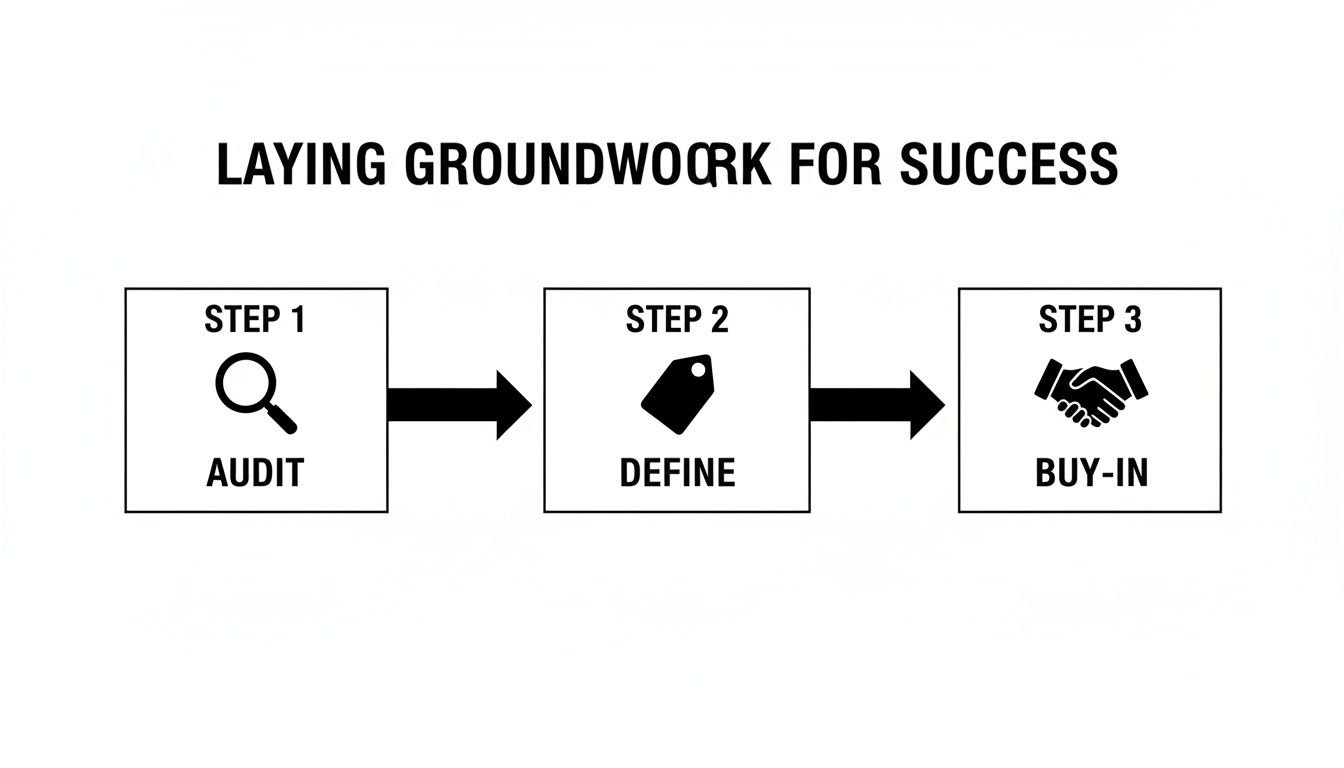
As you can see, a quick audit, clear definitions, and solid team buy-in are the pillars that will hold everything up.
Customizing templates for different roles
A one-size-fits-all calendar is destined to fail. A creative director’s day looks nothing like an account manager's, and their calendar templates need to reflect that reality.
For instance, the creative director might have large, four-hour blocks for “Creative Concepting,” while the account manager's schedule is dotted with shorter, 30-minute blocks for “Client Calls” and “Project Follow-ups.”
- Creative Director's Template: A mix of large deep work blocks (60%), collaborative review meetings (20%), and administrative time (20%).
- Account Manager's Template: A heavy focus on client communication (50%), with the rest split between project coordination (30%) and reporting (20%).
The real secret to making this stick is building in buffer time. A back-to-back schedule is a recipe for burnout. Adding 15-minute buffers between meetings gives people breathing room to grab coffee, answer a quick email, or just reset before the next thing.
This isn't just a niche productivity hack; it's part of a massive shift in how teams manage their time. The time-blocking calendar market was valued at USD 1.5 billion in 2023 and is projected to smash USD 4.8 billion by 2032. With over 45% of the market share in North America alone, its growth is being driven by the 81% of US employees who believe smarter scheduling would directly improve their happiness at work.
Rolling out the new system
Whatever you do, don't just spring the new system on your team all at once. A phased rollout is the way to go.
Start with a pilot group—one or two motivated teams who are open to trying something new. Let them test drive the templates, find the flaws, and become advocates for the system before it goes wide.
This approach lets you iron out the kinks on a small scale. You get to gather real, honest feedback and refine your process, which guarantees a much smoother transition for everyone else. If you want to dig deeper into the nuts and bolts of this, check out our guide on creating the perfect calendaring system for your team. It turns a potentially disruptive change into a collaborative and successful project.
Automating time capture with tags and rules
Let's be honest: if your new time block calendar system relies on people manually filling out timesheets, it's doomed from the start. We’ve all been there. Manual work is the single biggest reason timesheets are universally hated. It’s tedious, a magnet for errors, and the very first thing that gets dropped on a busy day.
This is where you graduate from a manual chore to a smart system that does the heavy lifting for you, running silently in the background.
The goal is to put an end to timesheet fatigue for good. Using a platform like TimeTackle, you can automate the entire time capture process. Your team will never have to fill out another timesheet. It all works through simple, rule-based automations that tag calendar events based on criteria you set.
Creating your first automation rules
Think of these rules as simple “if-then” commands for your calendar. You can tell the system to look for keywords in an event title, check the list of attendees, or even scan the meeting description. Based on what it finds, it applies the correct tags automatically.
Here’s what this looks like in the real world:
- Rule 1: If a calendar event title contains “Client X,” automatically tag it as “Billable: Client X.”
- Rule 2: If an event includes anyone from the internal marketing team, tag it as “Internal: Marketing.”
- Rule 3: If the meeting description mentions “Project Phoenix,” tag it as “Project: Phoenix.”
You can see below just how straightforward it is to build these rules inside TimeTackle.
The interface lets you connect keywords directly to your project tags using simple logic. This one-time setup turns time tracking from a dreaded manual task into an intelligent, automated workflow.
This hands-off approach doesn't just save hundreds of collective hours across your team each month. It also ensures your time data is 100% accurate, because it’s based on the calendar events themselves, not on someone’s memory from last Tuesday.
This kind of automation transforms your time block calendar from a simple planning tool into a powerful data collection engine. To take this even further, you might look into AI-powered scheduling solutions that can help optimize your team's schedule and productivity even more.
When you automate how time is captured, you give your team the freedom to focus on high-value work instead of getting bogged down in admin. For more ideas on getting the most out of your calendar, our guide to time tracking with Google Calendar is a game-changer for any team serious about their productivity.
Managing the system and your team
Let’s be honest: you can design the most beautiful time block calendar in the world, but if your team doesn't actually use it, it’s just another failed initiative collecting digital dust. Getting this right is less about the technology and all about the people.
The real trick is to get everyone on board without making them feel like Big Brother is watching. It all comes down to how you frame it. This isn't a surveillance tool; it’s a shield.
Your message should be simple and clear: “This calendar isn't here to watch you. It’s here to make sure your hard work is visible, your time is respected, and your workload is manageable.”
When people see the calendar as a tool for protecting your team from overwork—one that prevents burnout and validates their efforts—they’ll actually want to use it.
Handling resistance and building trust
Expect some pushback. It's totally normal, especially if your team has been burned by clunky, top-down systems before. The fastest way to build trust is to show them you’re in their corner.
Instead of just rolling it out as a mandate, bring them into the process. Ask for their feedback on the calendar templates and work categories. When they see their ideas being put to use, they develop a sense of ownership. That feeling of "we built this together" makes all the difference.
Conducting weekly calendar reviews
To keep the system from falling apart, you need a quick and easy feedback loop. That’s where weekly calendar reviews come in. Think of them as a quick, 15-minute huddle, not a performance review.
The entire point is to catch problems before they blow up. During these check-ins, you can:
- Spot scheduling conflicts: Instantly see any double-bookings or clashing priorities for the week.
- Check for overallocation: Get a visual gut-check if someone’s schedule is packed solid with no room to breathe.
- Discuss workload balance: Use the calendar to have fact-based conversations about who has capacity and who is drowning.
For example, you might notice a designer’s calendar is 90% booked with client work for the next three weeks. That’s not a moment for criticism. It’s an opportunity to ask, “It looks like you’re completely maxed out. Do we need to shift a deadline or get you some support?”
These regular check-ins transform the time block calendar from a rigid plan into a living, breathing tool for communication. You’re not micromanaging; you’re co-managing the team's workload, together. This is how you build a culture of proactive planning where the system truly works for everyone.
Turning time data into business decisions
So, your team is consistently using the time block calendar, and the system is humming along. Now what? All that beautiful, clean data isn't just for show. For COOs and agency owners, this is where you start seeing a real return on your investment. It’s time to turn that raw time data into smart, strategic business decisions.

When you connect a tool like TimeTackle, your team's calendar data starts feeding directly into real-time dashboards. This isn't some dusty report you run at the end of the month; it’s a live view of your agency’s pulse. Suddenly, you have an immediate, accurate picture of team utilization, project profitability, and overall operational health.
The real power comes from connecting your team's daily schedule directly to your agency's bottom line. You stop guessing and start knowing.
Answering your most important business questions
Your calendar data now holds the answers to the tough questions you’ve probably been wrestling with for years. Using dynamic filters in your dashboard, you can slice and dice the information to uncover insights that were previously hidden.
Just think about the questions you can finally answer with complete confidence:
- Are we spending too much on non-billable tasks? You can see the exact ratio of billable to non-billable hours across the entire company or drill down into specific teams. If you see non-billable work creeping up from 20% to 40%, you know exactly where to start asking questions.
- Which clients are actually our most profitable? By filtering your time data by client tags, you can compare the hours invested against the revenue generated. You might be shocked to discover that your highest-paying client is also your least profitable due to scope creep, while a smaller client is an absolute goldmine of efficiency.
- Is our team properly utilized? Dashboards can show you utilization rates at a glance. If one person is consistently at 110% capacity while another is sitting at 70%, you have the data you need to rebalance workloads or confidently justify a new hire.
- Do we have the capacity for a new project? Instead of just going with your gut, you can look at your team's future-blocked time and see exactly who has the bandwidth to take on new work next month.
This data-driven approach strips the emotion and office politics out of resource allocation. Decisions about hiring, project pricing, and even which clients to keep become grounded in cold, hard facts pulled directly from your time block calendar. It’s the ultimate link between daily operations and long-term agency growth.
Common questions (and honest answers)
Even the best-laid plans come with a few questions. When teams first start time blocking, a few common concerns always pop up. Let's tackle them head-on so you can get past the initial hurdles.
What if an unexpected task messes up my plan?
It absolutely will, and that's perfectly okay. Think of your time block calendar as a default plan, not a rigid prison.
When something urgent and unavoidable lands on your plate, you simply make a conscious choice to adjust your schedule. The critical part is to then drag and drop the block for the work you're postponing. Don't just delete it. Move it to a new time. This keeps the work visible and ensures your true workload remains accurate.
Isn't this just putting meetings on my calendar?
Not quite. There's a fundamental difference.
Putting meetings on a calendar is typically a reactive process—you're just logging appointments and demands from others. Time blocking is proactive. You are intentionally carving out and protecting time for your own deep work, administrative tasks, and even necessary breaks. It's about designing your ideal week, not just reacting to everyone else's schedule.
How do I keep my team from feeling micromanaged?
This is all about framing and transparency. It’s a common and valid concern.
Present the time block calendar as a tool to protect their focus, not to police their every move. Explain how it helps ensure workloads are fair and can even be used to justify the need for more resources or headcount down the line.
When your team sees it as a shield that actively prevents burnout and validates their hard work, they'll embrace it. Using automated tools like TimeTackle also helps by removing that manual, “check-in” feeling you get from old-school timesheets.
Ready to transform your team's productivity and get accurate, automated insights from your time block calendar? See how TimeTackle can eliminate timesheet fatigue and connect your team's work directly to business outcomes.