Friday afternoon is when attendance problems show up in the ugliest way. Payroll is due Monday, three project teams have sent three different spreadsheets, and one manager is still chasing a missing day from a contractor who swears they “sent it yesterday.” By the time finance starts asking why billable time doesn't match the project plan, you've already lost hours to cleanup and guesswork.
That's why attendance management software matters to agencies and professional services teams. It is not just a clock-in tool. Used well, it gives operations leaders a cleaner view of who worked, when they worked, where they worked, and where the gaps are before those gaps hit payroll, utilization, or client reporting.
Why agencies outgrow manual attendance tracking
I've seen the same pattern in mid-sized agencies more than once. A team starts with spreadsheets, then adds email reminders, then leans on managers to approve timesheets “by end of day,” and then payroll week turns into a cleanup sprint. The system still works on paper, but only because someone in operations is stitching it together by hand.
The problem gets worse when work stops fitting one team, one office, one schedule. Creative, strategy, implementation, and account teams all run differently, so manual tracking creates blind spots in utilization, billing, and leave coverage. People also fill in forms after the fact, which means the numbers look neat even when they're wrong.
Practical rule: if your attendance process needs one person to chase everyone else, it's already too fragile.
At some point, usually around the size where managers stop knowing everyone's schedule by memory, the admin load becomes the bottleneck. That's where attendance management software earns its place. It replaces honor-based reporting with a system that captures time, checks it against policy, and sends cleaner data into payroll and reporting. The result is less cleanup, fewer “which version is right?” arguments, and a better shot at knowing utilization while work is still in flight.
For agencies, that shift matters because time data is not just an HR record. It affects client billing, resource planning, and whether a team lead sees a problem early enough to fix it. Once attendance gets handled as operational data instead of a monthly chore, the rest of the stack becomes easier to trust.
How attendance management software works
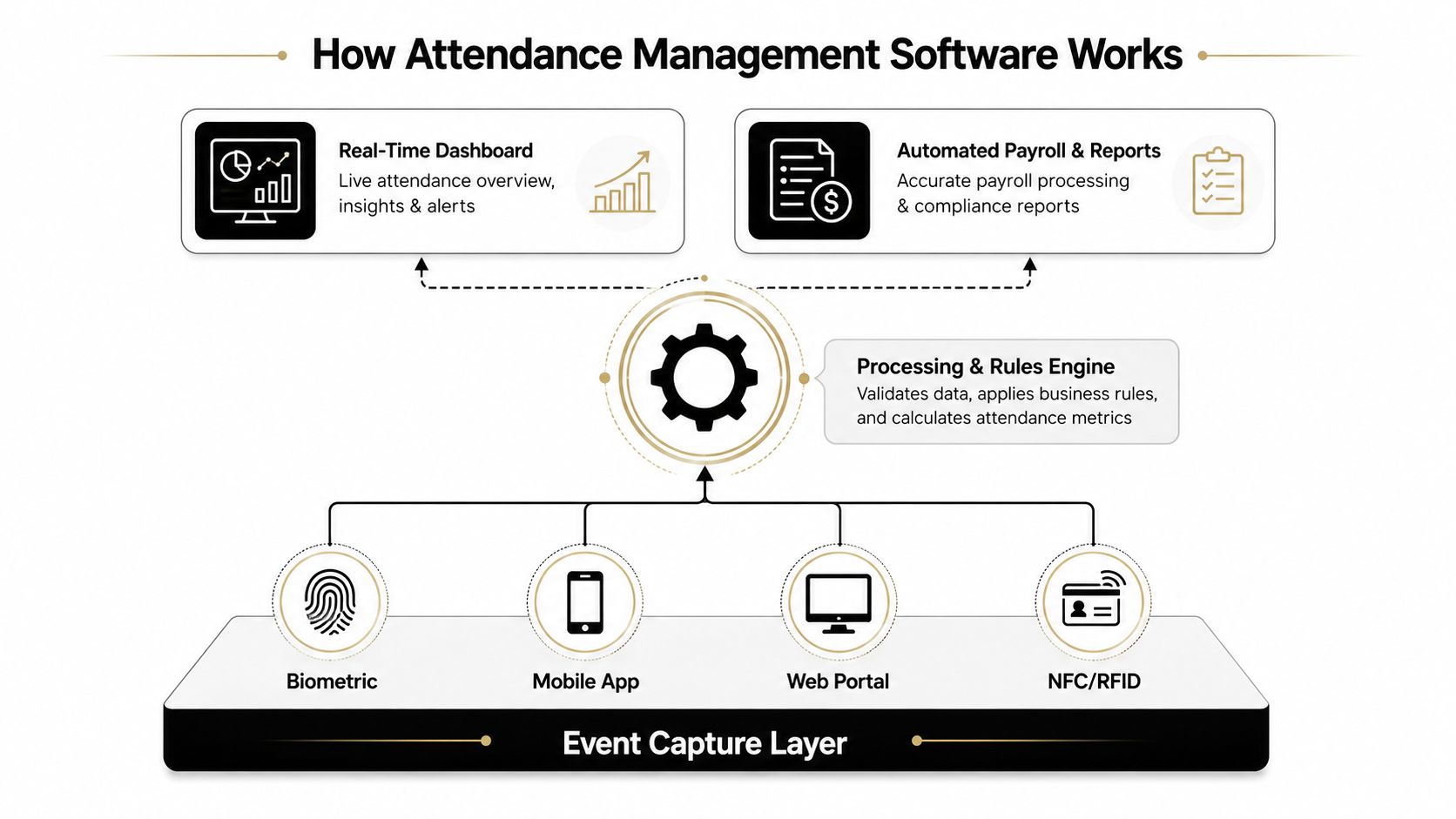
A solid system runs on two layers. First, it captures clock-in and clock-out events as they happen. Then it checks those events against the rules you set for late arrivals, missed punches, overtime, and absences, so errors get flagged before payroll export instead of after finance finds them.
The capture layer comes first
Modern tools collect attendance from web, mobile, biometric, or kiosk channels, and Zoho People says they can also use facial recognition and geo-fencing for capture Zoho People's attendance management overview. That flexibility matters because agencies rarely work from one setup. Office staff, remote staff, and field staff all need different ways to record time without slowing the day down.
What matters is that the system records the event in the moment, so you're not asking someone to remember what happened two days later. Gartner Peer Insights describes time and attendance software as a system that automates work-hour tracking, attendance, leave, and overtime, while also supporting real-time attendance tracking and automated leave approvals Gartner Peer Insights time and attendance software reviews.
Rules catch exceptions before payroll does
Once a check-in lands, the software compares it to policy. If someone clocks in late, misses a punch, or runs into overtime, the system can flag it for review instead of letting it drift into export. That is the part many teams miss when they buy software for tracking but still handle exceptions in email threads.
Geofencing adds another layer for distributed or field teams. Sutisoft describes it as location-verified clock-ins that help prevent off-site time fraud and make coverage gaps visible on live dashboards Sutisoft attendance management guide. For agencies with client sites, pop-up events, or rotating support coverage, that live view is often more useful than a static timesheet. It also helps managers see where attendance patterns affect coordination and utilization, especially across hybrid teams that do not share the same office rhythm.
For tools for delivery heads, that same flow keeps field attendance tied to actual work locations instead of after-the-fact edits.
The best systems reduce manual review by surfacing exceptions early, not by burying them in a cleaner-looking export.
Core features that matter for mid-sized agencies
Spiceworks breaks the basics into a pretty useful split. Clocking in and out, leave management, payroll, and reporting are the must-haves, while biometrics, missed-punch alerts, and calendars sit closer to the “nice to have” side. It also calls out mobile and cloud access, self-service, and analytics as differentiators, which is a good reminder that basic time capture alone won't carry a growing agency Spiceworks attendance management system features.
What to prioritize first
For a 50 to 200 person agency, I'd rank features by how much cleanup they remove from payroll and ops, not by how good they sound in a demo. You want the tools that keep managers out of reconciliation mode and give leadership a clearer read on capacity.
| Feature | Agency problem it solves | Priority level |
|---|---|---|
| Clock in and out capture | Cuts manual entry and missing timesheets | High |
| Leave management | Keeps coverage planning from breaking | High |
| Payroll export | Reduces retyping and handoffs to finance | High |
| Reporting | Gives leaders a usable view of attendance patterns | High |
| Self-service portal | Lowers admin tickets for edits and approvals | Medium |
| Missed-punch alerts | Catches bad records before payroll runs | Medium |
| Mobile and cloud access | Supports hybrid and remote teams | Medium |
| Biometrics or facial recognition | Helps in controlled office settings | Medium |
| Calendar integration | Reduces double entry for scheduled work | Medium |
| Analytics | Helps spot patterns in utilization and absence | Medium |
What usually gets overlooked
The features that sound flashy often matter less than the ones that fit daily work. If your team uses calendars heavily, that integration can save a lot of manual fixing. If your delivery leads need a cleaner planning view, tools for delivery heads like this resource from Deliverhub AI can be useful alongside attendance data, because capacity decisions get better when schedule and attendance sit in the same conversation.
That's also where self-service matters more than leaders expect. If employees can fix a missed punch or request leave without a ticket, operations stops becoming the help desk. And if your reporting exports are weak, the software just creates a prettier bottleneck.
For teams that want a calendar-first view of time, TimeTackle's attendance tracker app is one option that fits into that category.
Beyond clock-ins solving coordination and capacity problems
Most attendance tools get sold as anti-fraud or payroll tools, which is too narrow for hybrid agencies. Value shows up when managers need to answer coordination questions, not just attendance questions. Who should be in the office on Tuesday? Which project team is thin on coverage? Who looks overbooked before burnout starts showing up in missed deadlines?
That's where attendance data becomes a planning input. It helps teams see when collaboration is likely to work and when the office is full of people on the same calls from different desks. It also gives ops a better way to spot under-allocation, especially in professional services where billable utilization shapes revenue and staffing pressure.
Attendance data is only useful if someone turns it into a decision before the week is over.
For agencies that use hot-desking or rotating schedules, live attendance makes capacity planning less reactive. It helps managers know when the office can support a working session, a client workshop, or a team review without overcrowding. If you already keep a planning sheet, this capacity planning template can sit alongside attendance data and make the whole process easier to manage.
The same idea shows up in engineering and product teams, where capacity planning needs a live view of actual availability rather than a guess based on calendars alone. A useful external reference is the engineering capacity strategy from devPulse, because the planning problem is the same even if the team structure isn't.
The shift here is simple. Attendance software is not just proving someone was present. It gives operations leaders a better read on how the week will work.
Buyer's checklist for choosing the right platform
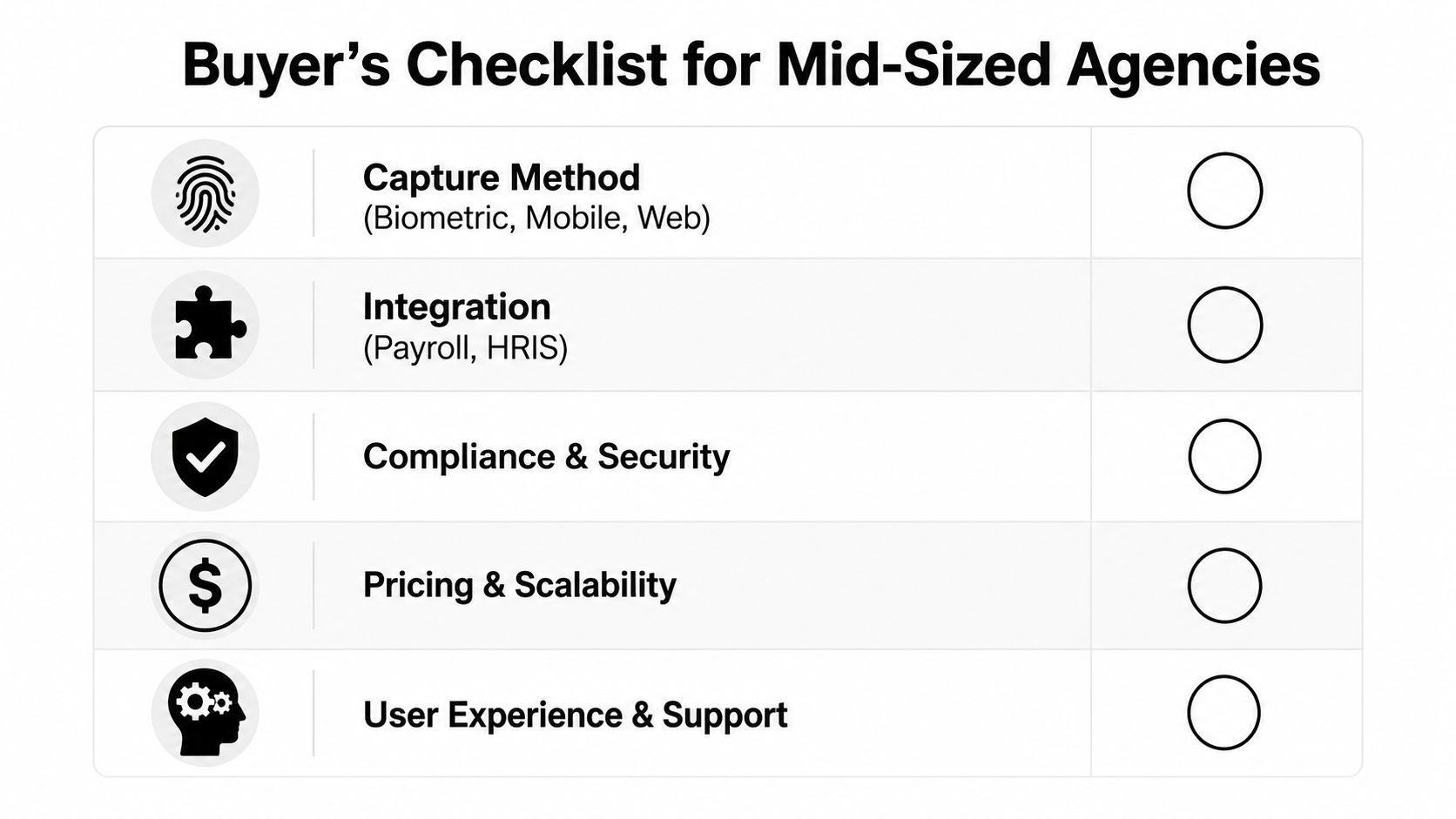
A good demo can hide a weak implementation, so I always push buyers to test the boring parts. If the software can't handle your real schedules, your real approvals, and your real payroll handoff, it will fail after go-live no matter how polished the interface looks.
Check these before you buy
- Capture methods: Confirm the system supports web, mobile, biometric, facial recognition, and geofencing if your teams need them. The method has to fit the work pattern, not the other way around.
- Integrations: Ask how it connects to payroll, HR, calendars, CRM systems, and reporting tools. If data still gets retyped, automation is fake.
- Policy setup: Test whether you can set different rules for office staff, hybrid staff, contractors, and field teams without creating a mess.
- Security and compliance: Ask about access controls, encryption, retention rules, and audit trails. For sensitive employee and client data, that is not optional.
- Support and rollout help: Find out if the vendor gives you implementation support or just a login and a help center.
I also like to press on failure cases. What happens when internet drops at a job site? How does the tool handle multi-timezone teams? Can managers approve exceptions from mobile? Those are the questions that separate a clean demo from a system that works on a Wednesday when things are already busy.
If you want a broader software selection lens, the 2026 enterprise ITAM guide from DataLunix is a useful reminder that software buyers should test fit, workflow, and support together, not one at a time.
Implementation and getting your team to actually use it
The technical setup is the easy part. The harder part is getting people to trust the tool enough to use it every day without turning it into another complaint channel. If the rollout feels like surveillance, adoption drops. If it feels like a cleaner way to stop chasing forms, it sticks.
Set up the system before you ask for behavior change
Start by connecting calendars and any downstream payroll or reporting tools, then configure the rules that define a late punch, a missed punch, or a leave request. Test the export with real sample records before you send live data anywhere, because broken handoffs usually show up only after the first pay cycle.
Then give each team a short pilot window. One agency team will almost always find a weird edge case that the others miss, and that's good. Better to find the issue in a pilot than after five managers have copied the same bad habit.
Sell the reason, not just the tool
People accept change faster when they know what gets easier. If your team already hates timesheets, be direct about what changes and what doesn't. The goal is fewer corrections, less manual follow-up, and a cleaner picture of work, not more admin.
I've found that naming one champion per team helps a lot, because questions spread through peers faster than through operations. Use the first 90 days to collect objections, fix friction, and publish small wins so the tool feels normal instead of imposed. For a practical angle on getting people over the time-tracking hump, this guide on motivating employees to track time is worth a look.
The best rollouts treat adoption as part of the product. If the workflow fits, people use it. If it adds steps, they route around it.
Measuring ROI with the right KPIs
You do not need a long scorecard to know if attendance software is working. You need a few numbers that show whether the tool is cutting cleanup, tightening payroll, and improving how quickly leaders can make staffing calls.
Track the metrics that change decisions
The first sign of value is usually less manual reconciliation. If payroll and operations spend less time fixing missing punches and format errors, that's a real operational win, even before you get to strategy. A separate market study found that automated systems were linked to a 3.2% reduction in payroll processing errors and up to a 62% reduction in administrative time spent on manual reconciliation Dataintelo attendance management system market report.
After that, watch leave approvals, utilization visibility, and forecast accuracy. The point is not just to record time. It's to make sure project plans, staffing decisions, and client commitments are built on actual attendance patterns instead of guesswork. If the team keeps using old spreadsheets after launch, that tells you the workflow still has too much friction.
Use a simple timeline
At 30 days, I'd expect cleaner captures and fewer missing records. By 90 days, managers should be handling exceptions faster and relying less on manual follow-up. By a year, the bigger test is whether attendance data is feeding resource planning and billing with enough confidence that leadership uses it without second-guessing.
If the software only changes payroll week, it's underused. If it changes planning, it's paying for itself.
Common pitfalls and compliance considerations
The most common failure I see is an integration gap. If attendance data does not flow cleanly into payroll, HR, or reporting, teams end up entering the same record twice and the whole point of automation gets lost. That also creates a trust problem, because every duplicate step invites another mistake.
Security matters just as much. Time records, schedules, and employee details are sensitive data, so buyers should ask about enterprise-grade encryption, access control, and audit trails before they sign anything. TimeTackle says its platform is SOC 2 Type II certified and uses enterprise-grade encryption, which is the level of language buyers should expect from any vendor handling sensitive workforce data.
Compliance is the other place teams get caught off guard. Overtime rules, labor records, and data retention policies can vary by jurisdiction, so the software has to be configured to match the way your agency works. A tool can be technically sound and still put you at risk if it applies one policy to every team without review.
The fix is a maintenance cadence, not a one-time setup. Review exception rules, audit exports, and recheck permissions as people move roles or new offices open. That keeps the system accurate as the agency changes, which is what most buyers want in the first place.
If you're trying to get attendance data out of spreadsheets and into something your team will use, TimeTackle can help you turn calendars into cleaner time records, utilization views, and payroll-ready exports. Visit TimeTackle to see how it fits into an agency workflow that needs less chasing and more clarity.