You've been chasing a larger enterprise client for months. The pitch went well, the scope is clear, and legal is close to done. Then procurement sends a spreadsheet with a long security questionnaire, asks for your SOC 2 report, and wants proof that your team controls access to client data across Google Workspace, your CRM, project tools, and shared docs.
That's the moment many mid-sized agencies realize security compliance isn't an IT side task. It's part of sales, delivery, finance, and client trust. If you can't answer clearly, deals slow down. If your controls exist only in policy docs, the problem gets worse because enterprise buyers want proof that those controls are applied.
The money behind that caution is real. The global average cost of a data breach reached $4.44 million in 2025, while the United States hit a record-high average of $10.22 million per incident, which is why security failures now sit inside basic financial risk planning, not just technical risk planning, according to Sprinto's 2025 compliance statistics.
That new enterprise client just asked for your security credentials
The usual story goes like this. An agency grows from founder-led hustle into a real operation with account teams, delivery managers, contractors, a RevOps stack, and a lot of SaaS tools tied together by convenience. Calendars sync to meeting notes. The CRM triggers workflows. Project management tools pull client details from forms and shared inboxes. Everything works, until a buyer asks how those connections are governed.
The first instinct is often to treat the questionnaire like paperwork. Fill in what you can, ask IT for a few answers, and hope procurement moves on. That approach rarely works with enterprise buyers because they're not just checking if you have policies. They're checking whether your business is safe to trust with their data, their people, and their reputation.
Why this gets stuck fast
A mid-sized agency usually has some security basics already. Password managers, admin controls, maybe MFA, maybe decent onboarding and offboarding. What's missing is evidence, consistency, and ownership.
Common failure points look like this:
- Policies exist but nobody follows them: The document says access is reviewed, but nobody can show the review happened.
- Tools are connected in ways leadership can't fully see: A calendar event creates a CRM note, which triggers an automation, which copies data into another system.
- Client-facing teams use workarounds: People export files, forward invites, or share reports outside the approved path because it's faster.
- Sales promises outrun operations: The team says “yes, we're secure,” before anyone has checked whether the control is working in practice.
Buyers don't pay for your intentions. They buy confidence that your systems hold up when people are busy, tools change, and mistakes happen.
What the client is really asking
When a client asks for security credentials, they're asking four things at once.
| What they ask | What they mean |
|---|---|
| Do you have SOC 2 or ISO 27001? | Can an independent party verify your control environment? |
| How do you manage access? | Can the wrong person see the wrong data? |
| How do you detect issues? | Will you spot a problem before it spreads? |
| What happens if something goes wrong? | Do you have a plan, or will you improvise under pressure? |
If you run an agency, that's why enterprise security compliance matters. It protects revenue, shortens deal friction when done well, and forces operational discipline where agencies often rely too much on trust and memory.
What enterprise security compliance really means
Most agencies hear “compliance” and think paperwork, auditors, and a lot of meetings. That's understandable, but it misses the point. Enterprise security compliance is the ongoing practice of proving that your business protects data in a controlled, repeatable way.
It's closer to a business health program than a final exam. You don't pass once and forget it. You build habits, check whether they still work, and fix drift before it turns into risk.
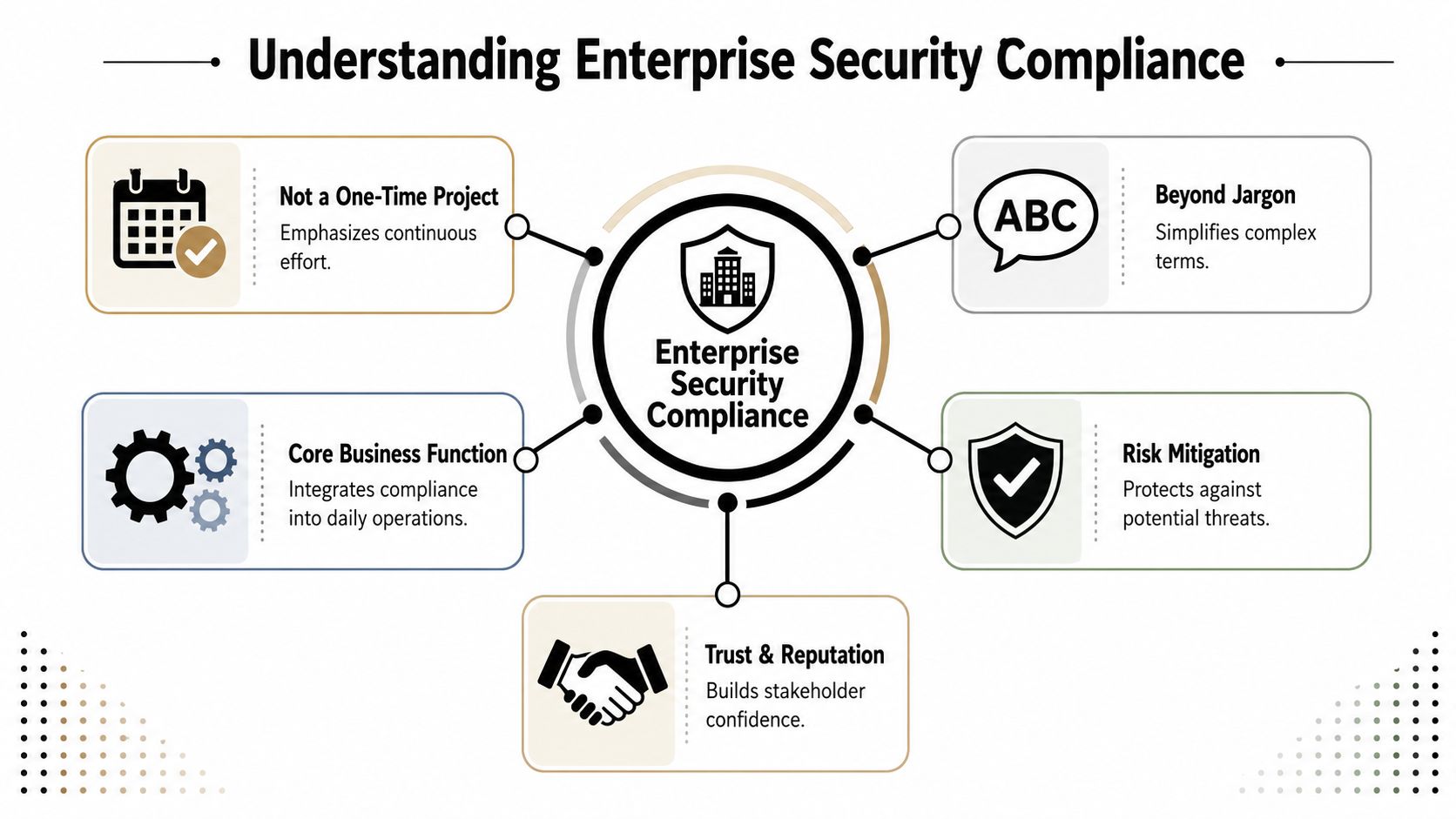
For agencies, this usually touches client data in CRMs, campaign assets in shared storage, internal planning in calendars, and communication across email, chat, and project tools. If you want a practical reference point for what buyers expect from a vendor security posture, TimeTackle's overview of enterprise-grade security is a useful example of how companies explain controls in buyer-friendly terms.
The parts that matter most
At a working level, compliance comes down to a few basic questions:
- Risk management: What could go wrong in your stack, your workflows, and your vendor setup?
- Access control: Who can see what, who approves access, and how quickly do you remove it?
- Incident response: If data is exposed or misrouted, who responds and what happens first?
- Monitoring and evidence: Can you prove your controls ran when they were supposed to?
Those pieces fit together. Access control without monitoring leaves blind spots. Monitoring without ownership creates noise. Policies without process become shelfware.
Where agencies get confused
A lot of teams think compliance starts with a framework. It doesn't. It starts with reality. You need to know where client data lives, how it moves, and which people and tools touch it.
That's why jargon causes problems. Teams hear terms like “control environment” or “risk register” and assume the work belongs to specialists. In practice, some of the most important answers come from ops leads, project managers, CRM admins, and department heads because they know how work moves through the agency.
Practical rule: If you can't explain a control in plain English to an account director, you probably haven't operationalized it yet.
What compliance is not
It's not a giant binder of policies nobody reads. It's not a once-a-year rush before an audit. And it's not a promise that incidents can't happen.
It is a disciplined way to reduce avoidable mistakes, catch weak points early, and show clients that your business handles their data with care. Agencies that get this right stop treating compliance as overhead and start using it as an operating standard.
Comparing the major compliance frameworks for agencies
Most agencies don't need every framework. They need the right first framework. That choice should come from buyer expectations, where clients are based, and how mature your internal operations are.
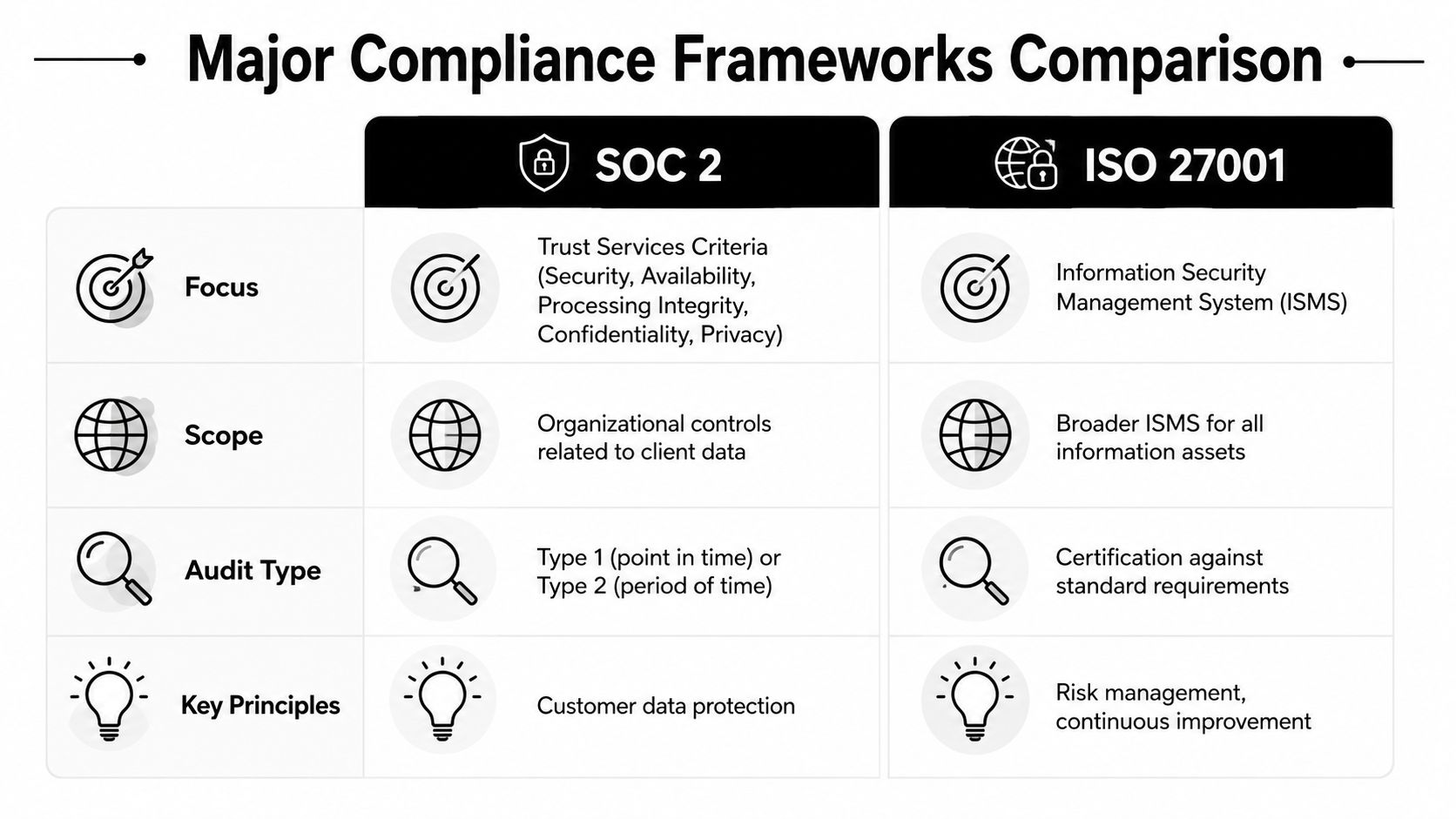
The two that matter most in early enterprise deals are SOC 2 and ISO 27001. They overlap in important ways, but they answer different buyer questions.
When SOC 2 makes the most sense
For agencies that sell into North American enterprise accounts, SOC 2 usually comes up first. Buyers know it, procurement teams ask for it, and security reviewers often treat it as the baseline proof that your controls aren't just described, but tested.
The most important distinction is Type I versus Type II. Type I looks at control design at a point in time. Type II goes further and tests operating effectiveness over a period of at least six to twelve months. For B2B SaaS and service platforms, SOC 2 Type II is the primary priority, and organizations with it show 40 to 60 percent faster enterprise procurement cycles because buyers can verify that controls work over time, according to SalesDocx on enterprise SaaS security documentation.
That matters for agencies because long due diligence cycles drain sales energy and tie up leadership. If you lack Type II validation, buyers often push more security questionnaires back onto your team.
If you're assessing your own maturity, it also helps to review a live example of how a vendor communicates that status. TimeTackle's note on being SOC 2 Type II certified shows the kind of assurance language enterprise buyers expect to see.
When ISO 27001 is the better fit
ISO 27001 fits agencies with international clients, more formal risk management needs, or a broader push to standardize security governance across the whole business. It's more of an operating system for information security.
According to NordLayer's guide to security compliance standards, ISO 27001 covers 14 core domains including risk assessment, incident response, business continuity, encryption, and third-party assessment. The same source notes that certified organizations achieve 25% faster incident recovery times and 40% lower data loss volumes than non-certified peers, and that annual surveillance audits plus continuous improvement cycles reduce vulnerability exposure windows by 60%.
For an agency, that means ISO 27001 is often the stronger choice when the question is bigger than a single enterprise deal. It works well if leadership wants one security model that can support growth across regions and client types.
A simple agency view
| Framework | Best fit | Main strength | Main trade-off |
|---|---|---|---|
| SOC 2 Type II | Agencies selling into US enterprise buyers | Familiar proof for procurement and security reviews | Narrower buyer-facing focus |
| ISO 27001 | Agencies with global clients or broader governance goals | More complete management system | Heavier internal discipline |
Some agencies also face sector-specific rules. Healthcare work may trigger HIPAA needs. Work involving EU data may bring GDPR obligations into contract reviews. Those still matter, but they usually sit alongside your core program, not in place of it.
For cloud-heavy teams, practical implementation details often matter more than framework diagrams. This guide to practical steps for securing your cloud is useful because it brings access control back to the day-to-day systems agencies run.
What I'd tell a mid-sized agency choosing now
Pick the framework your buyers already recognize, unless your growth plan makes that too narrow. If most of your pipeline is US enterprise work, start with SOC 2 Type II. If your agency is spreading across markets and needs one broader model, ISO 27001 may be the better anchor.
What doesn't work is chasing a badge before fixing your operating habits. The framework should formalize good practice. It can't replace it.
Building your compliance program from the ground up
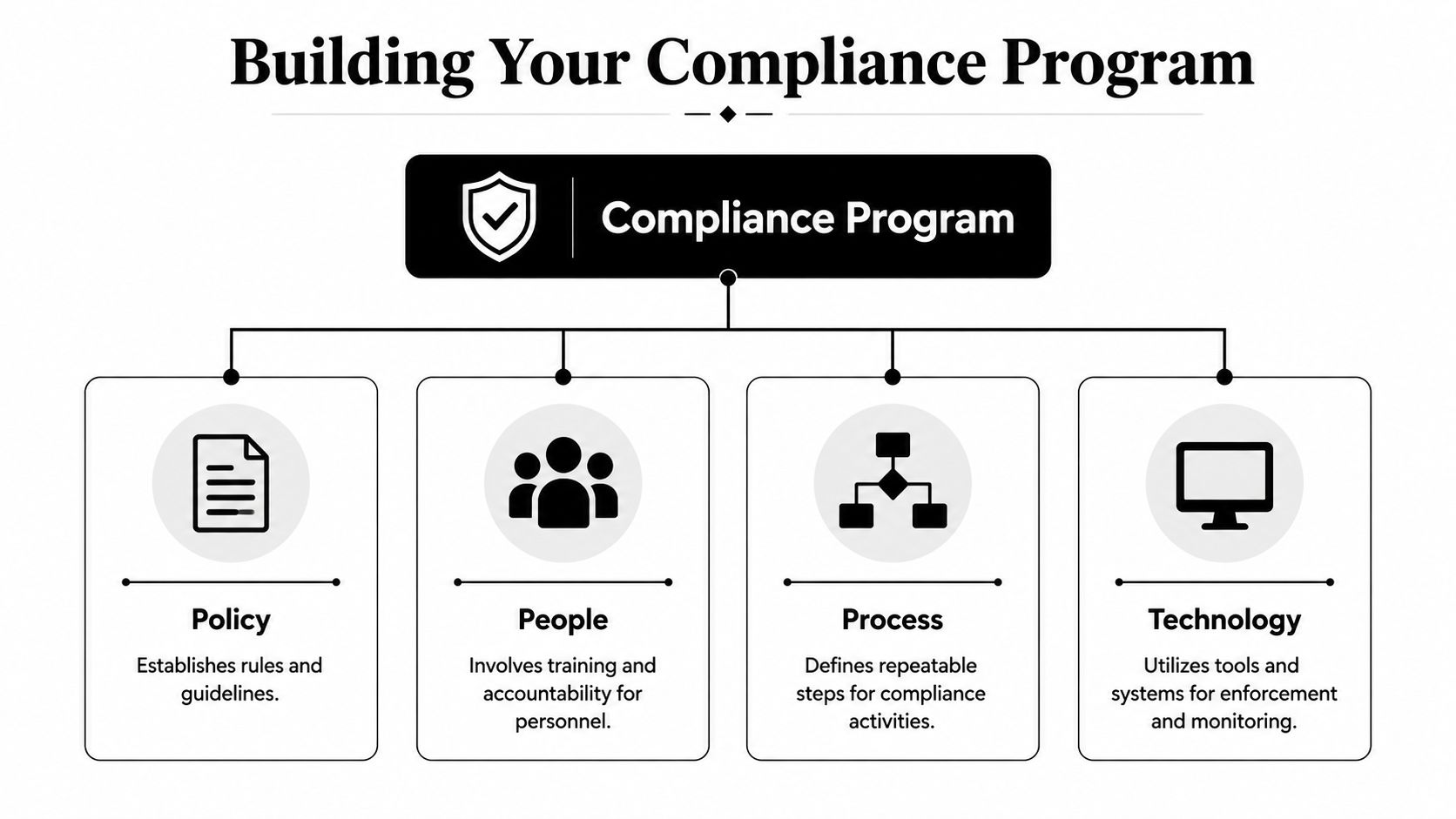
A workable program doesn't start with expensive software. It starts with clear rules, named owners, repeatable routines, and a short list of controls you can realistically maintain. For most agencies, I'd build around four pillars: policy, people, process, and technology.
Start with policy
Policy is where leadership states the rules. Keep it short enough that managers will read it, but specific enough that auditors and clients can see what your business expects.
You'll usually need an information security policy, access control policy, incident response policy, vendor management approach, and onboarding or offboarding rules. If your agency handles sensitive client work, spell out how data is stored, shared, retained, and deleted.
A policy should answer basic operational questions:
- Who approves access: Role owner, department lead, or system admin.
- What counts as sensitive data: Client records, campaign data, financial information, credentials, or regulated content.
- When reviews happen: At set intervals and after role changes.
- How exceptions are handled: Temporary access, documented approval, timed removal.
The mistake here is writing for the auditor instead of the business. If your access policy sounds like legal boilerplate, managers won't use it when real decisions show up.
Put people on the hook
Compliance fails when everyone assumes someone else owns it. Agencies need named responsibility, even if the team is small.
That doesn't mean hiring a large compliance department. It means assigning clear ownership. Ops might own vendor reviews. IT or a managed partner might own identity and device controls. Department heads might own access recertification for their teams.
“Who owns this?” is one of the fastest ways to test whether a control is real.
Training matters too, but keep it connected to the work people do. Show account managers how client data moves in the CRM. Show project leads what not to sync into open docs. Show managers how to review access after role changes and departures.
Build process before you buy more tools
Good process lowers cost because it stops you from solving every problem with software. Agencies need a handful of repeatable routines that people can follow under pressure.
I'd start with these:
Access requests and approvals
Decide how someone gets access, who approves it, and how that action is logged.Joiner, mover, leaver workflow
New hire access, role change review, and offboarding should follow one path. Loose offboarding is one of the easiest ways to leave risk behind.Vendor review
Your agency's risk includes the tools you connect. Review core vendors before adoption and again when usage changes.Incident handling
Define what counts as a security event, who escalates it, and where evidence is stored.Audit cadence
Compliance audits should happen at least once annually or immediately after significant organizational changes such as mergers, acquisitions, or major IT overhauls, according to Hyperproof's security compliance guidance.
That last point matters more than many agencies think. Growth changes risk. A new CRM migration or acquisition can undermine old assumptions.
Use technology to enforce, not just document
Technology should make the rules harder to break and easier to verify. It should not be your only control.
For agencies, the base layer usually includes identity management, MFA, role-based access, endpoint security, encrypted storage, shared drive controls, monitoring, and backup or recovery planning. Some technical requirements are straightforward. For example, national security compliance requirements such as China's Network Security Law and Data Security Law call for AES-256 encryption for sensitive data at rest and in transit, plus RBAC and MFA to restrict access, as explained in Tencent Cloud's compliance overview.
Monitoring is where many teams still lag. A continuous compliance program should connect audit logs to a SIEM so unusual access patterns trigger alerts in real time, rather than waiting for manual review, according to Slack's enterprise data security guide.
A practical first build
If you're leading a first major compliance project, do this in order:
- Map your systems: Calendar, CRM, file storage, PM tools, messaging, finance, HR.
- Classify sensitive workflows: New business, client delivery, reporting, invoicing, support.
- Assign owners: Every key system and every recurring review needs a name beside it.
- Tighten access: Remove broad permissions, add MFA, review admin roles.
- Create evidence habits: Save approvals, logs, training records, and review outputs where they can be found later.
That's not flashy, but it works. The agencies that struggle are usually the ones trying to look mature before they behave maturely.
How time and activity tracking supports evidence collection
Auditors ask for proof. That's where agencies often get stuck, because people remember doing the work but can't show it cleanly. Security reviews happened in meetings. Access checks were discussed in Slack. Client activity moved through calendars, CRMs, and project tools, but nobody kept a usable trail.
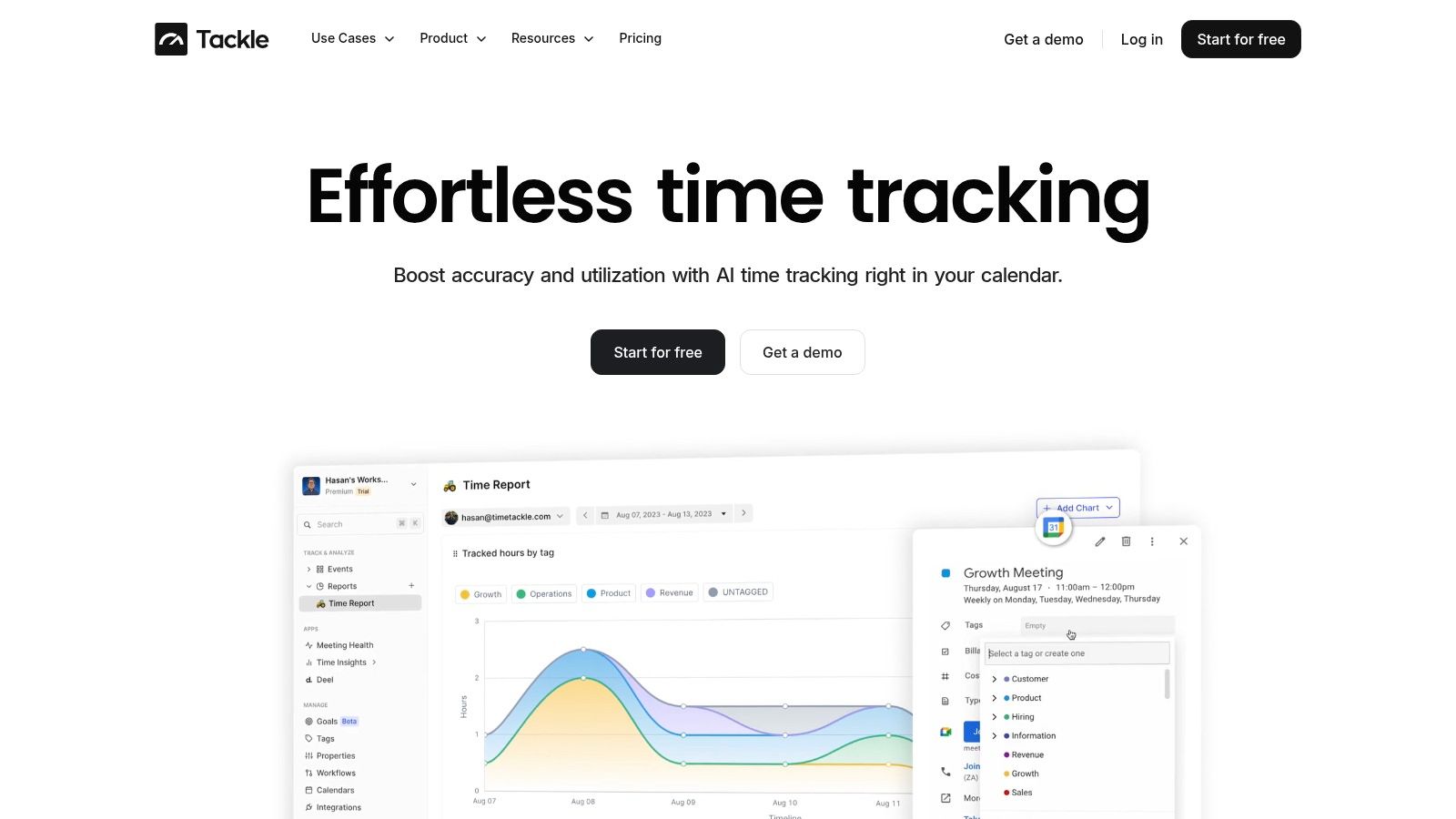
That's why operational activity data matters. When systems record who worked on what, when it happened, and how that work ties back to client or internal processes, you get evidence that is far easier to retrieve and explain.
Where agencies can use this well
A modern activity record can support compliance in practical ways:
- Review evidence: You can show that scheduled security reviews, training sessions, and incident follow-ups took place.
- Access-related context: If only authorized people should work on a client account, activity records help support that narrative.
- Process adherence: Repeating workflows leave a pattern. Missing patterns often reveal where controls are being skipped.
- Audit preparation: Pulling operational history is faster when the work already sits in a structured record instead of scattered inboxes.
This is especially useful for agencies running delivery from calendars and CRMs. Those systems are often closer to the truth of daily work than manual timesheets, because they reflect what people did instead of what they reconstructed later.
If your team is still chasing manual entries, it's worth looking at how time tracking for agencies can create cleaner operational records with less friction.
The best evidence is the evidence your team creates while doing normal work, not evidence they scramble to rebuild for the auditor.
The limit to keep in mind
Activity tracking is not a security control by itself. It won't replace access management, logging, or incident response. What it does well is strengthen your evidence layer and make it easier to prove that routines happened on time, with the right people involved.
For agencies, that's often the missing link between a policy that sounds good and an audit package that holds up.
Preparing for your first security audit without the panic
A first audit feels chaotic when teams treat it like a document chase. It gets much calmer when you treat it like an operational check. The core assessment is simple. Can you show that your controls match how work happens now, not how you thought it happened six months ago?
That's where many agencies fall into the operational validation gap. Compliance reviews focus on the checklist, but they don't test whether controls still work across real workflows. This is especially risky in agencies with connected calendars, CRMs, and productivity tools, where automations can create unmonitored data paths, as discussed in this analysis of the operational validation gap.
Run a readiness review before the auditor does
Do an internal pass first. Pick a few live workflows and follow them end to end. For example, trace a new client kickoff from signed contract to internal setup, calendar invites, CRM records, shared folder creation, and reporting access.
Look for these kinds of breaks:
- Access drift: Former team members still have permissions, or current staff have more than they need.
- Workflow bypasses: Someone exports client data into a spreadsheet outside your approved tools.
- Tool-to-tool blind spots: An automation moves data into a system nobody included in the control review.
- Evidence gaps: The team did the work, but there's no record tied to a date, owner, or approval.
That exercise tells you more than a policy binder ever will.
Get your audit pack in order
Most first audits go better when evidence is organized by control area, not by whoever happened to save a screenshot. Build folders or a working document set around clear categories.
I'd want these ready:
- Access control records: User lists, role reviews, onboarding and offboarding proof
- Security policies: Current versions, approval history, owner names
- Training records: Attendance, schedules, reminders, completion evidence
- Vendor reviews: Notes on key providers, contracts, security documentation
- Incident materials: Plan, escalation path, any tests or tabletop outputs
If you need a practical benchmark for what formal audit support can look like in a consulting context, Lighthouse Consultants' page on UK business information security audits is a helpful reference.
Audit mindset: Don't ask, “Do we have a control?” Ask, “Can we prove the control worked in a live workflow?”
Prepare your people, not just your files
Auditors often learn more from interviews than documents. If a manager owns access reviews, that manager should know the routine. If operations owns vendor assessments, they should be able to describe how the review happens.
Keep answers plain. “We review access when someone changes roles, and the department lead signs off,” is better than jargon. Auditors usually trust straightforward, consistent explanations more than polished language that nobody follows in practice.
The best first-audit posture is calm and honest. If something is in progress, say so, show the remediation path, and show ownership. That reads far better than pretending a weak control is mature.
Compliance is a journey not a destination
The first certification or audit outcome is not the finish line. It's proof that your agency has started to run security as part of the business, not beside it. That shift matters because enterprise clients want more than a document set. They want evidence that your controls still work as your team grows, your tools change, and client demands get messier.
Agencies that treat compliance as a living operating discipline usually become easier to trust, easier to buy from, and easier to manage internally. That's the key payoff.
If your agency wants cleaner evidence without adding more manual admin, TimeTackle helps teams capture work directly from calendars and connected systems, so you can reduce reporting friction and keep a better operational record for audits, client reviews, and day-to-day management.