


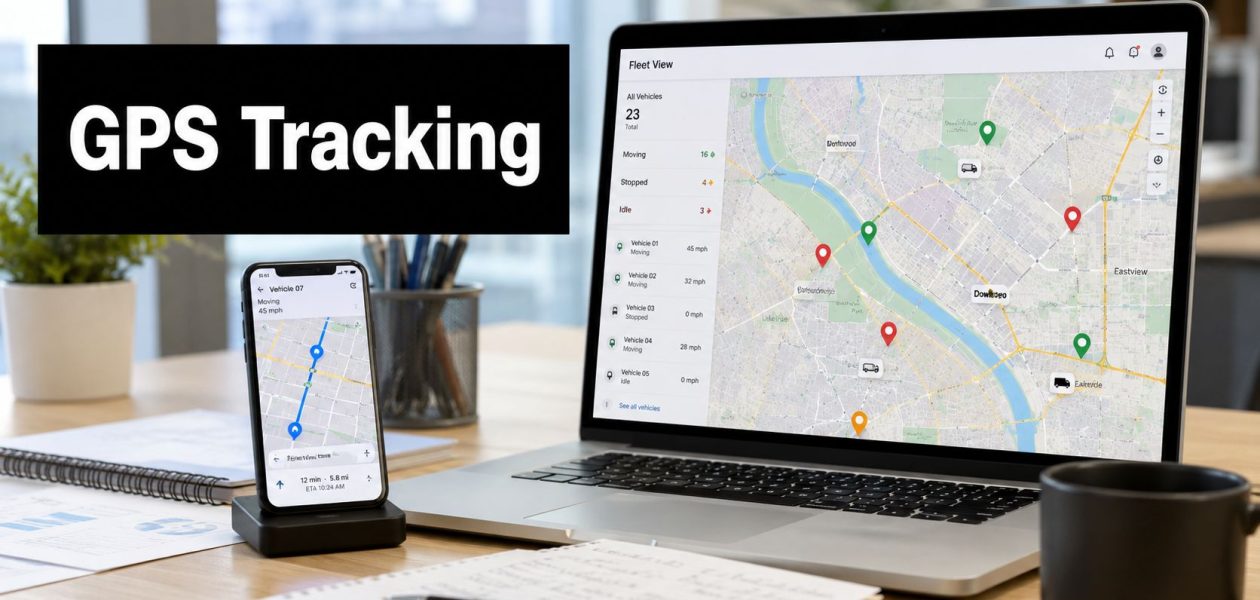
You probably know the moment. A client calls and says the field team never showed. Your account manager says they did. The team lead checks Slack, texts two people, opens a spreadsheet, and still can't tell who was where, when, or for how long.
That's usually when agency leaders start looking at employee location tracking.
For some teams, that makes sense. If you run event crews, install teams, on-site consultants, merchandisers, or property visits, location data can answer real operational questions. It can confirm arrival, support billing, sort out mileage, and help dispatch the next job without a dozen calls. If that sounds familiar, it's worth looking at.
But the harder question isn't just whether you can gps track employees. It's whether you should, for which roles, and under what limits. I've seen tracking solve real problems for mobile teams. I've also seen agencies create a trust problem they didn't have before, because they rolled out surveillance when what they really needed was better scheduling, better time capture, or clearer client delivery records.
The challenge of managing a team on the move
An agency with a studio staff rarely asks for GPS first. An agency with people constantly out in the field often does.
Think about a team that runs pop-up events across a city, or a creative production crew moving between venues, or consultants who spend their week at client sites. Operations needs a clean answer to basic questions. Did the team arrive on time. How long were they on site. Which jobs are still in progress. Who's closest to the urgent call that just came in.
Without a system, managers patch it together. They use texts, photos, check-ins, timesheets, and memory. That works until volume rises, a client disputes an invoice, or someone's mileage log doesn't match the calendar.
Modern GPS tracking is broader than “dots on a map.” In a business setting, it usually means location events tied to work activity. That might include arrival at a client site, route history during a shift, timestamps, mileage, or alerts when a vehicle enters or leaves a geofenced area. Used well, it becomes part of service verification and dispatch, not just supervision.
For agencies trying to reduce manual reporting, this often sits next to broader remote employee time tracking practices rather than replacing them. Location tells you where work happened. It doesn't tell you whether the work itself was good, billable, or complete.
GPS makes the most sense when location is part of the service you sell.
That's the dividing line I use with clients. If physical presence is central to the job, some level of location visibility may be reasonable. If it isn't, GPS often becomes a blunt tool that creates more management noise than value.
The real business case for GPS tracking and its risks
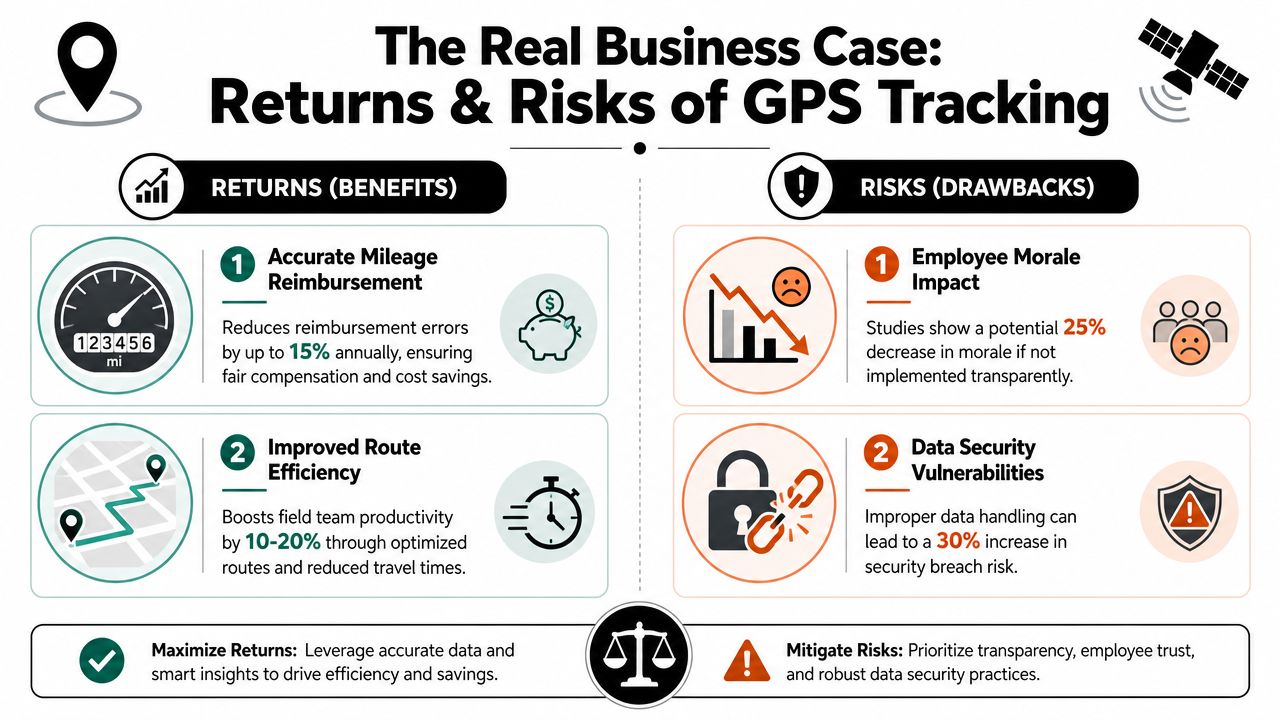
There's a reason this topic keeps coming up in operations meetings. GPS tracking is no longer niche. One industry survey found that 34% of employee monitoring tools now track employees' exact GPS location, up from 19% in 2021, which the source describes as a 44.85% increase. The same source says Gartner expected 70% of large employers to be using monitoring tools by 2025. You can review those figures in this employee monitoring study summary.
Where agencies get real value
The best business cases are concrete, not abstract.
A field marketing agency may need proof of service when a client disputes whether a team reached all assigned retail locations. A consultancy with mobile staff may need clean mileage records because handwritten logs create reimbursement fights. A property services team may need dispatch visibility so ops can assign the nearest person to an urgent issue. A lone worker in an unfamiliar area may benefit from safety visibility during work hours.
Those are all sane uses because location data connects to a clear business purpose.
Here's a simple way to test whether the case is real:
| Use case | GPS likely fits | GPS probably doesn't |
|---|---|---|
| Field visits | Yes, when attendance and travel matter | No, if site proof already comes from another reliable system |
| Vehicle routing | Yes, especially for company vehicles | No, for staff who barely travel |
| Billing support | Yes, if presence on site affects invoicing | No, for project work billed by deliverable |
| Team management | Sometimes | Rarely, if the real issue is poor planning |
Where it goes wrong
The common failure isn't technical. It's managerial.
Some leaders install tracking because they don't trust what they can't see. Employees feel that immediately. The issue stops being route efficiency or safety and becomes control. That's when the system starts costing more than it saves.
The split in employee reactions is real. One survey cited by Bonusly found 78% of employees were comfortable with GPS tracking for work, 82% said it was not an invasion of privacy, and 65% of those with direct experience reported a positive experience. But another survey found 50% were most concerned about micromanagement. That tension matters because the same tool can feel fair or invasive depending on how management uses it.
Practical rule: If a manager plans to use GPS data to question every stop, every route choice, or every five-minute gap, don't roll it out yet. You have a leadership problem, not a tracking problem.
In agencies, the hidden risk is role mismatch. Tracking can make sense for installers, drivers, event staff, and mobile service teams. It tends to make less sense for account leads, strategists, creatives, and consultants whose value comes from judgment, relationships, and output.
Navigating the legal and privacy minefield
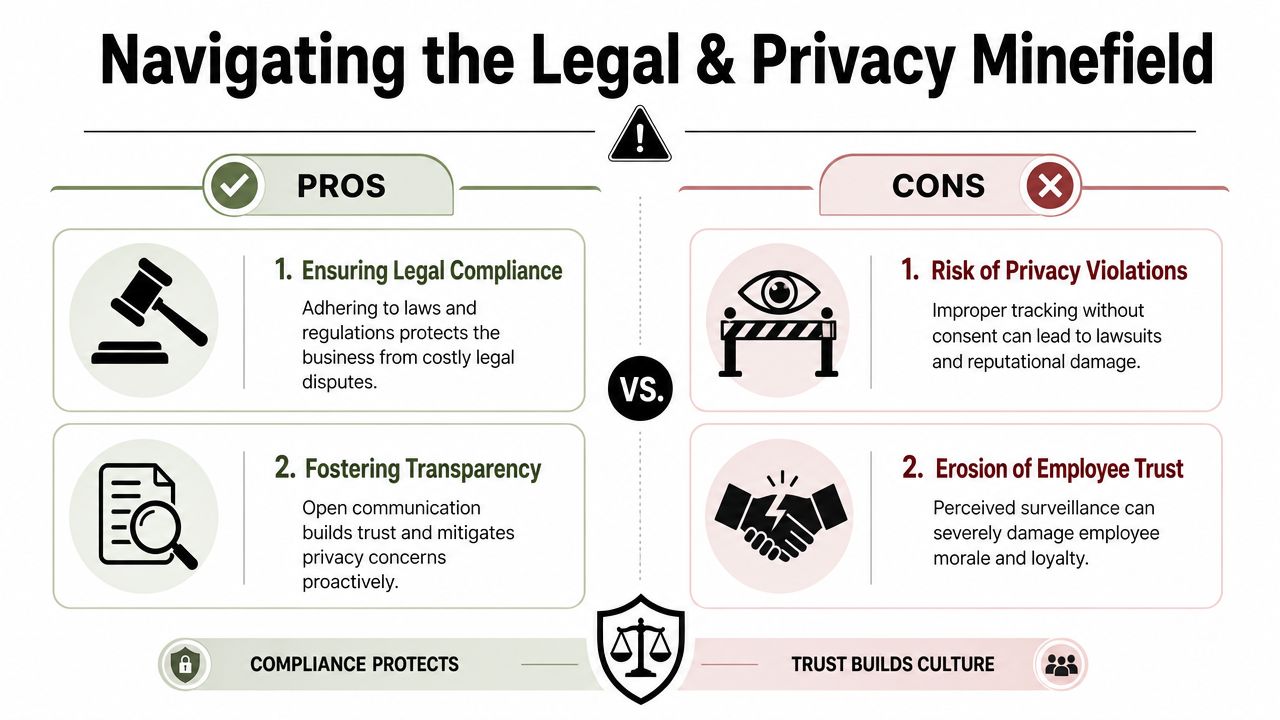
A tracking policy usually fails before legal ever reviews it. It fails when a field employee realizes the app can still see their location after a shift, or when a manager starts using route history to question ordinary judgment calls. At that point, the problem is no longer software setup. It is trust, consent, and scope.
Start with consent and clarity
The legal baseline is straightforward. Tell people what you collect, when you collect it, why you collect it, who can access it, and how long you keep it. Then get written acknowledgment that matches the reality of the system you are deploying.
That sounds simple. In practice, many agencies get sloppy here. The handbook says “location may be collected for operational needs,” while the app logs route history all day and keeps it for months. That gap creates risk. It also creates resentment because employees notice vague policy language faster than leaders expect.
A usable agency policy answers four questions in plain English:
- What data is collected: location pings, route history, timestamps, mileage, or device identifiers
- When collection happens: during scheduled hours, during assigned field jobs, or only at clock-in and clock-out
- Who can see it: named roles in operations, payroll, finance, safety, or HR
- Why the company needs it: dispatch, proof of service, mileage reimbursement, payroll accuracy, or safety response
If your team is already debating where operational oversight ends and privacy begins, this guide on productivity vs privacy in employee tracking is a useful companion read.
Treat personal devices as a separate risk class
Tracking a company van is one thing. Tracking a personal phone is another.
That distinction matters legally and culturally. Employer-side legal guidance from Fisher Phillips notes that businesses need a legitimate purpose, clear notice, and special care with personal devices and off-duty tracking because state rules differ and location data can expose private activity outside work. Their overview is a good starting point for policy drafting and counsel review: Fisher Phillips on GPS tracking and employee privacy.
For agencies, the practical hierarchy usually looks like this:
- Company vehicle: the cleanest case when driving is part of the job
- Company-issued phone: workable if tracking shuts off outside work time
- Personal vehicle: hard to justify unless mileage or route verification is central to the role
- Personal phone in a BYOD program: highest-friction option and the one most likely to create disputes
I usually advise clients to slow down any BYOD rollout until they can answer one hard question: can the employee clearly tell when tracking is on and off? If the answer is no, the setup needs work.
Limit by purpose, not by technical possibility
A legal policy can still produce bad operations.
Location data should stay tied to a defined business use. Payroll verification for mobile crews is a defined use. Dispatching technicians is a defined use. Reviewing every detour, coffee stop, or five-minute gap is not a serious operating model, and it trains managers to supervise motion instead of results.
That is where agencies get into trouble with knowledge work. If the job is client strategy, project leadership, creative production, or consulting, GPS data usually adds little and costs a lot. It signals suspicion, produces weak management data, and distracts from the measures that matter, such as deadlines, utilization, client feedback, and deliverable quality.
Collect the minimum location data needed for a specific operational purpose. Anything beyond that adds exposure without adding much value.
The companies that handle this well do three things consistently. They restrict tracking to field-based roles, shut it off outside work activity, and set manager rules before launch so supervisors do not turn raw location logs into day-to-day micromanagement.
Choosing the right tracking technology
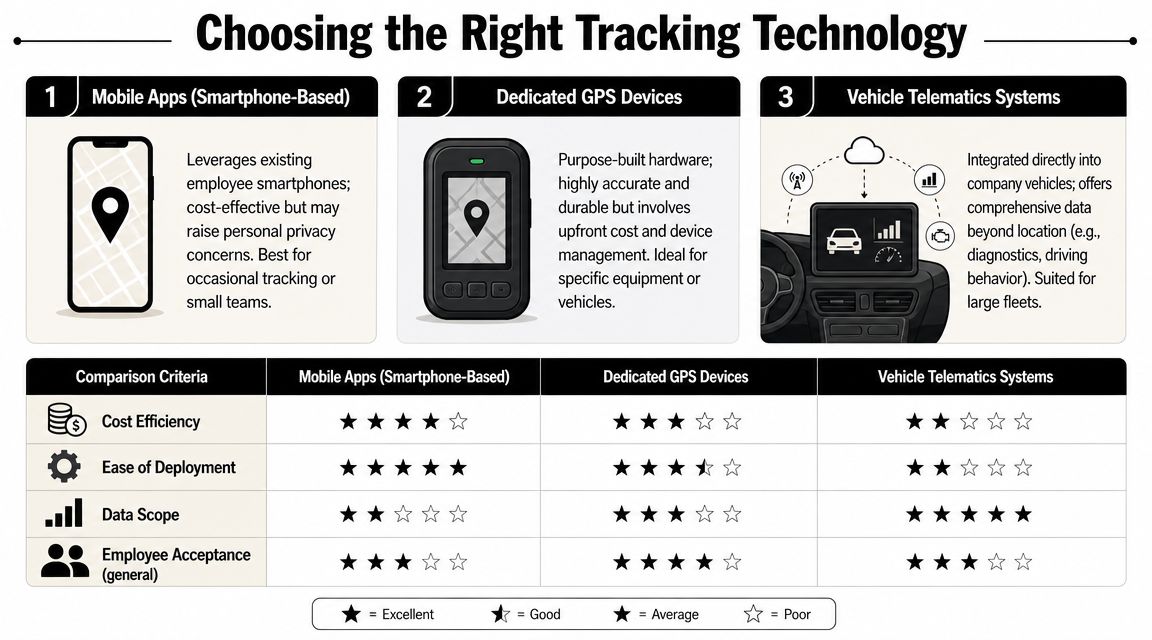
Not every tracking setup feels the same to employees, and not every setup creates the same legal and operational load. The right choice depends on what you're trying to verify.
Three common options
| Technology | Best fit | Main upside | Main problem |
|---|---|---|---|
| Mobile app on a phone | Small mobile teams, occasional field work | Quick to deploy | Privacy concerns on personal devices |
| Dedicated GPS device | Equipment or specific assets | Clear separation from personal life | Extra hardware to buy and manage |
| Vehicle telematics | Company fleets | Good fit when work is vehicle-based | Too much for teams that don't drive as core work |
A lot of agencies start with the phone app because it looks simple. Sometimes it is. But if your people use their own devices and cars, app-based tracking can trigger the strongest pushback. A dedicated tracker in a company vehicle often feels more reasonable because it's attached to the asset, not the person's private life.
Scope-limited telemetry is the better design
The most defensible setup records location only at defined work events or during work hours. The supporting policy should spell out location data, route history, timestamps, mileage, access controls, and retention or deletion periods. That approach is described well in this guide to implementing a GPS work policy for mobile employees.
That principle matters more than the vendor logo.
Look for tools that let you:
- Start and stop tracking by shift: not continuous collection
- Restrict access: managers don't all need raw location feeds
- Set retention rules: don't keep data forever by default
- Tie events to work: job arrival, departure, mileage, dispatch history
For teams where location matters only sometimes, it's also worth comparing software beyond pure GPS tools. For example, GPS time tracking apps are only one category. Some teams need geofencing. Others need better time records with occasional location confirmation. Those aren't the same buying decision.
How to roll out a tracking program without a team revolt
A rollout usually goes sideways before anyone opens the app. The pattern is familiar. Leadership buys software to solve dispatch, attendance, or route questions, then tells the team after the decision is already made. Employees read that as surveillance first and operations second.
Do the work in the reverse order. Decide the use case, limits, and manager rules before any install starts.
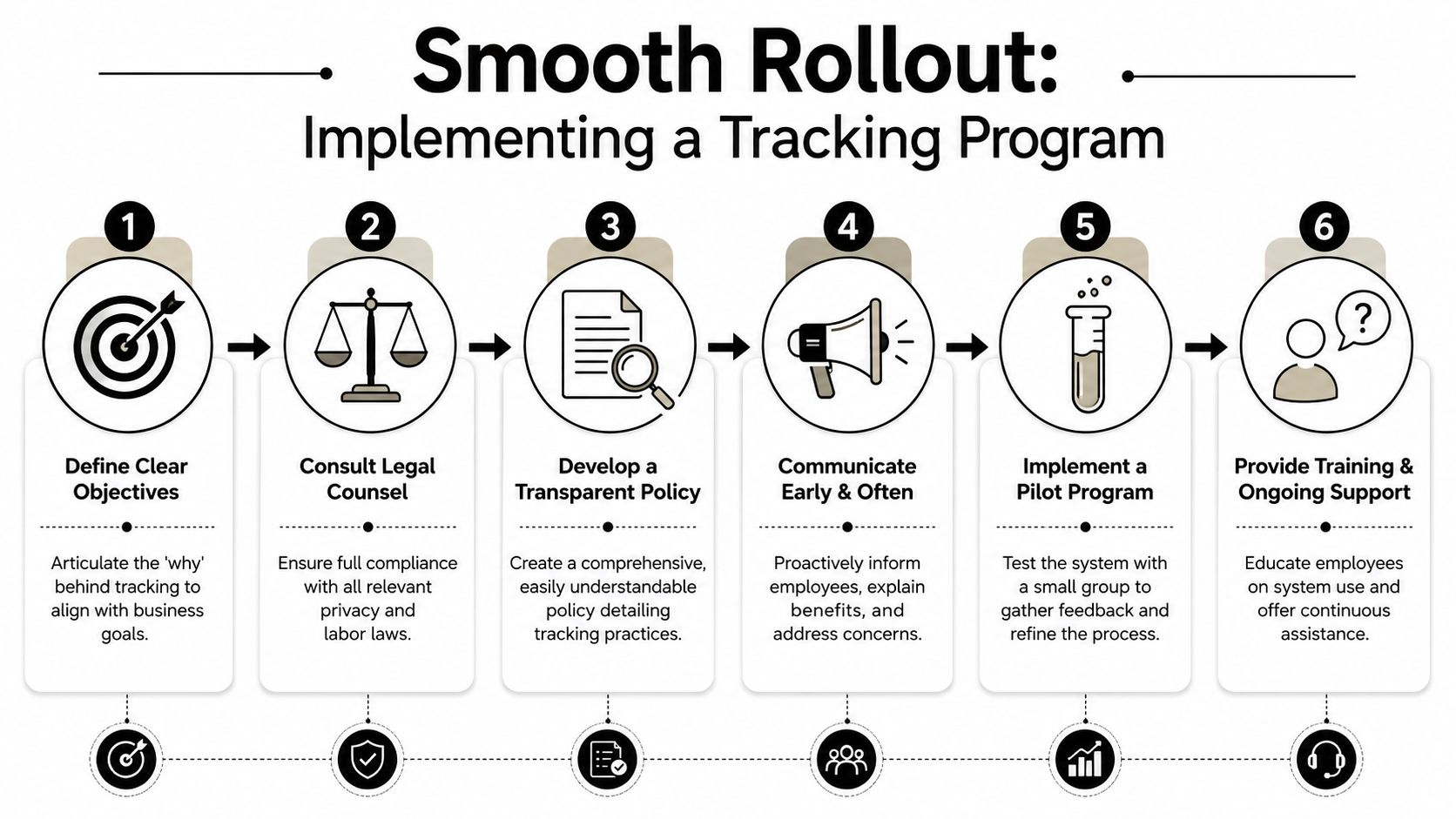
Write the policy before you install anything
A workable policy reads like an operations document, not a memo written for lawyers. If an employee cannot tell what is collected, when it runs, and who can see it, the policy is not finished.
Cover these points:
- Business purpose: state whether the program supports safety, dispatch, mileage, proof of service at client sites, or company vehicle oversight
- Covered roles and assets: name the specific jobs included and whether tracking applies to company vehicles, company phones, or any approved personal-device cases
- Collection window: define the hours, shifts, or job events that trigger tracking
- Data access and retention: specify who can view location history, how long records stay in the system, and when they are deleted
- Use in management decisions: clarify whether location data is used for payroll review, attendance disputes, coaching, or only operational follow-up
- Exceptions and failure cases: explain what happens when a battery dies, a signal drops, or an employee forgets to clock in
The policy also needs one plain statement many companies skip. GPS data is not a general-purpose management feed. It is collected for narrow operational reasons. That distinction lowers confusion and gives managers less room to turn location logs into constant supervision.
For practical guidance on policy rollout and employee communication, SHRM outlines how employers can set notice, consent, and device rules in its article on GPS tracking and employee privacy.
Explain the why in person
Do not announce tracking through a policy attachment and hope people accept it.
Managers need to explain the operational problem in plain language. "We need proof of arrival for event crews because clients dispute on-site time" is specific. "We want more visibility" sounds evasive, and employees usually hear it as "we do not trust you."
This conversation matters more than the software demo. In agency settings, one sloppy explanation can turn a limited field-use program into a morale problem across the whole company, including teams who will never be tracked.
Expect questions such as:
- Why do we need location data at all
- Can tracking continue after a shift ends
- Who can see the records
- Will location data affect reviews or discipline
- What happens if the app fails or the phone battery dies
- Is this for everyone, or only field roles
Answer directly. If the answer is uncomfortable, fix the design before rollout.
Pilot with one team and audit the human impact
Start with one field team, one clear use case, and a short review window. A pilot should test more than whether the map works. It should show whether the program solves a business problem without creating a trust problem.
I usually review pilots on four dimensions:
- Operational value: Did location data reduce billing disputes, missed arrivals, dispatch confusion, or safety blind spots
- Manager behavior: Did supervisors use the tool for the stated purpose, or did they start checking movement out of curiosity
- Employee friction: Did the team report after-hours concerns, battery drain, false alerts, or confusion about expectations
- Signal quality: Did the system capture events that helped the business, or just produce extra noise and extra admin work
That third point gets ignored too often. A tracking program can look successful on a dashboard and still fail in practice if managers overuse it or if employees start working around it.
Set manager rules before bad habits start
The biggest rollout risk is often not the employee app. It is manager behavior after launch.
Give supervisors explicit rules. They should know when they are allowed to check location, when they are not, and what requires a follow-up conversation instead of an assumption. A late arrival marker is a reason to ask a question. It is not proof of poor performance on its own.
I also recommend logging manager access to location history and reviewing a sample of those checks. That creates accountability and stops the quiet spread of "just checking" behavior that damages trust faster than the tracking itself.
If the pilot produces more checking, more arguments, and more exceptions than solved problems, narrow the scope or stop. GPS works well for defined field operations. It is a poor fit as a default management system for an entire agency.
When GPS is the wrong tool for the job
Some agency leaders start from the wrong assumption. They think all employee tracking solves the same problem.
It doesn't.
For developers, writers, designers, account managers, strategists, and many consultants, location usually tells you very little. A designer can do excellent work from a studio, a client office, a home office, or a train. Tracking that person's coordinates won't tell you whether the concept is strong, whether the client meeting moved the project forward, or whether the work was billable.
That's why the better question is often operational, not legal. Many employers ask if GPS tracking is legal, but fewer ask if it is wise. Ogletree notes that surveillance can create a climate of lower trust, which can reduce motivation and increase turnover risk, especially for professional services teams where autonomy drives performance. That point is discussed in Ogletree's piece on workplace monitoring and employee trust.
Better options for knowledge work
For knowledge teams, I'd rather measure work through systems that fit the job:
- Calendar-based time capture: good for meetings, client calls, internal reviews, and delivery patterns
- Project and task data: better for output, status, and accountability
- Client-facing activity records: useful for consulting and account work
- Clear utilization reporting: more relevant than raw location history
For many agency roles, a tool like TimeTackle provides a better fit than GPS. It connects Google or Outlook calendars and CRMs to capture activities automatically, then uses tags, properties, and reporting to show how time gets spent across clients and projects. For professional services teams, that usually matches the work more closely than location tracking does.
If the job is thinking, writing, designing, advising, or selling, location is often a weak proxy for value.
GPS is a specialist tool. It's good for physical logistics. It's not a universal answer to timesheets, productivity, or client reporting.
Frequently asked questions about employee tracking
What should you do if an employee refuses tracking or keeps turning off GPS
Start with the reason, not the discipline process.
If the role requires location verification, such as field service, event staffing, or use of a company vehicle, the company should restate the business need, the policy terms, and the limits on data collection. Then check whether the issue is technical, privacy-related, or role-related. I've seen staff resist because they thought the app tracked them after hours, when the policy said it wouldn't.
If the refusal continues, treat it as a policy compliance issue only after you've confirmed the policy is lawful, clearly communicated, and necessary for that role. If GPS is not essential for the role, forcing the issue usually creates more damage than value.
How long should you store employee location data
Keep it only as long as the business purpose requires.
Your policy should define retention and deletion clearly. For most agencies, the right question is practical: how long do you need the data for billing disputes, mileage review, payroll questions, safety review, or client verification. If nobody can answer that, the retention setting is probably too loose.
Avoid the lazy habit of keeping everything forever. Long retention expands privacy risk and creates one more data store you need to defend.
Is it legal to track employees during lunch breaks
That depends on how the break works and what your policy says, so legal counsel should guide your final rule. From an operations standpoint, the safer approach is simple. Don't collect location during unpaid breaks or off-duty time unless there is a specific, documented reason tied to safety or another legitimate business need.
If your system can't distinguish work time from non-work time, that's a design problem. Fix the configuration before rollout.
Can GPS data be used for performance reviews
Use it carefully and only for narrow questions.
GPS can support facts such as attendance at a client site, route completion, or whether a field worker reached assigned locations during a shift. It is a poor tool for judging effort, attitude, service quality, or overall performance. If managers start treating location logs as a full performance record, they will overread thin data and lose credibility with the team.
My advice is to use location data as supporting evidence, not as the main story. For most agency roles, client outcomes, project delivery, communication quality, and time records tell you far more.
If your team needs cleaner visibility into work without turning monitoring into a trust problem, TimeTackle is worth a look. It captures work from calendars and connected systems, which gives agencies better reporting on time, utilization, and client activity without relying on blanket location tracking for roles where GPS doesn't fit.


