



If you’re reading this, there’s a good chance Jira already exists in your agency, but it isn’t doing the job you hoped it would. The team updates tickets late. Project leads still build status decks by hand. Finance wants cleaner time reporting. Ops wants to know who has capacity, who is overloaded, and which client work is eroding margin.
That’s where most agency Jira setups go wrong. The software isn’t the problem. The setup is.
I’ve seen the same pattern across creative, implementation, and consulting teams. Someone creates a project with default settings, everyone starts dumping tasks into it, and six months later nobody trusts the reports. Then the team blames Jira, when the issue is that the system was never built for the way agencies operate.
If you want to know how to use Jira well inside a mid-sized agency, start with one rule. Build for visibility first, then for convenience. If your structure can’t answer simple operational questions, it will create more admin work, not less.
Setting up your agency's Jira foundation
On Monday morning, the client asks for a status update. The PM opens Jira, finance wants billable hours by account, and ops needs to know who still has capacity this week. If your Jira setup cannot answer those three questions without manual cleanup, the foundation is wrong.
A clean setup reduces admin. A sloppy one creates extra timesheet chasing, patchy reporting, and arguments about what is in progress.

Pick the project style that fits the work
Jira gives you Scrum and Kanban for a reason. They solve different operational problems.
Use Scrum for delivery teams working against planned scopes, launch dates, or fixed sprint commitments. Use Kanban for teams handling a steady stream of requests, support work, retainers, or approval cycles that do not fit cleanly into a sprint. Atlassian’s getting-started guide covers the basics of creating a project from those templates and is a useful reference for the initial setup path in Jira (Atlassian guide).
For mid-sized agencies, the better question is not "Scrum or Kanban?" It is "Where does reporting stay consistent?"
In practice, this setup usually holds up well:
- Scrum for scoped delivery teams
- Kanban for account, support, or inbound request teams
- Shared reporting rules across projects, especially for client, service line, billable status, and team ownership
Some agencies try to force every department into one giant project. Others split everything into separate systems by team or client. Both create problems. One oversized project becomes noisy and hard to govern. A separate project for every team or client breaks utilization reporting fast. The middle ground works better. Keep the architecture simple, standardize the fields that matter, and let boards give each team its own working view.
Match issue types to real agency work
If every item in Jira is just a task, reporting gets muddy. Leads cannot roll work up properly. Ops cannot see where time is going. Finance gets weak data.
Use issue types that map to how agencies sell and deliver work:
| Jira level | Agency example | Why it matters |
|---|---|---|
| Epic | Client retainer, campaign, migration, website rebuild | Keeps reporting tied to a commercial unit |
| Story | Deliverable, channel, feature, or workstream | Gives leads a meaningful progress layer |
| Task or sub-task | Draft copy, QA page, build component, send for approval | Makes day-to-day execution clear |
This is also where agencies should get strict about classification. Add only the fields that help with staffing, reporting, or routing. In most cases that means client/account, billable vs non-billable, service line or department, and work type such as retainer, project, support, or internal.
Anything else needs a reason.
I usually use one simple test. If a field will not help someone assign work, report margin, or understand capacity, it stays out. Extra fields make issue creation slower, and staff will skip them under pressure. Then your dashboards fill up with blanks and your team goes back to spreadsheets.
Build workflows around handoffs, not software defaults
Agencies lose time at the handoff points. Internal review. Waiting on client feedback. Waiting on assets. Legal approval. Those pauses matter because they affect delivery dates, utilization, and how much work looks active when it is blocked.
A workable starting workflow looks like this:
- To do
- In progress
- Internal review
- Client approval
- Blocked
- Done
That is often sufficient for teams.
The common failure is over-design. I have inherited agency Jira instances with 14 or 18 statuses because every edge case got its own column. The board looked smart. Nobody used it consistently. Reporting became unreliable because staff could not tell the difference between "Ready for QA," "QA Review," "Peer Review," and "Awaiting Review."
Keep statuses few and meaningful. Use automation and fields for nuance, not more workflow clutter.
Understand screens, schemes, and permissions before adding custom fields
Many Jira setups start drifting at this point.
Adding a field is easy. Making sure the right team sees it on the right issue type, in the right project, with the right edit permissions, is where admins usually lose time. If your agency uses company-managed projects, screens and schemes control a lot more than new admins expect. A practical video walkthrough of that setup logic is here (tutorial insight).
Use this order every time:
- Confirm the issue type
- Check the screen tied to that issue type
- Review the screen scheme or project configuration
- Verify the field context and permissions
- Test the change in the actual project, not only in admin settings
That order saves rework.
It also prevents a common agency mistake. Admins add fields for utilization, client codes, or approval dates, but they only appear on one issue type or one project. Teams then start tracking the missing data somewhere else. Once that happens, Jira stops being the operational source of truth.
If your team still confuses documentation with delivery tracking, send them this quick explainer on Dupple on Jira Confluence differences. That confusion causes real reporting gaps in agencies. Notes live in Confluence, action items live in Slack, and Jira ends up holding only part of the work.
Set up boards by team view, then connect them to agency reporting
Boards should help each department work without breaking the underlying data model.
Create views for creative, development, implementation, strategy, and account management. Use filters so each team sees only the issues relevant to them, while leadership still gets cross-team reporting from the same core structure. JQL does the heavy lifting here.
A simple example:
- project = CLIENTX AND status != Done ORDER BY priority DESC
That is enough to give a team a usable board. The bigger win is what happens after the board setup. Once work is tagged consistently, you can connect Jira activity to calendar and meeting data to see where utilization is really going. That matters in agencies where time disappears into internal calls, client check-ins, and unplanned support. Jira tracks planned and executed work. Calendar analytics tools such as TimeTackle help fill the visibility gap around meeting load and actual time allocation.
If you want a practical planning model that supports better reporting later, this guide on agile project planning for operations teams is worth reading before you start adding more custom fields.
Mastering backlogs, boards, and sprints
Monday morning at an agency often starts the same way. Account managers are chasing client approvals, specialists are asking what is due this week, and the backlog is full of requests nobody has sized or ranked. Jira helps only if the backlog reflects delivery reality. If it becomes a holding pen for every idea, sprint planning turns into admin work and utilization reporting gets noisy fast.

Use the backlog to make trade-offs visible
Agency backlogs should answer one question clearly: what gets done next, and what waits.
A simple hierarchy usually holds up best: Epic > Story > Task. For agency teams, that maps well to client outcomes, deliverable groups, and the actual execution work. It also keeps reporting usable later. If an Epic represents a client initiative and the Stories represent the deliverables underneath it, you can see very quickly where time is going, what is stuck, and which accounts are absorbing more delivery effort than planned.
The planning guidance referenced earlier also supports a two-week sprint cadence and drag-and-drop prioritization for backlog management. I’ve found that rhythm works for mid-sized agencies because it balances two competing realities. Client priorities do change. Teams still need enough stability to finish real work and forecast capacity with some confidence.
A backlog stays useful when teams follow a few rules consistently:
- Keep only ready work near the top. If a ticket has no owner, no delivery outcome, or no realistic next step, move it down.
- Split vague requests before planning. “Update website” is not sprint-ready. “Revise homepage hero copy” is.
- Show internal work beside client work. Ops fixes, pre-sales support, and team admin still consume capacity. Hiding them makes utilization look better than it is.
- Archive stale requests on purpose. Old items distort priority and create false demand.
That discipline matters more in agencies than in product teams with a single roadmap. Agency work arrives from many directions at once. Without a clean backlog, scope creep slips in through unscoped revisions, “quick” support asks, and internal tasks nobody counted.
Turn client language into delivery language
Clients rarely submit work in a format a team can estimate. They ask for outcomes, not production steps.
That translation layer is where good Jira setups either help or fail. If “launch campaign for new product line” goes into the sprint as one issue, the team cannot estimate it properly, specialists cannot own clear pieces of work, and your reporting tells you almost nothing useful.
Break large requests down before they hit the board:
| Client request | Better Epic | Better Stories |
|---|---|---|
| Launch campaign | Q3 product launch campaign | Messaging, design assets, landing page, paid media setup |
| Website refresh | Homepage redesign | Wireframes, approved copy, dev build, QA |
| CRM cleanup | HubSpot lifecycle overhaul | Field audit, workflow mapping, import prep, test pass |
That structure reduces timesheet fatigue later too. Teams log time more accurately when tickets match the work they did. It also improves reporting because leadership can compare planned effort against real execution, rather than trying to decode broad umbrella tasks after the fact.
Story points can help here, but they have limits. Use them to compare effort inside one team. Do not use them to compare a developer’s work against a strategist’s work or turn them into a billing proxy.
If a ticket cannot be finished inside one sprint without splitting it, it is usually too large.
Build boards that show flow, not just status
Boards should show where delivery is slowing down.
In agencies, that means columns need to reflect handoffs and waiting states clearly enough that a producer or operations lead can spot a bottleneck in seconds. “In Progress” and “Done” are not enough if half the delay happens during internal review or while waiting on client assets.
The columns that tend to work well are the ones tied to operational decisions:
- Ready to Start
- In Progress
- Ready for Review
- Client Review
- Awaiting Client Assets
- Done
That is usually better than adding ten micro-statuses that nobody updates consistently. I’ve seen teams overbuild boards for every edge case, then lose the visibility they were trying to get. If a status does not change who needs to act next, it probably does not belong on the board.
Use swimlanes, labels, or quick filters to separate work by function, retainer, or urgency. Keep the underlying workflow shared where possible. That gives teams a clean day-to-day view without breaking cross-team reporting. It also makes later automation easier, which matters if you plan to automate repetitive Jira admin work instead of assigning producers to clean up statuses by hand.
If your team needs a refresher on sprint mechanics without the usual theory-heavy tone, Nerdify's practical Scrum guide is a decent companion piece.
Run sprints as capacity commitments, not wish lists
Sprint planning should answer two practical questions. What can the team finish in the next two weeks, and what gets left out?
For agencies, that second question is the one teams avoid. People try to fit in one more client request, one more revision round, one more internal task. Then the sprint closes with half the work still open, and forecasting becomes guesswork.
A better approach is simple:
- Review only the top of the backlog during planning.
- Pull work that is defined, assigned, and small enough to complete.
- Leave visible capacity for support requests, reviews, and interruptions.
- Track carryover closely. Repeated carryover usually means tickets are too large, priorities are unstable, or the team is overcommitting.
Burndown charts can help, but they are not the goal. The goal is a planning system that gives agency leaders a believable view of delivery load. Once that is in place, Jira starts doing more than task management. It becomes a reliable record of planned work versus completed work. Pair that with calendar analytics from a tool like TimeTackle, and you can finally see the gap between what the sprint said the team should be doing and where time went, especially in meetings, approvals, and internal coordination.
That is the difference between a Jira setup that looks organized and one that gives operations real visibility.
Automating workflows to reduce manual tasks
Friday at 4:30 p.m. is when weak Jira setups show themselves. Project leads are chasing status updates, specialists are trying to remember what changed on Tuesday, and account managers are piecing together client answers from Slack, email, and half-updated tickets. That is not a reporting problem. It is a workflow problem.
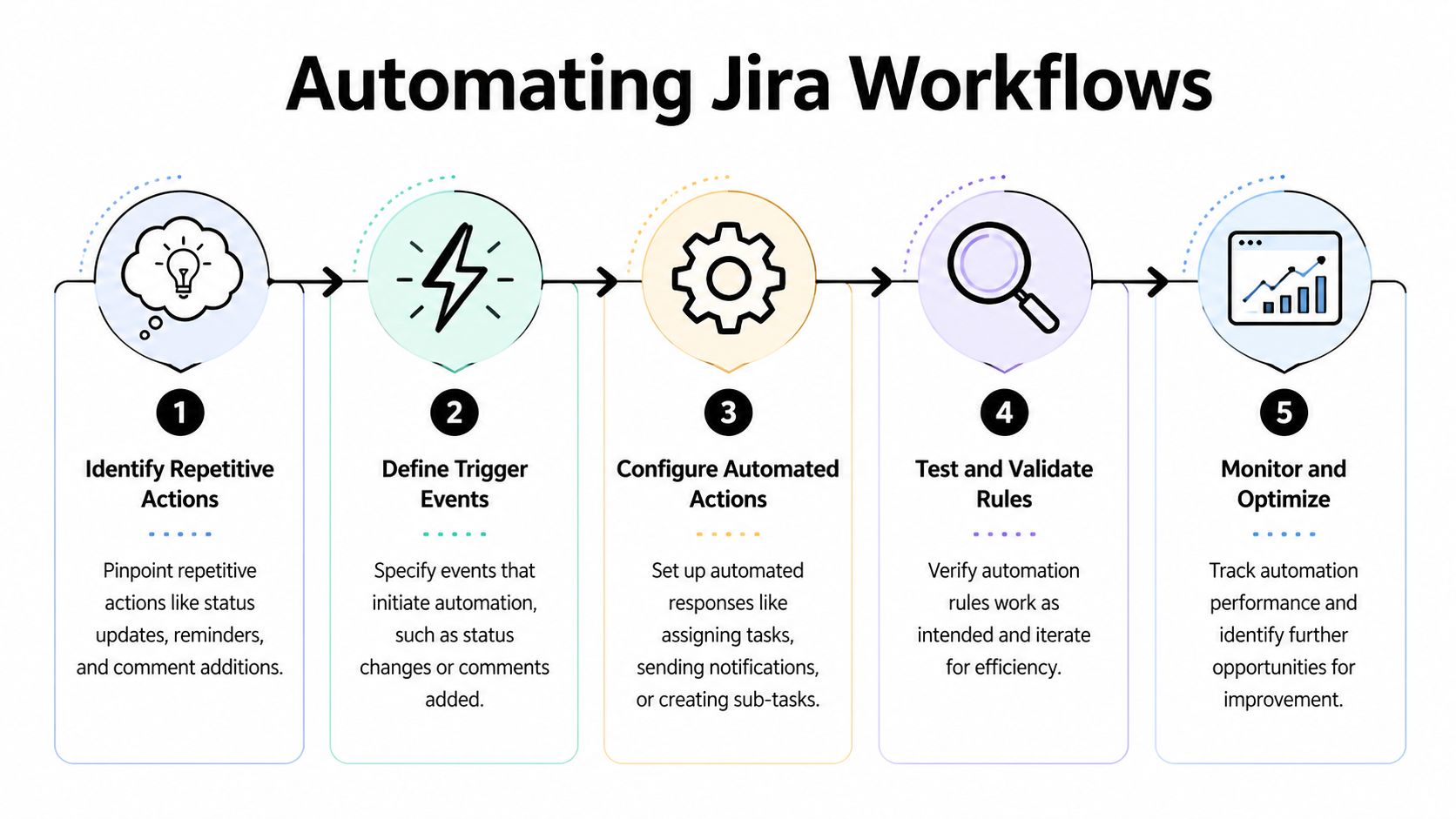
For mid-sized agencies, automation earns its keep when it reduces admin load in three places: status chasing, repeat setup work, and reporting cleanup. If a rule does not save time or improve delivery visibility, it probably does not belong.
Start with workflow design, not rules
Bad workflows create bad automation.
I have seen agencies build dozens of Jira rules on top of fuzzy statuses like "In Progress," "Review," and "Waiting." The rules fired. The team still had no idea whether work was blocked, with the client, or ready for an internal handoff. Operations lost time anyway because the workflow did not reflect how agency work moves.
A better setup uses a short set of statuses with clear operational meaning. For many agencies, that includes:
- Client review for work that has left the delivery team and needs feedback or approval
- On hold awaiting assets for anything blocked by missing copy, files, access, or client input
- Ready for QA for internal review before release or handoff
- Done only when no further action, approval, or follow-up is required
That last definition matters more than teams expect. If "Done" means "my part is done," Jira reports become unreliable fast. Cycle time looks better than reality, utilization gets distorted, and account leads start asking people for updates outside the system again.
Four automations worth setting up early
Start with rules that remove repetitive decisions and expose stalled work. Those usually create more value than complicated chains of conditional logic.
Auto-assign incoming work
Route tickets based on issue type, component, client team, or request channel. New work should land with an owner or at least with the right queue immediately. Unowned issues are one of the simplest ways agencies lose response time.Flag stalled items by status and age
Set rules around real bottlenecks, not generic inactivity. A ticket sitting in Client Review for five days needs a different follow-up than a task sitting in Ready for QA for two days. Good alerts tell the account lead or delivery lead exactly where intervention is needed.Advance linked work after approvals
If a parent deliverable is approved, move dependent tasks forward or notify the next owner automatically. This cuts the dead time between "approved" and "someone remembered to start the next step."Create repeatable sub-tasks for standard deliverables
Campaign launches, landing pages, ad creative rounds, analytics setups, and monthly reporting packs often follow the same internal sequence. Let Jira create those sub-tasks automatically so the team does not rebuild the same checklist every time.
These are boring automations. That is usually a good sign.
Keep the rule set simple enough to survive turnover
Agencies change shape often. New producers join. Client teams shift. Service lines expand. An automation setup that only one Jira power user understands will break the first time ownership changes.
Use plain naming conventions for rules. Document what triggers them, who they notify, and what problem they solve. Review rules once a quarter and delete the ones nobody can explain. Complexity tends to creep in through one-off exceptions, and one-off exceptions are how teams end up distrusting the system.
The common mistake is trying to automate judgment. Jira should handle handoffs, reminders, field updates, and repeatable setup. People should still decide scope, priority, and whether a client request belongs in the sprint.
Use automation to reduce reporting drag
The payoff is not the rule itself. It is the cleaner data that follows.
When tickets move status on time, standard sub-tasks exist for repeatable work, and ownership is clear from the start, weekly reporting gets easier. Team leads spend less time reconstructing what happened. Ops gets a more accurate view of active load, blocked work, and delivery patterns. That matters for agencies because timesheet fatigue usually starts when the system does not reflect the work cleanly enough to trust.
Jira still has limits here. It can show issue movement well, but it does not tell the full story of where team time went, especially across meetings, approvals, and internal coordination. Pairing Jira with calendar analytics fills that gap. If you want to reduce admin work outside the ticket itself, this guide on how to automate repetitive tasks covers practical ways to cut recurring manual effort.
If you are comparing Jira with broader automation options across the business, this roundup to find best small business automation gives useful context on where Jira fits and where a separate tool makes more sense.
Building dashboards for true utilization visibility
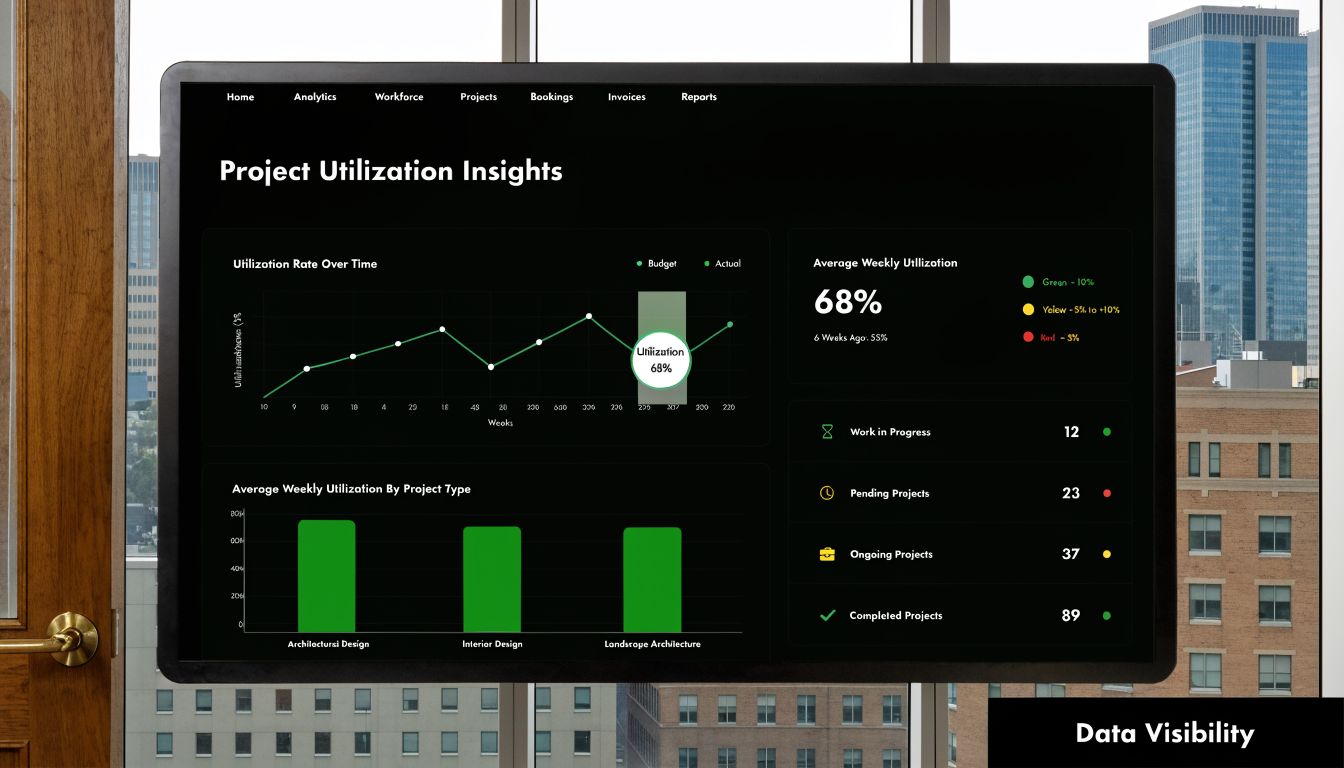
Monday morning. Client leads want status before noon, department heads want to know who can take more work, and finance wants a cleaner read on billable effort than last week’s timesheet scramble. If your Jira dashboard cannot answer those questions in under a minute, it is adding noise instead of helping the agency run.
Build dashboards around operating decisions
A useful dashboard starts with decisions, not widgets.
For a mid-sized agency, the core questions are practical. Who is over capacity this week? Which client accounts have urgent work sitting too long? Are logged hours tracking against the kind of work you planned to deliver? Jira can answer part of that well if the underlying issue structure is clean and the dashboard is built around workload, status aging, and effort by account or work type.
Rich Filter gadgets are useful here because they let teams show statistics and two-dimensional views from the same filter logic. That means ops, delivery, and team leads can look at the same pool of work through different cuts without rebuilding the dashboard every time requirements change. Appfire’s documentation also notes that quick charts can be opened from the gadget and placed on the dashboard, which helps when one team wants a simple chart and another needs a more detailed breakdown (Appfire documentation on Rich Filter dashboard statistics and quick charts).
That flexibility matters because agency reporting usually breaks down in the same three places. Too much manual effort to prepare weekly updates. Too little clarity on real utilization. Too many dashboards that show ticket activity without showing delivery risk.
Use single-axis views for capacity checks
Start simple.
A workload view by assignee is one of the few dashboard elements I consider required. It gives delivery leads a fast read on who is carrying too many active issues, who has room, and where work needs to be redistributed before a sprint turns into a rescue exercise.
Use issue count if your ticket sizes are reasonably consistent. Use story points or time-based fields if the work varies a lot in effort. There is a trade-off here. Issue count is easier to trust at a glance, but it can hide the difference between a small revision and a large production task. Story points add nuance, but only if the team estimates consistently. Time spent is closer to operational reality, but many agencies know how messy time logging gets when the process feels like admin overhead.
That is why I usually want all three available somewhere, but not all on the same opening dashboard.
Use two-dimensional views to find delivery friction
The next layer is where dashboards start becoming management tools.
A two-dimensional view lets you ask better questions. Priority by status shows whether urgent work is moving. Client by assignee shows whether one account is overloading a small part of the team. Time spent by status can expose work that absorbs hours without reaching done, which is common in approval-heavy agency environments.
Those combinations are more useful than generic activity charts because they point to an action. Reassign work. Challenge inflated priorities. Escalate a blocked approval. Adjust staffing on a client that keeps consuming unplanned hours.
One warning. Do not build a matrix for every possible field combination. I have seen teams create dashboards so dense that nobody can tell what matters. Pick the views tied to recurring agency decisions and ignore the rest.
What an agency dashboard should include
Keep the first version tight and operational:
| Dashboard element | What it answers |
|---|---|
| Assignee workload stats | Who has capacity and who is overloaded |
| Priority by status table | Where urgent work is stalling |
| Open work by client or account lead | Which delivery streams are creating risk |
| Time-based breakdown by client or work type | Where effort is actually going |
| Sprint or flow trend | Whether work is closing at a healthy pace |
If a widget does not help with staffing, prioritization, client communication, or margin protection, remove it.
That rule saves a lot of time.
Jira gives structure. It does not give the full utilization picture.
Jira is strong at showing planned work, current status, and issue movement. Agencies still need another layer for the time that never gets reflected cleanly in tickets. Internal reviews. Client calls. Slack coordination. Approval loops. Context switching between accounts. That is where timesheet fatigue usually starts, because the work happened but nobody wants to reconstruct it manually at the end of the week.
For true utilization visibility, pair Jira dashboards with calendar analytics so you can compare assigned work against how time was spent. That is the difference between a dashboard that looks organized and one that helps ops spot underutilization, over-servicing, and reporting gaps early. If you want a clearer picture of what strong reporting looks like, these performance dashboard examples for agency and ops teams are worth reviewing.
Advanced tactics for running your agency on Jira
A mid-sized agency usually hits the same wall at the same stage. The board is live, the team is using it, and leadership still cannot answer basic operating questions fast enough. Who can take on more work this week. Which accounts are drifting because requests are bypassing intake. Where delivery notes, internal risk, and client-visible updates should live. Advanced Jira work starts there.
Set permissions to match how agency work actually runs
Permission mistakes create admin overhead faster than almost anything else.
If access is too broad, client-sensitive notes, margin discussions, and staffing concerns end up visible to people who should never see them. If access is too tight, project managers start filling the gaps in Slack and email, and Jira stops being the system of record.
Set access by role, not by individual preference. Delivery leads usually need cross-project visibility. Freelancers usually need project-level access and little else. Clients, if they get access at all, need a heavily filtered view with strict comment rules. I have seen agencies create more work for themselves by giving clients raw board access and then spending weeks policing language, hiding internal blockers, and duplicating conversations elsewhere.
A simple check works well. People should be able to get the context they need to do the work, but not the commercial or operational detail they do not own.
Clean taxonomy matters more than clever taxonomy
Agencies love adding fields because every team thinks its work is unique. Six months later, reporting breaks because nobody uses the same language.
Keep your structure boring on purpose. Use components for categories you need to report on month after month, such as service line, delivery discipline, or account group. Use labels for short-term sorting, campaign tracking, or one-off internal initiatives. Do not let every pod create its own version of the same tag.
If your system contains “retainer,” “monthly-retainer,” “retainers,” and “ongoing-support,” you do not have taxonomy. You have cleanup work.
This matters more for agencies than for in-house teams because reporting is tied to margin, staffing, and account health. A messy label system does not just look untidy. It makes utilization reviews and client reporting less trustworthy.
Build intake rules that protect delivery time
A lot of agency chaos starts before work even reaches the board.
Teams accept requests from email, Slack, meetings, and client messages, then try to reconstruct priorities later. Jira can handle this, but only if intake is standardized. Give every request one path into the system. Require the fields that affect delivery decisions, such as client, due date, owner, and work type. If the team cannot triage a request without asking three follow-up questions, the intake form is too loose.
This is also where agencies reduce timesheet fatigue upstream. Cleaner intake makes work easier to categorize at the point it starts, which means less reconstruction later. If you pair Jira issue data with calendar analytics in a tool like TimeTackle, ops can compare what was requested, what was scheduled, and where untracked effort showed up in meetings and internal coordination. That combination closes a visibility gap Jira does not solve on its own.
Prepare for Jira UI changes before the team feels the pain
Jira changes often enough that stale documentation becomes an operational problem.
The 2025 interface rollout created exactly that kind of friction. Teams were not relearning delivery process. They were relearning where settings lived, how views were labeled, and which old screenshots were now useless, as noted earlier in the article. For an agency in a busy quarter, that kind of confusion slows admin work, lowers data quality, and leads people to sidestep the system.
Treat UI change like process change. Assign one admin to test changes first in a controlled way. Update SOPs with current screenshots. Record short walkthroughs for common paths such as creating work, updating status, logging time, and pulling reports. Keep a one-page reference that maps old navigation paths to the new ones.
That small bit of change management prevents a lot of avoidable drift.
Run Jira governance like an ops function
Someone needs to own the system after launch.
Not full-time, in most agencies. But clearly enough that boards, workflows, fields, and automations do not sprawl unchecked. Without ownership, every urgent team request gets approved, every exception becomes permanent, and Jira slowly turns into a custom setup nobody wants to touch.
A practical model is a light governance cadence. Review field usage monthly. Review automations quarterly. Remove stale issue types, unused labels, and duplicate workflows before they become permanent clutter. Say no to configuration requests that only solve a single team’s edge case and make reporting worse for everyone else.
Good Jira administration is not about adding more. It is about protecting clarity as the agency grows.
Common Jira questions from agencies
These are the questions that usually come up after the initial setup. They’re less about features and more about judgment.
How should we track time for retainers versus fixed-scope projects
Treat them differently in Jira, even if the same team works on both.
For retainers, group work under a client or monthly epic structure so you can review effort against ongoing service buckets. For fixed-scope projects, tie work to the defined delivery structure so you can see progress against scope and spot drift early.
What you want to avoid is one flat board where all client work looks identical. If the commercial model is different, the reporting structure should be different too.
Should clients get direct access to our Jira board
Usually, no. At least not by default.
Client access sounds transparent, but it often creates more admin. Teams start editing ticket language for audience management. Internal comments move to Slack. Delivery nuance gets hidden. If you do allow client access, use a filtered view with strict permissions and clear rules about what belongs there.
For many agencies, a curated external view works better than full board access.
How do we handle urgent requests without wrecking the sprint
Keep one visible intake lane for urgent work and define what “urgent” means before the pressure starts.
If every new request can interrupt the sprint, the sprint is fake. If nothing can interrupt the sprint, the system is rigid and unrealistic. The middle ground is better. Let a lead decide whether a request enters now, replaces something already committed, or waits until the next planning point.
That trade-off should be visible. Hidden interruptions are what ruin forecasting.
The issue isn’t urgent work. The issue is pretending urgent work had no cost.
Team-managed or company-managed project
For agencies that need consistent reporting across departments, company-managed projects are usually the better choice. They take more setup, but they give you tighter control over workflows, fields, and shared standards.
Use team-managed projects only when a team needs speed and autonomy, and when cross-team reporting is less important. They are easier to start. They are also easier to let drift.
If operations, finance, and department heads all need one reliable reporting layer, company-managed usually wins.
How much customization is too much
Less than many organizations realize.
If your setup requires a long training deck just to explain how to create a ticket, you’ve gone too far. If every department has its own workflow for largely the same type of work, you’ve gone too far. If reports depend on fields people forget to fill, you’ve probably gone too far too.
Good Jira setups feel obvious to the team using them. They don’t feel clever.
What should we review every month
Not everything. Just the parts that keep reporting honest.
Review these regularly:
- Workflow usage so statuses still match real work
- Field quality so key reporting fields aren’t blank or duplicated
- Board filters so each team still sees what it needs
- Backlog hygiene so stale work doesn’t distort planning
- Dashboard relevance so leaders only see metrics that drive action
That monthly review is where agency Jira setups stay healthy. Without it, even a strong system drifts.
If your Jira data still leaves you guessing about where time goes, TimeTackle can close that gap. It connects calendar activity with the work your team is already managing, so you can reduce timesheet drag, get cleaner utilization insight, and give ops and finance a clearer view of effort by client, project, and team.


