
Most advice about blocking your day starts in the wrong place. It tells you to color-code your calendar, protect focus time, and stay disciplined. That sounds fine until a client calls, a proposal needs revisions, your account lead gets pulled into a sales meeting, and half the plan is dead before lunch.
That is why groups often do not fail at time blocking because they lack intent. They fail because they try to run a personal productivity system inside a team environment with shared calendars, billable work, delivery pressure, and manual timesheets hanging over everything.
In an agency, time blocking only works when it fits how work moves. That means choosing a style your team can keep up with, connecting blocks to the calendar tools people already use, building room for interruptions, and tracking what really happened instead of trusting memory later. If you skip that part, you don't have a system. You have a nice-looking calendar.
Your first decision is picking the right blocking style
Many professional groups hear “time blocking techniques” and assume there's one right way to do it. There isn't. The right method depends on how often your team gets interrupted, how much deep work the role needs, and whether output depends on long concentration or quick response time.
The fastest way to make people hate the process is to pick a format that fights the work.
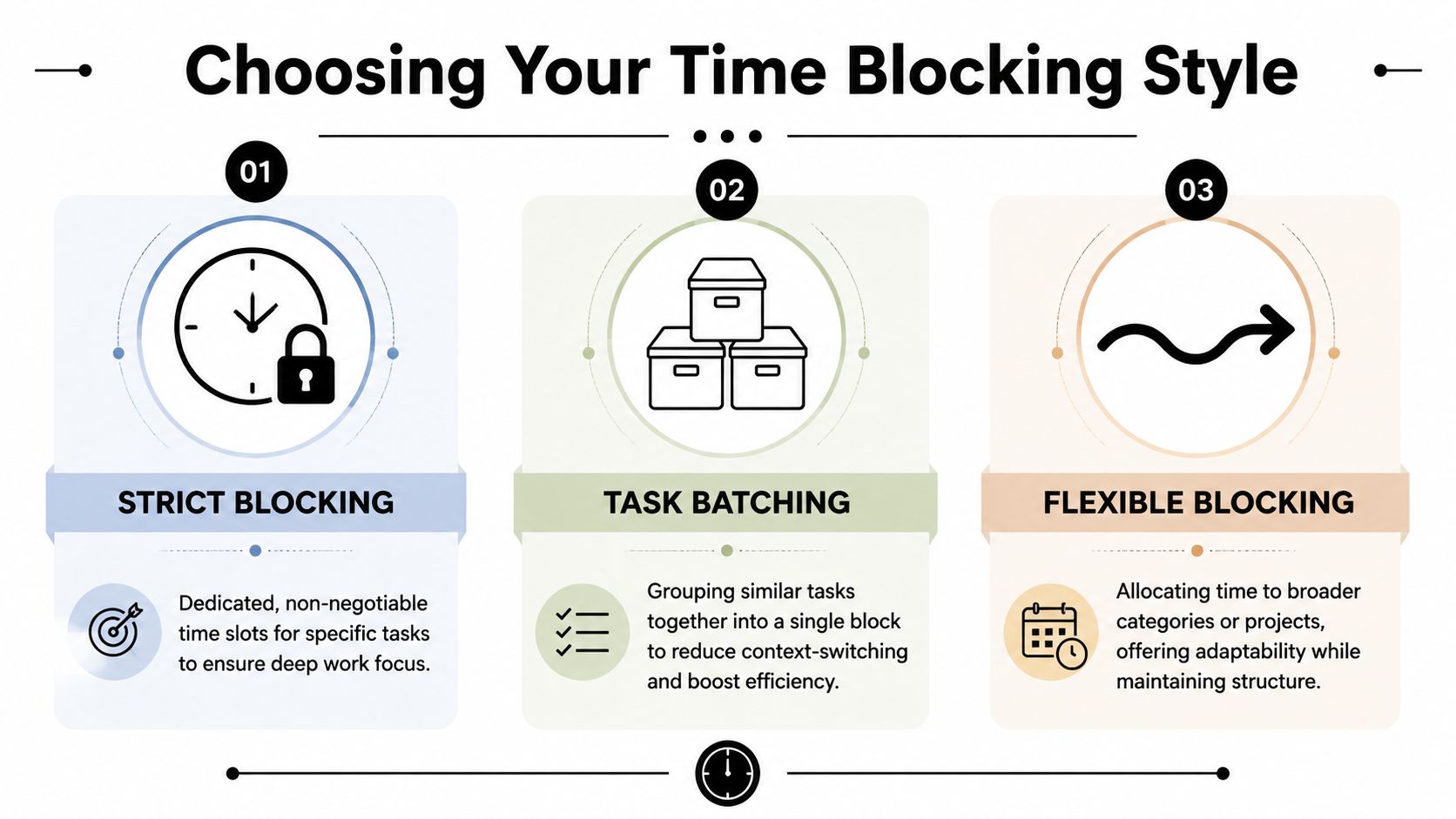
Task batching works best for repetitive work
If your team spends a lot of time in email, approvals, follow-ups, reporting, or CRM updates, batching is usually the cleanest starting point. You group similar work into one block instead of scattering it across the day.
That matters because task batching cuts context-switching by 37%, boosting efficiency in project-based teams. For account managers, coordinators, and ops staff, that's often the difference between running the day and reacting to it.
A few examples where batching usually fits:
- Client follow-ups: Put outbound check-ins and status replies into one window.
- Internal approvals: Review assets, estimates, or scopes at the same time each day.
- Admin work: Handle CRM hygiene, notes, and handoff updates in one pass.
- Inbox control: Check and clear messages at planned intervals instead of all day.
Batching breaks down when the work itself needs long, original thinking. If your copy team is writing campaign concepts, or your strategy lead is building a workshop deck, a batch of “creative tasks” can still be too fragmented.
Time boxing is better when tasks sprawl
Time boxing is tighter. Instead of one broad block for a category, each task gets a fixed start and stop. That makes it useful for perfectionists, reviewers, and anyone whose work expands because there's no clear finish line.
Design reviews, proposal edits, audit passes, and QA often fit this style. A fixed box forces a decision. Done, revise, or move it forward.
If your team needs a more detailed breakdown of this approach, this guide to time boxing is a useful companion because it frames the method around fixed limits rather than vague focus time.
“Give review work a hard edge. If you don't, feedback rounds eat the whole afternoon.”
The trade-off is obvious. Time boxing can feel rigid in client-facing roles. If your schedule changes often, too many tightly packed boxes create stress instead of control.
Flexible blocking fits messy agency calendars
This is the style most agencies end up using once they stop pretending every day is predictable. Instead of assigning every task a narrow slot, you block time by project, function, or work mode.
A strategist might hold a morning block for client planning, an afternoon block for production review, and a late-day admin window. A creative lead might reserve broad focus blocks on two days, then cluster meetings on another.
Here's the simplest decision frame:
| Team or role | Best fit | Why it works |
|---|---|---|
| Account management | Task batching | Repetitive communication and coordination work responds well to grouped handling |
| Strategy, design, writing | Flexible blocking | Protects larger thinking windows without forcing unrealistic precision |
| QA, finance, proposals, reviews | Time boxing | Fixed limits stop overwork and reduce drift |
| Leadership roles | Hybrid approach | Broad strategic blocks plus batched approvals and short review boxes |
The mistake isn't choosing one method over another. The mistake is forcing one method on everyone. Teams stick with blocking when the format lowers friction. They abandon it when it adds another system to maintain.
A realistic rollout plan for your team
Time blocking fails at rollout for a simple reason. Teams are asked to adopt a clean planning system inside a messy delivery environment.
Rolling this out across a team takes more than a calendar workshop. People need proof that the schedule is realistic, that leaders will respect it, and that they will not end up doing duplicate admin just to keep the system alive.

Start with observed work, not wishful planning
Do not build the first version from estimates alone. Pull two to three weeks of calendar history, tracked time, and delivery records, then compare planned work against what kept interrupting it.
In agencies, the gaps show up fast. Internal reviews spill into client work. Slack approvals break focus blocks into fragments. PMs leave buffers out because the plan looks cleaner without them.
Start with two questions:
- Where does the team lose time every week?
- Which work types repeat often enough to reserve in advance?
That review gives you something more useful than enthusiasm. It gives you a baseline for planning, staffing, and reporting.
If your team needs a practical setup for blocking work directly in the calendar layer, this guide on how to time block your calendar is a useful reference point.
Set rollout rules before anyone starts color-coding calendars
A weak rollout usually looks organized for one week, then collapses into exceptions. The fix is not better templates. The fix is operating rules.
Set them early:
- Blocked time represents intended work, not a promise of perfect adherence
- Client emergencies can move blocks, but routine requests cannot
- Every block needs a work label the team can report on later
- Managers review recurring patterns, not single bad days
- Focus time is protected unless the owner agrees to give it up
Those rules matter because time blocking becomes political fast. If senior staff can override blocks whenever they want, everyone else stops trusting the system.
Pilot with one delivery unit and one measurement goal
A full-team launch creates too many variables. Start with one function that has repeatable work and visible deadlines, such as account management, production, or a mixed client pod.
Keep the pilot narrow:
- Pick one lead who models the behavior
- Use one weekly planning cadence
- Keep one daily adjustment window
- Review one metric at the end of the week
That metric should be simple. Planned focus hours versus interrupted focus hours is enough for the first month. You are testing whether the schedule survives contact with real work, not trying to build a perfect utilization model on day one.
I have seen teams skip this step and go straight to company-wide adoption. What they get is calendar theater. Blocks appear everywhere, but nobody can explain which ones protected work and which ones were there for optics.
Give people a script they can use
Broad rollout language causes confusion. Use direct language that explains the reason for the change and the limits of the system.
Try this:
“We are using time blocking to make planned work visible, protect delivery time, and compare the week we expected against the week we ran. If priorities change, move the block and keep the category accurate.”
Then spell out the trade-offs. People will lose some spontaneity. They will gain better visibility into overload, missed capacity, and where context switching keeps wrecking the day.
If you need a useful model for how to structure a working relationship around clear roles, shared accountability, and regular review, Sensoriium's partnership model is a good example of that kind of operating clarity. The point is not to copy the format. It is to make expectations explicit before the pilot starts.
Build the admin path before adoption
This is the part standard guides skip. If blocked time lives in one place and tracked time lives in another, the team will stop maintaining one of them.
Before rollout, decide who updates recurring blocks, how categories map to time tracking, and what gets reviewed each week. In an agency setting, that usually means ops owns standards, team leads adjust schedules, and individual contributors only need to move or relabel blocks when priorities change.
Keep the maintenance burden low. If the process adds five extra clicks to every change, adherence drops and reporting gets noisy.
Connect time blocks to your calendar and tools
If your plan lives in a separate doc, it won't last. In agency settings, the calendar has to be the working layer because that's where meetings, deadlines, handoffs, and actual time commitments already collide.
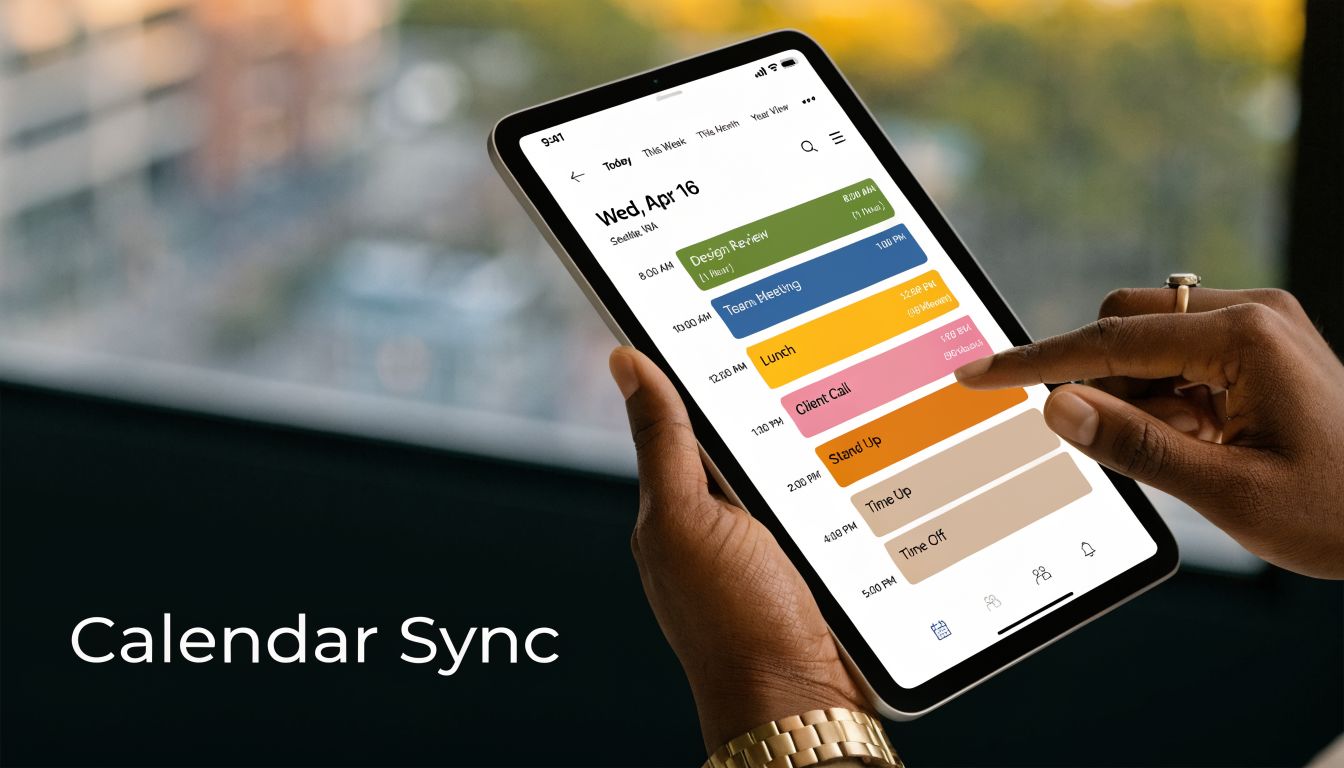
Make the calendar the source of truth
Google Calendar and Outlook are where people already negotiate their day. That's why blocking should start there, not in a side system the team has to remember to update later.
Set a few standards early:
- Use consistent event naming: “Client A strategy,” “proposal review,” “admin batch”
- Separate focus work from meeting holds: both matter, but they should read differently
- Tag by client or project where possible: that makes reporting far easier later
- Add intent to the event title: a block should tell the team what kind of work it protects
The practical win is simple. When someone looks at the calendar, they should understand what the day is for, not just when calls happen.
Connect blocked time to tracking categories
The system fails when teams block time in the calendar but log their hours elsewhere. Most organizations find that people eventually abandon this double entry process.
The better setup is rule-based capture. Calendar events sync into your tracking layer, then rules assign categories like client, service line, billable status, or internal work. If an event starts with a client name, it maps automatically. If it matches a meeting type, it gets tagged accordingly. If it's personal or private, it stays out.
A tool like TimeTackle's calendar-based time blocking workflow shows this model well because it treats the calendar as the input, then lets teams classify and report on the work after the fact without rebuilding the day manually.
One mention of TimeTackle fits naturally here. It connects Google or Outlook calendars with CRM and reporting workflows, then applies custom tags and rule-based automations so blocked time and tracked time stay tied together with less manual clean-up.
Keep the setup lean
You do not need a complex taxonomy on day one. Too many fields kill adoption.
Use a small set of tags first:
| Field | Why it matters |
|---|---|
| Client or internal | Separates revenue work from support work |
| Project or retainer | Gives delivery visibility |
| Billable or non-billable | Helps finance and operations later |
| Work type | Strategy, production, admin, sales, meeting, review |
After a few weeks, you'll know what's missing. Don't guess upfront.
A tracking setup should answer real operating questions. If a field never changes a decision, drop it.
Build for adjustment, not perfection
Calendar-linked systems work because they can absorb change. If a block moves, the data should move with it. If a meeting overruns, the team shouldn't need to recreate the whole day in a timesheet at 6 p.m.
That's the operational difference between “doing time blocking” and embedding it in the business. One is a planning habit. The other is a work record.
Why most time blocking plans fall apart and how to save yours
Most failed schedules don't collapse because people lack discipline. They collapse because the system assumes a level of control that agency teams rarely have.
A strategist may plan a clean afternoon for deep work, then get pulled into a client escalation, an internal pricing review, and a last-minute sales prep call. None of that means the plan was foolish. It means the plan ignored the cost of switching between different kinds of work.
The hidden cost is context switching
In multi-client teams, interruptions aren't random noise. They're part of the operating model. That's why standard advice often lands badly. It treats context switching as something people can avoid, when a lot of agency work demands it.
The problem is real. Standard time blocking advice often misses the “context-switching tax” in multi-client environments, where multitasking can decrease efficiency by up to 40%. It also assumes a level of schedule autonomy many agencies don't have, which is why a client emergency can blow up a carefully planned day.
That doesn't mean blocking is useless. It means the schedule has to account for interruption as a known condition, not an exception.
Overfilling the day is the fastest way to kill the habit
A blocked calendar that leaves no room for spillover looks disciplined. In practice, it turns into guilt.
The more grounded approach is to leave open capacity and add explicit recovery space. The Reclaim guide to time blocking recommends 20% to 50% buffer for padded time boxes, notes that unbuffered boxes overrun in 55% of cases versus 15% with padding, and warns that overfilling drives a 73% failure rate. For teams that live in client work, that's not a minor optimization. It's the difference between a usable system and one people abandon.
Use two kinds of protection:
- Buffer blocks: short gaps after demanding work so meetings or reviews don't run into the next commitment
- Overflow blocks: reserved periods later in the day for whatever got displaced
A practical pattern is to place one overflow window before lunch or late afternoon. If nothing breaks, that time becomes catch-up, admin, or planning. If the day goes sideways, the system absorbs the hit.
Perfectionism makes blocked calendars worse
Some people love the look of a fully mapped day because it feels controlled. Those are often the same people who scrap the whole system after two messy days.
Time blocking should be adjustable. If someone sees every moved block as failure, the schedule becomes emotionally expensive to maintain. That's especially true for senior staff who carry review work, approvals, and exceptions for the rest of the team.
“A blocked calendar is a draft, not a verdict.”
That mindset sounds soft, but it's operationally hard-nosed. Teams need a reliable way to recover from change. They do not need a brittle schedule that only works on quiet days.
Save the system by planning for interruption
When a team keeps abandoning blocking, I'd check four things before blaming commitment:
- Are focus blocks scheduled during known interruption windows? If yes, move them.
- Are review and communication tasks scattered? If yes, batch them.
- Is every hour claimed in advance? If yes, free some capacity.
- Does the team have a rule for what can break a block? If not, set one.
One more fix matters. Separate “reactive work” from “deep work” on purpose. Client service teams often need both in the same day, but they should not pretend those modes can share the same block. A reactive window gives people permission to respond. A protected block gives them permission not to.
Rigidity is not the same as control
The agency version of control is recoverability. Can the team absorb interruptions, still protect high-value work, and see where time went? If yes, the system is working. If no, then a cleaner-looking calendar won't save it.
The teams that keep this habit are not the most strict. They are the ones that design for real work instead of ideal work.
How to measure if your time blocking is working
A blocked calendar has to survive contact with the week. If planned work never lines up with recorded work, time blocking is just a nicer-looking intention list.
That gap shows up fast in agencies. The team builds a calendar, keeps it going for a short stretch, then falls back to memory-based timesheets, vague utilization conversations, and reporting that nobody fully trusts. At that point, the problem is not motivation. It is instrumentation.

Manual logs blur the picture
If people block time in one system and rebuild the day later in another, the numbers drift. Meetings run long. Quick client fixes never get logged properly. Focus work gets split across three codes because someone is filling in Friday from memory.
Calendar-first capture solves a practical reporting problem. It keeps planned time and observed activity close enough to compare without adding more admin. Microsoft makes the same point from a different angle in its guidance on calendar analytics and workplace patterns, where calendar data is used to review meeting load, focus time, and work habits over time: https://www.microsoft.com/en-us/microsoft-viva/insights.
For measurement, that matters more than a perfect color-coded calendar.
Start with adherence, then judge performance
The first question is simple. Did people spend time where they said they would?
Do not jump straight to output, because output is shaped by role, client complexity, approvals, and interruptions. Adherence is the cleaner operational check. It shows whether the blocking model fits the way the team works.
Track a small set of signals first:
- Planned versus recorded time by category. Compare focus work, meetings, admin, client delivery, and internal support.
- Moved or shortened blocks. Find out which work types keep getting displaced.
- Interrupted focus sessions. Check which accounts, channels, or internal stakeholders break concentration most often.
- Unplanned work volume. Measure how much of the week came from requests that were never scheduled.
- Recovery rate. See whether moved work gets rescheduled inside the same week or just disappears.
That last metric is one I care about in agency operations. A moved block is not always a failure. Senior people get pulled into approvals, sales calls, or client escalations. The key issue is whether priority work gets recovered before it turns into delay, write-offs, or rushed delivery.
Tie calendar variance to business questions
Once adherence data is clean enough, time blocking stops being a personal productivity exercise and becomes a management tool.
A useful review should answer questions like these:
| Business question | What to compare |
|---|---|
| Are priority clients getting the time they were planned to receive? | Scheduled client blocks versus recorded client time |
| Are estimates holding up? | Planned delivery or review time versus actual duration |
| Where is non-billable time expanding? | Internal meetings, admin, and support work by role or team |
| Which tasks keep breaking the week? | Block types with repeated overruns, interruptions, or reschedules |
Teams often uncover the primary constraint. One director is carrying too many approvals. Sales support is landing in delivery hours. Internal check-ins are parked inside prime execution windows. None of that shows up clearly in a task list. It becomes visible when the calendar, time capture, and reporting all point to the same pattern.
If you want a broader framework for reading those patterns, this guide on how to measure team productivity is useful because it stays grounded in visible work and reporting, not vague effort.
Use the weekly review to change operations
A dashboard without a decision is overhead.
The weekly review should lead to calendar changes, staffing changes, or scope changes. In practice, I'd keep the conversation tight and ask:
- Which blocks held as planned?
- Which work types ran over repeatedly?
- Which clients or internal requests created the most churn?
- Where did planned work depend on one overloaded reviewer or approver?
- What should be blocked differently next week?
That review needs adult judgment. A leadership block that moved because of a major client issue is not the same as a focus block that gets broken every day by avoidable internal traffic. Treating both as "missed adherence" gives you bad management decisions.
Connect time use to goals
Calendar data matters when it supports a business priority. If leadership says margin needs attention, the team should be able to see how much time is going into under-scoped accounts, internal rework, or non-billable support. If retention is the priority, the calendar should show whether account care and proactive client work are protected or constantly pushed aside.
That link gets stronger when the team has clear planning criteria up front. These effective goal setting techniques are a useful companion because they help define what the team is trying to improve before anyone starts judging the calendar.
Without that connection, reporting turns into noise.
What healthy measurement looks like
A solid time blocking system does not produce perfect adherence. It produces dependable visibility.
You can see the difference when:
- People plan real work on the calendar because it matches how the day unfolds
- Team leads can spot interruption patterns by client, task type, or role
- Ops and finance can separate billable, non-billable, and reactive work without guesswork
- Estimate quality improves because planned time and recorded time can be reviewed side by side
- Timesheet cleanup drops because fewer entries rely on recall
That is the standard to aim for. Clear plans. Measurable variance. Better decisions.
If your team is trying to make time blocking stick without adding more admin, TimeTackle is worth a look. It connects calendar activity with tracking, tagging, and reporting so planned work and recorded work stay close enough to measure adherence, utilization, and recurring sources of schedule churn.