



A client asks for a new project by Friday. Sales wants an answer in an hour. The delivery lead wants to know who's free, finance wants to know if the margin will hold, and the account team is already saying yes before anyone has checked the actual workload.
That's the moment when most agencies find out whether they have a resource tracking system or just a collection of guesses.
If your answer still depends on opening three spreadsheets, pinging team leads in Slack, and hoping the timesheets are current, you don't have visibility. You have delay. And delay gets expensive fast.
The familiar chaos of managing agency resources
The pattern is almost always the same. A project lands. Someone asks, “Can we take this on?” Then the scramble starts.
The operations manager opens the master staffing sheet. It was updated on Monday, maybe. A department head says one designer is “probably” available next week. Another says a strategist can help, but only if a current client deliverable doesn't slip. Someone else checks a project plan that doesn't match the hours in the timesheet system. By the time the team pieces together an answer, the answer is already stale.
What the mess looks like in real agencies
In agencies with 50 to 200 people, resource decisions often live in too many places at once:
- A staffing spreadsheet that one person owns and everyone else distrusts
- Slack threads full of one-off availability checks and last-minute swaps
- Timesheets completed late, in batches, or from memory
- Project plans that show what was supposed to happen, not what did happen
That setup creates a strange kind of fake confidence. The agency looks organized because there's a file, a process, and a meeting cadence. But when a real decision needs a real answer, people still fall back on instinct.
You can't plan capacity from memory. You can only argue about it.
The damage isn't just operational. It hits morale too. Team leads get interrupted all day with staffing questions. Project managers spend hours reconciling different versions of the truth. Staff get overbooked because no one saw the conflict early enough. Then leaders wonder why deadlines slip and why reporting takes so long.
Why spreadsheets stop working
Spreadsheets aren't evil. They're just fragile. They work for a while, then the agency grows, work gets more complex, and the sheet becomes a lagging record instead of a decision tool.
That's when the cracks show up as missed handoffs, uneven workloads, and chronic fire drills. A lot of that pain overlaps with broader time management problems at work, but resource tracking is where those problems become visible enough to fix.
Resource tracking starts to matter the moment your agency can no longer answer two simple questions quickly and with confidence: who is available, and what will it cost us if we say yes?
What resource tracking actually is
At a practical level, resource tracking is the system an agency uses to know who is working on what, when they're available, how much capacity is left, and whether the work is staying inside plan.
It's not just time logging. It's not a prettier timesheet. It's the operating view that lets you manage people, budgets, and workload in real time instead of after the fact.
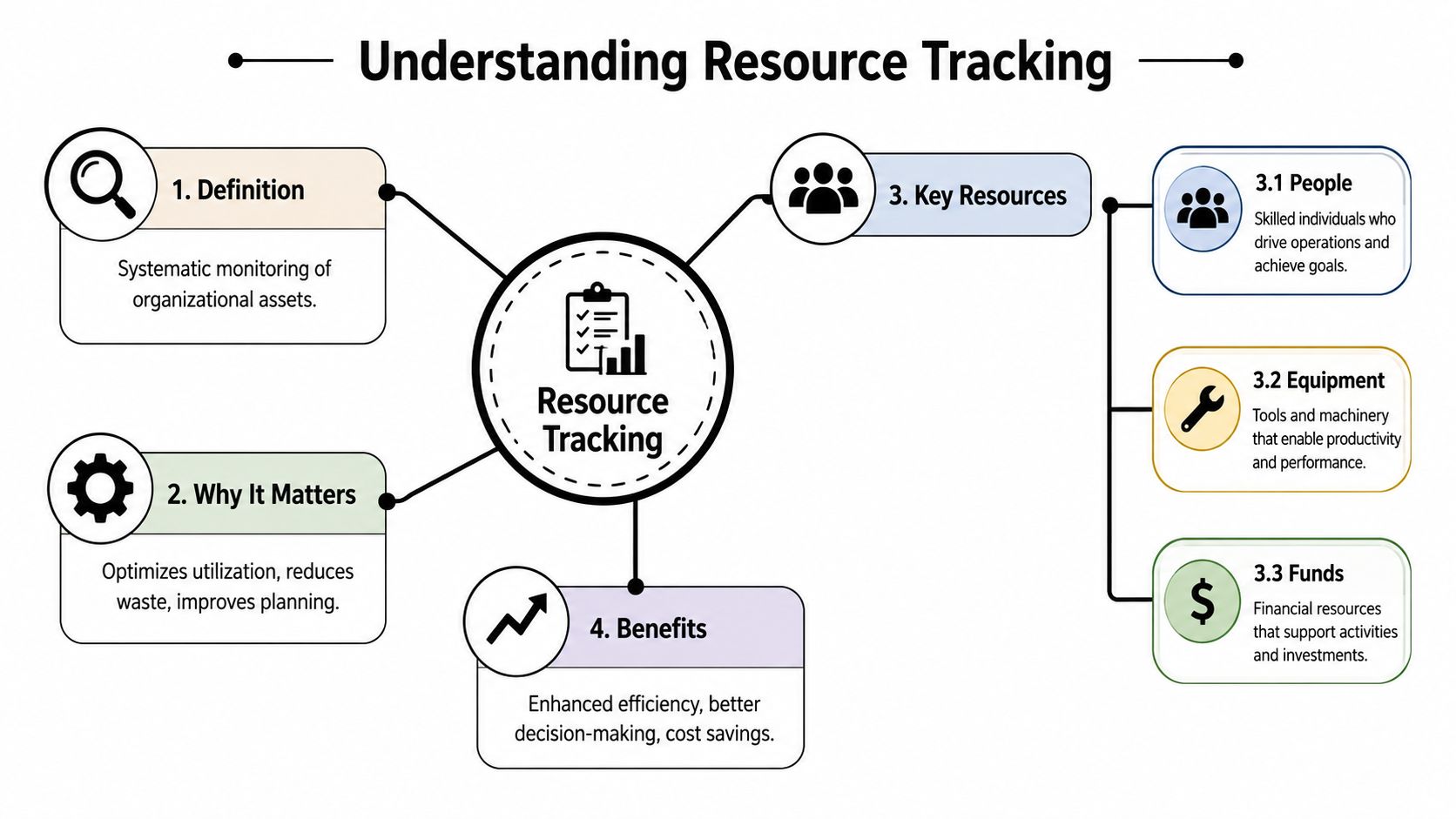
Think of it like air traffic control for agency work
A busy agency has dozens of moving parts at once. Clients change scope. Internal work appears out of nowhere. Team members split time across accounts, pitches, admin, and delivery. If no one sees the full picture, you get collisions.
That's why the best answer to “what is resource tracking” is simple. It's the control system for your delivery engine.
A good system tells you:
- Who has capacity this week and next
- Which skills are available for a given job
- Where work is overbooked before people burn out
- How actual effort compares with what the project was meant to consume
According to The Digital Project Manager's guide to resource tracking software, resource tracking is “a systematic process for monitoring and managing an organization's assets and personnel in real time to prevent overbooking, balance workloads, and improve profitability.” That same guidance points to KPIs such as utilization rate to measure how much available capacity the team is using.
What gets tracked in a working system
The mistake many teams make is thinking only about people's hours. In practice, the system has to cover more than that.
A useful setup usually tracks:
| What you track | Why it matters |
|---|---|
| People and skills | So you assign work based on actual fit, not just availability |
| Capacity and allocations | So you can see overbooking and idle gaps early |
| Project time and cost movement | So you know whether work is staying inside scope and budget |
| Shared resources | So internal specialists, vendors, and support teams don't disappear from planning |
| Planned vs actual effort | So estimates improve over time |
The best teams centralize this data. They don't leave it spread across a planning sheet, a PM tool, and a timesheet app that never fully match. If you're trying to connect planning and delivery, a more structured resource planning approach for project management makes that transition much easier.
Practical rule: If your staffing answer depends on asking three people before noon, your tracking system is not a system yet.
Why your agency's profitability depends on it
A lot of leaders still treat resource tracking as an admin process. That's the wrong frame. It's a profit control process.
When you don't know where capacity is going, you underprice work, overstaff the wrong accounts, miss warning signs on thin-margin clients, and accept projects you can't deliver cleanly. Every one of those mistakes eats margin.
The market has already moved
The shift away from manual tracking is no longer theoretical. In 2026, 54% of organizations use dedicated software for resource tracking, while 44% still rely on spreadsheets, according to Runn's resource management statistics. The same source says 71% of organizations actively track their utilization rate, which tells you where leadership attention has moved.
That same research also notes that 58% of resource managers list capacity alignment with demand as a top goal for 2026, and 58% prioritize operational efficiency. Those are not back-office concerns. They are direct business concerns.
Where the money leaks out
Most agencies lose margin in ordinary ways, not dramatic ones. A senior person spends too many unplanned hours fixing delivery. A client gets more rounds than the estimate allowed. A team is technically busy but not on the most profitable work. A PM doesn't notice a project drifting until the month is already gone.
Resource tracking helps because it gives you a live read on the operating facts that margin depends on.
Here's where it tends to pay off first:
- Scoping discipline. You can compare planned effort with actual effort and stop repeating bad estimates.
- Smarter staffing. You stop assigning work based on who shouts first and start assigning based on capacity and fit.
- Burnout prevention. You spot overloaded teams before quality drops and turnover risk climbs.
- Client mix clarity. You can see which work consumes time without giving enough back.
Profitability is a capacity problem first
Agencies often think of profitability as a finance issue. It isn't. Finance reports the outcome. Operations creates it.
If your best people are stuck on low-return work, if your specialists are overscheduled, or if your team logs too much non-billable support work without anyone seeing it, your margin is already moving the wrong way. Resource tracking gives you enough visibility to change course while the quarter is still in progress, not after finance closes the books.
That's why this work matters. It turns resource allocation from a weekly negotiation into a business control.
The old way vs the new way of tracking resources
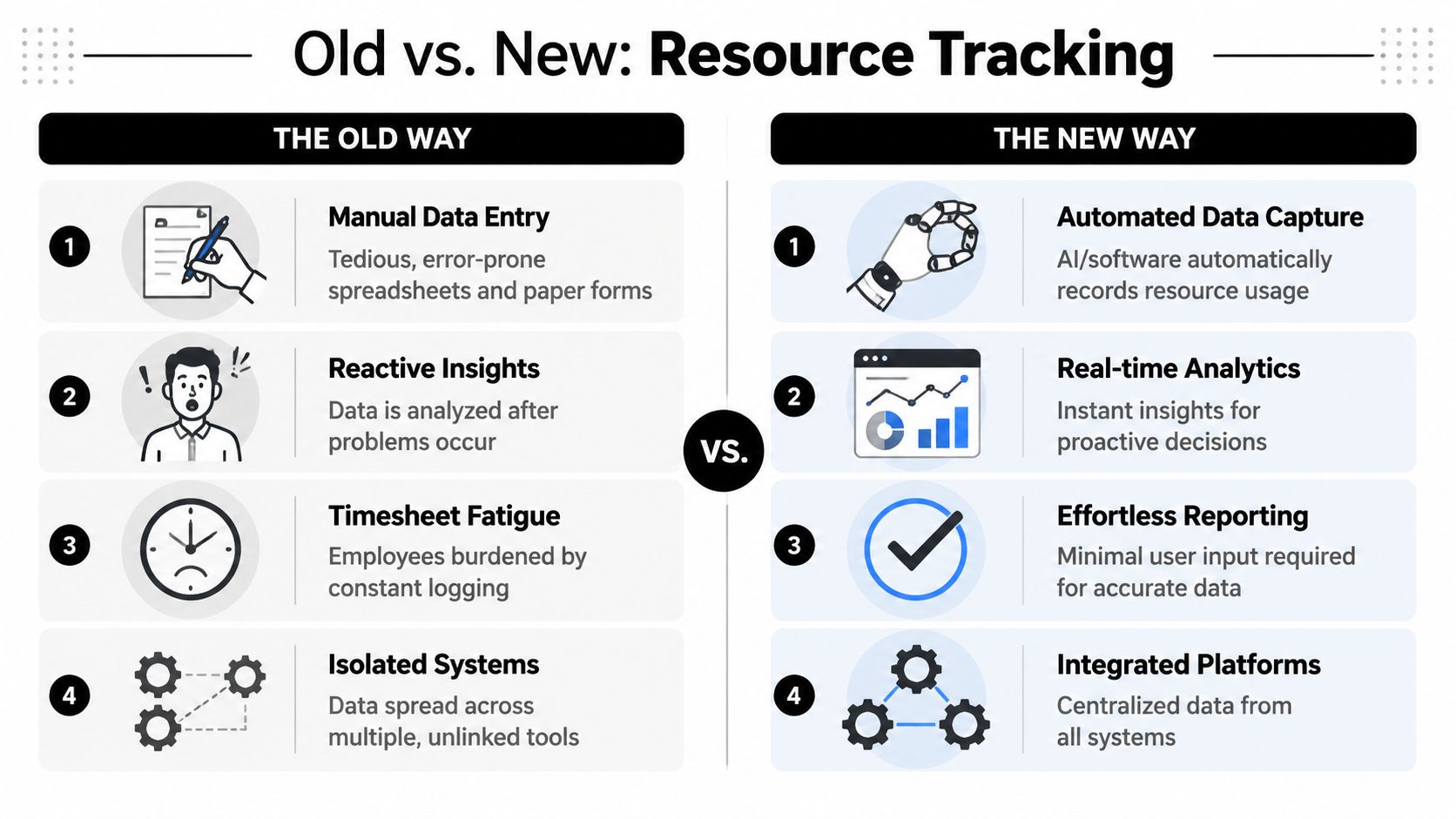
The old model of resource tracking came from a different kind of work. It assumed people could remember their hours, fill out timesheets later, and produce clean data from memory. In a modern agency, that assumption breaks fast.
Calendar changes, client messages, internal reviews, and partial-day work all blur together. By Friday, people are reconstructing their week instead of recording it.
What the old way gets wrong
Manual tracking usually depends on spreadsheets, reminders, and end-of-week cleanup. It creates several predictable problems:
- The data arrives late. By the time leaders review it, the chance to adjust has passed.
- People fill gaps from memory. That leads to rough estimates, not operational truth.
- Managers chase compliance. The process becomes about getting timesheets in, not using the data well.
- Systems don't connect. Planning, calendars, CRM notes, and delivery data stay separate.
That's why manual setups feel busy but still fail under pressure.
What the new way changes
A modern system treats tracking as continuous, not occasional. It gathers signals as work happens, then turns those signals into usable visibility. The point isn't to create more reporting. The point is to remove reporting friction while improving accuracy.
According to Float's resource tracking guidance, “An effective resource tracking system acts as an ‘always-on machine' that continuously gathers real-time utilization data.” Float also notes that this ongoing data collection supports better forecasting and removes the human error and delay built into manual methods.
That difference matters because forecasting depends on fresh information. If the actual work pattern changes on Tuesday but your system doesn't know until next Monday, your resourcing decisions will keep lagging behind reality.
A side-by-side view
| Old way | New way |
|---|---|
| Spreadsheet staffing plans | Centralized software with live data |
| Manual timesheets entered later | Automated capture from work signals |
| Weekly correction cycle | Ongoing visibility |
| Staffing by manager memory | Staffing by capacity, skills, and current load |
| Reporting as an admin burden | Reporting as a byproduct of daily work |
“Always-on” is the right standard. If the system sleeps until Friday, it won't help you manage the week.
The best modern setups also make key operating metrics easier to monitor. Scheduled versus logged time, allocation levels, capacity in hours, and budget movement become visible without forcing every person to act like a data clerk.
That doesn't mean all automation is equal. Some tools still depend on heavy manual tagging, and some teams need a mix of automation and human review. But the direction is clear. Agencies that keep relying on spreadsheets and memory are choosing slower decisions and weaker data.
How to get started with resource tracking
Most agencies make this harder than it needs to be. They try to design a perfect model, define every category, and map every edge case before they've built a working habit. That usually ends in delay.
A better approach is to start small, centralize fast, and tighten the process as the data gets cleaner.
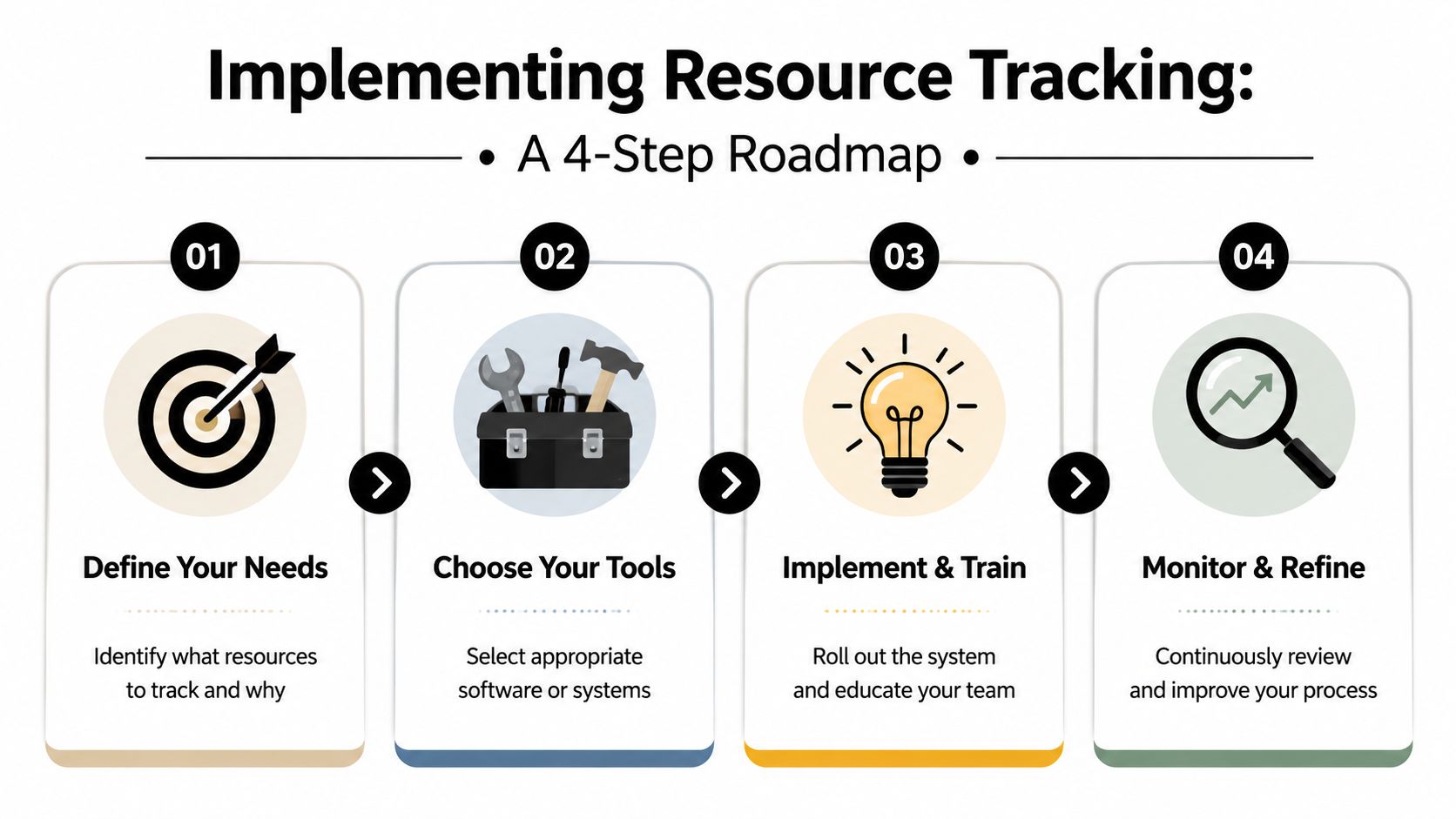
Step 1. Define what you need to see
Don't begin with software. Begin with the decisions you keep getting wrong.
If your problem is overloaded creative teams, track capacity and allocation first. If your problem is hidden project overruns, track planned versus actual effort. If your problem is poor staffing decisions, map people by role, skill, and availability.
Write down the few questions your system must answer every week. That list will stop you from building a bloated setup no one uses.
Step 2. Move to one source of truth
The second step is operational, not technical. Pick one place where resource data lives.
That doesn't mean every other tool disappears. It means one system becomes the point where the team checks availability, allocations, and project effort. If you're still building this in Excel, a simple resource allocation template can help as a transitional step, but treat it as temporary. The goal is to get out of spreadsheet maintenance, not perfect it.
Step 3. Track a short list of useful metrics
You do not need a giant KPI stack on day one. Start with a short list that managers can use:
- Utilization rate for delivery teams, so you can spot overbooking and underuse
- Capacity versus demand for the next few weeks, so staffing decisions stop being reactive
- Scheduled versus logged time so estimates can improve
- Budget or cost variance on active work, so overruns show up early
This is enough to make better decisions without drowning the team in categories.
Step 4. Review at real project checkpoints
Many rollouts falter here. Teams collect data, but they don't tie it to project moments that require action.
According to Atlassian's resource tracking guidance, tracking only becomes actionable when it's synchronized with project milestones and reviewed at major deliverable checkpoints. That means you don't wait for month-end. You review resourcing when the work naturally reaches a point where staffing, scope, or effort might need to change.
One working habit: review allocations at each major deliverable, not just in a weekly ops meeting.
That simple rhythm does two things. It improves the current project, and it makes future planning less guessy because the agency starts learning from real performance, not memory.
Common pitfalls and how to avoid them
Most agencies don't fail because they refuse to track resources. They fail because they track the wrong things, trust weak data, or stop too early.
The first trap is confusing activity with usefulness. A full calendar doesn't automatically mean productive work. A busy team can still miss deadlines, lose margin, and spend too much time on low-value tasks. If your system only tells you that people were occupied, it's incomplete.
Pitfall one: tracking hours without context
Hours matter, but only when they connect to the right unit of analysis. You need to know whether time went to the right client, the right kind of work, and the right phase of delivery.
That means your tracking model should help you separate things like:
- Client delivery work from internal admin
- Billable effort from non-billable support
- Planned project work from unplanned rework
- Specialist time from general account handling
Without that context, utilization can look healthy while margin erodes.
Pitfall two: building a system nobody wants to maintain
This one is common. Leadership wants clean reporting, so they create too many tags, too many categories, and too many rules. Staff respond the way anyone would. They stop caring or they fill the fields with whatever gets the form submitted fastest.
A better rule is to track only what changes a decision. If a field never affects staffing, pricing, or planning, question whether you need it.
Clean data comes from simple inputs. Once the system feels like homework, the quality drops.
Pitfall three: stopping at utilization
This is the biggest miss. Many guides treat utilization as the finish line. It isn't. It's an input.
A key question is whether your resource data helps you predict margin risk before the quarter ends. That's where the biggest value sits. 60% of mid-sized agencies lose 15–30% of potential profit because they detect margin erosion too late in the quarter. Strategic resource tracking can help solve that by connecting effort patterns to client and project profitability.
What better practice looks like
A stronger setup asks harder questions:
| Weak question | Better question |
|---|---|
| Is the team busy? | Is the team spending time on work that pays well enough? |
| Are timesheets complete? | Is the data accurate enough to change staffing and pricing decisions? |
| Are people fully allocated? | Are the right people allocated to the right work? |
| Did we hit utilization? | Which clients are starting to erode margin and why? |
If your current system can't answer those questions, you're measuring work without really managing it.
The future is automated not logged
The next step in resource tracking is already clear. Agencies are moving away from self-reported time and toward systems that infer work from digital signals people already create.
That shift matters because manual logging asks people to interrupt work in order to describe work. People hate it, and they hate it for good reason. It adds friction, creates recall errors, and turns managers into compliance officers.
Why timesheet fatigue keeps killing adoption
70% of mid-sized agencies report “timesheet fatigue,” and McKinsey found that AI-powered auto-tracking reduces reporting overhead by 40% while increasing billing accuracy by 25% in service firms. Those numbers explain why old-school time entry keeps breaking down. The process asks too much of the team and gives too little back.
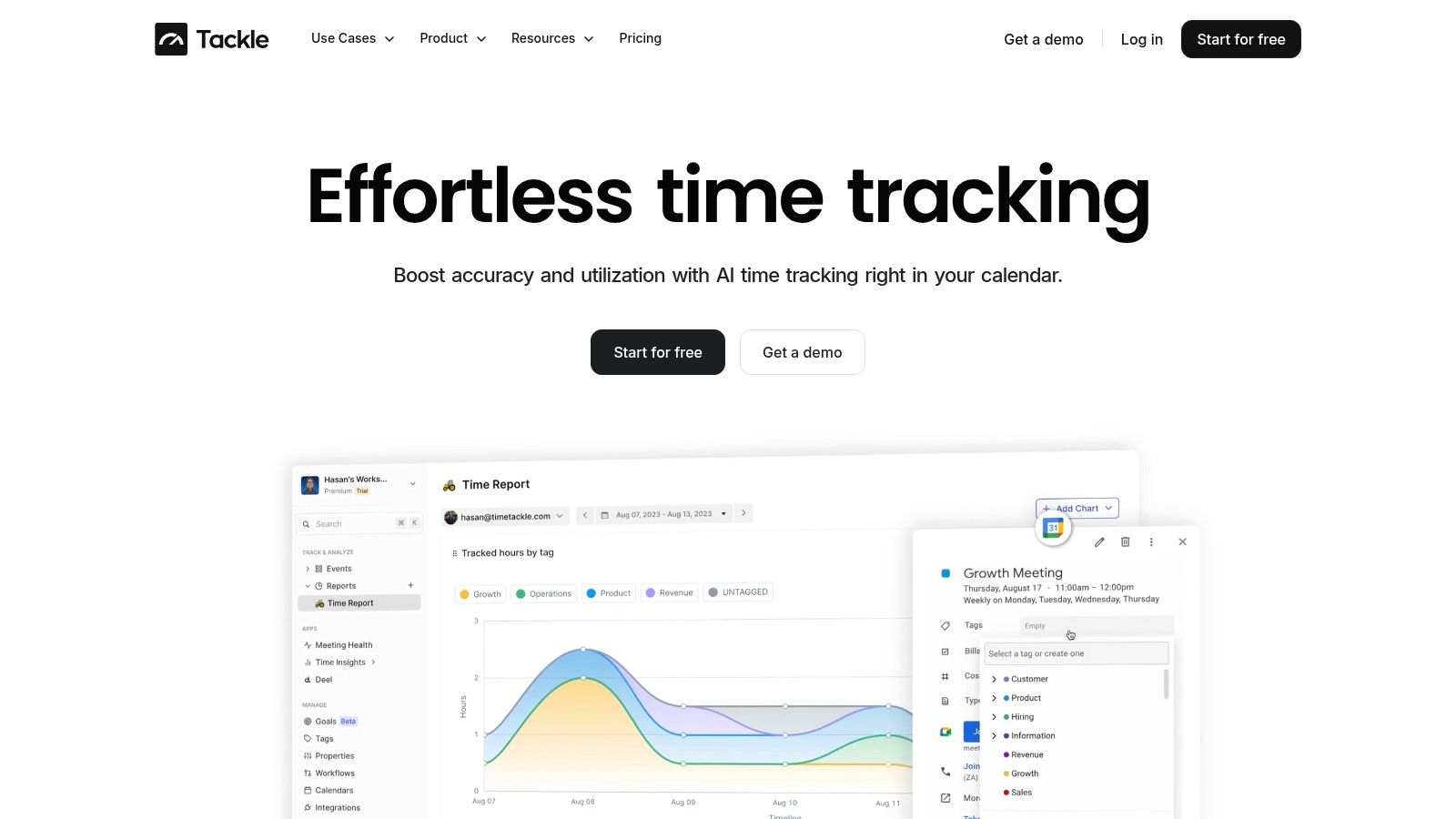
The better model uses existing signals such as calendars and connected systems to capture activity with far less manual effort. That makes the data more complete because it is gathered as work happens, not reconstructed later.
What automated resource intelligence looks like
In practice, this means the calendar becomes a real operating signal. Meetings, working sessions, client calls, reviews, and internal handoffs already leave a trail. When a system can organize that activity, categorize it, and connect it to clients or projects, managers get cleaner visibility without begging for updates.
That model is especially useful in agencies where work is fragmented across client calls, internal reviews, sales support, delivery work, and admin. It reduces the gap between what occurred and what the records say happened.
The same shift is happening outside agencies too. Teams in regulated environments often need better operating visibility across people, work, and vendors. If you're dealing with that kind of complexity, tools such as Software for Government contracting can help teams evaluate procurement and vendor data in a more structured way.
The main point is simple. Logged time is a poor substitute for observed work. The agencies that move first will spend less time chasing reports and more time making better staffing, pricing, and delivery decisions.
If your team is tired of spreadsheets, late timesheets, and half-true staffing answers, TimeTackle is worth a close look. It connects to Google and Outlook calendars, captures work automatically, and turns daily activity into usable resource data without asking your team to spend more time reporting. For agencies that want cleaner utilization visibility, less admin overhead, and a better grip on project effort, it's a practical step away from manual chaos.


