


You're probably feeling two things at once right now. First, your remote team is clearly busy. Calendars are packed, messages keep moving, and client work keeps shipping. Second, you still don't have a clean answer to a basic operations question: where is time going, and is it going to the right work?
That tension is why remote work productivity tracking keeps coming up in leadership meetings. Not because managers want to spy on people, but because distributed work removes the casual visibility that offices used to provide. You can't glance across a room and see what's blocked, who's overloaded, or which client is eating margin.
The mistake is thinking the fix is more surveillance. It isn't. Good tracking makes work visible. Bad tracking makes people defensive.
The remote work trust gap is real
A lot of remote teams live in the same awkward middle ground. Leaders see activity everywhere but still feel blind. Employees know they're getting work done but worry that any tracking system will turn into micromanagement.
That gap is bigger than many teams admit. 39% of business leaders still doubt remote worker productivity without active oversight or tracking, while 87% of remote employees say they are productive, according to Hubstaff's review of remote productivity measurement. That disconnect is a major problem.
When I see this go wrong, it usually starts with a reasonable management question. Are we still on track for the client launch? Why did this implementation run over budget? Why is one team always slammed while another has spare capacity? Those are valid questions. But if the answer is “install more surveillance,” the team hears something else: “We don't trust you.”
Good tracking answers business questions. Bad tracking creates fear and still leaves you with messy data.
Remote work doesn't fail because people are invisible. It fails when work itself is invisible. If a manager can't see progress, priorities, or load, they often reach for the easiest proxy, which is hours, screen time, or green dots. Those signals feel concrete, but they rarely explain whether useful work is moving.
A better frame is this: tracking should reduce ambiguity for both sides. Leaders need a clearer view of delivery, risk, and resourcing. Employees need a fair way to show what they've done without filling out painful admin after the fact.
That's also why debates about remote work often get stuck in the wrong place. The issue isn't whether people can work well outside an office. A lot of that old thinking has already been challenged, including in discussions like this breakdown of remote work benefits and common objections. The issue is whether your operating system can measure performance without turning your team into suspects.
If you get that right, tracking stops feeling like control. It starts feeling like shared visibility.
Start by defining what success looks like
Picking a tool first and then asking what to track is an incorrect starting point. That's backwards. If you haven't defined productivity in practical terms, the software just gives you cleaner confusion.
For agency teams, “productive” should never mean “looked busy all day.” It should mean work moved, clients got what they paid for, quality stayed high, and the team didn't burn itself out doing it.
Move from time watched to outcomes measured
A stronger model is already pretty clear. Effective remote work productivity tracking starts by shifting from hour-based monitoring to outcome-based measurement, and about 72% of employees are willing to accept time tracking when they retain full access to their own data, based on WorkTime's remote productivity tracking guidance.
That tells you two things at once. First, hours alone are a weak management tool. Second, transparency changes how people react to tracking.
This visual is a good way to think about the structure of success:
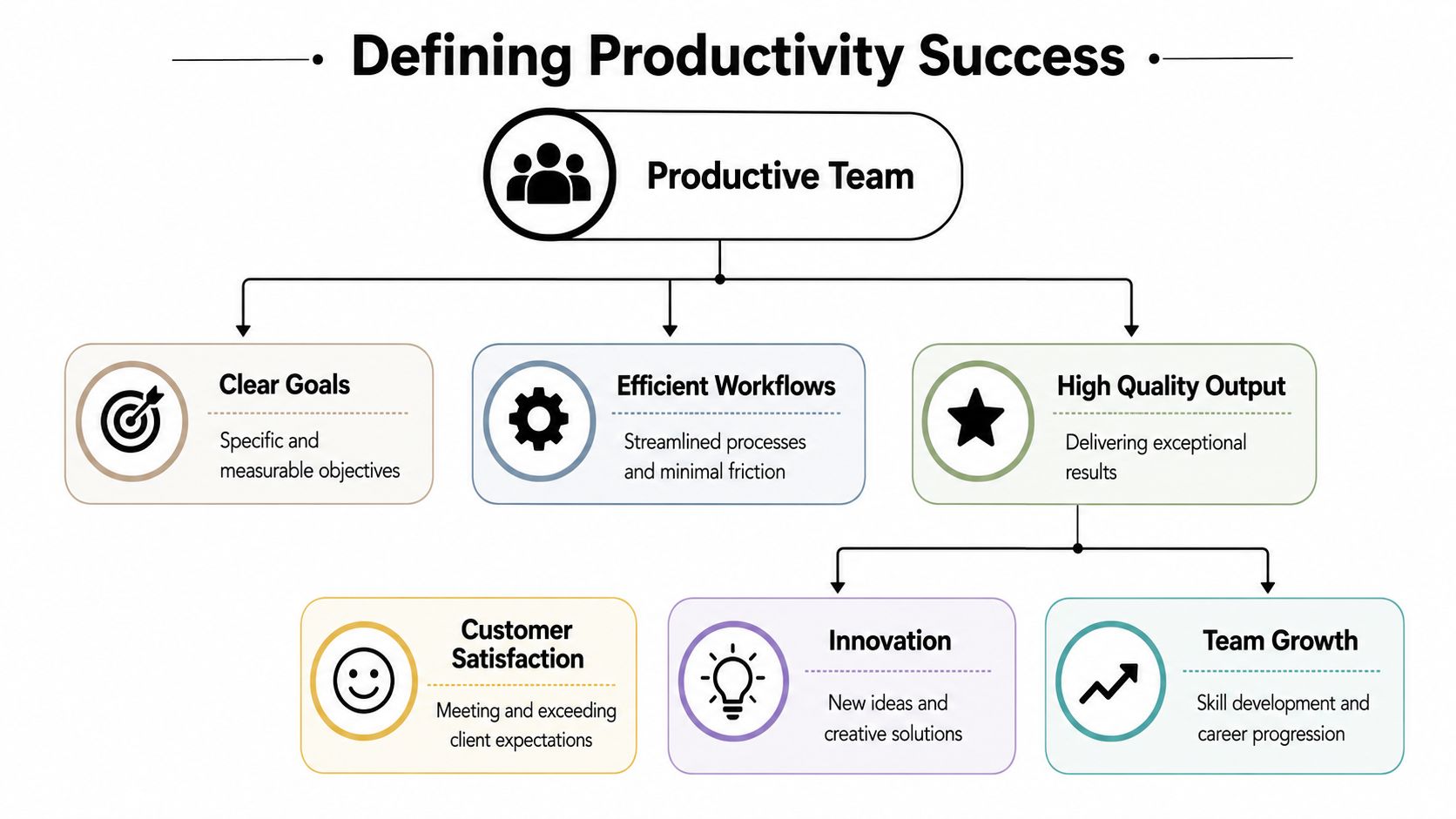
If you lead a marketing, consulting, or implementation team, your first pass should focus on a short stack of outputs:
- Client delivery: Did agreed work ship on time, and did it meet the expected standard?
- Project movement: Are milestones moving forward, or are they sitting in review, revision, or dependency limbo?
- Budget health: Is the team spending time in line with the retainer, SOW, or internal estimate?
- Workload balance: Who is overloaded, who is underused, and where are handoffs getting stuck?
That's enough to build a useful system. You don't need a huge KPI library. You need a few metrics that tie directly to delivery and team health.
Build a hierarchy, not a grab bag
The most practical setup has layers. Start at the top with business outcomes, then drill down into team outputs, then individual activity categories. That gives you context. A missed utilization target means one thing if delivery stayed strong and another if deadlines slipped too.
A simple hierarchy looks like this:
Business result
Revenue protection, client retention, project margin, delivery reliability.Team output
Milestones hit, tasks completed, response time on client-facing work, budget burn by account.Activity pattern
Time in project work, internal meetings, admin, rework, support, sales assist, and blocked time.
Practical rule: If a metric can't help you make a staffing, delivery, or coaching decision, don't track it.
Many leaders get relief for the first time. Once success is defined properly, conversations improve fast. A team lead no longer says, “I think we're busy.” They can say, “Client A absorbed far more delivery time than planned, internal approval loops took too long, and the strategist lost too many hours to ad hoc support.”
That's a management conversation. “Your mouse wasn't active enough” isn't.
Make room for quality
One warning. Outcome-based tracking still fails if you ignore quality. Fast work that needs rework is expensive work. So when you set KPIs, pair speed with a quality check that fits the role. For creative teams, that may be revision volume or approval flow. For consulting teams, it may be delivery acceptance and fewer follow-up fixes. For implementation teams, it may be project completion against planned effort.
The point is simple. Count what the business needs. Don't count what software happens to make easy.
Choose your data capture method wisely
Once you know what matters, the next issue is data capture. Many rollouts lose the team during this stage. Leaders define smart metrics, then ask people to log everything manually each day. The result is predictable. People forget. They estimate. They round. They resent it.
That's not a people problem. It's a system problem.
Manual input creates drag
Manual timesheets can work for a while, especially in smaller teams with disciplined habits. But once volume increases, the cracks show fast. Reconstructed time is rarely accurate, and the admin burden lands on the people doing the actual work.
A better path is low-friction capture that fits the tools people already use. For many remote teams, the calendar is the cleanest starting point because it already reflects planned work, client calls, internal reviews, workshops, handoffs, and focus blocks.
A 2022 Great Place To Work study covering over 800,000 employees found that remote work does not decrease performance, which means the job of tracking is visibility into output, not enforcement of effort, as noted in Great Place To Work's two-year remote productivity study.
That shifts the whole discussion. You don't need to “catch” people working. You need cleaner records of where work happened.
Here's the trade-off in plain terms:
| Attribute | Manual Timesheets | Automated Calendar Capture |
|---|---|---|
| Accuracy | Relies on memory and end-of-day estimates | Pulls from scheduled work already on the calendar |
| Team effort | High, because people must enter and review time manually | Low, because capture happens in the background |
| Adoption risk | Higher, because people see it as admin overhead | Lower, because it fits existing habits |
| Reporting speed | Slower, especially at week or month end | Faster, because data is available continuously |
| Manager confidence | Often mixed, because entries may be rounded or delayed | Stronger, because the system captures real activity structure |
Low-friction systems get better data
A screenshot makes this concrete:
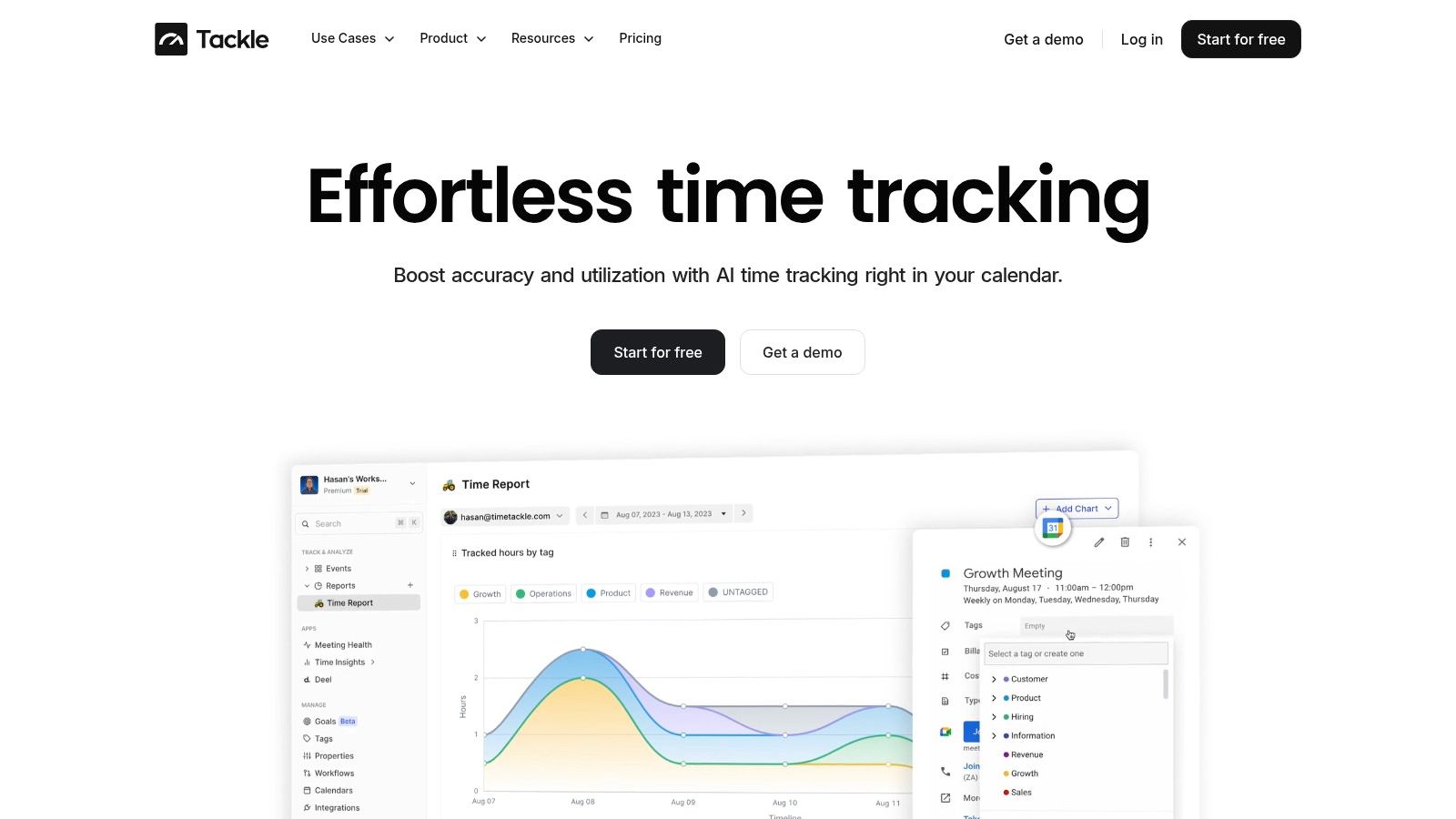
Calendar-based capture won't solve everything on its own. It won't know whether a meeting was useful, and it won't magically classify work in the right budget bucket unless you set it up well. But it does solve the first hard problem, which is getting consistent data without making your team do a second job.
That's why teams comparing options should look closely at tools built for remote work monitoring software that reduces manual entry and improves visibility. The best systems remove friction first, then add structure.
What to avoid
A few methods look attractive in demos and fail in practice:
- End-of-week reconstruction: People fill gaps from memory, which means the data gets cleaner in appearance and worse in truth.
- Always-on surveillance tools: These create fear, encourage performative activity, and still don't explain whether priority work moved.
- Overly detailed manual codes: If every task needs a mini accounting exercise, compliance drops and resentment rises.
What works is simpler. Capture passively where possible. Ask for human input only where judgment matters.
Automate categorization with tags and rules
Raw calendar data is only half useful. It tells you that a meeting happened. It doesn't tell you whether it was billable, which client it supported, whether it belonged to delivery or pre-sales, or if it should count against a project budget.
That's why categorization matters so much. And it has to be automated, because teams won't keep up with manual tagging for long.
Turn activity into usable operational data
A solid setup starts with a short taxonomy. Don't create fifty tags on day one. Start with the categories you need for decisions:
- Client or account
- Project or retainer
- Work type, such as delivery, internal, admin, sales support, training
- Billable status
- Team or department
Once that structure exists, use rules to apply tags automatically based on event title, attendees, organizer, calendar source, or CRM link.
For example, if an event title includes “Project Phoenix,” the system can tag it to that project automatically. If the attendees include a known client contact, it can map the event to that account. If the event comes from the sales calendar, it can classify the meeting as pre-sales rather than delivery.
That one-time setup changes the quality of reporting. Instead of a pile of meetings, you get patterns.
A practical rule set that works
This is the sort of logic I'd use first in a mid-sized agency:
- If the event title contains a client name, tag the matching client.
- If the event includes proposal, demo, or scoping terms, classify it as pre-sales.
- If the event sits on an internal team calendar, classify it as non-billable internal.
- If the event includes project code words, assign it to the matching budget bucket.
This kind of structure is easier to maintain than people expect. You aren't trying to automate every edge case. You're trying to automate the bulk of recurring patterns so people only correct the exceptions.
Here's how that looks in practice:
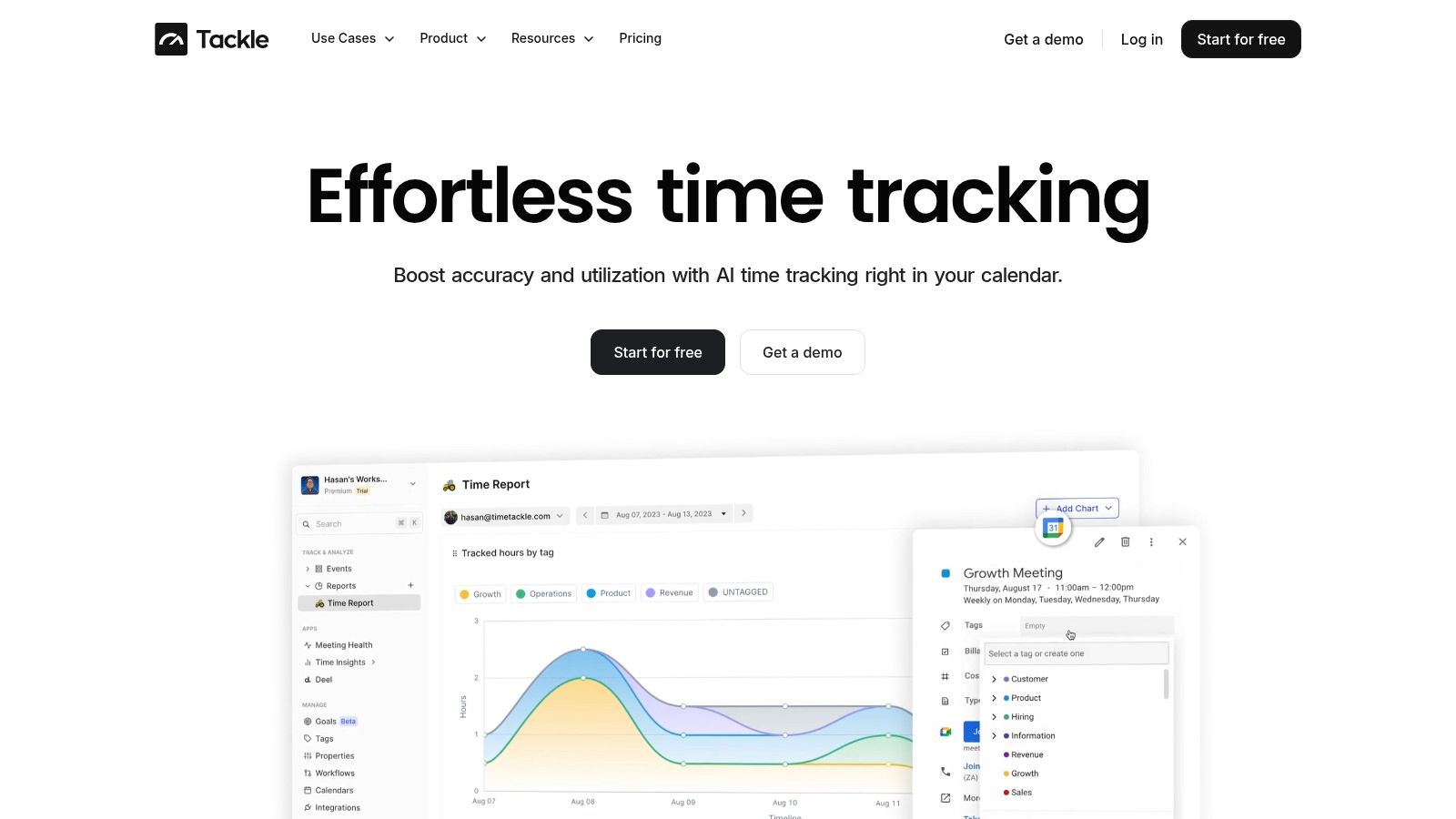
If your categorization model needs constant manual cleanup, the model is too complex.
Keep the rule engine readable
The easiest mistake here is overengineering. Teams build elaborate logic trees, then nobody understands why entries land where they do. Keep your naming clean and your rule order visible.
A few habits help a lot:
- Use plain labels: “Client delivery” is better than an internal code no one remembers.
- Review exceptions weekly: Don't hunt for perfection. Fix the recurring misses.
- Map to decisions: Every tag should support a report someone uses.
- Let people correct errors: Managers shouldn't own every recategorization.
When this is done well, your reporting stops depending on heroic admin effort. It becomes a byproduct of normal work. That's the difference between a system teams abandon and one they keep using.
Build dashboards that tell a story
Once capture and categorization are working, dashboards become useful. Before that, they're decoration.
A good dashboard should answer one question clearly. Are we over-servicing this client? Which team is overloaded? Where are we losing margin? Which work type is crowding out delivery? The mistake is trying to put every chart on one screen and calling it insight.
Build separate views for separate decisions
Most agency leaders need three operational views.
First, a client profitability view. This shows time spent against retainer, budget, or expected delivery load. It helps you spot the client that looks healthy in revenue yet consumes too much senior time.
Second, a team utilization view. This shows who is buried in meetings, who has too much fragmented work, and who still has room for new projects. It helps with staffing before burnout forces the issue.
Third, a project health view. This compares planned effort to actual time patterns, plus where that time went. If a project slips, you can see whether the issue came from scope creep, approvals, rework, or internal churn.
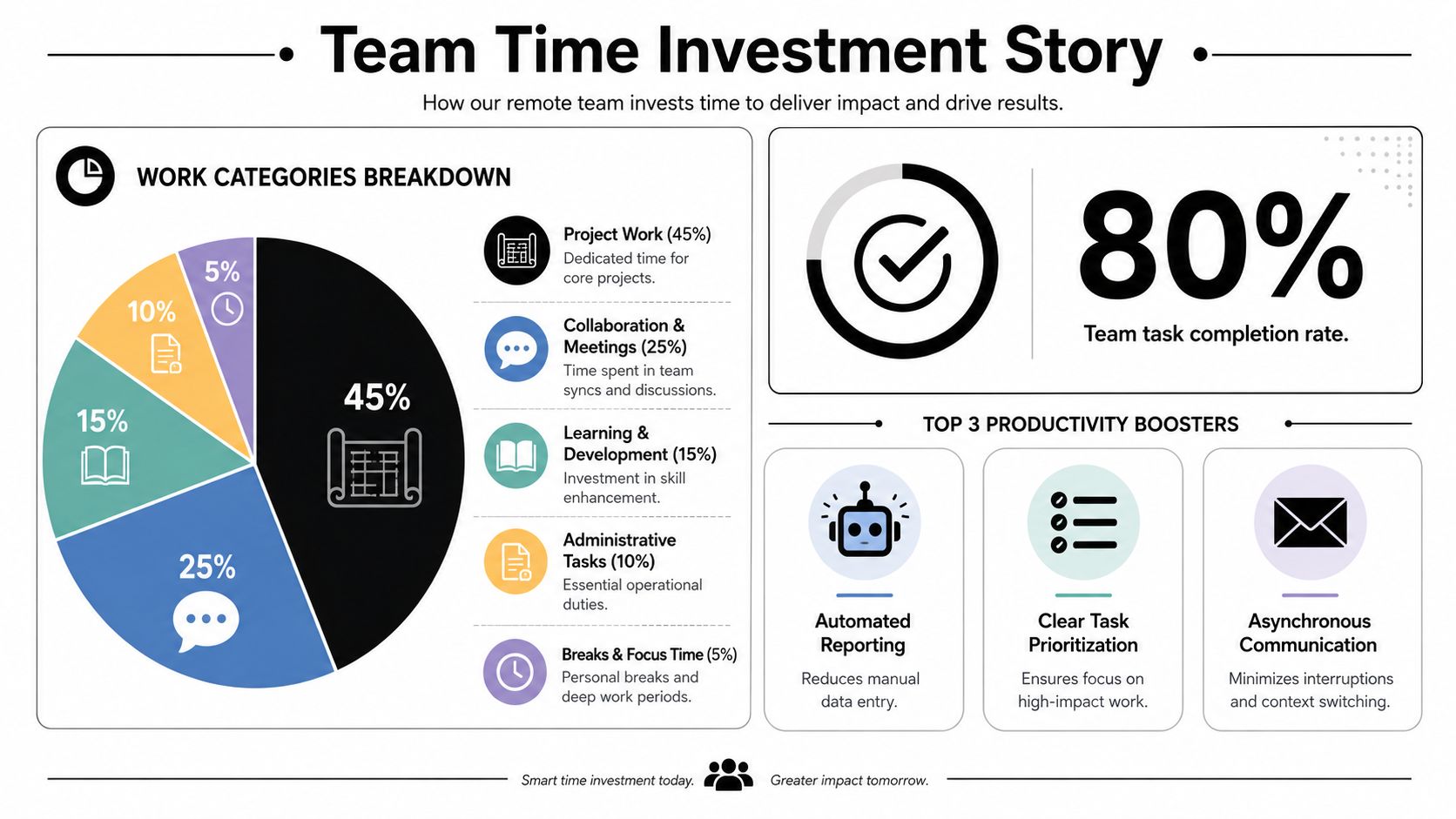
This kind of reporting works best when it tells a narrative rather than dumping raw numbers. The point is not “we tracked hours.” The point is “client delivery stayed stable, but internal review cycles expanded and started consuming senior capacity.”
This is the kind of visual summary leaders can use:
Use dashboards to spot risk early
This matters even more because remote teams carry a real burnout risk. 86% of full-time fully remote employees report experiencing burnout, according to WorkTime's remote work statistics roundup. If your tracking only measures visible activity, you'll miss the warning signs.
Your dashboard should help you intervene early, not explain the damage after someone is already exhausted.
That means you should look for patterns such as:
- Meeting-heavy weeks: Too much coordination and not enough execution time.
- Repeated after-hours spillover: Work keeps escaping the normal day, which usually means overload or poor planning.
- Admin creep: Non-core work starts eating time that should belong to delivery.
- Uneven client drag: One account keeps pulling in more unplanned effort than the rest.
Make the story actionable
Dashboards should trigger decisions, not just discussion. If one team lead spends too much time in internal approvals, cut approval layers. If account managers absorb too much support work, rebalance responsibilities. If a high-value client consumes far more effort than planned, reset scope or pricing.
That's why I like operational dashboards more than “productivity scores.” Scores feel neat, but they flatten context. A person can look “productive” and still be stuck in a broken workflow. Another can look underused when they're waiting on approvals from three other teams.
Make the dashboard tell the story. Who spent time where. Why that pattern matters. What action follows.
Ensure privacy and get your team on board
Most tracking rollouts fail here, not in the software. Teams can live with measurement. They can't live with hidden rules, vague monitoring, or a system that only managers can see.
Privacy and adoption are tied together. If people don't understand what's being captured, how it's classified, and how it will be used, they'll assume the worst. In remote settings, that usually means “big brother.”
Say what you will not do
Start with boundaries, in writing. Don't bury them in a policy doc nobody reads.
Be direct:
- No keystroke logging
- No screen captures
- No webcam checks
- No hidden monitoring of personal content
Those lines matter because surveillance-heavy setups often backfire. The strongest systems focus on work patterns and outputs, not intrusive behavior policing.
Then explain what you will do. You'll track calendars, work categories, project effort, and delivery patterns so the team can plan better, protect capacity, and reduce admin.
That framing changes the conversation fast.
Give employees access to their own data
This is the part most companies skip, and it's a mistake. Only 12% of companies currently offer workers self-service productivity dashboards, while early adopters report 20-25% higher engagement, according to WorkTime's guide to monitoring remote employees constructively.
That finding matches what works in real operations. When people can see their own data, they start correcting problems before a manager has to step in. They catch miscategorizations. They notice overloaded weeks. They can prove where client time went. They stop experiencing the system as something done to them.
If you're evaluating options for remote employee time tracking that employees can actually work with, make self-access non-negotiable.
“We use the same data to help employees manage their work that we use to help leaders manage the business.”
That one sentence is a good test for your rollout. If it isn't true, trust will erode.
Roll it out like a policy change, not a tool install
The best launches are boring in a good way. Clear rules. Plain language. No hidden agenda.
I'd roll it out in this order:
Explain the business problem
Manual reporting is slow, visibility is weak, and teams need better workload planning.Define the boundaries
Be explicit about what the system tracks and what it never touches.Show personal value
Employees should see how this reduces timesheet fatigue, supports workload fairness, and gives them a clean record of their work.Open correction paths
Let people edit tags, flag errors, and ask how categories affect reporting.Review the data together
Use early reports to improve workflows, not to shame individuals.
That last point matters most. If the first dashboard review turns into a hunt for underperformance, the rollout is dead. If the first review fixes a bad meeting pattern, identifies a client overrun, or protects someone from overload, people understand the system immediately.
Privacy-first tracking doesn't mean weak accountability. It means accountable systems that adults can trust.
TimeTackle is a strong option if you want remote work productivity tracking without the usual timesheet drag. It connects to Google and Outlook calendars, captures work activity automatically, and gives teams a cleaner way to tag, review, and report time. If you need better visibility into utilization, client effort, and team workload, take a look at TimeTackle.


