


Friday afternoon. Finance wants draft invoices. Client leads want to know which accounts are slipping. Team leads are still nudging people to fill in last week's timesheets, and someone is piecing together a utilization report from spreadsheets, Slack messages, and half-remembered calendar events.
If you run a mid-sized agency, that mess probably feels familiar. The problem usually isn't that your people aren't working. It's that the business can't see the work clearly enough to bill it, plan it, or learn from it.
That's the answer to what is time tracking software. It isn't just a digital stopwatch. It's the system that turns daily work into usable records, so you can invoice with confidence, spot delivery drift early, and stop burning manager time on reporting admin.
The endless cycle of chasing timesheets
A lot of agencies still run time tracking like this: people do the work first, then try to rebuild the week from memory later. Monday is for client delivery. Tuesday is for meetings. By Thursday, nobody remembers whether that strategy review took forty minutes or two hours, and by Friday the ops team is chasing entries that should have been captured as the work happened.

I see the same pattern in agencies between fifty and two hundred people. The pain shows up in small ways at first. A missed half hour on a client call. Internal work that never gets tagged. Project managers spending part of every week cleaning data instead of managing delivery. Then those small misses stack up and turn into weak reporting, shaky billing, and arguments about whether a project was ever profitable.
What this looks like in practice
You might have:
- Late timesheets: people submit after the work is done, which means they rely on memory instead of records
- Patchy billing data: client hours are partly captured, partly guessed, so invoices become awkward to defend
- Manual reporting: someone exports one file from payroll, another from the PM tool, and combines them by hand
- Poor margin visibility: a project looks healthy until the team realizes too much non-billable work sat outside the report
Agencies rarely have a work problem first. They have a visibility problem first.
That's one reason this category keeps growing. The time tracking software market projection from Straits Research says the global market is valued at USD 6.66 billion in 2026 and is projected to reach USD 18.3 billion by 2034, with a 13.46% CAGR over the forecast period.
There's also a people side to this. Better tools won't fix weak habits on their own, and teams that work with budgets, deadlines, and payroll still need sound operating discipline. For leaders who want that side covered too, these effective time management skills for finance are a useful companion to software, because process and behavior still matter.
Why agencies get stuck
Older systems ask employees to do two jobs. First, do the work. Second, act as bookkeepers for their own day. That's where the cycle starts. The more effort it takes to record time, the worse the data gets. Then managers add more reminders, more approvals, and more cleanup, which makes everyone dislike the system even more.
What time tracking software actually does
The simplest way to explain it is this. Time tracking software is a ledger for work. Your accounting system records where money goes. A time tracking system records where effort goes.
That matters because agencies don't sell hours in the abstract. They sell strategy, design, implementation, service, and support. Time is the raw input behind all of it, so if you don't record time well, your pricing, invoicing, payroll, and planning all sit on weak ground.
The basic job of the system
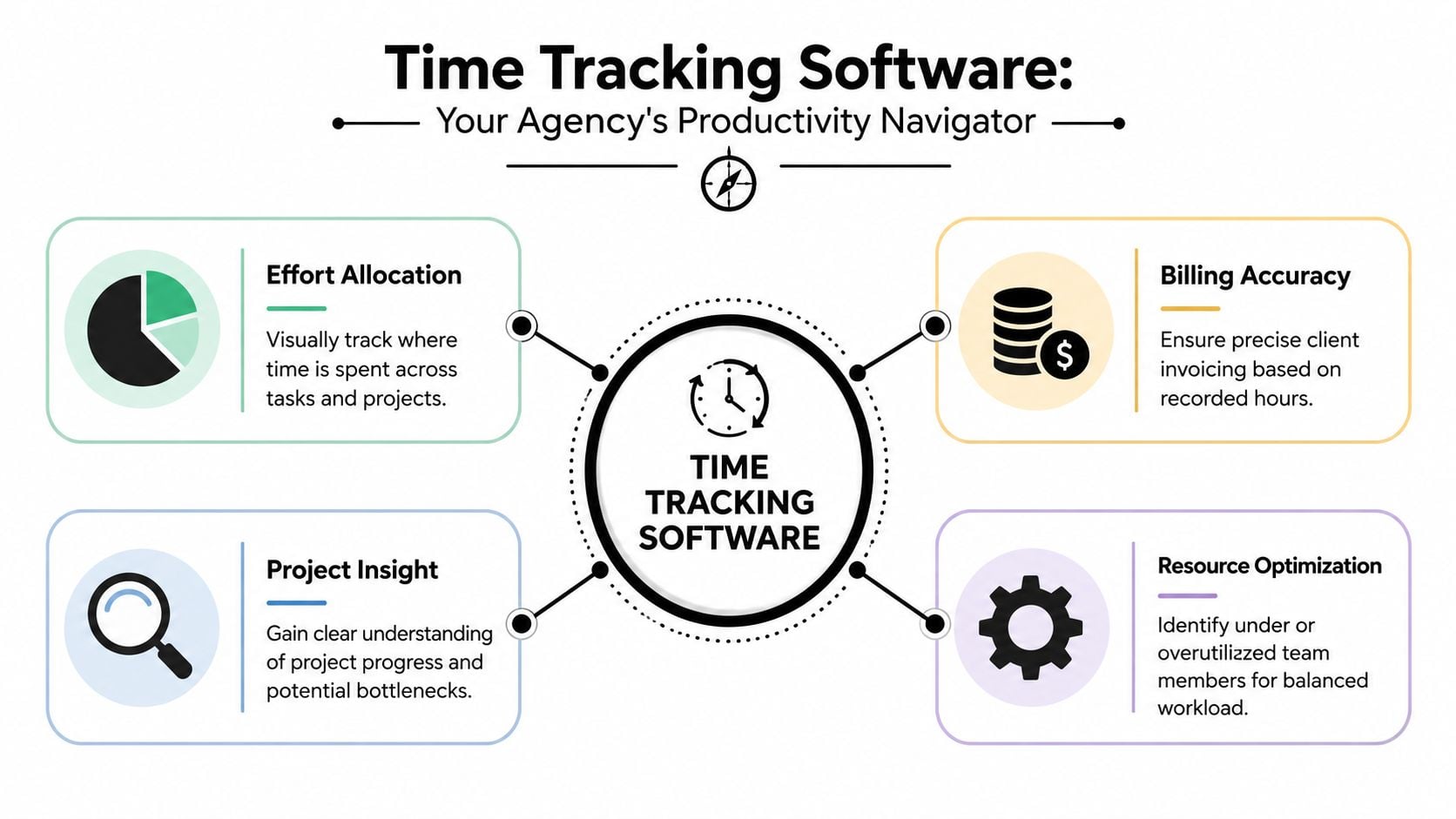
At a practical level, time tracking software records when work starts and ends, ties that time to people or activities, applies rules, and moves clean data into the systems that need it next.
According to TCP Software's explanation of employee time tracking software, time tracking software operates as a digital system that records employee work start and end times, calculates hours against pay rules, and feeds accurate data into payroll and HR systems through bidirectional integrations with over 50 payroll systems.
That phrase “bidirectional integrations” matters more than it sounds. It means data doesn't just leave the tracker once a week in a CSV file. Changes can move both ways between systems, so payroll, HR, and time records stay in sync without someone retyping data.
Why this matters to an agency owner
For an agency, that operational chain usually looks like this:
| Business need | What the software records | Where the data goes |
|---|---|---|
| Payroll | Start times, end times, approved hours | Payroll and HR systems |
| Client billing | Time by client, project, task, or service line | Invoicing and finance workflows |
| Delivery management | Time against projects and teams | Project reports and utilization views |
| Ops decisions | Capacity, patterns, exceptions | Dashboards for managers and leadership |
A basic timer can tell you someone tracked two hours. That's not enough. A proper platform tells you whose two hours they were, what client they belonged to, whether they were billable, whether the entry matches policy, and whether the record is ready for payroll or billing.
Practical rule: If your time data has to be cleaned by hand before payroll or invoicing, your system is still unfinished.
What it is not
Time tracking software is not automatically employee surveillance. Some tools drift in that direction, and that's where teams push back. The useful version is much simpler. It captures work in a way the business can trust, without turning every employee into a manual data-entry clerk.
Core features that separate modern tools from simple timers
Most agencies don't need another stopwatch. They need a system that captures work with less friction and produces data that can survive finance review.
According to Memtime's breakdown of modern time tracking features, advanced time tracking solutions include five critical features: automatic time tracking, local data hosting, productivity reports, individual performance analytics, and project performance tracking.
Automatic capture beats manual reconstruction
The biggest shift is automatic time tracking. Instead of asking people to remember every task and click start and stop all day, the system captures work as it happens or pulls it from the tools people already use.
For agencies, that matters because manual entry fails at the edges. The formal work gets logged. The messy real work doesn't. Quick client calls, review meetings, revisions, handoffs, and internal planning disappear first, even though those hours still cost money.
A tool with automatic capture reduces that loss because it starts with evidence, not memory.
Reporting has to answer business questions
A lot of products say they have reports. The question is whether those reports answer anything useful.
Good reporting should help you see:
- Project drift: where planned effort and actual effort are no longer close
- Client mix: which accounts absorb more time than pricing assumes
- Team load: who is stretched, who has slack, and where the bottlenecks sit
- Work patterns: whether the week is dominated by delivery, meetings, rework, or admin
If your report only tells you “hours tracked by person,” you still have to do the thinking elsewhere. Modern platforms should bring the business question closer to the raw record.
Individual analytics need restraint
Individual performance analytics can be useful, but tools often falter in this domain. Used well, they help managers see who needs support, where work gets blocked, and whether capacity assumptions are realistic. Used badly, they turn into a scorecard for visible busyness.
That distinction matters in agencies because creative and strategic work doesn't happen in a neat, uniform rhythm. A designer thinking through a concept and an account lead handling six client threads won't produce the same activity pattern, and the software shouldn't pretend they should.
Local data hosting and integrations are not side issues
Data hosting sounds technical, but it becomes very practical when clients care about privacy, contracts, or where work data sits. For some firms, that's a buying requirement, not a nice extra.
Integrations matter for the same reason. Time data gets its value when it connects with payroll, project management, CRM, accounting, and reporting tools. A tracker that sits alone creates one more island of admin.
Good time tracking software doesn't just collect records. It fits into the rest of your operating system.
The real business benefits for mid-sized agencies
Once a system is set up well, the gain isn't just tidier timesheets. The gain is cleaner decisions.
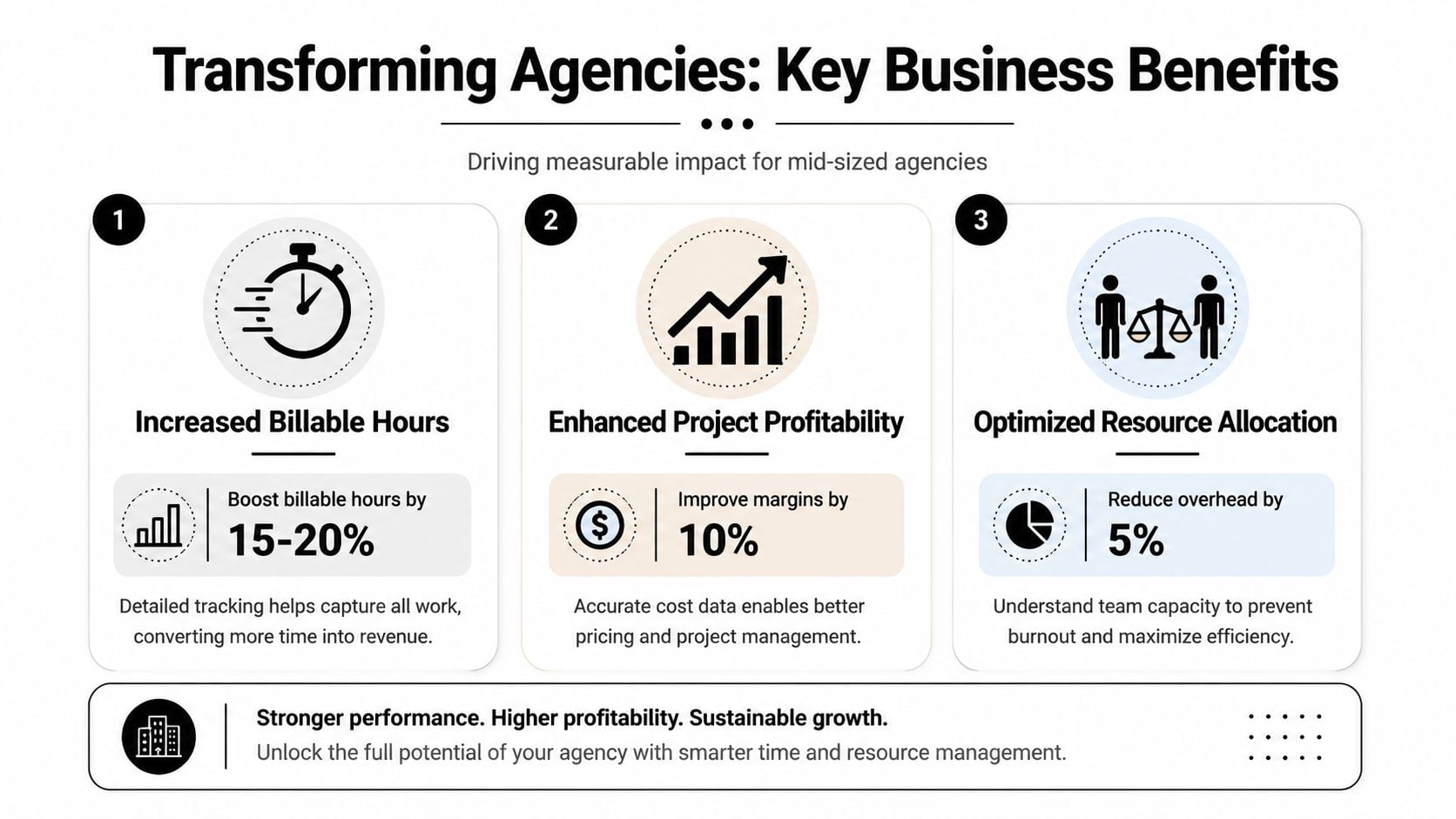
The strongest agencies use time data in three places at once. They use it to invoice accurately, to understand delivery economics, and to protect team capacity before people burn out.
According to Breeze's time tracking statistics, effective time tracking implementation can boost revenue by up to 61%, reduce employee stress by 25%, and about 70% of employees using mobile time tracking apps report increased accountability.
Better billing without weekly archaeology
The first win is billing accuracy. Agencies lose money when people reconstruct time after the fact, because they forget the edges of the work. The quick call. The extra review. The prep before a workshop. None of that looks dramatic alone, but it changes invoice quality and margin over time.
When the system captures time close to the moment the work happens, invoices stop depending on memory. That gives finance cleaner support for billed hours and gives client service teams a stronger answer when a client asks, “What are we paying for?”
For agency-specific workflows, this guide to time tracking for agencies gives a useful view of how firms connect time records to client delivery and reporting.
Stronger profitability data
The second win is pricing and project control. If you can't see actual effort by service line, project type, or client, your pricing model is mostly intuition. Agencies often think they have a utilization problem when they really have a packaging problem. They're selling work one way and delivering it another way.
With better time data, you can ask tougher questions:
- Which retainers absorb more senior time than planned?
- Which flat-fee projects depend on unpaid internal coordination?
- Which clients create the most context switching across teams?
- Where do revisions or approvals eat margin?
Less management drag
The third win is operational speed. Managers stop spending so much time collecting, correcting, and explaining the same data every week. Reporting becomes part of the workflow instead of a separate scramble.
That's the part owners often miss. Bad time tracking doesn't just lose billable hours. It also burns management hours, because someone has to chase entries, fix categories, and build reports no one trusts.
How to choose the right software for your agency
Most buying mistakes happen because agencies choose for feature volume, not workflow fit. The demo looks polished. The dashboard looks clean. Then the team rolls it out and discovers it can't handle the way the agency works.
That mismatch is common. According to Arcoro's reporting on time and workflow mismatches, 52% of mid-sized consulting firms struggle with mismatched time tracking and project management tools, which leads to billing errors and utilization visibility gaps, while 39% lose revenue from inaccurate time-to-value reporting.
Start with your billing model
Agencies rarely bill in one simple way. You may have retainers, hourly work, scoped projects, implementation phases, or advisory time under one roof. So the first question isn't “Does this track time?” It's “Can this reflect how we charge and how we review work?”
Ask vendors things like:
- Can we track hourly, fixed-fee, and retainer work in the same system?
- Can we separate billable, non-billable, and internal investment time?
- Can managers review time by client, project, service line, and team?
- Can finance export data without manual cleanup?
If a product can't answer those cleanly, the burden will land on your ops team later.
Check the systems around it
A time tracker that doesn't connect to the rest of your stack creates more admin. For agencies, the key links usually include project management, CRM, accounting, payroll, and calendar systems.
Many firms get value from reading practical guidance on tracking billable hours, because the setup only works when billing logic, delivery structure, and reporting rules stay connected.
Use this simple screen during evaluation:
| Question | Why it matters |
|---|---|
| Does it connect with our PM and CRM tools? | So teams don't classify the same work twice |
| Can it reflect client and project hierarchies? | So reports match how the agency is run |
| Are dashboards useful for ops and finance? | So leadership sees margin and capacity without spreadsheet work |
| Can employees review and correct entries easily? | So adoption stays high and data stays clean |
Test the weekly reality
Don't buy based on the polished scenario in the sales demo. Test the Friday afternoon reality.
Have a project lead, an account manager, someone from finance, and an ops person run the same workflow through the product. Log work. Review it. Approve it. Export it. Build a report. Then ask where the friction showed up.
If the system makes your busiest people do more admin at the end of the week, adoption will drop no matter how nice the dashboard looks.
Common pitfalls and why most implementations fail
Most failed implementations don't fail because the software lacks features. They fail because the operating model creates friction or mistrust.
The most common mistake is treating time tracking as a compliance exercise first and a business tool second. Teams feel that instantly. If the system exists to police them, they'll resist it, work around it, or fill it with low-quality data.
Timesheet fatigue is real
Manual entry creates a special kind of resentment. People already know what they worked on. What they hate is having to recreate it in a second system when the day or week is over.
According to Harvest's discussion of how time tracking is changing work, 43% of remote workers feel time tracking reduces their sense of trust and increases stress. The same source notes a 27% drop in creative output when tracking is perceived as punitive, and 68% of agencies report spending over 5 hours weekly on manual reporting.
That set of numbers explains a lot. If people feel watched and still have to do more admin, the tool becomes doubly unpopular.
More data can create worse behavior
The second mistake is measuring what's easy instead of what's useful. Some tools gather lots of activity signals, but if leaders use those signals badly, employees start optimizing for visible motion.
That's how you get the productivity paradox. People spend more effort proving they're active than doing the hard parts of the work, which are often slower, quieter, and less easy to count.
Here are a few warning signs:
- Punitive reviews: time data gets used as a blunt performance weapon
- Over-detailed categories: employees need too many clicks and codes to log a normal day
- Managerial overreach: leaders ask for minute-by-minute evidence instead of delivery clarity
- No employee payoff: staff do the admin, but never see any benefit in planning, workload, or reduced reporting
“Track enough to run the business well. Don't track so much that the business starts performing for the tracker.”
Trust has to be designed in
Good implementation starts with boundaries. Tell people what the tool is for, what it is not for, what data managers can see, and how the records will be used. Then choose a system that reduces memory work instead of increasing it.
If you skip that, even solid software will feel like a bad policy wrapped in a nice interface.
The calendar-first approach to solving these problems
The cleanest fix is to stop asking people to rebuild their week from scratch. For most agency roles, the calendar already holds a large share of the truth. Client meetings, internal reviews, workshops, planning sessions, sales calls, handoffs, and check-ins already live there.
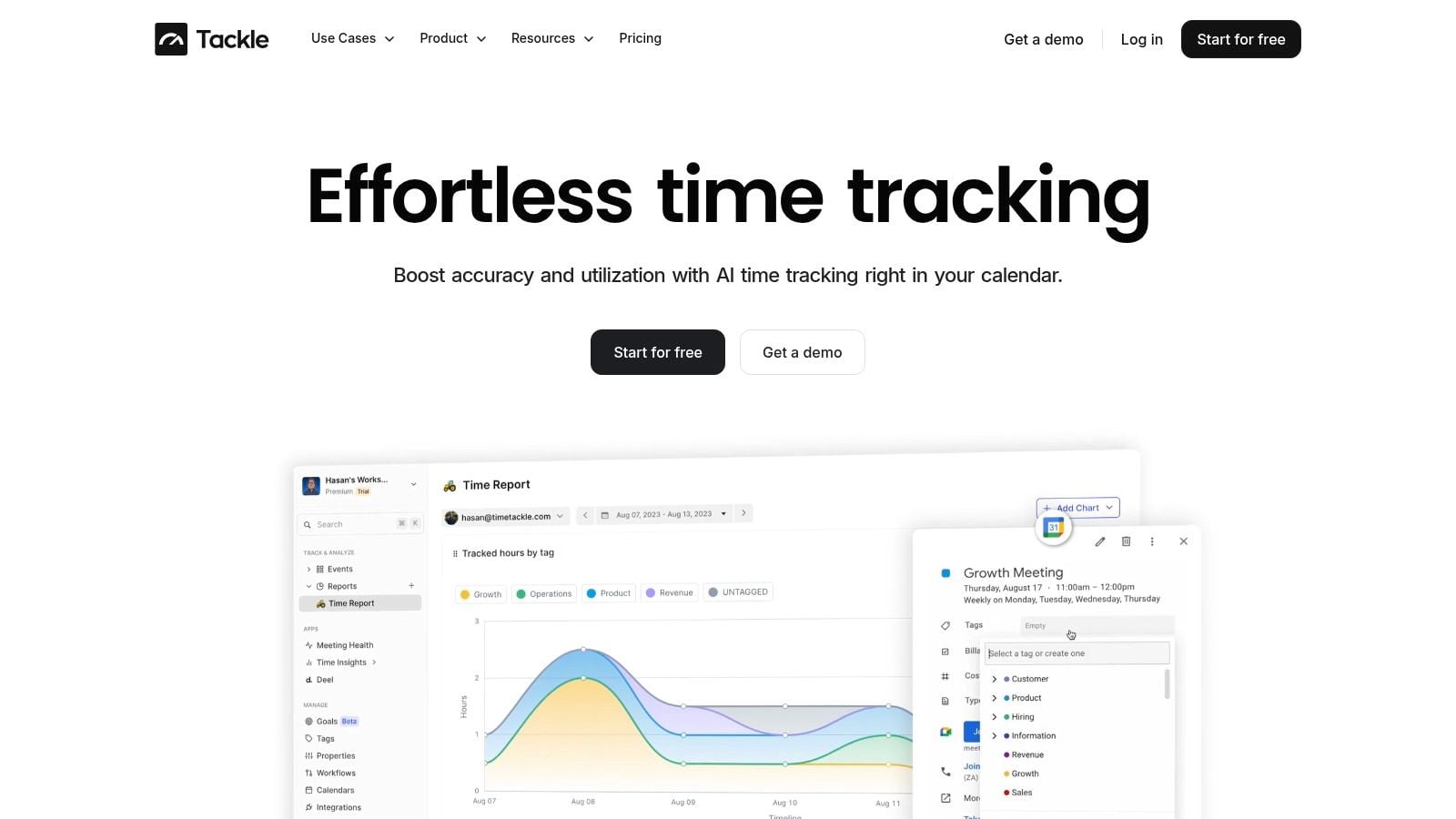
A calendar-first approach starts from that record and turns it into time data with less manual effort. Instead of forcing people to run timers all day, the system captures activity from calendars and connected tools, then lets users review, tag, and approve what matters.
Why this model fits agency work
Agency work is fragmented. A day may include client calls, internal prep, proposal work, delivery reviews, and commercial discussions. Traditional timers struggle because they expect people to remember every switch. Calendar-first tracking starts with the schedule people already keep.
That reduces the main sources of failure:
- Less memory-based entry: people review actual events instead of guessing later
- Less timesheet fatigue: fewer manual steps means fewer end-of-week catch-up sessions
- Better categorization: rules and tags can sort work by client, project, or meeting type
- Lower trust risk: passive capture feels different from invasive monitoring
One example in this category is automated timesheet software from TimeTackle, which connects calendars and business tools so teams can capture activities, apply tags and rules, and turn that record into reporting data with less manual entry.
What good looks like
The strongest setup is simple from the employee side. Connect the systems people already use. Pull the activity into one place. Let them review and classify it quickly. Then let managers and finance work from the same cleaned record.
That's the version of time tracking agencies usually wanted all along. Not more policing. Not more admin. Just a more accurate way to turn work into billing, reporting, and planning data people can trust.
If your agency is stuck in weekly timesheet chasing, TimeTackle is worth a look. It uses a calendar-based approach to capture work with less manual entry, which can make billing, utilization reporting, and project review easier to run without adding more friction for the team.


