


An ERP entered mainstream business vocabulary in the early 1990s, and at its core it means one system with a single shared database that connects the core parts of a business. For an agency, that usually means finance, projects, people, and reporting all run from the same place instead of being stitched together across separate tools.
If you run a growing agency, you've probably felt the problem before you ever heard the term. Finance has one margin number. Client services has another. Delivery leaders trust the project tool. The exec team gets a monthly pack built by hand, and half the meeting goes to arguing over which export is right.
That's the moment when “enterprise resource planning system meaning” stops being a search term and starts being an operating question. Not because you suddenly want enterprise software, but because your current stack no longer gives you a clean view of the business.
For agencies, this topic gets muddled fast. Most ERP content talks like you run a factory. You don't. You sell time, expertise, and delivery capacity. So the question isn't “What is ERP in theory?” It's “What would an ERP mean for a professional services firm like mine, and when is it worth the pain?”
Why we need to talk about ERP systems
A mid-sized agency can look healthy from the outside and still have a messy operating core.
Revenue is coming in. New clients are landing. Headcount is growing. But inside the business, the work starts to drag. Monthly close takes too long. Resourcing calls turn into opinion contests. Project leads keep separate trackers because they don't trust the master report. Then leadership asks a simple question like “Which accounts are making money?” and nobody can answer without pulling data from four places.
Where the cracks usually show first
For agencies, the first break usually isn't dramatic. It shows up in ordinary work:
- Finance runs manual reconciliations because invoicing, project data, and payroll assumptions live in different systems.
- Project managers build side spreadsheets because the delivery tool doesn't match accounting reality.
- Department leads guess at capacity because planned work and actual work don't sit in one view.
- Leadership waits for month-end reports that are already out of date by the time they're read.
None of this means the team is weak. It usually means the business grew faster than the tools did.
Most agency ops problems don't start as software problems. They start as trust problems in the data.
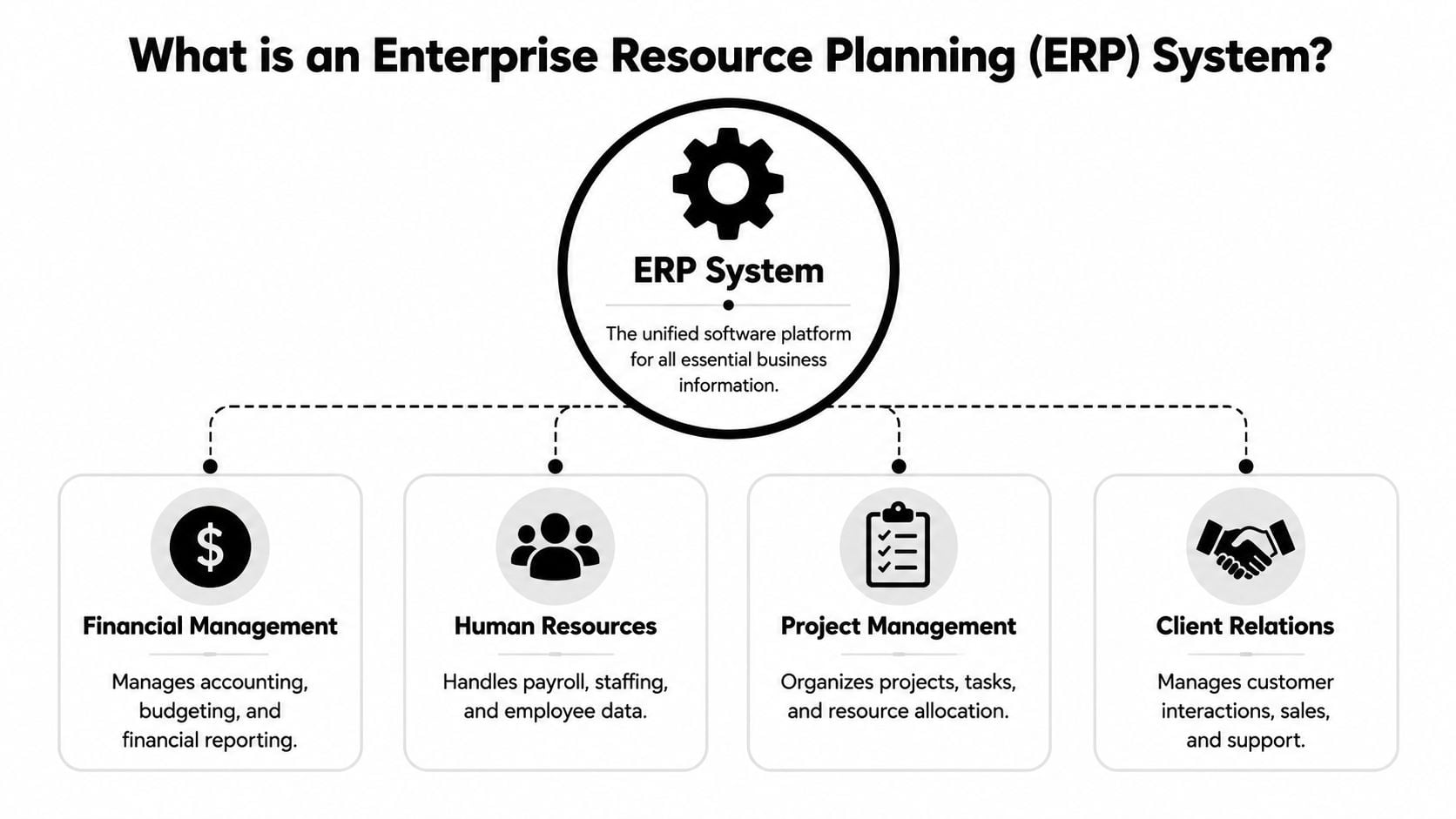
That's why ERP comes up. In plain English, an enterprise resource planning system is a single software system that connects all your core business functions, like finance, projects, and HR, into one shared database. The promise is simple. Everyone works from the same record, so the numbers match and decisions happen faster.
Why this matters more for agencies than people think
A lot of firms dismiss ERP because they hear “enterprise” and think “too big, too slow, too corporate.” Sometimes that instinct is right. But the underlying need is real. Agencies still need clean financial control, project visibility, and staff planning.
The issue isn't whether your business is “enterprise enough.” The issue is whether disconnected tools are starting to block good decisions.
When that happens, you don't need more dashboards. You need a better operating model underneath them.
So what is an enterprise resource planning system?
An ERP is a unified information system built around a single shared database. That technical detail is the whole point. Because finance, HR, purchasing, sales, and operations all read and write to the same system of record, the architecture reduces duplicate entry and cuts down cross-department inconsistencies, as explained in this IEEE overview of ERP systems.
Here's the visual version.
What “single shared database” means in real life
This sounds abstract until you map it to agency work.
Say a project is sold. In a fragmented setup, the client record might live in the CRM, the budget in a project tool, the invoice schedule in finance software, and the staffing plan in another system. Each team updates its own version. Small differences pile up. Before long, “revenue,” “forecast,” and “remaining budget” mean different things depending on who pulls the report.
In an ERP model, those functions connect through one core record. The project setup, billing logic, people assignments, and financial reporting are tied together. That doesn't make the business simpler, but it does make the truth easier to find.
Why agencies care about the architecture, not the acronym
Most leaders don't buy ERP because they love software categories. They buy it because they're tired of these problems:
- Double entry across accounting, delivery, and HR workflows
- Broken reporting logic caused by mismatched data definitions
- Slow decisions because every answer needs manual cleanup
- Constant reconciliation between what was sold, staffed, delivered, and billed
Practical rule: If every monthly report needs a human to “fix the numbers,” you don't have a reporting problem. You have a system design problem.
ERP as a term goes back to the early 1990s, after Gartner coined it in 1990. It grew out of earlier MRP and MRP II approaches into a broader platform for functions like finance, HR, supply chain, procurement, and project management, all built around a shared database, as described in IBM's history of enterprise resource planning.
For agencies, the manufacturing roots can make ERP sound irrelevant. The database logic is still very relevant. Your business may not move inventory, but it does move labor, budgets, approvals, invoices, and delivery commitments. Those need coordination too.
The core modules your agency would actually use
Most ERP suites can do far more than an agency needs. That's one reason buyers get overwhelmed. They see procurement, warehousing, and supply chain features and assume the whole category is a bad fit.
It helps to strip the idea back to the modules that matter in professional services.

Finance and accounting
This is usually the anchor. For many firms, if finance isn't connected, the rest of the stack never quite works.
A good finance module handles the chart of accounts, billing, revenue tracking, expenses, reporting, and the logic needed to understand project profitability. In an agency setting, that matters because margin often leaks in small ways. Write-offs, scope creep, under-recorded time, and poor staffing decisions don't always show up clearly in a loose tool stack.
If your delivery team says a project is healthy but finance says the margin is thin, this is the gap ERP tries to close.
Project and resource management
For agencies, this module matters almost as much as finance. It covers project setup, budgets, milestones, staffing, and the planned use of people across accounts.
The practical question is simple. Can you see who is committed, who is free, and whether the team assigned to work matches the commercial model sold to the client?
That's why some agencies look at dedicated agency resource management software before they look at a full ERP. If the primary pain is staffing visibility rather than enterprise-wide process control, a focused system can make more sense.
HR and people data
Agencies often ignore this until it hurts.
HR inside an ERP usually means employee records, roles, org structure, leave, payroll-related data, and workforce changes that affect planning. Even if you don't want “HR software” in the broad sense, you do need people data to line up with project planning and cost views. Otherwise you get strange reporting gaps, like utilization models based on outdated headcount or project plans that assume people are available when they aren't.
CRM, sometimes, but not always
Some ERP setups include customer relationship management. Some agencies keep CRM separate, which is often fine.
The test is whether your handoff from sales to delivery is clean. If account data, pricing terms, scope assumptions, and billing rules fall apart after the deal closes, integration matters more than software labels.
Real-world benefits of a single source of truth
ERP's value isn't that everything sits in one place. The value is that the business can act on one version of reality.
Modern ERP suites support real-time, organization-wide process integration through analytics, workflow automation, and standardized module connections, so decisions can come from continuously updated data instead of delayed batch reports, as described in this overview of ERP process integration.
Better financial control
When finance and delivery connect properly, reporting stops being a monthly clean-up project.
You can trace how sold work becomes scheduled work, then delivered work, then billed work. That doesn't mean every number becomes magically accurate. It means errors show up sooner, and that alone changes how fast leaders can respond.
Cleaner project profitability views
Agencies usually don't fail because they lack activity. They fail because activity hides weak economics.
With integrated data, margin conversations get sharper. You can see whether a profitable client is profitable after staffing reality, write-downs, and delivery drift. That matters more than a nice dashboard.
A good operating stack also makes it easier to keep data at the center of the organization, which is what turns reporting into management rather than record keeping.
When everyone trusts the same numbers, meetings get shorter and decisions get better.
Faster workflows and less admin drag
ERP also helps where process handoffs break.
Think approvals, billing triggers, staffing updates, expense flows, or changes to project scope. In a disconnected setup, those steps rely on emails, memory, and manual follow-up. In an integrated setup, the workflow can move with the record.
That's a dry way to say something very practical. Teams spend less time chasing status across systems.
Stronger operating decisions
This is the biggest win when an ERP is set up well.
Leaders stop making calls on stale snapshots. They can look at commitments, available capacity, and financial exposure in the same operating frame. For agencies, that changes hiring decisions, pricing calls, staffing tradeoffs, and even which client work to push back on.
ERP vs PSA vs CRM where do they differ?
Most agency software discussions go sideways as people compare tools by feature lists instead of by the job they need done.
A CRM is built to manage the customer journey before and around the sale. A PSA focuses on service delivery after the sale. An ERP goes wider. It ties delivery to core business functions like finance and HR through a shared database.
That wider scope is useful. It can also be too much.
A simple way to separate them
| System type | Primary focus | Typical user | Core goal |
|---|---|---|---|
| CRM | Pipeline, contacts, sales activity | Sales teams, account managers | Win and manage customer relationships |
| PSA | Project delivery, time, resourcing, billing support | Professional services teams, PMs, operations | Run client work efficiently after the deal closes |
| ERP | Finance, HR, projects, and cross-functional control | Finance leaders, ops leaders, executive teams | Manage the business through one integrated system |
When a PSA is the better fit
A lot of agencies don't need a full ERP yet. They need stronger delivery control.
If your biggest pain is project planning, time capture, staffing, or service billing, a PSA plus a solid accounting platform may be enough. That setup often gives agencies more flexibility, especially if they want best-of-breed tools instead of one broad suite.
For teams trying to tighten client workflows without rebuilding the whole operating core, that can be the smarter route.
When ERP is the right move
ERP makes more sense when your real issue is cross-functional control.
That usually means finance, people data, project data, and reporting all need to connect tightly. It also means the business is willing to standardize process, because ERP is not a “plug it in and keep every team working its own way” category.
A neutral point that many definition pages miss is this: ERP can be a poor fit for teams that mostly need best-of-breed tools, lightweight automation, or simple reporting rather than end-to-end process control. The same source notes that Gartner has reported only about a third of digital transformations deliver expected value, which is a useful warning when complexity outruns the need in this Syracuse University overview of ERP trade-offs.
If your core pain is delivery discipline, buy for delivery. If your core pain is enterprise-wide control, then ERP enters the conversation.
A quick side note. The same distinction shows up outside agencies. For example, a CRM built to automate real estate lead follow-ups solves a very specific front-end sales problem. It doesn't replace project accounting, HR records, or resource planning. Different systems exist because the jobs are different.
A checklist to decide if your agency needs an ERP
ERP is a big move, so the decision should come from operating friction, not software envy.
One industry estimate put global ERP software revenue at $33.6 billion in 2017 with a forecast of $47.9 billion by 2023, and in the same source 57% of businesses said accounting was the most sought-after ERP feature, which tells you where many implementations start: financial control and reporting, not flashy automation, according to these ERP market figures and survey findings.
Signs the move may be justified
Ask these questions:
- Do your financial numbers need manual stitching every month? If finance has to merge exports from multiple systems to get a reliable view, your stack may be past its limit.
- Can you see project profitability without delay? If margin visibility only appears after a lot of cleanup, you're managing by hindsight.
- Do your staffing decisions depend on side spreadsheets? That usually means your current systems don't connect operational planning to commercial reality.
- Have your integrations become fragile? When one tool change breaks reporting in another, complexity starts to become its own cost.
Signs it may be overkill
ERP isn't automatically the mature choice. Sometimes it's the wrong one.
You may not need it if your agency mainly needs better time capture, cleaner delivery workflows, or stronger reporting from a narrower set of tools. You may also not need it if your teams still work in very different ways and aren't ready to standardize core processes.
A hard truth here is cultural. ERP asks people to change behavior. If the business wants cleaner data but refuses common process, the software won't save it.
A practical decision filter
Use this simple rule set:
- Choose ERP when the biggest pain is cross-functional control across finance, HR, projects, and reporting.
- Choose PSA plus accounting when delivery operations are the main bottleneck.
- Choose lighter reporting and workflow tools when the issue is visibility, not business-system architecture.
- Wait when leadership can't commit to process discipline, ownership, and implementation effort.
Good software can reduce friction. It can't fix a team that won't agree on how the business should run.
How calendar-based time tracking complements your ERP
ERP gives you structure. It doesn't always give you clean ground-level truth about how people spend time.
That gap matters in agencies because labor is the product. If the time data is weak, then utilization views, project costing, delivery forecasts, and billing logic all get weaker with it. This is one reason teams keep living in partial workarounds even after buying larger systems.
Where ERP often needs support
Many ERP setups depend on users entering time cleanly and consistently. Agencies know how that goes. People forget, backfill late, round hours, or dump work into generic buckets on Friday afternoon.
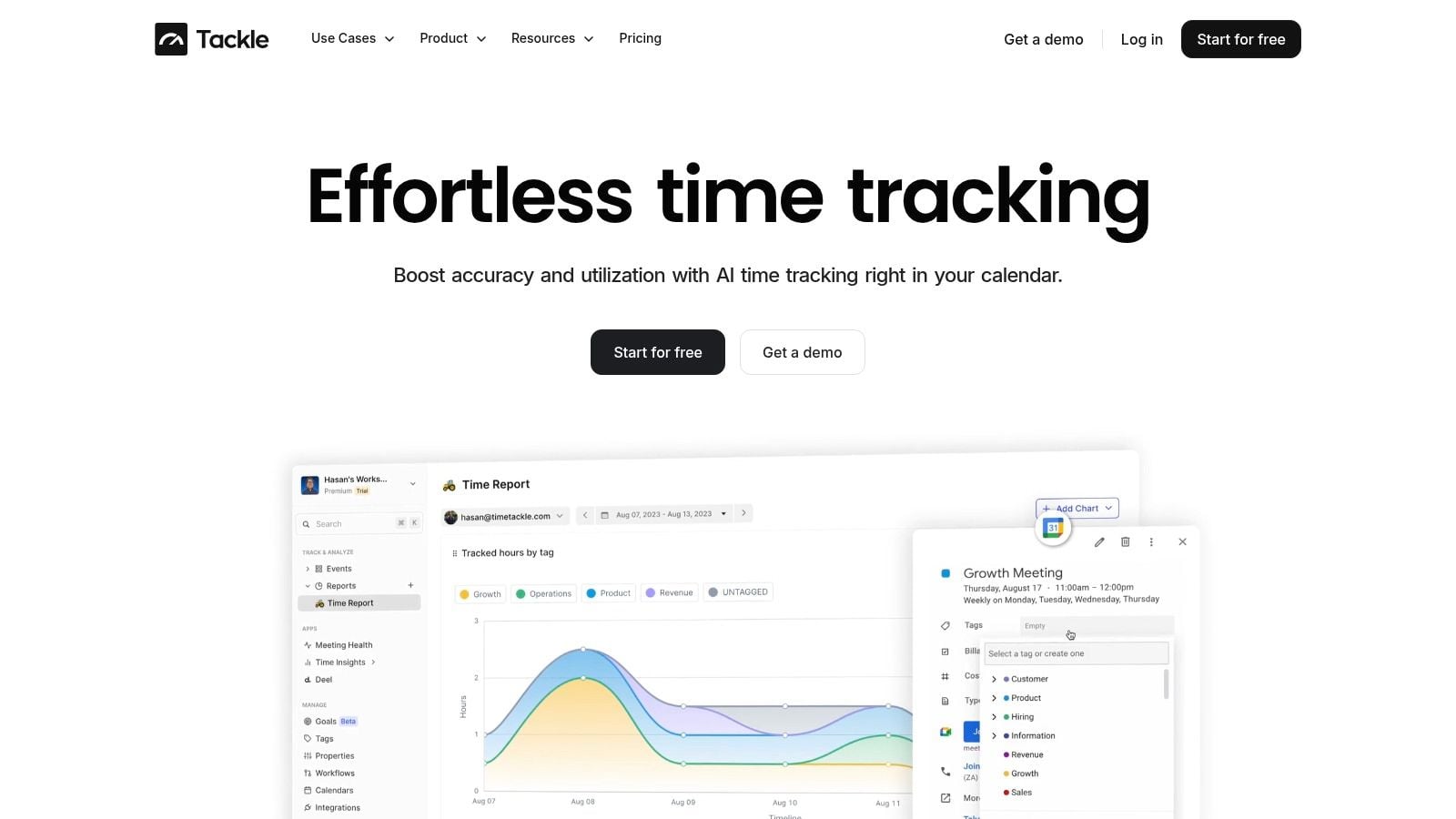
Calendar-based tracking can help because it starts from activity already recorded in the day. Meetings, client calls, internal reviews, and working sessions create a better raw timeline than memory alone. Teams can then classify and review that data instead of rebuilding the week from scratch.
For agencies that already run an ERP, this approach can feed more accurate activity data into the wider system. For agencies that aren't ready for ERP, it can still solve a very real reporting problem on its own.
Where a lighter layer can make sense
Here, a tool like Google Calendar time tracking becomes useful. It adds a practical data layer around real work patterns without forcing an agency into a full enterprise implementation before it's ready.
Used well, that kind of system can support:
- Cleaner utilization reporting because logged activity starts closer to the truth
- Better project costing because time gets tied back to actual calendars and work categories
- Lower admin load because teams review and tag activity instead of rebuilding it manually
- Stronger management visibility because leaders can see work patterns earlier
TimeTackle fits in that category. It connects calendars and related systems, captures activity data, and helps agencies tag and report on work with less manual timesheet effort. That makes it useful in two different setups. It can complement an ERP by improving time and activity inputs, or it can give a mid-sized agency better operational visibility before a larger system ever makes sense.
A lot of firms don't need a bigger suite first. They need better source data about how work actually happens.
That's often the more honest starting point. If your reporting is weak because people hate timesheets and managers don't trust utilization numbers, you don't have to jump straight to ERP to make progress.
If your agency wants cleaner time data, less manual reporting, and a better view of utilization without forcing a full ERP rollout, take a look at TimeTackle. It's a practical option for teams that want calendar-based time tracking and reporting that can stand on its own or fit into a broader systems stack later.


