


Most agency teams don't have an efficiency problem in the abstract. They have a Tuesday-afternoon problem.
Account managers are chasing updates in Slack. Project leads are rebuilding the same status report in a spreadsheet. Finance is asking why write-offs keep showing up after the work is already done. Team leads know people are busy, but they can't tell whether that busyness is billable work, internal churn, or cleanup from a broken handoff.
That's why a lot of advice on how to improve operational efficiency falls flat. It jumps straight to automation, new software, or “better processes” without first asking a harder question: which problems are worth fixing first, and how will you know the fix worked?
For mid-sized agencies, that distinction matters. You can automate a bad process and still get bad outcomes, just faster. You can standardize work and still hurt margins if the new process creates more admin load somewhere else. And you can roll out a shiny dashboard that tells you a lot about activity while telling you almost nothing about utilization, cost, or delivery drag.
The better approach is simpler. Diagnose first. Measure what matters. Remove obvious waste. Redesign only the workflows that keep causing pain. Then keep checking whether the gains show up in margins, utilization, and delivery quality, not just in a nicer-looking process map.
First, find the real problem instead of guessing
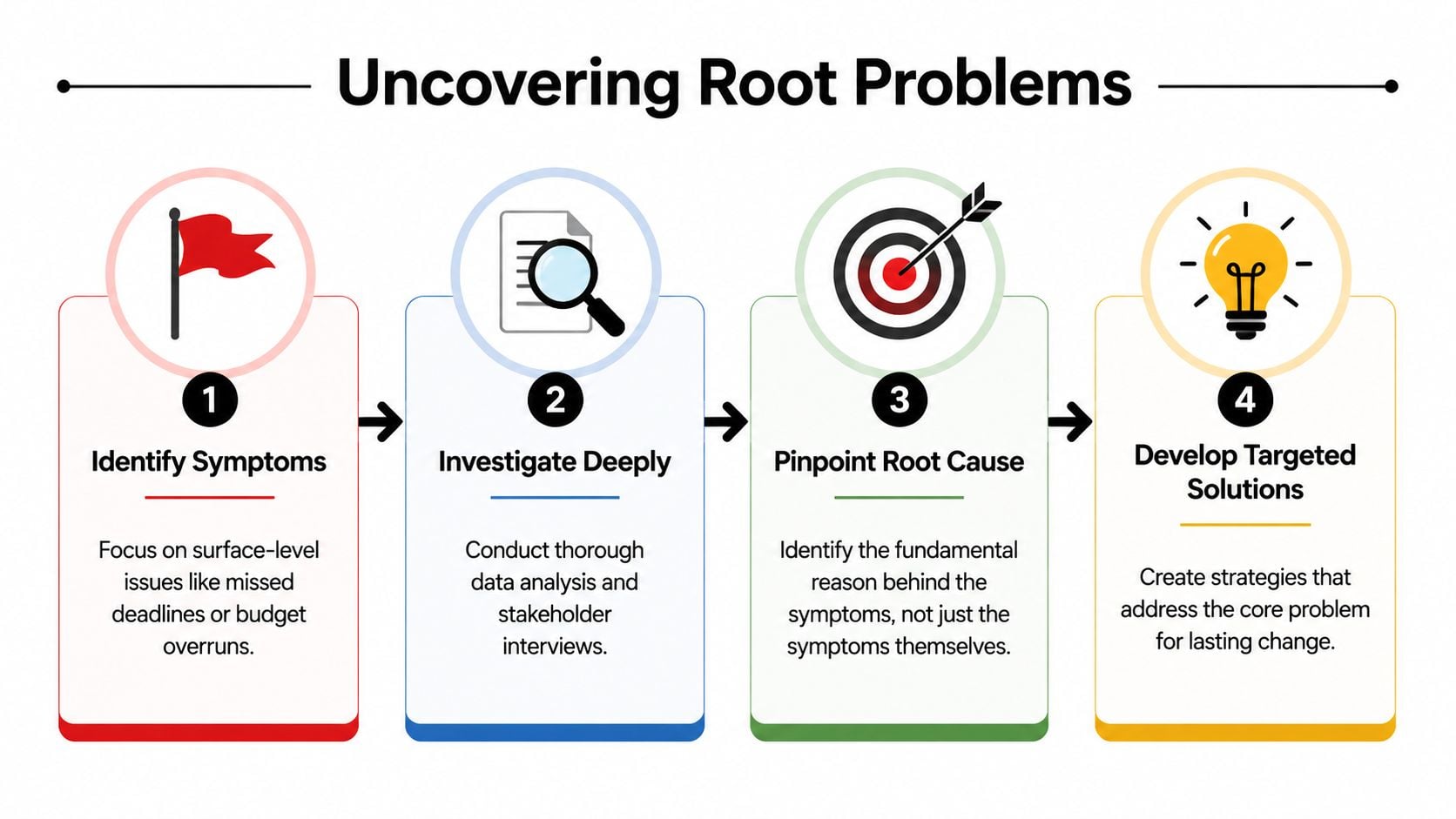
Many groups start too late in the story. They see missed deadlines, slow approvals, scope creep, or budget overruns and call those the problem. They aren't. They're symptoms.
If you want to improve operations, treat it like diagnosis. The first move is to map and time your top 3 processes, then look for bottlenecks, redundancies, and delay costs before you change anything. That stepwise process audit is a recommended starting point, and measuring each step over multiple cycles gives you a baseline so you can target the highest-impact fixes (ClearFuze).
Start with your most painful work
Don't map every workflow in the business. That's how teams turn a practical fix into a workshop series nobody wants.
Pick the top three processes that create the most drag. In agencies, that often means things like:
- Client onboarding: From signed proposal to kickoff, including forms, access, scheduling, and internal briefings.
- Project delivery: From intake to first draft, review, revision, approval, and handoff.
- Reporting and billing prep: From time capture to reconciliation, client reporting, and invoice support.
- Change requests: From “small ask” email to scoped work, approval, scheduling, and billing treatment.
The reason to focus on just a few is simple. Pain tends to cluster. If one approval queue breaks, it usually affects delivery, finance, and client confidence at the same time.
Time the work you think you understand
A process map without timing data is still guesswork. You need to know how long work waits, not just how it moves.
For each of the top processes, list every step in plain English. Then note who owns it, what input starts it, what output completes it, and where it sits when nobody is touching it. Measure a few real cycles. Don't use one “good” project and call it normal.
A basic time audit for agency workflows helps here because it shows where time goes before anyone starts rewriting SOPs.
Practical rule: If a process has five handoffs and only one value-adding step, the issue probably isn't effort. It's coordination.
Look for friction that repeats
You're trying to find recurring offenders, not one-off mistakes. In practice, the same patterns show up again and again:
| Friction point | What it usually means |
|---|---|
| Work waits for approval | Decision rights are unclear or buried |
| The same data gets entered twice | Systems don't connect or ownership is split |
| People ask for status updates constantly | The workflow is opaque |
| Rework appears late in the job | The brief, scope, or review standard is weak |
This is also where finance should stay close to operations. If reporting delays, bad handoffs, or untracked changes are affecting invoice timing or write-offs, the issue is no longer just “project management.” It becomes a cash problem. That's why a practical guide for CFOs on cash flow is useful alongside process mapping. It helps connect delivery friction to working capital reality.
Don't aim for a perfect map. Aim for an honest one. Once you can see where work stalls, you stop debating opinions and start fixing actual waste.
Track the only metrics that matter for service businesses
A lot of agencies drown in reporting and still can't answer a simple question: are we using team time well?
That happens when leaders track visible activity instead of operational health. More tickets closed, more messages sent, more tasks created. None of that tells you whether delivery is getting cleaner or margins are getting better.
Operational efficiency gets better when teams move from ad hoc management to measurement-driven process control. In professional services, tracking time spent, utilization, and workflow delays helps teams see where work piles up and where rework starts. Digital dashboards made that much more precise than manual observation ever was (insightsoftware on operational efficiency analysis).
The three numbers that tell the truth
For service businesses, I keep coming back to three measures because together they show where time turns into revenue and where it leaks out.
- Utilization: This shows how much team capacity goes to client work versus internal admin, meetings, rework, or dead time. If you need a clean way to define it, this utilization rate guide breaks down the logic.
- Project cycle time: This shows how long work takes from start to finish, including waiting time. Long cycle times often reveal approval lag, unclear briefs, or overloaded reviewers.
- Cost per project: This tells you what the work consumes. If cycle time is rising and utilization looks “fine,” cost per project often exposes the hidden damage.
These are better than vanity metrics because they force operational reality into view. A team can look busy and still be trapped in low-value churn.
What each metric reveals
Here's the practical read on them:
| Metric | What a healthy trend suggests | What a bad trend often points to |
|---|---|---|
| Utilization | Capacity is directed toward client value | Too much admin, poor planning, or hidden rework |
| Cycle time | Handoffs and approvals are moving | Bottlenecks, unclear ownership, or queue buildup |
| Cost per project | Delivery is staying controlled | Scope drift, inefficient staffing, or process waste |
You don't need a hundred KPIs. You need a few that expose delay, waste, and cost clearly enough to act on.
Baselines beat opinions
The point of tracking isn't reporting for reporting's sake. It's to create a before-and-after view that lets you test whether a process change improved something.
So set a baseline first. Pull a recent period. Look at current utilization patterns, average cycle time across your core work types, and the rough labor cost profile of projects. Once you have that, your process changes become testable. Without it, every improvement claim turns into a debate.
That's usually where agencies mature fastest. They stop saying “it feels smoother now” and start asking whether smoother work is also cheaper, faster, and easier to staff.
Secure quick wins to build momentum
Once you've mapped the biggest pain points, don't begin with the hardest fix. Begin with the most visible waste.
That's not a political move. It's an operational one. Teams adopt bigger changes more easily after they've seen a few annoying problems disappear.

IBM notes that automating manual processes, such as replacing spreadsheet-based data entry with data capture solutions, can improve efficiency, avoid human errors, and free staff for higher-value work. The broader case is large too. McKinsey found that as much as 60% of occupations have at least 30% of activities that could be automated (IBM on operational efficiency).
Go after repetitive admin first
In agencies, the best quick wins are usually boring. That's exactly why they work.
Look for work that happens often, follows a repeatable pattern, and nobody thinks is a good use of skilled time:
- Status reporting: Pulling the same project notes into the same client update every week.
- Timesheet chasing: Reminding people to reconstruct their week on Friday.
- Data re-entry: Copying meeting details, deal notes, or project data between tools.
- File and task setup: Creating the same folder structure, naming rules, and task templates again and again.
A practical approach to automating repetitive tasks helps because it pushes you to remove manual handling where the rules are already stable.
Pick wins people can feel
The fastest way to lose support is to launch an “efficiency initiative” that only leadership can see.
Choose fixes that change daily experience. If account managers stop rebuilding reports by hand, they notice. If project leads stop chasing missing time entries, they notice. If finance gets cleaner project data before invoicing, they notice too.
Small wins matter because they change belief. Once people see one ugly process get easier, they stop assuming every operational change will add more work.
What doesn't work is automating around bad ownership. If nobody knows who approves a scope change, software won't solve it. If the brief is weak, more templates won't save delivery. Quick wins should remove obvious drag, not hide structural problems under a cleaner interface.
Redesign key workflows that will actually stick
After the quick wins, you can tackle the workflows that keep creating the same trouble. Here, teams often overbuild. They write a giant SOP, add too many fields, add a new tool, and call the rollout finished. Then nobody follows it.
A better sequence is simpler: standardize the workflow, automate the repeatable parts, then track workload against the new baseline. That order is reinforced by operational-efficiency guidance, which also warns that workload needs monitoring after changes so you don't create burnout while “improving” the process (Asana on operational efficiency).
Standardize the path before you automate it
Automation only works well when the underlying path is stable. So start with a plain-language version of the workflow.
For one broken process, define:
- Entry point: What starts the workflow?
- Required inputs: What information must be complete before work begins?
- Decision owner: Who approves, rejects, or redirects the work?
- Completion rule: What counts as done?
- Exception path: What happens when the work falls outside the standard case?
That's enough for most agency workflows. You don't need a binder. You need a version of the process that a new manager can follow without guessing.
Train for real use, not policy compliance
A workflow sticks when the team finds it easier than the old workaround. If the new process adds friction, people will route around it.
That means your rollout should include:
| Change step | What to do |
|---|---|
| Communication | Explain what problem the new process fixes |
| Training | Use real examples from current client work |
| Feedback | Ask where the process still feels clumsy |
| Adjustment | Fix the rough edges quickly instead of defending them |
If your team includes technical operators, analysts, or implementation leads, borrow from fields that care about repeatability under pressure. Even a focused training format, similar to how people prepare for AWS DevOps certification, can be useful as a mindset: practice the sequence, test edge cases, and make sure people can apply the method under real conditions, not just describe it.
Watch for the hidden cost of “better process”
A redesigned workflow can look cleaner and still fail if it loads too much admin onto the team.
Here are the usual warning signs:
- More required fields than anyone uses
- Extra review steps added “just in case”
- Automation that creates cleanup work later
- Managers carrying the burden of enforcing every rule
A workflow is only better if people can follow it under normal workload, not just during launch week.
Here, many operations projects encounter difficulties. Leaders think adoption failed because the team resisted change. Often, the core issue is that the new design didn't respect how work is performed. If the process takes too long to maintain, people will bypass it, and they'll be right to do so.
Choose tools that solve problems, not create them
Software buying gets messy when teams shop by feature list instead of by operating pain. That's how you end up with more dashboards, more fields, more admin, and less clarity.
One of the most under-answered parts of how to improve operational efficiency is deciding what not to automate or standardize first. Popular advice often skips the ranking logic and doesn't help leaders judge initiatives by expected ROI, implementation risk, or scope-creep impact (Scoro on improving operational efficiency).
Use a simple filter before you buy anything
I'd rank any tool or automation idea against four questions:
- Does it remove a known bottleneck? If the issue isn't clear, the tool won't become clear later.
- Will it cut manual handling people already hate? Adoption rises when the tool removes obvious pain.
- Does it fit the current workflow with minimal extra steps? A tool that needs constant upkeep is another burden.
- Can you measure the result in utilization, cycle time, or cost? If not, the value will stay fuzzy.
That framework also helps you reject tempting projects. Some things sound useful but aren't worth the disruption now.
Good tools reduce double entry
For agencies, one of the biggest failures is the gap between where work happens and where it gets reported. Meetings happen in calendars. Client conversations happen in email and CRM. Delivery happens across project tools. Then someone has to reconstruct the week in a timesheet or reporting spreadsheet.
That gap creates bad data and resentment at the same time.
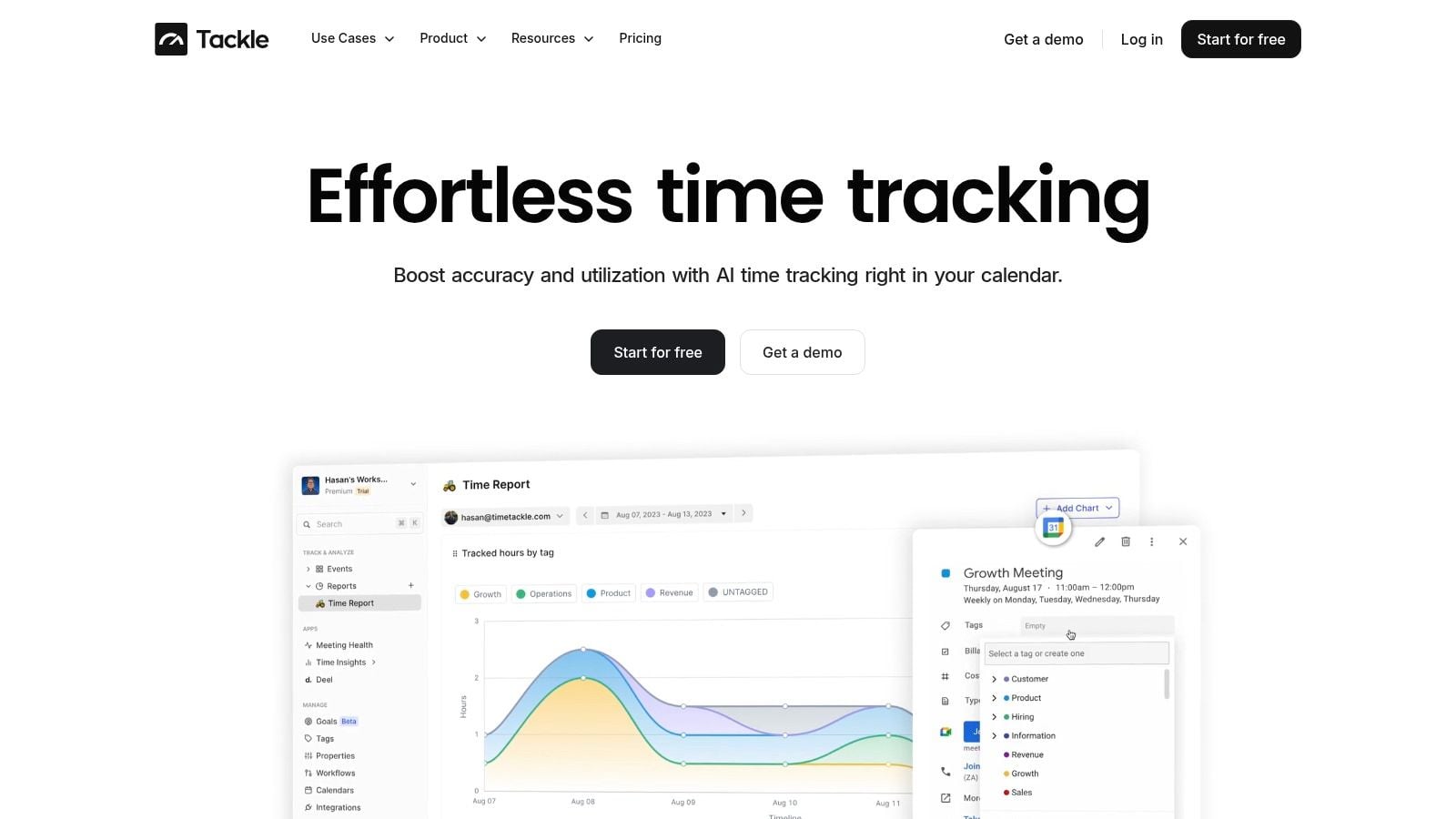
A tool like TimeTackle fits this problem when the issue is manual time capture and reporting overhead. It connects calendars and related systems to capture activity data, then lets teams categorize and analyze that work without rebuilding everything by hand. That kind of setup makes sense when your bottleneck is missing utilization visibility caused by admin-heavy reporting.
Know what to leave alone
Not every messy process needs software. Some need a rule, a clearer owner, or a better handoff.
A few examples:
| Situation | Better first move |
|---|---|
| Scope changes keep slipping in informally | Tighten change approval rules |
| Reviews take too long because nobody owns final sign-off | Assign one decider |
| Status meetings keep expanding | Set a fixed agenda and output |
| Team members enter inconsistent project names | Create a naming standard |
The test is simple. If a tool solves a defined operating problem, buy carefully and implement tightly. If it mostly creates hope, wait.
Continuously monitor and prove the impact
A lot of teams stop at rollout. They launch the new workflow, maybe train the team, maybe build a dashboard, then move on. That's usually when the old problems start coming back in new clothes.
Real efficiency work doesn't end with implementation. It keeps asking whether the gains are visible in the business, or whether the work just moved somewhere harder to see.
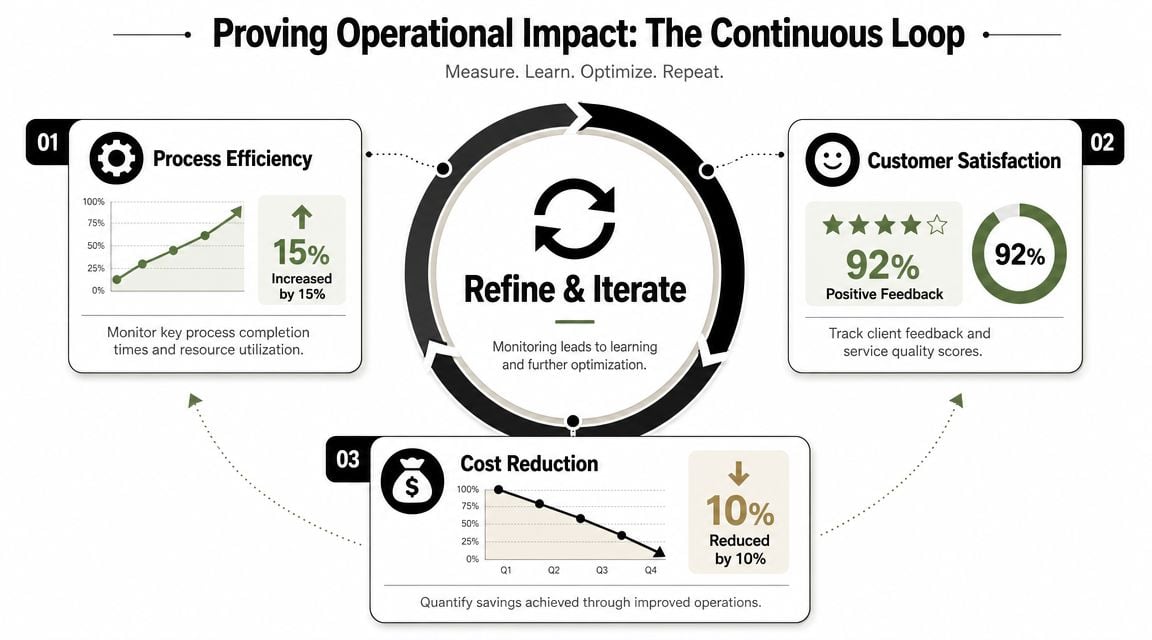
A more useful question than “did we automate it?” is this: did margins and utilization improve, or did we just shift busywork around? Real improvement depends on data discipline, end-to-end process review, and careful removal of “process offenders,” not just more tooling (Accelo on improving operational efficiency).
Ask harder questions after every change
Once a new process has been live long enough to observe, review it against the baseline you set earlier.
Don't ask whether people “like” it first. Ask:
- Did utilization improve, or did admin work move to managers?
- Did project cycle time drop, or did work spend the same time waiting in a different queue?
- Did cost per project improve, or are you paying for cleanup later?
- Did delivery quality hold up, or did speed create rework?
Those questions stop surface-level wins from getting celebrated too early.
Keep the review cadence boring and consistent
You don't need a giant operations review. You need a rhythm.
A simple cadence works well:
| Cadence | Focus |
|---|---|
| Weekly | Spot immediate bottlenecks, missing data, or adoption issues |
| Monthly | Review trend lines in utilization, cycle time, and cost |
| Quarterly | Decide what to keep, revise, or retire |
Quarterly matters because it's long enough to show whether a change stuck and short enough to act before the year gets away from you.
Efficiency that can't survive a quarterly review isn't operational improvement. It's a temporary patch.
Watch for second-order effects
Mature teams set themselves apart. They don't just look for faster workflows. They look for side effects.
A cleaner reporting process might improve finance visibility but increase meeting load on project leads. A tighter intake process might reduce rework but slow sales handoff if the required information is unrealistic. A new automation might cut admin time but create category errors that someone now cleans up manually.
You want proof, not applause. If a change improves visibility, margins, utilization, and delivery consistency, keep it. If it mostly changes where the pain shows up, rework it.
That's the answer to how to improve operational efficiency. Find the right problem. Fix it in the right order. Then prove the result in the numbers that matter to a service business.
If your team is tired of chasing timesheets and rebuilding the same reports by hand, TimeTackle is worth a look. It helps agencies capture time from calendars, categorize work with less manual entry, and surface utilization and reporting data in a form operations, finance, and delivery leaders can effectively use.


