



Teams often don’t think they have a project management problem at first. They think they have a difficult client, an overloaded designer, a vague brief, a late vendor, or a bad week.
Then the same pattern repeats.
A project that looked healthy on Monday is suddenly over budget by Friday. The team says they’re busy, but nobody can say with confidence where the hours went. Leadership asks for a status update, and someone spends half the day stitching together notes from Slack, calendars, spreadsheets, and timesheets that were filled in from memory.
That’s why so many conversations about the issues of project management go nowhere. People argue about symptoms while the underlying problem keeps running in the background. In a lot of agencies and professional services teams, the deeper issue isn’t just scope, staffing, or communication. It’s weak time data. If you don’t know what work happened, when it happened, and who did it, you can’t manage the project well no matter how many status meetings you hold.
Why every project feels like it’s on fire
A familiar scene plays out in agencies all the time. The client wants “one small change.” The team lead says yes because it sounds manageable. Finance asks why margin is slipping. Delivery says the project is still on track because the latest status sheet hasn’t caught up to reality yet. By the time someone notices the pattern, the project is already in recovery mode.
That experience feels personal when you’re inside it. It feels like your planning failed, or your team dropped the ball. But the bigger numbers say otherwise.
According to a PricewaterhouseCoopers study summarized by WiMi project management statistics, 70% of all projects fail to meet their original time, budget, and quality goals, and only 2.5% of companies complete all of their projects successfully.
That should change how leaders read project failure. In most cases, this isn’t one careless manager. It’s a weak operating system.
What the fire usually looks like
In day-to-day operations, the early warning signs are rarely dramatic. They look ordinary:
- Status reports feel reassuring: The project appears fine because the reporting lag hides what happened this week.
- People look productive: Everyone is busy, but busyness and useful project progress aren’t the same thing.
- Budget drift seems temporary: Teams assume they’ll make the time back later, which usually doesn’t happen.
- Meetings multiply: More check-ins create the feeling of control, even when the underlying data is still wrong.
Projects rarely fail in one big moment. Teams usually lose control in small, accepted increments.
The hard part is that traditional advice often stops at “communicate more” or “plan better.” That’s not wrong, but it’s incomplete. Better plans still break when nobody can see actual work in real time. Better communication still fails when everyone brings different numbers to the meeting.
Why the usual fixes stall out
I’ve seen teams add more templates, more approval steps, and more project ceremonies. Sometimes that helps for a while. Then the process itself becomes extra work, and people start updating the system after the fact, which means the system becomes less reliable the moment pressure rises.
That’s the trap. The issues of project management often look separate on the surface, but they tend to share one cause. The team is making decisions with delayed, partial, or guessed data.
The obvious culprits scope creep and vague requirements
The first suspects are usually the right ones. Scope creep and bad requirements do wreck projects. The problem is that teams often spot them too late, after the extra work has already become normal.

In an agency setting, scope creep rarely arrives as a formal change request. It sneaks in through comments like “can we also,” “while you’re in there,” or “it should only take a few minutes.” When the original brief is loose, nobody can say with confidence whether that request is inside or outside the work already sold.
According to ProjectWizards on project management challenges, scope creep can inflate project costs by 15% to 25% and extend timelines by 20% to 30%, and only 59% of traditionally managed projects finish within their original budget.
How vague requirements turn into real cost
The chain reaction is simple.
A kickoff document uses broad language. The client and the team each interpret it differently. Delivery starts work before edge cases are nailed down because the deadline is close. Midway through the job, everyone realizes they weren’t picturing the same final result.
At that point, the team has two bad choices. They can push back and create friction, or accept the extra work and absorb the cost. Most service teams do a bit of both, which means they annoy the client and still lose margin.
A few signs tell you the project is drifting before it fully breaks:
- Approvals sound fuzzy: Phrases like “looks good for now” often mean a firm decision hasn’t happened.
- Tasks keep getting re-opened: Work that should be done comes back for another round because the original requirement was too loose.
- Hours move to generic buckets: Teams log time under catch-all labels because the work doesn’t map neatly to the original scope.
- The project manager becomes translator-in-chief: One person spends too much time interpreting what people “meant.”
Practical rule: If two stakeholders would describe the final deliverable differently, the scope isn’t clear enough.
What works better than “being more careful”
Telling teams to “control scope” is weak advice unless you change the mechanics of how scope gets recorded and reviewed. Good teams make change visible. They don’t rely on memory or goodwill.
That usually means tighter scoping documents, clearer approval language, and a formal point early in the project where the team stops treating every idea as free exploration. If you want a practical companion resource, preventing project creep with Fluidwave is a useful read because it stays close to operational reality instead of abstract theory.
It also helps to connect scope decisions to time captured against the work, not just the statement of work. That’s where many teams still struggle. Their documents may be cleaner, but their execution data is messy. A guide on how to prevent scope creep is useful for that reason. It ties scope control to what teams do each day, which is where scope either holds or slips.
The hidden drain resource misallocation and team burnout
Some projects fail even when the scope is stable. The brief is decent. The client isn’t chaotic. The budget still goes sideways.
That usually points to resource planning. Not the version that looks fine in a spreadsheet, but the one where actual humans have limits, skill gaps, conflicting meetings, partial availability, and work that takes longer when the wrong person gets assigned.
According to Project Insight on common project management challenges, 41% of projects exceed budgets due to poor resource planning. The same source notes that mismatched skills can slow progress by 25% to 40%, while ignoring non-working time can create 15% to 30% utilization inefficiencies in remote teams.
Why static allocation plans fail
A lot of planning tools still assume the workday is a clean block of available hours. It isn’t.
A strategist may be assigned six hours of project work, but also spend time in internal reviews, sales calls, and client escalations. A designer marked “available” might be available only on paper because half the week is already fragmented. A part-time contractor often gets scheduled like a full-time employee because the plan ignores their true capacity.
That creates fake certainty. On the project board, everything looks covered. In real life, people start working nights, quality drops, and deadlines slip.
Here’s where teams usually get it wrong:
| Planning habit | What actually happens |
|---|---|
| Assign work by role title | The person has the role, but not the right level of skill for that task |
| Plan around nominal availability | Calendars fill with non-project work that never made it into the resource plan |
| Treat all hours as equal | Fragmented time produces slower delivery and more rework |
| Update plans weekly | The team loses days before anyone sees the overload |
Burnout is often a reporting problem first
Burnout gets framed as a culture issue, and sometimes it is. But operationally, it often starts as a visibility issue. Leaders can’t fix overload they can’t see.
When people log time late or not at all, managers underestimate how much hidden work sits outside planned delivery. Then they assign more because the dashboard says there’s room. The employee doesn’t argue because the team is trying to be helpful. A month later, the same person is exhausted and the project has stalled.
You can’t resource plan from wishful thinking. You need to see real capacity, real meetings, and real interruptions.
This is why resource planning works better when it starts with observed activity instead of idealized availability. A practical guide to resource planning for projects is useful when teams need to move beyond spreadsheet allocation and build planning around actual workload patterns.
The communication black hole reporting delays and KPI blind spots
A project can survive a mistake. It usually can’t survive delayed visibility.
The reporting problem in many teams isn’t that nobody cares. It’s that the reporting process itself is slow. Data sits in calendars, notes, task tools, and half-completed timesheets. Someone has to collect it, clean it up, and turn it into a status update. By the time leadership sees the report, the project has already moved.
That lag changes behavior. Managers stop trusting the dashboard, so they ask people directly. Team members then spend more time explaining work than doing it. Different departments bring different versions of the truth into the same meeting, which turns decision-making into debate.
Old data produces bad decisions
According to Scoop Market project management statistics, the average IT project goes over budget by 27%, and 47% of organizations don’t have access to real-time project KPIs.
That second number matters more than most leaders think. If the KPI view is delayed, every corrective action happens late. You discover over-servicing after the team has already spent the hours. You discover low utilization after the month has already closed. You discover margin leakage when it’s too late to recover the work.
A lot of dashboards also track the wrong things. They measure task completion, ticket count, or planned hours because those are easy to collect. But those metrics don’t tell you whether the team spent time on the right client, the right project phase, or work that can be billed.
The black hole usually starts with manual compilation
When reporting depends on a weekly scramble, three things happen fast:
- People round from memory: The numbers look neat, but they’re less reliable.
- Project drift gets normalized: Small misses don’t look serious when the report compresses a messy week into a tidy summary.
- Leaders intervene late: By the time a problem appears in the report, it has already been active for days.
The question isn’t whether you have KPIs. It’s whether they reflect what happened this week, not what somebody reconstructed on Friday afternoon.
A common reason many project teams stall is their approach to communication. They know communication matters, but they treat communication as meetings and messages. Good communication also needs fresh operational data. Without that, updates become performance instead of management.
The root cause you might be ignoring manual time tracking
Teams often treat time tracking like admin work. That’s the mistake.
Time tracking is not just for billing. In a service business, it is the raw material for delivery control, margin control, staffing decisions, and client accountability. If that raw material is weak, every management layer above it becomes less reliable.
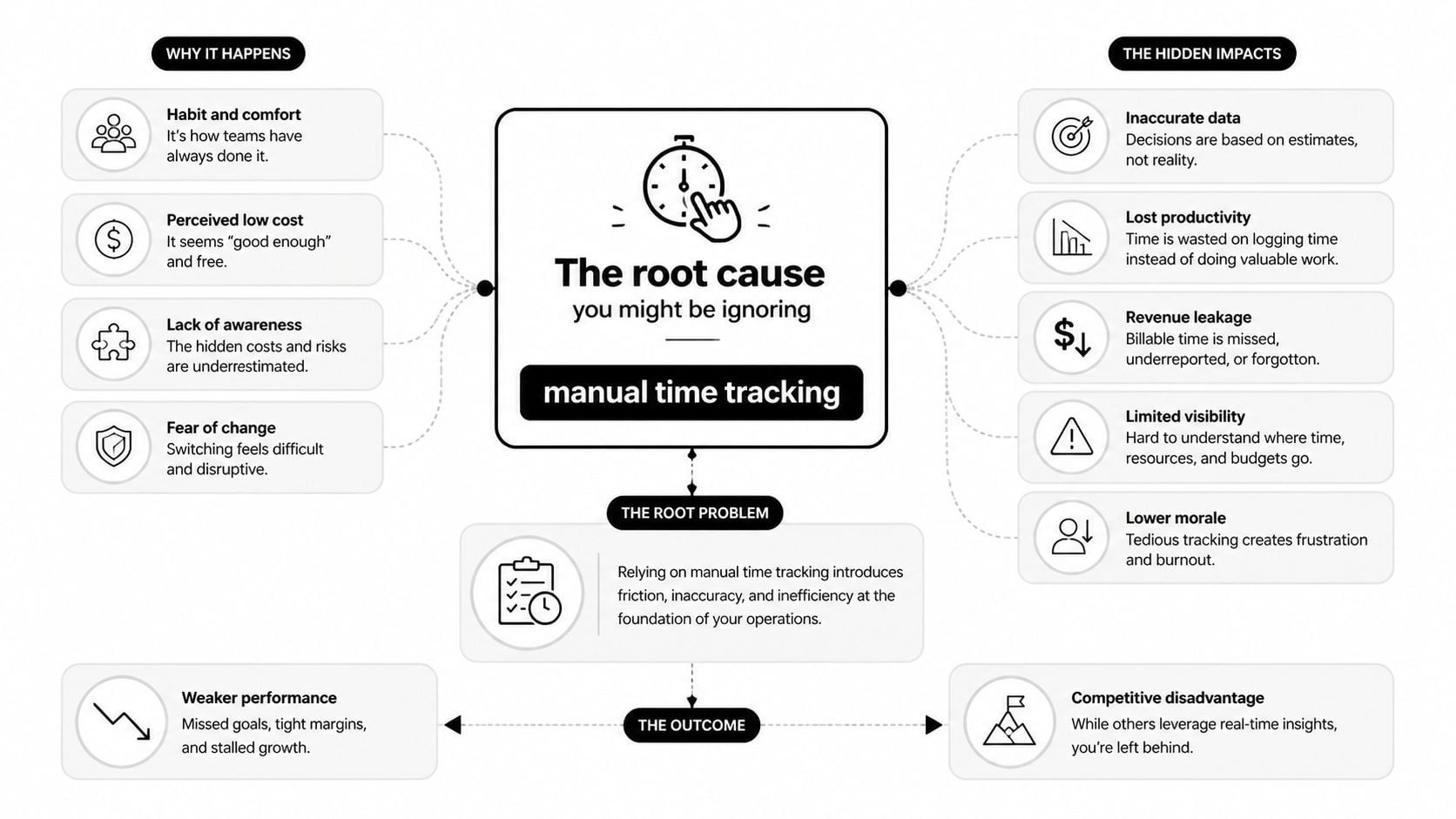
According to this discussion of major project issues on ProjectManagement.com, timesheet fatigue and manual reporting overhead cause productivity losses of 20% to 30%, and incomplete logs lead to 15% billing inaccuracies.
That’s why the common issues of project management often cluster together. Weak time capture feeds all of them.
Why manual timesheets break under pressure
Manual systems depend on behavior that disappears when teams get busy. People postpone logging. They forget context. They simplify categories. They dump work into broad buckets just to submit something. None of that means they’re lazy. It means the process fights the reality of the workday.
The damage spreads in predictable ways:
- Scope control weakens: If extra work isn’t captured clearly, nobody sees the true cost of “small” requests.
- Resource planning gets distorted: Managers think people have capacity because their logs are incomplete.
- Reporting slows down: Ops teams spend hours cleaning and reconciling instead of analyzing.
- Billing accuracy drops: Revenue leaks when client-facing work never makes it into the final record.
What manual systems reward
Manual timesheets often reward compliance over truth. People learn to submit something acceptable rather than something accurate. That creates a false sense of order, which is worse than visible chaos because it delays corrective action.
A more useful way to think about it is this:
| If time tracking is treated as… | The business gets… |
|---|---|
| Admin | Late entries, weak trust, poor forecasting |
| Billing only | Missed management insight between invoice cycles |
| Core operating data | Better decisions about scope, staffing, and profitability |
If your team hates timesheets, don’t start by asking for better discipline. Start by asking whether the method makes accuracy too hard.
A good reference point is how automated timesheets change the way you manage time. The useful shift isn’t cosmetic. It moves time capture closer to the work itself so teams don’t have to rebuild their week from memory.
The modern fix calendar-driven tracking and automated insights
The best fix I’ve seen is simple in concept. Capture work from the systems people already use, then classify and review it with less manual effort.
For most knowledge teams, the calendar is the closest thing to a shared operational record. It shows meetings, project blocks, client calls, reviews, internal work, and the fragments that usually disappear from traditional reporting. It isn’t perfect, but it’s a much better starting point than asking people to remember everything at the end of the week.

According to Eagle Point on common project management challenges, 68% of firms struggle with resource planning in work-from-anywhere models. The same source says AI-driven calendar analytics can boost utilization visibility by 35% and help teams spot untracked meetings and activities that can cause up to a 40% drop in productivity in some teams.
Why calendar-first works
Calendar-driven tracking fixes the collection problem first. That matters because most reporting issues begin at collection, not at dashboard design.
When teams connect Google Calendar or Outlook to a time analytics workflow, they no longer start from a blank timesheet. They start from actual activity. Then they can apply categories, client tags, project labels, approval rules, and reporting logic on top of something that already happened.
That changes the trade-off. Instead of choosing between “accurate but painful” and “easy but vague,” teams can get closer to accurate without adding more admin.
Here’s what that approach improves:
- Scope visibility: Extra meetings, review cycles, and ad hoc client requests show up faster.
- Resource planning: Managers can see workload patterns that static plans miss.
- Reporting speed: Dashboards update from captured activity rather than weekly reconstruction.
- Utilization analysis: Leaders can separate client work, internal work, and non-project overhead with more confidence.
What an automated workflow looks like
A practical setup usually includes calendar sync, CRM or project tags, approval logic, and filters by client, project, or team. That’s enough to make the data useful without making the process heavy.
One example is TimeTackle, which connects Google or Outlook calendars with CRM data, applies custom tags and rule-based automations, and surfaces utilization and project views through dashboards and exports. That kind of setup won’t fix bad strategy or poor client management on its own, but it does remove a lot of the friction that keeps teams from seeing what’s really happening.
Better project control starts with easier capture. If recording work depends on memory, the system will fail when the team gets busy.
This is why calendar-first automation gets overlooked in so many project management discussions. People focus on methodology, governance, and meetings. Those matter. But if the underlying work data is stale or incomplete, even a disciplined project process starts slipping.
Putting it into practice a simple framework for better projects
You don’t need a giant transformation plan to fix this. You need a cleaner operating rhythm and a better source of truth.
A practical starting framework looks like this:
Pick one trusted time source
Stop letting project data live in five places. Choose one main source for recorded work and make every downstream report depend on that source.Capture activity where work already happens
If your team lives in Google Calendar, Outlook, CRM records, and project tools, connect those systems so people review their work instead of recreating it.Review live delivery signals every week
Don’t wait for end-of-month reporting. Look at workload, project time, internal time, and unplanned activity while there’s still time to act.Give team leads usable data, not admin burden
The best managers I know don’t want more forms. They want cleaner visibility so they can make staffing, scoping, and client decisions faster. If your leads want to sharpen their formal PM judgment too, resources like online PMP practice tests can help them pressure-test how they think through delivery trade-offs.
The main shift is cultural as much as technical. Stop treating time data as a back-office chore. Treat it as operating data. Once you do that, many of the usual issues of project management stop looking random. They become visible, measurable, and far easier to fix.
If your team is stuck with late timesheets, fuzzy utilization, and reporting that arrives after the damage is done, TimeTackle is worth a look. It uses calendar-based time capture, automated categorization, and live dashboards so teams can track project work with less manual effort and make decisions from fresher data.


