



Your team looks slammed. Calendars are full. Slack is noisy. Project managers are juggling deadlines, and department leads keep saying they need more people.
Then the month closes, and the margin still looks weak.
That gap is where many agencies get stuck. Leaders see activity and assume capacity is tight, but the underlying issue is often resource underutilization. People are working, but not always on the highest-value work, not always at the right time, and not always in a way that turns effort into profit.
I've seen this pattern in agencies that thought they had a sales problem, a staffing problem, or a discipline problem. Often, they had an operations problem. They packed schedules too tightly, chased perfect utilization, and stripped out the slack that keeps delivery healthy. The result was predictable. Burnout went up, quality slipped, senior talent got buried in low-value tasks, and actual productive capacity got worse.
The fix usually starts with one uncomfortable idea. Aiming for 100% utilization is a mistake. If you remove all buffer time, you also remove room for planning, training, quality control, client changes, and the kind of thinking that prevents rework later.
Why busy doesn't always mean profitable
A familiar agency story goes like this. The creative team is online late. Account managers are in back-to-back calls. Strategy leads are pulled into pitches, reviews, and internal approvals all week. Nobody looks idle, yet the business keeps asking the same question: why aren't profits moving with effort?
The answer is that busyness and productive capacity aren't the same thing. A team can look overloaded while still wasting a lot of expensive time. Senior people get dragged into coordination work. Specialists wait on client approvals. Designers sit in meetings that don't change the work. Delivery keeps moving, but value creation slows down.
That's why resource underutilization is easy to miss. Many leaders expect it to look like empty calendars or obvious bench time. In agencies, it often looks like the opposite. It looks like a team that is fully occupied but poorly deployed.
The trap of trying to fill every hour
Some firms respond by pushing harder. They set utilization targets as high as possible, treat unbooked time as failure, and keep adding work until there's no visible slack left. That feels disciplined, but it usually creates more waste, not less.
According to ProSymmetry's research on resource utilization, aiming for utilization rates above 80% risks burnout and future underutilization due to attrition, while rates below 80% leave resources underused. That finding matters because it cuts straight through the old “keep everyone fully loaded” mindset.
Practical rule: If your schedule leaves no room for revision, training, pre-sales support, or unexpected client work, your utilization target is too high.
What profitable agencies do differently
The strongest operators don't treat every open hour as waste. They protect a controlled buffer and use it on purpose.
- They keep room for change: Client work rarely lands exactly as planned, so rigid schedules break fast.
- They protect senior focus: High-cost talent should solve hard problems, not absorb admin overflow.
- They make time for capability building: Training and process work don't bill today, but they improve margin later.
- They watch margin with workload: A packed team with weak profitability is a signal, not a success.
A full calendar can hide a weak operating model. That's why good COOs don't ask only, “Are people busy?” They ask, “Are the right people doing the right work, at the right level, with enough room to do it well?”
What resource underutilization actually means for agencies
In agency operations, the cleanest definition is simple. In professional services firms, resource underutilization is any utilization rate below 90%, calculated as (Time spent on Billable Work / Total Capacity) × 100. For example, an employee working 36 billable hours out of 40 has a 90% utilization rate, as explained in Saviom's guide to resource underutilization in professional services.
That formula gives leaders a starting point, but it also creates confusion if they use it too strictly. A utilization metric tells you how much billable work fills capacity. It does not tell you whether the work mix is smart, sustainable, or profitable.
Busy work still counts as waste
An agency can miss the mark in a few different ways:
- Senior staff doing junior work: A strategist cleaning slides or chasing status updates may look fully booked, but the business wastes expensive capacity.
- Specialists stuck in internal drag: Designers, consultants, or developers can lose hours to recurring admin and approval loops.
- Teams carrying hidden bench time: Work stalls between handoffs, approvals, or unclear priorities, so people stay “busy” without moving revenue work forward.
- Project load masking poor allocation: One team may run hot while another has usable capacity that no one sees.
That's why I tell COOs to separate activity, billable work, and value-generating work. They overlap, but they aren't identical.
A better way to read the number
The utilization formula is useful because it forces a basic question: where did the week go? If the answer is vague, the agency already has an operational visibility problem.
A good next step is to compare your current tracking against a plain definition like the one in TimeTackle's explainer on what resource utilization means. Not because another formula will save you, but because teams often discover they've been mixing client work, internal work, and low-value overhead into one blurry bucket.
If your team can't tell the difference between billable hours, support work, and admin drag, you can't manage utilization. You can only react to it.
The metric matters. The interpretation matters more. Agencies get into trouble when they chase the percentage and ignore what fills it.
The hidden causes beyond not enough client work
When leaders see unused capacity, many jump straight to pipeline. Sometimes that's correct. Often it isn't.
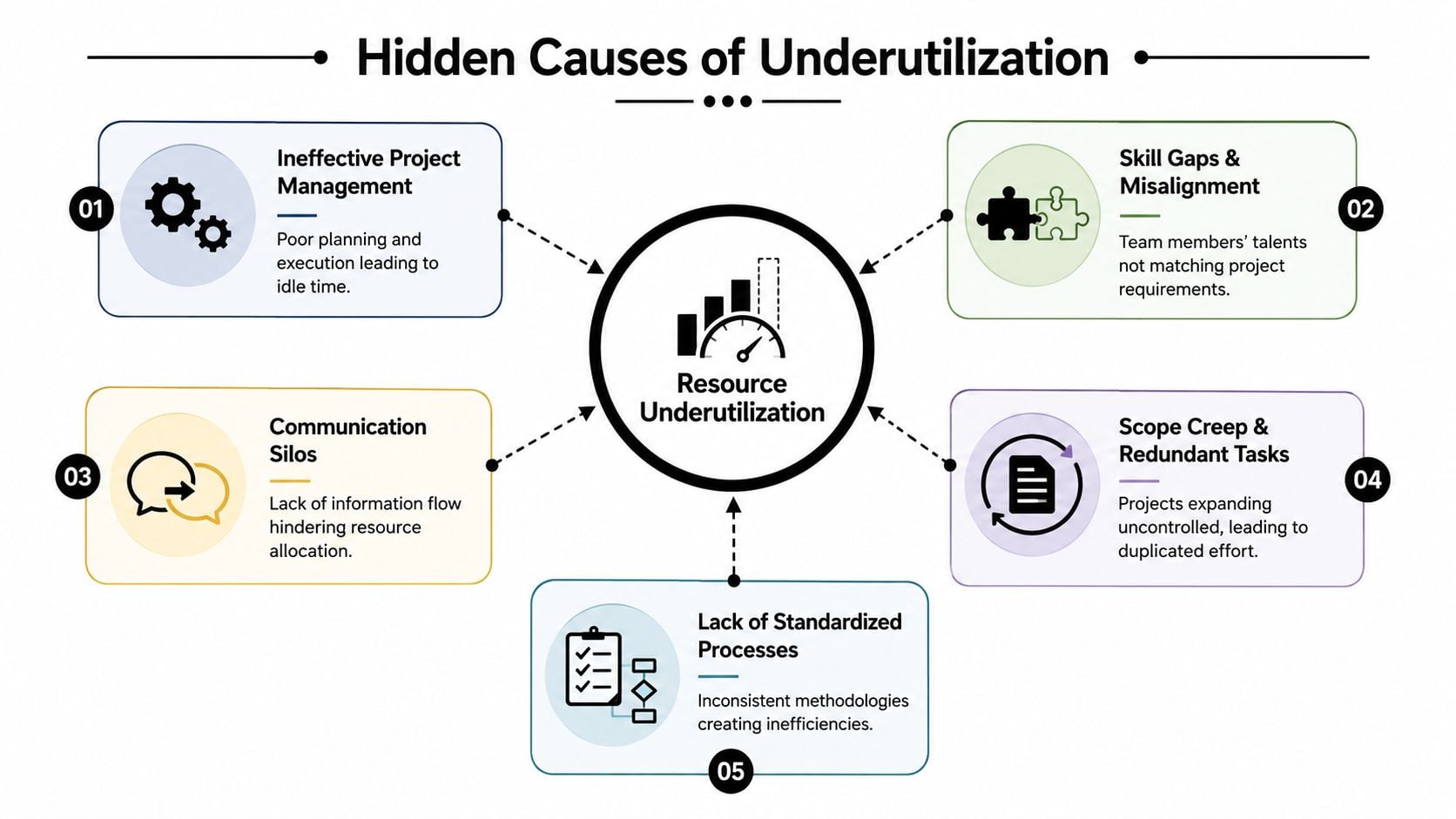
A lot of agency underuse comes from operational friction inside the building. The work exists, but it doesn't move cleanly to the right people in the right sequence. Capacity gets lost in handoffs, weak scoping, unnecessary meetings, and role confusion.
Misalignment is more common than most leaders think
One of the clearest examples is skill-task mismatch. According to Birdview, 68% of underutilized professionals in agencies are capable of higher-value tasks but are stuck in low-impact roles. Their analysis on resource underutilization in agencies points to a problem that many firms misread as a sales issue.
That pattern shows up everywhere. A senior implementation lead handles repetitive setup work because nobody documented the process. A strong account manager spends hours rebuilding reports by hand. A paid media specialist waits days for basic approvals and then rushes through execution at the end.
Five problems worth checking first
Before you assume demand is weak, inspect these areas:
- Poor role definition: If nobody has drawn a clear line between strategic work, support work, and admin work, expensive talent gets used badly.
- Broken project planning: Weak scoping creates stop-start delivery, which leaves people available on paper but unusable in practice.
- Communication silos: Sales promises one thing, delivery plans another, and staffing learns about either too late.
- Redundant work: Teams recreate decks, reports, or workflows because process standards are loose or absent.
- Manual reporting drag: People spend time proving work happened instead of doing the work.
What usually fails: Hiring before fixing allocation. More headcount rarely solves poor flow.
The clue hidden in “everyone is busy”
If an agency says, “No one is free,” but projects still move slowly, I usually look for one of two issues. Either the wrong people are overloaded, or the right people are spending too much time on tasks below their level.
Underutilization isn't only idle time; it's also misused time. That's the kind that hurts margin, because the team appears productive while the work mix erodes profit.
The practical test is simple. Review a sample week for a few senior team members. If too much of their time goes to coordination, rework, status chasing, or low-skill execution, you've found underutilization hiding inside overwork.
How to see underutilization in your data
Most agencies already have the raw data they need. It's just scattered across calendars, PM tools, CRM notes, spreadsheets, and half-finished timesheets. That makes the conversation subjective, which is why so many utilization reviews turn into arguments.
The fix is to build one operating view of capacity, billable time, and work mix.

Start with one benchmark and make it visible
Gartner analyst Robert Handler specifies that the ideal billable utilization rate for professional services is strictly between 70% and 80%, and he advises managers to calculate targets below 80% for all project resources, as cited by Runn in its article on billable utilization targets for professional services.
That target is useful because it gives leaders permission to stop chasing a false perfect score. It also creates a stable range for dashboard design.
A basic utilization dashboard should show:
- Individual billable utilization: Who is below target, who is above it, and who has been trending in either direction.
- Team-level load by function: Strategy, creative, delivery, account management, and support rarely move in sync.
- Planned versus actual allocation: This exposes scope drift, stalled work, and scheduling errors.
- Non-billable categories: Internal meetings, reporting, training, and business development should be visible, not lumped together.
For teams that still fight software waste in other systems, the same discipline applies elsewhere too. If you're auditing overhead across the stack, this resource on how to identify unused Zendesk licenses is a useful example of how hidden waste sits in plain sight when no one reviews actual usage.
Pull data from systems people already use
You don't need a giant BI project to start. Most agencies can get a workable first view from a few sources:
| Data source | What it tells you | Common warning sign |
|---|---|---|
| Calendars | Meetings, calls, reviews, focus time | Senior staff buried in internal meetings |
| Project tools | Planned work, owners, deadlines | Tasks stall between functions |
| CRM | Pre-sales effort and client touchpoints | Delivery teams doing too much unpaid support |
| Time capture data | Actual time mix by project or client | Billable load lower than expected |
A practical reference for the math is TimeTackle's walkthrough on how to calculate utilization rate. The key isn't the formula by itself. The key is making sure every team uses the same rules when they classify time.
Watch the trend, not just the snapshot. One quiet week is noise. A repeated pattern is a staffing or process issue.
What a COO should look for first
I'd start with exceptions, not averages. Averages hide problems. They smooth out the consultant who is overloaded, the designer who is trapped in low-value internal work, and the implementation team that keeps waiting on inputs.
Look for persistent patterns like these:
- A function that stays below target for multiple review cycles
- A high performer with low billable time but high meeting volume
- A department that appears full but has weak margin
- A repeated gap between scheduled work and recorded work
That's where underutilization becomes visible enough to fix.
The real business cost of an underused team
Underutilization hits revenue first, but the larger damage usually shows up in planning. Once teams stop trusting the numbers, every staffing decision gets worse.
Aprika notes that underutilization creates a measurable gap between available working hours and actual hours spent on billable tasks, which skews historical data and makes future capacity planning and demand forecasting unreliable in its piece on the challenges of under-utilization of resources.
Bad history creates bad decisions
When your past data is distorted, several things happen at once.
- Forecasts lose credibility: Leaders can't tell whether they need more pipeline, more staff, or better assignment logic.
- Hiring gets reactive: Managers ask for headcount because work feels chaotic, even when the core issue is poor deployment.
- Pricing gets weaker: If delivery patterns are inconsistent, project estimates become less reliable.
- Sales and operations drift apart: Sales believes delivery has capacity. Delivery believes it doesn't. Both may be reading flawed data.
That's why resource underutilization is not just a delivery metric. It's a planning risk.
The human cost is usually delayed, then sudden
People don't quit because a utilization spreadsheet says something odd. They quit because their work stops making sense.
A senior person who spends too much time on low-value tasks starts checking out. A specialist who sits underused too long gets rusty or bored. A team that swings between idle periods and overloaded periods loses trust in management because the system feels random.
Underuse and burnout can exist in the same agency at the same time. One team waits. Another team drowns.
That combination is expensive because it creates a false narrative. Leaders think they need more pressure, tighter schedules, or stricter reporting. In many cases, they need cleaner role design, better staffing logic, and a more honest use of buffer time.
A weak utilization model doesn't just reduce this quarter's margin. It trains the whole business to make worse decisions next quarter.
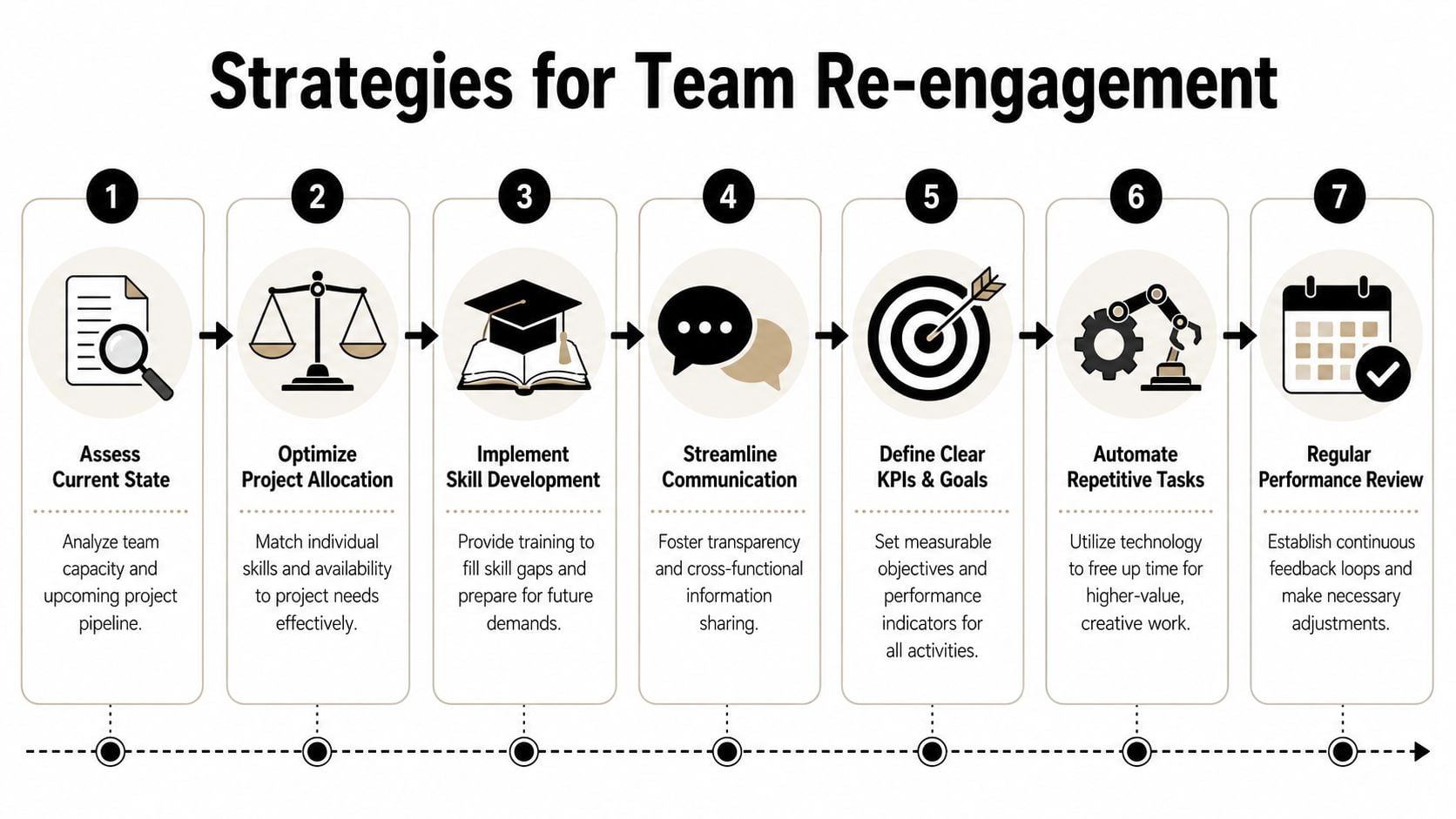
Practical strategies to get your team back on track
Most agencies do not solve this by demanding better timesheets. They solve it by changing how work gets assigned, scoped, reviewed, and protected.
The goal is not to squeeze every hour. The goal is to turn available capacity into useful output without burning people out.
Protect buffer time on purpose
This is the part many agencies resist. They assume any non-billable space is waste, so they remove it. Then they wonder why work quality drops and delivery gets jumpy.
A better model is to plan controlled slack into the system. Use that time for training, process fixes, internal QA, proposal support, and proactive client work. Those hours may not bill directly, but they prevent low-value churn later.
Fix allocation before asking for more demand
When capacity feels off, start with assignment logic.
- Map skills to work type: Keep a live view of who should handle strategic work, execution work, and support work.
- Review senior time monthly: If expensive people are doing repeatable admin, strip that work out fast.
- Split true non-billable work from waste: Training and process improvement are not the same as status meetings with no decision.
- Set a cap on concurrent work: Too many active projects create context switching and hidden idle time.
Tighten the front end of delivery
A lot of underuse begins before kickoff. Sales closes work with loose assumptions, operations fills gaps later, and teams spend the first weeks untangling the scope.
I'd put these controls in place:
- Require staffing review before final sign-off. Delivery should confirm skill fit and likely capacity before sales locks the promise.
- Define handoffs clearly. Every project should have named owners for approvals, inputs, and decisions.
- Tag recurring causes of delay. If waiting on assets or approvals keeps disrupting utilization, make it visible and chargeable where appropriate.
- Build cross-training where demand shifts often. You need enough flexibility to move work without dropping quality.
For operators working on process cleanup more broadly, this guide for operations teams is useful because it frames efficiency as a system issue, not just a labor issue.
“We need more work” is often the wrong diagnosis. Many firms need cleaner assignment, better scoping, and fewer handoff failures.
Change the management rhythm
Underutilization gets worse when reviews happen too late. Quarterly analysis is useful for trends, but not for control.
A tighter rhythm works better:
- Weekly: Check load by function and by seniority level.
- Monthly: Review time mix, recurring delays, and projects with weak margin.
- Quarterly: Adjust role definitions, hiring plans, and training priorities.
This approach gives teams room to improve output without turning the agency into a utilization factory.
Building an efficient workflow with the right tools
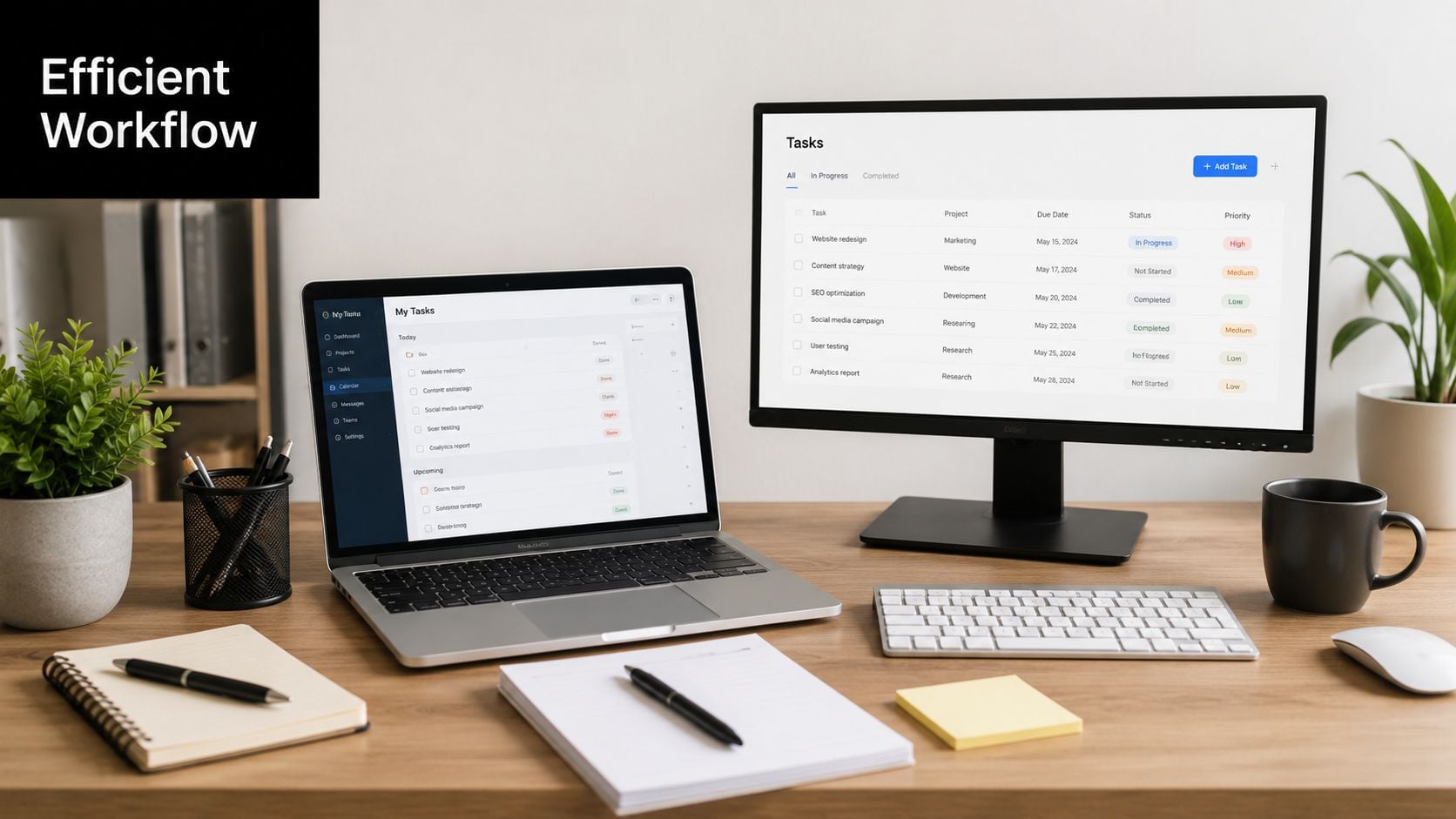
Process discipline matters, but it breaks down fast when data collection is manual. If your agency still relies on people to reconstruct their week from memory, the reporting layer will stay weak no matter how smart the operating model is.
That's why the workflow needs to start where work already happens. For most service teams, that means calendars, project systems, and CRM activity.
Build around captured activity, not memory
A workable setup usually includes these pieces:
- Calendar-based activity capture: Google Calendar and Outlook already contain a large share of delivery reality.
- Project and client tagging: Meetings, working sessions, reviews, and calls need consistent labels by client, project, and work type.
- Rule-based categorization: Repetitive admin should be automated so people don't spend time cleaning data by hand.
- Dashboard filters by team and service line: Leaders need to compare functions without exporting five versions of the same report.
This is also where tools like Asana, Jira, HubSpot, and Salesforce should support the picture rather than compete with it. The goal is one operating view, not another silo.
Use tools that make utilization visible in real time
If you want to connect strategy to daily behavior, use systems that can show actual work mix as it happens. One option is TimeTackle's resource capacity planning tools, which connect calendar activity and categorization rules so teams can analyze utilization, client effort, and reporting data with less manual cleanup.
The larger point is not the vendor choice. It's the design choice. If the tool depends on heavy manual entry, people will avoid it, managers will distrust it, and your utilization data will decay.
For leaders weighing the bigger operating case, this overview of the benefits of workforce efficiency is a helpful companion because it ties workflow visibility to staffing, performance, and planning decisions.
Good tooling should reduce admin work, not create a second job for the team.
A solid workflow gives you three things at once: cleaner data, earlier warning signs, and a better way to protect strategic buffer time without losing control of delivery. That's what turns utilization from a backward-looking report into a management system.
If you want a cleaner way to spot resource underutilization without piling more timesheets onto the team, TimeTackle is worth a look. It captures work from the calendar, applies tags and rules automatically, and gives operations leaders a clearer view of billable time, internal load, and capacity by client, project, or team.


