


You already know the feeling.
A client asks for a fast-turn proposal. Sales says delivery should be fine. Your spreadsheet says two people are available next week, one specialist has room later in the month, and margins still look acceptable. Then the week gets underway. Those “available” people are buried in internal reviews, status calls, Slack interruptions, and work that never made it into the plan. By Friday, the proposal slipped, one project manager is apologizing to three clients, and your strongest team lead is asking for help because their calendar is full and their actual work still hasn't started.
That isn't a people problem. It's a planning problem.
Most mid-sized agencies don't fail at strategy because leaders lack ambition. They fail because strategy sits in one system, delivery sits in another, and actual time use sits in people's heads until someone forces it into a timesheet. The result is a resource plan that looks tidy in a deck and falls apart in real work.
Strategic resource planning fixes that, but only if you treat it as an operating system, not an annual exercise. It has to connect growth goals, staffing choices, calendar reality, project load, and the dull but expensive friction that eats a team's week.
The resource spreadsheet is failing you
The spreadsheet usually starts as a sensible tool.
A COO asks for more control, so operations builds a staffing sheet. It lists projects, roles, dates, estimated effort, and a rough view of who is free. For a while, that works. Small teams can carry a lot with smart people and good instincts.
Then the agency grows.
Now there are more accounts, more specialists, more dependencies, and more “small” internal tasks that never stay small. The spreadsheet still shows capacity, but delivery teams feel squeezed all the time. That gap matters more than the sheet itself. If the plan says one thing and the week feels completely different, your planning system has stopped telling the truth.
What the sheet gets wrong
Most resource spreadsheets assume work is stable enough to plan in blocks. Agency work usually isn't.
A designer may look free for six hours on Tuesday, but those hours sit between a client review, an internal kickoff, a revision call, and a last-minute escalation. On paper, that is capacity. In practice, it's fragments. Fragments don't ship work well, especially for deep-focus roles.
Here's what I see most often in mid-sized firms:
- Availability is treated as open space: An empty cell gets counted as usable time, even when that person is already carrying unresolved work.
- Skills are flattened into role labels: “Designer” or “strategist” looks neat, but it hides who can lead a pitch, who can handle a difficult client, and who still needs support.
- Replanning happens too late: By the time the sheet gets updated, the damage is already in motion.
Your team isn't unreliable. Your inputs are.
Why this turns into fire-fighting
When data is old or incomplete, managers compensate with meetings, check-ins, and manual status chasing. That creates more overhead, which makes the original plan even less accurate.
So the agency gets trapped in a loop. Plans become optimistic because they ignore the mess. Teams miss deadlines because the plan was optimistic. Leaders ask for more reporting because deadlines slipped. Reporting steals more time from the work.
That's why this issue shows up as burnout, margin pressure, and endless reprioritizing. The spreadsheet didn't just fail to organize work. It trained the business to react late.
What strategic resource planning means for agencies
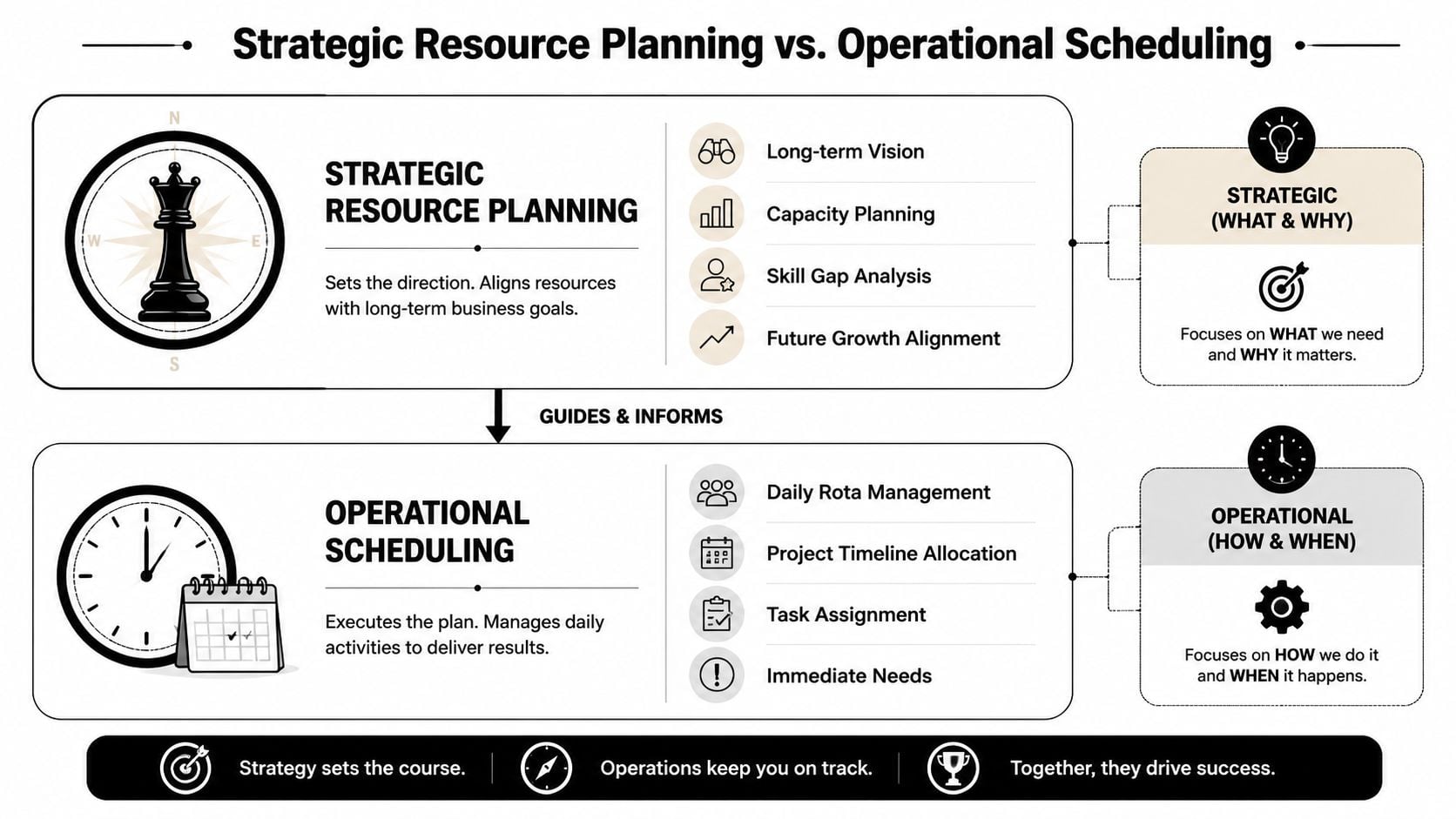
Strategic resource planning is not the same thing as scheduling.
Scheduling answers short-range questions. Who's on this job next week? Who can cover the kickoff? Who can take revisions without pushing another deadline? You need that. Every agency does.
Strategic resource planning sits above it. It asks whether your current team shape, skills, and capacity match the business you're trying to build over time.
According to Productive's guide to strategic human resource planning, this planning operates on a 1- to 5-year horizon and follows a cycle of current-state analysis, needs forecasting, gap analysis, and strategy implementation.
City planning versus traffic control
The simplest way to explain the difference is this.
Operational scheduling is traffic control. You're managing flow, avoiding collisions, and keeping things moving today.
Strategic resource planning is city planning. You decide what kind of agency you want to be, what capabilities you'll need, where pressure will build, and whether your current system can support future demand.
That distinction matters because agencies often try to solve strategic issues with tactical fixes. They overbook a senior person, add a contractor, move a deadline, or ask a team to stretch one more week. Those moves can save a project. They don't fix the underlying capacity model.
The planning questions that matter
A real strategic process forces leadership to answer tougher questions:
| Question | Why it matters |
|---|---|
| Do we have the right skill mix for the clients we want next year? | Growth breaks when sales outpaces capability |
| Which roles carry too much hidden management work? | Senior capacity disappears faster than plans show |
| Where are we relying on a few people to absorb chaos? | Single points of failure create delivery risk |
| What work should not be done by high-cost specialists? | Margin falls when expensive talent handles low-value tasks |
What good planning looks like in practice
Strong agencies usually do four things well:
- They assess current capacity accurately: Not just headcount, but real working capacity, role by role.
- They forecast demand by service line: They don’t lump all future work into one generic pipeline.
- They identify gaps early: Skills, seniority, utilization risk, and bench risk all show up before they become urgent.
- They act on the gap: Hiring, training, role redesign, scope control, and better assignment rules all sit on the table.
Practical rule: If your plan cannot tell sales what kind of work you can safely sell, it isn’t strategic yet.
Why your current resource plan is hiding the truth
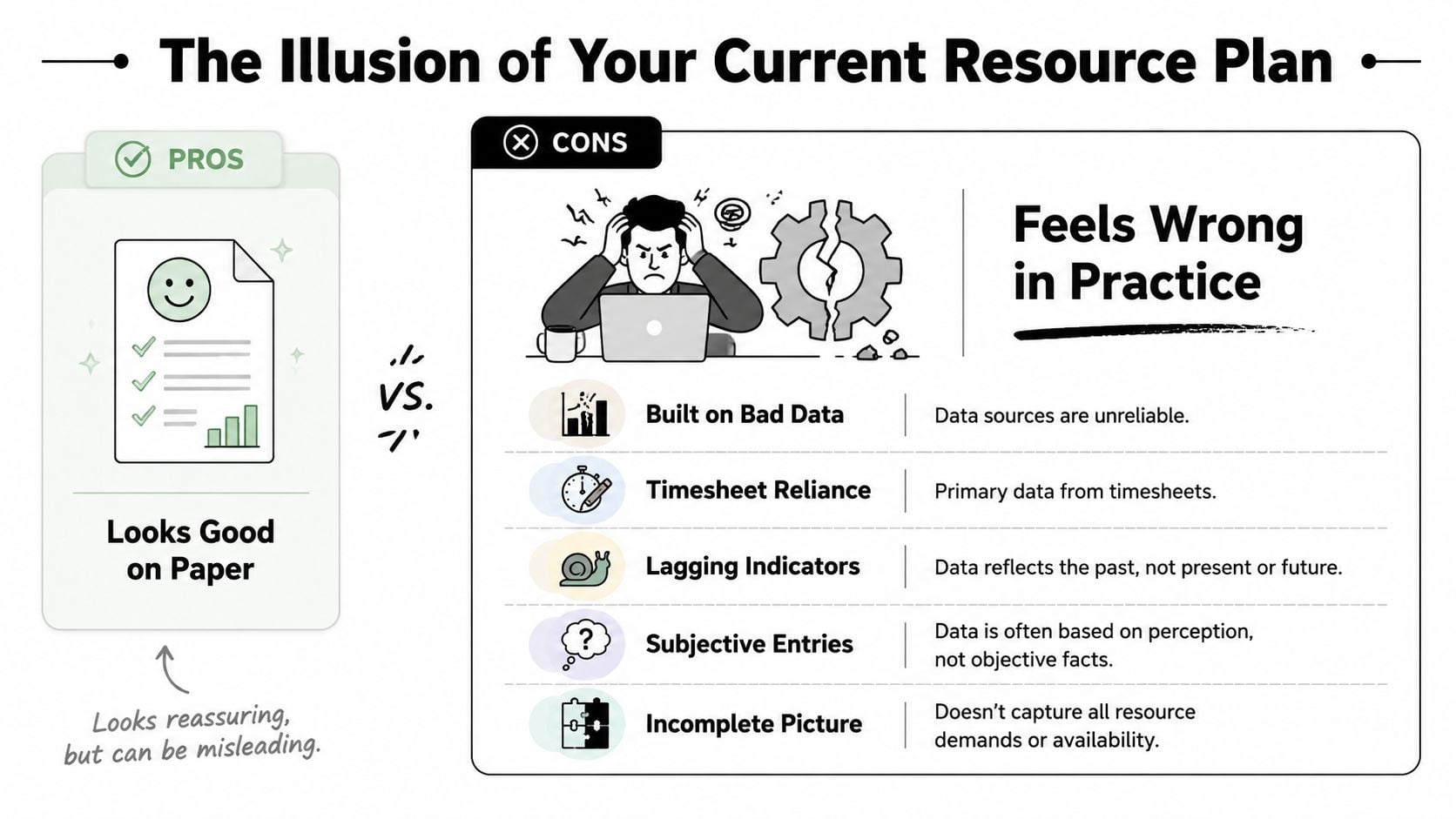
Most agency resource plans are built on data that arrives too late to help.
Timesheets are the usual source. They can still help with billing and retrospectives, but they’re weak as a planning foundation because they tell you what someone entered after the fact. They don’t show interruptions clearly, they rarely capture context switching well, and they almost never reflect the shape of a person’s day.
That blind spot is larger than many teams admit. A 2024 Gartner study cited here found that 68% of project delays stem from “unplanned context switching” and “hidden administrative overhead.” The same source says less than 5% of strategic planning literature suggests integrating granular time-capture data, which leaves plans blind to the 30% of time often lost to untracked activities.
The hidden work your plan ignores
Agency calendars are full of work that doesn’t fit neatly into project estimates:
- Coordination overhead: Internal reviews, handoffs, follow-ups, and rescheduling
- Client friction: Extra calls, urgent edits, clarification loops, and approval delays
- Administrative drift: Status prep, CRM updates, invoicing queries, and compliance tasks
- Attention loss: Switching between accounts, roles, and deadlines in the same day
Each item looks minor on its own. Together, they redraw your true capacity.
A plan that ignores this tends to make the same mistakes repeatedly. It overcommits senior staff because they “only” have a few hours booked. It assumes project estimates translate cleanly into delivery time. It labels overloaded teams as inefficient when the underlying problem is planning based on incomplete evidence.
Why teams stop trusting the plan
Once people see that the numbers don’t reflect reality, they stop using the system with integrity.
Project managers start padding estimates. Team leads protect key people informally. Department heads hold back capacity because they expect surprise requests. Sales loses trust in delivery forecasts. Finance sees utilization swings that nobody can explain cleanly.
A bad resource plan doesn’t only hide capacity. It changes behavior across the business.
That’s the operational gap in plain terms. Leadership thinks it has a strategic view. Delivery teams are living inside a different one.
A practical framework for a modern resource plan
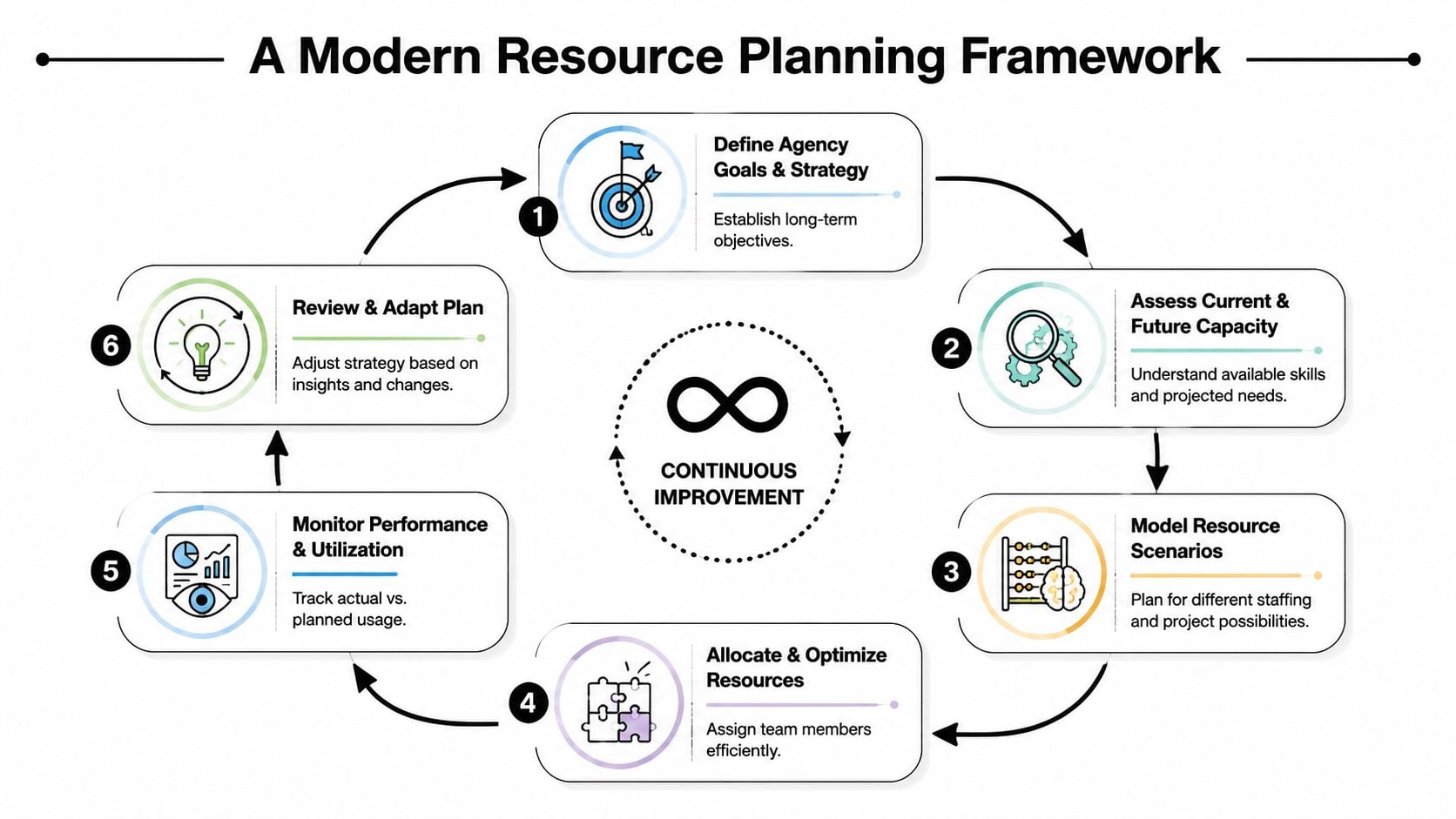
A useful plan is not a yearly document with nicer formatting. It is a repeatable cycle that gives leaders enough signal to make better decisions before pressure turns into missed deadlines.
The frame I trust most is simple. Start with the decision you need to make. Then collect the data that can answer it. That sounds obvious, but a lot of agency reporting still works backward from whatever data happens to be easy to pull.
The EDUCAUSE framework for data-driven strategic planning describes this well. Define the focus, identify the data needed to assess the current state and future drivers, use a systematic collection method, and organize inputs in a matrix before making capacity or investment choices.
A working cycle for agency operations
I’d translate that into five practical moves.
-
Define the business question
Don’t begin with reporting. Begin with tension. Are you trying to grow a service line, stop overloading senior staff, improve forecast confidence, or decide whether to hire? One planning cycle should answer a small set of hard questions.
-
Map current capacity
Most firms rush resource considerations. Don’t just count people. Map actual available time, key skills, recurring internal load, role constraints, and dependencies between teams.
-
Collect data from where work happens
If people have to reconstruct their week from memory, your planning data will stay weak. Pull information from calendars, project tools, CRM records, and delivery systems. If you need a practical reference point, this guide to a project management resource plan is a useful checklist for structuring the inputs.
-
Model likely scenarios
Build a few versions of reality. What happens if the pipeline closes faster than expected? What if one senior hire slips? What if a key client expands and absorbs specialist time for a quarter?
-
Review and adjust on a rolling basis
Conditions change too fast for static planning. The model should update as work patterns shift, not just when finance asks for a quarterly review.
What to collect and what to ignore
A compact planning system usually works better than a giant one.
| Keep | Drop |
|---|---|
| Capacity by role and person | Vanity dashboards with dozens of charts |
| Demand by service line or account type | One blended demand view for the whole agency |
| Calendar load and meeting patterns | Manual comments no one reads later |
| Rework, delays, and blocked time | Broad labels that hide the cause |
Operational note: If a metric doesn’t change a staffing, sales, or delivery decision, it’s reporting noise.
The key metrics that actually move the needle
Teams often swing between two bad options. They either track almost nothing, or they track everything and can’t tell what matters.
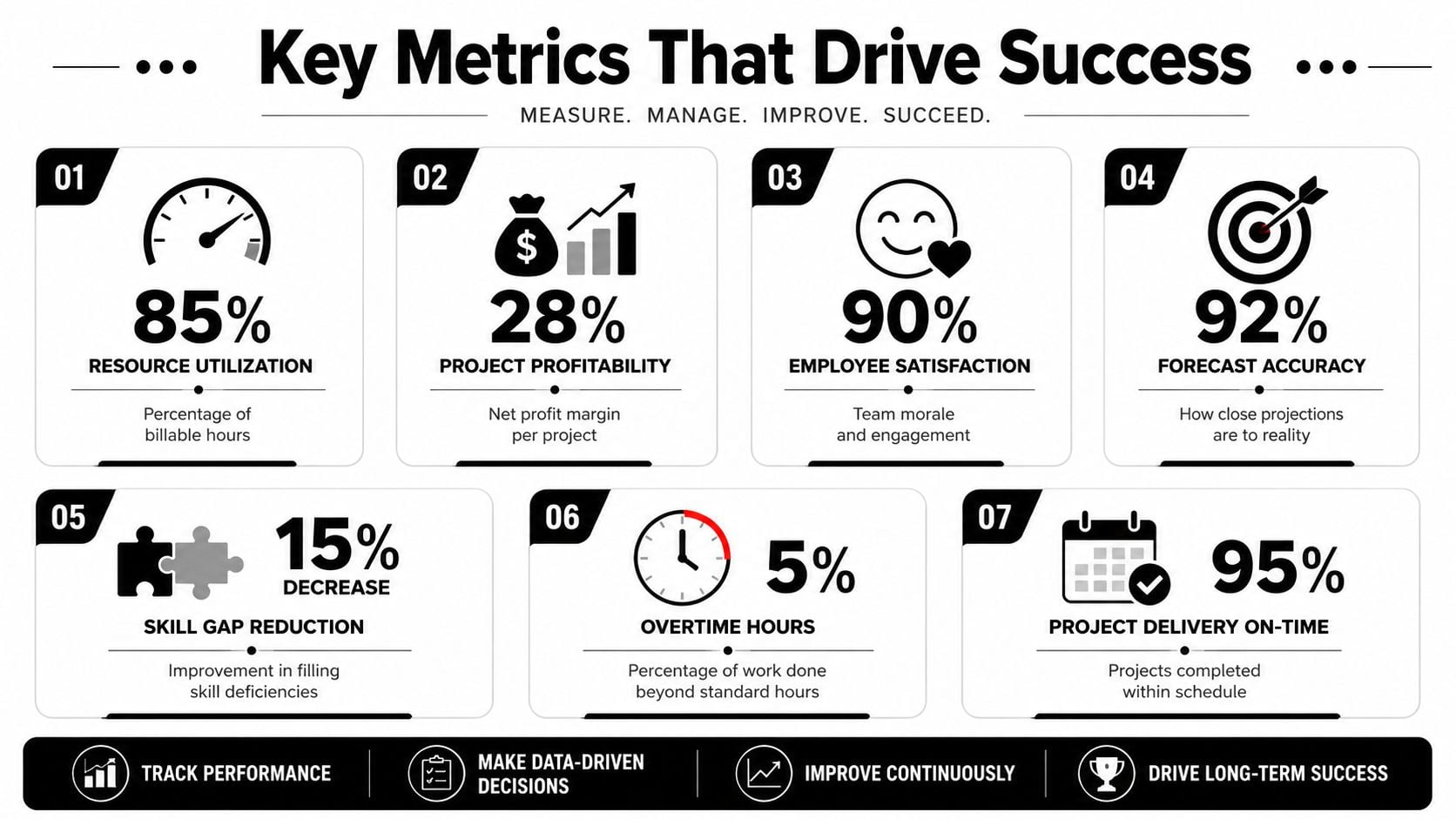
A better standard is smaller and sharper. OnStrategy’s guidance on strategic planning basics recommends translating objectives into about 5–7 KPIs and reviewing them regularly. The same guidance warns that plans extending beyond 36 months become more failure-prone, which is a good reminder to keep resource planning tied to rolling reviews instead of fixed long-range assumptions.
The metrics worth watching
For a mid-sized agency, I’d focus on a small set like this:
- True capacity: Not nominal hours. Real productive time after recurring meetings, admin load, and internal obligations.
- Utilization quality: Not just whether people are busy, but whether expensive roles spend time on the right work.
- Forecast accuracy: The gap between planned allocations and actual time patterns.
- Project profitability: Margin by project type, team shape, or client segment.
- Overload risk: Persistent signs that some roles or teams absorb too much interruption and unplanned work.
- Non-revenue investment time: Training, process fixes, knowledge sharing, and team development.
The last one gets cut too often because it looks optional when delivery gets tight.
The metric most agencies misread
Non-revenue time is usually where weak planning shows up first. Leaders say they value training and process improvement, then squeeze those hours the minute utilization slips.
That is short-term thinking. According to the 2025 McKinsey survey cited here, high-performing teams in mid-sized agencies spend 15–20% of their week on non-revenue activities like training and process improvement. The same source says 80% of strategic plans force cuts to that time, which led to a 30% increase in burnout and a 25% drop in innovation within six months.
That doesn’t mean every internal meeting is valuable. Many aren’t. It means protected non-client time needs better tagging and better judgment, not blanket cuts. If you want a useful starting point for choosing practical measures, this roundup of essential project management metrics for 2025 is worth reviewing.
Track non-revenue time by type. Training is different from admin drag, and process improvement is different from status churn.
Choosing the right tools for automated planning
If your planning process still depends on people remembering and retyping what happened, you’ll keep getting delayed signals.
That’s why the tool decision matters. The point isn’t to buy software because software is modern. The point is to remove manual collection as the main source of truth. Agencies need systems that capture work with as little extra effort as possible, then turn that data into something operations can act on.
The market has already moved in that direction. In 2026, 54% of resource managers reported using dedicated resource management software, overtaking spreadsheets for the first time, and 58% ranked aligning capacity with demand as a top priority, according to Runn’s resource management statistics roundup.
What a planning tool should actually do
A useful system should help you answer practical questions quickly:
- What is this team really available for next week and next month?
- Where is meeting load crowding out project work?
- Which accounts create hidden overhead?
- What happens to delivery if one deal closes early or slips?
If a tool only gives you prettier reports after the month ends, it isn’t helping planning much. It’s helping narration.
Why calendar-based data matters
For agencies, calendar data is often the closest thing to operational ground truth because a large share of real work is scheduled there first. Reviews, handoffs, client calls, internal syncs, workshops, approvals, and blockers all leave a trace.
That doesn’t replace project systems or finance data. It complements them. Project tools tell you what should happen. Calendars often show what filled the week.
One option in this category is TimeTackle’s list of resource capacity planning tools for agencies. Platforms like this pull activity from Google or Outlook calendars and categorize time with tags, automations, and dashboards, which can reduce timesheet fatigue and give operations teams a cleaner read on utilization, meeting overhead, and real capacity.
A simple buying filter
When evaluating tools, I’d ask four blunt questions:
| Question | Why it matters |
|---|---|
| Does it reduce manual entry? | Adoption falls when reporting feels like extra work |
| Can it show actual time patterns by team and client? | You need evidence, not averages |
| Can operations filter by role, project, and service line? | Broad reporting hides constraints |
| Can the data feed planning reviews regularly? | Static exports won’t keep up |
Buy for signal quality, not feature count.
How a creative agency put this plan into action
A mid-sized creative agency I'd consider typical had a familiar problem. Sales believed the team had room. Project leads disagreed. The spreadsheet showed available hours, yet the same senior designers kept becoming bottlenecks and deadlines kept sliding.
The turning point came when operations stopped asking, “Who is booked?” and started asking, “What is taking this team's week?” That sounds like a small wording change, but it shifts attention from planned allocations to observed time use.
Once they reviewed calendar patterns alongside project commitments, the issue became easier to see. Senior creatives were spending too much of their week in review loops, status meetings, and internal coordination that nobody had counted as delivery load. The resource plan wasn't wrong because the math was bad. It was wrong because the inputs ignored the work around the work.
They changed three things.
First, they tightened meeting rules for design reviews and recurring internal check-ins. Second, they moved some coordination work to lower-cost roles with clearer ownership. Third, they updated capacity planning to reflect actual calendar load before approving new work.
The result was not magic. They still had trade-offs, and they still had weeks where demand spiked. But they could finally trust the signal. Sales had a firmer answer on what could be sold. Delivery leads had evidence when they pushed back. Senior staff got more focus time because operations stopped pretending scattered hours were the same as usable capacity.
That's what good strategic resource planning looks like in an agency. It connects ambition to the actual shape of the workday.
If your agency is still planning from spreadsheets and chasing timesheets after the fact, TimeTackle is worth a look. It captures work from the calendar, helps categorize time with less manual effort, and gives operations teams a clearer view of utilization, overhead, and actual capacity so planning decisions rest on what people are really doing, not what they remember later.


