



Every agency hits the same wall at some point. Time lives in calendars, tasks live in project tools, costs live in finance systems, and invoices get built in spreadsheets that only one operations manager fully trusts. By the time leadership asks, “Are we making money on this account?”, someone is already copying rows between tabs and hoping nothing broke along the way.
That workflow fails in quiet ways. Hours get logged late. Client work gets tagged to the wrong project. Internal meetings slip into billable buckets. Then the bad data moves downstream into utilization reports, margin reviews, and invoices, where it stops looking like a timesheet problem and starts looking like a planning problem.
A good time tracking API fixes the plumbing. It gives you a repeatable way to move time data from where work happens into the systems that run the business. That might mean pushing calendar-based activity into reporting, syncing approved entries into payroll, or feeding project dashboards with current data instead of last Friday's export.
If you're still cleaning CSVs by hand, this is the shift to make. Teams that move to automated timesheets usually don't just save admin time. They get cleaner billing, faster month-end reporting, and fewer arguments about whether the numbers are right.
The end of manual reporting chaos
The pattern is familiar. A client asks for a billing breakdown. Finance wants labor cost by project. Delivery leads want utilization by team. None of those answers live in one place, so ops pulls a timesheet export, joins it with project budgets, checks a cost sheet, then fixes exceptions by hand.
That process is slow, but speed isn't the primary problem. Trust is.
If the spreadsheet depends on manual lookups, hidden formulas, and a few “temporary” columns no one wants to touch, every report becomes suspect. Leaders stop arguing about what to do and start arguing about whose numbers are correct.
Where the mess usually starts
Manual reporting tends to break in the same spots:
- Late entry correction: People remember work after the fact, so they guess durations or forget context.
- Category drift: A project name changes in one tool but not another, which means reports split one account into multiple versions.
- Approval gaps: Finance assumes time was reviewed, but no system enforced that check.
- Billing mismatches: Client-facing work, internal support, and non-billable overhead all end up mixed together.
A time tracking API gives you a way out because it replaces one-off exports with a system. Instead of asking people to prepare data for reporting, you pull structured data directly from the source, validate it, enrich it, and send it where it needs to go.
Manual reporting rarely breaks all at once. It breaks one exception at a time, until nobody trusts the totals.
For agencies, that matters more than the technical elegance. The API is useful because it turns time entries into operational data. Once time data moves cleanly into dashboards, cost models, and invoicing workflows, project profitability stops being a monthly reconstruction exercise.
What changes when the pipeline is automated
The biggest shift is that reporting stops being a side job.
Project managers can see whether work is landing in the right client bucket. Finance can reconcile approved time instead of raw submissions. Leadership can compare billable effort against delivery capacity without waiting for a custom spreadsheet refresh.
That's the definitive end of reporting chaos. It's not that spreadsheets disappear. It's that spreadsheets stop being your integration strategy.
What a time tracking API actually is
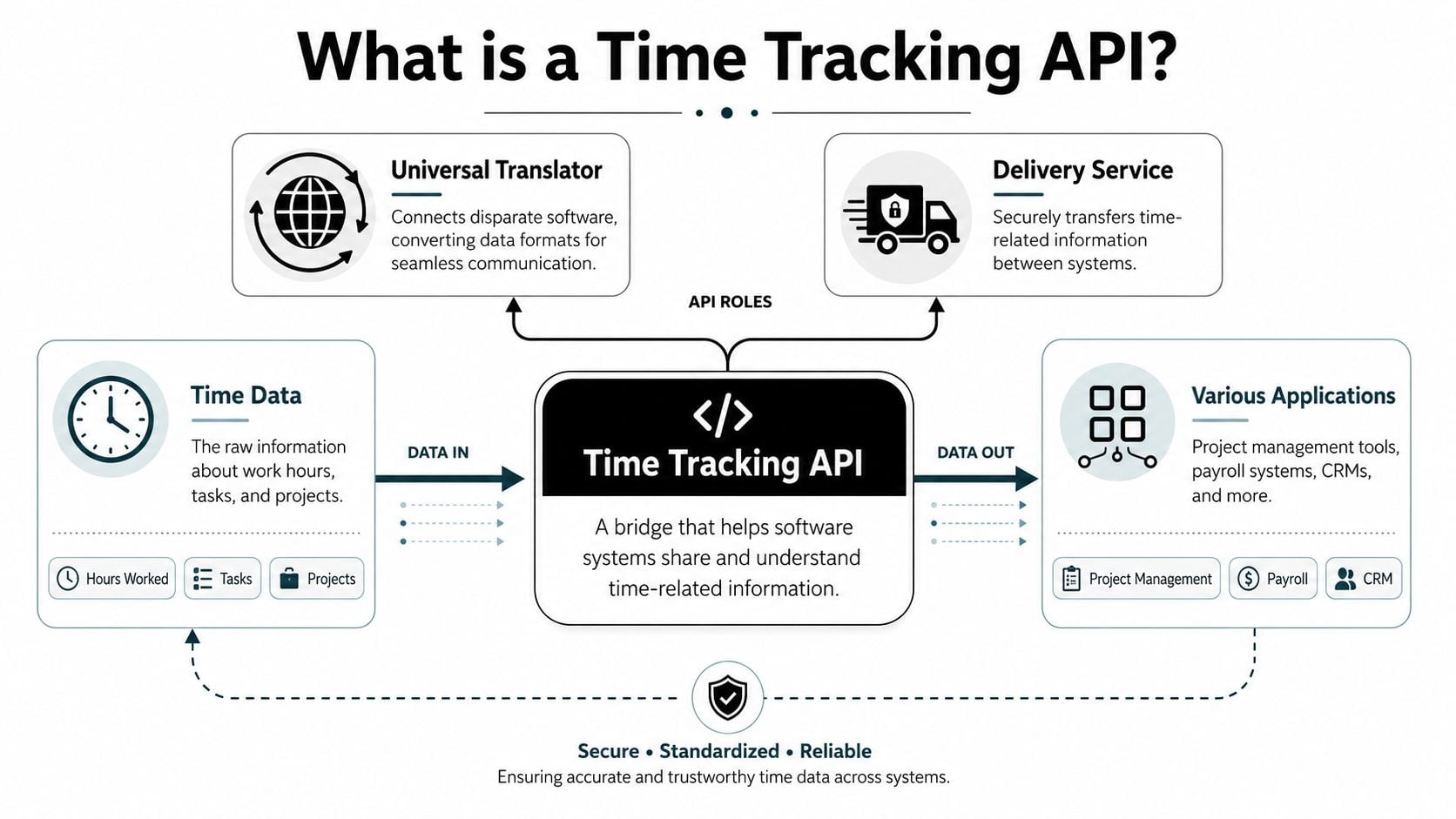
A time tracking API is the connection layer between your time data and the rest of your stack. It lets software send, retrieve, and update records about hours worked, projects, tasks, approvals, and related metadata without someone exporting a file and uploading it somewhere else.
The simplest way to think about it is this. The API is both a translator and a courier. It translates data into a format other systems can use, and it moves that data between systems on demand.
Why APIs beat CSV handoffs
CSV exports still work for small teams, but they break down once reporting needs to be frequent, consistent, and auditable. Every export-based process has the same weak points:
- The file is already stale: By the time someone downloads it, the underlying data may have changed.
- Field mapping gets brittle: One renamed column can break a report or sync.
- Error handling is manual: If a row is malformed, someone has to notice and fix it.
An API removes that friction because systems can request the data they need, when they need it, with the rules built into the integration logic instead of living in someone's memory.
That's one reason this category keeps getting investment. A 2026 industry review of time tracking software estimated the market at $6.1 billion in 2025, with projected growth to $11.43 billion by 2030, implying a 13.38% CAGR. The same review ties adoption to remote and hybrid work, compliance reporting, and SaaS-based HR tech. Those are exactly the pressures that push agencies toward API-based reporting instead of manual timesheet admin.
What the API is really buying you
The technical answer is “programmatic access to time data.” The business answer is better control over how work turns into revenue data.
A solid integration lets you do things like:
| Need | Without an API | With an API |
|---|---|---|
| Weekly utilization reporting | Export, clean, merge, recalculate | Pull current entries and refresh reports automatically |
| Client billing | Manually filter billable rows | Send approved billable entries into invoice workflows |
| Labor cost analysis | Join hours and pay data by hand | Enrich time records in a repeatable pipeline |
| Exception review | Spot issues after reporting breaks | Catch missing fields and policy violations earlier |
That's why a time tracking API isn't just “developer tooling.” For ops leaders, it's the piece that turns work-hour data into something usable across finance, delivery, and management.
Core features and common API endpoints
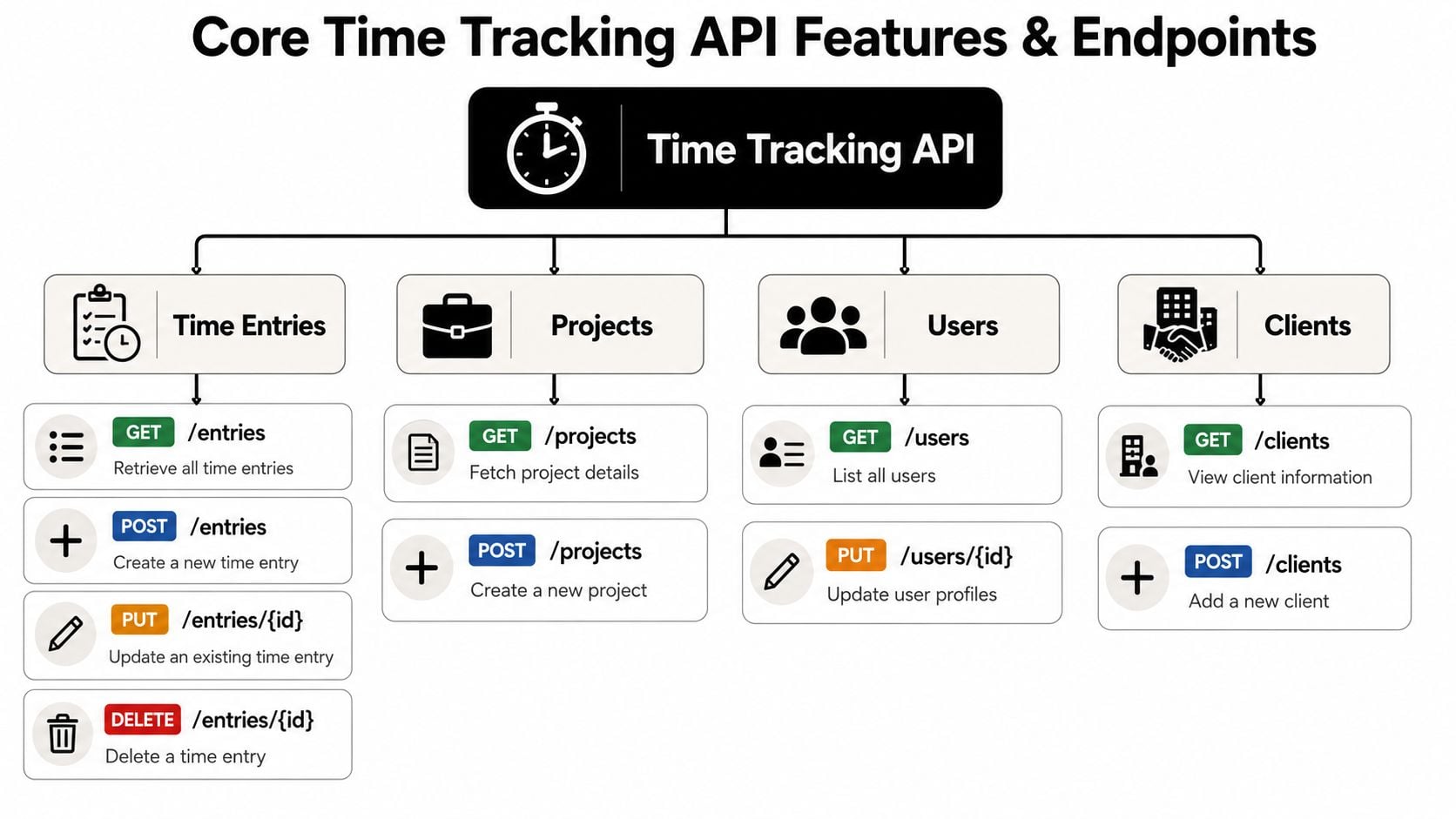
Most time systems revolve around a small set of core objects. Users log time against projects or clients, often with tasks, notes, billable flags, or approval states attached. Once you understand those objects, the endpoint structure gets predictable.
The common pattern is CRUD. Create, read, update, delete.
The nouns you usually work with
Here are the records most integrations need to handle:
- Users: Who did the work, and sometimes which team or role they belong to.
- Projects: The delivery container where time gets budgeted, reviewed, and reported.
- Clients: The account or customer entity tied to billing and profitability.
- Time entries: The actual work records with start time, duration, task, notes, or status.
- Tasks or activities: Optional but useful when teams need finer categorization than project alone.
The endpoints that matter most
You don't need every endpoint on day one. Many users begin with reads for reporting, then add writes and updates once they trust the data model.
| Object | Common endpoint | What it does |
|---|---|---|
| Time entries | GET /entries | Pull time records for reporting or sync |
| Time entries | POST /entries | Create a new entry from another system |
| Time entries | PUT /entries/{id} | Correct duration, tags, or metadata |
| Time entries | DELETE /entries/{id} | Remove invalid or duplicate records |
| Projects | GET /projects | Retrieve active project data |
| Projects | POST /projects | Create projects from a source system |
| Users | GET /users | Pull staff records for attribution |
| Users | PUT /users/{id} | Update user settings or profile data |
| Clients | GET /clients | Fetch client details for joins and reporting |
| Clients | POST /clients | Create client records programmatically |
That basic shape is enough to build a lot. You can sync project masters from your PSA, read approved time into billing, or push categorized time into a warehouse for deeper reporting.
Why modern APIs do more than log hours
The old model was simple export access. Pull raw rows and reconstruct meaning later. That still exists, but newer APIs are doing more work closer to the source.
Hubstaff's time tracking API documentation says the API can read and write time and activity data across entities including users, activities, reports, tasks, integrations, location, job sites, and all-time data. It also describes a daily activities endpoint that is pre-aggregated to the organization day and is “much faster” than pulling raw activity records and rebuilding sessions manually.
That design matters. If you've ever built reporting on top of raw event streams, you know where the time goes. Not into the chart. Into reconstructing sessions, deduplicating events, and fixing edge cases.
Practical rule: If the API offers pre-aggregated reporting endpoints, use them for analytics and reserve raw event pulls for audits or edge-case debugging.
In practice, that split lowers compute cost, reduces pipeline complexity, and makes dashboards easier to keep fast as volume grows.
Authentication, data models, and integration patterns
The technical work starts with trust boundaries. Before you move a single time record, you need to decide who can access the API, what scope they get, and whether the integration only reads data or also writes it back.
Most time tracking APIs use either API keys or OAuth. API keys are straightforward and work well for internal server-to-server jobs. OAuth is better when users authorize access from their own accounts or when permissions need tighter separation.
Keep authentication boring
Authentication should be the least interesting part of your build. If it's complicated, the integration will be fragile in production.
A few rules hold up well:
- Store credentials outside app code: Use a secret manager or environment-based configuration.
- Separate read and write clients: Reporting jobs and writeback jobs often need different scopes.
- Log failures without leaking secrets: Debug details matter, but tokens should never appear in logs.
- Rotate credentials on a schedule: Even stable internal integrations need regular key hygiene.
The other foundation is the data model. If your team can't answer “what is a valid time entry?” the API won't save you.
A simple time entry model
A typical JSON object might look like this:
{ "user_id": "u_123", "project_id": "p_456", "client_id": "c_789", "task_id": "t_101", "start_time": "2026-02-10T09:00:00Z", "end_time": "2026-02-10T10:30:00Z", "duration_minutes": 90, "billable_status": "billable", "approval_status": "pending", "description": "Client workshop prep" } The exact fields vary by platform, but the integration questions are always the same. Which fields are required, which system owns them, and what should happen when one side changes a value the other side also edits?
That's where endpoint design matters. Time cockpit's web API architecture combines HTTP/REST/JSON and OData endpoints for create, read, update, and delete operations, plus a separate query endpoint for more complex analytics and data transfer. That split is smart because operational writes and reporting queries have different needs. One favors predictability. The other favors flexible retrieval.
Choose the sync pattern on purpose
I usually see three patterns work well:
One-way sync to reporting
Pull time data into a warehouse, BI tool, or spreadsheet model. This is the safest starting point for agencies because it can't corrupt the source system.Two-way sync with a system of record
Push project or client metadata one way, and time entries or statuses the other way. This can work, but only if field ownership is explicit.Event-driven updates
Trigger downstream actions when entries are created, approved, or changed. This is useful when project tools and reporting systems need near-real-time updates.
If you're connecting calendar-based capture to delivery systems, the primary win is usually in the second step, not the first capture. Project management integrations matter because they decide whether time data stays isolated or becomes part of planning, delivery, and finance workflows.
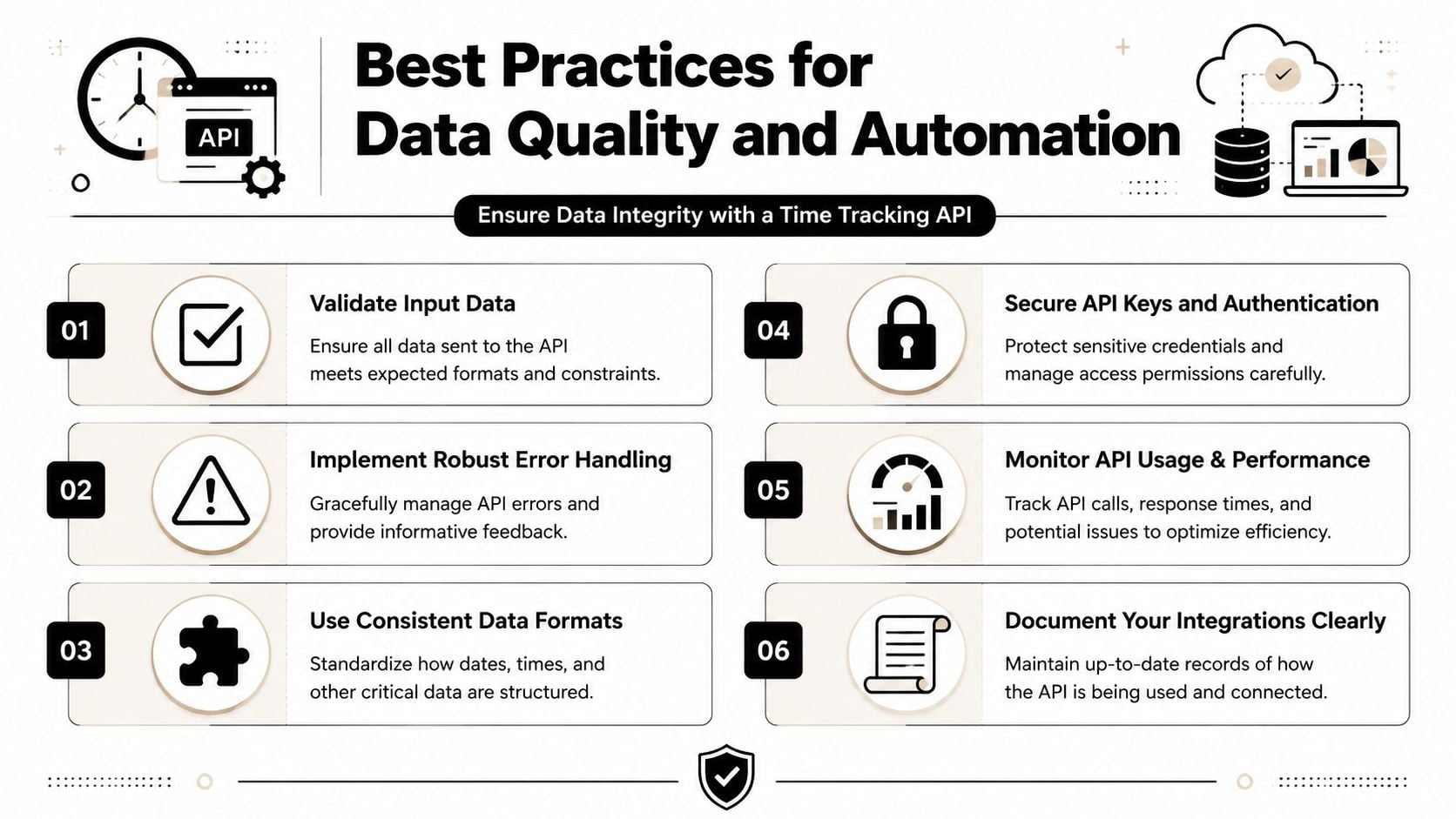
Best practices for data quality and automation
A time tracking API with weak data controls just automates mistakes faster. That's the part most guides skip. They explain how to post hours, but not how to stop bad records from reaching payroll, billing, or utilization reports.
The hard part isn't moving data. It's deciding which data is trustworthy enough to move.
Build validation into the workflow
At minimum, every entry should pass a few checks before it leaves the source system or lands in reporting:
- Required field checks: Reject or quarantine entries missing project, client, or task references.
- Time logic checks: Flag overlaps, negative durations, or impossible sequences.
- Status gates: Only send approved entries into billing or payroll workflows.
- Mapping checks: If a project or client code no longer exists in the target system, stop the sync and log it clearly.
Arcoro's guidance on preventing time tracking errors says teams need automatic capture, supervisor review, anomaly analytics, and end-to-end integration to get over 95% accuracy. I'd treat that less as a benchmark to chase and more as a design principle. Accuracy comes from controls, not from asking people to be more careful.
What works and what fails
The strongest setups reduce manual choice at the point of entry. They infer categories from context, enforce required metadata, and route exceptions for review.
What fails is the opposite. Free-text everything, optional fields everywhere, and approval happening after the invoice draft already exists.
Bad time data is usually a governance problem wearing a UX costume.
A practical control stack looks like this:
- Automated capture where possible: Calendar, activity, or workflow signals reduce recall-based entry.
- Rule-based categorization: Match event titles, clients, or project codes to predefined tags.
- Exception queues: Send missing or suspicious records to a reviewer instead of forcing them into reports.
- Audit loops: Reconcile source entries, approved entries, and billed entries on a schedule.
Treat anomalies as first-class events
A good pipeline doesn't just move clean records. It notices when something is off.
For example, if a user logs internal meetings to a billable client project, the system should flag that mismatch before finance sees it. If a project is closed but still receives time, that should trigger review. If an entry changes after approval, the integration should mark it for recheck instead of allowing prior outputs to be overwritten.
That's what makes automation safe. Not fewer humans, but better checkpoints.
Real-world workflows for agencies and operations
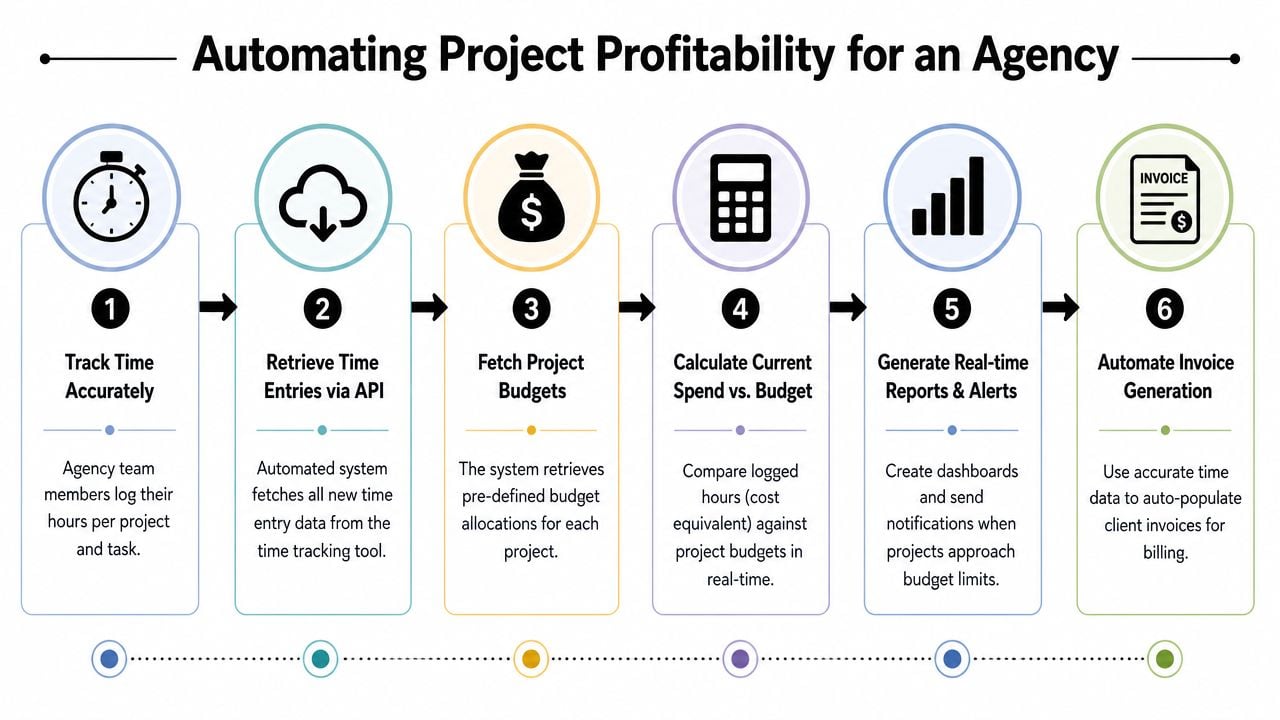
Once the data model is stable and the quality controls are in place, the API starts paying for itself. Agencies usually get the most value from two workflows first. Project profitability and team utilization.
Workflow one for project profitability
This build is straightforward and useful early.
First, pull time entries from the source system on a schedule. Next, join those entries to project budgets, billing rules, and internal labor cost assumptions. Then calculate current spend against budget and expose it in a dashboard or sheet that account leads can use.
The fields that make this easier are not just timestamps. They're billing and labor semantics. Square's Labor API model includes shift timing, breaks, wage information, and declared cash tips in a single timecard object. That matters because downstream systems can calculate labor cost and overtime without stitching together separate records. For agency ops, the same principle applies. The more complete the record, the less reconciliation work you do later.
A practical agency profitability pipeline often looks like this:
| Step | Input | Output |
|---|---|---|
| Pull new entries | Time system API | New or updated time records |
| Normalize metadata | Project, client, staff mapping | Clean reporting model |
| Add cost context | Internal rate card or wage model | Costed time records |
| Apply billing logic | Billable flags, approvals, exclusions | Invoice-ready time set |
| Publish results | BI tool, sheet, or finance export | Margin and budget visibility |
For teams that capture time from calendars and push it into downstream reporting, time tracking for agencies is often less about replacing a timer and more about getting cleaner project-level data into the places where finance and delivery work.
Workflow two for utilization reporting
Utilization dashboards sound simple until you define the categories. What counts as billable. What counts as strategic internal work. Whether presales belongs in delivery utilization or sales support. The API won't answer those policy questions, but it can enforce the structure once you decide.
Richer fields start to matter. Some newer APIs expose workflow and billing status directly. Asana's Time Tracking Entries API now includes approval_status, billable_status, and description, which reflects a broader move toward approval routing and billing classification in the API layer, not just in the UI, as noted in the Asana product update.
With those fields in place, the dashboard logic gets cleaner:
- Billable utilization only counts approved client-facing work
- Non-billable delivery can include training, QA, or internal support
- Management overhead stays visible instead of disappearing into generic admin buckets
- Trend analysis becomes possible because categories stop changing every reporting cycle
If your utilization dashboard depends on manual recoding before every leadership meeting, you don't have a dashboard. You have a recurring cleanup project.
One useful move here is to keep raw entries and reporting views separate. Don't rewrite history to fit the chart. Preserve the source record, then build reporting logic that groups work into the categories leadership wants to review.
Migration, reporting, and advanced use cases
After the first integration works, the next question is usually scale. Not “can we pull time entries,” but “how do we use this as part of our operating system?”
Migration is the first advanced use case. If you're moving from an old tracker, write endpoints let you backfill historical records into the new system or at least into a reporting layer that preserves continuity. The hard part isn't import volume. It's field mapping, identity matching, and deciding how much old categorization to keep versus normalize.
Webhooks are the next step up. Instead of polling every few minutes, the source system can tell you when something changed. That's useful for approval alerts, project threshold warnings, or finance notifications when invoice-ready time lands.
A more strategic move is pushing time data into a warehouse or reporting store instead of querying the transactional API for every dashboard. APIs are good at serving applications. They're usually not ideal as the only layer behind cross-team analytics. Once reporting grows, you want modeled tables, stable dimensions, and refresh logic built for analysis rather than operational reads.
At that point, the time tracking API stops being a feature and becomes infrastructure. It feeds finance, delivery, workforce planning, account management, and leadership reporting from the same source data, with controlled transformations in between.
That's also where product choice matters more. Some tools only expose basic hour logging. Others support richer metadata, approval states, exports, query models, or warehouse syncs. One option is TimeTackle, which centers time capture around calendars and supports exports, API access, and warehouse sync for downstream analysis. Whether that's the right fit depends on where your time data starts and how much categorization and reporting work you want the platform to handle before the data reaches your own stack.
If your team is tired of chasing timesheets, fixing report logic, and rebuilding the same billing views every month, take a look at TimeTackle. It gives agencies a calendar-based way to capture work, apply rules and tags, and move clean time data into reporting, sheets, and downstream systems without relying on manual spreadsheet glue.


