Only 18% of people report having a proper time management system, and workers still lose about 91 minutes a day to tasks and meetings that don't matter to their role. In a week, that's more than 7.5 hours per employee, which is why workload management isn't just about making a list shorter, it's about keeping work visible, prioritized, and paced so people can stay in control.
You can see the problem in a mid-sized agency right away. A project manager is chasing approvals, account leads are rescheduling client calls, and timesheets land late because everyone is tired of logging work after hours. The team looks busy, but the question is whether that busy time is producing the right work, at the right speed, with enough room left to breathe.
Workload management is a continuous control loop that matches demand to available capacity, then rebalances as conditions change. That sounds technical, but the agency version is simple, you keep checking who has work, who has room, what matters most, and what needs to move now.
If that sounds familiar, the pressure usually shows up first as missed deadlines, fuzzy ownership, and the sense that managers are flying blind. A practical resource on reduce team stress and boost performance is useful here because the same basic problem shows up in many teams, people are carrying more cognitive load than the system can see. For a quick contrast with common time-sink patterns, I'd also look at problems in time management, because unmanaged workload often starts with the same bad habits.
The agency workload puzzle everyone ignores
A mid-sized agency can look calm from the outside while it's slipping inside. The creative team is waiting on inputs, the account team is jumping between client pings, and the PMs are trying to sort priorities from memory instead of from data. By Friday, everyone feels behind, but no one can say with confidence where the time went or which work should have moved.
That's where simple scheduling breaks down. When demand spikes, a manager's gut can't tell the difference between an urgent client issue and a pile of low-value tasks that just happen to be loud, and that's how deadline risk builds up without anyone seeing the full picture.
Why guesswork fails
In agency work, one person's overload often hides behind another person's spare capacity. The team may even look balanced on paper, yet the actual work can still be lopsided because some people are buried in meetings, revisions, or admin while others are waiting for decisions.
Practical rule: if you can't say who is at capacity, who is underused, and what work can move, you don't have workload management yet.
A manager who wants a cleaner operating model needs more than a calendar and a weekly check-in. They need a system that makes demand visible, shows capacity in real time, and lets the team rebalance before work starts to slip. That is the agency meaning of workload management, not a nicer to-do list, but a living control process that keeps the work flowing.
When teams don't have that system, they often mistake motion for progress. People stay late, answer more messages, and keep the machine running, but that doesn't fix the underlying mismatch between demand and capacity.
What workload management really means
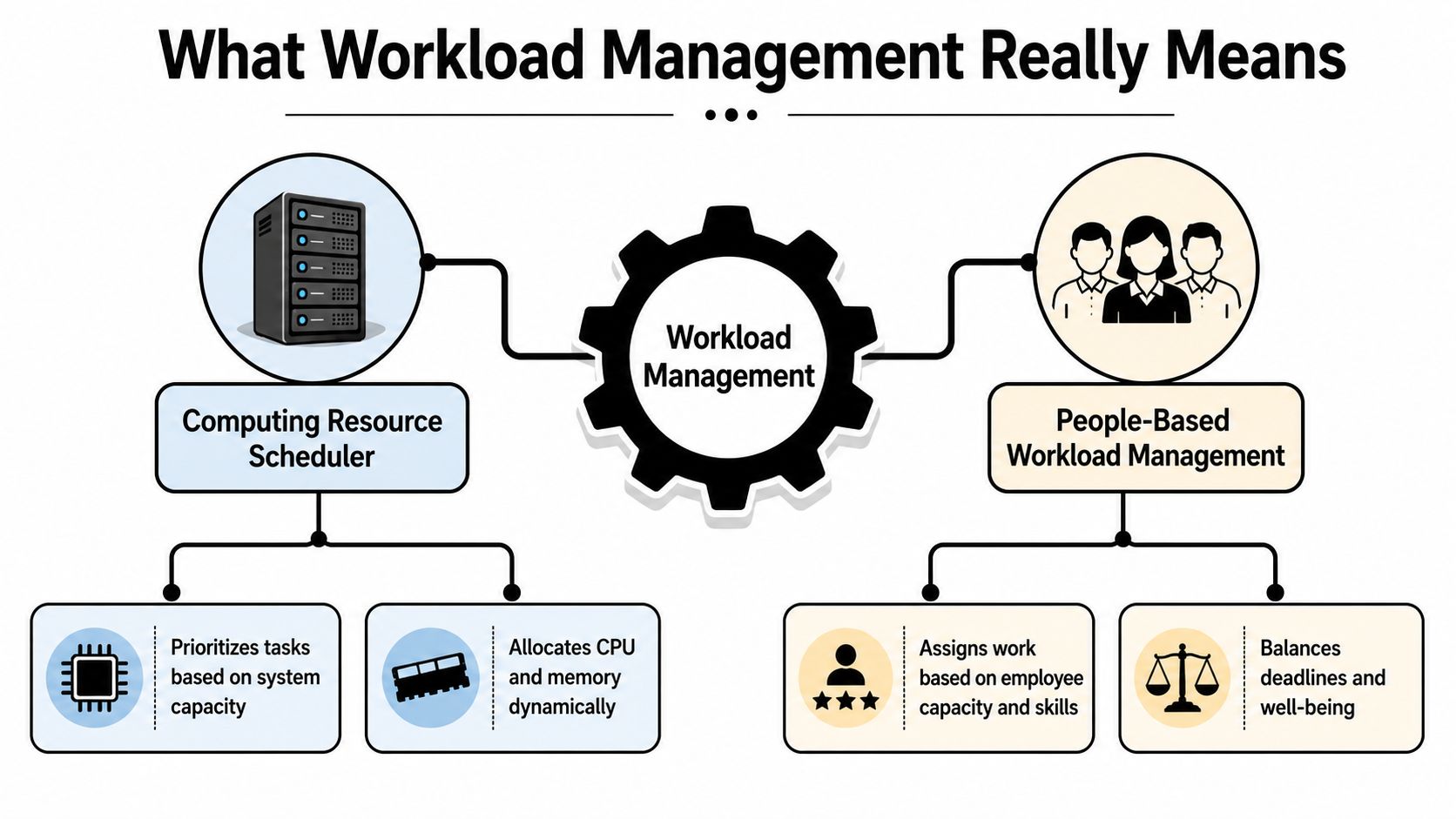
In agency operations, workload management is a control loop. It watches demand, assigns limited resources, and shifts capacity as conditions change. The people involved are the team's time, attention, and skills. The goal is to keep work inside workable limits so deadlines hold and quality does not slip.
The computing analogy that makes it click
A useful comparison is the system scheduler in computing. It does not send every task to the first available machine. It checks what each job needs, what the system can handle, and where the work should go so performance stays steady. Agency work follows the same logic when campaigns, client requests, and internal tasks all compete for attention.
The people side needs that same discipline. A manager has to review demand, compare it with available hours and skills, then decide what gets done now, what waits, and what moves to someone else. When demand changes, the plan changes too. That is why workload management is continuous, not a one-time assignment.
Workload is not the same as caseload
Many managers confuse workload with a simple task count. That is too thin for agency life, because one “small” client account may need daily coordination while another sits quiet for days. Research on workload management says the useful measure is the gap between workload and capacity, and it also notes that workload is shaped by time, equipment, and support, not just volume (workload management implementation guide).
That difference matters because a team can look full and still be misallocated. A designer who spends most of the day in review loops and status calls may appear busy on paper, while the actual load is heavier than the caseload suggests.
The better question is not, “How many tasks do we have?” It is, “How much effort do these tasks actually consume, and where is that effort coming from?”
For agencies, the loop is easy to describe and hard to fake. Measure demand, compare it with capacity, sort the work by value and skill, move the load where it fits, then review what changed. If you want a practical way to connect that visibility to output, the internal piece on how to calculate utilization rate is a useful companion.
Core components and the benefits they bring
A workload system only works when each piece has a clear job. If one part is missing, the rest turns into guesswork, and guesswork is costly in agency settings because delays get passed between people, projects, and clients.
The four pieces that matter
First, you capture demand. Every real piece of work needs to be visible, client requests, revisions, admin, internal meetings, and unplanned fixes. If those items stay buried in inboxes or chat threads, the team is left guessing about the true load, and the day always looks smaller than it is.
Second, you map capacity. That means checking available hours, skills, and current commitments before promising more work. It gives managers an early warning when a pod is already full, so overload shows up in time to adjust, rather than after a deadline slips or a review round starts to stack up.
Third, you prioritize by value and fit. Two tasks can look similar on a board and still have very different effects on delivery. A quick client update may clear a blocker, while a low-value internal request can consume the same attention as a meaningful campaign task. Matching work to the right person and the right priority cuts down on avoidable friction and keeps the team focused on work that moves client outcomes.
Fourth, you redistribute. Many teams avoid this step because it can feel awkward, especially when one person is already carrying a visible load and another seems quieter. In practice, redistribution is how agencies recover capacity without burning people out, since work can move to the person or team that has room and the right skill set.
Agency rule of thumb: if a task can move without hurting the client, it probably should move when the original owner is already overloaded.
The hidden cost of skipping these pieces is bigger than it first appears. Acuity Training research shows how much time can disappear into low-value tasks and meetings, and it also points to how few people use a proper time management system. In agency life, that shows up as a quiet leak in capacity, with experienced staff spending part of the week on work that does not match their role or the client value at stake.
That leak is also a human-risk issue. When people keep carrying the wrong mix of tasks, they do not just slow down, they start missing details, pushing decisions into tomorrow, and absorbing stress that should have been redistributed earlier. A workload system gives managers a way to spot that strain before it turns into rework, missed handoffs, or avoidable turnover.
If you want a practical way to connect that visibility to output, the internal piece on how to calculate utilization rate is a useful companion.
How to measure workload and track the right KPIs
A team can look busy and still be overloaded. A manager sees full calendars, a long task list, and a steady stream of updates, then assumes the load is under control. That view often misses the true shape of work, because workload is not only volume, it also includes time, support, interruption, and the kind of demand a person is carrying.
A practical metric set
| Metric | What it captures | Why it matters |
|---|---|---|
| Workload vs capacity gap | The difference between assigned work and available hours | Shows overload before it turns into missed deadlines |
| Time-to-complete | How long similar tasks actually take | Helps managers set better plans and stop guessing |
| Non-project overhead | Meetings, admin, rework, and other hidden load | Reveals why a “full” team still misses delivery |
| Task mix by type | The balance between deep work, coordination, and quick admin | Shows whether the work itself is fragmenting attention |
| Skill fit | Whether the task matches the person's training and role | Reduces avoidable slowdowns and quality issues |
The most useful starting point is local benchmarking. A child-welfare workload guide notes there is no universal formula for an acceptable workload, and that workload is often judged by the average time needed for each assigned case plus noncasework duties (case work management guide). Agency teams can use the same logic without copying the field, because a marketing team, a creative team, and a consulting team will never carry the same load in the same way.
How to build a usable baseline
Start with job analysis. List the recurring work, the support work, and the interruptions that never show up in a project plan. Then add psychosocial risk screening, which helps you see whether the load is becoming stressful even when the task count looks normal.
Use three simple questions.
- What takes time but doesn't show up in delivery plans? That is usually overhead.
- Where do tasks stall most often? That points to mismatch, missing approvals, or poor handoffs.
- Which work keeps showing up after hours? That often signals hidden overload, not just poor habits.
Those questions help managers separate visible effort from real strain. A designer can finish every assigned ticket and still be under pressure if feedback loops are long, priorities shift midweek, or client changes keep landing late.
Track the numbers with a light touch at first. Daily time logs, intake counts, and a simple review of how to calculate utilization rate can give enough signal to show where work is piling up without turning measurement into a second job. The point is to compare reality with capacity, not with a generic industry average. That keeps the metric honest and makes the fix local, which is where workload management becomes useful instead of abstract.
Common pitfalls and misconceptions to avoid
A common mistake is treating equal distribution as healthy distribution. A team can have work split evenly and still be overloaded if the total demand is too high or if nobody has counted the support work, admin work, and interruptions that keep draining time.
Where agencies get it wrong
The first problem is stale capacity data. A dashboard that only reflects last week's hours cannot help a manager who needs to decide this morning. Agency work changes fast, and one client escalation can reshape the whole week.
The second problem is reading busyness as proof of output. A person can fill the day with meetings, email, and quick replies, then still leave the important work unfinished. Managers need to look at the shape of work, not just the size of the pile.
The third problem is ignoring cognitive load. A copywriter switching between five brands and three tones of voice is carrying a different load from a planner with one steady project, even if the hours look similar. The UK Health and Safety Executive says workload assessment should cover normal and emergency conditions, task analysis, role clarity, how work is distributed across shifts, and the visual, auditory, cognitive, and psychomotor demands of the job (HSE workload guidance).
A fair-looking roster can still leave people stressed if the work is fragmented, unpredictable, or mentally expensive.
That is the human-risk side many articles skip. Workload management also sits inside psychosocial risk, because poor load control can contribute to stress, fatigue, absenteeism, disengagement, and mental wellbeing concerns (ISCRR psychosocial risk guidance). Once leaders see that link, the question changes. They stop asking only, “Who can take this?” and start asking, “Does this work need to exist in this form at all?”
Implementation roadmap for mid-sized agencies
A workable rollout doesn't start with software, it starts with a clean sequence. Queensland's manager guide lays out a structured response, identify the issue, collect data, establish benchmarks, analyze contributing factors, then choose solutions such as task reallocation, process review, training, or reprioritizing services (Queensland manager guide).
A five-step path that fits agency life
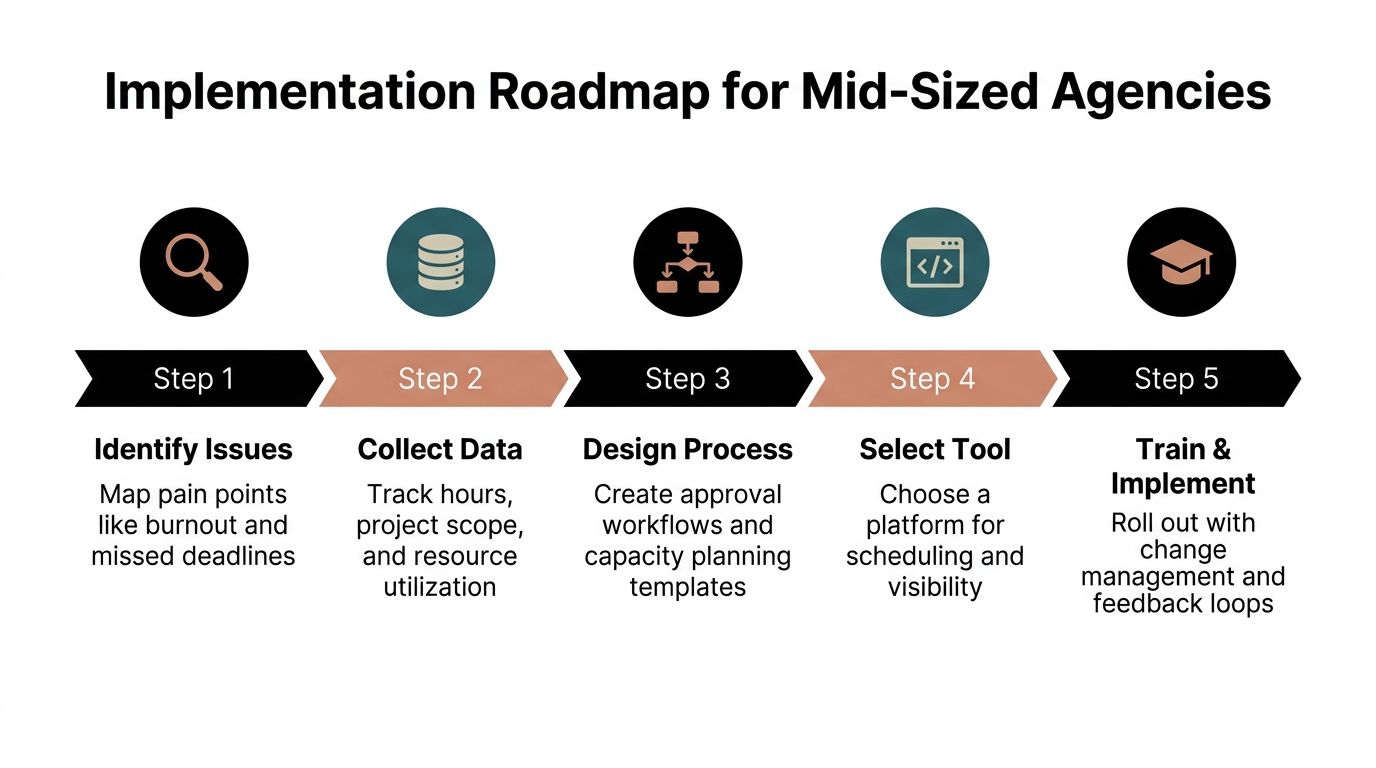
- Identify the issue. Start with the pain the team already feels, missed deadlines, late approvals, or people staying online too long.
- Collect data. Pull calendar activity, project hours, and the mix of client and internal work so you can see where time is going.
- Establish benchmarks. Set a local standard for what a normal week looks like in each role or pod.
- Analyze the causes. Decide whether the problem is too much demand, poor handoffs, weak process, or a role that carries too many different tasks.
- Choose and test fixes. Reassign work, clean up approvals, train where skills are missing, or cut low-value work that keeps clogging the system.
That flow matters because it moves the team from opinions to evidence. A COO or PMO can support the process without asking for a giant transformation, and the early win is usually better visibility, not instant perfection.
If you want software support, one option is TimeTackle, which uses calendar data to surface time patterns and can help teams see where work is stacking up. I'd still treat the process as the main thing, because tools only work after the team agrees on what it's measuring.
Real-world examples and your next steps
A 120-person marketing agency I'd expect to see in this situation had the usual signs, late timesheets, overloaded account leads, and a constant sense that client work was swallowing the week. The team started pulling calendar data instead of relying on memory, and that exposed a lot of unrecorded client meetings and coordination work that had been hiding in plain sight.
Once the managers saw the pattern, they stopped treating overload as a personal problem. They used the roadmap above, rebalanced a few recurring duties, and cleaned up the handoff process so people weren't bouncing between the same tasks all day.
The lesson is simple. Workload management is not a once-a-quarter review, it's a living system that needs fresh data, local benchmarks, and regular rebalancing. If you run an agency, your best next move is to map demand, pick three metrics, and test a small benchmark sprint with one team before you spread the model wider.
If you want to make that easier, TimeTackle helps teams capture calendar activity automatically, organize work by client or project, and turn messy time data into a clearer view of capacity. Visit TimeTackle if you want a practical way to track workload patterns from the calendar your team already uses.