



Month-end billing has a way of exposing every weak habit in an agency.
You open the timesheets. One account manager logged neat entries by client and task. A designer dumped a vague block called “project work.” Someone else hasn’t submitted anything yet. Finance wants invoices out. Client services wants to avoid pushback. You know revenue is slipping somewhere, but you can’t see exactly where.
That’s the primary job of a billable hours calculator. It isn’t just a way to multiply hours by rate. It’s a way to find leaks before they turn into margin problems. Used well, it shows where time went, what got billed, what didn’t, and whether your rates and habits still make sense.
I’ve seen teams blame profitability on pricing when the actual problem was messy tracking. I’ve also seen teams blame tracking when the actual issue was poor rate design. Most agencies have both problems at the same time, which is why a calculator only matters if it’s tied to a better operating system.
That nagging feeling you’re leaving money on the table
The familiar version goes like this. It’s late in the month, invoices are waiting, and your team is trying to reconstruct a week from memory. Someone remembers the strategy call but forgets the prep. Someone logs the workshop but skips the follow-up notes, the internal handoff, and the client email thread that ate half an hour across two days.

On paper, the month looks busy. In the bank account, it looks thinner than it should. That gap is what drives agency owners, COOs, and ops leads mad, because people were working hard. The problem is that hard work and captured revenue are not the same thing.
A calculator gives you a clean place to start. You put in the time, the rate, and the split between client work and internal work. Then the numbers force an honest conversation. Are you charging enough? Are people spending too much time in internal meetings? Are small client requests piling up without being logged?
What the calculator really tells you
A basic spreadsheet can tell you gross billable value. A useful system tells you more than that:
- Where revenue leaked through admin time, delayed logging, or poor tagging
- Which teams are billable versus just busy all week
- Whether your listed rate and real earned rate are even close
- How much margin you lose when scope creeps in
The worst billing problems rarely come from one dramatic mistake. They come from small misses repeated every week.
That’s why I don’t treat time tracking as a finance chore. It’s an operations signal. If your calculator shows a healthy pipeline and strong client demand, but your effective revenue still feels soft, then your workflow is broken somewhere between calendar, project, and invoice.
Clarity beats end-of-month panic
When teams rely on memory, billing turns into cleanup. When they use a solid process, billing turns into review.
That difference matters because agency profit doesn’t disappear in theory. It disappears in tiny pieces. A half-hour not logged here. A meeting tagged to the wrong client there. A project manager absorbing scope creep because “it was just a quick one.”
A billable hours calculator won’t fix discipline by itself. But it will show you, fast, where discipline is missing.
What counts as billable and what doesn’t
Organizations often don’t have a math problem first. They have a definition problem.
If your staff don’t know what belongs in billable time, every report after that gets fuzzy. Then your utilization numbers become fiction, project profitability gets distorted, and managers start making staffing calls off bad data.
Draw a hard line
Billable hours are time you can directly charge to client work. In an agency, that usually includes strategy sessions, design, development, implementation work, reporting for the client, workshops, and client calls tied to a real engagement.
Non-billable hours are the work your business needs but can’t invoice. Internal meetings, proposals, sales calls, admin, recruiting, training, internal marketing, and process cleanup all sit here. They still matter. They just don’t generate direct client revenue.
Here’s where teams go wrong. They treat non-billable work as accidental or shameful, so people either hide it or force it into billable buckets. That doesn’t fix anything. It just wrecks your reporting.
Practical rule: If the client wouldn’t reasonably accept the line item on an invoice, don’t log it as billable.
Why utilization matters more than gut feel
Once the billable versus non-billable split is clean, you can look at utilization. In plain English, that’s the share of someone’s working time that becomes client-billable time.
Professionals in billable-hour businesses typically land at 1,200 to 1,600 billable hours per year, which works out to about 65-80% utilization when you account for admin, meetings, and business development, according to ShiftFlow’s billable hours breakdown. That range is realistic. It also tells you why any plan built around everyone billing nearly all day is fantasy.
A healthy team is not a team at 100% utilization. People need room for planning, coordination, sales support, and the work that keeps delivery from falling apart next month.
Common agency examples
A clean policy usually looks something like this:
- Billable client delivery: Discovery calls, wireframes, paid strategy, implementation, campaign setup, account work tied to an active scope
- Billable client communication: Scheduled review meetings, decision-making calls, feedback rounds, documented revisions
- Non-billable internal work: Team meetings, one-to-ones, internal planning, hiring interviews, training
- Non-billable growth work: Proposal writing, pitch prep, networking, agency marketing
If your team needs a sharper framework, this guide on billable and non-billable time is a useful reference.
What good classification changes
Once the categories are stable, your calculator becomes useful for staffing and margin decisions, not just invoicing. You can see who is overloaded with client work, who is buried in internal work, and which accounts create too much coordination drag.
That’s the moment a billing report starts acting like an operations report.
The essential formulas for calculating profitability
A team can look busy all week and still miss margin targets. The problem usually is not effort. It is the gap between hours worked, hours billed, hours collected, and the small pieces of time that never make it onto an invoice.
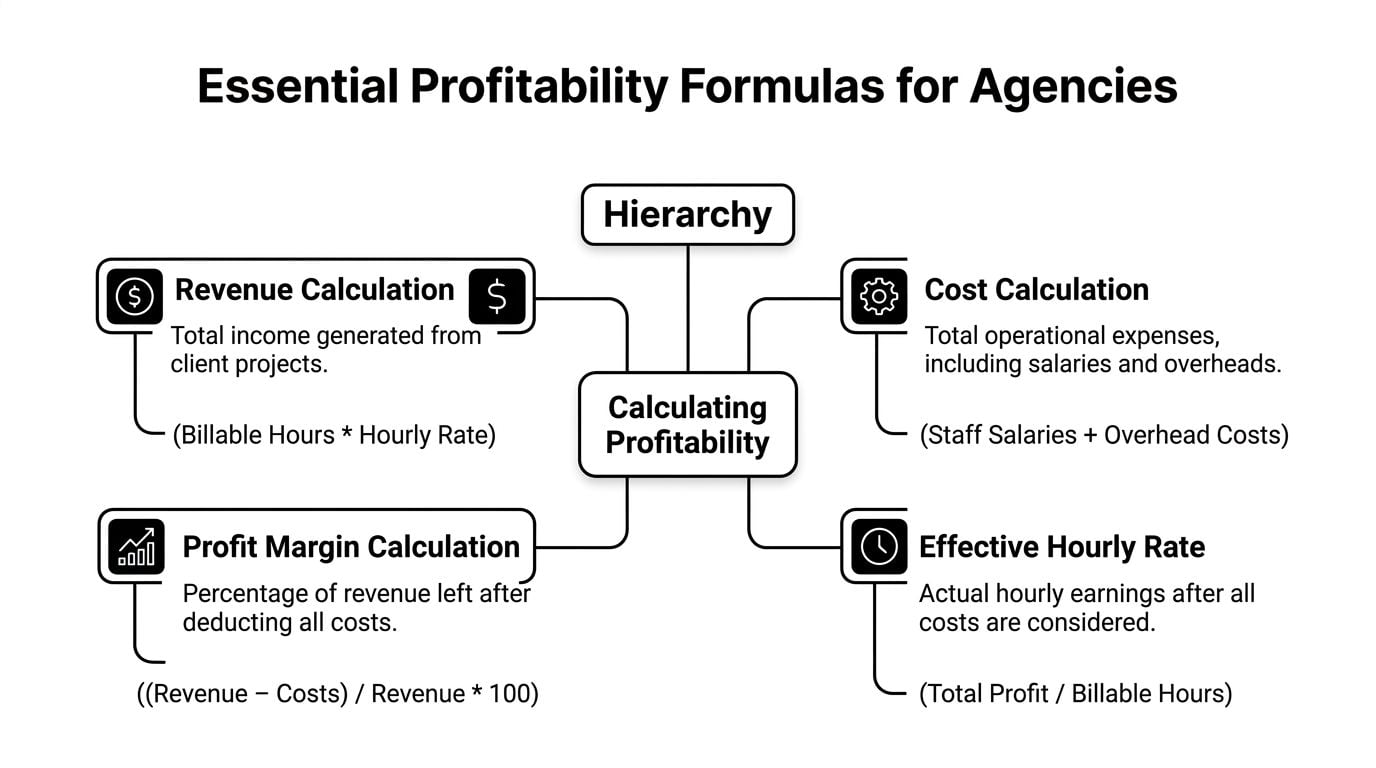
Start with the base calculation
Use the invoice formula first:
Total billable revenue = (billable hours × hourly rate) – discounts + expenses
That gives you the top-line number for a project or billing period. It does not tell you whether the work was delivered efficiently or whether your stated rate survives discounting and lost time.
If someone logs 6.3 billable hours at $200 per hour, the math is simple. The day produces $1,260 in billable revenue, based on the standard calculation described in Memtime’s billable hours calculator guide.
Good operations teams stop there only long enough to send the invoice.
Measure billable efficiency
The next calculation shows how much of the workday was recoverable:
Billable efficiency = billable hours ÷ total logged hours
If a person logs 20 hours across client work, internal meetings, revisions, and admin, but only 15 of those hours are billable, efficiency is 75%. On a listed rate of $40 per hour, that pushes the effective return on logged time down to $30 per hour.
Here’s the practical view:
| Logged time | Billable time | Efficiency | Listed rate | Effective rate |
|---|---|---|---|---|
| 20 hours | 20 hours | 100% | $40/hour | $40/hour |
| 20 hours | 15 hours | 75% | $40/hour | $30/hour |
That $10 gap matters. Across a 10-person team, weak utilization can erase thousands in revenue capacity before anyone notices it in the P&L.
Track the rate you actually earned
Listed rate is a sales number. Effective rate is an operations number.
Effective billable rate = total collected revenue ÷ billable hours
Use this when discounts, write-downs, capped retainers, or scope creep pull actual earnings below the number in your proposal. If you collect $162,000 from 1,200 billable hours, your effective billable rate is $135 per hour. That matters more than the rate card because it reflects what the business kept.
For a more detailed breakdown of rate math, this guide on how to calculate an hourly rate that protects margin is a useful reference.
Add revenue per available hour
This is the formula agency leaders should watch every week:
Revenue per available hour = effective billable rate × utilization
It combines pricing discipline with delivery discipline. A team can sell at a healthy nominal rate and still underperform if too much capacity is absorbed by internal work, untracked support, or avoidable write-downs.
Using the example above, an effective billable rate of $135 with 70% utilization produces $94.50 per available hour.
That is the number that exposes revenue leaks. If it falls, the cause is usually easy to find. Rates are too low, discounts are too common, or too much labor is being spent on work nobody can bill.
Don’t ignore billing increments
Small tasks get written off more often than large ones. That is why rounding policy matters.
Many firms bill in 1/10th of an hour, which equals 6 minutes. Under that method, 13 to 18 minutes rounds to 0.3 hour. At $100 per hour, 15 minutes bills at $30. If those fragments are tracked loosely, they disappear. If they are tracked consistently, they add up across every account manager, strategist, and developer on the team.
This is not bookkeeping trivia. It is margin control.
Build these formulas into your calculator and review them together, not in isolation. Revenue shows what you invoiced. Efficiency shows how much time was recoverable. Effective rate shows what you earned. Revenue per available hour shows whether the delivery model is financially healthy.
How to set your rates with confidence
A calculator is only as good as the rates you feed into it. If the rate is wrong, every neat report that follows is still wrong.
A lot of agencies set hourly pricing by watching competitors or using a rough salary multiplier with no real check on overhead. That works until margins tighten, software costs rise, or senior staff spend more time managing than billing. Then the numbers stop working, but nobody can explain why.

Use a cost-plus formula
A solid starting point is:
(Labor Costs + Overhead + Desired Profit Margin) ÷ Billable Hours
That’s the standard agency pricing logic described in ClickTime’s guide to calculating hourly billing rates. The same source notes that agencies often use a 2.5-3x multiplier on base salary to target a 25-35% net profit margin.
The value in this approach is that it forces honesty. Salary alone is not your cost. Neither is desk cost alone. You need the whole picture, including software, management overhead, support time, and your target profit.
A concrete example
ClickTime’s example gives a simple benchmark. For an employee on an $80,000 salary, using a 2.75x markup and assuming 1,500 billable hours per year, the hourly rate comes out to $133.
That example is useful for one reason. It shows how quickly underpricing becomes expensive. If you price that role at $100 instead of $133, the verified data says you forfeit $49,500 in annual revenue per employee.
That’s why “we’ll make it up on volume” usually turns into “we’re busy but not very profitable.”
Rate-setting works better by role
You don’t need one flat number across the agency. In fact, that often causes more problems than it solves.
Some teams build separate rates for roles such as creative and implementation work. That keeps pricing closer to the labor profile and the margin reality of the work. If you want a practical framework, this guide on how to calculate hourly rate lays out the mechanics.
Use your calculator to test rates against actual billable capacity, not idealized capacity. If a senior strategist spends a lot of time in internal reviews and client escalation, their listed rate has to account for that. If a delivery role has cleaner billable utilization, the math looks different.
The point isn’t to justify high prices. The point is to make sure every sold hour can carry its share of costs.
Common billing mistakes that secretly drain your revenue
The expensive mistakes are rarely dramatic. They’re routine, and because they look small, teams let them slide.
I’ve seen agencies obsess over proposal margins while ignoring the way people round time, delay entries, or absorb “tiny” client requests without logging them. Those habits create soft data, and soft data turns into underbilling.
Inconsistent rounding rules
If one person bills in tenths and another rounds loosely, your billing policy isn’t a policy. It’s a suggestion.
Billing increments change revenue capture on short tasks. According to LeanLaw’s explanation of legal billing increments, using 6-minute (0.1 hour) blocks instead of 15-minute (0.25 hour) blocks can capture 15-20% more revenue from short tasks. The same source gives a simple example: a 7-minute call would be billed as 0.2 hours in that structure instead of being rounded to 0.25 under a quarter-hour system.
That doesn’t mean you should blindly copy a legal billing model. It means you need a consistent method that fits your client agreements and your workload pattern.
Scope creep that never hits the invoice
This one usually sounds harmless.
A client asks for one more revision. Someone jumps on a quick call. A strategist reviews extra notes after hours because “it’ll only take a few minutes.” No single moment feels big enough to log, but together they chip away at margin.
Watch for these patterns:
- Loose client comms: Frequent unscheduled requests that no one ties back to scope
- Bundled entries: People logging big blocks like “account management” instead of specific work
- Internal rescue work: Senior staff stepping in without tagging the time correctly
- Polite write-offs: Teams deciding not to bill because they assume the client won’t like it
Small tasks still use paid staff time. If you don’t track them, you’re choosing to fund the work yourself.
Delayed entry changes behavior
Another problem is simple lag. When people wait, they edit reality. They smooth over the day, collapse tasks together, and forget the interruptions that consumed time.
A good billable hours calculator helps, but policy matters too. Decide on one rounding rule. Decide what counts as billable communication. Decide when time must be entered. If those basics are fuzzy, you’ll keep losing revenue in ways that never show up as obvious mistakes.
Moving from manual timesheets to automated accuracy
Manual timesheets create two kinds of waste. They waste admin time, and they waste revenue.
The admin waste is obvious. Managers chase entries, staff rebuild their week from memory, and ops teams clean up categories before finance can invoice. The revenue waste is worse because it hides inside that messy process.

What manual tracking gets wrong
Delayed time entry doesn’t just feel annoying. It loses billable work. According to Rize’s calculator research on delayed tracking loss, professionals can lose 10-50% of billable hours due to delayed tracking. Hours recorded later the same day carry a 10% loss rate, and by the end of the week that loss can jump to 50%.
That’s why end-of-week timesheets are so damaging. They reward memory, not accuracy.
A manual system also tends to flatten detail. Calendar meetings disappear into generic project blocks. Quick calls vanish. Internal work gets miscoded as client work, or client work gets missed because no one wants to reconstruct it later.
What automated capture changes
Calendar-based systems fix the source problem. Instead of asking people to remember what happened, they pull from the record of what happened.
That can include Google or Outlook calendar events, mapped to clients and project codes through rules. It can also include CRM context, tags, and approval flows. One option in this category is automated timesheet software, including tools like TimeTackle that capture activities from calendars and apply rules for billable and non-billable categorization.
AI can offer practical assistance. If you’re looking at the broader shift toward smarter scheduling and work capture, Superchat’s piece on optimizing time with AI solutions is worth reading because it frames automation as a way to reduce manual overhead, not just add another tool.
The trade-off is worth being honest about
Automation won’t fix sloppy client scopes or bad rates. It also won’t replace manager judgment. Someone still has to define categories, rounding rules, and billing policy.
But it does remove the dumbest part of the process. People stop pretending they’ll remember every task on Friday. Managers stop relying on lagging spreadsheets. Finance gets cleaner inputs. Ops gets real utilization data sooner, which means you can intervene while a project is drifting instead of explaining it after the month closes.
Your weekly workflow for better billing
Thursday afternoon is a good test. A strategist has six client meetings on the calendar, two internal check-ins, and a block of “admin” time. If nobody reviews that week until month-end, some of those client conversations will be written off, the admin block will stay vague, and the invoice will understate the actual work. That is how agencies lose revenue in small, repeatable ways.
A better process is weekly, short, and enforced. The goal is not cleaner timesheets for their own sake. The goal is to catch missed billable time, spot delivery problems early, and protect margin before finance sends an invoice built on bad inputs.
A simple weekly review
Run this once a week with team leads or project owners:
- Review last week’s calendar activity. Check that meetings, workshops, review sessions, and client calls are mapped to the right client and project code.
- Check billable versus non-billable patterns. If a client-facing employee spent a large share of the week on internal work, find out why. It may be poor staffing, too many approval layers, or delivery work happening under the wrong code.
- Scan project time for oddities. Watch for large generic entries, missing follow-up after meetings, or repeated “quick asks.” Those usually point to scope creep, weak habits, or both.
- Resolve exceptions the same day. Memory drops fast. If something looks off on Thursday or Friday, fix it before it turns into a guess.
Keep the review tight. Twenty minutes is usually enough if the categories and ownership are clear. The reason is simple: billing falls apart when the system is too painful to use consistently.
What to look for in the review
Perfection is not the target. Patterns are.
Use questions like these:
- Where did client-facing staff spend too much internal time?
- Which accounts generated unplanned calls, Slack threads, or revisions?
- Who logged vague time blocks that hide the actual work mix?
- Which projects are pulling in senior oversight without enough budget to cover it?
One missed half-hour is not the issue. A repeated pattern of missed half-hours across an account team is a margin problem.
Clean weekly reviews beat perfect monthly reconstruction every time.
Turn billing into a management habit
A billable hours calculator should do more than total hours times rate. Used weekly, it becomes an operating check on revenue leakage. You can see where non-billable work is creeping up, where rounding rules are shaving off legitimate time, and which accounts look healthy only because the team is under-reporting effort.
That changes the conversation. Instead of arguing about utilization after the month closes, managers can correct behavior while the work is still in motion. Shift hours to the right code, flag scope overages early, and decide whether a client needs a change order, a tighter process, or a higher rate.
If your team is tired of end-of-week timesheets and you want cleaner billable data from the calendar activity people already create, TimeTackle is worth a look. It connects calendar and work data so teams can categorize time with less manual entry, review utilization more clearly, and cut down the billing gaps that usually show up too late.


