You can feel it before anyone says it out loud. The calendar fills up with check-ins, Slack keeps pinging, and a few people are always “busy” while deadlines still slip. The problem usually is not effort. It's that the team has no shared picture of what matters, who owns it, or how anyone knows whether the work is moving.
That's why how to manage remote teams has changed. The old habit of judging by visible activity falls apart once people work across homes, cities, and time zones. Gallup's guidance is blunt about the shift, managers need clear expectations, intentional development, and performance judged on outcomes rather than proximity, with goals tied to customer results and regular conversations about shifting demands in a remote workers guide from Gallup. In practice, that means the job is not to keep people online. It's to run a system where deliverables, communication, and workload are visible enough that you can lead without hovering.
What remote team management actually looks like in 2026
A manager I worked with recently had what looked like a healthy setup. The team had meetings on the books, the chat channels were active, and everyone said they were “in sync.” Then the quarterly work landed late, one client kept asking for status updates, and the manager admitted she couldn't tell which projects were stuck and which ones just felt loud.
That's the point where remote management becomes real. Gallup's model is not about counting messages or watching green dots, it's about clarifying expectations, connecting work to purpose, and judging performance by outcomes, not physical presence Gallup. Harvard Business School Online makes the same practical point in different words, remote leaders need team norms, regular check-ins, one-on-ones, and constant communication through video and collaboration tools, while Atlassian pushes written goals, clear roles, milestones, and time-zone fairness, and Sage recommends a mix of synchronous and asynchronous rhythms with stand-ups, one-to-ones, performance check-ins, pulse surveys, and anonymous feedback forms Harvard Business School Online.
The operating model beats the vibe
The best remote teams I've seen do not rely on intuition. They use a written operating model that spells out who owns what, how decisions move, where updates live, and what “done” means. That matters even more in distributed teams because ambiguity spreads fast across time zones, and every unclear handoff creates more back-and-forth the next day.
A solid overview is also useful when you're comparing your current setup with what other operators run. If you want a practical benchmark, remote teams at Madeira gives a useful external view of the basics, but the deeper lesson is simpler, remote work only works when the team can see the work without needing to chase people for it.
Practical rule: if a task cannot be described in one written sentence, with an owner and a due date, the team does not really have a task yet.
The signals that matter are boring in the best way. Do people know what they own. Do they know where decisions live. Do managers see blocked work before it turns into a missed deadline. If those answers are fuzzy, the team is not badly motivated, it's badly structured.
Setting the foundation before the first hire logs on
The first mistake is picking tools before deciding how the team works. I've seen companies buy software, add meetings, and write onboarding docs, then still struggle because nobody agreed on decision rights, documentation rules, or who owns each project. Those decisions need to come first, because tools only make a bad process faster.
Start with ownership and written norms
Every project needs a directly responsible individual, or DRI. That does not mean one person does every task, it means one person owns the outcome, the handoffs, and the final call when the work stalls. Once that is clear, write down where decisions go, where status lives, and what belongs in a document instead of a meeting.
That written layer is not bureaucracy. It protects the team from time-zone gaps and makes onboarding easier for new hires who should not have to guess how things work. If you want a practical starting point, pair your team norms with essential company policies templates and a simple remote work agreement like the one in this internal guide, then keep them short enough that people read them.
Build onboarding around week one and week two
A remote hire should know three things fast, what they own, where to find answers, and how the team communicates. I like to map the first two weeks around visible outcomes instead of a pile of reading. Give them one live project, one shadowed process, and one written source of truth they can return to without asking someone to repeat it on a call.
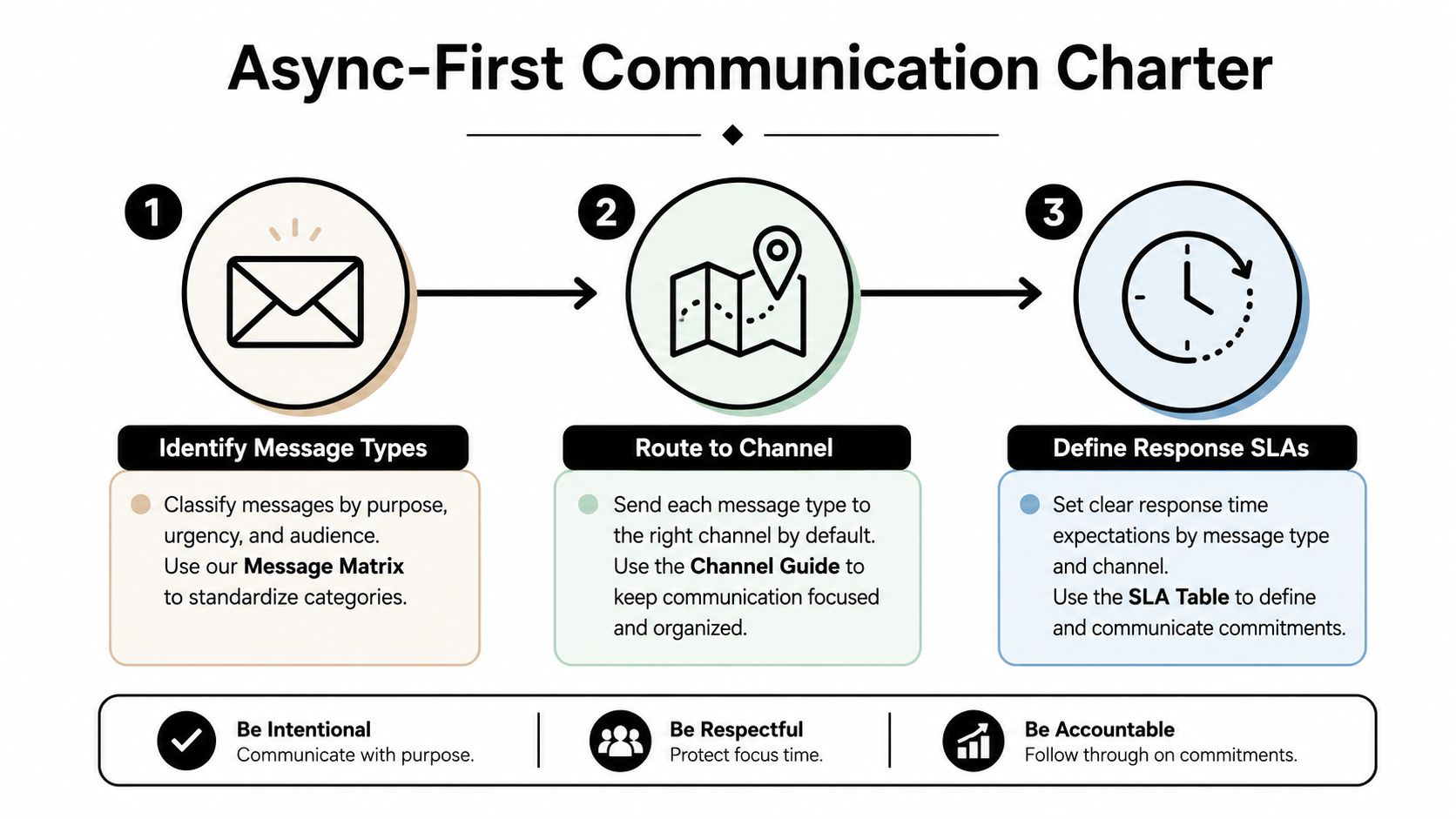
Coverage across time zones also needs a plan, not improvisation. A follow-the-sun setup works only when handoffs are written and the overlap windows are protected. Harvard DCE recommends a fixed 2-to-4-hour core collaboration window, plus recurring one-on-ones and weekly team check-ins in an async-first communication charter. That is a sane way to keep enough overlap for decisions without dragging everyone into the same call all day.
New hires do not need more meetings. They need fewer surprises, cleaner handoffs, and a place to find the truth.
That is why the foundation should fit on one page. If the team cannot point to it, the team does not really have it.
Designing the async-first communication charter
Remote teams break when every message has the same path. A status update lands in chat, a decision gets buried in a thread, and a deadline lives only in someone's memory. The fix is not “communicate more.” The fix is routing.
Write channel rules that people can use
An async-first communication charter should say which channel gets which kind of message. A planning change belongs in a shared doc. A quick question can stay in chat. A decision needs a written record. A sensitive people issue needs a one-on-one, not a public thread. That routing keeps people from becoming the human glue between tools.
Harvard's guidance is useful here because it points to constant communication, regular check-ins, and collaboration platforms, while Atlassian pushes documentation, milestones, and progress tracking, and Sage recommends mixing synchronous and asynchronous touchpoints Harvard Business School Online. The point is not a bigger stack. It's a clearer stack.
Use a rhythm that the team can keep
My default cadence is simple. Daily async standups should take 3 to 5 sentences in a shared channel, not a long diary entry. Weekly syncs should run 25 minutes with one agenda and one decision. Monthly retros should cover what shipped, what blocked work, and what changed. Quarterly resets should review strategy and adjust goals.
A lot of teams get this wrong by turning every interaction into a meeting. That drains focus and makes the manager the routing desk for every issue. RemoteTeamer's operating advice is cleaner, it recommends short daily async updates, weekly syncs with one decision, monthly retros, and quarterly alignment, all built around output, deadlines, and dashboards that show task completion instead of screen time RemoteTeamer.
| Channel | Use it for | Don't use it for |
|---|---|---|
| Shared doc | Plans, decisions, project updates | Fast back-and-forth fixes |
| Chat | Quick questions, short clarifications | Long approval chains |
| One-on-one | Feedback, conflict, personal blockers | Team-wide announcements |
| Weekly sync | Decisions that need live discussion | Routine status that belongs in writing |
A good charter makes the next person's job easier. If it makes the manager the bottleneck, it is the wrong charter.
Measuring what matters without sliding into micromanagement
Remote teams need outcomes, but outcomes alone do not tell you whether the team is healthy or running hot. I look at three signal families, delivery health, workload balance, and engagement. If you ignore the second and third, you usually find problems only after deadlines slip or good people start pulling back.
Track the right signal family for the problem
Delivery health tells you whether work moves on time, whether scope keeps changing, and where items stay blocked too long. Workload balance tells you whether some people carry too much, whether meeting load is crowding out focus time, and whether the team is drifting into overload. Engagement tells you whether people feel clear, supported, and willing to stay.
Microsoft's 2025 Work Trend Index found that 52% of leaders said productivity needs to increase, while 80% of the global workforce said they lack enough time or energy to do their work. Those are not remote-only numbers, but they explain why managers are moving away from manual status chasing and toward calendar- and workflow-based analytics, automated time capture, and AI-assisted reporting. Gallup also says engaged employees are more productive and less likely to leave, but engagement alone does not show you workload or billable effort Gallup.
Useful lens: if the team says it is fine but the calendar says everyone is packed and the board says nothing is moving, trust the board and the calendar.
The other trap is turning the dashboard into a surveillance tool. Ask for patterns, not minute-by-minute proof. Use the data to rebalance work, fix meetings, and remove blockers, not to police lunch breaks.
Choose metrics by team size and work type
| Signal family for remote team health | What it measures | Example metric | Where it comes from |
|---|---|---|---|
| Delivery health | Progress and blockage | Blocked items in the board | Project tracker |
| Workload balance | Load and focus time | Meeting load by person | Calendar data |
| Engagement | Morale and retention risk | Pulse survey themes | One-on-ones and surveys |
| Utilization | Capacity use | Billable or planned effort | Time capture and reporting |
If you want a fast self-check on whether your style drifts toward control, the quiz at find out if you micromanage is a useful mirror. The honest answer usually shows up in how often you ask for proof versus how often you ask what is blocked.
For a deeper frame, this internal productivity guide fits well with the idea that numbers should help managers see workload, not just activity.
Replacing timesheets with calendar-based time capture
Manual timesheets break down for the same reason people hate them, they ask people to remember work after the fact. In agencies and client-facing teams, that means the data is late, vague, and full of small errors. Calendar-based capture is better because it starts from what already happened and trims the logging down to a few seconds.
Pull effort from the calendar first
The cleanest setup starts with Google or Outlook calendars, then connects CRM records, project tags, and client properties. Meetings, calls, and blocks on the calendar get matched to work categories by rules, so the system can tag effort without asking people to rebuild their day from scratch. That is the whole point, less admin, better data.
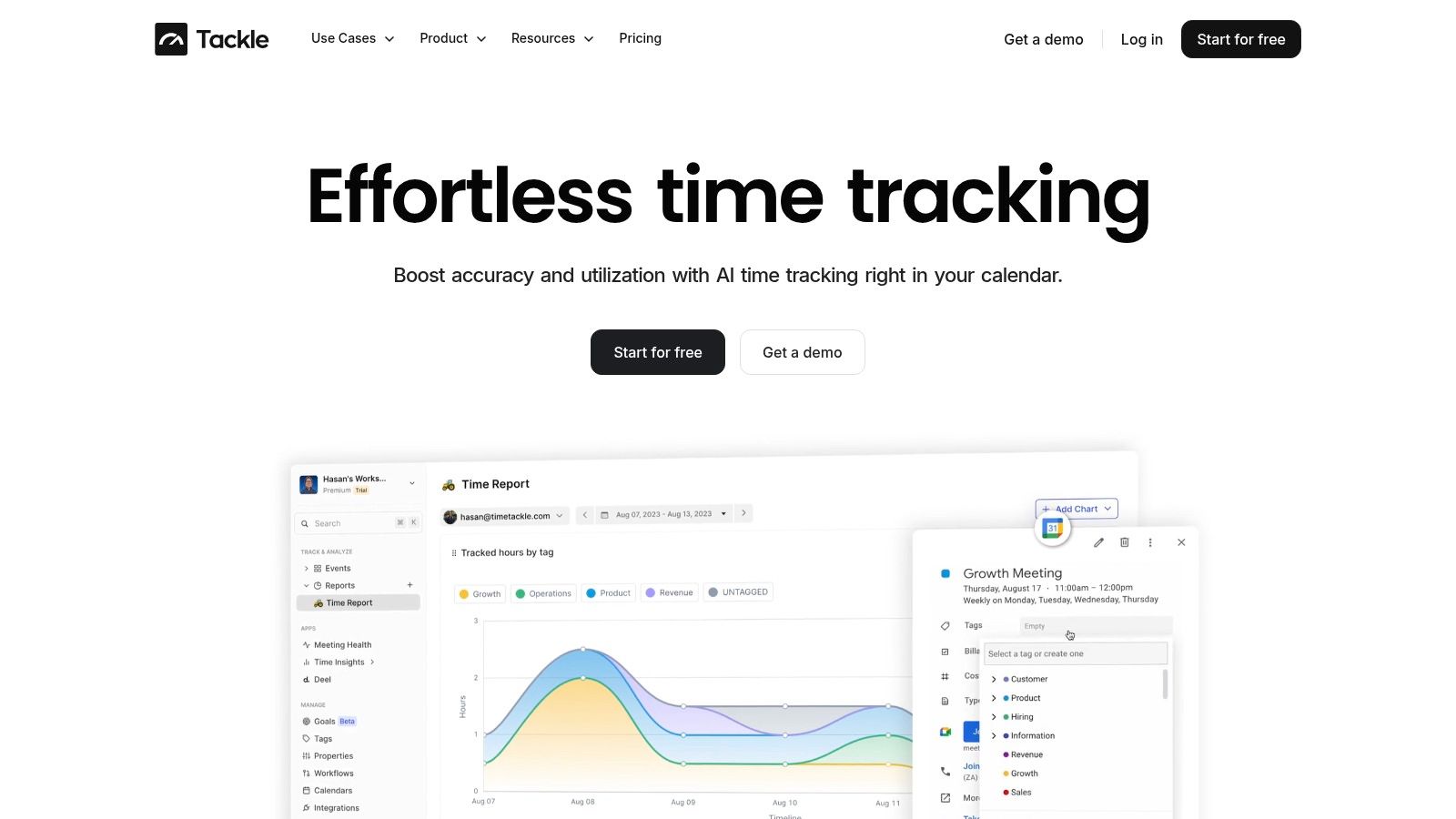
TimeTackle is one option in this category. It connects calendars and CRMs, applies custom tags and rule-based automations, and surfaces utilization, ROI, and operational efficiency by project, client, team, or opportunity. It also supports exports to Excel, CSV, and PDF, plus Google Sheets sync, API access, and data warehouse sync for deeper analysis. For teams trying to reduce manual reporting, the value is not a flashy dashboard, it is that the team spends less time reconstructing work after the fact. You can see the product context in Tackle's time tracker.
Let automation do the classification
The best workflow I've used looks like this. The calendar event lands first, the CRM match adds the client or opportunity, rules apply the right tags, and the dashboard updates by team or project. People can still adjust edge cases, but the system handles the routine work.
That matters because bad data compounds fast. If people fill timesheets from memory on Friday afternoon, they guess at categories and leave out real context. If the calendar and CRM already hold the context, the report gets closer to truth without adding admin. That is where automation earns its keep, not by making managers feel modern, but by making the data less annoying to produce.
A practical stack usually starts with a Sheets sync, API access, and a warehouse sync if the team needs deeper reporting later. You do not need every connector on day one. You need the ones that keep effort visible without turning logging into another job.
Running the monthly review that ties it all together
Remote teams drift when nobody looks at the same picture at the same time. A monthly review solves that by forcing the manager, the lead, and the team to look at delivery, load, and priorities in one place. If the meeting ends without decisions, it was only a status call in disguise.
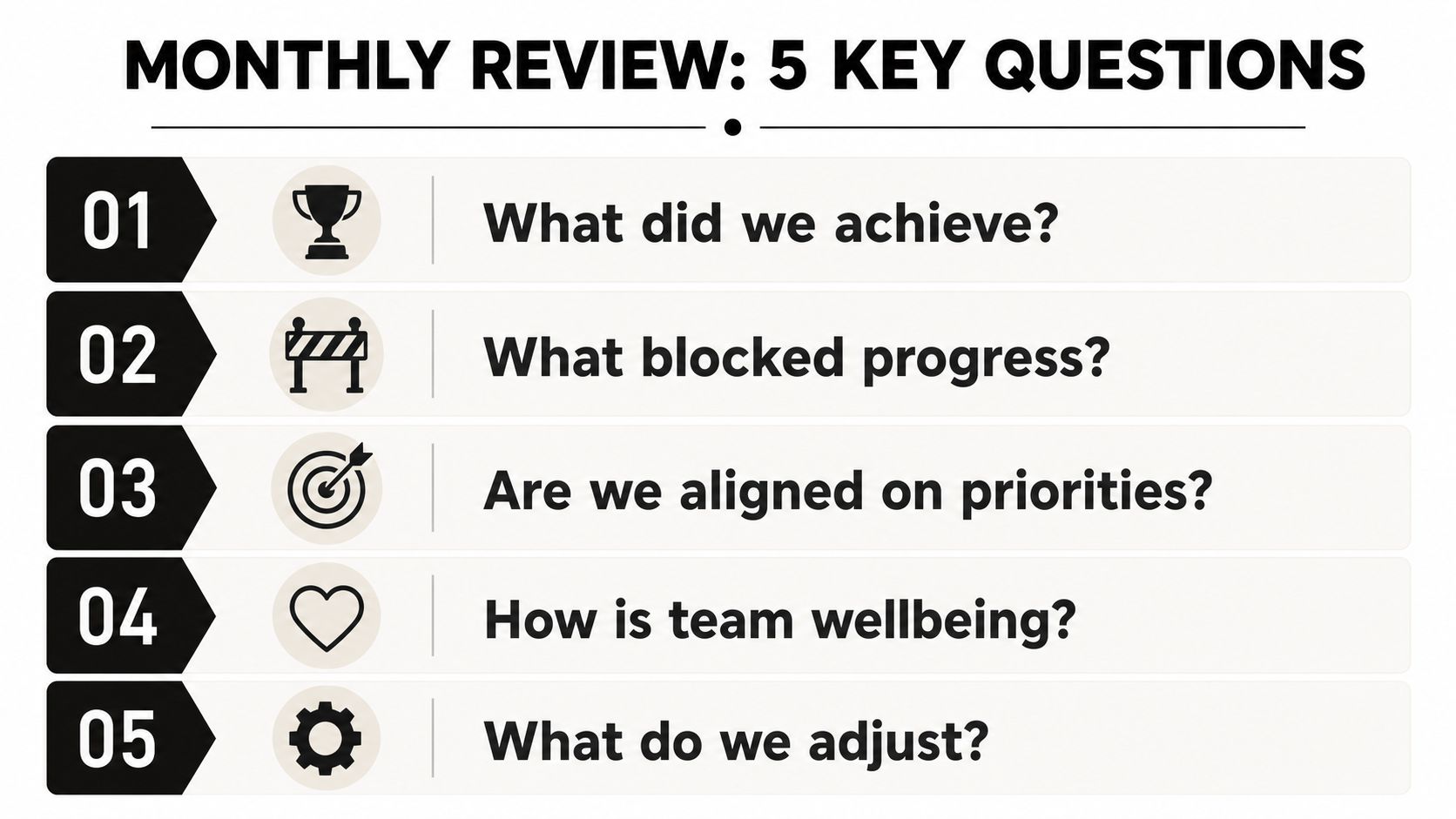
Ask the same five questions every month
- What did we achieve.
- What blocked progress.
- Are we still aligned on priorities.
- How is team wellbeing.
- What do we adjust.
That sequence works because it moves from facts to friction to action. Open the dashboards in the same order every time, delivery first, utilization second, then goal tracking. If a team is over capacity, the answer is not more pressure. It is rebalancing work, cutting noise, or changing scope.
Close the loop in writing
The review should end with a written summary, not a vague “we're good” feeling. Capture the decisions, the open risks, and the next owners in a shared doc so people who miss the meeting can catch up without replaying the call. That written close is what keeps remote management from becoming performative.
I like monthly reviews because they expose trade-offs plainly. If utilization is high but progress is slow, the team may be overloaded or working on the wrong things. If utilization is low but the board is packed, the issue may be handoffs or blocked decisions. Either way, the answer comes from looking at the same data together, not from more guessing.
Rolling this out and the questions managers actually ask
A practical rollout is better than a perfect one. In month one, write the operating agreement, set channel rules, pick the weekly cadence, and choose the three metrics you will watch. In month two, tighten onboarding, clean up the dashboard, and remove any meeting that does not produce a decision or a written update. In month three, review workload balance, check whether the team uses the charter, and fix the parts people still bypass.
The questions I hear most often are straightforward. Silent overload shows up as more blocked work, more meeting load, and shorter focus windows before it shows up as a resignation. A new hire feels included when they can find answers in writing, know their DRI, and see a clear first-two-weeks plan. A teammate who says “that could have been an email” is usually right if the message is a status update, and wrong if the team needs live decision-making. Client-facing teams often need a tighter cadence than engineering teams, but both still need the same core rules, written ownership, channel routing, and visible outcomes.
If you want a cleaner way to see work, utilization, and reporting without chasing people for timesheets, TimeTackle is built for that calendar-first workflow. It connects the work people already schedule with the reporting leaders need, which makes remote management easier to run and easier to trust. Take a look at TimeTackle if you want to cut manual status work and get a clearer read on how your team is really using its time.